Choosing the right raid enclosure for video editing can make a huge difference in timeline playback, cache performance, and project backup confidence.
This roundup focuses on enclosures that balance speed, drive count, connectivity, and real-world editing workflow needs.
Best 10 Raid Enclosure for Video Editing Picks for 2026
Compact Speed Pick
TERRAMASTER D2-320 2-Bay USB RAID Enclosure

- USB 3.2 Gen 2 with up to 10Gbps
- RAID 0, 1, JBOD, and Single support
- Tool-free trays with push-lock design
Best For: Solo editors needing a simple two-drive RAID enclosure
Thunderbolt Pro Workhorse
OWC ThunderBay 4 Thunderbolt RAID Enclosure

- Thunderbolt 3 with dual ports
- Up to 1527MB/s sustained performance
- SoftRAID Premium included for 3 years
Best For: Mac and PC editors needing a fast 4-bay Thunderbolt array
High-Capacity Editing Pick
ORICO 5-Bay 20Gbps RAID Enclosure

- USB 3.2 Gen 2x2 with up to 20Gbps
- Six RAID modes including RAID 5 and 10
- Five bays with support up to 130TB
Best For: Large video libraries and teams needing expandable RAID storage
Large-Format Production Pick
SanDisk Professional G-RAID Shuttle 8
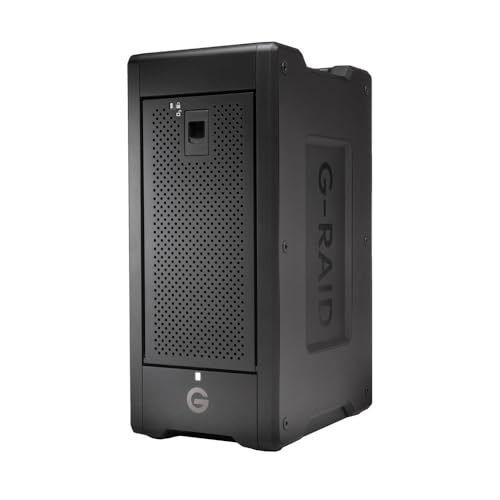
- Up to 160TB transportable RAID storage
- Thunderbolt 3 with up to 1900MB/s read
- Supports RAID 5, 6, 10, 50, 60, and JBOD
Best For: Pro editors working with 4K, 8K, or VR media
Hardware RAID Workhorse
ORICO 5 Bay Hardware RAID Enclosure

- Hardware RAID modes for speed or redundancy
- Up to 110TB with 2.5/3.5-inch SATA drives
- Built-in 150W PSU and 80mm cooling fan
Best For: Editors needing a stable, high-capacity desktop RAID enclosure
Flexible USB-C Expansion

- 8 modes including RAID 0/1/3/5/10, PM, Large, Clone
- USB-C connection rated up to 5Gbps
- Up to 160TB capacity with smart cooling
Best For: Creators wanting flexible, high-capacity USB-C storage expansion
Compact RAID Value

- Multiple modes including RAID 0, 3, 5, 1/10, Clone
- Up to 96TB with four 24TB 3.5-inch drives
- Two cooling fans for desktop reliability
Best For: Editors who need a compact 4-bay desktop RAID enclosure
Editor’s Pick
Yottamaster 5-Bay RAID for 120TB

- 5-drive enclosure with up to 120TB capacity
- RAID 0/1/5/10, JBOD, CLONE, and Normal modes
- Aluminum build with 80mm fan for cooling
Best For: Editors needing high-capacity DAS with flexible RAID modes
Value Choice

- Up to 80TB capacity across 4 bays
- USB A/C 3.0 and eSATA connectivity
- Supports RAID 0/1/3/5/10, CLONE, LARGE, NORMAL
Best For: Compact multi-bay storage for editing and backups
USB-C Upgrade

- USB-C RAID enclosure with up to 110TB capacity
- RAID 0/1/3/5/10, JBOD, and CLONE support
- Aluminum build with 80mm intelligent fan
Best For: USB-C editing setups that need flexible high-capacity storage
Compact Speed Pick – TERRAMASTER D2-320 2-Bay USB RAID Enclosure
If you want a raid enclosure for video editing that keeps the setup straightforward, the TERRAMASTER D2-320 is a compact 2-bay DAS with USB 3.2 Gen 2 speeds and hardware RAID options. It supports RAID 0, RAID 1, JBOD, and Single, so it can fit either performance-first scratch storage or mirrored backups for active projects.
Best For: Solo editors and small studios wanting a simple, fast 2-drive RAID setup.
Pros:
- USB 3.2 Gen 2 connection with up to 10Gbps transfer speed
- RAID 0 can reach up to 521MB/s with 2 HDDs, or up to 1075MB/s with 2 SSDs
- Supports RAID 1 for mirrored backup, plus JBOD and Single modes
- Tool-free trays and push-lock design make drive swaps easy
Cons:
- Only holds two drives, so expansion is limited
- It is a DAS, not a NAS, so it is meant for direct attachment
- Best performance depends on the drives you install
For editors who value direct connection, faster turnaround, and a small footprint, this enclosure covers the core workflow without adding extra complexity. It is especially appealing if you want an affordable RAID 0 scratch disk or a mirrored RAID 1 backup for current projects.
Thunderbolt Pro Workhorse – OWC ThunderBay 4 Thunderbolt RAID Enclosure
The OWC ThunderBay 4 is a raid enclosure for video editing built around Thunderbolt 3, four drive bays, and software-driven RAID management. With up to 1527MB/s sustained performance and support for 3.5-inch or 2.5-inch drives, it is aimed at editors who need a fast direct-attached storage solution for heavier timelines.
Best For: Mac and PC editors who want a flexible 4-bay Thunderbolt RAID workstation.
Pros:
- Dual Thunderbolt 3 ports for fast connectivity
- Up to 1527MB/s sustained performance
- Supports RAID 0/1/4/5/1+0(10)/JBOD
- Includes SoftRAID Premium for RAID creation and monitoring
Cons:
- Only four bays, so capacity is more limited than larger arrays
- SoftRAID subscription is included for 3 years, not permanently
- Requires Thunderbolt-equipped systems to get the intended performance
This enclosure makes sense when you want a serious editing volume with more RAID flexibility than basic two-bay models. It is a strong fit for users who prefer Thunderbolt connectivity and software tools for managing the array.
High-Capacity Editing Pick – ORICO 5-Bay 20Gbps RAID Enclosure
If your raid enclosure for video editing needs to handle large projects and growing media libraries, the ORICO 5-bay model leans into capacity and flexibility. It uses USB 3.2 Gen 2×2 for up to 20Gbps bandwidth, supports six RAID modes, and is built for heavy file transfers and long editing sessions.
Best For: Editors and production teams managing large 3.5-inch SATA drive arrays.
Pros:
- USB 3.2 Gen 2×2 interface with up to 20Gbps bandwidth
- Supports RAID 0, 1, 5, 10, JBOD, and Normal modes
- Five bays support up to 130TB total capacity with 26TB drives
- Built-in 45dB low-noise fan and aluminum alloy cooling design
Cons:
- Thunderbolt connections will not reach full 20Gbps speed
- RAID changes erase drive contents, so setup needs care
- Built for 3.5-inch SATA drives, so it is less compact than smaller units
For editors who need room to scale, this enclosure offers more bays and more RAID choices than smaller desktop units. It is a practical option when capacity, cooling, and straightforward expansion matter as much as raw transfer speed.
Large-Format Production Pick – SanDisk Professional G-RAID Shuttle 8
The SanDisk Professional G-RAID Shuttle 8 is a raid enclosure for video editing made for very large media workloads and transportable storage. With eight removable Ultrastar drives, Thunderbolt 3 connectivity, and pre-configured RAID 5, it is designed to move a lot of footage quickly while staying flexible for different project needs.
Best For: Professional editors handling multi-stream 4K, 8K, or VR footage.
Pros:
- Up to 160TB of RAID storage in a transportable design
- Read speeds up to 1900MB/s and write speeds up to 2000MB/s
- Supports RAID 5 by default, plus RAID 0, 1, 6, 10, 50, 60, and JBOD
- Dual Thunderbolt 3 ports and up to 85W USB-C Power Delivery
Cons:
- Very heavy at 32 pounds, so it is not a light travel unit
- Mac-focused compatibility may limit some workflows
- Large capacity and feature set make it more specialized than entry-level enclosures
This is the most serious option in the group for editors who need scale, speed, and rugged removable storage. It is especially useful when a project calls for shared high-capacity media that can still be moved between studio and set.
Hardware RAID Workhorse – ORICO 5 Bay Hardware RAID Enclosure
If you need a raid enclosure for video editing with room to grow, this ORICO 5-bay DAS is built for large media libraries, backup projects, and multi-drive workflows. Its hardware RAID controller supports several modes, so you can prioritize speed, redundancy, or simple drive management depending on the job.
Best For: Editors who want a high-capacity external RAID enclosure with flexible hardware modes and clean desktop power.
Pros:
- Hardware RAID modes include 0, 1, 3, 5, 10, JBOD, Clone, and Clear.
- Supports both 2.5" and 3.5" SATA HDDs/SSDs with up to 110TB total capacity.
- Built-in 150W power supply helps keep a 5-drive setup stable.
- Aluminum shell, 80mm fan, and airflow vents are designed for long-term cooling.
Cons:
- USB 3.0 tops out at up to 230MB/s in the supplied specs.
- Hardware RAID setup may be more than casual users need.
- Changing RAID modes will require planning around your data.
For editors building a serious shared scratch or archive setup, this ORICO unit focuses on capacity, RAID flexibility, and thermal stability rather than portability. It is a strong fit when you want a desktop enclosure that can stay in place and handle heavy media loads.
Flexible USB-C Expansion – UGREEN 5-Bay USB-C RAID DAS
This raid enclosure for video editing is aimed at users who want flexible storage modes and a faster USB-C connection for moving large project files. The UGREEN 5-bay DAS supports multiple RAID options, plus independent drive access, so it can serve both editing and backup workflows.
Best For: Creators who want a USB-C RAID enclosure with broad mode support and simple multi-drive expansion.
Pros:
- Supports 8 storage modes, including PM, RAID 0, RAID 1/3/5/10, Large, and Clone.
- USB 3.2 Gen 1 Type-C interface offers up to 5Gbps transfer speed.
- Five-bay design supports up to 160TB total capacity with 2.5/3.5-inch SATA drives.
- Smart cooling, S.M.A.R.T.-based fan control, and drive status LEDs add convenience.
Cons:
- Changing RAID modes requires reformatting, so backups are essential first.
- It uses a 5Gbps interface rather than a higher-speed connection.
- The enclosure is described as a DAS, not a NAS pool device.
For editors who value flexibility and easy access to multiple drives, this UGREEN model is a practical balance of capacity, cooling, and mode selection. It fits best as a desktop expansion box for projects, backups, and reusable drive pools.
Compact RAID Value – MAIWO 4-Bay RAID Enclosure
If you want a raid enclosure for video editing without stepping up to a larger 5-bay unit, this MAIWO 4-bay enclosure gives you multiple RAID choices in a simpler footprint. It supports a useful mix of performance and redundancy modes, plus enough capacity for sizable media libraries and backups.
Best For: Editors who want a 4-bay RAID enclosure with dual cooling fans and straightforward desktop storage.
Pros:
- Supports Normal, RAID 0, 3, 5, 1/10, Clone, and Large (JBOD) modes.
- Up to 96TB capacity with support for four 24TB 3.5-inch SATA drives.
- USB A/C 3.1 interface supports up to 5Gbps transfer speed.
- Two built-in fans help maintain operating temperatures during heavy use.
Cons:
- Only supports 3.5-inch SATA drives based on the supplied notes.
- Smaller 4-bay capacity may be limiting for larger editing archives.
- RAID mode selection still requires planning before setup changes.
This MAIWO enclosure is a practical pick if you need RAID features and cooling without the bulk of a larger chassis. It is best suited to editors who want a desktop DAS for project storage, backups, or a media library built around 3.5-inch drives.
Editor’s Pick – Yottamaster 5-Bay RAID for 120TB
If you need a RAID enclosure for video editing with room to grow, this Yottamaster 5-bay model is built for large media libraries and multi-drive workflows. It supports up to 120TB, offers RAID 0/1/5/10, JBOD, CLONE, and Normal modes, and uses a USB 3.0 Type-B connection rated up to 5Gbps for direct-attached storage.
Best For: Editors who want a high-capacity DAS enclosure for handling large video projects, backups, and mixed HDD/SSD storage.
Pros:
- Up to 120TB total capacity with support for 5 drives
- Hardware RAID options include RAID 0/1/5/10, JBOD, CLONE, and Normal
- Aluminum body with built-in 80mm low-noise fan for cooling
- Works with 2.5-inch and 3.5-inch SATA HDDs and SSDs
Cons:
- Uses USB 3.0 Type-B rather than newer USB-C
- Auto-sleep timing may need adjustment for some workflows
- Best suited to SATA drives only
Overall, this is a strong fit for editors who want a straightforward, high-capacity RAID enclosure with flexible modes and dependable cooling. It prioritizes storage density and workflow versatility over compact design.
Value Choice – CENMATE 4-Bay RAID Enclosure
This RAID enclosure for video editing is a practical 4-bay option for users who want multi-drive storage without moving up to a larger chassis. It supports 2.5-inch and 3.5-inch SATA HDDs and SSDs, up to 80TB total capacity, and includes USB A/C 3.0 plus eSATA connectivity for flexible desktop setups.
Best For: Editors and creators who want a compact multi-bay DAS for backups, media storage, and RAID-based organization.
Pros:
- Supports up to 80TB across 4 drives
- Multiple RAID modes including RAID 0/1/3/5/10, CLONE, LARGE, and NORMAL
- USB A/C 3.0 and eSATA cables included
- Aluminum-alloy body with built-in fan and 12V power adapter
Cons:
- Hot-swapping is not supported
- eSATA access depends on the computer’s RAID-capable port
- Fan noise may be noticeable at 40–50 dB
This model stands out for broad compatibility and flexible connection options, but its setup rules matter. If you want a no-nonsense RAID box for editing storage and can live with the noise and port requirements, it delivers strong utility for the price class.
USB-C Upgrade – Yottamaster 5-Bay USB-C RAID
If you want a RAID enclosure for video editing with a modern USB-C connection, this Yottamaster 5-bay model is a strong candidate. It supports up to 110TB, accepts both 2.5-inch and 3.5-inch SATA HDDs and SSDs, and offers RAID 0/1/3/5/10, JBOD, and CLONE for flexible media workflows.
Best For: Video editors who prefer USB-C DAS storage with high capacity and adjustable RAID options.
Pros:
- USB 3.1 Type-C connection with up to 5Gbps transfer rate
- Supports 5 drives and up to 110TB total capacity
- RAID 0/1/3/5/10, JBOD, and CLONE modes
- Aluminum shell and 80mm intelligent fan for cooling
Cons:
- Total drive power draw must stay within the stated 78W limit
- New drives may need formatting and partitioning first
- Best matched to SATA drives rather than more advanced interfaces
For editors who want a cleaner USB-C connection without giving up multi-bay RAID flexibility, this enclosure is well balanced. Its cooling, capacity, and mode support make it especially useful for large project libraries and backup-heavy setups.
How We Picked the Best Raid Enclosure for Video Editing
For a Raid Enclosure for Video Editing, we prioritized connectivity that fits modern editing rigs, support for multiple drives, and enclosure designs that help maintain stable performance during long transfers and renders. We also considered RAID flexibility, build quality, cooling, and how well each option matches common workflows like working from camera originals, proxy files, or active project libraries.
Quick Comparison
In general, 2-bay models are best for compact setups and simpler redundancy, 4-bay units offer a strong balance of speed and capacity, and 5-bay or larger systems are better for editors handling larger media libraries or multi-project storage. Thunderbolt options usually suit Mac-based and high-bandwidth desktop setups, while USB-C and USB 3.2 models are often better values for mixed-platform users.
Key Buying Factors for Raid Enclosure for Video Editing
Connection Type
Match the interface to your editing workstation. Thunderbolt is ideal when you want the lowest latency and strongest sustained throughput. USB-C and USB 3.2 can still be excellent choices, especially if your footage is mostly 1080p, 4K, or proxy-based editing.
Drive Count and RAID Modes
More bays mean more capacity and more RAID flexibility. If redundancy matters, look for RAID 1, 5, or 6 support depending on the model. If your priority is maximum speed or large scratch storage, choose a system that supports the RAID modes you actually plan to use.
Drive Type and Capacity
Most editors will want 3.5-inch HDD support for bulk storage, though some enclosures also accept 2.5-inch SATA SSDs for faster workflows. Check the enclosure’s maximum supported capacity if you plan to use large 20TB-plus drives.
Cooling and Noise
Video editing can keep drives busy for hours, so cooling matters. Active fans and aluminum housings can help with thermal stability, but quieter designs may be preferable in small studios.
Who Should Buy Which Raid Enclosure for Video Editing?
If you need a compact setup for a single workstation, a 2-bay enclosure is usually the most practical choice. Editors juggling multiple active projects or larger media caches should look at 4-bay options for better balance. If you’re managing heavy 4K/8K workloads, archives, or shared production libraries, a 5-bay or larger enclosure is often the smarter long-term investment.
For buyers who want a Raid Enclosure for Video Editing with maximum performance, prioritize Thunderbolt models. If value matters more and your workflow is less demanding, USB-based enclosures can deliver plenty of speed at a lower cost.