Choosing the right storage setup can make a huge difference on a Mac, especially if you work with large media files, backups, or shared project libraries. A well-matched RAID enclosure can improve speed, protect data, and keep your workflow organized.
The best options balance compatibility, performance, noise, cooling, and RAID flexibility. Use this guide to narrow down the right RAID enclosure for your Mac without overbuying features you may never use.
Best 10 Raid Enclosures for Mac Picks for 2026
Mac Speed Pick
TERRAMASTER D2-320 2-Bay RAID Enclosure

- USB 3.2 Gen 2 up to 10Gbps
- RAID 0, RAID 1, JBOD, and SINGLE
- Tool-free trays with cooling fan
Best For: Mac users needing a fast 2-bay RAID enclosure for storage or backup
Thunderbolt Pro Pick
OWC ThunderBay 4 Thunderbolt 3 Enclosure

- Thunderbolt 3 with dual ports
- Up to 1527MB/s sustained performance
- RAID 0/1/4/5/1+0 support
Best For: Mac professionals needing a fast four-bay Thunderbolt RAID enclosure
Compact RAID Choice
CENMATE 2-Bay 10Gbps RAID Enclosure

- ASM1352R chip for stability
- RAID 0, RAID 1, Normal, and JBOD
- USB A/C 3.2 with aluminum and fan
Best For: Mac users wanting a simple two-bay RAID enclosure with broad drive support
High-Capacity Pick
ORICO 4-Bay RAID Enclosure with 8 Modes

- Eight modes including RAID 0/1/3/5/10
- Up to 88TB total capacity
- 150W power supply with silent fan
Best For: Mac users needing a large-capacity four-bay RAID enclosure
Flexible 4-Bay Storage
4 Bay HDD RAID Enclosure for 3.5" SATA

- Supports RAID 0, 3, 5, 1/10, Clone, and JBOD
- Up to 96TB with four 24TB 3.5" SATA drives
- Dual cooling fans and USB-A/C plus C/C cables
Best For: Mac users needing flexible RAID and high-capacity backup storage
Hybrid Speed-and-Capacity Pick
40Gbps 4-Bay Hybrid RAID Enclosure

- Combines dual-bay HDD and dual-bay NVMe storage
- USB4 40Gbps support with Thunderbolt 3/4/5 compatibility
- Hardware RAID 1, software RAID 0, and LARGE mode
Best For: Mac users who need one enclosure for backups and fast SSD workflows
Compact Dual-Bay Choice
Dual Bay RAID Enclosure for 3.5" HDD

- RAID 0, 1, JBOD, and Normal modes
- Up to 48TB total with two 24TB 3.5" drives
- 10Gbps USB 3.1 Gen2 with fan cooling
Best For: Mac users wanting a compact dual-bay RAID for backups and expansion
4-Bay High-Capacity Pick
CENMATE 4-Bay Aluminum RAID Enclosure

- 4 bays with up to 80TB capacity
- 8 RAID modes including RAID 0/1/5/10
- USB A/C 3.0 plus eSATA connections
Best For: Mac users needing a high-capacity desktop DAS with multiple RAID modes
Compact Dual-Bay 10Gbps Choice
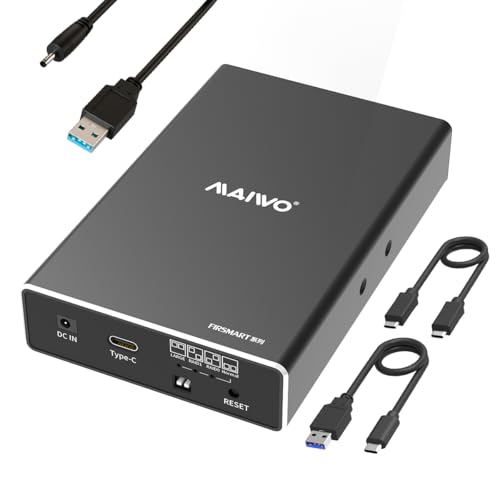
- Up to 10Gbps over USB 3.1 Gen 2
- RAID 0/1 plus NORMAL and JBOD modes
- Compact 2.5-inch dual-bay design
Best For: Mac users wanting a small, fast dual-bay enclosure for 2.5-inch drives
Best Value Dual-Bay For Mixed Drives
MAIWO 2-Bay Fan-Cooled RAID Enclosure

- Fits both 2.5-inch and 3.5-inch SATA drives
- RAID 0/1, JBOD, and NORMAL modes
- Built-in fan with aluminum cooling design
Best For: Mac users needing a versatile, fan-cooled enclosure for mixed drive sizes
Mac Speed Pick – TERRAMASTER D2-320 2-Bay RAID Enclosure
If you want raid enclosures for mac that prioritize speed and simple expansion, the TerraMaster D2-320 is a straightforward 2-bay DAS for SATA HDDs and SSDs. It uses USB 3.2 Gen 2 for up to 10Gbps transfers and supports RAID 0, RAID 1, JBOD, and SINGLE, so it fits both performance and backup use cases.
Best For: Mac users who want a compact two-drive RAID enclosure for fast working storage or mirrored backups.
Pros:
- USB 3.2 Gen 2 connection with up to 10Gbps bandwidth.
- Supports RAID 0, RAID 1, JBOD, and SINGLE modes.
- Works with 3.5-inch, 2.5-inch HDDs, and 2.5-inch SATA SSDs.
- Tool-free trays and automatic push-lock design simplify drive swaps.
Cons:
- Diskless enclosure, so drives must be purchased separately.
- Two-bay design limits total capacity versus larger enclosures.
- Best performance depends on using the right drive type and RAID mode.
Overall, this is a practical choice if you want a flexible Mac-compatible RAID enclosure without moving up to a larger, more complex chassis. The cooling fan, multiple RAID options, and tool-free design make it an easy fit for everyday storage or backup duties.
Thunderbolt Pro Pick – OWC ThunderBay 4 Thunderbolt 3 Enclosure
For raid enclosures for mac that lean into professional throughput, the OWC ThunderBay 4 is built around Thunderbolt 3 and four-drive expandability. It supports user-configurable RAID 0/1/4/5/1+0 (10) and is rated for sustained performance up to 1527MB/s, making it a strong option for larger Mac storage workflows.
Best For: Mac users who need a high-speed four-bay Thunderbolt enclosure for demanding media or storage projects.
Pros:
- Thunderbolt 3 connectivity with dual Thunderbolt ports.
- Up to 1527MB/s sustained performance.
- Supports RAID 0, 1, 4, 5, and 1+0 (10).
- Works with 3.5-inch or 2.5-inch drives without adapters.
Cons:
- Higher-end enclosure aimed at users with Thunderbolt-equipped systems.
- Drives are not included.
- Larger four-bay chassis takes up more desk space than compact units.
This is the most capable Mac-focused option here if you need fast, configurable storage and expect to scale beyond a basic two-drive setup. Its aluminum chassis and quiet design also make it a good fit for a desktop workstation.
Compact RAID Choice – CENMATE 2-Bay 10Gbps RAID Enclosure
If you want raid enclosures for mac with a compact footprint and basic hardware RAID control, the CENMATE 2-bay enclosure is built around the ASM1352R chip for stability and compatibility. It supports RAID 0, RAID 1, Normal, and JBOD, and includes USB A/C 3.2 connectivity for straightforward plug-and-play use.
Best For: Mac users who want a simple 2-bay enclosure for mirrored backups or everyday external storage.
Pros:
- ASM1352R chip for improved stability and compatibility.
- Supports RAID 0, RAID 1, Normal, and JBOD.
- Works with 2.5-inch and 3.5-inch HDDs and SSDs.
- Aluminum build with built-in fan for cooling.
Cons:
- Mac OS has no RAID software, so configuration expectations should be practical.
- Fan noise is noted at around 40–50 decibels.
- Only two drive bays, so capacity is limited versus larger enclosures.
For Mac users who want a dependable two-drive enclosure rather than a feature-heavy desktop array, this model keeps things simple. The mix of hardware RAID modes, broad drive support, and USB-C-friendly cabling makes it an easy fit for basic storage setups.
High-Capacity Pick – ORICO 4-Bay RAID Enclosure with 8 Modes
Among raid enclosures for mac, the ORICO 4-bay enclosure focuses on capacity, flexible RAID modes, and straightforward desktop expansion. It supports eight configurations, including RAID 0, 1, 3, 5, 10, JBOD, CLONE, and CLEAR, and works with 3.5-inch SATA drives up to 22TB each for as much as 88TB total.
Best For: Mac users who need a large external RAID enclosure for backups, shared media, or project storage.
Pros:
- Eight RAID-related modes, including RAID 0, 1, 3, 5, 10, JBOD, CLONE, and CLEAR.
- Up to 88TB total capacity with 22TB single-disk support.
- Built-in 150W power supply for multi-drive use.
- Aluminum chassis with 80mm silent fan and front/rear vents.
Cons:
- Uses USB 3.0 speeds, so it is slower than 10Gbps or Thunderbolt options.
- Supports 3.5-inch drives only, not 2.5-inch SSDs or HDDs.
- Four-bay enclosure is bulkier than smaller desktop units.
This is the best pick here if capacity and RAID flexibility matter more than top-end speed. It is built for users who want a roomy Mac-compatible DAS that can handle large backups and long-term storage with decent cooling.
Flexible 4-Bay Storage – 4 Bay HDD RAID Enclosure for 3.5" SATA
If you’re shopping for raid enclosures for mac, this MAIWO 4-bay model is a practical choice for users who need flexible RAID options and roomy capacity. It supports RAID Normal, 0, 3, 5, 1/10, Clone, and Large (JBOD), and it’s built for 3.5" SATA drives with a stated max capacity of 96TB.
Best For: Mac users who want a high-capacity 4-bay DAS for backups, media libraries, or workstation storage.
Pros:
- Supports multiple RAID modes, including RAID 0, 3, 5, 1/10, Clone, and JBOD
- Up to 96TB capacity with support for four 24TB 3.5" SATA drives
- Includes two built-in cooling fans for better drive temperature management
- Comes with USB-A to USB-C and USB-C to USB-C cables
Cons:
- Designed for 3.5" SATA drives only, not a mixed NVMe solution
- USB transfer is listed up to 5Gbps, so it’s not a high-speed Thunderbolt option
Overall, this enclosure makes sense if your priority is flexible RAID setup and large, reliable storage rather than top-end interface speed. It’s a straightforward DAS for backups, surveillance, and large file collections.
Hybrid Speed-and-Capacity Pick – 40Gbps 4-Bay Hybrid RAID Enclosure
For buyers comparing raid enclosures for mac, this ACASIS hybrid unit stands out because it combines a dual-bay HDD enclosure with a dual-bay NVMe enclosure in one box. It supports 3.5"/2.5" SATA drives and NVMe 2230-2280 SSDs, with hardware RAID 1 for HDD mirroring, software RAID 0 for NVMe speed, and a LARGE mode that merges bays for up to 78TB.
Best For: Mac users who want a hybrid RAID setup for both backup storage and fast NVMe workflows.
Pros:
- Combines HDD and NVMe storage in one enclosure
- Supports hardware RAID 1 on HDDs and software RAID 0 on NVMe SSDs
- USB4 40Gbps interface for fast transfers with compatible Thunderbolt 3/4/5 and USB4 ports
- Active cooling, 96W power supply, and premium aluminum construction
Cons:
- Full 40Gbps performance requires RAID mode and a compatible USB4/Thunderbolt port
- It’s a more specialized hybrid setup than a simple all-HDD enclosure
This is the most versatile option in the group if you need one enclosure for both fast project work and larger backup volumes. The tradeoff is that you’re paying for features that are only fully useful if your Mac setup can take advantage of USB4 or Thunderbolt.
Compact Dual-Bay Choice – Dual Bay RAID Enclosure for 3.5" HDD
If you want raid enclosures for mac without moving up to a large 4-bay chassis, this MAIWO dual-bay option keeps things simpler and more compact. It supports 3.5" SATA HDDs, offers RAID 0, 1, JBOD, and Normal modes, and lists up to 48TB total capacity with two 24TB drives.
Best For: Mac users who want a compact dual-bay RAID enclosure for backups or storage expansion.
Pros:
- Four RAID modes: RAID 0, RAID 1, JBOD, and Normal
- Supports up to 48TB total capacity with two 24TB drives
- 10Gbps USB 3.1 Gen2 connection with UASP acceleration
- Aluminum alloy body and adjustable cooling fan for heat dissipation
Cons:
- Only supports 3.5" SATA HDDs directly; 2.5" drives need a bracket
- Real-world speed is limited by mechanical drive performance
As a value-focused RAID enclosure, this one is best when you want redundancy or mirrored storage without extra complexity. It offers a good balance of capacity, cooling, and a faster USB interface for a two-drive setup.
4-Bay High-Capacity Pick – CENMATE 4-Bay Aluminum RAID Enclosure
If you want raid enclosures for mac that can act as a roomy desktop DAS, this CENMATE 4-bay model is built for larger storage jobs. It supports 2.5/3.5-inch SATA HDDs and SSDs, includes USB A/C 3.0 plus eSATA, and offers multiple RAID options for users who want flexibility rather than a simple single-drive case.
Best For: Mac users who need a 4-bay external storage enclosure with RAID options and high capacity.
Pros:
- Supports 8 RAID modes including RAID 0/1/3/5/10, plus CLONE, LARGE, and NORMAL
- Handles up to 80TB total capacity across four 2.5/3.5-inch SATA drives
- Includes USB A/C 3.0 and eSATA cables for flexible connection options
- Aluminum body with built-in fan helps with heat management
Cons:
- MAC OS has no RAID software, so mode setup is handled at the enclosure level
- Hot-swapping is not supported
- Fan noise is listed at around 40–50 decibels
This is a strong pick if capacity and RAID variety matter more than portability. Just keep in mind the eSATA notes and the need to manage RAID mode changes carefully, since switching modes can cause data loss.
Compact Dual-Bay 10Gbps Choice – MAIWO 2.5-Inch RAID Enclosure
For buyers comparing raid enclosures for mac in a smaller desktop-friendly format, this MAIWO dual-bay case focuses on 2.5-inch SATA drives and fast USB 3.1 Gen 2 performance. It is designed for SSDs and HDDs that fit the 7mm to 9.5mm range, making it a practical option when you want RAID support without a bulky chassis.
Best For: Mac users who want a compact dual-bay RAID enclosure for 2.5-inch SSDs or HDDs.
Pros:
- USB 3.1 Gen 2 interface supports up to 10Gbps transfer speed
- Offers RAID 0, RAID 1, NORMAL (PM), and LARGE (JBOD) modes
- Tool-free installation, hot swapping, and plug-and-play use
- Includes both Type-C to Type-A and Type-C to Type-C cables
Cons:
- Supports only 2.5-inch SATA drives, not 3.5-inch models
- Total capacity is limited to 16TB
- Additional power is required, though the cable is included
This enclosure makes the most sense if you are prioritizing speed and a compact footprint over maximum drive size. Its 2-bay setup is simple to manage, but the 2.5-inch-only limit means it is best suited to SSD-based or smaller capacity storage builds.
Best Value Dual-Bay For Mixed Drives – MAIWO 2-Bay Fan-Cooled RAID Enclosure
If you need raid enclosures for mac that can handle both 2.5-inch and 3.5-inch SATA drives, this MAIWO dual-bay enclosure is a straightforward all-rounder. It uses USB 3.0, includes a built-in two-speed cooling fan, and supports several RAID modes for users who want a more flexible external storage setup.
Best For: Mac users who want a fan-cooled dual-bay enclosure for mixed 2.5-inch and 3.5-inch SATA drives.
Pros:
- Compatible with 2.5-inch and 3.5-inch SATA I/II/III drives
- Supports RAID 0, RAID 1, LARGE (JBOD), and NORMAL (PM)
- Built-in two-speed fan plus aluminum body for better heat dissipation
- Up to 48TB total capacity with 18TB per slot
Cons:
- Needs a 2.5-to-3.5 mounting bracket when using 2.5-inch drives
- Transfers are limited to 5Gbps over USB 3.0
- RAID mode changes require care and the drives should be initialized and formatted first
For a general-purpose desktop RAID enclosure, this model balances compatibility and cooling well. It is not the fastest option in the group, but it is a practical choice if you need support for both drive sizes and a higher overall capacity ceiling.
How We Picked These Raid Enclosures for Mac
We focused on enclosures that make sense for Mac users in real-world use: solid macOS compatibility, practical RAID modes, dependable cooling, and interface options that match modern Macs. We also looked at drive support, enclosure build quality, and whether the product is better suited for backup, editing, or high-speed working storage.
Because Raid Enclosures for Mac are used for everything from Time Machine-style backups to photo and video editing, we prioritized models that offer a clear value at different performance levels instead of chasing specs alone.
Quick Comparison: Which Type Fits Your Mac Setup?
Two-bay models are usually the easiest starting point if you want RAID 1 mirroring or a compact striped volume for light creative work. Four-bay enclosures make more sense when you need higher capacity, more flexible RAID levels, or a better performance-to-storage balance for larger libraries.
Thunderbolt and fast USB-C options are the best fit for Mac users who edit directly from the enclosure. Standard USB 3.x models are often enough for backups, archives, and everyday file storage, especially if cost matters more than maximum throughput.
Key Buying Factors for Raid Enclosures for Mac
Interface and Real-World Speed
Match the enclosure to your Mac’s ports. Thunderbolt is the fastest and most future-proof for pro workflows, while 10Gbps USB-C is a strong middle ground. Slower USB 3.0 options can still be perfectly fine for backup and media libraries.
RAID Modes You’ll Actually Use
RAID 0 increases speed but offers no redundancy. RAID 1 mirrors data for safety. JBOD and normal modes can be useful if you want flexibility without committing to a striped or mirrored array. Don’t pay extra for RAID features you won’t use.
Drive Size, Heat, and Noise
Check support for 2.5-inch SSDs, 3.5-inch hard drives, or both. Larger multi-drive enclosures generate more heat, so active cooling matters. If the enclosure will sit on a desk, fan noise may be worth considering, especially in quiet studio spaces.
MacOS Compatibility and Setup
Most modern enclosures work well with Mac once formatted correctly in Disk Utility. Still, it helps to choose models with straightforward setup, clear documentation, and stable RAID behavior so the initial configuration is not a hassle.
Who Should Buy Which Raid Enclosures for Mac?
If you want affordable backup redundancy, a compact two-bay RAID 1 enclosure is often the smartest choice. If you need a working drive for photo, video, or audio projects, look for a faster USB-C or Thunderbolt model with enough bays to keep performance and capacity comfortable. If you are building a larger local archive or shared media pool, a four-bay enclosure is usually the better long-term investment.
In short, the best RAID enclosure for your Mac depends on whether your priority is speed, safety, or storage growth. Pick the smallest setup that meets your current needs, but leave room to expand if your files are likely to grow.