Choosing the right SDI video capture device for Mac comes down to compatibility, resolution support, driver stability, and the kind of workflow you need. Whether you are capturing a camera feed for streaming, recording, conferencing, or field production, the best option should connect cleanly and perform without surprises.
Below, we focus on practical picks that balance Mac support, image quality, and useful features like loop-through, uncompressed capture, and flexible audio input.
Best 10 SDI Video Capture Device for Mac Picks for 2026
Pro Pick
Magewell USB Capture SDI Gen 2

- Up to 1080p60 SDI capture
- On-device FPGA processing reduces CPU load
- Plug-and-play with macOS and other platforms
Best For: Mac users needing dependable SDI capture for streaming or recording
Simple Value

- Up to 1080p60 capture with low latency
- Driver-free UVC/UAC setup
- SDI input with loop output
Best For: Users who want a simple, driver-free SDI capture device for Mac
Compact Workhorse

- Uncompressed YUY2 capture up to 1080p60
- Works with macOS and major apps like OBS and Zoom
- Tiny, portable USB 3.0 design
Best For: Compact Mac-friendly SDI capture for streaming, conferencing, and education
4K Upgrade
Magewell USB Capture SDI 4K Plus
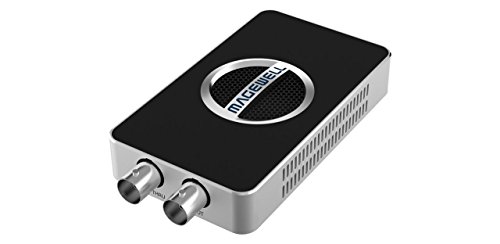
- Captures up to 4Kp30 or 1080p90
- SDI loop-through for monitoring
- Analog line I/O plus embedded audio support
Best For: Mac users who need 4K-capable SDI capture with monitoring and audio flexibility
Budget-Friendly SDI/HDMI Hybrid
AVMATRIX UC2018 USB 3.0 Capture Card

- macOS 10.8+ support with plug-and-play setup
- SDI and HDMI input with audio support
- Up to 1080p 60fps uncompressed capture
Best For: Mac users who want simple dual-input capture
Broadcast-Ready SDI Option
gofanco Prophecy PRO-CaptureSDI

- Mac OS 10.12+ compatibility with USB 3.0 or USB 2.0
- Supports 3G-SDI, HD-SDI, and SD-SDI inputs
- SDI loopout plus UVC 1.0 software support
Best For: Mac users needing dedicated SDI capture with monitoring loopout
Driver-Free Dual-Input Pick
ATCCPYDM S2U-2 3G-SDI Capture Card

- Driver-free UVC/UAC support for Mac and other OSs
- 3G-SDI capture up to 1080p 60fps via USB 3.0
- SDI/HDMI loop out with microphone audio mixing
Best For: Users wanting simple, driver-free capture with loopout
Best Value for Basic SDI Capture
Wiistar 1080P60 SDI/HDMI to USB 3.0

- Captures SDI and HDMI at up to 1080P60
- Includes SDI loopout and microphone support
- Compatible with Mac OS, Windows XP, and Linux
Best For: Mac users seeking a low-cost capture card with loopout
Best Plug-and-Play Choice
Groza USB 3.0 SDI Capture with HDMI Loopout

- No driver or external power required
- Captures up to 1080P60 with HDMI loopout
- Compatible with Mac OS, Windows, and Linux
Best For: Users who want quick Mac setup and monitoring
Best Dual-Output Streamer Pick
ACHAVE USB 3.0 SDI Capture with HDMI Loopout

- Captures up to 1080p60 with multiple output modes
- Has SDI input plus HDMI loopout for monitoring
- Plug-and-play and listed for Mac OS compatibility
Best For: Creators who want monitoring and simple capture on a Mac
Pro Pick – Magewell USB Capture SDI Gen 2
If you want an SDI video capture device for Mac that focuses on reliability and clean conversion, the Magewell USB Capture SDI Gen 2 is a strong fit. It captures up to 1080p60 and handles processing like scaling, de-interlacing, color conversion, and flip/mirror on the device itself, which helps reduce CPU load during recording or streaming.
Best For: Mac users who need a dependable SDI capture device for professional streaming, recording, or 24/7 workflows.
Pros:
- Supports SDI input up to 2048×1080 at 60fps and records up to 1080p60.
- On-device FPGA processing reduces strain on your computer.
- Plug-and-play operation works with macOS, Windows, Linux, and Chrome OS.
- Built for 24/7 use with thermal protection and a 3-year warranty.
Cons:
- Limited to 1080p capture rather than 4K.
- USB Type-A connection may be less convenient on newer Macs without adapters.
Overall, this is a solid choice if you value stability, broad compatibility, and hardware-assisted processing over extra resolution. It is especially appealing for Mac setups that need dependable SDI capture without complicated setup.
Simple Value – Aja U-TAP SDI
The Aja U-TAP SDI is a straightforward SDI video capture device for Mac users who want a simple, low-latency USB 3.0 solution. It supports up to 1080p60, is UVC/UAC compliant, and does not require external drivers, which makes setup quick for basic capture and streaming workflows.
Best For: Mac and Windows users who want a no-fuss, driver-free SDI capture device for live capture.
Pros:
- Captures up to 1920x1080p60 with low latency.
- No external drivers required; UVC/UAC compliant for easy setup.
- Works with both Windows and macOS software workflows.
- Includes SDI input and loop output via BNC connectors.
Cons:
- No advanced processing features are listed.
- Limited to 1080p capture, not 4K.
This model makes sense when simplicity matters more than extra features. If you need reliable SDI capture on a Mac without adding driver management or complex configuration, it keeps the workflow lean.
Compact Workhorse – AVMATRIX UC1118
The AVMATRIX UC1118 is an SDI video capture device for Mac that targets practical, uncompressed capture at 1080p60. It supports plug-and-play operation, automatic input signal detection, and broad software compatibility, making it a useful option for streaming, conferencing, education, or telemedicine setups.
Best For: Mac users who need compact, uncompressed SDI capture for live workflows and conferencing.
Pros:
- Captures uncompressed YUY2 video and audio up to 1080p60.
- Driver-free and compatible with macOS, Windows, and Linux.
- Works with OBS, Zoom, Teams, Google Meet, and more.
- Compact design makes it easy to carry and deploy.
Cons:
- Limited to 1080p rather than higher-resolution capture.
- Platform details emphasize PC compatibility more than Mac-specific optimization.
For users who want an uncomplicated capture card that plays nicely with common meeting and streaming apps, this is an efficient choice. Its compact size and uncompressed output make it especially practical for mobile or shared setups.
4K Upgrade – Magewell USB Capture SDI 4K Plus
If your SDI video capture device for Mac needs higher resolution, the Magewell USB Capture SDI 4K Plus is the most capable option in this group. It captures SD/HD/3G/2K/6G-SDI signals up to 4Kp30, adds SDI loop-through for monitoring, and includes analog line I/O for flexible audio handling.
Best For: Mac users who need 4K-capable SDI capture with monitoring and flexible audio support.
Pros:
- Captures up to 4096×2160p30 or 1080p90 from SDI sources.
- Built-in SDI loop-through supports simultaneous monitoring and capture.
- Includes embedded SDI audio extraction and analog line in/out.
- Works plug-and-play with macOS, Windows, Linux, and Chrome OS.
Cons:
- More expensive and feature-heavy than basic 1080p capture options.
- USB Type-A connection may require adapters on some Macs.
This is the best pick if resolution and workflow flexibility matter most. For Mac users building a more professional SDI setup, the 4K capture, loop-through monitoring, and onboard processing are major advantages.
Budget-Friendly SDI/HDMI Hybrid – AVMATRIX UC2018 USB 3.0 Capture Card
If you need an SDI video capture device for Mac that also keeps HDMI in the mix, the AVMATRIX UC2018 is a straightforward plug-and-play option. It supports macOS 10.8 and above, uses USB 3.0 for uncompressed capture, and automatically detects the input signal for easier setup.
Best For: Mac users who want a simple, driver-free capture card with both SDI and HDMI input support.
Pros:
- Works with macOS 10.8 and above with no driver installation.
- Supports SDI and HDMI input, plus audio input, for flexible camera setups.
- Captures and streams up to 1080p 60fps with uncompressed transmission.
- Automatic input signal detection helps simplify operation.
Cons:
- Limited to 1080p capture, so it is not built for higher-resolution workflows.
- Requires a USB 3.0 connection to get the intended performance.
Overall, the UC2018 is a practical choice if you want broad Mac compatibility and simple operation without giving up SDI support. It fits live streaming, webcasting, and conferencing setups where reliability and ease of use matter more than advanced formats.
Broadcast-Ready SDI Option – gofanco Prophecy PRO-CaptureSDI
The gofanco Prophecy is a solid SDI video capture device for Mac if you want a dedicated SDI workflow with loopout and broad software compatibility. It supports Mac OS 10.12 or later, captures up to 1080p 60Hz over USB 3.0, and auto-detects supported video formats for a more plug-and-play experience.
Best For: Mac users who need a dedicated SDI capture card with loopout and compatibility with common streaming software.
Pros:
- Supports 3G-SDI, HD-SDI, and SD-SDI signals.
- Works with Mac OS 10.12 or later and USB 3.0 or USB 2.0 ports.
- Includes SDI loopout for connection to a monitor or display.
- Compatible with UVC 1.0 and most third-party software such as OBS Studio.
Cons:
- Does not support interlaced sources like 1080i, 480i, or 576i.
- Capture/streaming software is not included.
This model makes sense when you want a more broadcast-oriented setup and need loopout for monitoring. Its Mac support is solid, but the format limitations mean it is best matched to progressive SDI sources.
Driver-Free Dual-Input Pick – ATCCPYDM S2U-2 3G-SDI Capture Card
3G-SDI to USB 3.0 Video Capture Card 1080P 60FPS with HDMI and SDI Loop Out | Driver Free
Check Price On AmazonIf you’re shopping for an SDI video capture device for Mac and want something simple, the ATCCPYDM S2U-2 keeps the setup basic with driver-free UVC/UAC support. It works with macOS as well as Windows, Linux, and Android, and it offers 3G-SDI input with HDMI/SDI loop out for flexible monitoring.
Best For: Users who want a driver-free Mac-compatible capture card with dual-input flexibility and loopout.
Pros:
- Driver-free UVC/UAC design for easier setup on Mac and other systems.
- Supports 3G-SDI 1080p 60fps capture over USB 3.0.
- Includes SDI and HDMI loop out for monitoring.
- Supports microphone audio mixing and multiple output formats like YUY2 and MJPEG.
Cons:
- Brand and model details are less established than some competing options.
- Listed capture resolution tops out at 1080p.
For Mac users who want broad OS compatibility and a low-friction workflow, this card is appealing. It is especially practical for setups that benefit from loopout and basic audio mixing without needing a more complex installation process.
Best Value for Basic SDI Capture – Wiistar 1080P60 SDI/HDMI to USB 3.0
If you need an SDI video capture device for Mac that can also handle HDMI sources, this Wiistar unit covers the basics well for streaming and recording at up to 1080P60. It connects over USB 3.0, supports SDI loopout, and includes an HDMI output port that mirrors the captured USB signal, making it a practical option for simple monitor-and-capture setups.
Best For: Mac users who want an affordable SDI capture card with loopout and mic support for live streaming or recording.
Pros:
- Supports SDI and HDMI capture over USB 3.0 at up to 1080P60
- Includes SDI loopout for connecting an additional SDI monitor
- Has microphone support for mixing voice with game or live audio
- Works with Mac OS, Windows XP, and Linux per the supplied specs
Cons:
- HDMI output mirrors the captured USB3.0 signal rather than acting as an independent source
- No plug-and-play claim is listed in the provided notes
- Warranty details are not provided in the supplied information
For a straightforward SDI-to-USB capture setup, this model offers the key connections and features most buyers look for first. The loopout and audio options add flexibility, especially if you want to monitor the feed while recording on a Mac.
Best Plug-and-Play Choice – Groza USB 3.0 SDI Capture with HDMI Loopout
This Groza SDI video capture device for Mac is aimed at users who want a simple USB 3.0 workflow without drivers or external power. It supports 1080P60 capture, offers HDMI loopout for monitoring, and is identified automatically as a webcam, which makes it appealing for quick streaming and recording setups.
Best For: Mac users who want a true plug-and-play SDI capture card with HDMI loopout and low-latency USB 3.0 output.
Pros:
- True plug-and-play operation with no driver or external power required
- Supports 1080P60 capture and multiple output resolutions
- Includes HDMI loopout for local monitoring
- Listed as compatible with Windows, Linux, and Mac OS
Cons:
- USB output resolution options are limited to the listed presets
- Compatible devices are listed only as personal computer in the supplied details
- No dedicated microphone feature is mentioned in the provided notes
If you want a no-fuss capture card that should fit into a Mac-based streaming setup quickly, this is one of the easiest models to evaluate. The automatic webcam-style detection and loopout make it especially practical for live production.
Best Dual-Output Streamer Pick – ACHAVE USB 3.0 SDI Capture with HDMI Loopout
For buyers comparing an SDI video capture device for Mac, this ACHAVE model stands out for its dual-output design and plug-and-play setup. It captures video at up to 1080p60, provides HDMI loopout for monitoring, and supports multiple output resolutions, which makes it a flexible choice for live streaming and recording workflows.
Best For: Mac-compatible creators who want SDI input, HDMI monitoring, and a simple webcam-style capture workflow.
Pros:
- Supports 1080p60 capture with multiple output resolutions and frame rates
- Includes SDI input, USB 3.0 capture, and HDMI loopout for monitoring
- Plug-and-play design with automatic webcam-style identification
- Listed as compatible with Windows, Linux, and Mac OS
Cons:
- Operating system detail in the supplied specs is listed as Windows only, despite Mac OS compatibility elsewhere
- No microphone-specific feature is mentioned in the notes
- Warranty detail is minimal in the supplied product data
This is a strong fit if you want a capture card that keeps the workflow simple while still offering monitoring output and flexible resolution options. The dual-function setup is especially useful when you need to stream and watch the source feed at the same time on a Mac-compatible system.
How We Picked the Best SDI Video Capture Device for Mac
We prioritized Mac compatibility, real-world reliability, and signal support first. That means looking for devices that work smoothly over USB on macOS, handle common SDI formats without unnecessary setup, and offer stable performance for recording or live output.
We also favored models with the right mix of resolution support, low-latency behavior, and useful extras such as loop-through, USB-C or USB 3.0 connectivity, and audio input options. For users building a simple desktop setup, ease of use matters just as much as specs.
Quick Comparison: Which Type Fits Your Workflow?
If you want a plug-and-play option for basic camera capture, a compact USB-powered model is usually the easiest choice. If you need more flexibility for monitoring or integrating with other gear, look for loop-through and stronger input/output control. For higher-end production, a device with 6G-SDI support and uncompressed capture can provide more headroom.
Budget-friendly models can be a smart fit for streaming, remote production, and general recording. More premium units are better suited to professional use where consistency, better signal handling, and broader format support matter more than price.
Key Buying Factors for an SDI Video Capture Device for Mac
Mac Compatibility
Not every capture card behaves the same on macOS. Check that the device is explicitly supported on Mac and that it works with your preferred apps, whether you use OBS, conferencing software, or editing tools.
Resolution and Frame Rate
For most users, 1080p60 is the sweet spot. It delivers smooth motion for live video and recording without demanding more bandwidth than necessary. If you work with higher-end cameras or production sources, consider models that support 6G-SDI or additional format flexibility.
Connection and Power
USB 3.0 and USB-C models are typically the most convenient on Mac laptops and desktops. Bus-powered units reduce clutter, while externally powered options may offer more consistent operation in demanding setups.
Audio and Monitoring Features
Look for line-in support if you need separate audio sources, and consider loop-through if you want to monitor the original feed while capturing it. These features are especially helpful in studio and live-event workflows.
Who Should Buy Which SDI Video Capture Device for Mac?
If you want the simplest path for everyday streaming or recording, choose a compact 1080p60 capture device with solid Mac support. If you are a creator or production user who needs better signal flexibility, a model with loop-through and uncompressed capture is worth the upgrade.
If your workflow depends on higher-resolution SDI sources or more robust professional features, step up to a premium capture device designed for broadcast-style use. The best SDI Video Capture Device for Mac is the one that matches your camera, software, and workflow without adding friction.