Choosing the right sheet-fed document scanner for Mac can save time, reduce paper clutter, and make filing far easier. The best models balance speed, image quality, and Mac compatibility without adding setup headaches.
Below, we focus on scanners that work well with macOS users who need reliable document capture for home offices, remote work, or small business use.
Best 10 Sheetfed Document Scanner for Mac Picks for 2026
Space-Saving Everyday Pick
ScanSnap iX1300 Compact Wireless/USB Duplex Scanner for Mac

- Compact design saves desk space
- Up to 30 ppm duplex scanning
- USB or Wi‑Fi to Mac and cloud
Best For: Mac users who need a compact scanner for everyday documents and receipts
Portable Travel Option
Epson WorkForce DS-30 Sheet-Fed Scanner for Mac

- Under 1 lb and easy to travel with
- USB powered with no external supply
- Scans legal-size documents and cards
Best For: Mac users who want a lightweight scanner for travel and occasional use
Advanced High-Capacity Choice
ScanSnap iX2500 100-Sheet Wireless/USB Scanner for Mac

- 5-inch touchscreen with profiles
- 100-sheet feeder for bigger jobs
- 45 ppm duplex scanning with Wi‑Fi 6
Best For: Mac users who need a fast, high-capacity scanner for frequent multi-page jobs
Fast Portable Workhorse
Epson WorkForce ES-200 Duplex Scanner for Mac

- Up to 25 ppm/50 ipm duplex scanning
- 20-page ADF for quick batches
- AC or USB power for portability
Best For: Mac users who need a fast portable scanner for small business stacks
Portable Simplex Pick
HPPS100 USB Sheetfed Scanner for Mac

- USB-powered and highly portable
- 15 ppm one-sided scanning
- MacOS-compatible WorkScan software
Best For: Light office and travel scanning on Mac
Desktop Duplex Workhorse
Epson ES-400 II Duplex Scanner for Mac

- 50-sheet ADF for larger jobs
- Duplex scanning and OCR support
- ScanSmart software with cloud sharing
Best For: Busy Mac desktops that scan stacks of documents
Wireless Mobile Pick
Epson DS-80W Wireless Portable Scanner
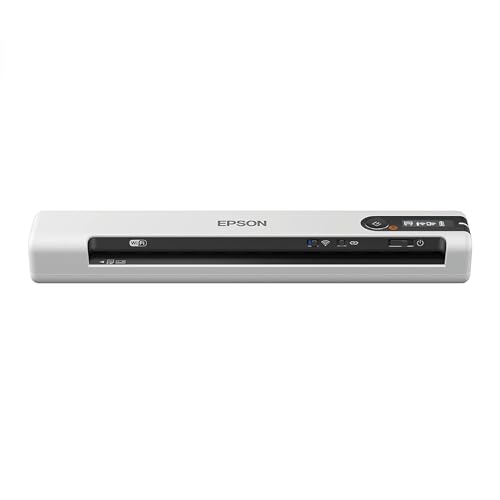
- Wireless scanning to Mac and mobile devices
- Single page in as fast as 4 seconds
- Compact, lightweight travel design
Best For: Mobile Mac scanning with wireless convenience
Fast Office Scanning
Epson DS-520 Sheet-Fed Document Scanner for PC & Mac

- 30 ppm/60 ipm scan speed
- Duplex scanning in one pass
- 50-sheet ADF for batches
Best For: Small offices needing fast duplex document scanning
Ultra-Portable Pick
Epson WorkForce ES-50 Compact Single-Sheet Scanner

- USB-powered and highly portable
- Scans a page in as fast as 5.5 seconds
- Handles receipts, IDs, and long documents
Best For: Travel and home users scanning one sheet at a time
Space-Saving Everyday Pick – ScanSnap iX1300 Compact Wireless/USB Duplex Scanner for Mac
If you want a sheetfed document scanner for Mac that fits into a small workspace without feeling basic, the ScanSnap iX1300 is built for that role. It handles documents, photos, receipts, business cards, and plastic cards, and it can scan to Mac, PC, mobile devices, or cloud services over USB or Wi‑Fi.
Best For: Mac users who want a compact all-purpose scanner for daily document and receipt scanning.
Pros:
- Space-saving design that stays out of the way on a desk
- Fast duplex scanning up to 30 ppm with one-touch operation
- Automatic de-skew, color optimization, and blank page removal
- ScanSnap Home software helps organize documents, receipts, cards, and photos
Cons:
- 20-sheet standard capacity is modest for larger batch jobs
- Requires the ScanSnap software workflow for the best experience
Overall, the iX1300 is a strong fit if you want a compact scanner that balances convenience, image cleanup, and Mac-friendly connectivity. It is especially appealing when desk space is limited but you still want reliable everyday scanning.
Portable Travel Option – Epson WorkForce DS-30 Sheet-Fed Scanner for Mac
Epson Workforce DS-30 Portable Document Scanner for PC and Mac, Sheet-fed, Mobile/Portable
Check Price On AmazonThe Epson WorkForce DS-30 is a sheetfed document scanner for Mac that leans hard into portability. It is lightweight, USB powered, and can scan documents up to legal size, plus business cards and plastic ID cards, making it useful when you need basic capture on the go.
Best For: Mac users who need a lightweight, USB-powered scanner for travel or occasional mobile scanning.
Pros:
- Weighs under 1 lb and is easy to carry
- USB powered, so no external power supply is needed
- Scans documents up to 8.5″ x 14″, plus cards
- Includes software for cloud scanning and OCR workflows
Cons:
- 10-sheet capacity is limited for batch jobs
- Sheet-fed portable design is less suited to high-volume use
If portability matters more than speed or capacity, the DS-30 is a practical Mac-compatible pick. It is best viewed as a travel scanner rather than a primary office workhorse.
Advanced High-Capacity Choice – ScanSnap iX2500 100-Sheet Wireless/USB Scanner for Mac
For buyers looking for a more advanced sheetfed document scanner for Mac, the ScanSnap iX2500 adds a large touchscreen, faster scanning, and a 100-sheet feeder. It supports Wi‑Fi 6 and USB-C, sends scans to Mac or cloud services, and includes automatic file optimization and sorting features.
Best For: Mac users who want a high-capacity, feature-rich scanner for frequent multi-page jobs.
Pros:
- Large 5-inch touchscreen for customizable profiles
- 100-sheet ADF handles bigger scanning jobs
- Fast 45 ppm double-sided scanning
- Wi‑Fi 6, USB-C, and cloud support offer flexible connectivity
Cons:
- Bulkier than compact desktop scanners
- Likely more scanner than casual users need
The iX2500 is the most capable option here if you scan often and want speed, capacity, and wireless convenience. It makes the most sense for users who value workflow control and reduced paper handling.
Fast Portable Workhorse – Epson WorkForce ES-200 Duplex Scanner for Mac
The Epson WorkForce ES-200 is a sheetfed document scanner for Mac aimed at users who want speed in a portable package. It supports duplex scanning in one pass, handles receipts, business cards, plastic IDs, and standard documents, and can run on AC power or USB power when an outlet is not available.
Best For: Mac users who want a fast portable scanner for business papers and small batch scanning.
Pros:
- Up to 25 ppm/50 ipm with single-step duplex scanning
- 20-page ADF supports quick batch scanning
- Can be powered by AC or USB for flexibility
- Includes ScanSmart software for previewing, emailing, and uploading files
Cons:
- 20-sheet feeder is not ideal for large stacks
- Portable format trades away some desk-friendly capacity
This model is a solid middle ground if you want speed, duplex scanning, and Mac compatibility without moving up to a larger desktop unit. It is especially sensible for people who scan in short bursts and value convenience.
Portable Simplex Pick – HPPS100 USB Sheetfed Scanner for Mac
If you want a sheetfed document scanner for Mac that keeps things simple and portable, the HPPS100 is built for light-to-medium scanning jobs without taking over your desk. It connects by USB, works with MacOS through HP WorkScan software, and handles documents, receipts, photos, cards, and more in a compact form factor.
Best For: Travelers, small offices, and home users who need a lightweight Mac-compatible sheetfed scanner for one-sided scanning.
Pros:
- USB-powered, compact, and easy to carry in a bag or briefcase
- Up to 15 ppm simplex scanning for small- to medium-batch jobs
- 1200 dpi resolution with support for PDF, JPG, and other file formats
- HP WorkScan software includes auto-scan, size detection, crop, and cleanup tools for MacOS
Cons:
- One-sided scanning only, so double-sided pages need manual handling
- Standard sheet capacity is limited to 10 pages
- Best suited to low- to medium-volume digitizing rather than heavy daily workloads
This is a practical pick if portability matters more than speed or duplex capability. For Mac users who want an affordable, USB-based scanner for documents and occasional photos, it offers a straightforward feature set with minimal setup.
Desktop Duplex Workhorse – Epson ES-400 II Duplex Scanner for Mac
The Epson Workforce ES-400 II is a strong sheetfed document scanner for Mac if you need faster desktop scanning and an automatic document feeder. With a 50-sheet ADF, duplex scanning, and Epson ScanSmart software, it is aimed at users who process stacks of paperwork and want easier file management.
Best For: Home offices and business users on Mac who want a fast desktop scanner with duplex feeding and workflow tools.
Pros:
- 50-sheet auto document feeder helps speed through larger stacks
- Duplex scanning supports both sides of a page in one pass
- ScanSmart software can preview, email, upload to cloud services, and auto-name files
- Includes TWAIN driver, OCR, and image adjustments like auto crop and background removal
Cons:
- Larger desktop footprint than portable sheetfed scanners
- Heavier and less travel-friendly at 3.7 kg
- Primarily a USB desktop model, so it is less convenient for grab-and-go use
For Mac users who scan paperwork regularly, the ES-400 II offers a more complete desktop workflow than compact portable models. Its feeder, duplex support, and file-management tools make it a sensible choice when speed and organization matter most.
Wireless Mobile Pick – Epson DS-80W Wireless Portable Scanner
The Epson DS-80W is a highly portable sheetfed document scanner for Mac users who need true mobility. It can scan wirelessly to a Mac, PC, iOS, or Android device, or switch to USB without user intervention, making it a flexible option for quick single-page jobs away from the desk.
Best For: On-the-go Mac users who want a wireless, single-sheet portable scanner for fast document capture.
Pros:
- Wireless scanning to Mac, PC, iOS, or Android devices
- Scans a single page in as fast as 4 seconds
- Very compact and light for travel or mobile work
- Automatically switches between USB and battery-powered wireless modes
Cons:
- Single-sheet design means no batch feeding
- Best for quick scans rather than high-volume workloads
- Uses a Windows 7 minimum system requirement in the supplied details, so Mac setup should be checked carefully
If portability is the top priority, the DS-80W stands out as the most mobile option here. It is best for users who need fast, one-page scanning and value wireless flexibility over feeder capacity.
Fast Office Scanning – Epson DS-520 Sheet-Fed Document Scanner for PC & Mac
If you want a sheetfed document scanner for Mac that can handle regular office stacks without slowing down, the Epson WorkForce DS-520 is built for that kind of workflow. It scans both sides in one pass, reaches up to 30 ppm/60 ipm, and uses a 50-sheet ADF to keep batches moving.
Best For: Small offices and Mac users who need fast duplex scanning with a real feeder.
Pros:
- Scans both sides in one pass for efficient duplex capture.
- Up to 30 ppm/60 ipm speed suits busy document workflows.
- 50-sheet automatic document feeder handles moderate batches.
- TWAIN and ISIS support helps with compatible document management software.
Cons:
- USB connection only, so it is not wireless.
- Minimum system requirements list Windows 7, so Mac-specific setup details are limited in the supplied notes.
- Designed for office documents rather than portable, one-sheet scanning.
The DS-520 makes sense if your priority is dependable batch scanning over portability. Its speed, duplex capability, and roller-based skew correction point to a scanner meant for steady everyday use.
Ultra-Portable Pick – Epson WorkForce ES-50 Compact Single-Sheet Scanner
The Epson WorkForce ES-50 is a sheetfed document scanner for Mac users who need something compact and easy to carry. It is USB powered, scans a single page in as fast as 5.5 seconds, and can handle documents up to 8.5 x 72 inches, plus receipts and ID cards.
Best For: Mobile users and home offices that need a lightweight scanner for one page at a time.
Pros:
- Very light and compact for travel or limited desk space.
- USB-powered operation means no batteries or external power supply.
- Scans documents, receipts, and ID cards with flexible paper handling.
- Includes OCR and ScanSmart software for searchable PDFs and editable files.
Cons:
- Single-sheet-fed design is not suited to high-volume batch jobs.
- Standard sheet capacity is 1, so each page is inserted individually.
- Wired USB connection limits mobility compared with wireless models.
If you mostly scan one page at a time and want the smallest possible footprint, the ES-50 is a practical choice. It leans heavily toward convenience and portability rather than throughput.
Best Simple Pick – Epson WorkForce ES-60W Portable Sheet-Fed Scanner
If wireless convenience matters in a sheetfed document scanner for Mac, the Epson WorkForce ES-60W stands out with Wi-Fi scanning and battery-powered use. It is the fastest, smallest, and lightest wireless mobile single-sheet-fed scanner in its class, scans a page in as fast as 4 seconds, and can send files to a PC, Mac, iOS, or Android device.
Best For: Mac users who want true wireless scanning in a compact portable scanner.
Pros:
- Wireless scanning to Mac, PC, iOS, and Android devices.
- Fast single-page scanning in as little as 4 seconds.
- Automatically switches between USB and battery-powered wireless operation.
- Supports OCR, cloud scanning, and TWAIN compatibility.
Cons:
- Single-sheet-fed design limits batch capacity.
- Standard sheet capacity is 1, so multi-page jobs require repeated feeding.
- Battery-powered wireless convenience may be more than some users need.
The ES-60W is the most flexible option here if you want to scan away from your desk without giving up Mac compatibility. It combines portability, wireless support, and fast scan times in a very compact body.
How We Picked the Best Sheetfed Document Scanner for Mac
We prioritized Mac compatibility, scanning speed, duplex support, feeder capacity, portability, and ease of setup. For a Sheetfed Document Scanner for Mac, the best choices also offer dependable software support and smooth file handling for PDFs, receipts, invoices, and multi-page documents.
Quick Comparison
Portable models are best for travel and tight desks, while desktop units usually offer faster throughput and larger ADF trays. If you scan stacks of contracts or client paperwork often, choose a higher-capacity duplex scanner. If you mainly digitize receipts and occasional forms, a compact or wireless portable model may be enough.
Key Buying Factors for a Sheet-Fed Document Scanner for Mac
Mac Compatibility
Confirm that the scanner supports your macOS version and includes current drivers or software. Good Mac support matters as much as raw speed, especially if you want one-click scanning, searchable PDFs, or cloud export.
Duplex Scanning
Duplex scanning lets the scanner capture both sides in one pass. It is a major time-saver for double-sided forms, statements, and office paperwork.
ADF Capacity and Speed
A larger auto document feeder reduces interruptions when scanning batches. Faster pages-per-minute ratings help if you process paperwork daily, but only if paper handling stays consistent.
Portability and Power
Many compact Mac scanners are USB-powered or wireless, which helps for mobile workspaces. If you travel often, prioritize a lighter model with a small footprint and simple setup.
Document Types
Think about whether you scan standard pages, receipts, ID cards, photos, or mixed stacks. Some models handle fragile or oddly sized items better than others.
Who Should Buy Which Sheetfed Document Scanner for Mac?
If you want the most balanced everyday option, choose a desktop duplex model with an ADF. If you need something for travel or occasional scanning, a compact portable scanner makes more sense. For heavier workloads, a faster cloud-enabled unit with a larger feeder is worth the extra cost. If your main priority is simple home use, a basic USB or wireless sheet-fed scanner for Mac can cover the essentials without taking up much space.
In short, match the scanner to your workflow: portability for mobility, duplex speed for volume, and Mac-first software support for the smoothest experience.