Smart remote controls with hub can replace a drawer full of remotes and make everyday control much simpler. From TV and streaming gear to air conditioners, garage doors, and scene-based automations, the right setup can streamline your whole home.
Below, we focus on models that balance compatibility, ease of use, and real-world convenience so you can choose a remote that fits how you actually watch, relax, and manage your space.
Best 10 Smart Remote Controls with Hub Picks for 2026
Apple Home Bridge Remote
SwitchBot Universal Remote with Hub Mini

- Controls IR appliances plus compatible SwitchBot Bluetooth devices
- Adds Matter support with a SwitchBot hub
- Simple 19-button design with long battery life
Best For: Apple Home users who want a compact IR/Bluetooth remote
Advanced Home Theater Hub Remote
SofaBaton X2 Touchscreen Remote

- Huge device library with IR, Bluetooth, Wi-Fi, and RF support
- Touchscreen, charging dock, and one-tap activities
- Home Assistant and MQTT integration for automations
Best For: Power users who want deep customization and broad compatibility
Garage Door Remote Access
Chamberlain myQ Smart Garage Control

- Controls compatible garage doors through the myQ app
- Includes wireless hub and door sensor
- Supports schedules, sharing access, and Amazon Key
Best For: Homeowners who want app-based garage access and status checks
Touchscreen Hub Controller

- Supports IR, Bluetooth, RF, and Wi-Fi devices
- Touchscreen plus charging dock for daily convenience
- Works with Home Assistant and MQTT automations
Best For: Users who want a hub-based remote with smart-home integration
Hub-Driven Legacy Control
Logitech Harmony Smart Control
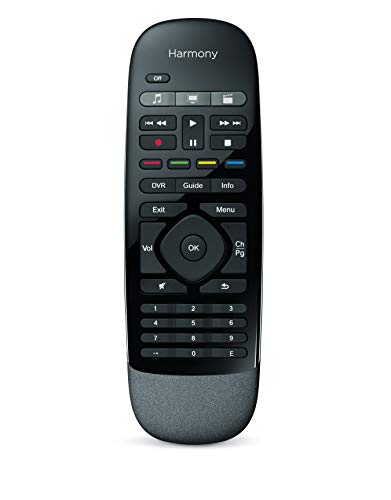
- Includes Harmony Hub for hidden devices
- Remote plus smartphone app control
- Supports up to 8 devices and many brands
Best For: Homes needing flexible control for hidden entertainment gear
Scene-Friendly Multi-Device Hub
SwitchBot Universal Remote Control with Hub 3

- Controls up to 25 devices and 10 scenes
- Hub 3 enables learning, pairing, and customization
- Supports IR appliances and select Bluetooth devices
Best For: Users who want scene control and broad IR/Bluetooth compatibility
Wi-Fi IR Hub for Basics
Frankever Smart Home Hub Remote
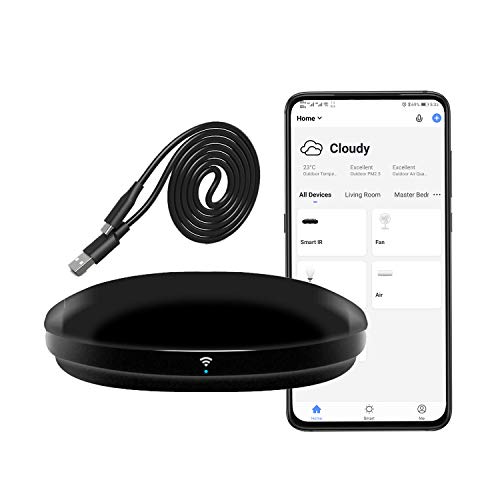
- Works with Smart Life app and voice assistants
- Supports over 50,000 IR devices
- Adds timers and custom scenes
Best For: Budget-friendly app control for TVs, AC, and other IR devices
Budget Smart IR
MOES WiFi Smart IR Remote Controller

- App-based control for IR devices from anywhere
- Works with Alexa and Google Assistant
- DIY learning helps with unsupported remotes
Best For: Single-room IR control on a budget
Apple Home Bridge Remote – SwitchBot Universal Remote with Hub Mini
If you want smart remote controls with hub support for a smaller setup, this SwitchBot model is built around simple control of IR TVs, AC units, and compatible Bluetooth devices. It also adds Matter support through a SwitchBot Hub Mini (Matter) or Hub 2, making it a practical bridge for Apple Home users who want one remote that can handle both legacy appliances and newer smart-home accessories.
Best For: Apple Home users and SwitchBot owners who need a compact universal remote for IR and select Bluetooth devices.
Pros:
- Supports up to 25 devices total, including IR and compatible Bluetooth devices.
- Works with a large IR code library and multiple learning methods for setup.
- Has Matter support when paired with a compatible SwitchBot hub.
- Simple layout with 19 buttons and a touch wheel, plus long battery life.
Cons:
- Does not support RF remotes or most third-party Bluetooth devices.
- Requires a SwitchBot Hub Mini (Matter) or Hub 2 for Matter features.
- Works only with 2.4GHz Wi-Fi.
This is a focused choice if you want a straightforward universal remote that covers common home entertainment and appliance control without a lot of complexity. Just make sure your devices are compatible before buying, since support is limited to specific IR and Bluetooth categories.
Advanced Home Theater Hub Remote – SofaBaton X2 Touchscreen Remote
For buyers comparing smart remote controls with hub features, the SofaBaton X2 is built as a high-capacity all-in-one option. It combines a huge device database with IR, Bluetooth, Wi-Fi, and RF support, plus a touchscreen, charging dock, and activity-based control so you can manage entertainment gear and linked smart-home actions from one device.
Best For: Home theater users who want broad device compatibility and a more advanced, customizable universal remote.
Pros:
- Supports over 500,000 devices from 6,000+ brands across multiple connection types.
- Activity controls can trigger multi-step routines like powering on devices and adjusting lights.
- Works with Home Assistant integrations and MQTT-triggered automations.
- Includes a 2.4-inch HD touchscreen and a charging dock for convenience.
Cons:
- More advanced than a basic universal remote, so setup may take time.
- Uses AA batteries in addition to the docked charging setup.
- Best suited to users who will actually use its automation and customization features.
The X2 stands out when you need one remote to replace a crowded stack of controllers and want room for automation. Its strength is flexibility: you can build activities, remap buttons, and tie the remote into a wider smart-home setup through Home Assistant.
Garage Door Remote Access – Chamberlain myQ Smart Garage Control
This Chamberlain unit is less about entertainment and more about everyday access, but it still fits the smart remote controls with hub category through its wireless garage hub and sensor design. With the myQ app, you can open or close your garage from anywhere, set schedules, and check whether the door is shut without needing a separate keypad or handheld remote.
Best For: Homeowners who want app-based garage control and remote status checking for a compatible sectional garage door.
Pros:
- Lets you control the garage door from the myQ app on iPhone or Android.
- Supports Amazon Key In-Garage Delivery and sharing access with family or friends.
- Bluetooth helps make setup easier.
- Can be expanded to control a second door with an additional sensor.
Cons:
- Only works with compatible garage door openers, mainly models made after 1993.
- Requires a 2.4GHz Wi-Fi network and a router within 50 feet.
- Not intended for several specific opener types listed by the manufacturer.
If your garage opener is compatible, this is a very practical upgrade for remote access and scheduled control. It is especially useful for people who want simple app-based monitoring rather than a full universal remote for AV devices.
Touchscreen Hub Controller – SofaBaton X2 Hub and Dock
If you want smart remote controls with hub functionality and a more modern interface, this SofaBaton X2 version is aimed at full-room control. It combines a broad device library with a 2.4-inch HD touchscreen, activity programming, Home Assistant support, and voice control for pre-programmed activities, making it a strong fit for users who want one remote to manage AV gear and related smart-home actions.
Best For: Users who want an all-in-one universal remote with hub features, touchscreen control, and smart-home integration.
Pros:
- Supports IR, Bluetooth, RF, and Wi-Fi devices from a large code library.
- Activity programming can run coordinated multi-device actions with one tap.
- Home Assistant and MQTT support add smart-home automation options.
- Includes a touchscreen and charging dock for easier everyday use.
Cons:
- Voice control is limited to on/off for pre-programmed activities.
- Best value depends on whether you need advanced automation features.
- May be more remote than some users need for simple TV control.
This model is a good fit if you want the SofaBaton approach but prefer a hub-and-touchscreen package that can grow with your setup. It is most appealing to users who want app customization and smart-home control in the same remote.
Hub-Driven Legacy Control – Logitech Harmony Smart Control
Logitech Harmony Smart Control with Smartphone App and Simple All In One Remote - Black
Check Price On AmazonIf you want smart remote controls with hub support that can manage a mixed entertainment setup, the Logitech Harmony Smart Control is built around flexibility. The included Harmony Hub lets you control devices hidden behind cabinet doors or walls, while the handheld remote and smartphone app give you multiple ways to run your TV, streaming gear, and other compatible devices.
Best For: Households that want a hub-based remote for hidden devices and app control.
Pros:
- Includes a Harmony Hub for devices behind doors or walls.
- Works with the included remote or the Harmony smartphone app.
- Supports up to 8 devices and over 270,000 compatible products.
- App features one-touch swipe and tap control with favorite channels and media functions.
Cons:
- Maximum range is listed at 10 feet for the remote.
- Smartphone app requires compatible iPhone or Android versions.
Overall, this is a practical option if you want a proven hub-and-remote setup that can unify a lot of gear without relying on line-of-sight alone. Its biggest strength is broad compatibility, especially for living rooms with gear tucked away out of view.
Scene-Friendly Multi-Device Hub – SwitchBot Universal Remote Control with Hub 3
For shoppers comparing smart remote controls with hub features, the SwitchBot Universal Remote Control with Hub 3 stands out for its mix of IR and Bluetooth support. It is designed to simplify a crowded setup by combining device control, app customization, and scene automation in one handheld remote with the included hub.
Best For: Families and smart-home users who want one remote for IR appliances, SwitchBot gear, and select Bluetooth devices.
Pros:
- Controls up to 25 devices and supports up to 10 custom scenes.
- Includes Hub 3 for one-tap pairing, IR learning, and code matching.
- Supports standard IR appliances plus SwitchBot Bluetooth devices and select Bluetooth TV boxes.
- Built-in rechargeable battery is rated for up to 150 days per charge.
Cons:
- Does not support RF remotes or most third-party Bluetooth devices.
- Requires 2.4GHz Wi-Fi, not 5GHz.
- Matter support is limited to Apple Home for this remote type.
This is a strong pick if you want a modern hub-based remote with more room for customization than a basic universal remote. It makes the most sense when your devices fall within its IR and Bluetooth compatibility limits.
Wi-Fi IR Hub for Basics – Frankever Smart Home Hub Remote
This Frankever smart hub is a straightforward choice among smart remote controls with hub functionality when your goal is app-based IR control. Using the Smart Life app, it turns your phone into a remote for compatible TVs, AC units, and other infrared equipment, with voice control available through Alexa, Google Assistant, and Siri.
Best For: Simple Wi-Fi IR control for everyday home entertainment and climate devices.
Pros:
- Supports more than 50,000 IR-controlled devices.
- Works with the Smart Life app for local or remote phone control.
- Compatible with Alexa, Google Assistant, and Siri voice control.
- Can create timers and custom scenes for connected devices.
Cons:
- IR only, so it is not meant for RF control.
- Requires a secured 2.4GHz Wi-Fi network.
- Maximum range is listed at 10 meters.
It is best viewed as a budget-friendly hub for basic IR automation rather than a premium all-device controller. If your setup is mostly TVs, AC, and similar line-of-sight gear, it covers the essentials well.
Top Pick – SofaBaton X1S Smart Remote Control with Hub
If you want smart remote controls with hub that can replace a messy stack of remotes, the SofaBaton X1S is built for broad compatibility and everyday convenience. It supports IR, Bluetooth, and Wi‑Fi devices, includes a hub with IR blasters for room-wide control, and lets you set one-touch activities for common routines.
Best For: Households that want a highly customizable all-in-one remote for TVs, streaming gear, and audio devices.
Pros:
- Supports over 6,000 brands and 500,000 device models.
- One-press activities can power on and coordinate multiple devices at once.
- Hub and IR blasters allow 360-degree control without needing to aim.
- Backlit buttons, raise-to-wake LCD, and a find-my-remote feature add convenience.
Cons:
- Requires setup if you want to fully use custom activities and automations.
- Uses a rechargeable battery system with specified compatibility considerations.
Overall, the X1S stands out when you want a premium hub-based remote that can manage a wide mix of home entertainment devices and tie into broader smart home routines.
Budget Smart IR – MOES WiFi Smart IR Remote Controller
The MOES WiFi Smart IR Remote Controller is a straightforward entry in smart remote controls with hub-style app control, especially if you mainly need to manage infrared devices from your phone. It works with the Smart Life/Tuya app, supports Alexa and Google Assistant, and is designed to control common IR appliances like TVs and air conditioners.
Best For: Budget-minded buyers who want app and voice control for a single IR room setup.
Pros:
- Controls IR devices through the Smart Life/Tuya app from anywhere.
- Compatible with Alexa and Google Assistant for voice commands.
- Includes a DIY learning function for remapping unsupported IR remotes.
- Comes with a USB cable and UL certified adapter.
Cons:
- Only supports IR devices and does not include RF.
- Works on 2.4G Wi‑Fi only.
- Infrared cannot pass through walls, so it is best used in one room.
This is a practical pick if you want app-based IR control without a full universal-remote ecosystem, but it is best suited to a single room and a narrower device type range.
Premium All-in-One – SofaBaton X1S Universal Remote with Hub and App
For shoppers comparing smart remote controls with hub features, the SofaBaton X1S Universal Remote with Hub and App is the most fully featured option in this group. It offers a large, always-updating device library, supports IR, Bluetooth, and Wi‑Fi gear, and adds a stable hub with two IR blasters for better room coverage and cleaner placement.
Best For: Users who want a high-end universal remote for mixed home theater and smart home control.
Pros:
- Supports 500,000+ devices across 6,000+ brands and keeps the code library updated.
- Custom activities can combine multiple actions into a single command.
- Hub includes 2 IR blasters for stronger coverage and fewer blind spots.
- Backlit buttons, raise-to-wake screen, and remote finder improve daily usability.
Cons:
- More advanced feature set may take time to configure.
- Best value depends on having several devices to automate.
If you want one remote that can handle a broad range of entertainment and smart-home tasks, this X1S version offers the deepest feature set and the most polished hub-based control.
How We Picked the Best Smart Remote Controls with Hub
We focused on broad device compatibility, hub reliability, app quality, and how easy each option is to use day to day. For Smart Remote Controls with Hub, the most important question is not just whether it can replace multiple remotes, but whether it can do so without adding setup friction.
We also looked at control methods, including physical buttons, touchscreens, charging docks, app customization, and macro support. Strong picks should handle common entertainment devices well and offer enough flexibility for households with mixed gear.
Quick Comparison: What Matters Most
If you want the simplest experience, prioritize a remote with a responsive app, stable hub connection, and straightforward activity setup. If you prefer tactile control, look for physical buttons and a layout that makes volume, input switching, and power easy to reach. If your home includes older AV gear or IR-only devices, make sure the hub supports the right signal types and has enough range for your room layout.
Key Buying Factors for Smart Remote Controls with Hub
Device Compatibility
Check support for IR, Bluetooth, Wi-Fi, and any brand-specific systems you rely on. The best choice is the one that covers your actual devices, not just the longest feature list.
Activity and Macro Support
One-touch routines can power on multiple devices, switch inputs, and set the right mode in seconds. This is one of the biggest reasons people upgrade to Smart Remote Controls with Hub in the first place.
Ease of Setup
Look for clear onboarding, strong app guidance, and reliable learning or code-based setup. A remote that is powerful but hard to configure may never get used to its full potential.
Hub Placement and Range
Hub placement matters more than many buyers expect. Make sure the hub can reach all of the devices you want to control and that its connection stays stable through walls, cabinets, or entertainment centers.
Power and Charging
Battery life, charging dock design, and standby behavior all affect convenience. A remote used every day should be easy to keep charged and ready.
Who Should Buy Which Smart Remote Controls with Hub?
Choose a touchscreen model if you want a more modern interface and detailed customization. Pick a button-focused remote if speed and familiarity matter most. If you mainly want to manage TV and streaming gear, a simpler hub-based option may be enough. If you want to control multiple room types or build scenes, choose a more advanced model with stronger automation features.
In short, the best Smart Remote Controls with Hub are the ones that match your devices, your room layout, and how much control you want at your fingertips.