Going live is easier when you can maintain eye contact, follow a script, and keep your delivery consistent. The right teleprompter can reduce missed points without making your setup feel complicated or distracting.
These 10 options cover compact smartphone models, camera-mounted tablet prompters, and larger systems for presenters who need more viewing distance. Consider your camera, screen size, mounting space, and workflow before choosing.
Best 10 Teleprompters for Livestreaming Picks for 2026
Best Built-In Display

- Built-in 9-inch Full HD display
- Shows scripts, chat, or any computer window
- Compatible with cameras, webcams, and Stream Deck
Best For: Streamers who want an integrated desktop-controlled display
Best Smartphone and Tablet Flexibility

- Supports phones, tablets under 11 inches, and DSLRs
- Includes multiple adapter rings
- Bluetooth remote and free script app included
Best For: Creators using varied mobile and camera-based setups
Best for Long-Distance Reading
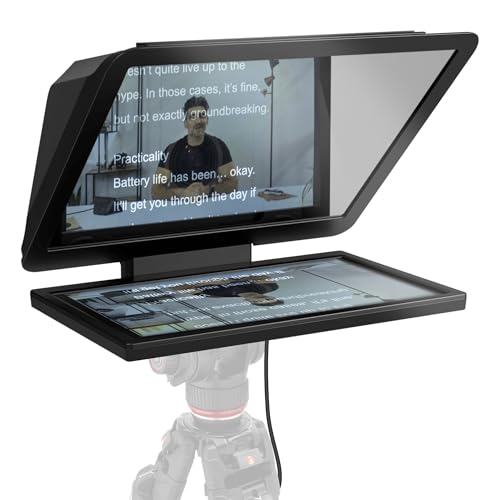
- Large 15.6-inch Full HD display
- Readable from an extended distance
- Detachable screen doubles as a spare monitor
Best For: Studio setups and presenters reading from farther away
Best Budget Tablet Setup

- 12-inch tablet-based teleprompter
- No-assembly aluminum-alloy design
- Folds flat and includes a carry case
Best For: Tablet users seeking an economical portable setup
Best for Mobile Walk-and-Talk
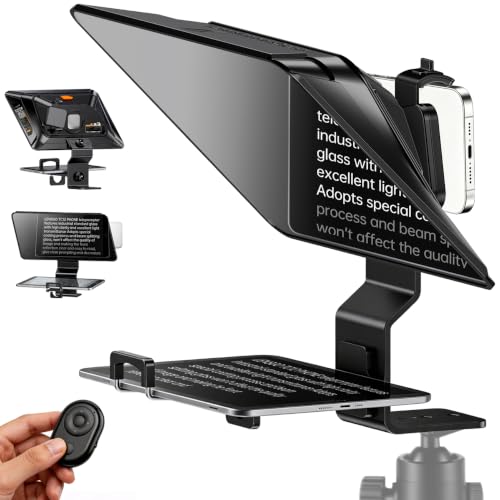
- 14.5-inch coated glass reading area
- Supports phones, iPads, and tablets
- Bluetooth remote with app-based scrolling
Best For: Mobile creators recording vlogs, TikToks, Zoom videos, and walk-and-talk content
Best Freestanding Livestream Setup
Xixan Large Screen Teleprompter
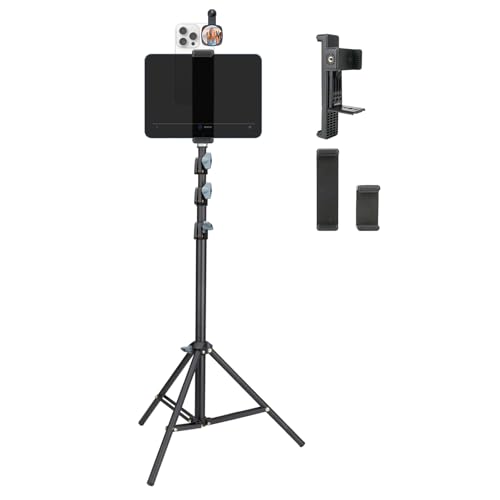
- Tablet-and-smartphone dual-clamp design
- Tripod height adjusts to 70.8 inches
- Supports flexible seated or standing placement
Best For: Presenters and livestreamers needing a tall, freestanding tablet setup
Best Camera-Compatible Option

- Works with phones, tablets, DSLRs, and mirrorless cameras
- Includes 49mm–82mm adapter rings
- App and Bluetooth remote support script control
Best For: Creators switching between mobile and professional camera livestreaming
Best All-Around Pick
NEEWER X12 14-Inch Teleprompter

- 75% light-transmittance glass with reading distance up to 10 feet
- App and included remote support script control
- Fits compatible tablets and smartphones; folds for transport
Best For: Creators who want broad device compatibility and portable setup
Best for Tablet-Based Camera Rigs

- Supports tablets up to 11 inches for DSLR, mirrorless, and camcorder use
- Requires a separately available 15mm LWS baseplate
- App imports and edits text from several common document formats
Best For: Livestreamers using a supported tablet with a rail-mounted camera rig
Best Quick-Setup Option
9.3-Inch Phone and Camera Teleprompter

- Works with smartphones, DSLR cameras, and mirrorless cameras
- Quick-release design sets up in about two minutes
- App and remote adjust scrolling, playback, and font size
Best For: Solo creators who prioritize fast setup and portable operation
Best Built-In Display – Elgato Prompter
The Elgato Prompter is a flexible choice among teleprompters for livestreaming because it includes its own 9-inch Full HD display. You can place scripts, Twitch chat, or another window on the screen from a PC or Mac, eliminating the need for a separate phone or tablet display.
Best For: Streamers and video-call users who want a built-in monitor and easy desktop control.
Pros:
- Built-in 9-inch Full HD display supports scripts, chat, and other windows.
- Compatible with DSLRs, webcams, smartphones, and computers.
- Works with the Camera Hub app and Stream Deck for customization and control.
- Designed for straightforward setup by attaching the camera and connecting to a computer.
Cons:
- Mac users need free DisplayLink software, while Android users need DisplayLink Presenter.
- At 0.69 kg, it may be less convenient than simpler tablet-based designs.
Choose this model if you want livestreaming convenience without managing a separate script device. Its monitor-style workflow is especially useful when you need to switch between scripts, chat, and calls.
Best Smartphone and Tablet Flexibility – Desview T5 Teleprompter
The Desview T5 is a versatile option among teleprompters for livestreaming, supporting smartphones, tablets under 11 inches, and DSLR cameras. Its free app and included Bluetooth remote let you prepare scripts, adjust display settings, and control scrolling without reaching toward the camera.
Best For: Creators who switch between mobile devices, tablets, and DSLR cameras for livestreams or videos.
Pros:
- Includes adapter rings from 49mm through 82mm for broad camera compatibility.
- Supports smartphones and tablets under 11 inches, plus DSLR cameras.
- App supports TXT and DOCX files, font adjustments, mirroring, rotation, and countdowns.
- Included Bluetooth remote controls playback, speed, and page turns.
Cons:
- Requires a compatible phone or tablet to provide the script display.
- Its listed tablet support is limited to devices under 11 inches.
The T5 makes sense for mobile-first creators who want one teleprompter for several shooting setups. Coated glass, light-sealing foam, and adjustable positioning add practical flexibility for different angles and environments.
Best for Long-Distance Reading – Elgato Prompter XL
The Elgato Prompter XL is built for creators who need a larger reading area while using teleprompters for livestreaming. Its detachable 15.6-inch Full HD display provides an extended reading range, while the enclosure is designed to work with DSLR, mirrorless, and studio cameras.
Best For: Studio streamers, presenters, and video-call users who read from farther away.
Pros:
- Large 15.6-inch Full HD display is easier to read at a distance.
- Detachable screen can serve as a spare monitor for conferencing and multitasking.
- Designed to fit DSLR, mirrorless, and studio camera setups.
- Voice Sync can scroll at a natural pace with compatible hardware.
Cons:
- Its full-sized design weighs 7.43 pounds and takes up more space.
- Voice Sync requires an NVIDIA RTX GPU or Apple M1-or-newer system.
This is the strongest fit when comfortable readability matters more than portability. The larger display and removable-monitor function make it particularly useful in a dedicated studio or presentation setup.
Best Budget Tablet Setup – NEEWER Basics X12B
The NEEWER Basics X12B offers a straightforward tablet-based approach to teleprompters for livestreaming. Its 12-inch beam-splitter design reflects text from a compatible tablet, while the included remote and app handle scrolling, page turns, and font sizing.
Best For: Budget-conscious creators using an iPad or tablet for streaming, tutorials, and presentations.
Pros:
- No-assembly aluminum-alloy design includes a liftable platform and adjustable glass.
- 12-inch display area reflects tablet text readable up to 10 feet away.
- Included Bluetooth remote and NEEWER app control playback, speed, pages, and font size.
- Folds flat and includes a carry case for storage and transport.
Cons:
- It does not function as a monitor or provide direct on-screen self-viewing.
- Not intended for phone shooting, despite some compatibility details listing smartphones.
- The RT113 remote requires an AAA battery, which is not included.
The X12B is a practical pick if you already own a tablet and want an economical, portable teleprompter. Its limitations are worth noting, but its no-assembly design and remote-controlled app keep the setup simple.
Best for Mobile Walk-and-Talk – LENSGO TC12P
For creators comparing teleprompters for livestreaming and mobile video, the LENSGO TC12P emphasizes portability and a large viewing area. Its 14.5-inch coated glass supports phones and tablets, while the included Bluetooth remote enables hands-free script control.
Best For: Smartphone-first creators who record vlogs, TikToks, Zoom videos, or walk-and-talk content.
Pros:
- Supports horizontal and vertical smartphone shooting.
- Works with iPhone, Android phones, iPads, and tablets up to 7.3 inches.
- Includes a Bluetooth remote and app support for scrolling, mirroring, and TXT imports.
- Anti-glare coated glass and light-seal foam help improve script visibility.
Cons:
- Designed around smartphone and tablet shooting rather than DSLR or mirrorless cameras.
- Not water resistant.
- Its larger glass may be less convenient than a compact teleprompter for minimal travel setups.
The TC12P is a practical choice when portability, a wide reading window, and phone-based shooting matter more than traditional camera compatibility.
Best Freestanding Livestream Setup – Xixan Large Screen Teleprompter
This Xixan model is built for teleprompters for livestreaming when you want a tablet-sized script display and flexible placement. Its dual-clamp design can hold a tablet and smartphone, while the included tripod adjusts from 20.5 to 70.8 inches for seated or standing presentations.
Best For: Livestreamers, presenters, and educators who need a tall, freestanding setup with a large tablet display.
Pros:
- Dual-device design supports a tablet and smartphone in synchronized orientations.
- Extendable tripod allows flexible height and freestanding positioning.
- 360-degree smartphone rotation helps with angle adjustment.
- Clamp options accommodate devices from roughly 2.2 to 8.7 inches, depending on the clamp.
Cons:
- At 1.2 kg, the setup is less travel-friendly than a compact teleprompter.
- It does not list a dedicated Bluetooth script remote or teleprompter app.
- Device fit depends on selecting the appropriate clamp size.
The Xixan stands out for room-based livestreams where height, tablet readability, and independent positioning are more important than compact portability.
Best Camera-Compatible Option – Desview T5
The Desview T5 is a versatile choice among teleprompters for livestreaming because it supports smartphones, tablets, DSLRs, mirrorless cameras, and camcorders. Its coated glass, broad set of adapter rings, and Bluetooth remote make it suitable for creators moving between mobile and camera-based production.
Best For: Livestreamers and video creators who want one teleprompter for phones, tablets, and interchangeable-lens cameras.
Pros:
- Compatible with smartphones, tablets under 11 inches, DSLR cameras, mirrorless cameras, and camcorders.
- Includes adapter rings from 49mm through 82mm for broad lens compatibility.
- Desview app supports TXT and DOCX imports, formatting controls, mirroring, timers, and speed adjustment.
- Includes Bluetooth remote, carrying case, coated glass, and a one-year warranty.
Cons:
- At 2.2 pounds, it is heavier than a phone-only teleprompter.
- The tablet support is limited to devices under 11 inches.
- Its camera-oriented accessories may be more than casual smartphone users need.
The T5 is the strongest all-around pick for creators who need flexible device support and more advanced script controls without limiting themselves to smartphone livestreaming.
Best All-Around Pick – NEEWER X12 14-Inch Teleprompter
The NEEWER X12 is a versatile choice among teleprompters for livestreaming, supporting smartphones, cameras, and tablets up to 9.84 x 8.68 inches. Its 75% light-transmittance glass, app control, and included remote make it practical for creators who want readable scripts without complicated setup.
Best For: Livestreamers, vloggers, online teachers, and creators using an iPad or smartphone as their script display.
Pros:
- Text can be read from up to 10 feet away through the high-definition beam-splitter glass.
- Includes RT-110 remote control and app support for iOS and Android.
- Fits tablets and smartphones, and folds for storage and transport.
- Includes a carrying case and phone holder.
Cons:
- Not compatible with wide-angle lenses or camera lenses shorter than 28mm.
- Not compatible with the 12-inch iPad Pro.
- The remote must pair through the NEEWER teleprompter app rather than directly with the phone or tablet.
The X12 offers a strong balance of compatibility, portability, and hands-free script control. Check your lens focal length and tablet dimensions before buying.
Best for Tablet-Based Camera Rigs – SMALLRIG 3646 Teleprompter
The SMALLRIG 3646 is built for DSLR, mirrorless, and camcorder setups that use an iPad or tablet up to 11 inches. For teleprompters for livestreaming, its rail-supported design and document-importing app are useful, but it requires a separately available 15mm LWS baseplate and does not support smartphones.
Best For: Camera operators and livestreamers building a more substantial tablet-based rig.
Pros:
- Supports iPads and tablets up to 11 inches.
- Works with lenses from 49mm to 95mm in diameter and focal lengths of 22mm or longer without vignetting.
- SmallGoGo App can extract text from PDFs, images, Word documents, and TXT files.
- Includes a top flag to reduce glare and ghosting plus a 4 x 5.65-inch filter adapter.
Cons:
- Not compatible with smartphones.
- Requires a separately available 15mm LWS baseplate.
- At 898g, it is heavier than a compact travel teleprompter.
The 3646 is a capable option for a structured camera rig rather than a quick phone setup. Factor the additional rail hardware into the total cost and installation time.
Best Quick-Setup Option – 9.3-Inch Phone and Camera Teleprompter
This 9.3-inch teleprompter is designed for flexible phone-and-camera recording, making it a convenient pick among teleprompters for livestreaming. Its 70/30 beam-splitter glass, two-minute setup, app controls, and wireless remote suit solo creators who need to start recording quickly.
Best For: Solo streamers, vloggers, interviewers, and presenters who want a compact, easy-to-carry setup.
Pros:
- Compatible with smartphones, DSLR cameras, and mirrorless cameras.
- Quick-release design reportedly sets up in about two minutes.
- Stream Prompt App supports font-size and scrolling-speed adjustments on iOS and Android.
- Included Bluetooth remote works from up to 10 meters for scrolling and playback control.
Cons:
- The supplied notes do not specify tablet size limits or lens compatibility details.
- The 1.94-pound weight may be less convenient than ultra-light travel models.
The 9.3-inch model emphasizes convenience and straightforward solo operation. It is a sensible fit when fast setup and remote script control matter more than detailed rig-mount specifications.
How We Picked the Best Teleprompters for Livestreaming
We focused on the features that matter during real livestreams: readable text, reliable mounting, camera compatibility, portability, and ease of setup. The roundup includes compact phone-based designs as well as larger tablet and full-size prompters, so different creators can find a suitable fit.
We also considered included adapter rings, supported tablet sizes, glass construction, remote-control support, and whether the design works best on a desk, tripod, or dedicated camera rig. A teleprompter is only useful if it keeps the script close to the lens while leaving enough room for a natural presentation.
Quick Comparison
| Type | Best For | Main Advantage | Watch For |
|---|---|---|---|
| Smartphone prompter | Mobile livestreams and compact cameras | Portable, simple setup | Smaller reading area |
| Tablet camera prompter | Desk, studio, and DSLR setups | More comfortable script viewing | Greater size and weight |
| Large or full-size prompter | Presenters farther from the camera | Better viewing distance | Needs more support and space |
Key Buying Factors for Teleprompters for Livestreaming
Camera and Lens Compatibility
Check the supported lens diameter, adapter rings, and mounting method before buying. Some models attach directly to a camera lens, while others require a tripod, cage, or separate holder. Wide lenses may show the edges of a smaller hood, so confirm the usable field of view.
Screen Size and Reading Distance
Phone-based units are convenient but can require smaller text and shorter presenter-to-camera distances. Tablet and full-size models are usually easier to read when standing or sitting farther away. Match the glass and hood size to your shooting distance rather than choosing solely by screen size.
Glass, Reflections, and Brightness
Beam-splitter glass should provide a clear reflection while keeping the camera image sharp. A bright tablet or phone helps, especially in rooms with strong lighting. Look for coated or high-quality glass when possible, and position lights to minimize glare.
Controls and Workflow
Bluetooth remotes are useful for pausing, changing speed, or moving through a script without reaching toward the camera. Also check app compatibility, text mirroring, power needs, and whether your preferred phone or tablet fits securely.
Stability and Portability
Aluminum construction can improve durability, but it also adds weight. For frequent travel, prioritize a compact model and a secure foldable design. For a permanent studio, a heavier frame and larger hood may be worthwhile.
Who Should Buy Which Teleprompters for Livestreaming?
- Choose a smartphone model if you stream from a phone, travel often, or need the smallest possible setup.
- Choose a compact camera-and-tablet prompter if you use a DSLR or mirrorless camera and want a more comfortable script view for desk-based livestreams.
- Choose a large-screen model if the presenter sits or stands several feet from the camera, uses larger text, or shares the setup with multiple speakers.
- Choose a full-size prompter if you need a studio-style reading area and have a sturdy tripod or support system.
Before ordering, measure your camera body, lens, tablet or phone, and available mounting space. The best teleprompter is the one that fits your complete livestreaming workflow without blocking the lens, overloading the support, or forcing an uncomfortable reading position.