If you want fast temperature checks, easier diagnostics, and live image sharing, a thermal viewer with WiFi streaming can make the job much simpler. These tools are especially useful for home inspections, HVAC troubleshooting, electrical checks, and automotive work.
In this roundup, we focus on models that balance image quality, battery life, app support, and portability so you can choose the right option with confidence.
Best 10 Thermal Viewer with WiFi Streaming Picks for 2026
AI Scene Inspection
TT17D Wi-Fi Thermal Camera with Touchscreen

- Wi-Fi transfer with app-based analysis
- AI presets for moisture, insulation, electrical, and solar checks
- 240x240 thermal imaging with 25Hz refresh and fusion modes
Best For: Contractors and inspectors who want guided thermal scanning
Phone Add-On

- USB-C plug-in design for iPhone 15 and newer
- 240x180 super resolution with MSX image blending
- App includes inspection guides for common faults
Best For: iPhone users who want guided thermal inspections
Pocket WiFi Scanner

- WiFi connectivity with photo and video storage
- 256x192 IR resolution and 25Hz refresh
- 3.2" touchscreen with thermal/visible overlay
Best For: General troubleshooting in a compact WiFi thermal camera
Wireless Corner-View
FLIR Edge Bluetooth Thermal Camera

- Bluetooth wireless viewing for iOS and Android
- 240x180 super resolution with MSX enhancement
- IGNITE cloud for uploading and sharing images
Best For: Wireless inspections on phones and tablets with cloud sharing
Compact Thermal Scanner

- 240x240 TISR-enhanced imaging
- 15-hour battery life
- High/low temp alerts with photo capture
Best For: Portable inspections with long runtime and simple on-device diagnostics
USB-C Thermal Companion

- 512x384 super-resolution imaging
- USB-C compatibility with phones/tablets
- Photo and video recording support
Best For: Mobile inspections with a phone or tablet as the display
Touchscreen Thermal Inspector
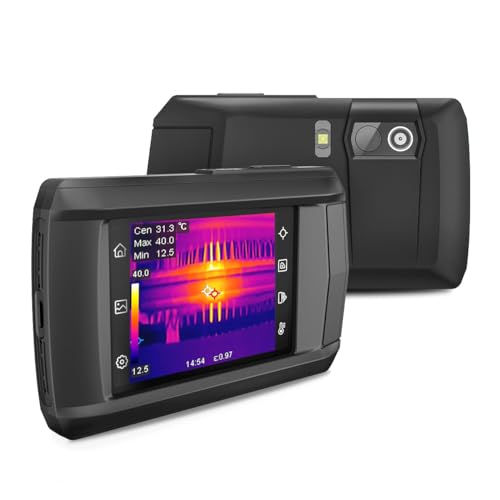
- 240x240 live super resolution
- IntellFault scene detection
- Thermal, visual, and fusion modes
Best For: Touchscreen inspections with scene recognition and recording
Wireless Reporting Thermal Imager
TOPDON TC004 WiFi thermal camera

- Wi-Fi transfers files to the mobile app
- 512x384 enhanced thermal imaging
- 64GB storage with rugged IP54 housing
Best For: Field inspectors who need wireless reporting and durable hardware
Compact USB-C Thermal Imager
REVASRI T160 USB-C thermal viewer

- 320x240 super resolution at 25Hz
- USB-C plug-and-play for iOS, Android, and Windows
- Alarm, zoom, and picture-in-picture tools
Best For: Portable inspection work with simple app-based operation
AI Scene Inspection – TT17D Wi-Fi Thermal Camera with Touchscreen
If you want a thermal viewer with WiFi streaming for fast field checks, the TT17D is built around guided inspection and app-based wireless transfer. Its AI scene modes can auto-detect moisture intrusion, insulation gaps, floor-heating faults, electrical issues, and solar panel problems, while fusion and other display modes help you interpret what the sensor is seeing in real time.
Best For: Contractors, inspectors, and maintenance users who want AI-assisted thermal scans with wireless analysis.
Pros:
- Wi-Fi transfer plus app-based analysis for remote review and sharing
- AI scene presets for moisture, insulation, floor heating, electrical, and solar work
- 240×240 thermal imaging with 25Hz refresh and fusion/visual/PIP/blending modes
- 3.5″ touchscreen, built-in storage, microphone, flashlight, and tripod mount
Cons:
- More feature-heavy than a simple point-and-shoot thermal tool
- Wireless workflow depends on the app and connected device setup
The TT17D is a strong pick if you want a thermal viewer with WiFi streaming that does more than capture images. Its automatic scene presets and practical inspection tools make it well suited to users who need speed, context, and shareable results.
Phone Add-On – FLIR ONE for iPhone 15 USB-C
The FLIR ONE is a compact thermal viewer with WiFi streaming-style convenience through your phone workflow, but it connects directly to an iPhone USB-C port rather than using built-in wireless. It is designed for quick inspections on iPhone 15 and newer, with super resolution, MSX image blending, and app-based inspection guides for finding air leaks, moisture buildup, and other common issues.
Best For: iPhone 15 and newer users who want a small, direct-connect thermal camera for home or light commercial inspections.
Pros:
- USB-C compatibility for iPhone 15 and newer
- 240×180 super resolution from 80×60 native IR with MSX detail enhancement
- Step-by-step inspection guides in the FLIR app
- Compact, lightweight design with 1.5m drop rating
Cons:
- Only works with iPhone 15 and newer USB-C models
- Not a standalone camera; it depends on the phone and app
This model makes sense if you want thermal inspection in a pocketable format and already use a compatible iPhone. It is less about wireless freedom and more about easy, guided imaging from a phone you already carry.
Pocket WiFi Scanner – VEVOR 256×192 Thermal Camera
For shoppers comparing a thermal viewer with WiFi streaming, the VEVOR pocket thermal camera focuses on a simple connected workflow. It combines 256×192 IR imaging, a visible-light camera, and WiFi connectivity so you can capture, store, and review thermal patterns with a compact tool built for everyday inspection work.
Best For: Users who want a pocket-size thermal camera with WiFi, touchscreen control, and solid resolution.
Pros:
- 256×192 IR resolution with a 25Hz refresh rate
- WiFi connectivity plus included storage card for photos and videos
- 3.2″ touchscreen and thermal/visible-light overlay support
- IP54 protection, 3000mAh battery, and pocket-friendly format
Cons:
- Does not offer the AI scene presets found on some rivals
- Visible-light sensor is modest at 0.3MP
The VEVOR is a practical choice if you want a connected thermal camera without a bulky body or complicated controls. Its WiFi workflow and decent resolution make it a good fit for general troubleshooting and routine field checks.
Wireless Corner-View – FLIR Edge Bluetooth Thermal Camera
The FLIR Edge is a wireless thermal viewer for users who want flexible phone and tablet viewing without a direct cable connection. While it uses Bluetooth rather than WiFi streaming, it still supports wireless inspection workflows, cloud sharing through FLIR IGNITE, and MSX-enhanced thermal detail for checking tight spaces and hard-to-reach areas.
Best For: Technicians and inspectors who need wireless thermal viewing across iOS and Android devices.
Pros:
- Compatible with all iOS and Android devices via Bluetooth
- Wireless viewing helps inspect tight spaces and corners
- 240×180 super resolution with MSX visual detail enhancement
- FLIR IGNITE cloud support for organizing and sharing images
Cons:
- Uses Bluetooth, not WiFi streaming
- Native IR resolution is 80×60 before upscaling
If your priority is wireless convenience and broad phone compatibility, the Edge is a solid fit. It is especially useful when you need to aim around obstacles and then move results into the cloud for later review.
Compact Thermal Scanner – TOPDON TC004 Mini
If you want a thermal viewer with WiFi streaming in a pocket-size form factor, the TOPDON TC004 Mini is built for fast handheld inspections rather than app-based live sharing. It combines a 128×128 IR sensor with 240×240 TISR enhancement, a 25Hz refresh rate, and a 40° x 30° field of view for smooth thermal checks around the home, on electrical gear, and on machinery.
Best For: Portable inspections where long battery life, alerting, and easy on-device photo capture matter most.
Pros:
- Enhanced to 240×240 with TISR for clearer thermal detail.
- 25Hz refresh rate and wide field of view for steady inspections.
- High/low temperature alerts automatically warn and capture photos.
- Up to 15 hours of runtime with built-in 512MB storage for up to 8,000 photos.
Cons:
- Does not list WiFi streaming or app connectivity.
- Paper manual is not included.
- Charging head is not included.
Overall, this is a practical mini thermal camera for users who care more about dependable capture, alerts, and battery life than wireless streaming features.
USB-C Thermal Companion – TOPDON TC002C Duo
For buyers looking for a thermal viewer with WiFi streaming style convenience through a phone-connected setup, the TOPDON TC002C Duo is a compact USB-C thermal camera made to work with compatible smartphones and tablets. It uses a 256×192 IR sensor enhanced to 512×384 with TISR, plus a 25Hz refresh rate and 40mK heat sensitivity for real-time inspection on the go.
Best For: USB-C users who want a mobile thermal imager for inspections, recording, and quick temperature checks.
Pros:
- Works with USB-C smartphones and tablets across iOS, Android, and Windows.
- 512×384 super resolution via TISR improves image detail.
- Supports photo and video recording for documentation.
- Compact 30g design is easy to carry for field work.
Cons:
- Not compatible with Mac devices or Android 16 devices at present.
- No built-in screen or standalone thermal display.
- Connectivity depends on a compatible USB-C device and app use.
This model makes sense if you want a phone-driven thermal tool with strong resolution and temperature range, but it is not a standalone wireless streaming camera.
Touchscreen Thermal Inspector – HP96 Thermal Imaging Camera
If you’re shopping for a thermal viewer with WiFi streaming features, the HP96 focuses instead on a self-contained inspection workflow with a 3.5-inch touchscreen, dual cameras, and live super-resolution viewing. It upgrades 96×96 thermal data to 240×240 in real time, while the 25Hz frame rate, 50° field of view, and built-in recording tools make it useful for detailed inspections without relying on a phone.
Best For: Hands-on inspectors who want a touchscreen thermal camera with scene detection, recording, and strong anomaly tracking.
Pros:
- Live super resolution improves thermal clarity from 96×96 to 240×240.
- IntellFault scene recognition can help identify water leaks and insulation gaps.
- Thermal, visual, fusion, PIP, and blending modes add flexibility.
- Built-in memory supports about 30,000 images and 20 hours of video.
Cons:
- No WiFi streaming feature is listed.
- Battery life is up to 4 hours, so it is less ideal for very long sessions.
- No moisture readings are provided.
As a practical inspection tool, the HP96 stands out for its touchscreen usability and scene detection, even though it is not built around wireless streaming.
Phone-Connected Thermal Scanner – Thermal Master P1 for USB-C
If you want a thermal viewer with WiFi streaming, this USB-C model is worth a close look for phone-based inspections, but note that its strength is plug-and-play imaging rather than wireless transfer. It turns a compatible phone, tablet, or Windows device into a portable infrared scanner with 320×240 super-resolution enhancement, fast 25Hz refresh, and a wide enough temperature range for home, HVAC, electrical, and automotive checks.
Best For: Inspectors who want a compact, phone-connected thermal camera for quick field checks without batteries.
Pros:
- 320×240 super IR resolution with 0.04℃ sensitivity for clearer thermal detail
- USB-C plug-and-play works with Android phones, USB-C iPhones, tablets, and Windows devices
- No batteries required; powered directly by the connected device for 5-8 hours of runtime
- Includes 15x zoom, 52°x39° field of view, and instant photo/video capture
Cons:
- Does not offer WiFi streaming or wireless transfer features
- Relies on a compatible USB-C device, so it is not a standalone handheld camera
- Thermal cameras detect surface heat only, not through walls
This is a practical choice if you want a lightweight thermal imager for fast, on-device inspection work. The strongest appeal is convenience: no charging, easy app access, and enough resolution to spot insulation gaps, moisture issues, and overheating components.
Wireless Reporting Thermal Imager – TOPDON TC004 WiFi thermal camera
If your priority is a thermal viewer with WiFi streaming for faster reporting, the TOPDON TC004 stands out by moving files wirelessly to the TopInfrared mobile app. It combines a 3.5-inch display, enhanced 512×384 TISR image output, and handheld durability, making it a strong option for inspection work where documentation matters as much as the live scan.
Best For: Technicians who want wireless file transfer, onboard storage, and a rugged handheld thermal camera.
Pros:
- Integrated Wi-Fi supports cable-free transfer to the TopInfrared mobile app
- 512×384 enhanced thermal output helps reveal subtle temperature differences
- 64GB built-in storage lets you save thousands of images and videos
- IP54 protection, 2-meter drop resistance, and LED light support field work
Cons:
- Uses a handheld form factor instead of phone-based convenience
- Wi-Fi is for file transfer and reporting, not stated as live streaming video
- Battery replacement requires included A batteries, so it is not USB-powered
For buyers who need organized inspection records and wireless workflow support, this model is especially practical. The combination of strong image detail, local storage, and Wi-Fi syncing makes it easier to inspect, save, and report without slowing down in the field.
Compact USB-C Thermal Imager – REVASRI T160 USB-C thermal viewer
For shoppers comparing a thermal viewer with WiFi streaming, the REVASRI T160 is more of a compact USB-C plug-and-play option than a wireless one. It focuses on sharp phone-and-computer thermal imaging with 320×240 super resolution, 25Hz refresh, and helpful inspection tools like temperature tracking, alarms, and picture-in-picture viewing.
Best For: Users who want a lightweight USB-C thermal camera for home, HVAC, and troubleshooting tasks.
Pros:
- 320×240 super resolution with 25Hz refresh for smooth thermal viewing
- USB-C compatibility works with iOS, Android, tablets, and Windows systems
- Includes high/low temperature alarms, 15x zoom, and picture-in-picture mode
- Compact, lightweight design is easy to carry for field or home use
Cons:
- No WiFi streaming feature is listed
- Requires a USB-C device and the dedicated Camera+ app
- Temperature range is more limited than some higher-end inspection cameras
This model is a sensible pick if you want simple setup and reliable thermal readings without extra hardware. It is best viewed as a practical everyday inspection tool rather than a wireless reporting platform.
How We Picked the Best Thermal Viewer with WiFi Streaming
We prioritized image resolution, refresh rate, display quality, wireless or app-based streaming, temperature range, and overall ease of use. We also looked for practical details such as battery life, portability, and whether a model works well with smartphones or as a standalone handheld device.
For a Thermal Viewer with WiFi Streaming, reliable connectivity matters just as much as raw sensor specs. A good unit should make it easy to view, save, and share thermal images without adding setup headaches.
Quick Comparison
Smartphone-connected models are usually the most portable and convenient for occasional use, while standalone handheld units tend to offer better ergonomics, built-in screens, and more independent operation. Higher-resolution options are better for spotting small heat differences, while lower-cost models can still be a strong fit for basic inspections.
Key Buying Factors for a Thermal Viewer with WiFi Streaming
Resolution and Image Clarity
Resolution affects how much detail you can see. If you need to identify hidden hot spots, insulation gaps, or electrical issues, choose a model with higher IR resolution or super-resolution processing.
Connectivity and App Experience
Look for stable wireless performance, straightforward pairing, and an app that makes it easy to stream, capture, and export images. A Thermal Viewer with WiFi Streaming should feel seamless in the field, not frustrating.
Frame Rate and Responsiveness
A smoother refresh rate helps moving subjects and quick scans appear more natural. This is especially helpful when checking HVAC vents, engine bays, or live equipment.
Battery Life and Portability
Long battery life matters if you plan to work onsite for extended periods. Compact designs are better for carrying in a tool bag or using in tight spaces.
Temperature Range and Measurement Accuracy
Make sure the unit covers the temperatures you actually need to inspect. For general troubleshooting, accuracy and consistency are often more important than having the widest possible range.
Who Should Buy Which Thermal Viewer with WiFi Streaming?
Choose a smartphone-based thermal viewer if you want maximum portability and simple sharing. Pick a standalone handheld model if you prefer a built-in display, easier one-handed use, and fewer device compatibility concerns. If you need the best detail for professional diagnostics, prioritize higher resolution and stronger software tools. If you mainly want an affordable inspection tool for home use, a compact midrange option is often the best balance of cost and capability.
In short, the best choice depends on how often you’ll use it, what you’ll inspect, and whether wireless sharing or standalone convenience matters more in your workflow.