Mac users moving large photo libraries, 4K video, or project files need more than a generic portable drive. The right Thunderbolt 5 external SSD for Mac can cut transfer times dramatically while keeping setup simple.
Below, we focus on fast, Mac-friendly options that balance speed, capacity, durability, and real-world compatibility.
Best 10 Thunderbolt 5 External SSD for Mac Picks for 2026
Thunderbolt 5 Speed Pick

- TB5 connection up to 80Gbps
- Up to 64Gbps transfer performance
- Rugged aluminum + silicone sleeve
Best For: Mac users who need top-end portable speed and broad Thunderbolt compatibility
USB-C Everyday Performer

- Up to 2,000MB/s sustained speeds
- Dynamic Thermal Guard cooling
- Works with Mac, PC, tablets, and iPhone
Best For: Mac users who want a reliable high-speed USB-C SSD for daily use
High-Capacity TB5 Choice

- Over 6000MB/s transfer speeds
- 4TB capacity for large projects
- Bus-powered, rugged aluminum build
Best For: Mac users who need a fast, roomy portable SSD for bigger workloads
Compact Travel Option
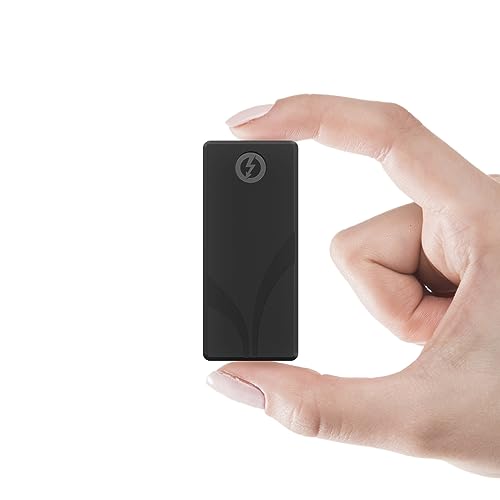
- Thunderbolt 3 up to 2700MB/s
- 4TB in a pocketable aluminum body
- Includes Thunderbolt and USB cables
Best For: Mac users who want a compact, travel-friendly SSD with plenty of storage
Best for Easy Setup
- Over 6000MB/s advertised speed
- Bus-powered with built-in Thunderbolt cable
- Fanless aluminum design for silent use
Best For: Mac users who want maximum speed in a compact drive
Rugged Mac runner-up
SanDisk Professional PRO-G40 4TB

- Up to 3000MB/s read and 2500MB/s write
- IP68 dust/water resistance and 3m drop rating
- Mac ready with APFS format
Best For: Mac users who want rugged storage with strong all-around speed
Largest capacity choice
- 8TB capacity for bigger libraries
- Over 6000MB/s advertised speed
- Thunderbolt 5 with bus-powered design
Best For: Mac users who want the fastest option with the most storage
USB4 Speed Pick
Corsair EX400U 2TB USB4 Portable SSD

- Up to 4,000MB/s read and 3,600MB/s write
- USB4 with Thunderbolt 4 and higher compatibility
- Compact, plug-and-play design with included 40Gbps cable
Best For: Mac users wanting a fast, portable USB4 SSD for editing and file transfers
High-End Performance Pick
OWC Express 1M2 80Gb/s Portable NVMe SSD

- Over 6000MB/s peak real-world speed
- USB4 and Thunderbolt-compatible with broad device support
- Heat-dissipating aluminum enclosure for sustained performance
Best For: Mac power users needing maximum external SSD speed for pro workflows
Value Compatibility Pick
SSK 2TB USB4 40Gbps External SSD

- Up to 4000MB/s read and 3700MB/s write
- USB4 and Thunderbolt 4 compatible with included 40Gbps cable
- S.M.A.R.T., TRIM, and LDPC ECC support for protection
Best For: Mac users wanting a durable, fast USB4 SSD with broad compatibility
Thunderbolt 5 Speed Pick – SABRENT Rocket XTRM 5 2TB
If you want a Thunderbolt 5 external SSD for Mac that prioritizes raw speed, the SABRENT Rocket XTRM 5 is built for demanding transfers and creator workflows. Its TB5 connection is rated up to 80Gbps, with transfer performance up to 64Gbps, and it also remains compatible with Thunderbolt 3, Thunderbolt 4, USB4, and fallback USB speeds.
Best For: Mac users who need the fastest possible portable storage for large file moves, media work, and busy hybrid setups.
Pros:
- Thunderbolt 5 connection with up to 64Gbps transfer performance.
- Backward compatible with TB3, TB4, USB4, and USB 3.2 fallback modes.
- Rugged aluminum body plus silicone sleeve for added protection.
- Bus-powered and includes a premium Thunderbolt cable.
Cons:
- Maximum speeds depend on Thunderbolt 5 or other high-bandwidth connections.
- 2TB capacity may be limiting for very large media libraries.
For Mac owners who care most about speed and flexibility, this drive is the most future-ready option in the group. It combines high-end TB5 performance with broad compatibility, so it can still serve well if you move between newer and older systems.
USB-C Everyday Performer – Samsung T9 Portable SSD 1TB
The Samsung T9 is not a Thunderbolt 5 external SSD for Mac, but it is a strong USB 3.2 Gen 2×2 portable drive if you want dependable performance and wide compatibility. It offers up to 2,000MB/s sustained read and write speeds, includes Dynamic Thermal Guard to help control heat, and works with Mac, PC, tablets, and iPhone 15/16.
Best For: Mac users who want a reliable, high-speed USB-C SSD for everyday file transfers and cross-device use.
Pros:
- Up to 2,000MB/s sustained read and write speeds.
- Dynamic Thermal Guard helps keep temperatures under control.
- Works with Mac, PC, tablets, and iPhone 15/16.
- Includes AES 256-bit hardware encryption and Magician software support.
Cons:
- Uses USB 3.2 Gen 2×2, not Thunderbolt 5.
- 1TB capacity may be modest for larger creative libraries.
For buyers focused on practical speed rather than absolute top-tier interface performance, the T9 is easy to recommend. It is especially appealing if you value portability, thermal management, and broad device support over TB5-level throughput.
High-Capacity TB5 Choice – OWC Envoy Ultra 4TB
If your goal is a Thunderbolt 5 external SSD for Mac with serious capacity, the OWC Envoy Ultra stands out with 4TB of storage and over 6000MB/s transfer speeds. It is bus-powered, includes a built-in Thunderbolt cable, and is designed to work with Macs, PCs, iPad Pros, Chromebooks, and Surface devices.
Best For: Mac users who need a fast, high-capacity portable SSD for large projects and cross-platform use.
Pros:
- Over 6000MB/s speeds with Thunderbolt 5.
- 4TB capacity suits larger media and project files.
- Bus-powered with a built-in Thunderbolt cable.
- Rugged, fanless aluminum design with weatherproof protection.
Cons:
- Speed and features are most compelling on TB5 systems.
- Premium capacity and performance typically come at a higher price tier.
This is the most storage-heavy option in the roundup while still delivering true next-gen performance. For Mac users working with large video, photo, or business datasets, the Envoy Ultra offers a practical blend of capacity, speed, and toughness.
Compact Travel Option – SABRENT Rocket Nano XTRM 4TB
The SABRENT Rocket Nano XTRM is a compact external SSD for Mac buyers who want strong portable performance in a very small package. It uses Thunderbolt 3 for up to 2700MB/s, falls back to USB 3.2 Gen 2 at up to 900MB/s, and ships with both Thunderbolt and USB-C to USB-A cables.
Best For: Mac users who want a pocketable high-capacity SSD for travel, backups, and on-the-go project work.
Pros:
- Very compact 4TB design with an aluminum body.
- Thunderbolt 3 speeds up to 2700MB/s.
- USB fallback up to 900MB/s with broad compatibility.
- Includes both needed cables and a silicone sleeve.
Cons:
- Thunderbolt 3 is older than Thunderbolt 5 and delivers lower peak speed.
- Max performance depends on using a compatible TB3 setup.
For users who value size and convenience as much as speed, this drive is easy to carry and easy to deploy. It is a smart fit when you want a durable, bus-powered SSD that can move between Mac, PC, and even Linux setups without extra accessories.
Best for Easy Setup – OWC Envoy Ultra 2TB
If you want a Thunderbolt 5 external SSD for Mac that focuses on top-end transfer speed, the OWC Envoy Ultra 2TB is built for exactly that job. It advertises over 6000MB/s performance, is bus-powered, and uses a fanless aluminum design, which makes it a practical option for fast working storage rather than just backup.
Best For: Mac users who want a compact, high-speed external SSD for pro creative work and large file transfers.
Pros:
- Thunderbolt 5 speeds advertised at over 6000MB/s
- Works with Macs, PCs, iPad Pros, Chromebooks, and Surface devices
- Bus-powered with a built-in Thunderbolt cable for simpler setup
- Fanless aluminum body helps keep operation silent
Cons:
- Requires a Thunderbolt 5-capable setup to reach its top performance
- 2TB capacity may be limiting for very large media libraries
Overall, this is the most speed-focused option in the group and fits buyers who care more about fast Mac workflows than maximum storage size. Its backward compatibility also makes it easier to use across different systems, but its value is strongest when paired with a modern Thunderbolt setup.
Rugged Mac runner-up – SanDisk Professional PRO-G40 4TB
The SanDisk Professional PRO-G40 is not a Thunderbolt 5 external SSD for Mac, but it is a strong high-speed alternative if you want proven Thunderbolt 3 performance and rugged protection. With up to 3000MB/s read speeds, APFS-ready Mac formatting, and dual-mode Thunderbolt 3/USB-C compatibility, it suits users who need a durable portable SSD more than cutting-edge interface speed.
Best For: Mac users who want a rugged, fast external SSD with broad compatibility.
Pros:
- Up to 3000MB/s read and 2500MB/s write speeds
- Dual-mode compatibility with Thunderbolt 3 and USB-C
- IP68 dust and water resistance plus 3m drop resistance
- Mac ready with APFS drive format
Cons:
- Thunderbolt 3, not Thunderbolt 5
- Slower than the fastest drive in this roundup
For Mac buyers who value toughness and dependable speed, this is the most rugged choice here. It gives up interface headroom compared with Thunderbolt 5 models, but it stands out for durability and larger 4TB capacity.
Largest capacity choice – OWC Envoy Ultra 8TB
If your Thunderbolt 5 external SSD for Mac needs are centered on capacity as much as speed, the OWC Envoy Ultra 8TB is the biggest option in this lineup. It still advertises over 6000MB/s transfer rates, adds Thunderbolt 5 connectivity, and keeps the same bus-powered, fanless aluminum approach as the smaller model.
Best For: Mac users who need high-speed storage with a much larger 8TB capacity.
Pros:
- 8TB capacity for larger project libraries and backups
- Over 6000MB/s advertised transfer speed
- Thunderbolt 5 connectivity with 80Gbps data transfer rate
- Bus-powered, fanless, and built with a heat-dissipating aluminum design
Cons:
- Needs a Thunderbolt 5 setup to make the most of its speed
- Larger capacity likely comes at a higher price than smaller models
This is the best fit if you want the speed profile of the OWC line but need more room for demanding creative work. It is especially appealing for Mac users handling large media files, since it combines speed, portability, and a bigger storage ceiling.
USB4 Speed Pick – Corsair EX400U 2TB USB4 Portable SSD
If you want a Thunderbolt 5 external SSD for Mac alternative that still pushes very fast transfer speeds, the Corsair EX400U is built around USB4 and is designed for quick file moves on Mac and PC. It’s a practical choice for editing large photos and video, with plug-and-play simplicity and a compact body that’s easy to carry.
Best For: Mac users who want a compact USB4 drive with strong everyday performance for creative work.
Pros:
- Up to 4,000MB/s read and 3,600MB/s write for fast large-file transfers
- USB4 connection with Thunderbolt 4 and higher compatibility
- Small, portable form factor for on-the-go storage
- Includes a 40Gbps cable and supports simple plug-and-play setup
Cons:
- Maximum performance requires a USB4 or higher connection
- Performance can vary by capacity
- Not a true Thunderbolt 5 device
This is a strong pick if your priority is fast, bus-friendly external storage with easy Mac compatibility rather than chasing the newest interface label.
High-End Performance Pick – OWC Express 1M2 80Gb/s Portable NVMe SSD
For shoppers comparing a Thunderbolt 5 external SSD for Mac, the OWC Express 1M2 stands out as the most performance-focused option here thanks to its 80Gb/s USB4 design and reported peak real-world speeds over 6000MB/s. It’s aimed at users who need near-internal-drive responsiveness for demanding creative work, with broad Mac and cross-platform support.
Best For: Mac power users who want the fastest option in this group for pro-level workflows.
Pros:
- Over 6000MB/s peak real-world speed
- USB4 and Thunderbolt-compatible for wide device support
- Patented heat-dissipating aluminum enclosure helps keep performance consistent
- Bus-powered and designed for future NVMe upgrades
Cons:
- Higher-end performance is overkill for basic storage needs
- Sold as a flexible platform, so SSD choice may matter if you build your own
- PCIe Gen 5 drive selection may need extra care for bus-power limits
This is the strongest match if speed is the top priority and you want a premium external drive that can keep up with intensive Mac workflows.
Value Compatibility Pick – SSK 2TB USB4 40Gbps External SSD
If you’re shopping for a Thunderbolt 5 external SSD for Mac and want broad compatibility without giving up fast transfer rates, the SSK 2TB USB4 drive is a sensible option. It’s rated up to 4000MB/s read and 3700MB/s write, and it includes a 40Gbps USB-C cable for straightforward use with Mac, laptops, phones, and more.
Best For: Users who want a compact, durable USB4 SSD with strong everyday performance and extra device compatibility.
Pros:
- Up to 4000MB/s read and 3700MB/s write
- USB4 and Thunderbolt 4 compatibility for next-gen connectivity
- Includes 40Gbps USB-C cable for plug-and-play use
- Built-in S.M.A.R.T., TRIM, and LDPC ECC support for data protection
Cons:
- Listed read speed is in megabits per second in the specs, which can be confusing
- Maximum speed depends on your port, cable, and system conditions
- Not the fastest choice in this group for heavy pro workflows
Overall, this is a balanced external SSD for Mac users who want fast USB4 performance, wide compatibility, and a tough enclosure without moving into ultra-premium territory.
How We Picked the Best Thunderbolt 5 External SSD for Mac
We prioritized drives and enclosures that make sense for Mac workflows: strong sequential performance, Thunderbolt 5 or fast USB4 support, solid thermal design, and broad backward compatibility with Thunderbolt 4, Thunderbolt 3, and USB-C Macs. We also weighed capacity choices, portability, and whether a model is better for plug-and-play use or for building a custom high-performance SSD.
Quick Comparison
If you want the simplest setup, choose a prebuilt portable SSD. If you want the highest ceiling and better long-term flexibility, a Thunderbolt 5 enclosure with a high-end NVMe drive is often the smarter route. MacBook Pro users handling large media files will benefit most from sustained speeds and thermal stability, while everyday users may be better served by a compact, lower-cost USB4 or Thunderbolt 3 option.
Key Buying Factors for Thunderbolt 5 External SSD for Mac
Speed and Real-World Performance
Peak specs matter, but sustained write performance is often more important for Mac users copying large video, photo, or development libraries. Thunderbolt 5 can offer a major jump in bandwidth, but the enclosure, controller, and internal NVMe drive all affect final results.
Compatibility with Your Mac
Check your Mac’s port standard before buying. A Thunderbolt 5 External SSD for Mac will work best on newer Macs, but many products here are also compatible with Thunderbolt 4, Thunderbolt 3, and USB4 systems. Backward compatibility is useful, but it may limit top speed.
Capacity and Workflow
For light creative use, 1TB to 2TB is often enough. For photographers, editors, and power users, 4TB or 8TB can be the better value because it reduces drive juggling and keeps large active projects close at hand.
Portability, Durability, and Heat
Compact aluminum builds travel well and help manage heat. If you work on the move or in demanding environments, look for better cooling, rugged construction, or IP-rated protection. Sustained speed depends heavily on thermal control.
Who Should Buy Which Thunderbolt 5 External SSD for Mac?
Choose a Thunderbolt 5-ready enclosure if you want top performance and are comfortable pairing it with a separate NVMe SSD. Pick a prebuilt portable drive if you want convenience and predictable setup. Go with a USB4 or Thunderbolt 3 model if you need strong Mac performance at a lower price or your current Mac cannot fully use Thunderbolt 5 speeds. For creators, developers, and frequent travelers, the best choice is usually the fastest drive that also matches your capacity needs and thermal limits.