Choosing the right ultrawide display can make Mac video editing feel faster, cleaner, and far less cramped. A good panel gives you more timeline space, better preview management, and easier app multitasking.
Below, we focus on models that balance resolution, color handling, connectivity, and everyday editing comfort so you can match the monitor to your workflow and budget.
Best 10 Ultrawide Monitor for Mac Video Editing Picks for 2026
UltraWide Workhorse
LG 34WR55QK-B 34-inch 3440x1440 Curved Monitor

- 3440 x 1440 resolution with a 21:9 workspace
- USB-C with up to 65W power delivery
- 99% sRGB, HDR10, and adjustable stand
Best For: Mac editors who want a roomy, low-clutter ultrawide
Color-Focused Curved Option
Dell S3425DW 34-inch USB-C Curved Monitor

- 3440 x 1440 ultrawide workspace for editing
- 99% sRGB and 95% DCI-P3 color coverage
- USB-C with up to 65W power delivery
Best For: Editors who want stronger color coverage and tidy USB-C connectivity
Budget Widescreen Helper
LG 34U530A-W 34-inch WFHD IPS Monitor

- 34-inch 21:9 ultrawide format
- IPS panel with wide viewing angles
- USB-C plus HDR400 and up to 99% sRGB
Best For: Budget-minded Mac editors who want widescreen multitasking
Budget Ultrawide Pick
MSI PRO MP341CQW E12 34-inch 120Hz UWQHD Monitor

- 34-inch 3440 x 1440 ultrawide layout
- 120Hz refresh for smoother motion
- Flicker Free and Low Blue Light support
Best For: Editors who want a wide 34-inch workspace for the lowest practical cost.
Mac-Friendly Smart Display
LG 34 Curved UltraWide WQHD Smart Monitor
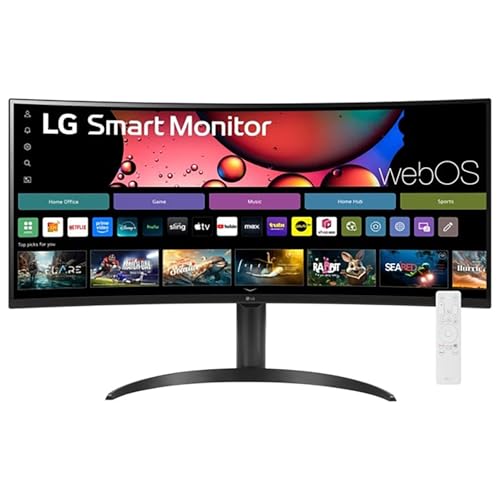
- AirPlay 2 and HomeKit support for Mac devices
- 3440 x 1440 ultrawide panel with HDR10
- Built-in webOS for streaming and cloud apps
Best For: Mac users who want editing space plus built-in streaming and wireless casting.
Creator-Style Value Choice
MSI PRO MP341CQ E12 34-inch 120Hz UWQHD Monitor

- 34-inch 3440 x 1440 ultrawide workspace
- 120Hz with Adaptive Sync for smooth motion
- Eye-Q Check plus Flicker Free comfort tools
Best For: Editors who want a wide monitor with extra eye-comfort and maintenance features.
Creative Multitasker
LG 34U640B-B 34-Inch UltraWide 21:9 QHD Curved Monitor

- 3440 x 1440 ultrawide workspace
- USB-C with up to 65W charging
- Up to 99% sRGB with HDR10
Best For: Mac editors who want an efficient ultrawide with simple USB-C connectivity
Balanced Workspace
LG 34U60ZB-B 34-inch UltraWide WQHD Curved Monitor

- 3440 x 1440 ultrawide layout
- Up to 99% sRGB and HDR10
- LG Switch with up to 11 layouts
Best For: Mac users who want a simple ultrawide with strong everyday workflow support
Creator-Friendly Pick
LG 34U650A-B 34-inch IPS UltraWide Curved Monitor

- IPS 3440 x 1440 ultrawide panel
- USB-C with up to 96W charging
- Up to 99% sRGB plus built-in speakers
Best For: Mac video editors who want IPS consistency and powerful USB-C charging
UltraWide Workhorse – LG 34WR55QK-B 34-inch 3440×1440 Curved Monitor
If you want an ultrawide monitor for Mac video editing that emphasizes workspace over flash, the LG 34WR55QK-B is a practical 34-inch 21:9 option. Its 3440 x 1440 resolution gives you room for timelines, preview windows, and tool panels side by side, while USB-C with up to 65W power delivery helps keep a MacBook connected with fewer cables.
Best For: Editors who want a simple, cable-light ultrawide setup for multitasking and general video work.
Pros:
- 34-inch 21:9 WQHD panel offers plenty of horizontal space for editing layouts
- USB-C with up to 65W power delivery simplifies Mac laptop connections
- 99% sRGB and HDR10 add helpful color and contrast for creative work
- Height- and tilt-adjustable stand makes it easier to set up comfortably
Cons:
- VA panel is less specialized than IPS for color-critical workflows
- 5ms response time and 100Hz refresh are solid, but not aimed at motion-first editing
- HDR10 support is useful, but not a substitute for a true reference display
Overall, this LG is a strong value pick if your Mac editing setup needs more screen real estate and less desk clutter. It prioritizes workflow efficiency, ergonomic flexibility, and broad connectivity over premium creator-specific features.
Color-Focused Curved Option – Dell S3425DW 34-inch USB-C Curved Monitor
The Dell 34 Plus USB-C Curved Monitor is a strong ultrawide monitor for Mac video editing if color coverage and a clean USB-C setup matter. Its 34-inch 3440 x 1440 display pairs 99% sRGB and 95% DCI-P3 with a single USB-C cable and up to 65W power delivery, making it a tidy fit for modern Mac workflows.
Best For: Mac users who want vibrant color, a sharp ultrawide canvas, and simple one-cable connectivity.
Pros:
- 3440 x 1440 resolution gives editors plenty of room for timelines and panels
- 99% sRGB and 95% DCI-P3 support make it the most color-focused pick here
- USB-C with up to 65W power delivery reduces cable clutter on a Mac desk
- 120Hz refresh and FreeSync Premium keep motion smooth for everyday use
Cons:
- VA panel contrast is strong, but not the same as a creator-grade IPS reference display
- Built-in speakers are convenient, but not a substitute for dedicated audio gear
- It’s still a general-purpose monitor, so serious color grading needs may call for calibration
If your priority is a balanced editing monitor with a more color-conscious spec sheet, the Dell stands out. It combines useful creative coverage with a clean single-cable connection that works especially well for MacBook-based setups.
Budget Widescreen Helper – LG 34U530A-W 34-inch WFHD IPS Monitor
The LG 34U530A-W is a more budget-friendly ultrawide monitor for Mac video editing when you want extra width without jumping to 3440 x 1440 pricing. Its 2560 x 1080 IPS panel still gives you a 21:9 workspace, and USB-C, DisplayPort, and HDMI make it straightforward to plug into a Mac laptop or desktop.
Best For: Editors who want an affordable ultrawide with IPS viewing angles and easy connectivity.
Pros:
- 21:9 34-inch format adds useful horizontal space for multitasking
- IPS panel provides wide 178-degree viewing angles
- USB-C, DisplayPort, and HDMI support flexible connection options
- VESA DisplayHDR 400 and up to 99% sRGB improve everyday visual quality
Cons:
- 2560 x 1080 resolution is lower than 3440 x 1440 models for editing detail
- One USB port is listed, so the hub features are modest
- More of a practical widescreen than a premium creator display
This LG makes sense if your main goal is to stretch your Mac editing workspace on a tighter budget. You give up some pixel density, but keep the ultrawide workflow benefits and the IPS panel that many users prefer for general creative use.
Eye-Care Multitasker – Samsung ViewFinity S50GC 34-inch Ultrawide
The Samsung ViewFinity S50GC is a smart choice if you want an ultrawide monitor for Mac video editing with a strong focus on multitasking comfort. Its 3440 x 1440 Ultra-WQHD panel gives you plenty of room for a timeline and browser windows, while PBP and PIP make it easier to juggle multiple sources on one screen.
Best For: Editors who want a spacious ultrawide with eye-comfort features and flexible split-screen use.
Pros:
- 3440 x 1440 resolution delivers a roomy workspace for editing and review
- PBP and PIP support useful multitasking with multiple sources
- Eye Saver Mode, Flicker Free, and ambient brightness sensing help reduce eye strain
- 99% sRGB, HDR10, and FreeSync add useful image quality features
Cons:
- Built-in speakers are not mentioned, so audio support is limited by the supplied specs
- 5ms response time is fine for general use, but not a standout creator spec
- Design is focused more on productivity than on premium creator calibration features
For Mac editors who spend long sessions in front of a screen, this Samsung balances space and comfort well. It doesn’t try to be a studio reference display, but it does offer a productive ultrawide layout with helpful eye-care tools.
Budget Ultrawide Pick – MSI PRO MP341CQW E12 34-inch 120Hz UWQHD Monitor
If you want an ultrawide monitor for Mac video editing that gives you a lot of screen for the money, the MSI PRO MP341CQW E12 is an easy model to shortlist. Its 34-inch 3440 x 1440 UWQHD panel, 21:9 aspect ratio, and 120Hz refresh rate make it useful for timeline work, multitasking, and smoother general motion than typical 60Hz office displays.
Best For: Editors who want a wide 34-inch workspace for the lowest practical cost.
Pros:
- 34-inch 3440 x 1440 ultrawide panel gives plenty of room for timelines and side-by-side apps.
- 120Hz refresh rate helps motion feel smoother than standard 60Hz or 75Hz monitors.
- TÜV Rheinland Flicker Free and Low Blue Light support long editing sessions with less eye strain.
- DisplayPort 1.4a and HDMI 2.0b provide flexible connectivity.
Cons:
- VA panel characteristics may not suit users who prioritize the wider viewing and color behavior of IPS.
- Built-in speakers are included, but audio features are not the main reason to buy it.
Overall, this is a practical ultrawide choice if your main goal is workspace and smooth desktop use rather than premium creator-focused extras. It covers the basics well for Mac video editing, especially if you want a large, simple monitor without paying for smart features.
Mac-Friendly Smart Display – LG 34 Curved UltraWide WQHD Smart Monitor
The LG 34″ Curved UltraWide is a strong ultrawide monitor for Mac video editing if you also want a screen that doubles as a smart entertainment hub. It offers a 3440 x 1440 21:9 panel, HDR10, 99% sRGB, and Apple AirPlay 2 with HomeKit support, so it fits a Mac workspace while still handling streaming and casual use without needing a separate device.
Best For: Mac users who want editing space plus built-in streaming and wireless casting.
Pros:
- 3440 x 1440 ultrawide resolution with a 34% wider view than 16:9 displays.
- Apple AirPlay 2 and HomeKit compatibility make Mac and iPhone casting easy.
- HDR10 and up to 99% sRGB add useful color and contrast support.
- webOS built in for streaming apps and cloud PC access without a computer.
Cons:
- 100Hz refresh rate is good, but not as fast as 120Hz alternatives.
- VA panel and 5ms response time make it more versatile than specialized creator monitors.
This model stands out if you want your editing display to do more than one job. For Mac video editing, the combination of ultrawide space, AirPlay support, and built-in smart features makes it especially convenient on a mixed-use desk.
Creator-Style Value Choice – MSI PRO MP341CQ E12 34-inch 120Hz UWQHD Monitor
If you are shopping for an ultrawide monitor for Mac video editing and want a more creator-leaning feature set, the MSI PRO MP341CQ E12 is worth a look. It pairs a 34-inch 3440 x 1440 UWQHD screen with 120Hz refresh, Adaptive Sync, and MSI Eye-Q Check, giving you a wide workspace for editing while adding comfort and maintenance features for long sessions.
Best For: Editors who want a wide monitor with extra eye-comfort and maintenance features.
Pros:
- 34-inch 3440 x 1440 ultrawide panel gives excellent room for editing timelines and tools.
- 120Hz refresh and Adaptive Sync help keep motion smooth and tear-free.
- Eye-Q Check and TÜV Rheinland Flicker Free / Low Blue Light support longer viewing comfort.
- DisplayPort 1.4a and HDMI 2.0b make it easy to connect to different setups.
Cons:
- 250 nits brightness is modest compared with brighter creator monitors.
- It is positioned more as a productivity ultrawide than a color-critical reference display.
For Mac editors who care more about screen real estate, comfort, and dependable everyday performance than flashy extras, this MSI makes a lot of sense. Its feature set is practical and focused on long-session usability rather than unnecessary complexity.
Creative Multitasker – LG 34U640B-B 34-Inch UltraWide 21:9 QHD Curved Monitor
If you want an ultrawide monitor for Mac video editing, the LG 34U640B-B gives you the extra horizontal space to keep your timeline, preview, and tools visible at once. Its 34-inch 3440 x 1440 curved panel, USB-C connectivity, and 99% sRGB coverage make it a practical fit for editing work, even if it also doubles well for general productivity.
Best For: Editors who want a wide, organized workspace with USB-C charging and smooth motion.
Pros:
- 3440 x 1440 21:9 display gives you more room for editing timelines and side-by-side apps.
- USB-C supports display, data, and up to 65W laptop charging through one cable.
- Up to 99% sRGB and HDR10 help provide balanced color and smooth tonal transitions.
- Height-adjustable stand and 1800R curve support comfortable long sessions.
Cons:
- VA panel may not be the first pick for users who specifically want IPS viewing characteristics.
- 65W charging is useful, but lower than some higher-powered USB-C monitor options.
This model is a strong all-around choice for Mac-based editing setups where desk simplicity and screen space matter more than premium creator extras. The 144Hz refresh rate is more than enough for smooth interface use, while the ultrawide layout is the main reason to buy it for editing.
Balanced Workspace – LG 34U60ZB-B 34-inch UltraWide WQHD Curved Monitor
The LG 34U60ZB-B is a straightforward ultrawide monitor for Mac video editing when you want a wide 21:9 layout without extra complexity. Its 3440 x 1440 resolution, 99% sRGB coverage, and 1800R curve make it a practical screen for keeping editing apps and timelines organized.
Best For: Editors who want a clean, reliable ultrawide for everyday creative workflows.
Pros:
- 34-inch 3440 x 1440 ultrawide panel gives you space for timelines and multitasking.
- Up to 99% sRGB and HDR10 support help with balanced color and tonal transitions.
- 120Hz refresh rate keeps motion smooth for scrolling and general use.
- LG Switch supports up to 11 screen layouts for faster organization.
Cons:
- No USB-C input, so Mac users will need to rely on HDMI or DisplayPort.
- 250 nits brightness is modest compared with some brighter monitors.
This is the most stripped-down option in the group, but that also makes it easy to recommend for editors who already have a dock or prefer a simpler setup. If your priority is screen real estate and basic creator-friendly color support, it covers the essentials well.
Creator-Friendly Pick – LG 34U650A-B 34-inch IPS UltraWide Curved Monitor
For an ultrawide monitor for Mac video editing that leans more toward creative use, the LG 34U650A-B stands out with its IPS panel, USB-C, and 96W power delivery. The 3440 x 1440 ultrawide format gives you plenty of space for your timeline, while the IPS screen and 99% sRGB coverage are especially appealing for long editing sessions.
Best For: Mac video editors who want IPS viewing consistency and high-power USB-C charging.
Pros:
- IPS panel offers consistent visuals across wide viewing angles.
- USB-C handles display, data, and up to 96W charging through one cable.
- 3440 x 1440 ultrawide resolution supports timeline-heavy editing workflows.
- Built-in speakers can reduce desk clutter for calls and playback.
Cons:
- 100Hz refresh rate is solid, but not as fast as higher-refresh alternatives.
- 3800R curve is gentler than some users may expect from a curved ultrawide.
This is the best fit if you care most about the editing experience itself, especially visual consistency and single-cable Mac connectivity. The built-in speakers and adjustable stand add convenience, but the real draw is the IPS ultrawide layout with strong USB-C power delivery.
How We Picked the Best Ultrawide Monitor for Mac Video Editing
For this Ultrawide Monitor for Mac Video Editing roundup, we prioritized 34-inch class displays with enough horizontal space for timelines and tool panels, plus resolutions that make text and footage look sharp on macOS. We also looked for USB-C support, strong sRGB coverage, HDR features where useful, and stands or VESA options that fit desk setups common to editors.
Quick Comparison
In simple terms: choose 3440 x 1440 if you want the best editing balance; choose 2560 x 1080 only if you want a lower-cost, less demanding option; and favor USB-C models if you want cleaner cable management with a MacBook. Higher refresh rates are nice for general use and smoother motion, but resolution and panel quality matter more for editing than raw speed.
Key Buying Factors for an Ultrawide Monitor for Mac Video Editing
Resolution and Workspace
For video work, 3440 x 1440 is usually the sweet spot. It gives you more usable detail than WFHD and keeps the interface readable without scaling compromises. If you edit 4K often, sharper panels help with preview clarity and text-heavy apps.
Color Performance
Look for solid sRGB coverage and accurate factory tuning if possible. HDR10 can be helpful, but it is not a substitute for reliable color behavior. If you color grade seriously, consider how well the monitor can be calibrated and whether your workflow needs a wider color gamut.
Mac Connectivity
USB-C is the most convenient connection for many Mac users because it can carry video and simplify desk setup. If a monitor includes USB-C, check whether it supports display plus charging at a level that fits your MacBook needs. HDMI and DisplayPort are still useful, especially for adapters, docks, and multi-device setups.
Panel Type and Ergonomics
IPS models generally offer wider viewing angles and more consistent color appearance, while VA panels often deliver stronger contrast. For long editing sessions, an adjustable stand, flicker-reduction features, and eye-comfort modes can make a real difference.
Who Should Buy Which Ultrawide Monitor for Mac Video Editing?
If you want the most balanced choice for Mac editing, start with a 3440 x 1440 ultrawide with USB-C and good color coverage. If you need a simpler home-office and editing hybrid, a high-refresh VA monitor can be a practical value pick. If your budget is tighter, a 2560 x 1080 model still improves multitasking, but it is best for lighter editing work rather than detail-heavy finishing.
In short, the best ultrawide is the one that matches your footage, desk space, and connection needs. Prioritize resolution and color first, then decide whether extras like higher refresh rates, smart features, or built-in speakers are worth the tradeoffs for your workflow.