If you want a cleaner desk and a bigger screen, an ultrawide monitor with power delivery for MacBook is one of the smartest upgrades you can make. It can handle display output and charging through a single USB-C cable.
Below, we focus on models that balance resolution, refresh rate, USB-C power delivery, and everyday usability for Mac users.
Best 10 Ultrawide Monitor with Power Delivery for MacBook Picks for 2026
Editor’s Pick
INNOCN 45" 5K2K Curved Ultrawide

- 45-inch 32:9 display with 5120 x 1440 resolution
- USB-C connectivity with power delivery and broad I/O
- 1500R curve, HDR 400, and PIP/PBP multitasking
Best For: MacBook users wanting a giant single-screen workspace
Best 34-Inch Value
Philips 346E2CUAE USB-C Ultrawide

- 3440 x 1440 ultrawide with 100Hz refresh
- USB-C power delivery plus USB 3.2 hub
- Height adjust, speakers, and Adaptive-Sync
Best For: Balanced MacBook desk setups and everyday productivity
Best for Modern Mac Desks
INNOCN 45E3R 45" USB-C Ultrawide
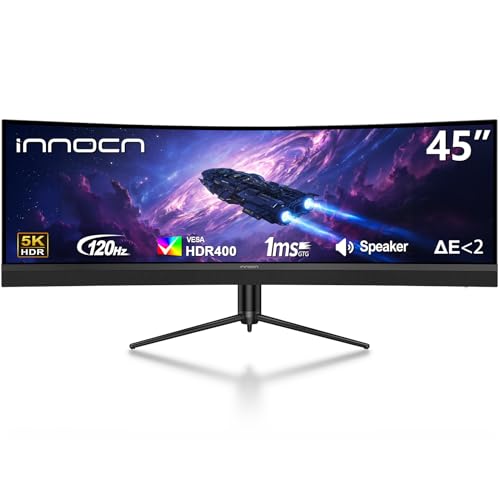
- 45-inch 32:9 display with 5120 x 1440 resolution
- USB-C with 65W power delivery for MacBook use
- 1500R curve, HDR 400, and PIP/PBP support
Best For: Large MacBook workstations needing one-cable convenience
Best Budget Gaming Option

- 34-inch 3440 x 1440 ultrawide with up to 165Hz
- 1ms MPRT, 99% sRGB, and FreeSync support
- HDMI and DisplayPort inputs, but no USB-C PD
Best For: Budget buyers who do not need MacBook charging
Wide-Screen Power Desk Upgrade
Deco Gear 49-Inch Dual QHD Ultrawide

- 49-inch 5120 x 1440 dual-QHD workspace
- USB-C with up to 65W power delivery
- KVM, PIP/PBP, and 120Hz support
Best For: Power users who want a huge one-screen workstation with MacBook charging
Balanced USB-C Workhorse
LG 34U650A-B 34-Inch UltraWide IPS

- USB-C delivers up to 96W charging
- 34-inch IPS ultrawide with 3440 x 1440 resolution
- 100Hz refresh with built-in speakers and stand adjustment
Best For: MacBook users who want the strongest charging and a refined everyday ultrawide
Best with Extra Features
Philips 34E1C5600HE 34" UltraWide USB-C Docking Monitor

- 65W USB-C Power Delivery for one-cable use
- Built-in webcam, mic, and speakers
- 34" 3440 x 1440 ultrawide with 100Hz refresh
Best For: MacBook users who want docking and meeting features in one monitor
Value Choice
LG 34WR55QK-B 34-Inch UltraWide USB-C Monitor

- Up to 65W USB-C power delivery
- 34" 3440 x 1440 curved ultrawide display
- OnScreen Control with picture-by-picture support
Best For: Work-focused MacBook users who want a simple USB-C ultrawide
Performance Pick
LG 34U640B-B 34-Inch 144Hz UltraWide USB-C Monitor

- 65W USB-C charging with display and data
- 144Hz panel with FreeSync Premium
- KVM-style Dual Controller and screen-splitting tools
Best For: MacBook users who want speed and workflow flexibility
Editor’s Pick – INNOCN 45" 5K2K Curved Ultrawide
If you want an ultrawide monitor with power delivery for MacBook use that also doubles as a serious desktop display, the INNOCN 45C1R stands out with its huge 45-inch 32:9 panel and 5120 x 1440 resolution. It gives you a ton of horizontal workspace, plus USB-C connectivity with up to 90W power delivery in the product title and a rich port selection for laptops, Macs, and peripherals.
Best For: MacBook users who want a massive one-screen multitasking setup for work, gaming, and mixed media.
Pros:
- 45-inch 32:9 ultrawide with 5120 x 1440 resolution for expansive multitasking
- USB-C connectivity with power delivery, plus HDMI, DP, USB-A, USB-B, and RJ45
- 1500R curve, height adjustment, and PIP/PBP for comfortable long sessions
- HDR 400 support, 99% sRGB, and Adaptive-Sync for smoother visuals
Cons:
- Very large footprint, so it needs plenty of desk space
- VA panel and 400 nits brightness may not suit every color-critical workflow
- Gaming-oriented feature set may be more than some office users need
This is a strong pick if your priority is screen real estate and a clean single-cable MacBook desk setup. The tradeoff is simply size: it is built for users who can accommodate a huge curved ultrawide.
Best 34-Inch Value – Philips 346E2CUAE USB-C Ultrawide
The Philips 346E2CUAE is a practical ultrawide monitor with power delivery for MacBook setups if you want a simpler 34-inch class display. Its 3440 x 1440 resolution, USB-C one-cable connection, and built-in USB 3.2 hub make it a straightforward choice for workstations that need clean cable management and decent everyday performance.
Best For: MacBook owners who want a balanced ultrawide for office work, browsing, and light gaming.
Pros:
- USB-C with power delivery lets you charge and connect with one cable
- 3440 x 1440 ultrawide resolution provides a useful productivity boost
- 100Hz refresh rate with Adaptive-Sync supports smooth daily use
- Height adjustment, built-in speakers, and USB hub add desk convenience
Cons:
- 34-inch screen is less immersive than the larger 45-inch ultrawides
- 300 nits brightness is modest compared with higher-end displays
- Glossy screen finish may not be ideal in bright rooms
This Philips model is a sensible middle-ground pick for MacBook users who want USB-C power delivery without moving into an oversized monitor. It covers the essentials well and keeps the setup tidy.
Best for Modern Mac Desks – INNOCN 45E3R 45" USB-C Ultrawide
If you are looking for an ultrawide monitor with power delivery for MacBook work and want a massive, modern display, the INNOCN 45E3R is built for that job. It pairs a 45-inch 32:9 panel and 5120 x 1440 resolution with USB-C connectivity and 65W power delivery, so it can support a cleaner laptop-first desk while still offering plenty of room for multitasking.
Best For: MacBook users who want a huge curved ultrawide with a cleaner single-cable desk setup.
Pros:
- 45-inch 32:9 screen with 5120 x 1440 resolution for expansive workspace
- USB-C with 65W power delivery supports MacBook connectivity and charging
- 1500R curve, height adjustment, and PIP/PBP improve comfort and flexibility
- HDR 400, 99% sRGB, and Adaptive-Sync add useful image features
Cons:
- 65W power delivery is lower than the 90W version in the lineup
- Large 45-inch size will not fit every desk
- VA panel brightness is listed at 250 nits, which is not especially high
For MacBook users who care most about workspace and USB-C convenience, this is a compelling large-format option. It keeps the same productivity-friendly ultrawide shape while using a simpler, more focused port set.
Best Budget Gaming Option – Sceptre 34" Curved Ultrawide
The Sceptre C345B-QUT168 is a more budget-minded ultrawide monitor, but it is not the right pick if you specifically need an ultrawide monitor with power delivery for MacBook. Instead, it focuses on value, speed, and a familiar 34-inch 3440 x 1440 curved format with up to 165Hz refresh, making it better suited to users who do not need USB-C charging from the display.
Best For: Buyers who want an affordable curved ultrawide for gaming and productivity without USB-C power delivery.
Pros:
- 34-inch 3440 x 1440 ultrawide panel delivers a productive workspace
- Up to 165Hz refresh rate and 1ms MPRT support fast-paced gameplay
- 99% sRGB and FreeSync add solid image and motion features
- Two HDMI and two DisplayPort connections provide flexible input options
Cons:
- No USB-C port or power delivery for MacBook charging
- Built-in speakers are basic compared with dedicated audio setups
- Not as feature-rich for laptop docking as the USB-C models in this roundup
This Sceptre model is included as a value alternative, but MacBook users who want single-cable charging should look elsewhere. It makes more sense as a low-cost ultrawide for gaming and general desktop use.
Immersive 34-Inch Productivity Pick – Samsung Viewfinity S65UA 34-Inch Ultrawide
If you want an ultrawide monitor with power delivery for MacBook use, the Samsung Viewfinity S65UA is built around a clean single-cable desk setup. Its 34-inch 21:9 curved panel gives you room for multitasking, while the USB-C connection delivers up to 90W charging alongside data, helping reduce cable clutter for everyday work, creative projects, and video calls.
Best For: MacBook users who want a balanced 34-inch ultrawide for work, media, and a tidy USB-C setup.
Pros:
- USB-C with 90W charging supports a streamlined MacBook connection.
- 34-inch 3440 x 1440 ultrawide panel is well suited to multitasking.
- 1000R curve, Eye Care features, and 100Hz refresh aim for comfortable long sessions.
- HDR10 and 1 billion colors add flexibility for mixed work and media use.
Cons:
- 90W charging may be less than some MacBook users want for fastest possible power delivery.
- It is a 34-inch ultrawide, so it offers less total workspace than 49-inch dual-QHD models.
This is a practical pick if you want a curved ultrawide that keeps a MacBook connected with one cable and still leaves plenty of room for apps, documents, and editing windows.
Wide-Screen Power Desk Upgrade – Deco Gear 49-Inch Dual QHD Ultrawide
For buyers searching for an ultrawide monitor with power delivery for MacBook, the Deco Gear 49-inch display goes big with a 32:9 Dual QHD workspace and USB-C charging up to 65W. That makes it a strong fit if you want to run a compatible laptop from one cable while gaining a huge continuous canvas for spreadsheets, creative work, and split-screen productivity.
Best For: Users who want maximum workspace and built-in KVM convenience for a MacBook desk setup.
Pros:
- 49-inch 5120 x 1440 panel replaces a dual-monitor style layout.
- USB-C provides video plus up to 65W power delivery for laptop use.
- Built-in KVM, PIP, and PBP help manage multiple devices and sources.
- 120Hz refresh, Adaptive Sync, and 1ms MPRT add smoother motion.
Cons:
- 65W power delivery is useful, but not as strong as higher-wattage USB-C options.
- The 49-inch footprint needs substantial desk space and a comfortable viewing distance.
This model makes the most sense if you want a true ultrawide command center and value convenience features like KVM and split-view modes alongside USB-C charging.
Balanced USB-C Workhorse – LG 34U650A-B 34-Inch UltraWide IPS
The LG 34U650A-B is a well-rounded ultrawide monitor with power delivery for MacBook owners who want a cleaner, more capable desk. Its USB-C port handles display, data, and up to 96W laptop charging, while the 34-inch 3440 x 1440 IPS panel gives you a comfortable amount of space for multitasking, calls, and everyday content work.
Best For: MacBook users who want the strongest USB-C charging here plus a polished all-around ultrawide.
Pros:
- USB-C with up to 96W power delivery is the highest-wattage option in this group.
- 34-inch 21:9 IPS screen offers wide viewing angles and consistent color.
- 100Hz refresh rate and 5ms response help keep motion smooth.
- Built-in speakers, tilt/height/swivel adjustability, and the Switch app add convenience.
Cons:
- It is still a 34-inch ultrawide, so it does not match the raw width of 49-inch models.
- Contrast is listed at 1000:1, which may be less dramatic than VA alternatives.
If you want a MacBook-friendly ultrawide with especially strong USB-C charging and a feature set aimed at everyday productivity, this LG is an easy recommendation.
Best with Extra Features – Philips 34E1C5600HE 34" UltraWide USB-C Docking Monitor
If you want an ultrawide monitor with power delivery for MacBook use that also handles meetings, the Philips 34E1C5600HE is built around one-cable convenience. Its 3440 x 1440 21:9 panel gives you room for side-by-side apps, while the USB-C dock delivers video, data, and up to 65W charging from a single connection.
Best For: MacBook users who want docking, charging, and built-in video-call tools in one ultrawide display.
Pros:
- USB-C docking provides up to 65W Power Delivery for compatible laptops.
- Built-in 5MP webcam, noise-canceling mic, and speakers reduce desk clutter.
- 3440 x 1440 21:9 screen and 100Hz refresh support productive multitasking.
- Height adjustment and VESA mounting help with ergonomic setup.
Cons:
- Windows Hello facial login is aimed at Windows devices, not MacBook.
- Glossy finish may not suit every lighting setup.
- It is a VA panel, so buyers seeking IPS-style viewing characteristics may want to compare.
Overall, this is a practical pick if you want a MacBook docking monitor that can also replace a separate webcam and basic conference gear. It focuses on convenience first, with strong productivity features and enough charging power for many everyday laptops.
Value Choice – LG 34WR55QK-B 34-Inch UltraWide USB-C Monitor
The LG 34WR55QK-B is a straightforward ultrawide monitor with power delivery for MacBook setups that need a clean desk and dependable everyday features. Its 3440 x 1440 curved screen, USB-C connection with up to 65W charging, and easy on-screen controls make it a sensible fit for work-first users.
Best For: Buyers who want a practical ultrawide USB-C monitor for office work, light content use, and easy laptop charging.
Pros:
- USB-C connection supports up to 65W power delivery.
- 34" 21:9 WQHD panel provides plenty of space for multitasking.
- OnScreen Control and PbP support help organize multiple inputs.
- Tilt and height adjustment make it easier to set up comfortably.
Cons:
- 5ms response time and 100Hz refresh are solid, but not aimed at high-end gaming.
- No built-in webcam or microphone for video calls.
- Warranty is listed as 1 year, shorter than some alternatives.
This model keeps the focus on simple productivity rather than extras. If you mainly want a clean MacBook dock with ultrawide workspace and charging over one cable, it covers the essentials well.
Performance Pick – LG 34U640B-B 34-Inch 144Hz UltraWide USB-C Monitor
For buyers looking for an ultrawide monitor with power delivery for MacBook use and extra headroom for motion, the LG 34U640B-B stands out with a 144Hz refresh rate and USB-C charging up to 65W. Its 34-inch 3440 x 1440 curved panel is designed for multitasking, while HDR10, FreeSync Premium, and the Switch app add flexibility for work and play.
Best For: MacBook users who want a faster ultrawide display with USB-C charging and KVM-style convenience.
Pros:
- USB-C provides display, data, and up to 65W charging in one cable.
- 144Hz refresh and FreeSync Premium support smoother motion.
- Dual Controller KVM lets you share one keyboard and mouse across two PCs.
- Switch app supports screen splitting into up to 6 sections for multitasking.
Cons:
- It is still a 34-inch ultrawide, so desk width matters.
- Mac users may not use the dual-PC KVM features as often as Windows-only setups.
- Like most ultrawides, it prioritizes workspace over portability.
This is the best fit if you want a MacBook docking monitor that goes beyond the basics. The combination of higher refresh, strong connectivity, and workflow tools makes it especially appealing for users who split time between productivity and casual gaming.
How We Picked the Best Ultrawide Monitor with Power Delivery for MacBook
We prioritized monitors that make MacBook use easier, not just bigger. That means reliable USB-C connectivity, enough power delivery to keep a MacBook charged during work, and screen formats that suit split-screen productivity. We also looked for strong panel quality, practical stand adjustments, and features like hubs, built-in speakers, or KVM/PBP support where relevant.
Quick Comparison
For most MacBook owners, 34-inch 3440 x 1440 displays offer the best mix of sharpness, scaling, and desk fit. If you need maximum workspace, 45-inch 5K2K or 49-inch dual-QHD models create a massive canvas, but they take more room and often require more tuning for macOS. If you want the simplest setup, choose a monitor with USB-C video, at least 65W power delivery, and a height-adjustable stand.
Key Buying Factors for an Ultrawide Monitor with Power Delivery for MacBook
Power Delivery Wattage
Look for at least 65W USB-C power delivery for MacBook Air and many 13-inch MacBook Pro models. If you use a larger MacBook Pro, 90W is often the safer choice for faster charging and sustained use.
Resolution and Scaling
macOS tends to look best on 3440 x 1440 or 5120 x 1440 panels when you choose the right scaling. Higher resolutions give more workspace, but text can become too small if the monitor is very large or you sit close.
Panel Size and Curvature
34-inch ultrawides are the easiest recommendation for most people. Bigger 45-inch and 49-inch screens are excellent for multitasking, spreadsheets, and timeline work, but they can feel overwhelming on smaller desks.
USB-C Features
A true USB-C docking experience is more than charging. Check for video over USB-C, a built-in USB hub, and enough ports to reduce cable clutter. Some models also include webcam and KVM-style features for mixed-device setups.
Who Should Buy Which Ultrawide Monitor with Power Delivery for MacBook?
If you mainly work in documents, browsing, and creative apps, a 34-inch QHD ultrawide with USB-C and 65W to 90W power delivery is the most balanced pick. If you want one screen for both work and play, choose a high-refresh ultrawide with USB-C, especially if you also use Windows or a gaming PC. For power users who live in spreadsheets, video timelines, or multiple full-size windows, the larger 45-inch and 49-inch options are worth the desk space.
In short, the best Ultrawide Monitor with Power Delivery for MacBook is the one that matches your workspace, charging needs, and how much screen real estate you actually use every day.