If you use an iMac with external drives, a good UPS can help prevent data loss, drive corruption, and sudden shutdowns during outages.
This roundup focuses on practical battery backup options that match real desktop setups, from compact systems to higher-demand workstations.
Best 10 UPS for IMac and External Drives Picks for 2026
Office-Ready Power

- 1500VA/900W capacity for larger setups
- 5 battery-backed outlets plus 5 surge-only
- LCD and AVR add practical monitoring and voltage support
Best For: Users with an iMac, external drives, and a bigger home office setup
Clean Power Choice
APC BR1000MS Pure Sine Wave UPS
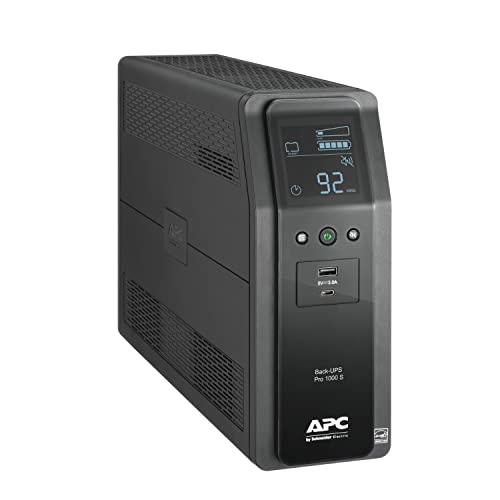
- Pure sine wave output for sensitive electronics
- 1000VA/600W with 6 battery-backup outlets
- LCD status plus USB-A and USB-C charging
Best For: iMac users who want cleaner power for drives and home office gear
High-Capacity Performer

- 1500VA/1000W pure sine wave design
- 12 outlets with 6 battery backup and 6 surge-only
- Color LCD and AVR for detailed power monitoring
Best For: Larger iMac setups with multiple external drives and accessories
Compact Backup

- Compact design for small desks
- 600VA/330W with 5 battery and 2 surge outlets
- USB charging and replaceable battery add convenience
Best For: Smaller iMac setups with one external drive and basic networking gear
Compact Eco UPS
CyberPower EC850LCD Ecologic UPS

- 12 outlets with 6 battery-backup ports
- ECO outlets help cut power use when idle
- 850VA/510W for smaller Mac setups
Best For: iMac users needing simple backup and energy-saving peripheral control
Premium Pure Sine UPS

- Pure sine wave output for sensitive gear
- 900W capacity with AVR voltage correction
- 10 outlets plus data-line surge protection
Best For: Larger iMac setups with external drives and sensitive electronics
Long-Life Lithium UPS

- LiFePO4 battery rated for 10+ years
- Pure sine wave power for computers and drives
- Eight outlets with LCD status display
Best For: Users who want a low-maintenance UPS for a Mac workstation
Home Office Backup
Vertiv Liebert PowerUPS 100 1100VA

- 1100VA/670W standby UPS
- 8 outlets plus USB-A/USB-C charging
- User-replaceable batteries and 3-year warranty
Best For: iMac setups needing simple backup power and extra charging
Long-Life Power
- LiFePO4 battery with 10+ year lifespan
- Pure sine wave output for sensitive gear
- 8 outlets and LCD status display
Best For: iMac users who want long-life lithium backup for multiple devices
Compact Lithium Backup
Vertiv Liebert PowerUPS 100 350VA

- Lithium-ion battery lasts longer than lead-acid
- 4 outlets for smaller desktop setups
- 5-year warranty and Energy Star certification
Best For: Minimal iMac and drive setups needing compact backup power
Office-Ready Power – APC BX1500M 1500VA UPS
If you need a UPS for iMac and external drives that can support a fuller desk setup, the APC BX1500M is built for exactly that kind of job. With 1500VA/900W capacity, AVR, and 10 outlets, it’s a practical fit for keeping an iMac, external storage, and networking gear powered through outages and brownouts.
Best For: iMac users with multiple external drives, NAS boxes, and a larger home office setup that needs extended backup capacity.
Pros:
- 1500VA/900W output gives you more headroom for an iMac plus external drives and accessories.
- Five battery-backed outlets help keep the most important devices running during outages.
- AVR corrects low voltage and surges without draining the battery.
- LCD shows battery charge, load, runtime, and power conditions at a glance.
Cons:
- It’s a larger tower unit, so it takes more desk or floor space.
- Lead-acid battery design means replacement is part of long-term ownership.
- Runtime is meant for short-term backup, not extended off-grid use.
For a Mac-focused workstation with external drives and other peripherals, this APC gives you strong capacity and useful monitoring in one package. It’s a solid choice when you want a little more breathing room than a compact UPS can provide.
Clean Power Choice – APC BR1000MS Pure Sine Wave UPS
For a UPS for iMac and external drives, pure sine wave output is a strong advantage, and the APC BR1000MS is designed with that in mind. It combines 1000VA/600W capacity with AVR, six battery-backed outlets, and real-time LCD status so you can protect sensitive gear without overcomplicating the setup.
Best For: iMac owners who want cleaner power for connected drives, routers, and other sensitive electronics.
Pros:
- Pure sine wave output is well suited to sensitive electronics and power supplies.
- Six battery-backup outlets can cover an iMac, external drive, and key network gear.
- LCD shows remaining runtime, watts, and system status clearly.
- USB-A and USB-C charging ports add convenient device charging.
Cons:
- 600W capacity is lower than the larger 1500VA models.
- Runtime at higher loads will be shorter than the headline 42-minute figure.
- It’s still a tower UPS, so it needs a bit of floor or shelf space.
If you want cleaner power delivery for an iMac setup with external storage, this APC model is an easy fit. It balances protection, output quality, and everyday convenience well for a home office.
High-Capacity Performer – CyberPower CP1500PFCLCD UPS
If you’re shopping for a UPS for iMac and external drives and want lots of capacity, the CyberPower CP1500PFCLCD is a strong contender. Its 1500VA/1000W pure sine wave design, AVR, and 12 outlets make it a flexible option for a more demanding desktop setup with multiple peripherals.
Best For: Users who want a high-capacity UPS for an iMac, external drives, and several connected accessories.
Pros:
- 1500VA/1000W output provides substantial room for a busy workstation.
- Pure sine wave support is suitable for active PFC and conventional power supplies.
- Six battery-backup outlets and six surge-only outlets help organize a larger setup.
- Color LCD gives detailed battery and power information, and the screen tilts for easier viewing.
Cons:
- It’s a heavier mini tower at 24.9 pounds.
- More features can mean more complexity than a basic backup unit.
- Some users may not need this much output for a simple iMac and one drive.
For users who want extra capacity and more outlets, this CyberPower model offers a very well-rounded package. It is especially appealing when an iMac shares power with multiple drives, chargers, or network devices.
Compact Backup – APC BE600M1 600VA UPS
If your main goal is a simple UPS for iMac and external drives without a big footprint, the APC BE600M1 keeps things compact. It offers 600VA/330W of battery backup, surge protection, and a small design that fits well on a desk or in a tight home office.
Best For: Light-duty iMac setups with a single external drive, modem, router, or other small office electronics.
Pros:
- Compact footprint makes it easy to place in smaller workspaces.
- Five battery-backed outlets plus two surge-only outlets cover a basic setup well.
- Built-in USB charging is handy during outages.
- Replaceable battery helps extend the unit’s usable life.
Cons:
- 330W capacity is much lower than the larger 1000W and 1500VA units.
- Best suited to lighter loads, not a heavily expanded desk.
- Runtime is intended for short backup and safe shutdown, not long use.
This APC is the most space-saving option in the group and makes sense when you only need modest backup power. For a smaller iMac setup with one or two essential peripherals, it covers the basics cleanly.
Compact Eco UPS – CyberPower EC850LCD Ecologic UPS
If you’re looking for a UPS for iMac and external drives, the CyberPower EC850LCD is a practical compact option for smaller desktop setups. Its simulated sine wave output, 850VA/510W capacity, and 12 outlets make it a useful fit for a computer plus accessories, while the ECO-controlled outlets can reduce power use when your Mac is asleep or off.
Best For: iMac users who want basic battery backup, surge protection, and power-saving outlets for external drive accessories and peripherals.
Pros:
- 12 total outlets, including 6 battery-backup and surge-protected outlets.
- ECO mode can shut off connected peripherals when the computer sleeps or powers down.
- Multifunction LCD shows battery and power-condition details at a glance.
- Includes a 3-year warranty and $100,000 connected equipment guarantee.
Cons:
- Uses simulated sine wave output, not pure sine wave.
- 510W output is best suited to lighter-duty setups.
- Runtime is listed at only 2 minutes, so it is mainly for safe shutdowns.
Overall, this is a budget-friendly UPS choice if your iMac setup is modest and you want extra outlet flexibility for external drives and peripherals. It focuses on straightforward backup and protection rather than long runtime or premium power conditioning.
Premium Pure Sine UPS – APC Back-UPS Pro 1500VA
For a UPS for iMac and external drives, the APC BR1500MS2 stands out if you want more headroom and cleaner output. Its 1500VA/900W pure sine wave design, AVR, and 10 outlets are a strong fit for a fuller desktop setup with an iMac, external drives, and other essential gear.
Best For: iMac owners with larger desktop setups who want pure sine wave backup, voltage correction, and room for multiple peripherals.
Pros:
- Pure sine wave output is designed for sensitive electronics and active PFC power supplies.
- 900W capacity offers substantial headroom for larger setups.
- AVR helps correct brownouts and spikes without using battery power.
- 10 outlets plus coax, Ethernet, and USB-C/A charging add useful flexibility.
Cons:
- It is a larger tower unit at 27.6 pounds.
- Runtime is listed at 4 minutes, so this is still mainly for orderly shutdowns.
- More capability usually means more footprint than compact desktop UPS models.
This is the strongest all-around pick here if your priority is cleaner power and better support for a fuller iMac workstation. It is especially appealing when external drives and other electronics need stable protection, not just basic battery backup.
Long-Life Lithium UPS – GOLDENMATE 1000VA LiFePO4 UPS
If you want a UPS for iMac and external drives with a more modern battery design, the GOLDENMATE 1000VA/600W model is built around a LiFePO4 battery pack rated for over 10 years of lifespan. It also offers pure sine wave output, eight outlets, and an LCD panel, making it a solid fit for everyday Mac protection with lower long-term maintenance.
Best For: Buyers who want a long-life lithium UPS for an iMac setup and connected drives, with minimal battery maintenance over time.
Pros:
- LiFePO4 battery is rated for over 10 years and more than 5000 cycles.
- Pure sine wave output suits computers and connected electronics.
- Eight outlets provide room for a desktop and key accessories.
- LCD panel shows real-time battery and power-condition information.
Cons:
- 600W capacity is lower than the largest UPS options in this roundup.
- Cooling fan can turn on during heavy battery usage and may be noticeable.
- Best results depend on staying within the rated 600W load limit.
This model is a good fit if you value long service life and low maintenance more than maximum wattage. For a streamlined iMac-and-external-drive setup, it offers modern battery tech in a compact package.
Home Office Backup – Vertiv Liebert PowerUPS 100 1100VA
If you’re shopping for a UPS for iMac and external drives, this Vertiv Liebert PowerUPS 100 is a practical standby option with 8 outlets, surge protection, and USB-A/USB-C charging. Its 1100VA/670W rating and user-replaceable batteries make it a straightforward pick for keeping a desktop setup and attached storage online long enough for a safe shutdown.
Best For: iMac users who want a compact backup UPS with extra outlets and built-in charging for everyday office gear.
Pros:
- 8 outlets provide room for an iMac, external drives, and other peripherals.
- USB-A and USB-C charging are included on VRLA models.
- User-replaceable batteries simplify long-term maintenance.
- 3-year full-unit and battery warranty adds peace of mind.
Cons:
- Standby design is less feature-rich than higher-end sine wave units.
- Lead-acid battery technology typically needs more maintenance than lithium options.
This model makes sense when you want dependable battery backup without overcomplicating the setup. It’s a solid fit for keeping an iMac and external drives protected from outages and surges, especially in a home office or small workspace.
Long-Life Power – GOLDENMATE 1000VA Lithium UPS
For a UPS for iMac and external drives, this GOLDENMATE unit stands out because it uses LiFePO4 batteries, pure sine wave output, and eight backed-up outlets. That combination is aimed at desktop systems, workstations, and network gear that benefit from cleaner power and long service life.
Best For: Users who want a longer-lasting lithium UPS for a desktop Mac and storage devices.
Pros:
- LiFePO4 battery pack is rated for over 10 years and 5000+ cycles.
- Pure sine wave output is a strong match for sensitive computer equipment.
- 8 outlets give plenty of room for an iMac and external drives.
- LCD display provides real-time power and battery status.
Cons:
- Cooling fan can ramp up under heavy battery use.
- More advanced than needed if you only want basic outage protection.
This is the most future-focused option in the group if you value durability and lower long-term ownership cost. It’s especially appealing when your iMac setup includes multiple external drives and you want a UPS built for frequent use.
Compact Lithium Backup – Vertiv Liebert PowerUPS 100 350VA
If you need a smaller UPS for iMac and external drives, this Vertiv Liebert PowerUPS 100 lithium model focuses on compact protection, lighter weight, and long battery life. With 4 outlets, surge protection, and Energy Star certification, it suits pared-down desktop setups where runtime needs are modest but reliability still matters.
Best For: Minimal iMac setups that need a compact, low-maintenance lithium UPS.
Pros:
- Lithium-ion battery offers up to 3 times the life expectancy of lead-acid.
- 4 outlets are enough for a small iMac-and-drive setup.
- Designed to handle temperatures up to 104°F.
- 5-year full-unit and battery warranty is a strong long-term benefit.
Cons:
- 210W output is better suited to lighter loads.
- Fewer outlets limit expansion for larger desk setups.
This is a smart pick when your priority is a small footprint and long battery life rather than high capacity. It works best for lean iMac configurations with one or two external drives, not a heavily expanded workstation.
How We Picked the Best UPS for IMac and External Drives
We prioritized models with enough wattage for an iMac plus one or more external drives, stable output for sensitive electronics, and useful runtime for saving work and shutting down safely. We also considered outlet layout, AVR, LCD monitoring, and battery chemistry, since those features make a real difference in day-to-day use.
Quick Comparison: What Matters Most
For most users, the best UPS for IMac and External Drives is not the biggest unit available, but the one that matches your load. A 600W class UPS may suit a basic iMac-and-drive setup, while 900W to 1000W models are better if you add a monitor, hub, NAS, or multiple external drives. Pure sine wave output is especially useful for modern power supplies and for reducing compatibility concerns.
Key Buying Factors for UPS for IMac and External Drives
Wattage and Runtime
Check the watt rating first, not just VA. Your combined iMac, drives, and accessories should stay comfortably below the UPS output limit so you get enough runtime to save files and shut down properly.
Output Type
Pure sine wave UPS models are usually the safer choice for Apple desktops and storage gear. They are especially worthwhile if you want maximum compatibility with external drives, higher-end power supplies, or always-on accessories.
Outlets and Battery Backup Split
Make sure the unit has enough battery-backed outlets for the iMac and the drives you want protected. Some outlets may offer surge-only protection, so verify the layout before buying.
Battery Technology and Maintenance
Traditional sealed lead-acid UPS units are common and cost-effective, while lithium UPS models can offer longer service life and lighter weight. If you want lower maintenance over time, lithium is worth considering.
Monitoring and Convenience Features
LCD screens, USB management, and automatic voltage regulation can make the UPS easier to monitor and more effective during unstable power. These extras are helpful, but capacity and output quality still matter most.
Who Should Buy Which UPS for IMac and External Drives?
If you only need backup for an iMac plus one external drive, a smaller UPS may be enough. If you run multiple drives, a large display, or a desk full of peripherals, step up to a higher-watt pure sine wave model. If long lifespan and reduced battery replacement are priorities, lithium units are a smart fit. For the most balanced choice in UPS for IMac and External Drives, match the UPS to your actual power draw and leave some headroom for safety.