Choosing the right enclosure can make an old drive feel new again. The best USB C hard drive enclosures turn spare SATA or NVMe storage into fast, portable external storage for backups, transfers, and everyday use.
Below, we focus on practical options for different drive sizes, connection speeds, and use cases so you can match the enclosure to your hardware and workflow.
Best 10 USB C Hard Drive Enclosures Picks for 2026
Everyday 2.5-Inch Pick
UGREEN 2.5" SATA SSD/HDD USB-C Enclosure

- 6Gbps SATA support with UASP
- Tool-free install; no driver needed
- Aluminum case for better cooling
Best For: Portable 2.5-inch SATA SSD/HDD use
Dual-Bay Cloning Dock
SABRENT USB-C Dual-Bay Docking Station

- Offline 1-to-1 cloning without a PC
- Two SATA drives mount simultaneously
- Supports 2.5-inch and 3.5-inch drives
Best For: Drive cloning and dual-drive access
High-Capacity Desktop Choice
ACASIS 3.5/2.5 SATA Aluminum Enclosure

- Supports 2.5-inch and 3.5-inch SATA drives
- 6Gbps with UASP and strong heat dissipation
- Includes power switch and smart sleep
Best For: Powered desktop storage and large SATA drives
Fast NVMe Option
SABRENT USB-C NVMe M.2 10Gbps Enclosure

- Built for M.2 PCIe NVMe SSDs
- Tool-free flip-open installation
- 10Gbps USB 3.2 Gen 2 performance
Best For: Portable high-speed NVMe storage
Powered Desktop SATA Dock
SABRENT USB 3.0 to SATA Hard Drive Docking Station

- Supports bare 2.5-inch and 3.5-inch SATA drives
- Includes 12V power for stable desktop use
- USB Type-A host cable; USB-C adapter not included
Best For: Users who want a simple powered dock for bare SATA drives
Fast USB-C SATA Enclosure
Cable Matters Aluminum 10Gbps USB C Hard Drive Enclosure

- USB-C enclosure for 2.5-inch SATA SSDs and HDDs
- Aluminum shell helps with protection and heat dissipation
- Supports UASP, TRIM, and S.M.A.R.T. on compatible systems
Best For: Portable USB-C users needing a 2.5-inch SATA enclosure
Dual-Connector Budget Pick
BENFEI Tool-Free USB-C/USB-A 2.5" SATA Enclosure

- Works with both USB-C and USB-A ports
- Tool-free, plug-and-play setup with hot-swapping
- Supports 2.5-inch SATA SSDs and HDDs up to 9.5mm
Best For: Users who want a simple enclosure with both USB-C and USB-A support
High-Capacity Docking Pick
ORICO 2.5/3.5" USB C SATA Dock
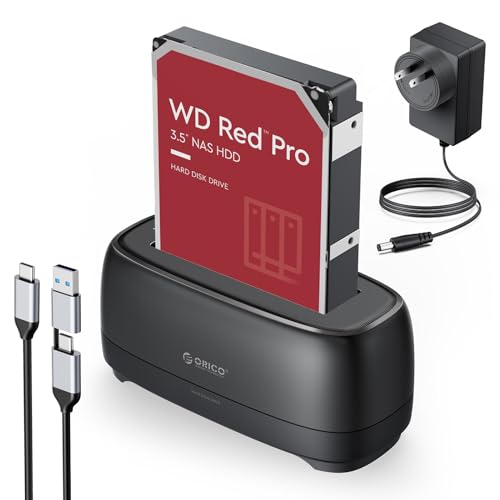
- Supports 2.5" and 3.5" SATA drives
- USB-C and USB-A cable included
- UASP/Trim with auto sleep and LED indicator
Best For: Mixed-drive users who want a simple, high-capacity SATA dock
Metal Cooling Choice

- Supports 3.5" SATA drives up to 24TB
- Aluminum housing with removable stand
- USB-A/USB-C cable plus UASP support
Best For: Desktop users who want a cooled 3.5-inch SATA dock
Compact Tool-Free Option
BENFEI 2.5" SATA USB Enclosure

- Tool-free 2.5" SATA enclosure
- USB-C/USB-A cable included
- JMS580 chipset with UASP support
Best For: Portable 2.5-inch SSD or HDD users who want fast, simple setup
Everyday 2.5-Inch Pick – UGREEN 2.5" SATA SSD/HDD USB-C Enclosure
If you want a straightforward option among usb c hard drive enclosures, this UGREEN model is built for 2.5-inch SATA SSDs and HDDs with plug-and-play simplicity. It focuses on fast everyday transfers, tool-free installation, and broad compatibility for common laptops, desktops, and even some game consoles.
Best For: Users who need a simple, portable enclosure for a 2.5-inch SATA SSD or HDD.
Pros:
- Supports up to 6Gbps SATA performance with UASP acceleration
- Tool-free, driver-free installation with no extra power supply needed
- Aluminum shell helps with heat dissipation and portability
- Works with Windows, macOS, Linux, and several consoles/devices
Cons:
- Limited to 2.5-inch SATA drives only
- Maximum capacity is listed up to 6TB
- Not designed for NVMe or 3.5-inch drives
For a basic external drive setup, this is a practical pick that keeps installation easy and performance solid for SATA storage. It’s best when you need a reliable enclosure rather than a specialized docking or cloning station.
Dual-Bay Cloning Dock – SABRENT USB-C Dual-Bay Docking Station
Among usb c hard drive enclosures, this SABRENT dock stands out because it is more than a simple enclosure: it can clone one SATA drive to another without a computer. It also lets both drives mount separately over USB, making it useful for file transfers, drive testing, and everyday disk access.
Best For: People who need a dual-bay SATA dock with offline cloning.
Pros:
- Offline cloning works without connecting to a PC
- Supports two drives at once as separate mounted volumes
- Fits 2.5-inch and 3.5-inch SATA HDDs and SSDs
- Includes USB-C cable and power adapter
Cons:
- Does not support IDE/PATA or M.2/NVMe drives
- Offline cloning speed tops out at 60MBps by design
- Requires a larger desktop-style footprint than a single-bay enclosure
This is a strong choice if your priority is drive management rather than portability. The dual-bay layout and cloning feature make it especially handy for backups, drive swaps, and maintenance tasks.
High-Capacity Desktop Choice – ACASIS 3.5/2.5 SATA Aluminum Enclosure
If you need usb c hard drive enclosures for larger desktop drives, this ACASIS model is built to handle 2.5-inch and 3.5-inch SATA SSDs and HDDs with a focus on cooling and capacity. Its external power, aluminum shell, and open-frame tray are aimed at longer sessions where heat management matters.
Best For: Users who want a powered enclosure for 3.5-inch or 2.5-inch SATA drives.
Pros:
- Supports up to 6Gbps transfer speed with UASP
- Aluminum construction and open-frame tray help dissipate heat
- Includes an independent power switch and 10-minute smart sleep
- Comes with a 12V/2A adapter and USB-C to USB-C/A cable
Cons:
- Requires external power, so it is less portable
- Bulky desktop form factor compared with 2.5-inch enclosures
- Best suited to SATA drives rather than newer NVMe drives
This is the better fit when storage capacity and stable desktop use matter more than travel convenience. It is a sensible enclosure for backups, media libraries, and long-running drive installs.
Fast NVMe Option – SABRENT USB-C NVMe M.2 10Gbps Enclosure
For buyers comparing usb c hard drive enclosures, this SABRENT model is the clear NVMe-focused option. It is designed specifically for M.2 PCIe NVMe SSDs and uses a tool-free flip-open design with aluminum cooling to support fast portable storage and sustained transfers.
Best For: Anyone who needs a compact enclosure for an M.2 NVMe SSD.
Pros:
- Supports NVMe SSDs in 2230, 2242, 2260, and 2280 sizes
- Tool-free flip-open design makes installation quick
- USB 3.2 Gen 2 connection supports up to 10Gbps
- Aluminum top and thermal pad help with heat transfer
Cons:
- Not compatible with M.2 SATA SSDs
- Only supports one drive at a time
- Best results depend on using an NVMe SSD, not SATA storage
This enclosure makes sense if your drive is already NVMe and you want a fast, portable USB-C solution. It is compact, easy to use, and tuned for speed rather than broad drive compatibility.
Powered Desktop SATA Dock – SABRENT USB 3.0 to SATA Hard Drive Docking Station
If you need one of the simplest usb c hard drive enclosures for bare SATA drives, this Sabrent dock is built for quick swaps rather than portable use. It supports 2.5-inch and 3.5-inch SATA I/II/III drives, includes external power for larger drives, and works well when you want an easy lay-flat station for backups or drive testing.
Best For: People who need a powered desktop dock for bare SATA HDDs and SSDs, not a portable USB-C enclosure.
Pros:
- Tool-free lay-flat dock for fast drive insertion and swapping
- Supports 2.5-inch and 3.5-inch SATA drives, plus SSDs
- Includes a 12V/2A power adapter for stable 3.5-inch drive use
- Plug-and-play on Windows 10/11, macOS, and Linux
Cons:
- Uses a USB Type-A host cable, so USB-C-only computers need an adapter
- Does not support M.2 NVMe, M.2 SATA, IDE/PATA, or SAS drives
- Not for drives already inside another USB enclosure
For a desktop setup, this is a practical option if your main goal is fast access to bare SATA drives. Just be sure your computer has the right USB port and that you are not trying to use it with M.2 or non-SATA media.
Fast USB-C SATA Enclosure – Cable Matters Aluminum 10Gbps USB C Hard Drive Enclosure
Among usb c hard drive enclosures for 2.5-inch SATA drives, this Cable Matters model stands out for its 10Gbps-rated USB-C connection and aluminum build. It is made for SATA SSDs or HDDs up to 9.5mm thick, and the enclosure is designed to help with heat dissipation while keeping the drive protected.
Best For: USB-C and Thunderbolt 3 users who want a fast aluminum enclosure for a 2.5-inch SATA SSD or HDD.
Pros:
- USB-C enclosure with up to 10Gbps transfer support
- Aluminum housing helps protect the drive and manage heat
- Supports UASP, TRIM, and S.M.A.R.T. with compatible systems
- Compatible with Windows and Mac computers, including Thunderbolt 3 setups
Cons:
- Only fits 2.5-inch SATA drives, not 3.5-inch models
- Maximum drive height is 9.5mm, so thicker drives will not fit
- Performance depends on compatible computer, drive, and OS support
This is a strong pick if you want a compact USB-C enclosure for a SATA SSD and care about convenience as much as speed. It is especially sensible for MacBook and Thunderbolt 3 users who want a portable external drive without opening the laptop.
Dual-Connector Budget Pick – BENFEI Tool-Free USB-C/USB-A 2.5" SATA Enclosure
If you want usb c hard drive enclosures with flexible host compatibility, this BENFEI model is an easy, tool-free way to connect a 2.5-inch SATA drive. It supports both USB Type-C and Type-A connections, works with SATA I/II/III drives, and is aimed at everyday file transfer or turning a spare SSD or HDD into an external drive.
Best For: Anyone who wants a simple, budget-friendly 2.5-inch SATA enclosure that works with both USB-C and USB-A ports.
Pros:
- Dual USB Type-C/Type-A plug design for broader compatibility
- Tool-free, plug-and-play installation with hot-swappable support
- Supports UASP and up to 5Gbps transfer rates
- Works with Windows, Linux, and macOS 8.0 or above
Cons:
- Limited to 2.5-inch SATA drives only
- Designed for 7mm and 9.5mm drives, so larger formats are not supported
- Speed is capped at 5Gbps, which is lower than 10Gbps alternatives
This enclosure makes sense if you want straightforward compatibility rather than premium materials or top-end speed. Its dual-connector design is the main advantage, especially if you switch between newer USB-C laptops and older USB-A systems.
High-Capacity Docking Pick – ORICO 2.5/3.5" USB C SATA Dock
If you want usb c hard drive enclosures for mixed-drive use, this ORICO dock is aimed at users who need a simple way to access 2.5-inch or 3.5-inch SATA drives. It supports UASP and Trim, includes both USB-C and USB-A connectivity in one cable, and is built for up to 22TB capacity with tool-free installation.
Best For: Users who want a versatile dock for 2.5-inch and 3.5-inch SATA drives, larger-capacity storage, and easy plug-and-play access across multiple devices.
Pros:
- Supports 2.5-inch and 3.5-inch SSD/HDD SATA drives
- Includes 2-in-1 USB-C and USB-A cable for broader compatibility
- Supports UASP and Trim, with stated 5Gbps transfer speed
- Tool-free design with LED indicator and auto sleep after 10 minutes
Cons:
- Bulkier dock design than a compact enclosure
- Only supports one drive at a time
- ABS build is practical, but not as premium as metal-only options
This is a practical choice if you want a straightforward dock rather than a compact enclosure, especially for larger drives and mixed-system use. The added cable flexibility and broad device compatibility make it easy to work with in a home or office setup.
Metal Cooling Choice – RSHTECH 3.5" USB C SATA Dock
Among usb c hard drive enclosures, this RSHTECH model stands out for users who want a 3.5-inch SATA dock with metal housing and easy everyday handling. It supports up to 24TB, includes a 2-in-1 USB-A/USB-C cable, and adds UASP support plus a power button for safer drive management.
Best For: Users who want a 3.5-inch SATA enclosure with better heat dissipation, a detachable dual-connector cable, and simple power control.
Pros:
- Supports 3.5-inch SATA drives up to 24TB
- Aluminum housing with bottom vents for heat dissipation
- 2-in-1 detachable USB-A/USB-C cable adds flexibility
- UASP support, LED status lights, and electronic power button
Cons:
- Designed around 3.5-inch drives, so it is less compact
- Only supports one drive at a time
- Best suited to SATA drives rather than broader storage formats
If you are focused on a desktop-style enclosure for a large SATA hard drive, this RSHTECH unit gives you the cooling and convenience features most buyers look for. The metal body and power controls make it feel more robust for regular use.
Compact Tool-Free Option – BENFEI 2.5" SATA USB Enclosure
If you need usb c hard drive enclosures for a 2.5-inch SATA SSD or HDD, this BENFEI enclosure focuses on portability and quick installation. It uses a tool-free design, includes a USB Type-C/Type-A cable, and supports UASP with a JMS580 chipset for faster, more stable transfers.
Best For: People who want a compact 2.5-inch SATA enclosure for SSDs or laptop drives, with easy setup and broad OS support.
Pros:
- Tool-free, plug-and-play installation
- Supports 2.5-inch SATA I/II/III drives up to 6TB
- USB-C/USB-A cable included for flexible connections
- UASP support with JMS580 chipset and hot-swappable design
Cons:
- Limited to 2.5-inch drives only
- Not suited for 3.5-inch HDDs
- Storage ceiling is lower than larger dock-style options
This is the most straightforward pick if your goal is a portable 2.5-inch SATA enclosure rather than a full-size dock. It keeps the setup simple while still offering the speed and compatibility features many buyers want.
How We Picked the Best USB C Hard Drive Enclosures
We focused on enclosure type, drive compatibility, transfer speed, build quality, cooling, and ease of installation. For USB C Hard Drive Enclosures, the most useful choices are the ones that match the drive you already own and the speed your workflow actually needs.
We also looked for features that matter in daily use, such as tool-free design, UASP support, aluminum shells for heat management, and clear support for 2.5-inch, 3.5-inch, SATA, or NVMe drives.
Quick Comparison
Portable 2.5-inch enclosures are best for lightweight SSDs and laptop drives. 3.5-inch docks are better for larger desktop HDDs and higher-capacity backups. NVMe enclosures are the speed choice for modern M.2 PCIe SSDs, while dual-bay models suit cloning, drive duplication, and workflow testing.
Key Buying Factors for USB C Hard Drive Enclosures
Drive Type and Form Factor
Start with compatibility. A 2.5-inch SATA enclosure will not fit a 3.5-inch hard drive, and a SATA enclosure will not work with an NVMe SSD. Make sure the enclosure supports the exact drive size and interface you own.
Speed and Port Support
Look for 6Gbps SATA support for most SATA drives and 10Gbps support if you want better headroom with SSDs. USB-C is the connector, but the actual performance depends on the enclosure controller, cable quality, and the device you plug into.
Cooling and Materials
Aluminum enclosures help dissipate heat better than plastic, especially during long file transfers or backup jobs. If you expect sustained use, cooling matters more than marketing claims.
Ease of Use
Tool-free trays, clear status lights, and simple plug-and-play setup make a big difference if you swap drives often. For frequent cloning or disk testing, dock-style models can be more convenient than slim portable cases.
Who Should Buy Which USB C Hard Drive Enclosures?
If you want a travel-friendly option for a spare SSD or laptop drive, choose a compact 2.5-inch enclosure. If you are backing up media libraries, old desktop drives, or large archives, a 3.5-inch dock is the better fit. If speed is your priority and you use an M.2 PCIe SSD, go with an NVMe enclosure. And if you need to copy drives or manage multiple disks, a dual-bay docking station is the most practical choice.
For most buyers, the best enclosure is the one that matches both the drive format and the job you need it to do. That simple check prevents compatibility mistakes and ensures you get the performance you paid for.