If you need to clone, verify, or sanitize flash drives at scale, the right USB duplicator can save hours and reduce errors. From compact desktop units to higher-capacity systems, the best options balance speed, ease of use, and dependable throughput.
Below, we focus on practical choices for offices, IT teams, schools, and media workflows that need fast, repeatable copying without a PC.
Best 10 USB Duplicators Picks for 2026
Compact standalone duplicator
Compact 1-to-2 USB Cloning and Erasing

- Standalone 1-to-2 USB duplication
- Quick erase plus 3-pass overwrite options
- LCD menu with compare and error scanning
Best For: IT pros and technicians needing a small duplicator/eraser
High-capacity standalone duplicator
High-Capacity 1-to-15 USB Duplicator

- Copies one source to up to 15 targets
- Standalone operation with no software required
- Up to 2GB per minute transfer rate
Best For: Teams that need to clone many USB drives at once
Portable USB flash drive copier
Portable 1-to-2 USB Flash Drive Cloner

- Copies one USB flash drive to two targets
- Quick Copy and Whole Media Copy modes
- Includes capacity checks, speed tests, and erase tools
Best For: Schools, IT teams, and field technicians
Mid-size standalone duplicator
Desktop 1-to-7 USB Duplicator for Flash Drives

- Copies one source to up to seven targets
- Standalone bit-by-bit duplication
- Supports synchronous and asynchronous modes
Best For: Users who need a mid-size desktop duplicator
Compact 4-Bay Portable Cloner
EZ Dupe Mini USB Plus MK II 1 to 4

- Copies up to 4 drives at once
- Standalone plug-and-use operation
- Updated version claims faster copy speed
Best For: Small-batch USB drive duplication in a portable setup
15-Bay USB Sanitizer Duplicator
StarTech Standalone Cloner Eraser 1:15

- Copies or erases up to 15 drives
- LCD menu with Copy & Compare verification
- Multiple erase modes for sanitizing drives
Best For: IT teams needing large-batch cloning and drive wiping
Mid-Sized 7-Bay Flash Copier
EZ Dupe Mini USB Plus MK III 1 to 7

- Copies up to 7 drives at once
- Standalone plug-and-use design
- Supports USB 1.0/2.0/3.0 flash media
Best For: Users needing more capacity than a 4-bay copier
Standalone 1-to-5 USB Duplicator & Eraser

- Duplicates or erases up to 5 USB drives at once
- LCD menu with copy, compare, scan, and erase tools
- Standalone operation with no computer required
Best For: Technicians and IT pros needing a small-batch USB cloning and wipe tool
Touchscreen 1-to-10 USB Duplicator

- Touchscreen controls for copy, compare, format, and erase
- Duplicates up to 10 USB flash drives at once
- Built for daily operation with a heavy-duty design
Best For: Frequent users who want a simple, high-capacity flash drive duplicator
Compact 1-to-9 USB Duplicator
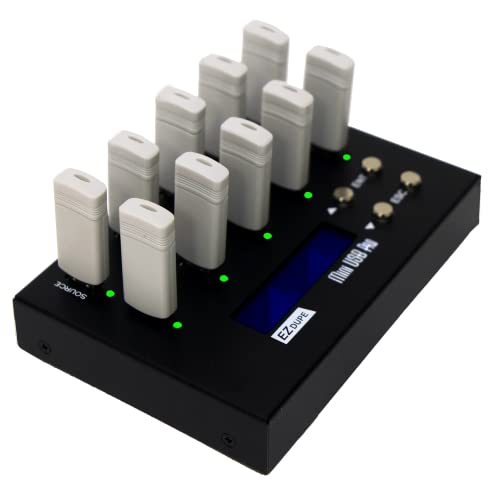
- Copies up to 9 USB drives simultaneously
- Quick copy, sector copy, and two erase modes
- Compact standalone design with indication lights
Best For: Small teams needing a space-saving duplicator with sanitizing features
Compact standalone duplicator – Compact 1-to-2 USB Cloning and Erasing
If you need a practical USB duplicators option for small batches, this StarTech unit is built for standalone cloning and drive sanitizing without a computer. It supports both duplication and erase workflows, includes an LCD menu, and adds verification tools for checking cloned drives and scanning for errors.
Best For: IT pros and technicians who need a compact 1-to-2 USB duplicator for cloning, wiping, and verification.
Pros:
- Standalone 1-to-2 duplication and erasing with no computer required
- Supports quick erase plus single-pass and 3-pass overwrite options
- LCD menu with compare, drive info, and bad-sector scanning
- Asynchronous copy mode helps start the next job as soon as a drive is swapped
Cons:
- Asynchronous mode requires source content under 64 MB
- Only duplicates up to two drives at a time
- Best suited to USB flash media and compatible external USB storage
For teams that value compact size and sanitizing features as much as basic cloning, this model covers the core jobs well. Its strongest appeal is the combination of standalone operation, erase modes, and simple LCD-based control.
High-capacity standalone duplicator – High-Capacity 1-to-15 USB Duplicator
For higher-volume USB duplicators use, this Systor model is aimed at copying one source drive to as many as 15 targets without needing a computer or software. It runs as a standalone system, supports synchronous and asynchronous copy modes, and is rated for speeds up to 2GB per minute.
Best For: Businesses and IT teams that need to duplicate many USB drives at once.
Pros:
- Copies from 1 to 15 USB drives in a single standalone system
- Up to 2GB per minute transfer rate
- Supports both synchronous and asynchronous copy modes
- Backed by 1-year parts, 3-year labor, and lifetime technical support
Cons:
- Bulkier desktop form factor than smaller 1-to-2 units
- Designed around USB 2.0 interfaces
- More capacity than many small offices need
This is a straightforward pick when volume matters more than portability. If you routinely need to prepare many identical flash drives, the 1-to-15 layout and standalone workflow make the job easier to manage.
Portable USB flash drive copier – Portable 1-to-2 USB Flash Drive Cloner
This BestDuplicator model is a good fit if you want a simple, portable USB duplicators solution for copying flash drives without a computer. It offers quick copy for data-only jobs, whole-media copy for bit-for-bit cloning, and built-in checks and erase tools for basic flash drive maintenance.
Best For: Schools, IT departments, and field users who need a lightweight 1-to-2 flash drive duplicator.
Pros:
- Duplicates one USB flash drive to two targets at the same time
- Quick Copy and Whole Media Copy modes for different cloning needs
- Includes capacity check, device info, speed tests, and erase functions
- Compact standalone design with LCD and port status LEDs
Cons:
- Best performance depends on source and target media of similar capacity
- Limited to USB 1.1 and USB 2.0 flash drives
- Card duplication requires a compatible USB card reader sold separately
For portable deployments, this unit balances ease of use with enough verification tools for everyday work. It is especially useful when you need a no-software copier that can also help validate flash media before use.
Mid-size standalone duplicator – Desktop 1-to-7 USB Duplicator for Flash Drives
If you need a mid-size option in the USB duplicators category, this Systor system sits between small 1-to-2 units and larger production rigs. It is a standalone desktop duplicator that copies from one source to up to seven USB drives, supports synchronous and asynchronous modes, and is built for bit-by-bit duplication.
Best For: Businesses and personal users who need a desktop duplicator for up to seven USB flash drives.
Pros:
- Copies one source drive to as many as seven targets
- Standalone operation with no computer or software required
- Supports synchronous and asynchronous copy modes
- Rated up to 2GB per minute transfer speed
Cons:
- Desktop form factor is less portable than smaller units
- Designed around USB flash drives, with external hard drive support only as optional
- Uses a USB 1.1 interface specification in the supplied details
This model makes sense when you need more than a compact cloner but do not need the full capacity of a 15-bay system. It keeps the same standalone approach while offering a practical middle ground for repeated duplication jobs.
Compact 4-Bay Portable Cloner – EZ Dupe Mini USB Plus MK II 1 to 4
If you want usb duplicators that stay simple and portable, this EZ Dupe Mini USB Plus MK II is built for fast, standalone copying of up to four USB flash drives at once. It supports USB 1.0/2.0/3.0 flash media and can also work with USB external storage devices that have their own power source, making it a practical choice for small batches without a computer.
Best For: Small teams or users who need a compact standalone duplicator for up to 4 USB drives.
Pros:
- Copies up to 4 USB flash drives simultaneously
- Standalone plug-and-use operation, no computer required
- Updated version with claimed 25% faster copy speed
- Supports USB 1.0, 2.0, and 3.0 flash drives
Cons:
- External USB storage needs its own power source
- Best results still depend on the source and drive write speeds
This is a solid pick if you need a compact copier for recurring small-batch duplication. Its main strengths are portability, asynchronous copying, and broad flash-drive support.
15-Bay USB Sanitizer Duplicator – StarTech Standalone Cloner Eraser 1:15
Among usb duplicators, this StarTech standalone unit stands out for handling both cloning and erasing in one workflow. It supports up to 15 USB flash drives, offers LCD menu control, and includes multiple erase modes, which makes it a practical tool for IT teams that need to duplicate, sanitize, or verify drives without using a computer.
Best For: IT pros and technicians who need a high-capacity duplicator plus erase functions.
Pros:
- Supports 1-to-15 duplication for larger batches
- Includes cloning, erasing, and sanitizer modes
- LCD menu helps monitor drive info and performance
- Copy & Compare option for verification
Cons:
- Source content must be under 128 MB for asynchronous copy mode
- Larger and heavier than compact mini duplicators
This model is best when drive management matters as much as copying speed. The combination of erase modes, verification, and 15-bay capacity makes it especially useful for professional workflows.
Mid-Sized 7-Bay Flash Copier – EZ Dupe Mini USB Plus MK III 1 to 7
If you need usb duplicators with more output than a 4-bay unit, this EZ Dupe Mini USB Plus MK III steps up to seven simultaneous copies in a compact standalone design. It supports USB 1.0/2.0/3.0 flash drives and USB external storage with its own power source, and it keeps the same no-computer, plug-and-use workflow for straightforward batch jobs.
Best For: Users who want a compact standalone copier that can handle up to 7 USB drives at once.
Pros:
- Copies up to 7 USB flash drives simultaneously
- Standalone operation with no computer needed
- Claimed 25% faster copy speed than the original version
- Supports USB 1.0, 2.0, and 3.0 flash media
Cons:
- External USB storage needs its own power source
- Performance still depends on drive read and write speeds
This is a practical middle-ground option if 4 bays are not enough but you still want a small footprint. It balances capacity, portability, and simple operation for recurring copy tasks.
Standalone 1-to-5 USB Duplicator & Eraser – StarTech 1:5 LCD Duplicator
If you need usb duplicators for small-batch work, this StarTech model is built for technicians and IT pros who want a standalone way to clone, erase, and verify USB flash drives without connecting to a computer. It supports both quick duplication and deeper erase options, so it can handle everyday media prep as well as sanitizing drives for reuse.
Best For: IT teams, technicians, and anyone needing a 1-to-5 standalone duplicator with erase functions.
Pros:
- Copies or erases up to 5 USB drives at once with no computer required
- Supports system/file copy, sector-by-sector copy, and multiple erase modes
- LCD menu, drive scans, and copy-and-compare verification add control
- Asynchronous mode helps keep duplication moving with minimal downtime
Cons:
- Asynchronous copy mode is limited by the 64 MB internal memory buffer
- External USB devices may need their own power source
This is a practical choice if you want a compact standalone duplicator with both cloning and sanitizing tools. The 1.5 GB/min rate and verification features make it better suited to managed workflows than casual one-off copying.
Touchscreen 1-to-10 USB Duplicator – EZ Dupe SOHO Touch
Among usb duplicators, the EZ Dupe SOHO Touch stands out if you want a straightforward touchscreen interface and the ability to handle larger batches. It supports copy, compare, format, and erase functions, while the lightweight yet heavy-duty build is aimed at daily operation.
Best For: Users who want a 1-to-10 touchscreen duplicator for frequent, everyday flash drive copying.
Pros:
- Touchscreen menu makes copy, compare, format, and erase easier to manage
- Copies up to 10 USB flash drives at once
- Rated for high-speed duplication at 35 MB per second
- Supports all file formats, file sizes, and drive capacities on USB flash media
Cons:
- Designed around USB flash media rather than a broader storage workflow
- Details don’t list advanced verification or sanitization standards beyond its erase tools
If your priority is easier operation and a higher drive count, this model is a strong fit. It balances speed, simple controls, and a durable build for regular duplication tasks.
Compact 1-to-9 USB Duplicator – EZ Dupe MiniUSB Pro
If you want usb duplicators in a compact standalone format, the EZ Dupe MiniUSB Pro gives you room for up to nine simultaneous copies without a complicated setup. It supports quick copy for essential files, whole-media sector-by-sector duplication, and two erase functions, so it covers both copying and data sanitizing in one unit.
Best For: Users who need a compact 1-to-9 duplicator with cloning and erase options.
Pros:
- Copies up to 9 USB flash drives at the same time
- Offers quick copy and whole media copy modes
- Includes two erase functions for sanitizer-style use
- Supports USB flash media, USB devices, and external USB powered hard drives up to 2TB
Cons:
- External hard drives must have their own power source
- No touchscreen or LCD interface is listed in the supplied specs
This model makes sense when you need a smaller footprint but still want a solid multi-drive copier. Its mix of copy modes and erase features gives it flexibility for routine media prep and cleanup.
How We Picked the Best USB Duplicators
For USB Duplicators, the most important factors are standalone operation, supported drive count, copy speed, erase/sanitize features, and media compatibility. We also favored models with clear LCD or touchscreen controls, since those reduce setup time and operator mistakes.
Because users often need repeatable workflows, we looked for units that can handle both simple duplication and administrative tasks like compare, erase, and sanitize. Capacity matters too: a 1:2 or 1:4 unit is better for small teams, while 1:10 and above makes more sense for production environments.
Quick Comparison
Think of these products in three groups. Smaller desktop units are best for occasional copying, training kits, or field use. Mid-range options fit IT departments, retail packaging, and in-house distribution. High-port models are better for bulk deployment, where throughput and consistency matter more than portability.
If your workflow includes mixed media, choose a model that supports USB 2.0, 3.0, and 3.1 devices. If secure disposal matters, prioritize duplicators with eraser or sanitizer functions rather than copy-only hardware.
Key Buying Factors for USB Duplicators
Port Count and Scale
Match the port count to your output volume. More targets per run usually improves efficiency, but larger units take more desk space and may cost more.
Speed and Workflow
Advertised copy speed is helpful, but real-world speed also depends on the slowest drive in the batch. For repetitive jobs, a straightforward interface can matter as much as raw performance.
Compatibility
Check whether the unit supports flash drives only or also USB hard drives and mixed-capacity media. If you handle newer thumb drives, broader USB 3.x support is a major advantage.
Erase and Sanitizing Options
Many USB Duplicators double as erasers. That is especially useful for IT asset refreshes, compliance routines, and secure redistribution.
Who Should Buy Which USB Duplicators?
Buy a compact 1:2 or 1:4 model if you need occasional copies, small test batches, or portable use. Choose a 1:7 to 1:10 system if you support a department, classroom, or moderate production workflow. Go with a 1:15 unit if you regularly clone large quantities and need maximum throughput from a single workstation.
If your priority is simple duplication, a basic standalone unit is enough. If you need cleaning, repurposing, or compliance-friendly data removal, look for a model with built-in erase and sanitize features.