A good USB extension cable can make a desk, entertainment center, gaming setup, or home office far easier to organize. The right choice depends on more than length: USB version, transfer speed, build quality, and your device’s power needs all matter.
We selected 10 USB extension cables covering common USB-A setups, from compact multi-packs and affordable USB 2.0 cords to longer USB 3.0 options designed for faster peripherals and data transfer.
Best 10 USB Extension Cables Picks for 2026
Durability Pick
AINOPE 6.6-Foot USB 3.0 Extension 2-Pack
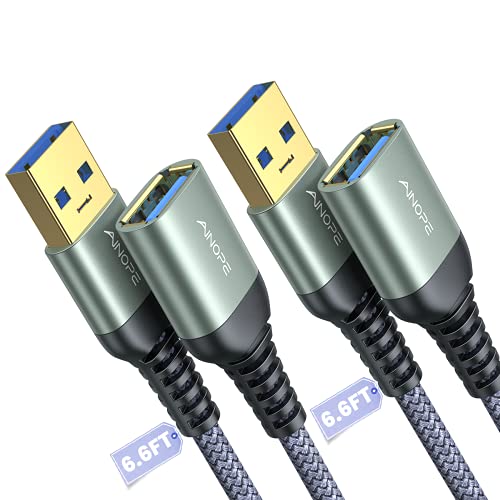
- Two 6.6-foot USB 3.0 cables
- Up to 5 Gbps transfer and 2A charging
- Braided design with reinforced joints
Best For: Durable multi-cable setups and everyday peripherals
Long-Reach Pick
Cable Matters 10-Foot USB 3.0 Extension

- Extra-long 10-foot cable
- Up to 5 Gbps transfer speed
- Shielded, gold-plated, and backward compatible
Best For: Long-distance computer, VR, and peripheral connections
Flexible Everyday Pick
6-Foot USB 3.0 Extension 2-Pack

- Two 6-foot male-to-female cables
- 5 Gbps transfer and 2A charging
- Braided, reinforced, and plug-and-play
Best For: Home, office, gaming, and media peripherals
Budget USB 2.0 Pick
Amazon Basics 6.5-Foot USB 2.0 Extension

- 6.5-foot USB-A extension
- 480 Mbps USB 2.0 transfer speed
- Gold-plated connectors and shielding
Best For: Basic printers, cameras, keyboards, and mice
Long-Reach Performance Pick
10-Foot USB 3.0 Extension Cable

- 10-foot reach for desks, TVs, and gaming setups
- Up to 5Gbps data transfer with backward compatibility
- Braided, reinforced design tested for over 10,000 bends
Best For: Longer high-speed connections for home offices and entertainment setups
Multi-Pack Value Pick
Five 5-Foot USB Extension Cables

- Includes five male-to-female USB A cables
- 5-foot length suits everyday desk and travel use
- USB 2.0 support for charging and transfers up to 480Mbps
Best For: Keeping spare extension cables available at home, work, or while traveling
Maximum Reach Pick
20-Foot USB 3.0 Extension Cable

- 20-foot reach for distant peripherals and room-to-room setups
- Up to 5Gbps USB 3.0 data transfer
- Braided, reinforced construction with a stated 36-month warranty
Best For: Long-distance direct connections to cameras, printers, storage, and controllers
Reliable Long-Reach Pick
Amazon Basics 9.8-Foot USB 2.0 Extension Cable

- 9.8-foot male-to-female USB-A reach
- Up to 480Mbps USB 2.0 transfers
- Gold-plated connectors with shielding
Best For: Extending common USB peripherals over a long distance
High-Speed Multi-Pack
JSAUX 10-Foot USB 3.0 Extension Cables

- Two 10-foot male-to-female cables
- Up to 5Gbps USB 3.0 transfers
- Nylon braided design with 18-month warranty
Best For: Long-distance, higher-speed connections for multiple peripherals
Budget Cable Bundle
3-Pack 6-Foot USB 2.0 Extension Cables
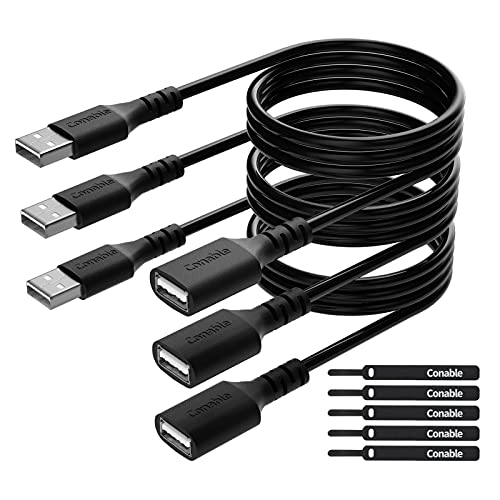
- Three 6-foot USB-A extension cables
- Up to 480Mbps with charging support
- Includes five cable ties for organization
Best For: Multiple everyday USB connections around a home or office
Durability Pick – AINOPE 6.6-Foot USB 3.0 Extension 2-Pack
For shoppers comparing usb extension cables, this two-pack from AINOPE combines USB 3.0 performance with a braided exterior, reinforced joints, and a 6.6-foot length. It supports up to 5 Gbps data transfer and works with USB 3.0, USB 2.0, and USB 1.1 devices.
Best For: Users who want two durable indoor or outdoor USB-A extension cables for peripherals such as hubs, printers, drives, keyboards, and mice.
Pros:
- Two 6.6-foot male-to-female cables provide useful reach.
- Supports USB 3.0 data transfer speeds up to 5 Gbps and up to 2A charging.
- Nylon braiding, an aluminum-alloy connector, reinforced joints, and included sticky buckles improve organization and durability.
Cons:
- Uses USB Type-A connectors rather than newer USB-C connectors.
- Its 6.6-foot length may be less suitable than a 10-foot cable for especially distant setups.
Choose this AINOPE set when durability, cable organization, and having a spare matter as much as USB 3.0 speed.
Long-Reach Pick – Cable Matters 10-Foot USB 3.0 Extension
This Cable Matters model is a strong option among usb extension cables when you need extra reach. Its 10-foot USB-A male-to-female design supports USB 3.0 transfer rates up to 5 Gbps while remaining backward compatible with USB 2.0 and USB 1.x devices.
Best For: Extending connections to VR headsets, hard drives, hubs, printers, keyboards, mice, and other USB peripherals across a larger desk or room setup.
Pros:
- 10-foot length offers more reach than the shorter options in this roundup.
- Supports up to 5 Gbps USB 3.0 data transfer and backward compatibility with older USB devices.
- Gold-plated connectors, bare copper conductors, shielding, molded strain relief, and grip treads support reliable everyday use.
Cons:
- Only one cable is included.
- Uses USB-A connectors and a PVC outer material rather than a braided exterior.
For long-distance connections, this is the most suitable choice here, especially if you need to position a VR headset or peripheral well away from the computer.
Flexible Everyday Pick – 6-Foot USB 3.0 Extension 2-Pack
This two-pack offers a practical middle ground for shoppers seeking usb extension cables for home, office, or gaming use. Each 6-foot USB-A cable supports up to 5 Gbps data transfer, up to 2A charging, and compatibility with USB 3.0, USB 2.0, and USB 1.1 devices.
Best For: Everyday setups involving gamepads, webcams, consoles, printers, drives, microphones, VR headsets, keyboards, and mice.
Pros:
- Two 6-foot cables provide flexible placement and a spare.
- Supports fast data transfer up to 5 Gbps and charging up to 2A.
- Braided shielding, aluminum-alloy connectors, reinforced joints, and plug-and-play operation add convenience.
Cons:
- Uses USB Type-A connectors, so it is not a direct USB-C extension.
- The notes specify reinforcement beyond 10,000 bending tests, which is less than the stated rating of some competing reinforced cables.
This pack is a versatile choice when you want two reasonably long cables for mixed computer, gaming, and media-device use without installing drivers.
Budget USB 2.0 Pick – Amazon Basics 6.5-Foot USB 2.0 Extension
Amazon Basics USB-A 2.0 Extension Cable, Male to Female, 480Mbps Transfer Speed, 6.5 Foot, Black
Check Price On AmazonFor basic connections, this Amazon Basics cable is a straightforward choice among usb extension cables. It provides a 6.5-foot USB-A male-to-female extension with transfer speeds up to 480 Mbps, making it suited to everyday peripherals rather than high-speed USB 3.0 storage or VR applications.
Best For: Extending connections to printers, cameras, mice, keyboards, and other compatible USB computer peripherals.
Pros:
- 6.5-foot length adds useful reach for desk setups.
- Gold-plated connectors and shielding are designed to support signal clarity and reduce interference.
- Simple male-to-female design is easy to connect, with frustration-free packaging.
Cons:
- USB 2.0 transfer speed is limited to 480 Mbps.
- Only one cable is included.
- It may not be the right choice for USB 3.0-speed storage or other high-bandwidth devices.
Pick this cable when affordability and basic peripheral extension are more important than maximum transfer speed or a braided construction.
Long-Reach Performance Pick – 10-Foot USB 3.0 Extension Cable
For shoppers comparing USB extension cables, this 10-foot USB 3.0 model is a practical choice when you need extra reach without giving up faster data transfers. It supports speeds up to 5Gbps and works with USB 2.0, 1.1, and 1.0 devices.
Best For: Extending keyboards, mice, printers, cameras, storage devices, and gaming peripherals across a desk or room.
Pros:
- 10-foot length helps position devices comfortably and reduces the need to reach behind desks or TVs.
- USB 3.0 data transfer speeds up to 5Gbps, with backward compatibility for older USB standards.
- Nylon-braided construction, reinforced joints, aluminum alloy housing, and over 10,000 bend tests support durability.
- Male-to-female design helps reduce wear from repeatedly plugging devices directly into a computer or other host.
Cons:
- It is an indoor/outdoor-rated cable, but the supplied information does not specify weatherproofing.
- As a 10-foot cable, it may be more length than needed for compact desktop setups.
This is a well-rounded USB extension cable for users who want a substantial reach, high-speed USB 3.0 performance, and a braided exterior for regular everyday use.
Multi-Pack Value Pick – Five 5-Foot USB Extension Cables
If you need several USB extension cables for different rooms, devices, or travel bags, this five-pack offers a convenient way to stock up. Each male-to-female USB 2.0 cable measures 5 feet and supports data transfer and charging up to 480Mbps.
Best For: Households, offices, and travelers who want multiple cables for keyboards, mice, printers, flash drives, controllers, and hard drives.
Pros:
- Five cables in one package provide useful spares or allow several devices to be extended at once.
- Five-foot length adds reach without the bulk of an especially long cable.
- Compatible with common USB peripherals including printers, keyboards, mice, flash drives, hard drives, and controllers.
- Male-to-female USB A design supports both charging and data transfer.
Cons:
- USB 2.0 speeds are limited to 480Mbps, so it is not the best fit for the fastest file transfers.
- The PVC construction may offer less flexibility and abrasion resistance than braided alternatives.
This multi-pack is a sensible budget-oriented option when quantity matters more than USB 3.0 speed, especially for basic peripherals and everyday cable replacements.
Maximum Reach Pick – 20-Foot USB 3.0 Extension Cable
Among USB extension cables, this 20-foot USB 3.0 model stands out for situations where a standard desk-length cable is not enough. It offers up to 5Gbps data transfer and is designed for connecting peripherals positioned farther from a computer, although the manufacturer recommends using a motherboard rear USB port rather than a hub.
Best For: Extending connections to distant printers, webcams, security cameras, storage devices, adapters, and gaming controllers.
Pros:
- 20-foot length can span rooms or reach devices placed well away from a computer.
- USB 3.0 supports high-speed data transfer up to 5Gbps and is backward compatible with USB 2.0 and 1.1.
- Nylon braiding, reinforced joints, an all-metal shell, aluminum alloy connectors, and gold-plated contacts support durability and signal clarity.
- Includes a stated 36-month warranty and compatibility with a broad range of USB peripherals.
Cons:
- The manufacturer cautions against connecting it through a USB hub because voltage attenuation over the longer cable may prevent some devices from working.
- A 20-foot cable can be excessive for short desktop connections and may require more cable management.
- The supplied details list a maximum current of 2A, which may limit suitability for some higher-power devices.
This is the strongest fit when reach is the priority. Its construction and warranty add reassurance, but the long length makes direct connection to a rear motherboard USB port especially important.
Reliable Long-Reach Pick – Amazon Basics 9.8-Foot USB 2.0 Extension Cable
If you need extra reach for a printer, camera, mouse, keyboard, or another USB peripheral, this Amazon Basics cable is a straightforward choice among USB extension cables. Its 9.8-foot length helps position connected devices more conveniently while supporting USB 2.0 transfer speeds up to 480Mbps.
Best For: Extending indoor USB connections when you need nearly 10 feet of additional reach.
Pros:
- Long 9.8-foot male-to-female design
- Supports transfer speeds up to 480Mbps
- Gold-plated connectors and shielding help minimize interference
Cons:
- USB 2.0 is slower than USB 3.0 alternatives
- Sold as a single cable
This is a practical, no-frills extender for common USB peripherals. Choose it when length and basic USB 2.0 performance matter more than higher-speed transfers or a multi-pack.
High-Speed Multi-Pack – JSAUX 10-Foot USB 3.0 Extension Cables
For setups that need both extra reach and faster transfers, these JSAUX USB extension cables provide two 10-foot USB-A male-to-female cords. They support USB 3.0 speeds up to 5Gbps and work with devices such as webcams, hard drives, printers, game consoles, hubs, mice, and keyboards.
Best For: Extending multiple USB 3.0 peripherals where long reach and faster data transfer are priorities.
Pros:
- Includes two 10-foot extension cables
- Supports data transfers up to 5Gbps
- Nylon-braided exterior, gold-plated connectors, and 18-month warranty
Cons:
- Long cables may be more than needed for compact setups
- USB-A connectors are required on the connected devices
With two long cables and USB 3.0 support, this is the strongest fit for demanding peripheral setups in this group. It is also backward compatible with USB 2.0 and USB 1.1 devices, though those devices will not gain USB 3.0 speeds.
Budget Cable Bundle – 3-Pack 6-Foot USB 2.0 Extension Cables
If you need several USB extension cables for different work areas, this three-pack offers three 6-foot USB 2.0 male-to-female cords. They support up to 480Mbps data transfer, normal charging, and common peripherals including printers, keyboards, mice, flash drives, hard drives, and controllers.
Best For: Home or office users who want multiple mid-length USB extension cables with cable-management ties.
Pros:
- Three 6-foot cables in one package
- Supports up to 480Mbps data transfer and normal charging
- Includes five cable ties and reinforced connectors tested for bending durability
Cons:
- USB 2.0 is not suited to the fastest data transfers
- Six-foot length may not cover very long-distance setups
This bundle is a cost-conscious option when you need multiple USB extension cables rather than one premium long cable. Its included ties are useful for keeping several cords organized.
How We Picked the Best USB Extension Cables
We focused on practical differences that affect everyday use: USB standard, advertised data speed, available lengths, pack size, connector type, construction, and compatibility with common USB-A devices. The selection includes short and long cables, USB 2.0 and USB 3.0 models, single cords and multi-packs, and options suited to keyboards, mice, printers, storage devices, game consoles, webcams, and cameras.
Product claims such as “5Gbps” describe the cable’s rated maximum under suitable conditions. Actual performance can be lower depending on the connected devices, USB port, hub, operating system, and cable length.
Quick Comparison
| Best For | What to Look For |
|---|---|
| Basic peripherals and printers | USB 2.0, affordable length, reliable connectors |
| External storage and faster transfers | USB 3.0 and a 5Gbps rating |
| Long-distance setups | 10- to 20-foot length, careful placement, and realistic speed expectations |
| Multiple devices | Two- or three-pack value, or a five-pack for broad coverage |
| Visible desktop or gaming setups | Braided construction or a finish that matches your equipment |
Key Buying Factors for USB Extension Cables
USB Version and Speed
USB 2.0 cables are generally sufficient for keyboards, mice, printers, and other low-bandwidth accessories. For flash drives, external storage, cameras, and frequent file transfers, choose USB 3.0, commonly advertised with transfer rates up to 5Gbps. Both the source port and connected device must support the faster standard.
Length and Signal Reliability
Choose the shortest cable that comfortably reaches your device. Six- to seven-foot cables work well for most desks, while 10- or 20-foot models help with distant consoles, webcams, or mounted equipment. Greater length can make signal quality and power delivery more sensitive to the setup, so avoid unnecessary slack and test demanding devices after installation.
Power, Compatibility, and Construction
These products use USB-A male-to-female connections, so check the ports on both devices before buying. An extension cable is not a substitute for a powered hub when a device needs more power than the host port can provide. For frequent handling, braided jackets and reinforced connectors may offer better durability; for stationary use, a basic PVC cable can be the better value.
Who Should Buy Which USB Extension Cables?
Choose a USB 2.0 multi-pack if you need inexpensive reach for keyboards, mice, printers, or other everyday accessories. Pick a USB 3.0 cable around six to 10 feet for faster storage, cameras, gaming accessories, and general-purpose data transfer. A 20-foot option makes sense when distance is the main challenge, but it is best for compatible devices and less demanding applications. If you are outfitting several workstations or rooms, a multi-pack provides convenient spares and usually lowers the cost per cable.