The best USB switch boxes for laptops make it easier to share a keyboard, mouse, printer, scanner, webcam, or other USB peripheral between computers without repeatedly unplugging cables.
This roundup compares 10 options across USB-A and USB-C compatibility, transfer speeds, port capacity, switching layouts, and everyday convenience so you can choose the right setup for your desk.
Best 10 USB Switch Boxes for Laptops Picks for 2026
Best High-Speed Pick
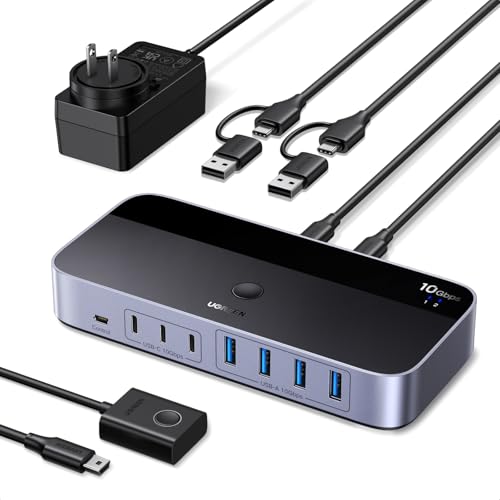
- Two computers share up to seven USB devices
- Up to 10Gbps USB 3.2 Gen 2 transfers
- Includes USB-C-to-A cable and power adapter
Best For: Mixed-port laptop workstations with many peripherals
Best Simple Setup
SABRENT USB 3.0 Sharing Switch
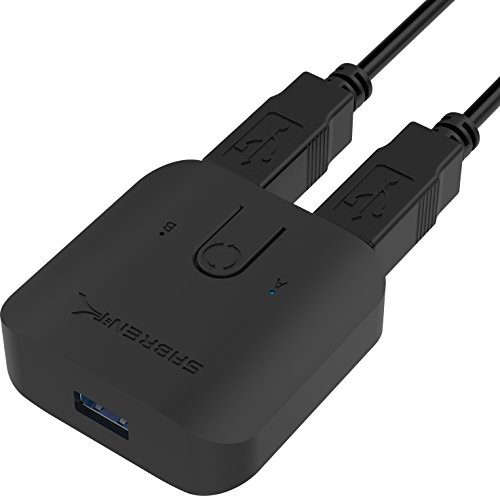
- Plug-and-play with no extra drivers
- Single-button computer switching
- LED indicators and up to 5Gbps transfers
Best For: Simple keyboard and mouse sharing
Best Compact Bi-Directional Option

- Works as 2-in-1-out or 1-in-2-out
- Includes two USB 3.0 cables
- Compact aluminum body with 5Gbps support
Best For: Flexible switching in space-constrained setups
Best Four-Device Value

- Two computers share four USB peripherals
- Up to 5Gbps with USB 2.0 backward compatibility
- Supports Windows, Mac, Linux, and Chrome OS
Best For: Dual-computer desks with multiple USB accessories
Best Budget 4-Port Pick
OLLGEN 4-Port USB 2.0 Sharing Switch

- Shares one USB device among four computers
- Compact design with dedicated switching buttons
- Supports USB 1.1 and USB 2.0
Best For: Basic printer, scanner, camera, or keyboard sharing
Best for Three Computers
THXCDBID USB 3.0 4-Port Switch

- Shares four USB-A ports among three computers
- Offers up to 5Gbps USB 3.0 transfers
- Includes button and IR-remote switching
Best For: Multi-computer desks needing remote peripheral control
Best Bi-Directional Option
DUOPURUI USB 3.0 Bi-Directional Switcher

- Supports two flexible sharing configurations
- Delivers up to 5Gbps USB 3.0 transfers
- Includes LED status indicators and two cables
Best For: Compact two-computer or two-device USB sharing
Best for Four-Computer Workstations

- Four computers share four USB 3.2 ports
- Up to 10Gbps data transfer
- Button and remote-control switching
Best For: Multi-computer desks using mixed USB-C and USB-A peripherals
Best Two-Computer Versatility

- Two computers share four USB devices
- USB-C and USB-A output ports
- 5Gbps, plug-and-play operation
Best For: Work-and-personal computer setups with several USB peripherals
Best Simple Two-Device Setup

- Two computers share two USB devices
- 5Gbps USB 3.0 transfer
- One-button switching with LED status
Best For: Minimal two-computer setups using a keyboard, mouse, or printer
Best High-Speed Pick – UGREEN 10Gbps USB-C/A Switch
For demanding laptop workstations, the UGREEN is one of the most capable USB switch boxes for laptops. It lets two USB-C or USB-A computers share up to seven peripherals, while four USB 3.2 Gen 2 ports support transfers up to 10Gbps.
Best For: Mixed USB-C and USB-A setups that need many shared peripherals and fast data transfers.
Pros:
- Supports two computers and up to seven shared USB devices.
- Offers up to 10Gbps through four USB 3.2 Gen 2 ports.
- Includes a USB-C-to-USB-A cable, power adapter, and external switching control.
Cons:
- Does not provide video output and is not a KVM switch.
- USB ports are primarily intended for data; audio connections are not recommended.
The included power adapter is useful for higher-power peripherals such as external hard drives and printers. Choose this model when port count, cross-platform compatibility, and speed matter more than display switching.
Best Simple Setup – SABRENT USB 3.0 Sharing Switch
The SABRENT USB 3.0 Sharing Switch is a straightforward option for shoppers seeking compact USB switch boxes for laptops. It uses a single button to swap connected USB peripherals between multiple computers and includes LED indicators to show the active system.
Best For: Basic keyboard, mouse, and hub-sharing setups that prioritize simple physical control.
Pros:
- Plug-and-play operation requires no additional drivers.
- One-button switching makes changing computers quick.
- Supports hubs and transfer speeds up to 5Gbps.
- LED indicators help distinguish the selected computer.
Cons:
- The supplied notes identify keyboards and mice as compatible devices, so broader peripheral support is less clearly specified.
- It offers USB 3.0 speeds rather than the 10Gbps performance of newer USB 3.2 switches.
Its small 2.4-inch class footprint and simple controls suit a tidy desk or basic two-computer arrangement. It is a sensible choice when you want uncomplicated peripheral sharing rather than a feature-heavy switching hub.
Best Compact Bi-Directional Option – USB 3.0 Aluminum Switch
This compact model stands out among USB switch boxes for laptops because it works bi-directionally: two computers can share USB devices, or two USB devices can be switched to one computer. It includes two USB 3.0 cables and uses a front button with an LED indicator.
Best For: Small workspaces needing flexible switching between two computers or two USB devices.
Pros:
- Supports both 2-in-1-out and 1-in-2-out configurations.
- Includes two USB 3.0 cables for immediate setup.
- Provides up to 5Gbps transfers and backward compatibility with USB 2.0 and 1.1.
- Compact aluminum housing helps save desk space.
Cons:
- Power comes through USB, so no dedicated power adapter is included.
- Its IP20 rating does not indicate protection from dust or water.
Broad Windows, macOS, and Linux compatibility, plus driver-free operation, makes this a flexible general-purpose switch. Its small aluminum enclosure is especially appealing for laptop bags, compact desks, and meeting-room setups.
Best Four-Device Value – BENFEI 2-in-4-out USB Switch
The BENFEI is a practical choice among USB switch boxes for laptops when two computers need access to several shared accessories. Its four USB 3.0 ports can serve keyboards, mice, storage, printers, scanners, cameras, and other USB devices, with one-button switching and an LED status indicator.
Best For: Home or office users sharing four USB peripherals between a work laptop and a personal computer.
Pros:
- Allows two computers to share four USB devices.
- Supports USB 3.0 transfers up to 5Gbps and USB 2.0 compatibility.
- Works with Windows, macOS, Linux, and Chrome OS without driver installation.
- Includes an extra USB-C power input for higher-power devices.
Cons:
- The extra power adapter is not included.
- Its notes specify using a BENFEI USB-A-to-USB-A cable for operation.
With a generous four-port layout and broad operating-system support, this model fits a typical dual-computer desk well. Consider it when you need more shared ports than a basic switch, while keeping in mind that power-hungry accessories may require a separate adapter.
Best Budget 4-Port Pick – OLLGEN 4-Port USB 2.0 Sharing Switch
If you need straightforward usb switch boxes for laptops or desktop computers, this OLLGEN model lets up to four computers share one USB peripheral. Its compact, button-operated design suits basic printer, scanner, camera, or keyboard switching.
Best For: Budget-conscious users who need to share one USB device among four computers.
Pros:
- Supports four connected computers sharing one USB device.
- Compact, portable enclosure with dedicated front-panel buttons.
- Compatible with USB 1.1 and USB 2.0 devices.
Cons:
- USB 2.0 limits transfer speeds to 480Mbps.
- Does not offer USB 3.0 performance or monitor switching.
- Its listed operating-system support is older than newer alternatives.
This is a simple choice for basic peripheral sharing rather than high-speed storage or display control. Choose it when four-computer compatibility and low-complexity operation matter more than modern transfer speeds.
Best for Three Computers – THXCDBID USB 3.0 4-Port Switch
Among usb switch boxes for laptops, this THXCDBID model stands out for connecting three computers to four shared USB-A peripherals. It combines 5Gbps USB 3.0 data support with physical-button and IR-remote switching.
Best For: Multi-computer workspaces that need remote switching and faster USB peripheral transfers.
Pros:
- Shares four USB-A ports among three computers.
- Supports USB 3.0 transfer speeds up to 5Gbps.
- Includes three input cables, an IR remote, and a Micro USB power cable.
- Works with Windows, Linux, and Mac operating systems.
Cons:
- It is not a KVM and cannot switch monitors.
- High-power USB devices may require separate power.
- The remote requires batteries, which are not included.
The combination of three computer inputs, four shared ports, and remote control makes this the most flexible option here for a busy desk. Be prepared to provide power for demanding peripherals and use a separate display solution.
Best Bi-Directional Option – DUOPURUI USB 3.0 Bi-Directional Switcher
This DUOPURUI unit adds flexibility to the usb switch boxes for laptops category with bi-directional operation. You can have two computers share one USB device, or share two USB devices with one computer, while maintaining USB 3.0 transfer support.
Best For: Users who want a compact switch with flexible two-computer or two-device configurations.
Pros:
- Supports both two-computers-to-one-device and two-devices-to-one-computer setups.
- Provides USB 3.0 speeds up to 5Gbps and supports USB 2.0 and 1.1.
- Works with Windows, Mac OS, and Linux without additional drivers.
- Physical switching and LED indicators show the active connection.
Cons:
- Limited to two connected computers or two shared devices.
- It is not a KVM and does not support monitor or video switching.
- Switching is button-based rather than remote-controlled.
Its reversible design makes it a particularly adaptable pick for compact setups, especially when your sharing needs may change. Select it for USB data and peripherals, not for controlling displays.
Best for Four-Computer Workstations – 10Gbps USB-C/A Switch
For demanding workstations, this USB switch box for laptops lets four computers share three USB-A and one USB-C peripheral connections. Its 10Gbps transfer rate, wired button, and remote control make it practical for switching keyboards, storage devices, printers, scanners, and other USB peripherals without repeatedly reconnecting cables.
Best For: Users who need to share several USB-C and USB-A devices among four computers, including higher-bandwidth storage peripherals.
Pros:
- Supports four computers and four shared USB 3.2 peripherals.
- Offers up to 10Gbps data transfer.
- Provides both button and remote-control switching.
- Includes a USB-C to USB-A adapter and optional Micro-USB power input.
Cons:
- It is not a KVM switch and does not support monitors or video transmission.
- High-power devices may require independent power.
- The remote control requires batteries, which are not included.
This is the most capable option here for a multi-computer desk with mixed USB-C and USB-A accessories. Choose it when four-source switching and faster data transfer matter more than display support.
Best Two-Computer Versatility – UGREEN 4-Port USB Switch
This UGREEN model is a flexible choice among USB switch boxes for laptops, allowing two computers to share four USB peripherals. It combines one USB-C and three USB-A ports with 5Gbps transfer, plug-and-play compatibility, and both button and controller switching.
Best For: People switching a keyboard, mouse, printer, headset, camera, or other USB devices between a work laptop and a personal computer.
Pros:
- Lets two computers share four USB devices.
- Includes one USB-C and three USB-A ports.
- Supports up to 5Gbps transfer and backward compatibility with USB 2.0.
- Works with Windows, macOS, Chrome OS, and Linux without drivers.
Cons:
- It does not support monitors or video transmission.
- Multiple devices may need optional USB-C power to avoid disconnections.
- The USB ports are intended for data transfer rather than charging.
With broad operating-system support and four shared outputs, this is a well-rounded option for a two-computer workspace. Its controller is useful when the switch needs to stay out of reach, but it remains limited to USB data peripherals.
Best Simple Two-Device Setup – UGREEN 2-Port USB Switch
For a straightforward setup, this compact UGREEN switch is one of the simpler USB switch boxes for laptops. It lets two computers share two USB devices, such as a keyboard, mouse, printer, scanner, or webcam, with one-button switching and a status LED.
Best For: Users with a basic two-computer desk who want to share a keyboard and mouse or another pair of USB peripherals.
Pros:
- Supports two computers sharing two USB devices.
- Provides up to 5Gbps USB 3.0 data transfer and USB 2.0 backward compatibility.
- Offers one-button switching with an LED status indicator.
- Includes two 5-foot USB 3.0 A-to-A cables.
Cons:
- It does not support monitors or video transmission.
- It has fewer shared ports than the four-port alternatives.
- The USB output is for data transfer, not video.
This model makes sense when two shared peripherals are enough and you prefer a simple physical control. It avoids unnecessary extra ports while retaining useful 5Gbps transfer and broad plug-and-play compatibility.
How We Picked the Best USB Switch Boxes for Laptops
We focused on the features that matter most in a laptop-centered workspace: computer and device compatibility, USB generation, port count, switching design, included cables, power requirements, and likely use cases. The selection includes compact USB 2.0 models for basic peripherals, faster USB 3.0 and USB 3.2 switchers for storage and modern accessories, and flexible options with USB-A and USB-C ports.
Because a USB switch is not automatically a video KVM, we also considered whether each design is best suited to sharing peripherals only or to complementing a separate monitor setup. A switch box can change which computer controls connected USB devices, but it generally does not switch HDMI or DisplayPort video unless explicitly designed to do so.
Quick Comparison
- Best for high-speed devices: USB 3.2 models rated up to 10Gbps.
- Best for common office peripherals: USB 3.0 four-port switchers.
- Best for simple printer sharing: Two-computer, one-device bidirectional switches.
- Best for several computers: Three- or four-computer selector models.
- Best for basic, low-cost setups: USB 2.0 sharing boxes for keyboards, mice, and printers.
Key Buying Factors for USB Switch Boxes for Laptops
Port and Connector Compatibility
Check both ends of the connection. Some models use USB-A host cables, while newer options support USB-C computers or provide a mix of USB-C and USB-A device ports. If your laptop has only USB-C ports, you may need a compatible cable, dock, or adapter.
Speed and Device Type
USB 2.0 is usually sufficient for keyboards, mice, printers, and scanners. Choose USB 3.0 or USB 3.2 for external drives, webcams, card readers, and other devices that benefit from higher throughput. The actual speed also depends on the laptop, cable, and connected peripheral.
Switching Direction and Capacity
Confirm whether the box lets multiple computers share several peripherals, one computer share a peripheral, or both. Pay attention to the wording: “two in, one out” and “one in, two out” describe different layouts. Also check how many devices can remain connected at once.
Power and Convenience
Bus-powered switches are simple, but several power-hungry devices may work more reliably with external power support. LED indicators, wired or remote buttons, and included host cables can make daily switching faster and reduce desk clutter.
Who Should Buy Which USB Switch Boxes for Laptops?
Choose a compact USB 2.0 unit if you only need to move a keyboard, mouse, or printer between two laptops. For a typical home-office desk with several peripherals, a four-port USB 3.0 switch offers a useful balance of speed and capacity. Users with newer laptops or fast storage should prioritize USB 3.2 and USB-C compatibility.
If three or four computers need access to the same devices, select a multi-host model with clear status indicators. For a printer or scanner shared between two systems, a bidirectional switch may be simpler than a larger hub. Finally, verify that the selected model matches your intended ports and remember that sharing USB peripherals alone will not switch your display signal.