USB switch boxes with remote buttons make it easier to share one keyboard, mouse, printer, scanner, or other USB peripheral between multiple computers without repeatedly unplugging cables.
These 10 options range from basic USB 2.0 selectors to faster USB 3.0 and USB 3.2 models, plus wired desktop controls, infrared remotes, wireless key fobs, and cabled KVM designs.
Best 10 USB Switch Boxes with Remote Button Picks for 2026
Best Flexible USB-C Pick
UGREEN USB-C 4-Port Switch with Remote

- Shares four USB devices between two computers
- USB-C and USB-A ports with up to 5Gbps data
- Supports remote and physical-button switching
Best For: Mixed USB-C/USB-A peripheral setups
Best Remote KVM
IOGEAR 2-Port USB VGA KVM Switch

- Shares VGA display, keyboard, and mouse
- Six-foot wired remote button
- Plug-and-play with no power adapter
Best For: Two-computer legacy VGA workstations
Best Budget USB Peripheral Switch
UGREEN 2-Computer USB 2.0 Switch

- Shares four USB peripherals between two computers
- One-button swapping with active-device LED
- Includes two USB-A-to-A cables
Best For: Basic keyboards, mice, printers, and scanners
Best Wireless Power Control
USB Remote Switch with Key Fob

- 433MHz wireless ON/OFF key-fob control
- Supports compatible 5V–12V USB-powered devices
- Plug-and-play setup with blue LED indicator
Best For: USB-powered lights, fans, and low-voltage devices
Best Multi-Computer USB Sharing

- Shares four USB devices among four computers
- Includes wired desktop controller and status LEDs
- Plug-and-play support for major operating systems
Best For: Four-computer office and classroom setups
Best Wireless USB Power Control
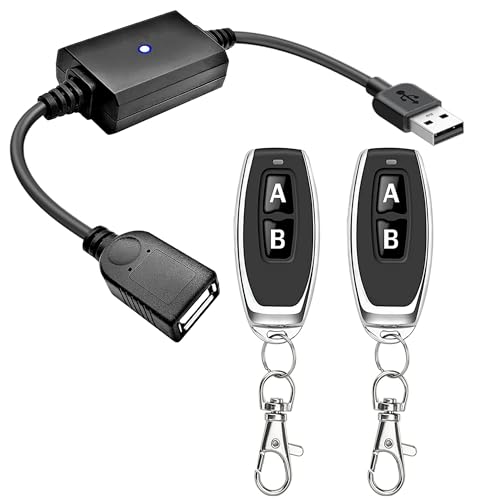
- Controls compatible 5V USB devices wirelessly
- Includes two transmitters and one receiver
- Rated for up to a stated 3A maximum load
Best For: Remote control of USB lights, fans, and routers
Best High-Speed Remote USB Sharing

- Shares four USB-A ports among three computers
- Supports data transfer speeds up to 5Gbps
- Switches by device button or included IR remote
Best For: Three-computer setups needing faster peripheral sharing
Best USB-C Upgrade
BENFEI 2-Computer USB 3.0 Switch

- Shares 3 USB 3.0 and 1 USB-C device
- Supports up to 5Gbps transfers
- Remote or front-button switching
Best For: Mixed USB-A and USB-C setups across two computers
Best Simple Remote Control
2-Computer 4-Port USB 3.0 Switch
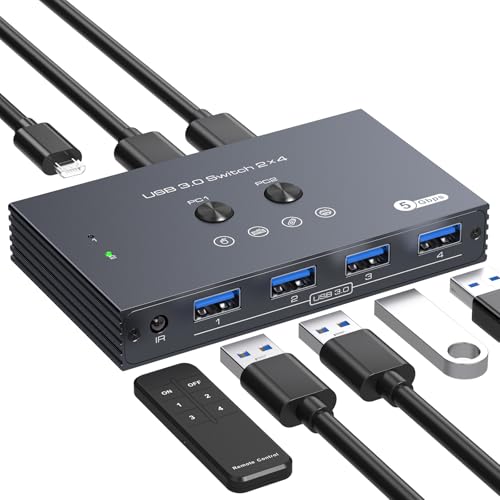
- Shares four USB 3.0 devices between two PCs
- Includes infrared remote and front button
- Optional 5V Micro USB power input
Best For: Two-computer desks with multiple USB-A peripherals
Best for Four Computers
USB 3.2 4-Port Switch with Remote

- Shares four USB devices across four computers
- Includes USB-A and USB-C 3.2 ports
- Offers up to 10Gbps transfer speeds
Best For: Four-computer setups without monitor switching
Best Flexible USB-C Pick – UGREEN USB-C 4-Port Switch with Remote
For shoppers comparing USB switch boxes with remote button control, this UGREEN model is a flexible option for sharing four USB peripherals between two computers. It combines one USB-C port with three USB-A ports, supports up to 5Gbps data transfer, and offers both remote and on-device switching. Note that it is not a KVM and does not carry monitor or video signals.
Best For: Users who need to share a mixed USB-C and USB-A setup between a work computer and a personal laptop.
Pros:
- Shares four USB devices between two computers.
- Includes two USB-C data cables and supports USB 3.0 speeds up to 5Gbps.
- Offers remote or physical-button switching.
- Optional USB-C power input can improve stability with multiple or higher-power devices.
Cons:
- Does not support monitors or video transmission.
- Power supply is recommended for multiple devices but is not described as included.
- USB ports are intended primarily for data transfer, not charging.
This is a strong choice when modern USB-C connectivity and convenient remote switching matter more than display support. Its four-port layout is practical for a keyboard, mouse, headset, webcam, or microphone, while the optional power input helps accommodate demanding peripherals.
Best Remote KVM – IOGEAR 2-Port USB VGA KVM Switch
The IOGEAR GCS22U is a practical choice for shoppers seeking USB switch boxes with remote button control and display sharing. This two-port KVM lets one VGA monitor, USB keyboard, and USB mouse serve two computers, with selection handled from a wired remote button placed on the desk.
Best For: Users switching between two older computers that use VGA video and USB peripherals.
Pros:
- Shares a VGA monitor, USB keyboard, and USB mouse between two computers.
- Includes a wired remote switch with a six-foot cable.
- Plug-and-play design requires no additional cables or power adapter.
- Supports Windows, Mac, and Sun systems listed by the manufacturer.
Cons:
- Limited to VGA video and two connected computers.
- Not suited to newer HDMI, DisplayPort, or USB-C display setups.
- Its 2048 x 1536 support reflects an older display standard.
Unlike USB-only peripheral switches, this model also handles VGA display switching, making it the better fit for a legacy two-computer workstation. Its wired remote keeps the selection button within easy reach without requiring a separate power adapter.
Best Budget USB Peripheral Switch – UGREEN 2-Computer USB 2.0 Switch
This UGREEN switch is a straightforward option among USB switch boxes with remote button alternatives, using a front-panel button to swap four USB 2.0 peripherals between two computers. It includes two USB-A-to-A cables, LED status indication, and driver-free compatibility with Windows, macOS, Linux, and Chrome OS.
Best For: Homes and offices that need to share basic USB peripherals such as a keyboard, mouse, printer, or scanner.
Pros:
- Shares four USB 2.0 devices between two computers.
- One-button switching and an LED indicate the active computer.
- Includes two USB 2.0 A-to-A data cables.
- Supports several Windows, Mac, Linux, and Chrome OS versions without drivers.
Cons:
- Uses USB 2.0 rather than USB 3.0 speeds.
- Switching is performed by the device button, not a supplied remote control.
- Does not support monitors or video transmission.
Choose this model if affordability and simple peripheral sharing are the priorities. It is well suited to everyday input devices and office equipment, though users with high-speed storage or a need for remote switching should consider a different design.
Best Wireless Power Control – USB Remote Switch with Key Fob
This compact wireless USB switch is a different kind of option for shoppers looking at USB switch boxes with remote button control. Rather than routing computer peripherals, it provides wireless ON/OFF control for compatible 5V–12V DC USB-powered devices such as LED strips, reading lamps, and fans through a 433MHz RF key-fob remote.
Best For: Users who want wireless power control for compatible USB-powered lighting or small devices.
Pros:
- Uses a 433MHz RF remote with dedicated ON/OFF buttons.
- Works with compatible 5V–12V DC devices, including LED strips, lamps, and fans.
- Plug-and-play USB interface avoids complicated wiring or programming.
- Blue LED provides visual power and connection status.
Cons:
- It is not a computer peripheral-sharing switch or KVM.
- Compatibility is limited to suitable 5V–12V DC USB-powered devices.
- Rated IP20, so it is intended for protected indoor use.
This product makes sense when “remote switch” means wireless power control rather than switching a keyboard, mouse, or other peripherals between computers. Its small key-fob remote and simple setup are useful for compatible lighting and low-voltage USB devices.
Best Multi-Computer USB Sharing – 4-Port USB 2.0 Switch
If you need USB switch boxes with remote button control, this 4-in/4-out model lets up to four computers share four USB 2.0 peripherals. It offers switching from the main panel or the included wired desktop controller, with LED status indication for the active computer.
Best For: Offices, classrooms, and home workspaces that share keyboards, mice, printers, scanners, or flash drives among four computers.
Pros:
- Supports four computers and four shared USB peripherals.
- Includes a convenient wired desktop controller for remote switching.
- Plug-and-play compatibility with Windows, Mac OS, Linux, and Chrome OS.
- Provides data transfer up to 480Mbps and includes four USB cables.
Cons:
- Uses USB 2.0 rather than USB 3.0 speeds.
- A 5V/1A power adapter may be needed for high-power devices such as hard drives, and it is not included.
This is a practical choice when wired-button access and four-computer sharing matter more than high-speed storage transfers. Its broad operating-system support and included cables make setup straightforward.
Best Wireless USB Power Control – 5V RF Remote USB Switch
Among USB switch boxes with remote button control, this model is designed for remotely switching 5V USB-powered electronics rather than sharing peripherals between computers. Its pre-paired RF receiver and two transmitters provide separate ON and OFF buttons for hard-to-reach devices.
Best For: LED strips, under-cabinet lighting, desk fans, routers, and other compatible 5V USB devices that need wireless power control.
Pros:
- Supports up to a 3A maximum load according to the product description.
- Uses a pre-paired latching relay with dedicated ON and OFF buttons.
- Offers up to a stated 164-foot open-area range and through-wall operation.
- Includes one receiver and two RF transmitters, with expandable pairing.
Cons:
- It is a USB power controller, not a computer peripheral-sharing switch.
- Compatibility depends on the device being a suitable 5V USB load.
This option fits DIY and household automation uses where wireless on/off control is the priority. Its 433MHz RF design avoids requiring Wi-Fi or Bluetooth, while the two-button transmitters keep operation simple.
Best High-Speed Remote USB Sharing – USB 3.0 3-Computer Switch
This USB 3.0 switch is a strong fit for shoppers seeking USB switch boxes with remote button control and faster data transfers. It shares four USB-A ports among three computers and provides switching through the device button or the included IR remote; it does not connect monitors and is not a KVM switch.
Best For: Users sharing keyboards, mice, printers, scanners, or other USB-A peripherals among three computers while benefiting from speeds up to 5Gbps.
Pros:
- Shares four USB-A ports among three computers.
- Supports USB 3.0 data transfer speeds up to 5Gbps.
- Includes both device-button switching and IR remote switching.
- Supports Windows, Linux, and Mac operating systems with plug-and-play setup.
Cons:
- Does not support monitor connections, so it is not a KVM switch.
- High-power USB peripherals require separate power for stable operation.
- IR remote batteries are not included.
Choose this model when faster USB transfers and IR remote access are more important than display switching. Connecting its Micro USB power cable to a 5V source can help maintain stable operation with demanding peripherals.
Best USB-C Upgrade – BENFEI 2-Computer USB 3.0 Switch
For shoppers comparing USB switch boxes with remote button control, the BENFEI model is a flexible choice for sharing three USB 3.0 devices and one USB-C device between two computers. It supports plug-and-play use across Windows, macOS, Linux, and Chrome OS, with switching available from the unit or included remote button.
Best For: Users who need USB-A and USB-C peripheral sharing between a work computer and a personal computer.
Pros:
- Shares three USB 3.0 ports and one USB-C port between two computers.
- Supports data transfer speeds up to 5Gbps and is backward compatible with USB 2.0.
- Offers both device-button and remote-button switching with LED status indication.
- Includes an optional USB-C power input for higher-power devices.
Cons:
- Requires a BENFEI USB-A-to-USB-A cable when connected.
- Additional power may be needed for devices such as hard drives, cameras, or headphones.
This is a practical pick when mixed USB-A and USB-C connectivity matters. Its broad operating-system compatibility and 18-month warranty add convenience, while the optional power input helps support more demanding peripherals.
Best Simple Remote Control – 2-Computer 4-Port USB 3.0 Switch
This USB switch box with remote button control lets two computers share four USB 3.0 peripherals without repeatedly unplugging cables. Front-panel and infrared remote switching make it suitable for a shared desk, while the extra 5V Micro USB input can help stabilize higher-power equipment.
Best For: Home offices and workstations that share several USB peripherals between two Windows or Mac computers.
Pros:
- Connects two computers to four shared USB 3.0 devices.
- Provides up to 5Gbps transfer speeds and supports USB 2.0 and 1.1 devices.
- Offers both front-button and infrared remote control.
- Includes a 5V Micro USB power port for higher-power peripherals.
Cons:
- Uses a Micro USB power input rather than USB-C.
- Designed for USB peripheral sharing and does not provide monitor switching.
Choose this model if straightforward two-computer switching and four USB-A ports are your priorities. The included remote and front control provide convenient access, while optional power support is useful for printers and external drives.
Best for Four Computers – USB 3.2 4-Port Switch with Remote
Among USB switch boxes with remote button control, this USB 3.2 selector stands out for supporting four computers. It provides three USB-A 3.2 ports and one USB-C 3.2 port, switches by top button or remote, and advertises transfer speeds up to 10Gbps.
Best For: Multi-computer workstations that need to share USB-A and USB-C peripherals without monitor switching.
Pros:
- Allows four computers to share four USB peripherals.
- Combines three USB-A 3.2 ports with one USB-C 3.2 port.
- Supports up to 10Gbps data transfer speeds.
- Includes a USB-C-to-USB-A adapter and remote or top-button switching.
Cons:
- It is not a KVM switch and does not support a monitor.
- The remote batteries are not included.
- High-power devices may require an independent power source.
This model is the strongest fit for users managing four computers and newer high-speed USB peripherals. Its combination of USB-A and USB-C ports is convenient, but buyers needing display control should choose a true KVM instead.
How We Picked the Best USB Switch Boxes with Remote Button
We compared these USB switchers by the number of computers and peripherals they support, USB version, advertised transfer speed, connector mix, switching method, and setup requirements. We also considered whether each model includes a wired desktop controller, infrared remote, wireless key fob, or another remote-button design.
Because compatibility varies, the most important distinction is whether you need peripheral sharing only or complete KVM control. USB-only switches share accessories, while KVM models may also switch a monitor connection.
Quick Comparison
| Best For | What to Look For |
|---|---|
| Basic keyboard and mouse sharing | USB 2.0, simple two-computer switching |
| External drives and faster devices | USB 3.0 or USB 3.2, preferably with matching cables |
| Several connected computers | Three- or four-computer support |
| Convenient desk control | Wired desktop button, IR remote, or wireless key fob |
| Keyboard, video, and mouse control | A KVM switch with compatible video connections |
Key Buying Factors for USB Switch Boxes with Remote Button
Port Count and Device Layout
Check both sides of the connection: how many computers can be selected and how many USB devices can remain connected. A four-port device may refer to peripheral ports rather than four host computers, so read the layout carefully.
USB Speed and Connector Type
USB 2.0 is generally sufficient for keyboards, mice, printers, and scanners. Choose USB 3.0 or USB 3.2 for storage, webcams, or other high-bandwidth accessories. USB-A and USB-C ports must match your computers or be used with suitable adapters.
Remote Control Style
A wired desktop button is usually simple and dependable, while an IR remote needs line of sight. Wireless key-fob models offer more placement flexibility but may require batteries and pairing. Confirm what the package includes before buying.
Power and Compatibility
Some switches draw power from USB, while higher-demand devices may work more reliably with external power. Verify operating-system, peripheral, and cable compatibility, especially for webcams, microphones, hard drives, and devices that need charging.
Who Should Buy Which USB Switch Boxes with Remote Button?
Choose a basic two-computer USB 2.0 selector if you mainly share a keyboard, mouse, printer, or scanner. Pick a USB 3.0 model when transferring files or using faster peripherals matters. A USB 3.2 option is better suited to demanding storage workflows, provided every connected component supports the higher standard.
For a busy workstation with several computers, select a model designed for three or four host connections. If you want to switch a display as well as USB accessories, choose the IOGEAR-style KVM approach rather than a USB-only box. Finally, prioritize a remote-button layout that fits your desk: wired controls favor reliability, while IR and wireless remotes offer more flexible placement.