If you want better control over screen time, safer browsing, and a more reliable home network, a wi fi router with parental controls can make a big difference. These routers help parents manage access without adding a lot of extra hassle.
In this roundup, we focus on models that balance speed, coverage, security, and easy-to-use family features so you can find the right fit for your home.
Best 10 Wi Fi Router with Parental Controls Picks for 2026
Top Pick for Security-Focused Families
ASUS RT-AX5400 Dual Band WiFi 6 Router

- Advanced parental controls included
- WiFi 6 dual-band with 5400 Mbps
- Built-in VPN and AiMesh support
Best For: Families wanting security, control, and fast home WiFi
Best Mesh Option for Whole-Home Control
TP-Link Deco S4 2-Pack Mesh WiFi System

- Mesh coverage up to 3,800 sq. ft.
- Parental controls for profiles and time limits
- Two Gigabit ports per unit
Best For: Larger homes needing mesh coverage and simple parental controls
Best Advanced Control Router
Synology RT6600ax Tri-Band Wi-Fi 6 Router

- Tri-band Wi-Fi 6 with 2.5GbE
- Parental controls plus web filtering
- Up to 5 separate networks
Best For: Tech-savvy homes wanting advanced controls and segmentation
Best Budget Wi-Fi 6 Choice
TP-Link Archer AX10 Wi-Fi 6 Router

- Wi-Fi 6 dual-band with four antennas
- Parental controls and guest mode
- Beamforming, MU-MIMO, and OFDMA
Best For: Budget-minded households wanting simple family controls
Tri-Band Mesh Coverage
Linksys MR8300 for 20+ Devices
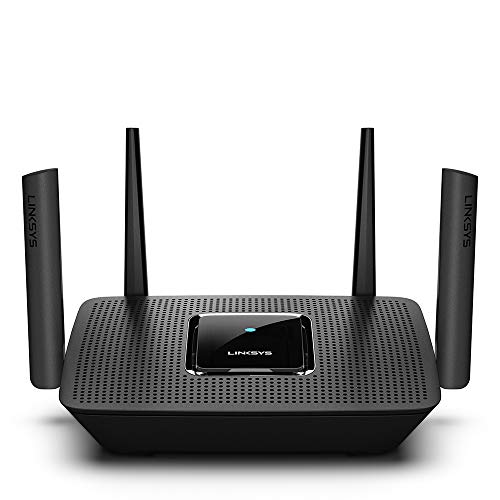
- 2,000 sq. ft. coverage
- Tri-band speeds up to 2.2 Gbps
- App setup with guest WiFi
Best For: Families needing easy setup and expandable coverage
Wi‑Fi 6 Power Router
ASUS RT-AX88U PRO with Security
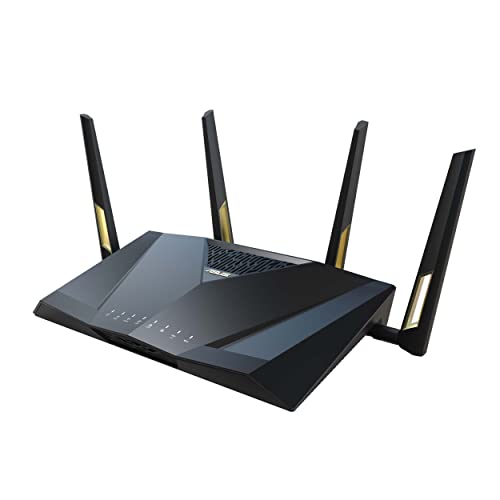
- Wi‑Fi 6 up to 6000 Mbps
- Dual 2.5G ports and QoS
- AiProtection Pro and WPA3
Best For: Power users wanting speed, security, and flexible ports
Whole-Home Mesh Pair
Google WiFi 2-Pack with Parental Controls

- Up to 3,800 sq. ft. coverage
- Mesh design reduces dead zones
- App-based parental controls
Best For: Homes that want simple mesh coverage and family controls
Tri-Band Security Router
ASUS AC3200 Tri-Band Gigabit WiFi Router

- Tri-band AC3200 with Smart Connect
- AiProtection and parental controls
- USB 2.0/3.0 ports for sharing
Best For: Large homes needing security and parental control features
Mesh Parental Control System
Gryphon Guardian Mesh WiFi Router

- Next-gen firewall with content filters
- Covers up to 1,800 sq. ft. per router
- App-based parental controls
Best For: Families wanting mesh coverage and content filtering
Wi‑Fi 6 Security Router
ASUS RT-AX1800S Dual Band WiFi 6 Router

- Wi‑Fi 6 with MU-MIMO and OFDMA
- Subscription-free AiProtection Classic
- Built-in VPN and parental controls
Best For: Homes wanting Wi‑Fi 6 security without subscription fees
Top Pick for Security-Focused Families – ASUS RT-AX5400 Dual Band WiFi 6 Router
If you want a wi fi router with parental controls that also has strong security tools, the ASUS RT-AX5400 is built for households that need more than basic filtering. It combines WiFi 6 performance, advanced parental controls, built-in VPN support, and lifetime internet security features in a dual-band design for home, gaming, and streaming use.
Best For: Families who want parental controls plus strong security and flexible app-based management.
Pros:
- Advanced parental controls and internet security features are included.
- WiFi 6 dual-band design with 5400 Mbps data transfer rate.
- Built-in VPN support and AiMesh compatibility add flexibility.
- Works with gaming consoles, smart TVs, smartphones, and more.
Cons:
- Only a dual-band model, not tri-band.
- Some users may not need the extra security and VPN features.
Overall, this is a strong choice if you want parental controls wrapped into a fast, security-minded router. It balances speed, coverage, and app-based control without pushing into the complexity of a more advanced network platform.
Best Mesh Option for Whole-Home Control – TP-Link Deco S4 2-Pack Mesh WiFi System
If your main goal is a wi fi router with parental controls that can also cover a larger house, the TP-Link Deco S4 2-pack is a practical mesh option. It creates a single seamless network, covers up to 3,800 sq. ft., and adds robust parental controls for limiting online time and blocking inappropriate websites.
Best For: Larger homes that need mesh coverage and easy family controls.
Pros:
- Mesh system provides seamless roaming with one network name and password.
- Parental controls let you limit time and block websites by profile.
- 2-pack coverage reaches up to 3,800 sq. ft.
- Each unit has 2 Gigabit Ethernet ports for wired connections.
Cons:
- Wi-Fi 5 performance is older than Wi-Fi 6 routers.
- Best experience depends on using the two-unit mesh setup.
For families spread across multiple rooms, this model is appealing because the controls are easy to use and the network stays consistent as you move around. It trades cutting-edge speed for dependable whole-home coverage and straightforward setup.
Best Advanced Control Router – Synology RT6600ax Tri-Band Wi-Fi 6 Router
For buyers looking for a wi fi router with parental controls and more granular network management, the Synology RT6600ax stands out. It adds tri-band Wi-Fi 6 performance, VLAN segmentation, multiple SSIDs, threat prevention, and parental controls, making it a strong fit for households that want both family controls and network organization.
Best For: Tech-savvy homes that want advanced parental controls and network segmentation.
Pros:
- Tri-band Wi-Fi 6 design with expanded 5.9 GHz support.
- Parental controls, web filtering, traffic control, and threat prevention.
- 2.5GbE port supports faster ISP connections and can be configured as LAN.
- Up to 5 separate networks help isolate different device groups.
Cons:
- More advanced than many households may need.
- Larger chassis may take up more space than compact routers.
This is the pick for people who want more than simple internet access control. It offers the kind of network features that let you separate devices, manage usage, and keep a closer eye on traffic without giving up high-speed wireless performance.
Best Budget Wi-Fi 6 Choice – TP-Link Archer AX10 Wi-Fi 6 Router
If you want a wi fi router with parental controls without moving into a premium price tier, the TP-Link Archer AX10 is a straightforward Wi-Fi 6 option. It adds parental controls, guest mode, Beamforming, MU-MIMO, and OFDMA, making it a solid fit for everyday family use, streaming, and mixed-device homes.
Best For: Budget-minded households that want Wi-Fi 6 and simple parental controls.
Pros:
- Wi-Fi 6 support with dual-band performance.
- Parental controls, guest mode, and Alexa compatibility.
- Beamforming, MU-MIMO, and OFDMA help improve efficiency.
- Four antennas and 5 ports support home networking needs.
Cons:
- No mesh system included by default.
- Coverage is described as extensive, but it is still a single-router setup.
For many families, this is the most practical entry point because it delivers key Wi-Fi 6 features and parental controls without unnecessary extras. It is a good fit if you want modern basics and dependable day-to-day performance.
Tri-Band Mesh Coverage – Linksys MR8300 for 20+ Devices
If you want a wi fi router with parental controls for a busy household, the Linksys MR8300 is built around simple app setup, tri-band Wi‑Fi 5 performance, and enough coverage for medium-sized homes. It supports guest WiFi, works with your existing modem, and is designed to handle streaming, gaming, and everyday browsing across more than 20 devices.
Best For: Families who want easy app-based setup, guest networking, and solid whole-home coverage from a Wi‑Fi 5 mesh-ready router.
Pros:
- Up to 2,000 square feet of coverage for 20+ wireless devices
- Tri-band Wi‑Fi 5 with combined speeds up to 2.2 Gbps
- Simple setup through the Linksys app with Android and iOS support
- Works with Velop Mesh Wi‑Fi for extended coverage
Cons:
- Wi‑Fi 5 is older than newer Wi‑Fi 6 models
- Coverage is strong, but not as large as some whole-home mesh systems
- Parental control is listed in the title, but the notes focus more on app management and guest features
This is a practical pick if you want a straightforward router with flexible mesh expansion and enough speed for everyday family use. It’s especially appealing for homes that value easy setup and reliable mid-range coverage over cutting-edge specs.
Wi‑Fi 6 Power Router – ASUS RT-AX88U PRO with Security
The ASUS RT-AX88U PRO is a strong wi fi router with parental controls for users who want fast Wi‑Fi 6 performance and more advanced network tools. It combines dual 2.5G ports, Adaptive QoS, WPA3 support, and AiProtection Pro, making it a smart fit for households that need speed, security, and flexible wired connections.
Best For: Tech-savvy families and power users who want a fast Wi‑Fi 6 router with security features and high-performance wired ports.
Pros:
- Wi‑Fi 6 speeds up to 6000 Mbps with 160MHz channels
- Dual 2.5G ports for flexible WAN/LAN setup and higher-priority traffic
- AiProtection Pro and WPA3 add strong security options
- Adaptive QoS and app control for more network management
Cons:
- Dual-band design may be less flexible than tri-band alternatives in crowded homes
- Higher-end hardware may be more than casual users need
- No mesh kit included, even though it supports AiMesh
This router stands out for households that want fast wireless performance plus serious security and port flexibility. If you need more than basic parental controls and want room to grow, it offers a powerful feature set.
Whole-Home Mesh Pair – Google WiFi 2-Pack with Parental Controls
The Google Wifi 2-pack is a simple wi fi router with parental controls that focuses on whole-home coverage and easy app-based management. With a mesh layout, dual-band Wi‑Fi 5 performance, and support for up to 3,800 square feet, it’s aimed at homes that want to reduce dead zones without a complicated setup.
Best For: Homes that want a straightforward mesh system with broad coverage and simple parental control features.
Pros:
- 2-pack system covers up to 3,800 square feet
- Mesh design helps reduce dead zones across the home
- Wi‑Fi 5 speeds up to 2.2 Gbps for streaming and browsing
- Easy app control with parental control support
Cons:
- Wi‑Fi 5 is not as current as Wi‑Fi 6 routers
- Only dual-band, so it has fewer bands than tri-band options
- Best for simplicity, not advanced networking features
This is a good choice if your priority is reliable whole-home Wi‑Fi and easy family management rather than maximum performance. It offers a clean balance of coverage, simplicity, and parental controls in a ready-to-use mesh package.
Tri-Band Security Router – ASUS AC3200 Tri-Band Gigabit WiFi Router
If you want a wi fi router with parental controls for a larger home, the ASUS AC3200 is built around coverage, tri-band flexibility, and Trend Micro-powered security. Smart Connect helps steer devices to the fastest band automatically, while the ASUSWRT interface makes setup and network management straightforward.
Best For: Large households that want strong parental controls, app-based management, and tri-band performance.
Pros:
- Tri-band AC3200 design with Smart Connect to balance devices across bands
- AiProtection with Trend Micro and robust parental controls for network protection
- USB 2.0 and USB 3.0 ports for storage sharing, printer sharing, and 3G/4G dongles
- ASUSWRT graphical interface for quick setup and advanced control
Cons:
- Older Wi-Fi generation compared with Wi-Fi 6 options
- No warranty listed in the supplied details
Overall, this model makes sense if you care more about broad home coverage and security features than chasing the newest wireless standard. Its built-in parental controls and security suite are the main draw for families.
Mesh Parental Control System – Gryphon Guardian Mesh WiFi Router
The Gryphon Guardian is a wi fi router with parental controls aimed at families that want content filtering and a strong security layer. As a mesh add-on or replacement unit, it covers up to 1,800 sq. ft. per router and uses an app-based control model for day-to-day management.
Best For: Families who want mesh expansion with content filters and app-controlled parental settings.
Pros:
- Built for parental controls, content filters, and next-gen firewall protection
- Mesh-friendly add-on design covering up to 1,800 sq. ft. per router
- App control for managing settings from Android or iOS devices
- Dual-band 1.2 Gbps performance with gigabit LAN support
Cons:
- Renewed unit, not new
- 90-day limited warranty is shorter than many new routers
This is a practical pick if your priority is family-focused filtering rather than raw networking extras. The renewal status and shorter warranty are worth weighing, but the security and parental control focus is clear.
Wi‑Fi 6 Security Router – ASUS RT-AX1800S Dual Band WiFi 6 Router
The ASUS RT-AX1800S is a wi fi router with parental controls for buyers who want Wi‑Fi 6 efficiency, subscription-free security, and flexible app or web management. It adds AiProtection Classic for home protection and includes built-in VPN support for safer remote access.
Best For: Households that want Wi-Fi 6 speed, built-in security, and parental control features without a subscription.
Pros:
- Wi‑Fi 6 support with MU-MIMO and OFDMA for better efficiency
- AiProtection Classic powered by Trend Micro for subscription-free network security
- Built-in VPN support plus ASUS Instant Guard for one-click secure access away from home
- Five Gigabit ports and support for a wide range of devices
Cons:
- Dual-band design may not suit very crowded homes as well as tri-band models
- Parental control features are included, but the notes emphasize security more than advanced family filtering
For shoppers comparing modern routers, this one stands out for pairing Wi‑Fi 6 performance with practical security tools. It is a strong middle-ground option if you want faster networking and parental controls in the same package.
How We Picked the Best Wi Fi Router with Parental Controls
We looked for routers that combine practical parental controls with strong everyday networking performance. That means solid Wi-Fi speeds, dependable coverage, useful app or web-based management, and security features that help protect every device on the network. We also favored options that fit different household sizes, from small apartments to busy multi-user homes.
Quick Comparison
Some models are best for simple, app-guided control and whole-home mesh coverage, while others are better for advanced networking needs like VLANs, multi-SSID setups, or higher wired throughput. If your top priority is family management, mesh systems and routers with easy scheduling tools tend to be the most approachable. If you want more customization, premium ASUS and Synology models offer deeper controls and stronger hardware.
Key Buying Factors for a Wi Fi Router with Parental Controls
Control Features
Look for schedule-based access, pause internet controls, content filtering, and profile management for each child or device. A good Wi Fi Router with Parental Controls should let you manage rules quickly from a phone app or browser.
Coverage and Speed
Match the router to your home size and internet plan. Mesh systems are often better for larger homes, while higher-end dual-band and tri-band routers can deliver faster performance for streaming, gaming, and multitasking.
Security and Updates
Built-in security, WPA3 support, threat protection, and subscription-free protections can add value. Frequent firmware updates matter too, especially for households with many connected devices.
Ease of Setup
Parents usually want features that are simple to configure and easy to revisit. If your household is not highly technical, prioritize guided setup, clean apps, and clear device labeling.
Who Should Buy Which Wi Fi Router with Parental Controls?
Choose a mesh system if you want broad coverage and straightforward family controls across a larger home. Pick a performance-focused router if you need stronger speeds, more advanced security, or better wired connectivity. For tech-savvy households, models with segmentation, multi-SSID options, and advanced QoS can offer more control. For families that want the simplest experience, look for a router with intuitive parental controls, reliable app management, and enough speed for everyone to stay connected without conflicts.