Wireless video receivers can simplify camera monitoring, studio production, and live streaming by sending a clean feed to a display or computer without running long cables across the room.
This roundup compares 10 options across professional HDMI and SDI systems, affordable extenders, multi-display setups, and UVC-ready streaming workflows. Prioritize compatibility, range, latency, and the output format your studio actually uses.
Best 10 Wireless Video Receivers for Home Studios Picks for 2026
Professional 4K Flexibility

- 4K30 transmission with HDMI and SDI
- 450-foot claimed line-of-sight range
- Up to four app-monitoring devices
Best For: 4K home studios using HDMI, SDI, and multi-device monitoring
Long-Range 4K Monitoring

- UHD 4K30 wireless transmission
- Up to 985 feet of stated range
- HDMI and SDI support with four-receiver capability
Best For: Studios prioritizing long-distance monitoring and production flexibility
Streaming-Friendly Dual-Band Choice

- Dual-band 2.4/5 GHz transmission
- UVC output for computer streaming
- Up to four receivers or mobile devices
Best For: Creators streaming to OBS or YouTube with multi-device monitoring
Simple 1080p Setup

- 1080p/60Hz output with 4K decoding
- No Wi-Fi, app, or Bluetooth required
- Up to 165 feet indoors or 328 feet outdoors
Best For: Simple HDMI display links and budget-conscious studio setups
Studio Collaboration Pick
7-Inch Monitor Wireless HDMI System
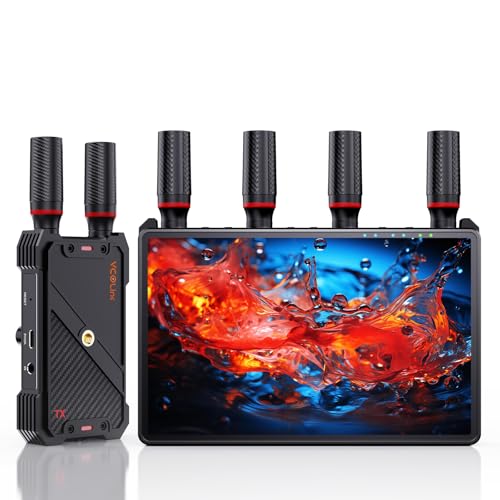
- Built-in 7-inch monitoring screen
- 1080p/60Hz with low claimed latency
- Supports up to five receivers
Best For: Home studios with multi-person monitoring needs
High-Resolution Multiroom Pick
4K 30Hz Wireless HDMI Receiver

- Supports 4K at 30Hz
- Connects one transmitter to three receivers
- Includes HDMI loop-out and selectable bands
Best For: Multi-display studios seeking 4K transmission
Flexible Power Pick
1080p Long-Range HDMI Receiver

- 1080p/60Hz with claimed 0.05-second delay
- Dual receiver HDMI outputs
- Supports NP-F, USB-C, and adapter power
Best For: Portable DSLR and streaming studio setups
Long-Range Pro Choice

- Dual-band 2.4/5GHz transmission for interference resistance
- Up to 1200ft range and about 0.05s latency
- HDMI and SDI support for 1080p/60fps workflows
Best For: Home studios needing long-range, low-latency HDMI/SDI monitoring
Simple Studio Extender

- Plug-and-play setup with mirror and extend modes
- Up to 360ft open-space range and dual-band wireless
- 4K decode with 1080p/60Hz output
Best For: Straightforward HDMI connections in home studios and presentations
Streaming-Focused Pick
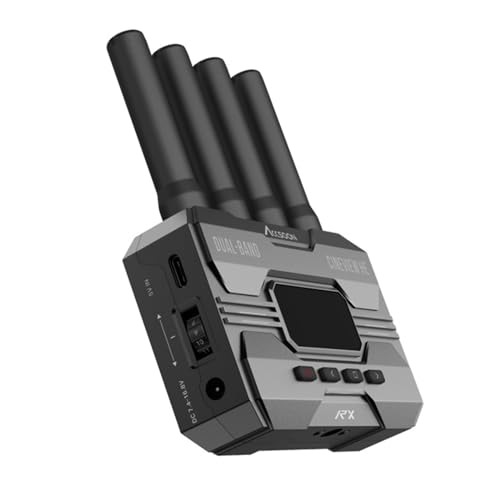
- UVC output sends received video to a computer
- Dual-band transmission with up to 1200ft range
- Supports 1080p/60fps and under 0.06s latency
Best For: Home studio livestreaming with OBS, YouTube, or similar software
Professional 4K Flexibility – Hollyland Mars 4K
For home studios that need both HDMI and SDI, the Hollyland Mars 4K is a versatile choice among wireless video receivers for home studios. It supports up to 4K30 video, professional decimal-point SDI frame rates, and monitoring through displays or mobile devices.
Best For: Home studios using 4K cameras, SDI equipment, and multi-person monitoring.
Pros:
- Supports up to 3840×2160 at 24/25/30 fps.
- Includes HDMI and 3G-SDI input/output options.
- Offers up to 450 feet of line-of-sight range and 66 ms latency in laboratory conditions.
- Supports up to four app-monitoring devices in transmitter-only use.
Cons:
- The listed range and latency are based on interference-free laboratory conditions.
- QC/PD charging is not supported.
- The system may offer more connectivity and setup complexity than a basic HDMI-only kit.
The Mars 4K stands out when your studio workflow includes SDI, 4K capture, or several people who need to monitor a shoot. Its built-in display, joystick controls, and multiple power options also support more involved production setups.
Long-Range 4K Monitoring – Atomos TX/RX Set
The Atomos TX 4K/HD set is a strong option for home studios seeking wireless video receivers for home studios with substantial range. It handles UHD 4K30 transmission, accepts HDMI and SDI inputs, and provides both HDMI and SDI outputs on the receiver.
Best For: Studios needing long-range wireless monitoring for cameras, gimbals, or handheld production.
Pros:
- Transmits UHD 4K30 video.
- Offers a stated range of up to 985 feet.
- Supports HDMI and SDI inputs, plus HDMI loop-out on the transmitter.
- Can transmit to up to four receivers and supports Android or iOS smartphones.
Cons:
- The supplied notes do not specify latency.
- Its 950 g listed item weight may be less convenient for lightweight setups.
- The system may be more capability than needed for simple, short-distance HDMI monitoring.
Choose this set if range and connection flexibility matter more than having the simplest possible kit. Its 4K support and HDMI/SDI connectivity make it suitable for a studio that may expand into more demanding production workflows.
Streaming-Friendly Dual-Band Choice – Accsoon CineView HE
The Accsoon CineView HE is designed for creators who want wireless video receivers for home studios with dependable monitoring and direct streaming support. Its dual-band transmission, UVC output, HDMI loop-out, and mobile-device compatibility make it especially practical for live production.
Best For: Home studios streaming through OBS or YouTube and monitoring on multiple devices.
Pros:
- Uses 2.4 GHz and 5 GHz dual-band transmission.
- Provides up to 1200 feet of stated range and less than 0.06-second latency.
- Receiver UVC output can connect to a computer without a separate capture device.
- Supports up to four receivers or mobile devices in mixed monitoring configurations.
Cons:
- Battery and charging cables are not included.
- It is an HDMI-focused system rather than an HDMI/SDI kit.
- A user-provided USB-C cable is required for UVC streaming to a computer.
The CineView HE is a particularly good fit for a compact streaming studio. Its UVC feature reduces equipment around the computer, while dual-band transmission and multi-device monitoring help support collaborative shoots.
Simple 1080p Setup – Wireless HDMI Extender
For straightforward camera, computer, or media playback connections, this HDMI extender offers a simpler alternative among wireless video receivers for home studios. It is plug-and-play, needs no Wi-Fi, app, or Bluetooth, and outputs 1080p at 60 Hz.
Best For: Budget-conscious home studios, presentations, classrooms, and short-range HDMI display setups.
Pros:
- Supports 1080p/60Hz output and 4K decoding.
- Requires no Wi-Fi, app, or Bluetooth connection.
- Offers up to 165 feet indoors or 328 feet outdoors under the stated conditions.
- Compact design includes Micro HDMI and Mini HDMI adapters.
Cons:
- Output is limited to 1080p rather than 4K.
- Both transmitter and receiver must be connected to power.
- Walls and obstacles can reduce transmission distance and speed.
This extender makes sense when ease of use and low setup overhead are more important than professional SDI, 4K output, or advanced monitoring features. It is a practical match for a single HDMI source and display in a home studio.
Studio Collaboration Pick – 7-Inch Monitor Wireless HDMI System
For home studios that need flexible monitoring, this wireless video receiver system combines a built-in 7-inch screen with HDMI output. It supports 1080p at 60Hz, low-latency transmission, and one-to-five receiver expansion, making it a practical option for cameras, filming, and live streaming setups.
Best For: Home studios needing private on-set monitoring and multi-viewer collaboration.
Pros:
- Built-in 7-inch monitor reduces the need for an additional display.
- Supports 1080p at 60Hz with claimed latency below 0.05 seconds.
- One transmitter can connect with up to five receivers.
- Offers HDMI loop-out, IR remote control, and multiple power options.
Cons:
- An HDMI cable for external displays is not included.
- Smartphone and tablet use requires a Type-C-to-HDMI cable.
- The 1312-foot range is specified for line-of-sight conditions.
The built-in display is the standout feature for compact studios, while HDMI output and expandable receivers make the system useful when several people need to monitor the same feed.
High-Resolution Multiroom Pick – 4K 30Hz Wireless HDMI Receiver
This wireless video receiver is aimed at home studios and larger spaces that want 4K transmission and multiroom distribution. The system supports 4K at 30Hz, 1080p at 60Hz, up to three receivers, HDMI loop-out, and selectable Wi-Fi bands for managing interference.
Best For: Studios, conference rooms, or home theaters distributing a source to multiple displays.
Pros:
- Supports 4K at 30Hz and 1080p at 60Hz.
- One transmitter can connect to up to three receivers.
- HDMI loop-out enables simultaneous local and remote viewing.
- Includes active and passive cooling plus nine selectable Wi-Fi bands.
Cons:
- Supports progressive formats only and does not support 1080i or 720i.
- The listed 1000-foot range may depend on the environment.
- The package includes IR hardware, but the remote controller is not included.
Choose this model when resolution and distribution matter more than a built-in monitor. Its 4K support and band selection are useful for more demanding studio or multi-display installations.
Flexible Power Pick – 1080p Long-Range HDMI Receiver
For home studios built around DSLR cameras, laptops, or set-top boxes, this wireless video receiver system provides 1080p at 60Hz transmission with a claimed 1300-foot line-of-sight range. It also adds transmitter loop-out, dual HDMI output at the receiver, IR support, and battery-friendly power options.
Best For: Portable streaming and camera setups that need flexible power and multiple display outputs.
Pros:
- Supports 1080p at 60Hz with a claimed 0.05-second delay.
- Transmitter loop-out and receiver dual HDMI outputs support local and multiple-screen monitoring.
- Can use NP-F batteries, USB-C power, adapters, or portable rechargeable power sources.
- Supports up to five receivers.
Cons:
- NP-F batteries are not included.
- Walls, metal, brick, and glass can reduce signal coverage.
- Transmission distance may decrease as more receivers are added.
This is a practical choice for creators who value portability and monitoring flexibility. Its 1080p limitation keeps it focused on live production rather than 4K workflows, but the output and power options suit mobile studio rigs well.
Long-Range Pro Choice – CineView SE Receiver
For home studios that need dependable wireless video receivers, the Accsoon CineView SE emphasizes long range, low latency, and dual-band stability. This receiver-only unit supports HDMI and SDI workflows for 1080p video up to 60 fps.
Best For: Home studios, camera crews, and multi-device monitoring setups that need HDMI/SDI flexibility.
Pros:
- Dual-band 2.4GHz and 5GHz transmission combines streams to help handle interference.
- Up to 1200 feet of range with approximately 0.05-second latency.
- Supports 1080p at up to 60 fps through HDMI and SDI connections.
- Compact aluminum design includes a 1.3-inch OLED display and silent cooling.
Cons:
- This listing includes only the receiver, so a compatible transmitter is required.
- The system is limited to 1080p output rather than 4K video.
The CineView SE is a strong fit when range and responsive monitoring matter more than a simple plug-and-play HDMI kit. Confirm that your existing transmitter and camera connections match before buying.
Simple Studio Extender – 4K Decode Wireless HDMI Kit
This wireless HDMI kit is a practical option for home studios that want a quick way to send video and audio from a computer, camera, or media source to a monitor. It uses dual-band 2.4GHz and 5.8GHz connectivity, requires no app or network setup, and outputs 1080p at 60Hz.
Best For: Home studios, presentations, streaming stations, and home theater setups using standard HDMI devices.
Pros:
- Plug-and-play pairing with duplicate and extended display modes.
- Claims up to 360 feet outdoors and 165 feet indoors, depending on obstacles.
- 4K decoding with 1080p at 60Hz output and near-zero-latency positioning.
- Supports one receiver with up to eight transmitters and includes Micro HDMI and Mini HDMI adapters.
Cons:
- Output is limited to 1080p at 60Hz, even though the system accepts 4K decoding.
- Walls and other obstacles can reduce the stated transmission distance.
- Compatibility and performance depend on HDMI source and display requirements.
Choose this kit if convenience and broad HDMI compatibility are priorities. It is less specialized than a professional HDMI/SDI receiver, but its automatic pairing and display modes suit many compact studio arrangements.
Streaming-Focused Pick – CineView HE Receiver
Among wireless video receivers for home studios, the Accsoon CineView HE stands out for its built-in UVC output. It can send received footage to a computer over USB-C for platforms such as OBS or YouTube, while retaining dual-band transmission and long-range monitoring.
Best For: Home studio livestreamers who want to connect a wireless camera feed directly to a computer without a separate capture device.
Pros:
- UVC output supports computer-based streaming through compatible third-party software.
- Dual-band 2.4GHz and 5GHz transmission is designed for stable, interference-resistant video.
- Up to 1200 feet of transmission distance with latency below 0.06 seconds.
- One transmitter can send video and audio to up to four receivers or mobile devices.
Cons:
- This listing includes only the receiver, not the transmitter.
- A USB-C cable for UVC connection is user-provided.
- The system is designed around 1080p video up to 60 fps rather than 4K transmission.
The CineView HE is the most compelling choice here for wireless livestreaming, especially if you use a computer-based workflow. Make sure you have a compatible transmitter and USB-C cable before planning a complete setup.
How We Picked These Wireless Video Receivers for Home Studios
We selected systems that cover the main home-studio use cases: camera-to-monitor viewing, wireless HDMI extension, multi-screen distribution, and direct computer streaming. The list includes 4K-capable products as well as 1080p systems, because resolution alone does not determine whether a receiver fits a workflow.
We also considered connection types, claimed transmission distance, latency, receiver capacity, loop-through support, and whether the system works with HDMI, SDI, or UVC. Treat manufacturer range figures as best-case estimates; walls, Wi-Fi congestion, antenna placement, and local regulations can affect real performance.
Quick Comparison
| Best For | What to Prioritize | Typical Choice |
|---|---|---|
| Camera monitoring | Low latency and dependable HDMI or SDI output | Dedicated professional video-link system |
| Live streaming | UVC output, stable connection, and 1080p60 support | Receiver with direct USB video support |
| Multiple displays | One-to-many transmission and receiver count | Multi-receiver HDMI kit |
| Long cable replacement | Range, line of sight, and loop-out capability | Long-range HDMI extender |
| 4K workflows | Source resolution, frame-rate support, and compatible outputs | 4K transmitter/receiver pair |
Key Buying Factors for Wireless Video Receivers for Home Studios
Inputs, Outputs, and Resolution
Check every connector on both ends. HDMI is common for mirrorless cameras, monitors, and capture devices, while SDI is better suited to longer wired runs and more production-oriented equipment. A product advertised as 4K may transmit only certain frame rates, and some receivers decode 4K but output 1080p. Match the receiver to your camera, monitor, switcher, and capture card.
Latency and Reliability
Low latency matters for directing, talking-head recording, and live performance. For casual monitoring, a small delay may be acceptable; for focus pulling or real-time interaction, choose a system with a clearly stated low-latency figure. Dual-band designs can help manage congestion, but they are not immune to interference. Keep antennas unobstructed and use a clear line of sight whenever possible.
Range, Power, and Studio Layout
Advertised range is usually measured outdoors or in an open area. For a home studio, consider the distance through walls, the location of the router, and whether the transmitter can run from the camera battery or USB power. A compact receiver is useful on a monitor or rig, while a larger unit may offer stronger connectivity and more mounting options.
Streaming and Expansion Features
Choose UVC output if you want the receiver to appear as a video source on a computer without a separate capture device. Loop-out is valuable when you need to monitor locally while sending the same feed elsewhere. If several people need to view one camera, verify the supported number of receivers and whether additional units must match the original system.
Who Should Buy Which Wireless Video Receivers for Home Studios?
Choose a professional HDMI/SDI system if you use cinema cameras, switchers, or mixed studio equipment and need dependable format support. Choose a UVC-capable receiver if your priority is streaming directly into a computer. Choose a multi-receiver kit for classes, interviews, or productions where several monitors need the same feed. Choose a budget HDMI extender for occasional presentations, simple camera monitoring, or replacing a long cable. Choose a 4K model only when your entire signal chain benefits from 4K; otherwise, a reliable 1080p system may provide better value and simpler compatibility.