LENTION USB C Hub 7-in-1 review: this compact adapter is built for people who want a clean desk, better laptop connectivity, and dependable everyday expansion.
It is especially appealing if you need one hub for charging, external display output, and basic peripherals.
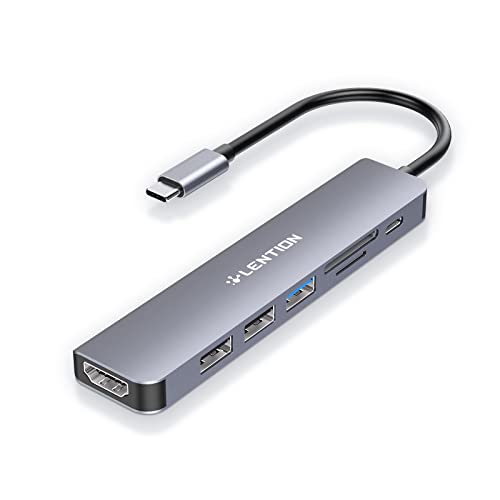
LENTION Hub Review Summary
The LENTION USB C Hub 7-in-1 is a smart choice for USB-C laptop and tablet users who want a portable hub that does the essentials well.
If your workflow includes connecting a monitor, charging your device, and using a mouse, keyboard, or memory card, this hub covers the bases without turning your setup into a bulky dock station.
From a buyer’s perspective, the strongest appeal is balance: 4K HDMI at 60Hz, 100W USB-C power delivery pass-through, SD/microSD readers, and a useful mix of USB ports in a compact aluminum body.
It is not trying to be a full multi-monitor docking solution, but for most desk, travel, school, and remote-work setups, that is exactly why it works so well.
If you are deciding is LENTION USB C Hub 7-in-1 worth it, the answer is yes for users who want a stable, no-fuss USB-C hub with real practical value.
It is less compelling for buyers who need multiple displays, ultra-fast storage expansion, or broad accessory compatibility with niche hardware.
Scorecard
| Category | Score | Why It Matters |
|---|---|---|
| Port Expansion | 9.0 | Adds a useful mix of video output, charging, fast data, and memory card access in one compact hub, making it strong for laptop desk setups. |
| Display Output | 9.0 | The HDMI port supports 4K at 60Hz, which is a big plus for users connecting to monitors, TVs, or projectors for crisp external display use. |
| Charging Pass-Through | 8.0 | Supports up to 100W USB-C power delivery, so users can charge a connected laptop while still using the hub for peripherals. |
| Device Compatibility | 8.0 | Works with a wide range of USB-C laptops, tablets, and desktops including MacBook, Surface, Chromebook, and iPad models, though some devices and accessories are excluded. |
| Peripheral Stability | 8.0 | The Stable Driver 3.0 design emphasizes interference reduction, reliable power delivery, and thermal management, which should help with connected accessories. |
| Build Quality | 8.0 | The aluminum enclosure and compact hub design suggest a sturdy, travel-friendly accessory rather than a bulky dock. |
| Card Reader Utility | 7.0 | Built-in SD and microSD readers add convenience for photographers and content creators, with support up to large-capacity cards. |
Bottom line: the LENTION USB C Hub 7-in-1 is a dependable, well-rounded accessory for people who want everyday productivity features in a portable form factor.
Best for: MacBook, Chromebook, Surface, and iPad users who need a compact USB-C hub with HDMI and charging.
Key Features and Specifications of LENTION Hub
The hardware package is straightforward, but it is thoughtfully chosen for real-world use.
Here is what the LENTION USB C Hub 7-in-1 offers and why those specs matter.
| Specification | Details |
|---|---|
| Brand | LENTION |
| Model | CE18HCR |
| Ports | 7 total |
| USB Ports | 3 total USB ports |
| Video Output | 1x HDMI, up to 4K at 60Hz |
| Charging | USB-C power delivery pass-through up to 100W |
| Data Speed | Up to 5 Gbps |
| Card Readers | SD and microSD |
| Card Support | SD/Micro SD 2.0 readers up to 2TB |
| Material | Aluminum |
| Color | Space Gray |
| Dimensions | 9.92 x 1.57 x 0.47 inches |
| Special Features | Plug and play, surge protection, 60Hz 4K display, Stable Driver 3.0 design |
- 1x USB 3.0 port for faster peripherals and compatible storage devices.
- 2x USB 2.0 ports for stable connections to a mouse, keyboard, printer, scanner, or dongle.
- 4K HDMI output at 60Hz for smooth external monitor, TV, or projector use.
- 100W USB-C pass-through charging so your laptop can stay powered while the hub is connected.
- SD and microSD card readers for quick photo transfers and mobile media access.
- Aluminum enclosure for a more premium feel and better desk durability than cheap plastic adapters.
- Plug-and-play operation with no complicated setup.
Those specs make this hub feel like a practical middle ground between a minimalist dongle and a large dock.
It provides enough expansion for most users while staying easy to carry.
Pros and Cons of LENTION Hub
Here are the LENTION USB C Hub 7-in-1 pros and cons buyers should weigh before adding it to a cart.
| Pros | Cons |
|---|---|
| Strong port mix for everyday laptop expansion | Not every accessory is supported, including Apple SuperDrive |
| 4K 60Hz HDMI is well suited to modern monitors and presentations | Some newer device compatibility is explicitly limited by model |
| 100W pass-through charging supports power-hungry devices | USB 2.0 ports are not meant for high-speed data transfers |
| Dual card readers add convenience for media workflows | The hub relies on the host device’s USB-C feature support for full functionality |
| USB 2.0 ports are useful for low-bandwidth accessories that benefit from stability | Single HDMI output means it is built for one external display rather than a full docking station setup |
| Compact aluminum build should fit well in travel or desk setups |
The biggest strength is that the hub is genuinely practical, not overloaded with gimmicks.
The main drawback is simple: if your device or accessory needs something highly specific, you should check compatibility first.
Who Should Buy LENTION Hub?
The LENTION USB C Hub 7-in-1 is best for buyers who need a simple, reliable adapter for daily productivity.
It is especially useful for people who connect one external display, a few accessories, and occasional memory cards.
- MacBook users who want a clean desk setup with charging and HDMI in one accessory.
- Chromebook owners who need practical port expansion for work or school.
- Surface and USB-C laptop users who want a compact hub for a monitor, mouse, keyboard, and card access.
- iPad Pro and iPad Air users who need a more desktop-like workflow when connected to accessories.
- Photographers and creators who frequently move files from SD or microSD cards.
- Remote workers and students who value plug-and-play simplicity over advanced docking features.
Who should skip it? Buyers who need dual monitors, a large number of USB-A ports, Thunderbolt-level throughput, or very specific legacy accessory support should look at a more advanced dock.
Design and Usability: A Clean, Travel-Friendly USB-C Hub
In day-to-day use, the LENTION USB C Hub 7-in-1 feels designed by someone who understands how people actually use laptop accessories.
The aluminum shell gives it a more durable, polished feel, and the Space Gray finish fits naturally alongside modern laptops and tablets.
Its compact footprint is a major advantage for buyers who move between a home desk, office, library, or coffee shop.
The dimensions, 9.92 x 1.57 x 0.47 inches, indicate a slim profile rather than a thick desktop dock.
That matters because the easier a hub is to pack, the more likely you are to use it regularly.
The port layout is also sensible.
You get a high-value HDMI port, one USB 3.0 port for faster accessories, and two USB 2.0 ports for peripherals that do not require speed but do benefit from stable connectivity.
That mix is better than an all-in-one layout that tries to make every port do everything.
Plug-and-play convenience is a major selling point here.
For most users, the appeal is that the hub should disappear into the background: connect it, use it, and keep working.
4K HDMI Performance and External Display Use
This is one of the biggest reasons to consider the LENTION hub.
The HDMI port supports 4K at 60Hz, which is a meaningful quality upgrade over hubs that stop at 30Hz.
For buyers connecting to a monitor or projector, the difference is noticeable in smoother motion, sharper text, and a more comfortable desktop experience.
That makes this hub especially useful for:
- working on spreadsheets and documents with more screen space
- watching media on a TV or monitor
- presenting slides in a meeting room
- turning a tablet or laptop into a more capable desktop-style setup
Still, there are limits.
This is a single HDMI output hub, so it is not the right buy for multi-display professionals who want a full docking station.
Also, the experience depends on the host device supporting video output over USB-C.
If your laptop’s port does not support display output, the hub cannot create that feature out of thin air.
If your main goal is a crisp external display connection, this is one of the strongest reasons to choose the LENTION USB C Hub 7-in-1.
Charging and Peripheral Power Management
Pass-through charging is another core strength.
With up to 100W USB-C power delivery, the hub lets you power the host device while still using the hub for connected accessories.
That is especially useful for laptops that drain quickly during video calls, display use, or multitasking.
From a buyer’s perspective, this matters because a hub should remove friction, not create it.
A good hub lets you plug in one cable and keep charging, using a monitor, and handling peripherals at the same time.
The Stable Driver 3.0 design is also worth noting.
LENTION is clearly trying to address common hub pain points like interference, unstable accessories, and heat buildup.
While no hub can eliminate every compatibility issue, the emphasis on thermal management and reliable power delivery is a positive sign for people who use a hub for long sessions.
The USB port selection is also deliberate.
The USB 3.0 port is ideal for moderately fast data transfers, while the USB 2.0 ports are better for mice, keyboards, printers, and scanners.
That may sound basic, but it is actually good design: stable peripherals often perform better on USB 2.0 than on an overloaded fast-data port.
Key drawback: if you want high-speed external drives or more advanced storage workflows, you may eventually outgrow this hub.
SD and microSD Card Reader Convenience
The built-in SD and microSD slots are a welcome addition for creators, students, and professionals who regularly move files from cameras, drones, or mobile devices.
The hub supports SD/Micro SD 2.0 readers up to 2TB, which is enough capacity for serious media use.
For photographers, this is a simple but valuable convenience feature.
Instead of carrying a separate reader, you can offload images directly through the hub while keeping the rest of your setup organized.
For students or office users, the card slots also help with occasional data transfer from older devices and memory cards.
It is worth being realistic, though: these readers are about convenience, not top-tier speed.
If you regularly work with huge media files and want the fastest possible transfer times, a dedicated high-speed card reader may still be a better fit.
What Devices Are Not Supported?
This section matters because compatibility is one of the main decision factors for any USB-C hub.
The LENTION USB C Hub 7-in-1 is designed for full-featured USB-C devices, but not everything is supported.
Notably, Apple SuperDrive is not supported.
The product information also calls out New MacBook Neo 2026 as unsupported, which means buyers with newer or niche devices should double-check before ordering.
As with many hubs, the host device must support the right USB-C functions if you want video output, charging, and full hub performance.
Before buying, confirm:
- your USB-C port supports display output if you want HDMI
- your device supports USB-C charging if you want pass-through power
- your accessories are compatible with the selected USB port type
- your machine is not one of the explicitly excluded models
This is not a deal-breaker, but it is an important buying factor.
USB-C does not always mean full compatibility.
Best Alternatives to Consider
If the LENTION model is close to what you want but not a perfect fit, several alternative product lines are worth comparing.