The WAVLINK 10Gbps Docking Station review is straightforward: this is a feature-rich desktop dock built for Windows laptop users who want more screens, faster ports, and less cable clutter.
If your workflow depends on dual monitors, wired Ethernet, and speedy file transfers, it makes a strong case.
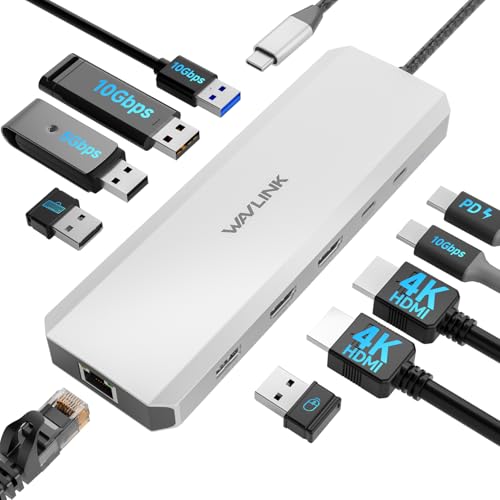
WAVLINK Docking Station Review Summary
If you want to turn a compatible Windows laptop into a cleaner, more productive workstation, the WAVLINK 10Gbps Docking Station is one of the more compelling single-cable options in its class.
It is especially attractive for office professionals, coders, traders, and remote workers who value dual displays, fast peripheral connections, and reliable wired networking in one powered hub.
What stands out most is the balance of features.
You get dual HDMI output with 4K@60Hz on one display and 4K@30Hz on the other, a strong mix of 10Gbps USB-A and USB-C ports, Gigabit Ethernet, and USB-C charging support that can help simplify a desk setup.
That combination makes it useful not just as a port expander, but as a real desktop replacement accessory for the right laptop.
That said, this is not a universal dock.
The Windows-only compatibility is the biggest decision point, and buyers also need to verify that their laptop supports USB-C video output, charging, and ideally DP 1.4 with DSC for the best display results.
If those boxes are checked, the WAVLINK dock can be a very efficient upgrade.
Scorecard
| Category | Score | Why it matters |
|---|---|---|
| Display expansion | 9/10 | Dual HDMI output supports a multi-monitor setup, with 4K at 60Hz on one display and 4K at 30Hz on the other for productivity, meetings, and trading. |
| Data transfer speed | 9/10 | Includes 10Gbps USB-A and USB-C ports plus additional 5Gbps USB-A and USB 2.0 connections for faster file transfers and peripheral support. |
| Power delivery | 8/10 | Supports up to 100W input with up to 85W laptop charging, making it useful for a single-cable desk setup when paired with a compatible charger. |
| Port selection | 8/10 | Offers a broad mix of dual HDMI, high-speed USB ports, USB 3.0, USB 2.0, and Gigabit Ethernet, covering most desk connectivity needs. |
| Compatibility | 5/10 | Works with many Dell, HP, and Lenovo systems, but is Windows-only and not compatible with Mac OS, which limits flexibility. |
| Setup and reliability | 7/10 | The dock is positioned as a powered hub with clear compatibility requirements, and the two-year warranty plus support improve buyer confidence. |
Bottom line: the WAVLINK 10Gbps Docking Station is a smart buy for Windows laptop users who need dual-monitor productivity and fast USB expansion.
It is less compelling for mixed-platform households or anyone using a Mac.
Key Features and Specifications of WAVLINK Docking Station
The WAVLINK Docking Station is marketed as a 10-in-1 laptop docking station, and the feature set reflects that.
It combines display output, charging, data transfer, and networking into one compact desk accessory.
| Specification | Details |
|---|---|
| Brand | WAVLINK |
| Product type | Laptop docking station / powered hub |
| Display outputs | Dual HDMI |
| Dual-display support | 4K@60Hz + 4K@30Hz |
| USB high-speed ports | 2 x 10Gbps USB-A 3.2, 1 x 10Gbps USB-C 3.2 |
| Additional USB ports | 2 x USB-A 3.0, 1 x USB 2.0 |
| Networking | Gigabit Ethernet |
| Power delivery | 100W input, up to 85W laptop charging |
| Compatibility | Windows systems only; not compatible with Mac OS |
| Host port requirement | USB-C port must support charging and video output |
| Video requirement | DP 1.4 + DSC supported for highest resolution |
| Charger | Not included; 20V/5A/100W recommended |
| Warranty | 2 years |
The most important buying detail is that this is not just a USB hub with a couple of display outputs.
It is a desktop-style docking station built to handle multiple roles at once.
For buyers trying to replace a pile of adapters, that matters.
The dock’s 10Gbps ports are another important design choice.
Many docks slow you down with basic USB expansion, but this unit is better positioned for external SSDs, high-speed flash drives, and other transfer-heavy accessories.
If you routinely move large video files, work project backups, or data sets, that speed becomes more than a spec sheet number.
Power delivery is also useful, though you should read the fine print carefully.
The dock supports up to 85W laptop charging, but the charger is not included, and you need a compatible 20V/5A/100W adapter.
That means the dock simplifies the desk, but only if you already have the right power brick or plan to buy one.
Pros and Cons of WAVLINK Docking Station
Here are the most important WAVLINK 10Gbps Docking Station pros and cons from a buyer’s point of view.
Pros
- Strong dual-monitor support for focused work, meetings, and trading setups.
- Very fast 10Gbps USB ports for SSDs, backups, and demanding peripherals.
- Good port mix with USB-C, USB-A, HDMI, and Ethernet in one unit.
- Gigabit Ethernet helps deliver a stable wired connection for work and gaming.
- Two-year warranty adds confidence for a dock that may be used daily.
Cons
- Windows-only, so Mac users should skip it immediately.
- Dual HDMI performance depends on host hardware and software support.
- Charger not included, which adds an extra step for setup.
- Best display output requires DP 1.4 + DSC support on the laptop.
- Up to 85W charging may be limiting for some higher-power notebooks.
From a value perspective, the pros are concentrated around everyday productivity.
The cons are mostly compatibility and setup constraints, which means the dock can be excellent for the right person and disappointing for the wrong one.
That is exactly why it pays to check your laptop specifications before buying.
Who Should Buy WAVLINK Docking Station?
The WAVLINK Docking Station is a good fit for buyers who want a serious desk setup without moving into expensive workstation hardware.
It is especially practical for:
- Windows laptop users who want a dual-monitor workstation at home or in the office.
- Remote workers who need one cable for displays, Ethernet, and peripherals.
- Coders and analysts who benefit from more screen space and faster data access.
- Stock traders who rely on a multi-screen layout and stable wired networking.
- Users with Dell, HP, Lenovo, and similar Windows laptops that support USB-C video and charging.
Who should skip it?
If you are on Mac OS, this is the wrong product.
You should also look elsewhere if your laptop USB-C port does not support video output, if your system needs more than 85W charging through the dock, or if you want a simple plug-and-play hub with no compatibility homework.
Dual HDMI monitor setup
The headline feature here is the dual HDMI monitor setup, and it is the main reason many people will consider the dock in the first place.
Dual-display support is often the difference between a cramped laptop workflow and a genuinely efficient desk environment.
According to the product data, the dock supports 4K@60Hz on one display and 4K@30Hz on the second.
For practical use, that is a strong configuration for office productivity, web work, spreadsheets, video calls, and market monitoring.
The 60Hz connection on the primary display is the one you will likely use for your most active screen, while the 30Hz secondary output is still suitable for documents, dashboards, reference material, and communication windows.
That said, the real-world result depends on the laptop.
The highest resolution requires DP 1.4 + DSC support, so buyers should not assume every USB-C Windows laptop will deliver the same outcome.
If your system is older or budget-oriented, you may still get dual displays, but not necessarily the full advertised performance.
Port layout and device connections
The port layout is one of the dock’s strongest selling points because it avoids the common problem of buying a “dock” that still leaves you short on ports.
The WAVLINK 10Gbps Docking Station gives you a practical mix of expansion options:
- 2 x 10Gbps USB-A 3.2 for fast storage and accessories.
- 1 x 10Gbps USB-C 3.2 for newer devices and fast data transfer.
- 2 x USB-A 3.0 for standard peripherals.
- 1 x USB 2.0 for low-bandwidth devices like keyboards, mice, or dongles.
- Gigabit Ethernet for a reliable wired network connection.
- Dual HDMI for monitor expansion.
That layout tells you this dock is designed around desk utility rather than minimalism.
The inclusion of both high-speed ports and lower-speed ports is smart because not every accessory needs 10Gbps.
You can reserve the fastest connections for storage and capture devices while keeping everyday peripherals connected elsewhere.
For a buyer, the key question is whether the dock will replace enough clutter to justify itself.
In this case, the answer is often yes.
It can reduce the number of cables coming out of a laptop to a single connection, while still leaving you with room to work.
Charging limits and power adapter requirements
Charging is helpful here, but it should be understood as part of a docked workflow rather than a universal power solution.
The unit supports 100W input and can provide up to 85W laptop charging.
That is enough for many business and productivity laptops, but not all of them.
The practical takeaway is simple: check your laptop’s charging needs before buying.
If your machine is comfortable charging below 85W through USB-C, this dock can streamline your setup nicely.
If your laptop expects more power, you may still use the dock for displays and peripherals, but charging may be insufficient for full performance or may not work as intended.
Another important note is that the charger is not included.
That is not unusual for docks in this category, but it does affect the total setup cost and convenience.
The product data recommends a 20V/5A/100W charger, which should be part of your planning if you do not already own one.
For buyers trying to compare this against simpler hubs, this is where the WAVLINK unit feels more like a true workstation accessory.
It is meant to sit on a desk, stay plugged in, and power a semi-permanent setup.
It is not really a grab-and-go travel dock.
Windows-only compatibility explained
This is the section that will make or break the purchase.
The WAVLINK 10Gbps Docking Station is explicitly Windows only for its dual HDMI display features and is not compatible with Mac OS.
That means compatibility is not just a minor footnote; it is the core buying filter.
That limitation matters because many shoppers browse docking stations expecting broad cross-platform support.
This model is more specialized.
It works best with Dell, HP, Lenovo, and similar Windows computers that have the right USB-C capabilities.
If you are in that ecosystem, the dock can be a great fit.
If you move between Windows and Mac devices, it is not the flexible all-rounder you may want.
It is also worth noting that the host port must support charging and video output.
Some USB-C ports are data-only, which would make this dock a poor match.
Before you buy, check the laptop manual or manufacturer page for USB-C DisplayPort Alt Mode, charging support, and ideally DP 1.4 with DSC if you want the best display quality.
Best use cases for productivity and trading
For many buyers, the most appealing part of this dock is not the raw spec sheet but the way it supports real work.
The WAVLINK Docking Station is particularly well suited to productivity and trading setups, where more screen space and stable connectivity directly improve usability.
In a work-from-home setup, it can connect your laptop to two monitors, a keyboard, a mouse, external storage, and Ethernet without creating a mess of adapters.
That makes the desk feel more like a proper desktop station.
For people who spend long hours in spreadsheets, dashboards, documents, or code, that kind of setup is a real comfort upgrade.
For traders, the dual-monitor configuration is even more obvious.
One screen can hold charts and market data while the other stays on news, order entry, or watchlists.
The 60Hz primary output is helpful for smoother motion and active use, while the second display handles reference content well.
If you need a dock for video editing, large file transfers, or external drives, the 10Gbps USB ports also help this model stand out.
That makes it more versatile than basic office docks that only prioritize display outputs.
Alternatives to consider
If you are comparing options, a few common Amazon-friendly alternatives are worth a look.
The right choice depends on whether you want broader compatibility, more Thunderbolt-style performance, or a simpler hub.
- Anker USB-C docking station dual HDMI for buyers who want a trusted mainstream brand and broad dock selection.
- Dell USB-C dock dual monitor for Dell-centric office environments.
- HP USB-C docking station dual HDMI for HP laptop owners who want ecosystem-friendly compatibility.
- Lenovo USB-C dock dual monitor for ThinkPad and Lenovo laptop users.
- USB-C hub 10Gbps PD Ethernet if you want a smaller hub instead of a full desktop dock.
Compared with those options, the WAVLINK dock looks strongest when your priority is dual HDMI plus fast USB in one unit.
If you need broader platform support or a Thunderbolt-based ecosystem, one of the alternatives may be more suitable.
Is WAVLINK Docking Station Worth It?
So, is WAVLINK 10Gbps Docking Station worth it?
For the right buyer, yes.
It is a well-thought-out Windows docking station that combines dual-monitor support, fast 10Gbps USB expansion, Ethernet, and charging into a single desk hub.
The value here is practical rather than flashy.
You are paying for convenience, fewer cables, better screen space, and faster access to peripherals.
That makes the dock especially appealing for people who work at one primary desk and want a cleaner, more capable setup every day.
The main reason to buy is clear: you need dual HDMI and fast USB in a dock that is built for Windows productivity.
The main reason to skip it is equally clear: you use a Mac, need universal compatibility, or have a laptop that cannot meet the USB-C video and charging requirements.
Final verdict: the WAVLINK 10Gbps Docking Station is a strong, focused choice for Windows users who want a desktop-style workstation upgrade.
If your laptop is compatible, this is one of the better balanced dual-monitor docking stations for productivity, trading, and everyday office use.
Best buying advice: confirm Windows compatibility, verify USB-C video and charging support, and make sure you already have or plan to buy a compatible 100W charger.
If those pieces line up, this dock is a smart and highly usable purchase.