If you need a dependable Dell WD19TB Thunderbolt Dock review, this dock is aimed squarely at laptop users who want a cleaner, faster desk setup.
It is especially appealing for Dell XPS and Vostro owners who run dual monitors and want one-cable convenience.
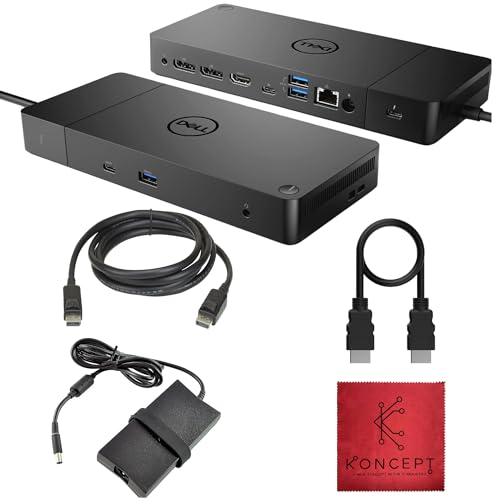
WD19TB Dock Review Summary
The Dell WD19TB Thunderbolt Dock is a business-style docking station that turns a compatible laptop into a much more capable desktop workstation.
For buyers who need dual-monitor support, wired Ethernet, extra USB ports, and easy cable management, it hits the practical features that matter most.
This renewed listing makes sense for professionals, students, and home-office users who already own a Dell XPS or Vostro system and want a dock that is built for productivity rather than just basic peripheral expansion.
The included power supply and cables add immediate value, and the dock’s port mix is strong enough to support a serious desk setup without resorting to a nest of adapters.
Bottom line: if your priority is a stable, workstation-style dock for a compatible Dell laptop, the Dell WD19TB Thunderbolt Dock is a very smart buy.
If you need broad cross-brand compatibility, you may want a more universal Thunderbolt dock instead.
Scorecard
| Category | Score | Why it matters |
|---|---|---|
| Port selection | 9.0 | Broad mix of Thunderbolt, USB-C, USB-A, dual DisplayPort, HDMI, Ethernet, and audio. |
| Dual-monitor support | 9.0 | Built for multi-display setups with two DisplayPort outputs plus HDMI. |
| Power delivery | 8.0 | High-wattage PSU is designed to keep compatible laptops and accessories running from one dock. |
| Compatibility | 7.0 | Strong for Dell systems, but not as universal as some generic docks. |
| Setup convenience | 8.0 | Plug-and-play for supported Dell laptops, which helps first-time users. |
| Included accessories | 8.0 | Dock, power supply, HDMI cable, DisplayPort cable, and microfiber cloth are included. |
| Renewed condition value | 7.0 | A cost-conscious way to buy business-class hardware, though condition may vary. |
Key Features and Specifications of WD19TB Dock
The WD19TB Dock is designed to consolidate desktop essentials into a single connection from your laptop.
Here is the core specification set buyers should care about:
| Specification | Details |
|---|---|
| Brand / Manufacturer | Koncept |
| Model | Docking-WD19TB Renewed |
| Color | Black |
| Hardware interface | USB / Thunderbolt 3 docking station |
| Total ports | 11 |
| USB ports | 6 total USB ports |
| Display outputs | 2x DisplayPort 1.4, 1x HDMI 2.0B, 1x USB-C multifunction DisplayPort |
| Networking | Gigabit Ethernet RJ45 |
| Audio | Combo audio/headset jack and audio out port |
| Power supply | 180W included |
| Input voltage | 230 Volts |
| Frequency | 50/60Hz |
| Minimum OS version | Windows 11 |
| Warranty | 1 year |
| Included accessories | HDMI cable, DisplayPort cable, microfiber cleaning cloth |
| Condition | Renewed |
| Compatible devices | Dell XPS and Vostro models, including multiple XPS 13, XPS 15, XPS 17, and Vostro 2-in-1 variants |
That spec sheet tells you exactly what kind of product this is: a serious productivity dock with enough video and USB bandwidth to support a workstation-style desk.
The included 180W power supply is especially important because it helps the dock handle both laptop charging and connected accessories without feeling underpowered.
The 11-port layout is one of the biggest reasons this dock stands out.
Many cheaper docks offer only one or two video outputs and a handful of USB ports, but the WD19TB Dock is built to replace multiple adapters at once.
For buyers who hate juggling chargers, dongles, and display cables, that design choice is a real advantage.
Pros and Cons of WD19TB Dock
Here is the practical Dell WD19TB Thunderbolt Dock pros and cons breakdown from a buyer’s point of view.
| Pros | Cons |
|---|---|
| Strong selection of display and USB ports | Best suited to Dell laptops rather than fully universal use |
| Excellent fit for dual-monitor desk setups | Renewed condition may not appeal to everyone |
| Includes power supply and useful cables | Long-term wear details are not fully transparent from the listing |
| No-driver setup claimed for Dell systems | Compatibility is clearest for specific Dell models |
| Good compatibility list across Dell XPS and Vostro laptops | Regional power expectations should be checked carefully |
The biggest strength is convenience: it is built to reduce clutter while expanding a laptop into a desktop.
The biggest drawback is that this is still a Dell-centered dock, so buyers with mixed-brand hardware should not assume universal compatibility.
Port Layout and Desk Connectivity
The Dell WD19TB Thunderbolt Dock is clearly designed around real desk use rather than minimal laptop expansion.
The front-and-rear connectivity mix gives you room for everyday peripherals like keyboards, mice, webcams, speakers, and storage drives while keeping display wiring simple.
Here’s what stands out most in the port layout:
- 2x DisplayPort 1.4 outputs for modern dual-monitor setups
- 1x HDMI 2.0B for a third display option or easier monitor compatibility
- 1x USB-C multifunction DisplayPort port for flexible modern device connections
- 2x USB-A 3.1 Gen 1 ports for common accessories
- 1x USB-A 3.1 Gen 1 with share for added utility at the desk
- Gigabit Ethernet RJ45 for stable wired networking
- Combo audio/headset jack and audio out for conferencing or speaker setups
For a home office or hybrid work station, that port layout is very practical.
Ethernet alone can make the dock worth considering if your laptop is often used in a room with weak Wi-Fi.
The extra USB ports help you keep a permanent setup connected, so you are not repeatedly plugging in storage, accessories, and headset cables every time you sit down.
Another positive design choice is that the dock is supplied with an HDMI cable and a DisplayPort cable.
That means many buyers can connect their first monitor immediately without having to buy extra leads.
It is a small detail, but on a workstation accessory like this, included cables matter.
How the WD19TB Handles Dual Monitors
If you are shopping for the WD19TB Dock, dual-monitor support is probably one of your main reasons for buying.
This is where the dock looks strongest.
It is built specifically with workstation productivity in mind, and the combination of two DisplayPort outputs plus HDMI gives you enough flexibility to match common monitor setups.
In practical use, that means the dock is well suited to:
- One high-resolution monitor plus one secondary productivity display
- Matching dual monitors on a home-office desk
- A mix of DisplayPort and HDMI monitors without constant adapter swapping
The real decision factor is not just whether the dock can connect two screens, but whether your laptop and monitors align with the dock’s capabilities.
Dell business and creator laptops typically get the best results here, and that is why the listing focuses on XPS and Vostro systems.
If your workflow depends on browser tabs, spreadsheets, coding, content creation, or video meetings, a proper dual-monitor dock can improve daily productivity dramatically.
Compared with simpler USB-C hubs, the WD19TB Dock is more appropriate if you want a permanent desk solution.
It is not just about screen count; it is about stability, cable simplicity, and the ability to keep everything connected all the time.
Compatible Dell Laptops and Limitations
Compatibility is one of the most important buying factors in any Dell WD19TB Thunderbolt Dock review.
This model is clearly aimed at Dell systems, and the listing specifically calls out support for a wide range of XPS and Vostro laptops, including several XPS 13, XPS 15, and XPS 17 generations.
Some of the highlighted compatible families include:
- XPS 17 9700, 9710, 9720
- XPS 15 7590, 9500, 9510, 9520
- XPS 13 9380, 7390, 9300, 9305, 9310, 9315, 9320
- Vostro 7510, 7590, 7620, 5320 and related 2-in-1 variants
That list is useful because it tells buyers the dock is not a random generic accessory.
It is a dock that is meant to play nicely with a specific ecosystem.
The advantage is smoother setup and fewer compatibility headaches.
The drawback is just as obvious: if you are using a non-Dell laptop, you should verify functionality before buying.
The listing also states a minimum operating system version of Windows 11.
For most buyers in the target audience, that will not be an issue, but it is still worth checking if you use older software, a secondary machine, or a nonstandard workstation environment.
One more point to note is the listed input voltage of 230V.
That suggests buyers should pay attention to regional power compatibility and make sure the included power adapter fits their setup.
For international shoppers, this is not a minor detail.
What’s in the Box
One of the most appealing parts of this renewed listing is the accessory bundle.
The Dell WD19TB Thunderbolt Dock arrives with more than just the dock body, which helps reduce the extra purchases many docking station buyers end up making.
- The dock itself
- The original power supply
- HDMI cable
- DisplayPort cable
- Microfiber cleaning cloth
That package is useful for a few reasons.
First, it lowers the friction of setup.
Second, it makes the listing feel more complete for a renewed product.
Third, it reduces the odds that you will need to hunt for the correct cable types just to start working.
For buyers who want a ready-to-use dock, this is a meaningful benefit.
A dock without the right power supply or display cables often turns into a hidden-cost purchase.
Here, those essentials are already included.
Renewed Condition and Warranty Notes
Because this is a renewed unit, buyers should evaluate it differently from a sealed new dock.
Renewed electronics can be a smart value play, especially for business-class hardware, but the tradeoff is that cosmetic condition and prior use are part of the equation.
The main upside is clear: you can often get a capable docking station at a more accessible entry point than a brand-new equivalent.
The included 1-year warranty also helps reduce the risk compared with buying used from an unknown seller.
That said, renewed hardware is not for everyone.
Here is the practical way to think about it:
- Buy renewed if you care more about function, port selection, and desk productivity than pristine packaging.
- Skip renewed if you want factory-fresh condition or maximum peace of mind from a brand-new unit.
This is especially important for office buyers.
A dock that sits under a desk usually does not need to look perfect, but it does need to be dependable.
For that reason, renewed can be a very sensible category choice if the seller is reputable and the warranty terms are clear.
Alternatives to Consider
If the WD19TB Dock is close to what you want but not quite perfect, there are several common alternatives that may fit different needs better.
- Dell WD19TBS Thunderbolt Dock — A close Dell alternative if you want a similar business docking experience and want to compare versions.
- Dell WD19S USB-C Dock — Worth considering if your laptop uses USB-C and you do not need Thunderbolt-specific features.
- CalDigit Thunderbolt dock — A strong option for buyers who want a more universal premium Thunderbolt dock.
- Anker USB-C docking station — A good alternative if you want a broader brand fit and simple everyday connectivity.
- Lenovo Thunderbolt docking station — Better if you are working in a Lenovo-heavy environment rather than Dell.
In general, the WD19TB Dock is best when you already live in the Dell ecosystem.
If you do not, one of the more universal Thunderbolt docks may be a safer long-term buy.
Who Should Buy WD19TB Dock?
The WD19TB Dock is a strong match for specific buyers, and that clarity is one of its biggest selling points.
It is not trying to be everything to everyone.
Instead, it is built for people who want a dependable workspace expansion tool for compatible Dell laptops.
You should buy it if you are:
- A Dell XPS or Vostro owner who wants a one-cable desktop setup
- Someone running two monitors from a laptop
- A home-office user who wants wired Ethernet and better cable management
- A professional who uses multiple USB accessories every day
- Comfortable buying a renewed item with a warranty
You should probably skip it if you are:
- Using a non-Dell laptop and need maximum plug-and-play compatibility
- Expecting brand-new, untouched hardware
- Shopping for the absolute cheapest basic hub rather than a business dock
- Uncertain about voltage or regional power compatibility
From a buyer-fit perspective, this dock is best for people who value performance, layout, and workstation convenience over minimalist portability.
It belongs on a desk, not in a travel bag.
Design and Usability for Everyday Work
The dock’s black finish and business-first design are exactly what you would expect from a workstation accessory.
It is not flashy, but that is the point.
Docks like this are supposed to disappear into the desk setup and just work.
Usability is where the Dell WD19TB Thunderbolt Dock makes the strongest case for itself.
A properly positioned dock lets you dock and undock your laptop in seconds, keep monitors and peripherals connected, and avoid wearing out your laptop’s ports through repeated plugging and unplugging.
That matters more over time than people often realize.
The no-driver claim for Dell systems is another practical advantage.
First-time dock users often worry that setup will require a long troubleshooting session.
A dock that behaves like a true workstation accessory should minimize that problem, and this one appears designed with that exact expectation in mind.
As with any dock, the best experience comes when your laptop and monitors are a good match.
If your setup is already Dell-centered, the usability advantage becomes even stronger because you are buying into a more integrated environment.
Is WD19TB Dock Worth It?
Yes, the WD19TB Dock is worth it for the right buyer. If you own a compatible Dell XPS or Vostro laptop and want a real desktop-style docking solution, this is a very practical, well-equipped choice.
The biggest reasons to buy are straightforward: excellent port selection, strong dual-monitor support, included power, and a bundle that is ready to use.
The renewed condition keeps it in a value-focused lane, and the 1-year warranty adds a layer of confidence.
However, the dock is not the right answer for everyone.
Its compatibility is strongest inside the Dell ecosystem, and buyers who want broad cross-brand support may be happier with a more universal Thunderbolt dock from CalDigit or Anker.
If you already own a Dell laptop, though, the Dell WD19TB Thunderbolt Dock review verdict is very positive: it is a capable, work-ready docking station that makes everyday laptop use feel much more like a desktop.
Final advice: buy it if you want a dependable, cable-reducing dock for a compatible Dell system and value desk productivity over portability.
For that use case, the Dell WD19TB Thunderbolt Dock is an easy product to recommend.
Recommended for: Dell XPS and Vostro owners, dual-monitor users, and anyone building a clean one-cable workstation.