ZUMWALT P7 Laptop Screen Extender review time: this portable dual-panel add-on is built for people who need more screen space on the move.
If your work lives in tabs, timelines, spreadsheets, or code, the ZUMWALT P7 Laptop Screen Extender makes an immediate difference.
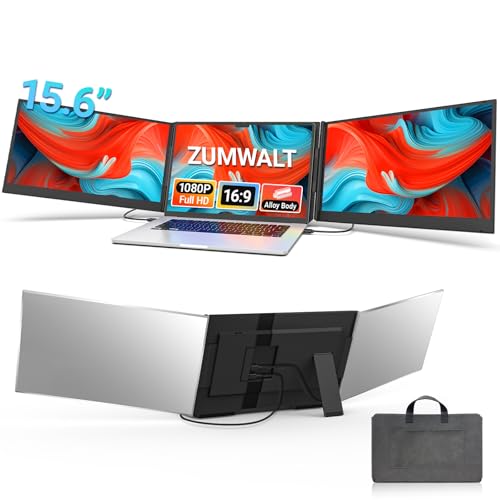
ZUMWALT P7 Review Summary
The ZUMWALT P7 Laptop Screen Extender is best understood as a mobile productivity multiplier, not just another portable monitor.
It adds two 15.6-inch FHD panels to your laptop, turning a single-screen machine into a true triple-screen workstation for work, study, and presentations.
That makes it especially appealing for remote workers, analysts, students, coders, and frequent travelers who want more usable space without carrying a full desktop setup.
If your buying decision comes down to whether you need a compact, travel-friendly way to split apps side by side, the ZUMWALT P7 is one of the more practical ideas in this category.
Scorecard
| Category | Score | What it means |
|---|---|---|
| Screen expansion and multitasking | 9.0 | Turns a laptop into a triple-screen setup for spreadsheets, coding, and side-by-side app use. |
| Display quality | 8.0 | Two 15.6-inch IPS LCD panels with 1080p resolution, 280 nits brightness, 178° viewing angles, and a glossy finish. |
| Portability | 8.0 | Ultra-slim aluminum shell, about 4 lb weight, and an included carry bag make it travel-ready. |
| Setup and cable simplicity | 7.0 | Plug-and-play in the easiest case, but some laptops need extra cabling and external power. |
| Compatibility | 6.0 | Works with many 13- to 17.3-inch laptops, but Mac and non-full-featured USB-C setups can be more complex. |
| Build and durability | 8.0 | Aluminum alloy construction feels sturdy and made for repeat travel use. |
| Versatility | 8.0 | Supports extend, mirror, and portrait modes for productivity and presentations. |
Bottom line: the ZUMWALT P7 Laptop Screen Extender is a strong buy if you value screen real estate more than ultra-light travel weight.
It is not the simplest universal accessory on the market, but for the right laptop and the right user, it can dramatically improve daily workflow.
Key Features and Specifications of ZUMWALT P7
The ZUMWALT P7 Laptop Screen Extender is designed to attach to a compatible laptop and deliver two additional 15.6-inch displays.
That means the core experience is not just dual-monitor convenience, but a three-panel workspace you can carry in a bag.
- Brand: ZUMWALT
- Model: P7 laptop screen extender
- Display size: 15.6 inches per panel
- Resolution: 1920 x 1080 FHD
- Native resolution: 1920 x 1080
- Panel technology: IPS LCD
- Aspect ratio: 16:9
- Brightness: 280 cd/m²
- Viewing angle: 178 degrees
- Refresh rate: 60 Hz
- Finish: Glossy
- Compatible laptop sizes: 13 inches to 17.3 inches
- Ports: 1 HDMI port, 1 USB port, 1 USB 3.0 port
- Item dimensions: 10" D x 6" W x 1.11" H
- Weight: about 4 lb / 1.8 kg
- Build: Aluminum alloy shell
- Included accessories: Carry bag, cables, power adapter
- Modes: Extend, mirror, portrait
- Compatibility: Mac, Windows, Chrome, and Switch
From a buyer’s perspective, the most important details are the two 15.6-inch FHD IPS panels, the portability, and the range of connection options.
The fact that it supports multiple operating systems is a plus, but the real-world experience depends heavily on whether your laptop has the right USB-C setup.
ZUMWALT P7 Laptop Screen Extender pros and cons
If you are searching for ZUMWALT P7 Laptop Screen Extender pros and cons, the short version is that the product delivers excellent workflow value while asking you to pay attention to compatibility before buying.
- Pros: Adds a true triple-screen workspace for productivity
- Pros: Sharp 1080p IPS panels with wide viewing angles
- Pros: Slim, travel-friendly, and includes a carry bag
- Pros: Plug-and-play for supported devices
- Pros: Multiple modes for work, meetings, and coding
- Pros: Sturdy aluminum alloy build
- Cons: Compatibility may require extra cables or external power on some laptops
- Cons: Non-full-featured USB-C laptops and some newer MacBooks may need alternate setup steps
- Cons: Glossy finish can reflect light in bright environments
- Cons: About 4 lb is portable, but not exactly featherweight
The pros are straightforward: more screen space, less window juggling, and a setup you can pack and move.
The drawbacks are also practical rather than cosmetic, which is actually useful because it helps set realistic expectations.
If your laptop is compatible, the ZUMWALT P7 Laptop Screen Extender can be a major workflow upgrade.
If it is not, the value drops quickly.
How the triple-screen layout changes workflow
This is the part that makes the ZUMWALT P7 Laptop Screen Extender stand out from a standard portable monitor.
A single extra display is helpful, but two added panels create a different level of efficiency.
You can keep your main app in the center, reference material on one side, and communication tools or notes on the other.
For many buyers, that means fewer alt-tabs and a smoother work rhythm.
It is especially useful when you are handling spreadsheets, dashboards, source code, browser-heavy research, content creation, or trading-style multitasking.
If you work across multiple documents all day, the ZUMWALT P7 can feel less like an accessory and more like a portable desk upgrade.
The three-screen layout also matters for presenters and teachers.
Mirror mode can help when sharing a screen, while portrait mode can be useful for reading long documents, code, or chat threads.
That flexibility is a genuine design advantage because it supports more than one workflow.
Display quality in real-world use
Display quality is one of the strongest reasons to consider the ZUMWALT P7 Laptop Screen Extender.
The two 15.6-inch IPS LCD panels use 1080p resolution, which is the sweet spot for portable productivity displays because it keeps text readable without pushing the hardware too hard.
The 280 nits brightness is decent for indoor use and many office settings.
It is not the brightest portable display class on the market, so if you often work outdoors or beside sunny windows, you may wish for more headroom.
Still, for typical remote-work setups, the brightness is sensible and serviceable.
The 178-degree viewing angle is another important quality point.
Wide angles help when you are glancing side-to-side between screens, sharing a display with a colleague, or adjusting the laptop lid slightly.
The glossy finish gives the image a crisp look, but it also means reflections can show up under bright lighting.
That is a trade-off buyers should understand up front.
At 60 Hz, this is clearly a productivity-first product rather than a gaming-focused one.
That is not a flaw; it is simply the right design choice for the category.
If your priority is motion performance or color-critical creative work, you may want a premium portable monitor instead.
Portability and travel setup
One of the strongest selling points in this ZUMWALT P7 Laptop Screen Extender review is its balance of size and portability.
The aluminum alloy shell and ultra-slim profile make it look and feel more premium than many basic plastic alternatives, and the included leather carry bag helps keep the system organized when you move between home, office, and travel.
At roughly 4 lb / 1.8 kg, the extender is portable, but it is still a substantial addition to your laptop bag.
That is important to remember if you are already carrying a charger, mouse, notebook, and other accessories.
If you travel light at all costs, this may feel like a lot.
If your goal is a genuinely useful mobile workstation, the weight is more reasonable.
The no-top-baffle, easier-removal design is a smart usability choice.
It reduces some of the annoyance common in clip-heavy accessories, and it should make setup and teardown less fiddly.
That said, the easiest experience comes only when your laptop has the right connection support, so portability is about more than just weight.
Compatibility checklist before you buy
This is the section that matters most for preventing regret.
The ZUMWALT P7 Laptop Screen Extender is compatible with laptops in the 13-inch to 17.3-inch range and supports major systems including Mac, Windows, Chrome, and Switch.
However, compatibility is not automatic.
Before buying, check these points:
- Confirm your USB-C port is full-featured if you want the cleanest setup.
- Check MacBook generation carefully, especially if you use M1, M2, or M3 models.
- Expect alternate cabling on some devices, including H5-T cable, HDMI, USB-A, and external power.
- Make sure your laptop size fits the supported range and can physically support the extender.
- Verify whether you want plug-and-play simplicity or are comfortable with a more involved setup.
For the right user, this is still a manageable product.
For the wrong user, compatibility friction can eliminate most of the convenience benefit.
That is why this accessory suits buyers who are willing to verify ports before checkout.
Best use cases for work, study, and presentations
The best buyers for the ZUMWALT P7 Laptop Screen Extender are those who will use all that extra screen space every day.
If you spend time in email, documents, browsers, and collaboration apps at the same time, the workflow gain is immediate.
Great use cases include:
- Remote work with multiple apps open at once
- Financial analysis and spreadsheet-heavy tasks
- Programming, debugging, and documentation side by side
- Online classes and note-taking
- Client presentations and screen mirroring
- Content planning, editing, and research
It is less compelling if you mainly do one-app-at-a-time work or if you already have a docked desktop setup with large external monitors.
In those cases, a single portable monitor or a desktop display may be the smarter purchase.
Who Should Buy ZUMWALT P7?
Buy the ZUMWALT P7 Laptop Screen Extender if you want a portable, multi-screen setup that meaningfully improves productivity on the road or at a flexible workspace.
It is especially well matched to remote workers, students, programmers, analysts, and frequent travelers who need more room without building a full desk station.
This is also a good fit for buyers who value a cleaner travel setup, because the included carry bag and slim shell make it easy to pack.
If your laptop already supports the right USB-C output, the experience can be impressively simple and efficient.
Skip it if you want the lightest possible accessory, if your laptop has uncertain port support, or if you do not like checking compatibility details before buying.
The ZUMWALT P7 Laptop Screen Extender is excellent at its job, but only when the host device is a good match.
Comparable alternatives to consider
If you are still comparing the category, there are a few familiar alternatives worth looking at before you commit.
The best choice depends on whether you want portability, simplicity, or broader display flexibility.
- portable dual monitor for laptop if you want a simpler two-screen layout instead of triple-screen expansion
- triple screen laptop extender if you want to compare similar product formats and brands
- 15.6-inch portable monitor extender if you prefer one or two independent displays rather than an attached system
- USB-C portable monitor for productivity if your priority is wider compatibility and easier standalone use
Compared with a standalone portable monitor, the ZUMWALT P7 offers a more integrated workflow because both panels attach around the laptop.
Compared with other dual-monitor accessories, it may deliver a more immersive and desk-like experience, but it also demands more attention to fit and cable support.
Is ZUMWALT P7 Worth It?
Yes, the ZUMWALT P7 Laptop Screen Extender is worth it for buyers who will truly use the extra screen space and have a compatible laptop.
Its biggest strength is not just adding displays, but transforming a laptop into a serious mobile productivity station that is easy to carry compared with a traditional multi-monitor rig.
The trade-offs are real: compatibility checks matter, glossy panels can reflect light, and the weight is manageable rather than minimal.
But those drawbacks are acceptable if your priority is workflow efficiency.
For the right buyer, the ZUMWALT P7 Laptop Screen Extender review verdict is clear: it is a practical, well-designed triple-screen upgrade that can pay off every day you use it.
If you want the most convenient portable multitasking setup and do not mind confirming your port compatibility first, the ZUMWALT P7 is a smart buy.
If your setup is uncertain, compare it with a standard portable monitor before making the jump.