If you want a wide workspace that still feels fast, a high-refresh ultrawide can transform how your Mac handles work and play. These displays are especially useful for timelines, spreadsheets, coding, and immersive gaming.
Our roundup focuses on models that balance refresh rate, Mac-friendly connectivity, panel quality, and everyday value so you can choose with confidence.
Best 10 High Refresh Rate Ultrawide Monitor for Mac Picks for 2026
Editor’s Pick
LG 34GX90SA-W 34-inch OLED Smart Ultrawide

- 240Hz OLED with 0.03ms response time
- USB-C with 65W power delivery
- webOS streaming and cloud gaming built in
Best For: Mac users who want premium OLED speed and all-in-one connectivity
Performance Pick
ASUS TUF 34-inch 250Hz Ultrawide

- Up to 250Hz refresh rate
- 0.5ms response with ELMB SYNC
- DisplayPort, HDMI 2.1, and USB ports
Best For: Gamers and power users who want top-tier speed at 3440 x 1440
Value Pick
SANSUI 34-inch 240Hz Fast VA Ultrawide

- 240Hz ultrawide with 1ms MPRT
- HDR400 with 97% DCI-P3
- HDMI 2.1 and DisplayPort 1.4 inputs
Best For: Cost-conscious gamers who want speed, size, and useful extras
Balanced Pick
ASUS TUF VG34VQ3B 180Hz Curved Ultrawide

- 180Hz 3440 x 1440 curved panel
- ELMB SYNC with FreeSync Premium
- Built-in speakers and 3-year warranty
Best For: Everyday users who want a smoother ultrawide without going extreme
Ultrawide Productivity Giant
INNOCN 45" 5K2K 120Hz Curved Monitor
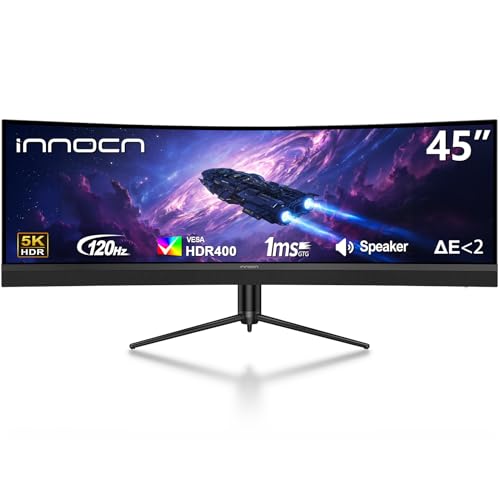
- 45-inch 32:9 display with 5120 x 1440 resolution
- USB-C 65W power delivery suits Mac laptops
- 120Hz, PIP/PBP, and a 1500R curve boost multitasking
Best For: Mac users who need a huge, high-refresh workspace for productivity and mixed use
Premium Motion Champion

- 240Hz QD-OLED panel with 0.03ms response time
- 3440 x 1440 ultrawide fits more easily on a desk
- DisplayHDR TrueBlack 400 and strong color accuracy
Best For: Mac users who want top-tier gaming motion and OLED image quality
Value Speed Pick
Amzfast 34" 240Hz UWQHD Monitor

- 240Hz and 1ms response for fast motion
- 3440 x 1440 resolution in a manageable 34-inch size
- HDR400, PIP/PBP, and ergonomic stand adjustments
Best For: Mac users who want a feature-rich fast ultrawide without paying OLED premiums
Premium Pick
Alienware 34 Curved Gaming Monitor AW3425DWM

- 180Hz refresh rate with 1ms response
- 34-inch 3440 x 1440 ultrawide with 1500R curve
- 95% DCI-P3 and DisplayHDR 400
Best For: Mac users who want a smooth, premium ultrawide for gaming and mixed use
Speed Champion
KOORUI 34" Ultrawide Curved Gaming Monitor G3441XC

- 240Hz refresh rate with 1ms response
- 3440 x 1440 ultrawide with 1500R curve
- PIP/PBP support and HDR400
Best For: Mac users who want maximum speed and multitasking flexibility
Editor’s Pick – LG 34GX90SA-W 34-inch OLED Smart Ultrawide
If you want a high refresh rate ultrawide monitor for Mac that also doubles as a premium gaming display, this LG 34-inch OLED stands out for speed and contrast. The 3440 x 1440 panel, 240Hz refresh rate, and USB-C connectivity make it a strong fit for Mac users who want a single-screen setup with sharp motion and modern convenience.
Best For: Mac users who want a fast OLED ultrawide with USB-C and smart features for work and play.
Pros:
- 240Hz refresh rate and 0.03ms response time for extremely smooth motion.
- OLED panel with deep blacks, up to 98.5% DCI-P3, and DisplayHDR True Black 400.
- USB-C with 65W power delivery plus HDMI 2.1 and DisplayPort 1.4 for flexible hookups.
- webOS built in for streaming apps and cloud gaming without a PC or console.
Cons:
- 800R curve is very aggressive and may not suit every desk setup.
- OLED care features help, but long-term panel care is still something buyers should consider.
This is the most feature-rich option here, especially if you value OLED image quality and want a monitor that can handle both Mac productivity and fast-paced gaming. The smart-platform extras are a bonus, but the core appeal is the combination of ultrawide size, very high refresh rate, and USB-C.
Performance Pick – ASUS TUF 34-inch 250Hz Ultrawide
For shoppers comparing a high refresh rate ultrawide monitor for Mac, this ASUS TUF model is a strong value-focused gaming option. It brings a 3440 x 1440 ultrawide panel, up to 250Hz refresh, and USB connectivity options that make it easy to build a tidy desktop setup with a Mac and accessories.
Best For: Buyers who want a fast ultrawide with lots of gaming features and broad connectivity.
Pros:
- Up to 250Hz refresh rate and 0.5ms response time for fast motion handling.
- FreeSync Premium Pro and ELMB SYNC for reduced tearing and ghosting.
- DisplayHDR 400 support and 95% DCI-P3 color coverage for improved image quality.
- Includes DisplayPort, HDMI 2.1, and USB ports, plus a 3-year warranty.
Cons:
- FastIPS panel is tuned for gaming first, not color-critical creative work.
- HDR400 is entry-level HDR, so don’t expect premium HDR performance.
This ASUS is a practical pick if speed matters more than premium panel tech. It has the refresh rate and features to feel responsive, while still offering enough connectivity and ergonomics for a Mac-based desk.
Value Pick – SANSUI 34-inch 240Hz Fast VA Ultrawide
If you’re shopping for a high refresh rate ultrawide monitor for Mac without jumping to a premium OLED price tier, this SANSUI is worth a close look. It offers a 34-inch 3440 x 1440 curved display, 240Hz refresh rate, and a feature set aimed at fast gameplay and flexible everyday use.
Best For: Budget-minded buyers who want a fast ultrawide with solid gaming extras.
Pros:
- 240Hz refresh rate with 1ms MPRT for smoother motion.
- 3440 x 1440 ultrawide resolution with HDR400, 450 nits brightness, and 97% DCI-P3.
- Two HDMI 2.1 ports and two DisplayPort 1.4 ports for flexible source support.
- Useful gaming extras like AI Crosshair, AI PQ, PIP/PBP, and FreeSync.
Cons:
- No built-in speakers.
- Fast VA panels can be more about contrast and gaming than top-end color accuracy.
This model delivers a lot of specs for the money, especially if your priority is high refresh and ultrawide immersion. It’s a sensible pick for Mac users who want a large desktop canvas and don’t need the most expensive panel technology.
Balanced Pick – ASUS TUF VG34VQ3B 180Hz Curved Ultrawide
This ASUS TUF ultrawide is a good middle-ground choice if you want a high refresh rate ultrawide monitor for Mac but don’t need the absolute fastest panel. The 3440 x 1440 resolution, 180Hz refresh rate, and 1500R curve make it a practical all-rounder for gaming, desk work, and everyday use.
Best For: Users who want a solid ultrawide refresh-rate upgrade with a friendlier price and simpler feature set.
Pros:
- 180Hz refresh rate gives a clear step up in smoothness over standard monitors.
- ELMB SYNC and FreeSync Premium help reduce blur and tearing.
- Built-in speakers add convenience for a cleaner desktop setup.
- Includes DisplayPort, USB, and HDMI connectivity plus a 3-year warranty.
Cons:
- 5ms response time is slower than the faster models in this roundup.
- 90% DCI-P3 is respectable, but not as wide as the color range on some rivals.
For Mac users who want smooth motion and ultrawide productivity without chasing elite-tier specs, this is a balanced option. It offers the essentials in a straightforward package and should fit well in mixed-use setups.
Ultrawide Productivity Giant – INNOCN 45" 5K2K 120Hz Curved Monitor
If you want a high refresh rate ultrawide monitor for Mac with maximum workspace, this 45-inch INNOCN delivers a massive 32:9 5K2K canvas at 120Hz. Its USB-C connection with 65W power delivery makes it a practical single-cable option for Mac laptops, while the 5120 x 1440 resolution and curved panel help keep multitasking, editing, and side-by-side windows comfortable.
Best For: Mac users who want an enormous multitasking display for productivity, content creation, and mixed work-plus-play use.
Pros:
- 45-inch 32:9 ultrawide with 5120 x 1440 resolution and 120Hz refresh rate
- USB-C with 65W power delivery for convenient Mac laptop connectivity
- 1500R curve and height-adjustable stand for a more comfortable viewing setup
- PIP/PBP support for showing two sources on one screen
Cons:
- Very large footprint may be more than many desks can comfortably handle
- VA panel is strong for contrast, but not the same as OLED for premium black levels
- Best value depends on whether you truly need the extra-wide 32:9 format
This is the most expansive option in the group, and it stands out if your priority is screen real estate over compactness. For Mac owners who want a fast, highly productive ultrawide setup, it offers a lot of display for the money.
Premium Motion Champion – Alienware 34 240Hz QD-OLED
For a high refresh rate ultrawide monitor for Mac that leans hard into speed and image quality, the Alienware 34 combines a 240Hz QD-OLED panel with a 3440 x 1440 ultrawide resolution. It is a strong fit if you want exceptionally smooth motion, deep contrast, and vivid color in a more desk-friendly 34-inch format.
Best For: Mac users who prioritize premium gaming performance, OLED contrast, and a refined ultrawide desktop experience.
Pros:
- 240Hz refresh rate and 0.03ms response time for very smooth motion
- QD-OLED panel with DisplayHDR TrueBlack 400 and infinite contrast
- 34.2-inch 3440 x 1440 ultrawide is easier to fit than very large 45-inch models
- USB connectivity plus height, tilt, and swivel adjustments
Cons:
- Smaller screen area than 45-inch super-ultrawide alternatives
- Premium OLED model may be overkill if you mainly need office productivity
- Refresh-rate benefits matter most if your Mac and workload can take advantage of them
This model is the clearest pick for users who value motion clarity and contrast as much as ultrawide real estate. If your Mac setup is meant to feel fast, sharp, and premium, it is the standout performance choice.
Value Speed Pick – Amzfast 34" 240Hz UWQHD Monitor
If you are looking for a high refresh rate ultrawide monitor for Mac without jumping to OLED pricing, the Amzfast 34-inch model pairs 3440 x 1440 resolution with a 240Hz refresh rate. It adds a 1500R curve, HDR400, and a USB-friendly input layout, making it a practical option for gaming and everyday use.
Best For: Mac users who want a fast ultrawide with strong features and a more budget-conscious approach.
Pros:
- 240Hz refresh rate and 1ms response time for fluid motion
- 3440 x 1440 ultrawide resolution in a 34-inch size
- USB-friendly connectivity with dual HDMI 2.1 and DP 1.4 ports
- Height, swivel, pivot, and tilt adjustments improve ergonomics
Cons:
- VA panel will not match OLED for contrast and black-level performance
- Best gaming features are more useful for competitive use than basic Mac productivity
- Not as expansive as 45-inch super-ultrawide monitors for heavy multitasking
This is the balanced choice if you want speed, useful extras, and a more conventional ultrawide footprint. For Mac buyers comparing features per dollar, it is an appealing middle ground.
Premium Pick – Alienware 34 Curved Gaming Monitor AW3425DWM
If you want a high refresh rate ultrawide monitor for Mac that focuses on smooth motion and strong all-around polish, the Alienware 34 Curved Gaming Monitor AW3425DWM is a compelling 34-inch 21:9 option. It offers WQHD 3440 x 1440 resolution, a 180Hz refresh rate, 1ms response time, and a 1500R curve for an immersive desktop layout.
Best For: Mac users who want a smoother ultrawide for gaming, creative work, and general entertainment.
Pros:
- 180Hz refresh rate with 1ms gray-to-gray response for fluid motion
- 34-inch WQHD ultrawide panel with 1500R curve and 21:9 aspect ratio
- 95% DCI-P3 color coverage plus VESA DisplayHDR 400
- Includes adaptive sync support, low blue light, and height/tilt adjustment
Cons:
- Refresh rate is lower than the 240Hz models in this roundup
- Notable focus on gaming features may be more than some Mac workflows need
Overall, this Alienware model balances speed, image quality, and ergonomic features well. If you want an ultrawide that feels premium and responsive without jumping to the most aggressive refresh rate tier, it is an easy one to consider.
Speed Champion – KOORUI 34" Ultrawide Curved Gaming Monitor G3441XC
For shoppers comparing a high refresh rate ultrawide monitor for Mac, the KOORUI 34-inch G3441XC stands out with a 240Hz panel, 3440 x 1440 resolution, and a 1500R curve. It is built for fast motion and multitasking, and its PIP/PBP support makes it easy to juggle multiple devices on one screen.
Best For: Mac users who want a fast ultrawide for gaming plus split-screen productivity.
Pros:
- 240Hz refresh rate with 1ms response time and Adaptive Sync
- 34-inch WQHD 3440 x 1440 ultrawide with 1500R curvature
- 98% DCI-P3 color gamut and HDR400 for richer image quality
- PIP/PBP support plus HDMI 2.1 and DisplayPort 1.4 connectivity
Cons:
- VA panel may not suit everyone’s preference for color behavior
- Glossy screen finish may be less ideal in bright rooms
This KOORUI model is the most speed-focused option here, while still offering strong ultrawide fundamentals for work and play. If maximum refresh rate is the priority, it deserves a close look.
Mac-Friendly Value – LG 34G630A-B UltraGear 34-Inch Ultrawide
The LG 34G630A-B is a strong high refresh rate ultrawide monitor for Mac if you want fast 240Hz performance with everyday usability features. It pairs a 34-inch 3440 x 1440 curved VA panel with 1ms response time, FreeSync Premium, and USB Type-C connectivity for a cleaner desk setup.
Best For: Mac users who want a 240Hz ultrawide with USB-C and a streamlined setup.
Pros:
- 240Hz refresh rate with 1ms response for very smooth motion
- USB Type-C, DisplayPort, and HDMI connectivity for flexible setups
- 34-inch 21:9 WQHD panel with 1500R curvature and slim bezels
- DisplayHDR 400, up to 95% DCI-P3, and built-in speaker support
Cons:
- VA panel and 300 cd/m² brightness may not match every user’s preference
- USB-C PD is limited to 15W, so it is not a full-power laptop charger
Among the three, this LG model is the most practical if you want speed and a simpler single-cable workflow. It is a well-rounded pick for Mac users who value refresh rate, ultrawide space, and desk-friendly connectivity.
How We Picked the Best High Refresh Rate Ultrawide Monitor for Mac
For this roundup, we prioritized models that make sense as a High Refresh Rate Ultrawide Monitor for Mac: strong refresh rates, wide 21:9 or wider aspect ratios, good motion handling, and practical connectivity. We also weighed panel type, resolution, HDR claims, USB-C availability, and whether the monitor is likely to deliver a clean desktop experience on macOS.
Quick Comparison
If you want the smoothest motion and the deepest contrast, OLED models stand out. If you want a bright, more traditional desktop monitor with easier long-session comfort, IPS options are appealing. If you want maximum workspace and multitasking, the larger 45-inch 5K2K-style option offers the most screen real estate.
Key Buying Factors for a High Refresh Rate Ultrawide Monitor for Mac
Resolution and Mac Scaling
Mac users should pay close attention to resolution. A 3440 x 1440 ultrawide is the most common sweet spot, while 5120 x 1440 or 5K2K-style displays can provide more workspace but may require more careful scaling to stay sharp and comfortable.
Refresh Rate and Motion Clarity
Higher refresh rates such as 180Hz, 240Hz, or 250Hz make scrolling feel smoother and reduce blur in games and fast-moving content. For a High Refresh Rate Ultrawide Monitor for Mac, look for a panel that pairs the refresh rate with low response time and solid adaptive sync support.
USB-C, Power Delivery, and Ports
MacBook owners should check for USB-C video input and power delivery if they want a cleaner single-cable setup. Some monitors in this category rely on HDMI or DisplayPort, so confirm the connection path before buying. Built-in USB hubs and KVM features can also help if you switch between a Mac and another device.
Panel Type and Use Case
OLED is best for contrast, black levels, and premium gaming feel. Fast IPS is a safer all-around choice for productivity and bright office environments. VA can be a good value pick, especially if you want a curved panel and high contrast without jumping to OLED pricing.
Who Should Buy Which High Refresh Rate Ultrawide Monitor for Mac?
Creative professionals and gamers who want the most premium image quality should lean toward OLED. Mac users who work all day and game occasionally may prefer a fast IPS ultrawide for broader versatility. Buyers chasing maximum multitasking space should consider the larger 45-inch option, while value-focused shoppers will usually get the best balance from a 34-inch 3440 x 1440 model with at least 180Hz refresh.
In short, choose the display that matches how you use your Mac most: motion quality, workspace size, or a blend of both.