Choosing a KVM switch with audio support for Mac can simplify a cluttered desk fast, especially if you move between a MacBook, Mac mini, and a second computer.
The best options balance Mac compatibility, reliable video switching, audio passthrough, and the right mix of USB-C, HDMI, VGA, or docking features for your setup.
Best 10 KVM Switch with Audio Support for Mac Picks for 2026
Simple VGA Mac KVM
2-port Mac KVM with audio and mic support

- 2.1 stereo audio plus microphone support
- Compatible with Mac, PC, and Sun
- No drivers or power adapter needed
Best For: Older Mac setups needing easy two-PC VGA switching
Dual-monitor Mac docking KVM
4K dual-monitor KVM dock with audio and Ethernet

- Adds 3.5mm audio, Ethernet, and USB ports
- 100W USB-C charging for laptops
- MacOS support is mirrored mode only
Best For: Mac desk setups needing a dual-monitor dock and KVM in one
Mouse-roaming audio KM switch
4-port KM switch with independent audio switching

- Mouse roaming across monitor layouts
- Independent USB and 3.5mm audio switching
- Works with macOS, Windows, and Linux
Best For: Multi-computer users who want fast mouse switching and audio control
MacBook dual-HDMI KVM dock
MacBook and PC KVM dock with dual HDMI and audio

- Built for MacBook + Windows PC setups
- Adds 3.5mm audio, Ethernet, and USB ports
- Plug-and-play with no drivers required
Best For: MacBook users needing a dual-monitor dock for one Mac and one PC
Mac-Friendly VGA Audio Starter
2-Port VGA Audio KVM for Mac and PC

- Mac OS compliant for simple two-computer sharing
- Includes KVM cables for immediate setup
- 3.5mm speaker and mic jacks add audio support
Best For: Two older VGA computers needing easy Mac-compatible switching
USB-C Dual-Monitor Desk Dock
Dual HDMI KVM Dock for Two Laptops

- Combines KVM switching and docking in one unit
- 3.5mm headset, Ethernet, SD, and USB ports included
- Mac users should expect mirrored displays because MST isn’t supported
Best For: Home office users with two laptops and dual HDMI monitors
Four-Computer Legacy Workhorse
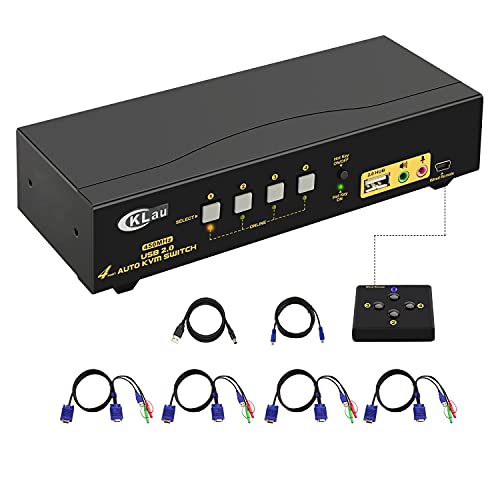
- Controls up to 4 VGA computers from one console
- Mac, Windows, and Linux compatibility are listed
- Audio, mic output, and USB 2.0 hub are included
Best For: Four-computer VGA setups that need Mac compatibility and audio
Mixed-Input 4K Desktop Hub
Hearvo USB 3.0 HDMI + USB-C KVM Switch

- Mixed HDMI + USB-C host support
- 4 USB ports for shared peripherals
- 4K@60Hz with wired remote control
Best For: PC and Mac mini users needing one-monitor switching
USB-C Audio Sharing Pick
Lemorele USB-C KVM Switch for 2 USB-C Devices

- Built-in 3.5mm audio jack
- 4K@60Hz with 100W PD charging
- Direct USB-C DP Alt Mode connection required
Best For: Dual USB-C laptops that need audio, video, and charging
USB-C 4K Audio Switch
Lemorele USB C KVM Switch with 100W PD
- 3.5mm audio support for headset use
- 4K@60Hz video with one-button switching
- 100W PD charging and shared USB ports
Best For: USB-C laptop users who want audio, 4K, and charging
Simple VGA Mac KVM – 2-port Mac KVM with audio and mic support
If you need a straightforward KVM switch with audio support for Mac, the IOGEAR GCS72U is built for simple two-computer sharing. It lets you control two systems with one USB keyboard, mouse, and VGA monitor, while also adding 2.1 stereo audio and microphone support for a cleaner desktop setup.
Best For: Mac users who want a basic, plug-and-play VGA KVM with audio and mic support for two computers.
Pros:
- Supports PC, Mac, and Sun platforms with no software drivers required
- Includes 2.1 stereo audio and microphone support
- One-touch pushbutton switching keeps operation simple
- No power adapter required; powered through USB
Cons:
- Uses VGA rather than modern HDMI or USB-C video
- Designed for only two computers
- Attached cables may limit placement flexibility
For older Mac setups that still rely on VGA, this model offers a practical mix of simplicity and audio pass-through. It is best when you want a compact, driver-free switch and do not need advanced display features.
Dual-monitor Mac docking KVM – 4K dual-monitor KVM dock with audio and Ethernet
For a KVM switch with audio support for Mac that also works as a docking station, the AV Access KD-E10 focuses on a full desk setup. It connects two computers to two monitors and adds 3.5mm AUX audio, Ethernet, USB ports, and USB-C charging in one unit.
Best For: Mac users building a dual-monitor workstation who want docking features, audio, and wired networking in one switch.
Pros:
- Combines KVM switching with docking-station features
- Includes 3.5mm AUX audio and 1G Ethernet
- Offers 100W USB-C charging support
- Supports 4K at 60Hz and fast button switching
Cons:
- macOS only supports mirrored mode
- Desktop connection requires USB-B, HDMI, and DP cables
- More complex than a basic KVM switch
This is a strong pick if you want one device to handle switching, charging, and peripheral expansion. Just note the macOS display limitation before choosing it for a Mac-based setup.
Mouse-roaming audio KM switch – 4-port KM switch with independent audio switching
If your priority is smooth workflow rather than full video switching, this StarTech KM switch is a smart fit for a KVM switch with audio support for Mac-style multi-device work. It focuses on keyboard and mouse sharing, independent audio switching, and USB 3.0 peripheral sharing across up to four systems.
Best For: Users who want keyboard, mouse, and audio switching across multiple Macs or mixed operating systems.
Pros:
- Mouse roaming lets you switch by moving the cursor between monitors
- Independent audio switching lets audio stay on one computer while controlling another
- Supports macOS, Windows, and Linux
- Includes USB audio and 3.5mm pass-through options
Cons:
- It is a KM switch, not a full video KVM
- Designed for keyboard/mouse sharing rather than display switching
- May be more than needed for simple two-computer setups
This model stands out for users who want faster pointer-based switching and flexible audio handling. It makes the most sense in productivity environments where the monitors stay put and the input devices do the switching.
MacBook dual-HDMI KVM dock – MacBook and PC KVM dock with dual HDMI and audio
This AV Access dock is a purpose-built KVM switch with audio support for MacBook users who also want dual-monitor productivity. It is designed for one MacBook plus one Windows PC, and it combines dual HDMI switching, 3.5mm audio, Ethernet, and USB expansion in a plug-and-play package.
Best For: MacBook owners pairing one laptop with one PC and wanting dual HDMI monitors plus audio and docking features.
Pros:
- Designed specifically for MacBook and PC combinations
- Includes 3.5mm audio, USB ports, SDXC, and 1G Ethernet
- Supports dual extended displays on compatible MacBook chips
- Plug-and-play with no drivers or DisplayLink software
Cons:
- Not compatible with Mac Mini or Mac Studio
- M1/M2 MacBooks support only one external monitor
- Dual external displays on some Macs require the lid to be closed
For MacBook-focused setups, this is one of the most complete switch-and-dock options in the group. Its value depends heavily on matching your Mac model to the supported display behavior.
Mac-Friendly VGA Audio Starter – 2-Port VGA Audio KVM for Mac and PC
If you need a KVM switch with audio support for Mac and older VGA-based setups, the TRENDnet TK-209K is a straightforward way to control two computers from one desk. It supports Windows, Linux, and Mac OS, includes the needed KVM cables, and adds 3.5mm speaker and microphone jacks so you can keep audio on the same shared workspace.
Best For: Users with two VGA computers who want simple Mac-compatible switching plus shared audio and mic support.
Pros:
- Compliant with Windows, Linux, and Mac OS
- Includes 2 KVM cable sets for quick setup
- 3.5mm audio and microphone jacks support shared sound
- No driver installation required
Cons:
- Built around VGA/SVGA connections, not HDMI or USB-C
- Only supports up to 2 computers
- Best suited for older display setups up to 2048 x 1536
Overall, this is a practical pick if your Mac setup still relies on VGA and you want a basic, plug-and-play switch with audio. The included cables and low-power design make it easy to deploy without extra accessories.
USB-C Dual-Monitor Desk Dock – Dual HDMI KVM Dock for Two Laptops
For a modern KVM switch with audio support for Mac, this AV Access KVM dock is aimed at users who want one USB-C hub to handle two laptops, dual HDMI monitors, and shared peripherals. It combines KVM switching with docking features, includes a 3.5mm headset port, and adds Ethernet, SD, and USB ports for a more complete desk setup.
Best For: Dual-laptop users who want a USB-C KVM dock with shared audio, dual displays, and docking features.
Pros:
- Shares two HDMI monitors and two laptops from one dock
- Includes a 3.5mm headset port plus Ethernet and SD slot
- USB-C ports provide data transfer and up to 60W charging per PC
- Plug-and-play setup with no drivers required
Cons:
- Mac OS does not support MST, so mirror mode is expected
- Extended dual-screen mode depends on compatible USB-C DP MST devices
- Not compatible with 5K monitors
This is a strong choice if you want a cleaner Mac-based workstation and can work within the Mac display limitations noted by the manufacturer. The fast switching, built-in charging, and broad port mix make it well suited to a home office.
Four-Computer Legacy Workhorse – 4-Port VGA Audio KVM for Mac
If you need a KVM switch with audio support for Mac across multiple legacy machines, this CKLau 4-port VGA model gives you a simple way to control up to four computers from one keyboard, mouse, and monitor setup. It supports Mac along with Windows and Linux, includes audio and microphone output, and comes with four cable kits for a more complete install.
Best For: Users who need to switch between four VGA computers and want audio plus Mac support.
Pros:
- Supports up to 4 VGA computers
- Compatible with Mac, Windows, Linux, and several Linux-based distributions
- Includes audio, microphone output, and a USB 2.0 hub
- Offers multiple switching methods, including hotkeys and remote push button
Cons:
- Limited to VGA connections, so it is not for HDMI or USB-C setups
- Best resolution support is tied to older displays
- Button switching and remote push button switching cannot be used together
For mixed Mac and legacy-PC environments, this is a practical four-way switch that keeps setup simple and adds the audio connections many basic KVMs leave out. It is best if your workspace still centers on VGA displays and you want flexible control methods.
Mixed-Input 4K Desktop Hub – Hearvo USB 3.0 HDMI + USB-C KVM Switch
If you need a KVM switch with audio support for Mac mini or a mixed PC-and-Mac setup, this Hearvo model is built around that use case. It lets two computers share one monitor plus USB peripherals, with one host using HDMI and USB-A while the other uses a full-function USB-C connection for both video and data. The 4K@60Hz output and adaptive EDID make it a practical choice for a clean desk and stable daily switching.
Best For: PC and Mac mini users who want one monitor, shared USB devices, and a compact switching setup.
Pros:
- Supports mixed HDMI + USB-C input for two computers
- Shares 4 USB ports, including 3 USB-A and 1 USB-C, for peripherals
- Outputs up to 4K@60Hz with HDCP 2.2 support
- Includes button and wired remote switching options
Cons:
- Audio support is not called out in the supplied notes
- One computer must connect by HDMI + USB-A, which may not fit every setup
- Best suited to desktop-style setups rather than highly mobile use
Overall, this Hearvo switch stands out for mixed-device flexibility, especially if you are pairing a Mac mini with another computer. It focuses on straightforward plug-and-play operation, stable resolution handling, and practical peripheral sharing instead of extra features.
USB-C Audio Sharing Pick – Lemorele USB-C KVM Switch for 2 USB-C Devices
This KVM switch with audio support for Mac is aimed at users who have two USB-C devices with DP Alt Mode and want to share a monitor, peripherals, and headphones through one compact box. It supports 4K@60Hz video, includes a 3.5mm audio jack, and adds 100W PD charging, making it a strong fit for modern laptop-based desks. Just note the connection rules carefully, since it must connect directly to the host devices and is not meant to sit behind a dock or hub.
Best For: Dual USB-C laptop users who need audio sharing, 4K display support, and charging in one switch.
Pros:
- Includes a 3.5mm audio jack for headphones and built-in microphones
- Supports 4K@60Hz video output
- Offers 100W PD charging with up to 60W to the active laptop
- Works with Windows, Mac, Linux, Android, and iOS according to the notes
Cons:
- Requires USB-C ports with DP Alt Mode/full-function video output
- Not recommended for desktop hosts without suitable USB-C video ports
- Cannot be daisy-chained through a dock or hub
For a Mac laptop setup, the appeal is simple: one switch handles display, USB peripherals, audio, and power in a compact format. The tradeoff is that you need the right USB-C ports and a direct connection, so it is best for well-matched modern devices rather than mixed legacy hardware.
USB-C 4K Audio Switch – Lemorele USB C KVM Switch with 100W PD
If you want a KVM switch with audio support for Mac and a modern USB-C workflow, this Lemorele model offers the basics in a compact package. It is designed for two USB-C output devices sharing one HDMI display, plus USB peripherals and headphones with built-in microphones. With 4K@60Hz output and 100W PD support, it fits best on a laptop-focused desk where simple one-button switching matters.
Best For: Mac and laptop users who want 4K switching, audio sharing, and USB-C charging in one unit.
Pros:
- Supports 3.5mm audio use through headphones with built-in microphones
- Outputs up to 4K@60Hz
- Includes 100W PD fast charging support
- Shares multiple USB ports for keyboards, mice, and USB storage
Cons:
- Requires USB-C video output support on both connected devices
- Designed for two USB-C sources, not mixed HDMI + USB-C hosts
- Needs an HDMI 2.0 cable and proper display support for 4K use
This is a solid fit if your Mac setup revolves around USB-C laptops or similarly equipped devices and you want audio plus charging in a single switch. It is less flexible than mixed-input models, but the one-button operation and clean peripheral sharing make it easy to live with day to day.
How We Picked the Best KVM Switch with Audio Support for Mac
For this roundup, we focused on models that make sense for Mac users first: stable input switching, audio support, clear display compatibility, and practical port layouts. We also favored products that reduce desk clutter without creating setup headaches, whether you need a simple two-computer switch or a more advanced docking-style unit.
We looked at video limits, USB device sharing, microphone and speaker support, power delivery, and whether the switch works cleanly with Mac laptops and desktops. For buyers comparing a KVM Switch with Audio Support for Mac, those details matter more than raw feature counts.
Quick Comparison
If you want the simplest path, a basic 2-port USB KVM is usually the easiest and most affordable choice. If you use dual monitors, look for dual-display support and confirm whether the unit handles mirroring or extended desktop properly on Mac. If you also want to charge a MacBook, prioritize USB-C models with Power Delivery and enough wattage for your laptop.
Docking-style KVMs are the best fit when you want to connect a MacBook like a workstation, while VGA-based models can still be useful for older office hardware. Audio pass-through can be a small detail on paper, but it is essential if you use desktop speakers, a headset, or a microphone during calls.
Key Buying Factors for a KVM Switch with Audio Support for Mac
Mac Video Compatibility
Check whether the switch supports HDMI, USB-C DisplayPort Alt Mode, or older VGA connections. For MacBook and Mac mini users, USB-C and HDMI are typically the most future-proof choices.
Audio Routing
Make sure the unit supports both speaker and microphone sharing if you need conferencing or voice chat. Some switches handle only stereo output, while others include mic passthrough or separate 3.5mm connections.
USB Peripherals
Keyboard and mouse sharing is standard, but not every model performs equally with webcams, headsets, printers, flash drives, or audio interfaces. If you use more than basic peripherals, choose a switch with multiple downstream USB ports.
Power Delivery and Docking Features
Many MacBook users benefit from built-in charging. A USB-C KVM with Power Delivery can replace both a dock and a switch, but verify the wattage is enough for your machine under load.
Single Vs. Dual Monitor Support
Dual-monitor setups demand extra care. Confirm the switch supports your resolution and refresh rate, and check whether Mac extended display behavior is fully supported in the mode you want.
Who Should Buy Which KVM Switch with Audio Support for Mac?
Choose a simple 2-port KVM if you only need to share one monitor, one keyboard, one mouse, and speakers between a Mac and another computer. Pick a dual-monitor USB-C KVM if you want a cleaner all-in-one desk setup for a MacBook or Mac mini. Go with a docking-style model if you want charging, extra USB ports, and Ethernet in one box. Budget shoppers can still get solid audio sharing from basic USB/VGA or USB/HDMI switches, as long as they match the ports on their gear.
In short, the best KVM Switch with Audio Support for Mac is the one that fits your display setup, charging needs, and peripheral mix without forcing adapters everywhere.