Building a cleaner, faster Mac setup starts with the right support gear. A strong workstation stand can improve posture, reduce desk clutter, and make dual-screen workflows feel effortless.
In this roundup, we focus on options that balance Mac-friendly connectivity, stable laptop support, and practical monitor positioning for work-from-home and office setups.
Best 10 Mac Workstation Laptop and Monitor Stand Picks for 2026
Flexible Desk Mount
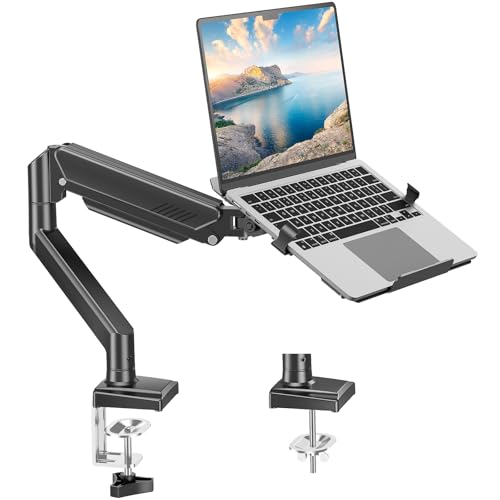
- 2-in-1 arm switches between laptop tray and monitor mode
- Full-motion adjustments help improve viewing comfort
- Clamp or grommet mounting fits many desk setups
Best For: People who want an adjustable single-arm setup for a laptop or monitor
Dual Screen Arm

- Holds two 32-inch monitors plus a 17-inch laptop tray
- Tilt, swivel, and rotation help fine-tune screen placement
- C clamp and grommet mounts support different desks
Best For: People building a full dual-monitor plus laptop workstation
Freestanding Dual-Screen Pick
VIVO Laptop + Monitor Glass Base Stand

- Holds a 32-inch monitor and 17-inch laptop
- Freestanding tempered glass base adds stability
- Tilt, swivel, rotation, and height adjustment
Best For: Freestanding dual-screen setups with flexible positioning
Docking Stand for Mac
Mukiya USB-C 9-in-1 Laptop Dock
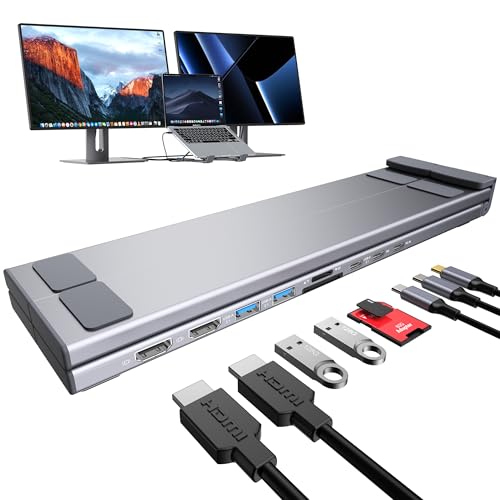
- Includes dual HDMI, USB, SD/TF, and 100W PD
- Foldable stand adjusts through 9 height levels
- Mac support is mirror mode only on macOS
Best For: Portable MacBook docking and laptop elevation
Clamp-Mount Workstation
Afaloona Dual Monitor and Laptop Stand
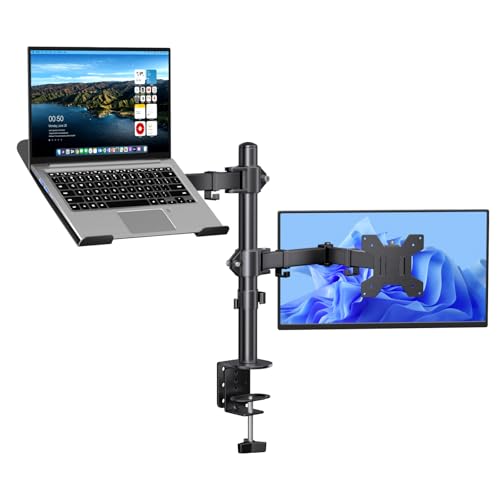
- Supports one monitor and one laptop at once
- Removable tray converts it to dual monitor use
- Clamp mount and cable clips save desk space
Best For: Space-saving desk setups with upgrade flexibility
Active Standing Desk Upgrade
Tounee Telescopic Swivel Laptop Stand

- 2.1" to 21" height range
- 360° swivel base for easy screen movement
- Aluminum build supports up to 22 lbs
Best For: People who want to switch between sitting and standing at their desk
Storage-Friendly Desk Riser
WESTREE Dual Monitor Stand with Laptop Shelf

- Five-level adjustable middle shelf
- Two drawers for desk storage
- Thick steel frame with anti-slip support
Best For: People who want screen height plus built-in desktop storage
Portable Docking Workstation

- Built-in 8-in-1 docking station
- Up to 85W laptop charging output
- Foldable 9-level adjustable design
Best For: MacBook users who want a portable stand with built-in ports
Mac Workstation Hub – Dual Monitor Docking Stand with SSD
If you want a Mac workstation laptop and monitor stand that does more than hold your laptop, this vertical dock is built to consolidate a busy setup. It combines a laptop stand, dual 4K@60Hz HDMI output, wired networking, fast USB ports, card slots, and an M.2 NVMe SSD enclosure in one unit, which makes it a strong fit for desk setups that need fewer accessories and cleaner cable flow.
Best For: MacBook users who need a vertical stand plus dual-monitor dock, fast storage expansion, and wired connectivity in one device.
Pros:
- 10-in-1 design includes dual HDMI, 100W PD, Ethernet, USB-C, USB-A, SD/TF, and M.2 SSD enclosure.
- Vertical laptop stand helps save desk space and supports passive cooling during long sessions.
- Dual 4K@60Hz output is supported for compatible MacBook Pro/Air models, including M-series Pro/Max and M4/M5 chip variants.
- 10Gbps ports and Gigabit Ethernet are useful for fast file transfers and stable online work.
Cons:
- Not compatible with base M1/M2/M3 chips, MacBook Neo, Windows, or iPad.
- SSD is not included, and SATA SSDs or heatsink SSDs are not supported.
- Dual display support depends on specific Mac chip compatibility.
Overall, this is a practical choice if your priority is combining docking, storage, and a vertical stand into a single Mac-focused workstation piece. It is especially appealing for users who want a streamlined setup without sacrificing external display support or wired connectivity.
Flexible Desk Mount – Laptop or Monitor Arm Stand
This Mac workstation laptop and monitor stand is designed for people who want more flexibility than a fixed riser. The 2-in-1 arm can hold a laptop tray for notebooks up to 17 inches or switch to a monitor setup for 13-32 inch displays, making it a good fit if you move between laptop work and a single-screen desktop arrangement.
Best For: Users who want one adjustable arm that can handle either a laptop tray or a single monitor.
Pros:
- 2-in-1 design works as a laptop tray or a monitor arm, depending on your setup.
- Full-motion adjustment includes tilt, swivel, and 360-degree rotation for positioning.
- Ventilated tray, anti-slip pads, and locking latches help keep the laptop secure and cooler.
- Clamp and grommet mounting options make it adaptable to different desks.
Cons:
- It is for one laptop or one monitor mode at a time, not both simultaneously.
- The monitor setup requires VESA compatibility and weight limits must be followed.
- The tray should not be rotated vertically when used with a laptop.
If you want an adjustable workstation upgrade that can change with your workflow, this arm gives you a lot of positioning freedom. It is a smart pick for cleaner desks, better ergonomics, and users who do not need dual displays.
Ergo Dock Stand – USB-C Laptop Stand with 7-in-1 Hub
For a compact Mac workstation laptop and monitor stand, this BENFEI model blends an adjustable laptop riser with a useful USB-C dock. It adds 4K@60Hz HDMI, SD and microSD slots, 100W power delivery, and multiple 10Gbps ports, so it suits users who want a cleaner desk without giving up everyday connectivity.
Best For: MacBook and USB-C laptop users who want an adjustable stand with a built-in dock for display, charging, and file transfers.
Pros:
- Adjustable height and angle help set a more comfortable working position.
- 7-in-1 hub includes HDMI 4K@60Hz, SD, microSD, USB-C, and USB-A ports.
- 100W power delivery keeps the laptop charged while using the dock.
- 10Gbps data ports and fast card reading support quick transfers.
Cons:
- It supports a single display output through HDMI, not dual-monitor expansion.
- Weight capacity and compatibility should be checked against your device before buying.
- The hub is built into the stand, so port selection is more limited than a larger dock.
This is a strong pick if you want a tidy, all-in-one stand for everyday desk use rather than a more complex workstation dock. It balances ergonomics and essential connections well for office work, study, and travel-friendly setups.
Dual Screen Arm – Laptop Tray and Monitor Mount
If your Mac workstation laptop and monitor stand needs to support a true multi-screen layout, this HUANUO arm is built for that job. It can hold two 32-inch monitors plus a 17-inch laptop tray, giving you a combined setup that saves desk space while keeping all three screens positioned in a more organized way.
Best For: Users who want to run dual monitors and a laptop tray from one mount.
Pros:
- Supports two monitors and a laptop tray at the same time for a more integrated workspace.
- Wide range of tilt, swivel, and rotation adjustments makes screen positioning flexible.
- C clamp and grommet options add mounting versatility across different desks.
- Designed to free up desktop space while supporting a more ergonomic viewing angle.
Cons:
- Requires VESA-compatible monitors up to 32 inches and within the stated weight limits.
- Grommet mounting is limited to wooden and plastic desks.
- The laptop tray is meant for notebook use, so buyers should stay within the size and support limits.
This is the most workstation-focused option in the group if you want a laptop plus dual-monitor arrangement on one mount. It is a solid fit for users who value screen flexibility, desk organization, and a more complete home-office layout.
Freestanding Dual-Screen Pick – VIVO Laptop + Monitor Glass Base Stand
If you want a Mac workstation laptop and monitor stand that keeps both screens elevated without clamping to the desk, this VIVO freestanding combo is a practical option. It supports a monitor up to 32 inches alongside a laptop up to 17 inches, with full articulation for dialing in a comfortable viewing position.
Best For: Users who want a freestanding laptop-and-monitor setup with a stable glass base and flexible positioning.
Pros:
- Supports one monitor up to 32 inches and one laptop up to 17 inches
- Full adjustment with tilt, swivel, rotation, and height changes
- Tempered glass base adds stability and desk protection
- Includes cable clips and a detachable VESA plate for easier setup
Cons:
- Best practices warn against pulling the screens too far forward or back unless bolted down
- Freestanding base takes more desk surface than a clamp-style mount
Overall, this is a versatile workstation stand for users who value adjustability and a clean, non-clamping layout. The laptop tray and monitor arm make it straightforward to build a compact dual-screen desk setup.
Docking Stand for Mac – Mukiya USB-C 9-in-1 Laptop Dock
This Mac workstation laptop and monitor stand combines an adjustable laptop riser with a USB-C dock, making it useful when you want one compact hub for peripherals and external displays. It supports laptops from 10 to 17 inches and includes dual 4K HDMI ports, USB ports, SD/TF slots, and up to 100W PD charging.
Best For: MacBook and USB-C laptop users who want a portable stand with built-in connectivity.
Pros:
- 9-in-1 hub with 2 HDMI, USB ports, SD, TF, and PD charging
- Adjustable 9-level laptop stand helps improve viewing angle
- Foldable, lightweight aluminum design with carry bag
- Supports up to 40 lbs and includes silicone pads for grip
Cons:
- On macOS, it supports mirror mode only, not extended desktop mode
- Video output requires a Thunderbolt or full-featured USB-C port
For Mac users who mainly need a travel-friendly docking stand rather than a true multi-monitor extension setup, this is a strong all-in-one pick. Just make sure your USB-C port supports the required video and power features before buying.
Clamp-Mount Workstation – Afaloona Dual Monitor and Laptop Stand
If your goal is a tidy Mac workstation laptop and monitor stand that frees up desk space, this clamp-mounted dual arm setup is built for that job. It holds one 13 to 32 inch monitor and one 11 to 17 inch laptop, and the removable laptop tray lets you switch to a dual-monitor arm layout later.
Best For: Desk setups that need a clamp-on dual arm with a removable laptop tray.
Pros:
- Supports a 13 to 32 inch monitor plus an 11 to 17 inch laptop
- Removable laptop tray converts the setup into a dual monitor arm
- Full motion adjustments with tilt, swivel, rotation, and height changes
- Built-in cable clips and clamp installation help keep the desk organized
Cons:
- Clamp mount requires a desk edge and will not suit every surface
- Each arm supports up to 18 lbs, so heavier displays are out of range
This is a strong option if you want a flexible, space-saving workstation with straightforward ergonomics. The removable tray makes it especially useful for people who may later want to run two monitors instead of a laptop-plus-monitor layout.
Active Standing Desk Upgrade – Tounee Telescopic Swivel Laptop Stand
If you want a Mac workstation laptop and monitor stand that helps you change positions during the day, this Tounee riser is built around sit-to-stand flexibility. It raises your laptop from a low desk position to a more comfortable viewing height, and the 360° rotating base makes it easier to share your screen or adjust angles without moving the whole setup.
Best For: Users who want a height-adjustable laptop stand for alternating between sitting and standing.
Pros:
- Height adjusts from 2.1″ to 21″ for sit-to-stand use
- 360° swivel base supports easy screen repositioning
- Aluminum alloy build and heavy base are rated to hold up to 22 lbs
- Folds for storage and works with laptops from 10″ to 17″
Cons:
- Designed for laptop elevation rather than full monitor mounting
- Single-laptop format may not suit dual-screen workstation needs
For a mobile-friendly workstation upgrade, this stand focuses on posture support, stability, and screen flexibility. It is a practical choice if your priority is a compact riser that encourages better working positions throughout the day.
Storage-Friendly Desk Riser – WESTREE Dual Monitor Stand with Laptop Shelf
This WESTREE model works well as a Mac workstation laptop and monitor stand when you want screen lift plus extra desk organization. The middle shelf is adjustable in five levels, and the steel frame is paired with two slide-out drawers for keeping small accessories close at hand while raising your laptop or monitor to a more comfortable viewing height.
Best For: Desk setups that need elevation, storage, and a tidier workspace.
Pros:
- Adjustable 5-level middle shelf for laptop placement
- Two slide-out drawers add practical storage
- Thick steel frame is built for stronger load support
- Anti-slip pad and snowflake shape help keep a laptop in place and cooler
Cons:
- Requires a larger desktop footprint than a simple riser
- Best suited to fixed desk use rather than portable setups
For users who want organization as much as ergonomics, this stand offers a useful middle ground. It is especially appealing if you want a single desktop piece that can help clean up clutter while lifting your screen.
Portable Docking Workstation – 8-in-1 USB-C Laptop Stand Hub
If your Mac workstation laptop and monitor stand needs to do more than just lift the computer, this foldable hub stand adds useful connectivity in one portable piece. It combines adjustable laptop elevation with an 8-in-1 docking station, including HDMI, USB-A, USB-C, and card slots, so it can help simplify a travel or desk setup without adding a separate dock.
Best For: MacBook users who want a stand and USB-C hub in one portable unit.
Pros:
- 8-in-1 hub includes 4K HDMI, USB ports, and SD/TF slots
- Provides up to 85W charging output for the laptop
- Foldable, lightweight design comes with a storage bag
- 9-level height adjustment and silicone pads support stable positioning
Cons:
- HDMI output depends on USB-C DisplayPort Alt Mode support
- Not intended for high-power devices or multiple hard drives
This is a strong option if you want to reduce desk clutter while keeping essential connections within reach. The added ports make it more versatile than a basic riser, especially for users who move between home, office, and travel.
How We Picked the Best Mac Workstation Laptop and Monitor Stand
For this Mac Workstation Laptop and Monitor Stand roundup, we prioritized products that solve real desk problems: better ergonomics, reliable device support, and connectivity that helps a Mac user work without extra adapters. We favored stands and mounts with stable construction, useful height or angle adjustment, and docking features that reduce cable mess.
Quick Comparison
The strongest picks generally fall into three groups: dock-and-stand hybrids for users who need ports and video output, arm-based mounts for a more flexible dual-screen layout, and riser-style stands for users who want a simpler, cleaner desktop. Your best choice depends on whether you value expandability, adjustability, or the smallest footprint.
Key Buying Factors for Mac Workstation Laptop and Monitor Stand
Connectivity and Mac Compatibility
If you rely on a MacBook as your main computer, check that the stand or dock supports the ports you need, including HDMI output, USB-A or USB-C peripherals, Ethernet, SD card access, and USB-C power delivery. Confirm whether the display setup matches your Mac model’s external monitor support.
Ergonomics and Adjustability
A good workstation setup should place the screen near eye level and keep the keyboard and trackpad within comfortable reach. Look for tilt, swivel, rotation, arm articulation, or height adjustment if you want to fine-tune your posture throughout the day.
Load Capacity and Stability
For a laptop and monitor combo, stability matters more than flashy features. Check the weight limits, VESA support where applicable, base design, and clamping method so the stand stays steady during typing, docking, and daily adjustments.
Desk Space and Cable Management
Some buyers need maximum desk clearance; others want a low-profile riser or a free-standing base. Consider whether drawers, hub integration, and cable routing will actually help keep your workspace organized.
Who Should Buy Which Mac Workstation Laptop and Monitor Stand?
If you want a compact all-in-one setup, choose a dock-style stand with video output and charging. If you use multiple displays and adjust your desk often, an articulated arm mount is usually the better fit. If your priority is comfort and simplicity, a telescopic riser or monitor stand may be enough. The best Mac Workstation Laptop and Monitor Stand for you is the one that matches your workflow, desk size, and port needs without adding extra friction.