Choosing the right ultra wide drawing tablet for Mac comes down to display quality, pen accuracy, comfort, and how well it fits your creative workflow.
Whether you want a pen display for detailed illustration or a more portable tablet for sketching on the go, this roundup focuses on the best options worth buying in 2026.
Best 10 Ultra Wide Drawing Tablet for Mac Picks for 2026
Premium 4K pen display
Wacom Cintiq Pro 22, 21.5" 4K Touch

- 21.5-inch 4K display with 120Hz refresh
- Pro Pen 3 with 8192 pressure levels
- 8 ExpressKeys plus 10-point multi-touch
Best For: Professional Mac artists needing a large premium pen display
Portable standalone sketch tablet
HUION Kamvas Slate 11, 10.95" Android

- Standalone Android 14 tablet with no computer needed
- 10.95-inch FHD+ display with 99% sRGB
- 90Hz screen and anti-glare laminated surface
Best For: Portable sketching, notes, and travel drawing
Wireless screenless pro tablet
Wacom Intuos Pro Medium, Bluetooth 2025

- Pro Pen 3 with 8192 pressure levels
- 16:9 format fits wide monitor setups
- 10 ExpressKeys and 2 mechanical dials
Best For: Mac users who want a slim wireless pen tablet
Compact color-accurate pen display
HUION Kamvas 13 Gen 3, 13.3" pen display

- 13.3-inch full-laminated anti-glare display
- 16384-pressure PenTech 4.0 stylus
- Factory-calibrated color with dual dials
Best For: Mac users wanting a portable connected pen display
Premium pen display
Wacom Cintiq 16 16-inch 2.5K Mac/PC

- 16-inch 2.5K IPS display
- Pro Pen 3 with 8,192 levels
- 99% DCI-P3 and 100% sRGB
Best For: Mac artists who want Wacom pen precision and vivid color
OLED touch pro display
XPPen Artist Ultra 16 4K OLED Touch

- 15.6-inch 4K OLED with touch
- 99% Adobe RGB and 10-bit color
- Two styluses plus shortcut remote
Best For: Mac creators who want premium color, touch gestures, and OLED contrast
Beginner-friendly pen display
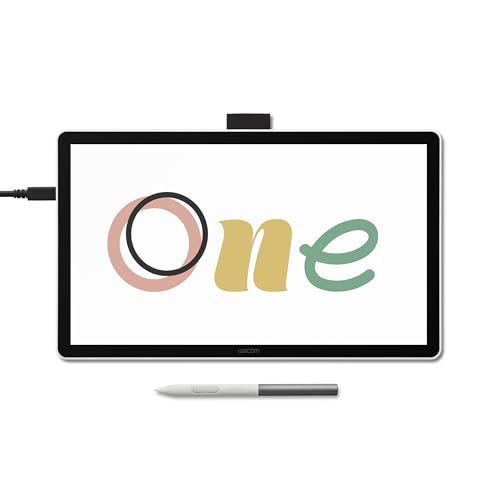
- 14-inch laminated Full HD screen
- 98% sRGB with anti-glare glass
- Includes software trials and training
Best For: Beginners and students who want a simple, dependable Mac drawing display
Compact Color-Packed Pick

- Full-laminated 13.3-inch screen with Canvas Glass 2.0
- 16,384 pressure levels and dual dial controls
- Works with Mac OS 10.12+ plus Windows, Android, and Linux
Best For: Mac users who want a compact, color-accurate pen display with strong controls
Feature-Rich Studio Choice

- Full-laminated 13.3-inch screen with anti-glare film
- 16K pressure stylus plus red dial and 8 shortcut keys
- USB-C connection supports compatible Mac, Windows, Chromebook, and Android devices
Best For: Mac creators who want a portable pen display with a cleaner cable setup
Balanced Large-Canvas Pick

- 15.6-inch full-laminated anti-glare display
- 16,384 pressure levels with X3 Pro stylus
- 8 shortcut keys, red dial, and Mac compatibility
Best For: Mac users who want a larger pen display for comfortable all-day drawing
Premium 4K pen display – Wacom Cintiq Pro 22, 21.5" 4K Touch
If you want an ultra wide drawing tablet for Mac experience with a large, color-accurate screen, the Wacom Cintiq Pro 22 is built for demanding creative work. Its 21.5-inch 4K display, 120Hz refresh rate, and Pro Pen 3 make it a strong fit for illustrators, animators, and 3D artists who want responsive pen input on macOS.
Best For: Professional Mac users who want a premium large-screen pen display for illustration, animation, and design.
Pros:
- 21.5-inch Ultra HD 4K display with 120Hz refresh for smooth, low-latency drawing
- Pro Pen 3 includes 8192 pressure levels, side switches, and customizable grip/balance options
- 10-point multi-touch plus 8 ExpressKeys and on-screen menus for efficient workflow control
- Works with macOS and includes a stand, cable set, and extra pen accessories
Cons:
- Large professional setup may be more than casual users need
- Easy Stand offers a fixed angle rather than broad tilt adjustment
- Requires desk space due to the 21.5-inch display size
The Cintiq Pro 22 is the most workstation-like option here, pairing a large display with top-tier pen response and customization. For Mac users who prioritize screen size, speed, and professional controls, it stands out as the premium choice.
Portable standalone sketch tablet – HUION Kamvas Slate 11, 10.95" Android
The HUION Kamvas Slate 11 is a standalone drawing tablet that does not need a computer, so it is less about a Mac desk setup and more about portable sketching anywhere. If you want an all-in-one tablet for quick ideas, notes, and casual art work, its Android 14 system and included drawing apps make it easy to start immediately.
Best For: Artists who want a self-contained portable sketching tablet for drawing, notes, and travel use.
Pros:
- No computer required; runs as a standalone Android 14 tablet
- 10.95-inch FHD+ screen with 99% sRGB color coverage
- 90Hz refresh rate and full-laminated anti-glare surface for smoother, more comfortable drawing
- Includes Clip Studio Paint and ibisPaint X with free membership offers
Cons:
- Not a Mac-connected pen display, so it is not aimed at a desktop workflow
- Smaller screen than full-size studio tablets
- 4096 pen pressure levels are lower than some pro pen displays
This model makes the most sense if portability matters more than a tethered Mac setup. It is a practical pick for sketching on the go, but it is not the best match if your priority is a large ultra wide drawing tablet for Mac workflow.
Wireless screenless pro tablet – Wacom Intuos Pro Medium, Bluetooth 2025
If you want an ultra wide drawing tablet for Mac setup without a built-in screen, the Wacom Intuos Pro Medium is a compact pen tablet designed for efficient desktop work. Its wide 16:9 format, Bluetooth support, and Pro Pen 3 make it a strong option for Mac users who prefer a clean workspace and precise pen control.
Best For: Mac artists who want a slim, wireless screenless tablet for drawing and productivity.
Pros:
- Pro Pen 3 with 8192 pressure levels and tilt support for precise strokes
- 16:9 active area suits modern monitors and wide display setups
- 10 ExpressKeys and 2 mechanical dials help speed up workflow
- Bluetooth and USB support for flexible Mac and PC use
Cons:
- No built-in display, so you draw indirectly on the tablet surface
- Medium active area may feel small for some artists used to larger tablets
- Requires macOS 13 or later
This is the best fit if you want a lightweight, modern pen tablet that pairs well with a Mac monitor setup. It trades screen drawing for portability, desk efficiency, and strong shortcut control.
Compact color-accurate pen display – HUION Kamvas 13 Gen 3, 13.3" pen display
The HUION Kamvas 13 (Gen 3) is a compact pen display for creators who want a Mac-compatible drawing tablet with screen performance in a travel-friendly size. It is not a standalone unit, but its laminated 13.3-inch display, anti-sparkle glass, and 16K-pressure pen make it a practical choice for precise digital art on a laptop or desktop.
Best For: Mac users who want a compact connected pen display with strong color accuracy and pen control.
Pros:
- 13.3-inch full-laminated display with anti-glare Canvas Glass 2.0
- PenTech 4.0 offers 16384 pressure levels and tilt auto-alignment
- 99% sRGB/Rec.709 and 90% Adobe RGB coverage with factory color calibration
- Two dial controllers plus five silent press keys for workflow shortcuts
Cons:
- Must be connected to a computer or laptop to work
- Smaller screen than larger studio pen displays
- Connection setup depends on compatible USB-C or 3-in-1 cable use
For Mac users who want a portable pen display rather than a standalone tablet, this model balances color accuracy, shortcut controls, and a compact footprint. It is a smart pick when desk space is tight but you still want a screen-based drawing workflow.
Premium pen display – Wacom Cintiq 16 16-inch 2.5K Mac/PC
If you’re shopping for an ultra wide drawing tablet for Mac, the Wacom Cintiq 16 is a strong pen-display option for artists who want a larger, color-accurate canvas rather than a true wide-format monitor. Its 16-inch 2.5K screen, 99% DCI-P3 coverage, and Pro Pen 3 make it well suited for detailed illustration, animation, and design work on Mac or PC.
Best For: Artists and designers who want a crisp, color-accurate pen display for Mac-based creative work.
Pros:
- 16-inch IPS display with 2560 x 1600 resolution for sharp detail.
- 99% DCI-P3 and 100% sRGB coverage for wide-gamut creative work.
- Pro Pen 3 offers 8,192 pressure levels, tilt support, and battery-free use.
- Built-in fold-out legs provide a 20-degree working angle out of the box.
Cons:
- Not a true ultra-wide format display.
- Mac setup depends on USB-C with DisplayPort Alt Mode or Thunderbolt 3/4.
- Best on macOS 13 or later, so older Macs may be out.
The Cintiq 16 stands out if you want Wacom’s pen feel and a sharp, color-accurate display for professional drawing. It is less about extra-wide workspace and more about reliable, high-quality pen input for serious creative sessions.
OLED touch pro display – XPPen Artist Ultra 16 4K OLED Touch
For buyers comparing an ultra wide drawing tablet for Mac, the XPPen Artist Ultra 16 is a compact but highly advanced pen display with a 4K OLED panel, touch support, and broad Mac compatibility. It is built for creators who care more about display quality, gesture control, and color accuracy than screen width.
Best For: Professional illustrators, photo editors, and motion artists who want 4K OLED clarity with touch controls on Mac.
Pros:
- 15.6-inch 4K OLED screen with 3840 x 2160 resolution and <1 ms response.
- 99% Adobe RGB, 99% sRGB, and 98% Display P3 with 10-bit color.
- Multi-touch support and customizable finger gestures for faster workflow.
- Includes two styluses with 16K pressure levels and an ACK05 shortcut remote.
Cons:
- Requires connection to a computer or laptop to work.
- Needs a bit more setup complexity than simpler plug-and-draw options.
- Not a wide-format display despite the keyword fit.
This is the most feature-rich display in the group if you want OLED contrast, touch navigation, and serious color specs. It is a better match for users prioritizing image quality and control over a larger physical canvas.
Beginner-friendly pen display – Wacom One 14 Full HD for Mac
If you’re looking for an ultra wide drawing tablet for Mac but want something simpler and easier to live with, the Wacom One 14 is a compact pen display built around a 14-inch laminated Full HD screen. It is aimed at students, teachers, and everyday creators who want dependable drawing on Mac without a steep setup process.
Best For: Students, beginners, and Mac users who want a reliable entry-level pen display.
Pros:
- 14-inch laminated IPS display with 1920 x 1080 resolution.
- 98% sRGB color accuracy and anti-glare glass for comfortable viewing.
- Battery-free pen with Wacom’s responsive pressure sensitivity.
- Includes creative software trials and Skillshare training to help you start fast.
Cons:
- Smaller and less detailed than higher-end 4K options.
- 4096 pressure levels are lower than the other two products here.
- USB-C setup may need extra converters or cables for some Macs.
The Wacom One 14 is the easiest recommendation if you want a dependable first pen display for Mac. It trades advanced features for a straightforward, low-friction experience that still covers the essentials well.
Compact Color-Packed Pick – HUION Kamvas 13 Gen 3
If you want an ultra wide drawing tablet for Mac-style creative workflows in a compact size, the HUION Kamvas 13 (Gen 3) is a practical pen display to consider. It pairs a 13.3-inch fully laminated screen with Canvas Glass 2.0, so you get reduced glare and a more paper-like feel while working on illustration, animation, or design.
Best For: Artists who want a compact pen display with strong color accuracy, dual dials, and broad Mac compatibility.
Pros:
- Canvas Glass 2.0 and full lamination help reduce glare and parallax.
- PenTech 4.0 offers 16,384 pressure levels and 2g initial activation force.
- Includes 5 programmable shortcut keys and dual dial buttons for faster workflow.
- Supports Mac OS 10.12 or later, plus Windows, Android, and Linux.
Cons:
- It is not a standalone tablet and must connect to a computer or laptop.
- At 13.3 inches, it is compact rather than truly wide-format.
- Full-featured USB-C connection requires a separate compatible cable.
Overall, this model stands out for artists who care more about color, pen feel, and workflow controls than sheer screen size. The included adjustable stand and factory color calibration add to its appeal as a dependable Mac-friendly pen display.
Feature-Rich Studio Choice – XP-PEN Artist 13.3 Pro V2
The XP-PEN Artist 13.3 Pro V2 is a strong ultra wide drawing tablet for Mac buyers who want a streamlined, portable pen display with premium pen response. Its fully laminated 13.3-inch screen, single-cable USB-C support, and red dial workflow controls make it well suited to artists working on Macs, Chromebooks, Android devices, or Windows systems.
Best For: Digital artists who want a portable, cable-clean pen display with high pressure sensitivity and extra workflow controls.
Pros:
- Full-featured USB-C connection helps keep desk setups clean on compatible Mac devices.
- X3 Pro stylus delivers 16,384 pressure levels and low activation force.
- Fully laminated 13.3-inch display reduces parallax and includes anti-glare film.
- Red dial roller and 8 shortcut keys provide useful control for creative apps.
Cons:
- It is not a standalone tablet and needs a computer or laptop.
- USB-C single-cable use requires compatible devices with USB3.1 DP1.2 support.
- The screen size is compact, so it may not suit users seeking a larger workspace.
For Mac users who value portability and a polished drawing experience, this model brings together strong color specs, flexible connectivity, and a capable shortcut layout. The included foldable stand and complete accessory bundle make it a practical creator kit right out of the box.
Balanced Large-Canvas Pick – XPPen Artist 15.6 Pro V2
If you are comparing an ultra wide drawing tablet for Mac and want more room to sketch, the XPPen Artist 15.6 Pro V2 gives you a larger 15.6-inch canvas with a full-laminated anti-glare screen. It is designed as a computer-connected pen display, so it fits artists who want a roomy workspace for drawing, painting, or design on Mac systems.
Best For: Mac artists who want a larger, more comfortable drawing surface with solid color accuracy and shortcut controls.
Pros:
- 15.6-inch full-laminated display helps reduce parallax and glare.
- X3 Pro stylus provides 16,384 pressure levels for smoother line control.
- 8 customizable shortcut keys and a red dial support efficient workflows.
- Compatible with Mac OS X 10.10 or later and major creative software.
Cons:
- It must be connected to a computer to work.
- Uses a 3-in-1 cable, which may be less tidy than a single-cable setup.
- It is still a pen display rather than a standalone tablet.
This is a sensible pick if screen size matters more than portability. With its larger display, included stand, and broad Mac support, it offers a comfortable middle ground between compact pen displays and more expensive studio-sized options.
How We Picked the Best Ultra Wide Drawing Tablet for Mac
We focused on tablets that pair well with Mac systems and offer a strong mix of screen quality, pen performance, build quality, and day-to-day usability. For an Ultra Wide Drawing Tablet for Mac, the most important factors are reliable macOS compatibility, accurate color, low parallax, and a comfortable active area that supports long sessions.
Quick Comparison
If you want the best overall drawing experience, look for a larger pen display with high resolution and a laminated screen. If portability matters more, a smaller screen tablet or a standalone model may be a better fit. If you already work with an external monitor, a non-screen tablet can offer excellent precision without taking up as much desk space.
Key Buying Factors for Ultra Wide Drawing Tablet for Mac
Screen Size and Aspect Ratio
Wider displays can make multitasking and broad canvas work more comfortable, especially for animation, storyboarding, and photo retouching. Make sure the size feels practical for your desk and your Mac setup.
Pen Pressure and Tilt Support
Higher pressure sensitivity helps with natural line variation, while tilt support is useful for shading and brush control. Artists who draw a lot should prioritize a pen that feels responsive and battery-free if possible.
Display Quality
For a pen display, resolution, color gamut, brightness, and anti-glare treatment matter. A laminated panel can improve accuracy and make the cursor feel closer to the pen tip.
Mac Compatibility and Connectivity
Check that the tablet supports your Mac model, macOS version, and preferred ports. USB-C convenience is ideal, but some setups may still need adapters or separate power connections.
Controls and Workflow Features
Shortcut keys, dual dials, and touch support can speed up editing and navigation. Choose features that match your software and editing habits rather than paying for extras you will not use.
Who Should Buy Which Ultra Wide Drawing Tablet for Mac?
Professional illustrators and designers should prioritize larger, color-accurate pen displays with strong pen technology. Students and hobbyists can often save money with mid-size tablets that still deliver excellent performance. If you need maximum flexibility, a standalone tablet may be the easiest option for sketching anywhere, while non-screen tablets are best for users who want a more affordable, compact setup.
In short, the best Ultra Wide Drawing Tablet for Mac is the one that matches your workspace, your software, and how you actually create. Focus on comfort and compatibility first, then choose the display size and features that support your process.