The best smart home hubs with touchscreen displays combine at-a-glance control with voice commands, making it easier to manage routines, calendars, entertainment, and connected devices from one place.
This roundup compares 10 options, from compact assistant displays and security panels to large family planners and wall-mounted control screens. Focus on ecosystem compatibility, screen size, subscription requirements, and installation before you buy.
Best 10 Smart Home Hubs with Touchscreen Displays Picks for 2026
Best Smart Display Hub

- 11-inch Full-HD touchscreen with expanded viewing area
- Built-in Alexa smart home hub for compatible devices
- Adds entertainment, cameras, calendars, and video calls
Best For: Alexa households seeking an all-purpose smart display
Best Family Planner Hub
Westsee 15.6-Inch Digital Calendar

- Large touchscreen for calendars, chores, meals, and rewards
- Core planning features do not require a subscription
- Includes app sync, photo storage, wall mount, and desk stand
Best For: Families organizing schedules and household routines
Best Dedicated Control Panel

- Customizable dashboard for lights, cameras, security, and routines
- Supports Wi-Fi, Zigbee, Matter, Thread, and more
- Includes an adjustable Made for Amazon stand
Best For: Broad, Alexa-centered smart home control
Best In-Wall Smart Controller
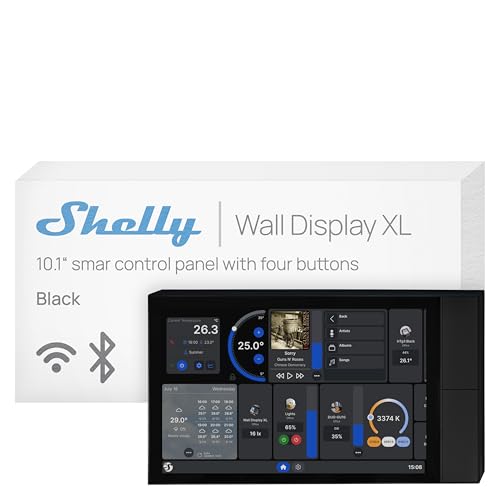
- 10.1-inch touchscreen with four customizable buttons
- Built-in 5A relay for direct appliance control
- Integrates with Shelly, Home Assistant, Alexa, Google, and HomeKit
Best For: Installed room control and platform-flexible automation
Best Flexible Family Dashboard

- Google Play app flexibility
- Large Full HD touchscreen
- Wall or countertop setup
Best For: Families building a customizable shared household dashboard
Best Alexa Smart Home Hub

- Built-in Alexa smart home hub
- 11-inch Full HD touchscreen
- Spatial audio and video calling
Best For: Alexa users combining device control with entertainment
Best No-Subscription Family Calendar

- No monthly subscription
- Syncs major calendar services
- Chores and family planning tools
Best For: Families managing shared schedules and routines
Best Value

- Compact 7-inch touchscreen
- Google Assistant with Wi-Fi and Bluetooth
- No camera; includes universal adapter
Best For: Small spaces and everyday Google smart-home control
Best for Security Monitoring

- 8-inch touchscreen with four camera views
- Instant door and entry alerts
- Local event playback and daily reports
Best For: Centralized monitoring of compatible eufy security devices
Best for Entertainment

- Large 10-inch HD touchscreen
- Built-in 6.5 MP Nest Cam
- Stereo audio with 30W subwoofer
Best For: Shared spaces, entertainment, and home monitoring
Best Smart Display Hub – Echo Show 11
The Amazon Echo Show 11 is a versatile choice among smart home hubs with touchscreen displays, combining an 11-inch Full-HD screen with Alexa controls, built-in smart home hub functionality, camera viewing, entertainment, and video calling. Its larger display is especially useful for recipes, calendars, shopping lists, and at-a-glance home control.
Best For: Households wanting a smart display that balances everyday organization, entertainment, video calls, and voice or touchscreen smart home control.
Pros:
- Vibrant 11-inch Full-HD touchscreen offers more viewing area than the Echo Show 8.
- Built-in smart home hub works with thousands of compatible Alexa devices without a separate hub.
- Spatial audio, camera feeds, recipes, calendars, photo slideshows, and video calls add broad everyday utility.
- Includes multiple camera and microphone privacy controls.
Cons:
- Many of its assistant and personalization features depend on Alexa and compatible devices.
- The larger display may take more space than smaller smart displays.
The Echo Show 11 is the most entertainment- and assistant-focused option here. Choose it if you want a central Alexa display that also serves as a capable smart home controller and family information screen.
Best Family Planner Hub – Westsee 15.6-Inch Digital Calendar
The Westsee 15.6-inch Digital Calendar is a family-planning alternative to typical smart home hubs with touchscreen displays. It focuses on shared schedules, chores, meals, rewards, grocery lists, reminders, and photo sharing, with calendar synchronization for Google, iCloud, Outlook, and other services.
Best For: Families that need a large shared touchscreen for schedules, household tasks, meal planning, and routines.
Pros:
- Large 15.6-inch touchscreen supports shared calendars, color-coded tasks, meals, and chores.
- Main functions have no subscription, including schedules, rewards, photo display, and grocery lists.
- Syncs with Google, iCloud, Outlook, and more through the Zical App.
- Includes 32GB of memory plus both a table stand and wall-mount kit.
Cons:
- Advanced tools such as the AI Assistant may require a future subscription.
- Its supplied features emphasize family organization rather than direct control of smart home devices.
Rather than acting as a general-purpose voice assistant, the Westsee is designed as a visible family command center. Its no-subscription core tools and flexible placement make it practical for kitchens, entryways, offices, or living rooms.
Best Dedicated Control Panel – Echo Hub Bundle
The Amazon Echo Hub Bundle is purpose-built for controlling connected devices, making it a strong fit among smart home hubs with touchscreen displays. Its customizable dashboard puts lights, cameras, security systems, routines, and other controls within quick reach, while the included stand supports tabletop placement.
Best For: Smart home users who want a dedicated Alexa control panel for a broad mix of connected devices and security equipment.
Pros:
- Supports more than 140,000 connected cameras, lights, locks, plugs, thermostats, speakers, and more.
- Built-in support for Wi-Fi, Bluetooth, Zigbee, Matter, Sidewalk, and Thread devices.
- Customizable controls, widgets, and camera views streamline everyday routines.
- Bundle includes a stand with adjustable up-tilt and down-tilt angles.
Cons:
- Wall installation may require separate cable pass-through or power-over-Ethernet accessories for a clean setup.
- It is more focused on smart home control than on general entertainment or family planning.
The Echo Hub is the most control-centric option in this roundup. Its broad protocol and device compatibility make it a compelling central interface for established Alexa-based systems, especially when security and camera access matter.
Best In-Wall Smart Controller – Shelly Wall Display XL
The Shelly Wall Display XL is a permanent in-wall option among smart home hubs with touchscreen displays. Its 10.1-inch screen, four customizable buttons, built-in 5A relay, and compatibility with Shelly Smart Control, Home Assistant, Alexa, Google, and HomeKit make it suited to integrated room control.
Best For: Homeowners and installers seeking a wall-mounted control panel with direct appliance switching and broad platform integration.
Pros:
- 10.1-inch touchscreen combines with four customizable physical buttons.
- Built-in relay can control lights, fans, heaters, coffee makers, and other compatible loads.
- Works with Shelly Smart Control, Home Assistant, Alexa, Google, and HomeKit.
- Can control Bluetooth or Sonos audio and supports custom scenes and automations.
Cons:
- Requires installation in a standard electrical wall box and a neutral wire.
- The built-in relay is rated at 5A, which may limit some appliance applications.
- It is less portable than tabletop smart displays.
The Shelly Wall Display XL is best viewed as an installed control surface rather than a casual countertop assistant. Its relay, physical buttons, and platform support are valuable for structured room automation, provided the electrical installation requirements fit your setup.
Best Flexible Family Dashboard – Mazera 21.5-Inch Smart Hub
For shoppers comparing smart home hubs with touchscreen displays, the Mazera stands out as a large, app-flexible family command center. Its Google Play access lets you choose compatible calendar, planning, photo, productivity, streaming, and smart home apps instead of relying on one proprietary calendar system.
Best For: Families wanting a large shared touchscreen for schedules, chores, meal plans, reminders, and customizable household dashboards.
Pros:
- Google Play access supports a broad range of calendar and productivity apps.
- Large 21.5-inch Full HD anti-glare display includes auto brightness.
- Works as a wall-mounted or countertop hub with the included metal stand.
- Can double as a Google Photos or other app-based digital photo frame.
Cons:
- Its 21.5-inch size requires more wall or counter space than smaller smart displays.
- Some voice-assistant and smart-home capabilities depend on supported apps and devices.
The Mazera is a strong choice when calendar flexibility and screen size matter more than a compact footprint. It is especially practical for households that already use a mix of Google, Apple, Outlook, or other services.
Best Alexa Smart Home Hub – Echo Show 11 Smart Display
The newest Echo Show 11 is a polished option among smart home hubs with touchscreen displays, combining an 11-inch Full HD screen with a built-in smart home hub, Alexa control, video calling, entertainment, and household tools. It is designed for users who want smart-home management and media features in one device.
Best For: Alexa households that want a capable touchscreen hub for controlling compatible devices, viewing cameras, watching content, and making video calls.
Pros:
- Built-in smart home hub controls compatible lights, thermostats, cameras, and other devices without a separate hub.
- Vibrant 11-inch Full HD display offers more viewing area than the referenced Echo Show 8.
- Spatial audio, Prime Video, Netflix, recipes, calendars, and shopping-list support broaden its everyday usefulness.
- Centered auto-framing camera supports video calls and live views.
Cons:
- Smart-home control is centered on devices that work with Alexa.
- Several personalized features depend on Alexa+ and compatible services.
- Its 11-inch screen is smaller than the two 21.5-inch family calendar displays in this roundup.
Choose the Echo Show 11 if you want a mainstream smart display that balances home control, entertainment, and communication. Its built-in hub makes it a convenient starting point for an Alexa-based setup.
Best No-Subscription Family Calendar – 21.5-Inch Family Hub Planner
This 21.5-inch family planner is one of the more focused smart home hubs with touchscreen displays, emphasizing shared organization rather than general entertainment. It combines calendar syncing, chore tracking, meal planning, reminders, and photo or video display without a subscription.
Best For: Busy families seeking a no-monthly-fee wall or desk calendar with chore management, multiple calendar integrations, and a large shared screen.
Pros:
- Syncs Google, iCloud, Outlook, Cozi, Yahoo, and TeamSnap calendars in real time.
- Supports up to 20 family members with color-coded tasks, chores, meal plans, and habit goals.
- 21.5-inch 1080p touchscreen offers daily, weekly, monthly, and checklist views.
- Includes photo and video features, 32GB storage, and offline USB or SD-card support.
Cons:
- Its organization-focused design may be less suitable for shoppers seeking broad smart-home device control.
- The large display takes up more space than a conventional countertop smart display.
- AI photo enhancement requires an internet connection.
The planner is a practical pick for families prioritizing routines and accountability. Its wide calendar compatibility and no-subscription model make it appealing when ongoing fees are a dealbreaker.
Best Value – Google Nest Hub 2nd Gen
The Google Nest Hub 2nd Gen is a compact, straightforward option for shoppers comparing smart home hubs with touchscreen displays. Its 7-inch screen, Google Assistant voice control, Wi-Fi, Bluetooth, and compatibility with Nest devices and Google services make it suitable for everyday home use.
Best For: Bedrooms, kitchen counters, nightstands, and buyers who want a small Google-connected display without a camera.
Pros:
- 7-inch touchscreen with 1024 x 600 resolution.
- Works with Google services, Nest speakers, displays, and other compatible Nest devices.
- Includes a universal power adapter and multilingual support for English, Spanish, French, and Portuguese.
- No camera, which may appeal to privacy-conscious users.
Cons:
- Corded electric design limits placement to areas near an outlet.
- Single full-range speaker is less substantial than the Nest Hub Max’s stereo audio system.
- Limited to a smaller 7-inch display.
This Nest Hub is a practical pick when you prioritize compact size, Google Assistant, and broad compatibility. Its lack of a camera and included international adapter add flexibility, while the smaller screen keeps it unobtrusive.
Best for Security Monitoring – eufy Smart Display E10
The eufy Smart Display E10 takes a security-first approach to smart home hubs with touchscreen displays. Its 8-inch panel can show four live camera views at once, deliver door and entry alerts, and provide quick access to locally stored event playback.
Best For: Homes using compatible eufy cameras, doorbells, and HomeBase 3 for centralized security monitoring.
Pros:
- Displays four simultaneous live feeds on one screen.
- Provides hands-free alerts for doorbell rings, door unlocks, and camera detection.
- Automatically downloads historical events to local storage for instant playback.
- Includes a charging station, Type-C cable, adapter, and wall mount.
Cons:
- Its security-focused features depend on compatible eufy devices and HomeBase 3.
- Battery life is listed at an average of seven days, so it requires periodic charging.
- Less suited to shoppers seeking a general-purpose voice assistant display.
Choose the E10 if camera feeds, entry notifications, and accessible touch controls matter more than broad entertainment or assistant features. The four-view layout and local event playback make it especially useful as a dedicated security station.
Best for Entertainment – Google Nest Hub Max
The Google Nest Hub Max is a larger smart home hub with a touchscreen display, built-in Nest Cam, and stronger audio hardware than the smaller Nest Hub. Its 10-inch HD screen is designed for managing compatible smart-home devices, staying connected, and enjoying entertainment.
Best For: Living rooms, video calls or home monitoring, and households that want a larger screen with a built-in camera and powerful stereo audio.
Pros:
- Large 10-inch HD touchscreen with 1280 x 800 resolution.
- Built-in 6.5 MP Nest Cam captures FHD 1080p video.
- Stereo speaker system includes a 30W subwoofer and 50W total output.
- Works with compatible smart-home devices and Google Assistant.
Cons:
- The built-in camera may not suit shoppers prioritizing a camera-free display.
- Larger footprint requires more counter or shelf space than the 7-inch Nest Hub.
- Listed as a first-generation model.
The Nest Hub Max is the stronger choice for shoppers who want an expansive display, built-in camera, and room-filling audio in one device. It is less discreet than the smaller Nest Hub, but better suited to shared spaces and entertainment.
How We Picked the Best Smart Home Hubs with Touchscreen Displays
We selected these Smart Home Hubs with Touchscreen Displays based on their intended use, screen size, smart-home compatibility, control features, and everyday practicality. The lineup includes Alexa and Google Assistant displays, security-focused panels, wall-mounted controllers, and subscription-free digital family calendars.
We also considered whether each device is best suited to a kitchen counter, shared family space, bedroom, entryway, or permanent wall installation. Because product capabilities can vary by region and software updates, confirm current compatibility with your devices before ordering.
Quick Comparison
| Best For | Look For | Featured Options |
|---|---|---|
| Voice assistant and media | Strong assistant ecosystem, audio, and video | Echo Show 11, Nest Hub, Nest Hub Max |
| Family scheduling | Large display, shared calendar, no subscription | Westsee 15.6-inch, 21.5-inch planners |
| Smart-home control | Device compatibility and centralized automation | Echo Hub, Shelly Wall Display XL |
| Security monitoring | Camera views, alerts, and compatible devices | eufy Smart Display E10 |
Key Buying Factors for Smart Home Hubs with Touchscreen Displays
Compatibility and Ecosystem
Choose a hub that works with the devices you already own. Alexa and Google Assistant displays are convenient when your lights, cameras, thermostats, and routines use the same ecosystem. A dedicated controller may be better for supported local devices, switches, or energy systems.
Screen Size and Placement
Seven- and eight-inch displays fit nightstands and counters, while 10-inch and larger screens are easier to read across a kitchen or family room. Large calendar panels need suitable wall or counter space, and wall-mounted products may require wiring or a more involved installation.
Subscriptions and Privacy
Check whether calendar, cloud storage, camera history, or advanced automation features require a recurring fee. Also review microphone, camera, permissions, and privacy controls, especially if the hub will be placed in a bedroom or shared living area.
Control and Visibility
Look for clear dashboards, responsive touch controls, useful widgets, and glanceable information. Security users should prioritize fast alerts and multi-camera views, while family planners should prioritize shared schedules, chores, and easy editing.
Who Should Buy Which Smart Home Hubs with Touchscreen Displays?
Choose an Echo Show 11 if you want a modern Alexa display for video, audio, routines, and general household control. Choose a Google Nest Hub or Nest Hub Max if your home is centered on Google services; the Max is the better fit for larger-room viewing and video calling.
Choose the Echo Hub or Shelly Wall Display XL for dedicated smart-home control, particularly when you prefer a permanent or highly visible control point. Choose the eufy Smart Display E10 when security cameras and door alerts are the priority.
Choose a Westsee or 21.5-inch family planner when the main goal is coordinating schedules, chores, and household tasks without a subscription. Pick the smaller 15.6-inch format for a more flexible footprint; choose a 21.5-inch model when maximum readability matters most.