Choosing the right podcast audio recorder with USB C can make recording faster, cleaner, and far less stressful. The best models balance microphone inputs, monitoring options, battery life, and easy file transfer.
Whether you record interviews, solo episodes, or remote conversations, the right recorder should fit your workflow without adding setup friction.
Best 10 Podcast Audio Recorder with USB C Picks for 2026
Studio-Ready Multitrack Pick
Zoom PodTrak P4next Podcast Recorder

- Four XLR inputs with multitrack recording
- AI noise reduction and tone tools
- USB-C plus phone input for video capture
Best For: Podcast teams and remote interviews
Simple USB Transfer Pick
USB Voice Recorder 24 Hours Continuous Recording

- One-switch recording with no app setup
- Up to 24 hours continuous recording
- USB drive-style file access on computer
Best For: Quick meetings, lectures, and note capture
Premium Dual-Device Interface
Antelope Audio Zen Quadro USB-C Podcast Interface

- Four studio-grade mic preamps with +75 dB gain
- Dual USB-C for two devices and audio routing
- 14-in/10-out with modeled effects onboard
Best For: Creators needing pro routing and dual-device setups
Portable Float-Recording Pick
Zoom H1essential 2-Track 32-Bit Float Recorder
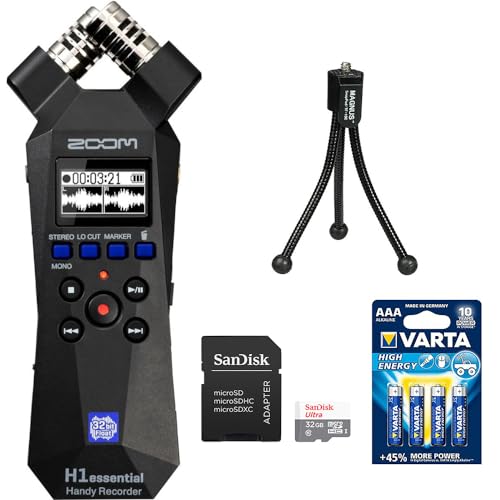
- 32-bit float recording with no gain setup
- Built-in X/Y mics capture clean stereo audio
- USB-C works as a USB mic for multiple devices
Best For: Solo creators and mobile interviews
Studio-Ready Multi-Guest Pick
Zoom PodTrak P4 for Multi-Host Podcasting

- 4 XLR mic inputs with phantom power
- 4 headphone outputs with individual volume control
- Automatic mix-minus for phone and remote interviews
Best For: multi-host podcasts and remote interviews
USB-C File Transfer Pick
72GB Voice Recorder with Easy Connectivity
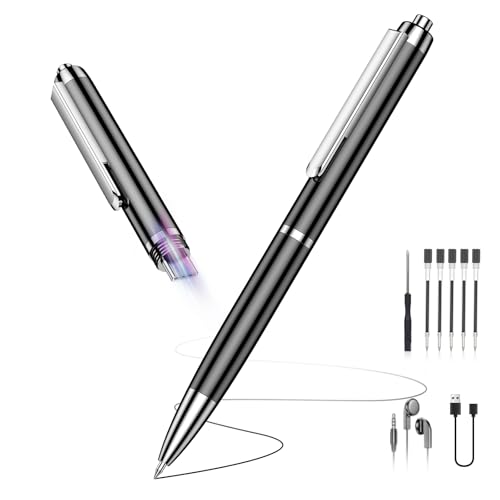
- Built-in USB-C port for transfer and playback
- 360° microphone with DSP noise reduction
- 72GB storage and up to 35 hours battery life
Best For: meetings, lectures, and quick spoken audio capture
Compact USB-C Podcasting Pick
Zoom PodTrak P2 for Two-Mic Shows

- Two USB mic inputs and two headphone outputs
- USB-C power support and SD card recording
- AI noise reduction plus mix-minus for remote guests
Best For: two-person podcasts and portable interview setups
Portable Clip-Free Starter
Zoom H1 Essential for Podcasters

- 32-bit float recording helps prevent clipping.
- USB-C mic mode supports podcasts and calls.
- Built-in X/Y stereo mics keep setup simple.
Best For: Podcasters and creators who want a compact USB-C handheld recorder
Flexible Dual-Input Pick

- Two XLR/TRS inputs expand microphone options.
- USB-C audio interface mode suits laptop use.
- 32-bit / 96kHz recording targets detailed sound.
Best For: Podcasters who need more input flexibility and USB-C interface support
Best All-Around Recorder
Zoom H4 Essential for Podcasts

- 4-track 32-bit float recording suits bigger projects.
- USB-C 4-in/2-out supports recording or streaming.
- Built-in mics plus XLR/TRS inputs add flexibility.
Best For: Creators who want the most versatile USB-C podcast recorder
Studio-Ready Multitrack Pick – Zoom PodTrak P4next Podcast Recorder
If you want a podcast audio recorder with USB C that can handle a full round-table setup, the Zoom PodTrak P4next is built for exactly that. It records up to four XLR mics, supports a call-in guest, and adds AI noise reduction plus tone tools to help keep sessions clean with less manual work.
Best For: Podcast teams, remote interview setups, and creators who want four mic inputs with easy monitoring.
Pros:
- Four XLR inputs with multitrack support for up to four people plus a call-in guest
- AI noise reduction, Tone Enhancement, and COMP help streamline sound setup
- Four headphone outputs with separate volume controls for each participant
- USB-C connectivity and phone input make it useful for direct-to-phone video capture
Cons:
- More capability than solo recorders, so it may be more unit than a single-host creator needs
- Uses 2 AA batteries, so battery management matters for longer sessions
The P4next is a strong fit if you need a podcast recorder that balances multitrack flexibility with built-in help for cleaner sound. Its mix of four mic channels, four headphone outs, and USB-C makes it practical for both in-room and phone-based production.
Simple USB Transfer Pick – USB Voice Recorder 24 Hours Continuous Recording
For a podcast audio recorder with USB C focused on simplicity, this USB voice recorder keeps the workflow very basic. Slide the switch to record, then plug it in like a USB drive to access files on your computer without extra software or app setup.
Best For: Meetings, lectures, interviews, and quick note capture when you want the simplest possible operation.
Pros:
- One-switch operation with no apps, accounts, or complicated setup
- Up to 24 hours of continuous recording and 25 days of standby time
- Stores up to 288 hours of audio in HQ mode
- USB 3.0 connection lets you transfer and manage files like a USB drive
Cons:
- No headphones jack for live monitoring
- Built-in mic and simple controls are less flexible than a true podcast interface
- Time setup requires Windows, per the supplied notes
This is a practical choice if ease of use matters more than studio features. It is best viewed as a compact USB recorder for straightforward voice capture rather than a full podcast production tool.
Premium Dual-Device Interface – Antelope Audio Zen Quadro USB-C Podcast Interface
If you need a podcast audio recorder with USB C that leans toward professional interface performance, the Antelope Audio Zen Quadro is a serious option. It supports up to four microphones, offers dual USB-C connectivity, and includes modeled effects and high-end conversion for cleaner, more polished recordings.
Best For: Podcasters, livestreamers, and content creators who want pro-grade routing and dual-device USB-C flexibility.
Pros:
- Four discrete studio-grade mic preamps with up to +75 dB of clean gain
- Dual USB-C lets you connect two devices at once and route audio between them
- 93 modeled analog effects, with 37 included, support monitoring and polishing while recording
- 14-in/10-out layout gives room for call-ins, music beds, and monitors
Cons:
- More interface than basic recorder, so it may be overkill for simple voice capture
- Feature depth may take more setup time than a plug-and-play recorder
The Zen Quadro stands out when you want recording quality and routing flexibility in one USB-C unit. It is especially appealing if your podcast setup also needs phone, tablet, or second-computer integration.
Portable Float-Recording Pick – Zoom H1essential 2-Track 32-Bit Float Recorder
For a podcast audio recorder with USB C that is easy to carry, the Zoom H1essential focuses on straightforward portable capture. Its 32-bit float recording reduces gain-setting worry, and the USB-C port lets you use it as a USB microphone for PC, Mac, iOS, or Android.
Best For: Solo creators, mobile interviews, and anyone who wants a compact recorder with simple gain-free operation.
Pros:
- 32-bit float recording means no need to set gain
- Built-in X/Y mics capture clean stereo audio up to 120 dB SPL
- Records up to 96 kHz to SD card for portable sessions
- USB-C port works as a USB microphone across multiple devices
Cons:
- Only 2-track recording, so it is less suited to multi-person podcast panels
- Requires AAA batteries rather than having a built-in rechargeable power system in the supplied bundle notes
The H1essential is a smart choice when portability and simplicity matter most. It is especially useful for creators who want clean audio capture without needing to manage input gain during the recording.
Studio-Ready Multi-Guest Pick – Zoom PodTrak P4 for Multi-Host Podcasting
If you want a podcast audio recorder with USB C support for flexible setup, the Zoom PodTrak P4 is built for multi-person shows, call-ins, and mobile recording. It gives you four XLR mic inputs, four headphone outputs, and direct phone or USB routing for interviews, plus multi-track recording so you can clean things up later.
Best For: Podcasters who need four mic inputs, separate headphone monitoring, and simple remote guest handling.
Pros:
- 4 XLR mic inputs with phantom power
- 4 headphone outputs with individual volume control
- Automatic mix-minus for phone and remote interviews
- 2-in/2-out USB audio interface mode and sound pads
Cons:
- Runs up to 3.5 hours on 2 AA batteries
- No built-in USB-C port listed in the supplied details
- May be more recorder than needed for solo use
For creators who prioritize guest flexibility and monitoring over portability, the P4 offers a very podcast-focused feature set. Its mix-minus, sound pads, and multi-track recording make it a practical choice for structured shows and interview-heavy formats.
USB-C File Transfer Pick – 72GB Voice Recorder with Easy Connectivity
This podcast audio recorder with USB C is aimed more at simple capture and fast file handling than full podcast production. The built-in USB-C connector makes it easy to move recordings to a computer, phone, or tablet, while the compact body, one-touch recording, and voice-activated mode keep everyday recording straightforward.
Best For: Anyone who wants a compact USB-C voice recorder for meetings, lectures, interviews, and quick audio capture.
Pros:
- Built-in USB-C port for easy transfer and playback
- 360° microphone with DSP noise reduction
- One-touch recording and voice-activated mode
- 72GB storage and up to 35 hours of battery life
Cons:
- Designed as a voice recorder, not a multi-mic podcast mixer
- Only one built-in microphone is listed
- Best suited to simple recording rather than advanced show production
If your priority is convenience, storage, and USB-C compatibility, this recorder covers the basics well. It is especially useful for note-taking and spoken-word capture, though it lacks the podcast mixing features more advanced creators may want.
Compact USB-C Podcasting Pick – Zoom PodTrak P2 for Two-Mic Shows
For a podcast audio recorder with USB C that keeps the setup simple, the Zoom PodTrak P2 is built for two-person shows and remote guest recording. It supports two USB mics, two headphone outputs, and USB-C power, while also saving individual tracks to SD card for editing later.
Best For: Two-host podcasts, on-the-go interviews, and creators who want USB-C power with simple operation.
Pros:
- Two USB mic inputs and two headphone outputs
- USB 3.0 Type-C hardware interface and USB-C power support
- Mix-minus for remote guests
- AI noise reduction, tone, compressor, and de-esser included
Cons:
- Limited to two mic inputs
- Up to 4 hours on 4 AA batteries
- Less flexible than larger mixers for expanding a show
The P2 is a strong fit if you want a compact recorder that is easy to carry and quick to run. Its USB-C power, built-in processing, and SD recording make it a practical choice for streamlined podcast setups.
Portable Clip-Free Starter – Zoom H1 Essential for Podcasters
If you want a podcast audio recorder with USB C that stays simple while improving sound, the Zoom H1 Essential is a practical place to start. Its X/Y stereo mics, 32-bit float recording, and USB-C microphone mode make it a flexible option for podcasts, interviews, voiceovers, and quick desktop or mobile recording.
Best For: Podcasters, interviewers, and creators who want an easy handheld recorder for clear voice capture and USB-C use.
Pros:
- 32-bit float recording helps reduce clipping concerns.
- Built-in X/Y stereo microphones are useful for voices and ambient capture.
- USB-C microphone mode works for livestreams, calls, podcasts, and voiceovers.
- Lightweight handheld design with up to 10-hour battery life.
Cons:
- Only 2 tracks, so it is less flexible than larger multi-input recorders.
- Uses AAA batteries instead of a built-in rechargeable pack.
Overall, this is a straightforward recorder for creators who value portability and easy USB-C connectivity. It is strongest when you want clean stereo capture without diving into a more complex setup.
Flexible Dual-Input Pick – Zoom H1 XLR for Podcasting
The Zoom H1 XLR is a strong podcast audio recorder with USB C if you need more connection options than a basic handheld unit. With two locking XLR/TRS inputs, a 3.5mm stereo mic/line input, and USB-C audio interface support, it fits interviews, podcast setups, and everyday recording where flexibility matters.
Best For: Podcasters and interviewers who want dual XLR/TRS inputs plus USB-C interface capability in a compact recorder.
Pros:
- Two XLR/TRS combo inputs support microphones, instruments, and other sources.
- 32-bit / 96kHz recording is aimed at clear, detailed audio.
- USB-C audio interface support makes it useful with laptops and other devices.
- OLED waveform display helps you monitor levels at a glance.
Cons:
- No built-in stereo mic, so it depends more on external gear for many setups.
- Uses AA batteries rather than a built-in rechargeable battery.
This model makes sense if you want a compact recorder that can handle more varied podcast setups than a simple plug-and-play unit. It is especially appealing when you need direct mic inputs and USB-C connectivity in one device.
Best All-Around Recorder – Zoom H4 Essential for Podcasts
For buyers comparing a podcast audio recorder with USB C, the Zoom H4 Essential stands out as the most versatile option here. It combines built-in stereo microphones, two XLR/TRS inputs, 4-track 32-bit float recording, and USB-C 4-in/2-out support, making it well suited to podcasts, interviews, video audio, and live performances.
Best For: Creators who want a more capable USB-C recorder for podcasts, interviews, and multi-source recording.
Pros:
- 4-track 32-bit float recording gives more room for larger projects.
- Built-in stereo mics plus two XLR/TRS inputs add real flexibility.
- USB-C works for recording or streaming to a phone, tablet, or computer.
- Can record to both your device and an SD card as backup.
Cons:
- More feature-rich than basic handheld recorders, so it may be more than casual users need.
- Larger and heavier than the H1 models.
If you want one recorder that can grow with your podcast workflow, this is the strongest all-around pick. It offers the best mix of built-in mics, external input support, and USB-C recording flexibility.
How We Picked the Best Podcast Audio Recorder with USB C
We focused on recorders that are practical for real podcast use: reliable audio quality, USB C connectivity, enough inputs for your format, and controls that make monitoring simple. We also favored models with features podcasters actually use, such as headphone outputs, plug-in power, portable power options, and quick transfer to a computer.
Quick Comparison
Some options are built for handheld, on-the-go recording, while others are better as tabletop podcast hubs with multiple mic inputs and guest monitoring. If you need a compact backup recorder, look for simplicity and long battery life. If you host multi-person shows, prioritize input count, headphone outputs, and strong remote-call support.
Key Buying Factors for a Podcast Audio Recorder with USB C
Input Count and Mic Support
Match the recorder to your show format. Solo creators may only need one or two inputs, while panel shows and interview podcasts benefit from four or more. Check whether the unit accepts XLR, TRS, or USB microphones, depending on your current gear.
Monitoring and Mix Control
Independent headphone outputs, level meters, and easy gain access help you catch problems before they ruin a take. For podcasts, clear monitoring matters as much as the recording itself.
Power and Portability
If you record in studios, homes, or on location, battery power can be a major advantage. For desk-based setups, a USB C connection may be more useful for continuous power, file transfer, or direct computer recording.
Recording Quality and Safety Features
Look for 32-bit float recording, limiter or noise reduction tools, and solid preamps if you want more forgiving captures. These features are especially valuable for unpredictable voices, remote interviews, or mobile sessions.
Who Should Buy Which Podcast Audio Recorder with USB C?
Choose a tabletop multi-input recorder if you host roundtables, live-to-tape shows, or guest interviews. Choose a handheld Podcast Audio Recorder with USB C if portability, quick backups, or field recording matter more than a full studio hub. If you primarily need a simple voice recorder for meetings or notes, a compact model with long storage and one-touch operation may be enough. The best choice is the one that matches your recording style today and leaves room to grow later.