The best USB switch boxes for Mac make it easier to share a keyboard, mouse, printer, scanner, webcam, or other USB device between computers without repeatedly unplugging cables.
This roundup compares 10 options across USB 2.0, USB 3.0, USB-C, remote-controlled, and multi-computer designs. Use the guide below to match port types, speed, device count, and switching method to your setup.
Best 10 USB Switch Boxes for Mac Picks for 2026
Best Overall

- Shares four USB devices between two computers
- Up to 5Gbps USB 3.0 data transfer
- USB-C power input and 18-month warranty
Best For: Mac setups with several shared USB peripherals
Best Simple Setup
SABRENT USB 3.0 Sharing Switch
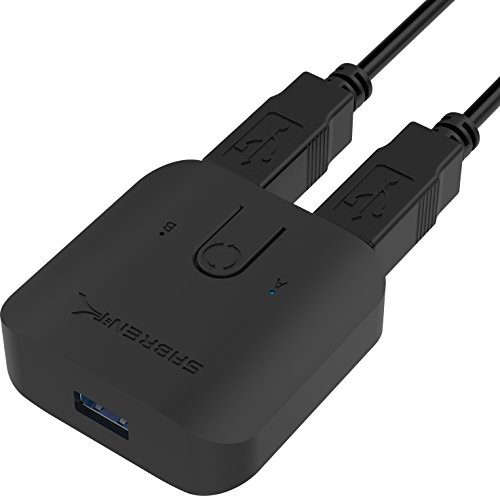
- Plug-and-play with no extra drivers
- One-button switching between computers
- Compact design with LED indicators
Best For: Basic keyboard and mouse sharing
Best With Remote Control

- Includes three USB 3.0 and one USB-C port
- Switches by button or remote control
- Optional USB-C power input
Best For: Mixed USB-A and USB-C Mac workstations
Best for Printers
QIANRENON USB 2.0 Printer Switch

- Shares one USB printer between two computers
- Includes two 1.5-meter printer cables
- Manual switching with LED indicators
Best For: Two-computer, one-printer setups
Best High-Speed Pick

- Four USB 3.0 ports with up to 5Gbps transfer speeds
- One-button switching with LED source status
- Driver-free macOS compatibility with external power option
Best For: Sharing multiple USB peripherals between two Macs or computers
Best Remote-Controlled Option

- Shares four USB devices between two USB-C computers
- Includes remote and physical-button switching
- USB 3.0 performance with optional USB-C power
Best For: USB-C Mac setups needing convenient remote peripheral switching
Best Budget Basic Switch
DUOPURUI USB 2.0 Bi-Directional Switch

- Supports two sharing modes for computers and USB devices
- Plug-and-play compatibility with Mac, Windows, and Linux
- Physical button and LED indicator for simple switching
Best For: Basic printer or peripheral sharing where USB 2.0 is sufficient
Best Multi-Peripheral Value

- Two computers share four USB devices
- Driver-free Mac OS X compatibility
- One-button switching with optional power
Best For: Sharing several peripherals between two Macs or computers
Best USB 3.0 Pick

- Up to 5Gbps USB 3.0 transfers
- Two computers share two USB devices
- Plug-and-play support for macOS
Best For: Faster sharing of a small set of Mac peripherals
Best for Multiple Computers

- Four computers share mixed USB-C and USB-A devices
- Up to 10Gbps transfer speed
- Button and remote-control switching
Best For: Multi-computer desks with mixed USB connector types
Best Overall – BENFEI 4-Port USB 3.0 Switch
For shoppers comparing usb switch boxes for mac, the BENFEI 2-in-4 switch is a flexible choice for sharing four USB peripherals between two computers. It supports USB 3.0 speeds up to 5Gbps, works with macOS and other major operating systems, and switches devices with a physical button.
Best For: Mac users who need to share several peripherals, including keyboards, mice, printers, scanners, storage drives, or cameras, between two computers.
Pros:
- Shares four USB devices between two computers.
- USB 3.0 supports data transfer speeds up to 5Gbps and is backward compatible with USB 2.0.
- Includes a status LED, push-button switching, optional USB-C power input, and an 18-month warranty.
Cons:
- Requires BENFEI USB-A-to-USB-A cables for operation.
- Power adapter is not included for the optional power input.
This is a strong all-purpose option when your Mac setup includes multiple shared USB accessories. The extra power connection may also help with higher-draw devices such as hard drives, cameras, and headphones.
Best Simple Setup – SABRENT USB 3.0 Sharing Switch
The SABRENT USB-SW30 is a compact option for usb switch boxes for mac when you want straightforward switching between two computer systems. Its plug-and-play design requires no additional drivers, and a single button changes the connected computer.
Best For: Users who want a small, uncomplicated switch for sharing peripherals such as a keyboard or mouse between two computers.
Pros:
- Plug-and-play operation with no additional drivers.
- Single-button switching makes changing systems simple.
- Supports data transfer speeds up to 5Gbps and includes LED computer indicators.
Cons:
- The supplied notes specifically identify keyboard and mouse compatibility rather than a broader list of peripherals.
- Only two computer positions are provided.
Choose this model for a focused, low-complexity setup. Its compact 2.4-by-2.32-inch footprint suits desks where a larger multi-port switch would be unnecessary.
Best With Remote Control – BENFEI USB 3.0/USB-C Switch
Among usb switch boxes for mac, this BENFEI model stands out for combining three USB 3.0 ports with one USB-C port and offering both button and remote switching. It connects two computers, supports up to 5Gbps, and is designed for plug-and-play use with macOS, Windows, Linux, and Chrome OS.
Best For: Mac users who want remote switching and need to share both standard USB and USB-C peripherals between two computers.
Pros:
- Provides three USB 3.0 ports plus one USB-C port.
- Offers both physical-button and remote-control switching.
- Supports up to 5Gbps, USB 2.0 backward compatibility, and optional USB-C power.
Cons:
- Requires BENFEI USB-A-to-USB-A cables for operation.
- The optional power adapter is not included.
The remote control is useful when the switch is placed out of reach, while the USB-C port adds flexibility for newer accessories. It is the more feature-rich BENFEI choice for a mixed-port Mac workstation.
Best for Printers – QIANRENON USB 2.0 Printer Switch
If your search for usb switch boxes for mac is specifically about printer sharing, the QIANRENON switch provides a dedicated two-computer-to-one-printer setup. It uses manual push-button switching, includes two 1.5-meter printer cables, and requires no external power or software installation.
Best For: Homes and offices where two Mac or Windows computers need to share one USB printer.
Pros:
- Connects two computers to one USB-B printer.
- Includes two 1.5-meter USB 2.0 printer cables.
- Manual button switching and separate LED indicators identify the selected computer.
Cons:
- Designed for printer sharing rather than multiple general-purpose USB peripherals.
- Uses USB 2.0 rather than USB 3.0.
This is a practical specialist option if the main goal is sharing a printer. The included cables simplify setup, and the stated compatibility includes macOS along with common Windows versions.
Best High-Speed Pick – 4-Port USB 3.0 Switch for Mac
For shoppers comparing usb switch boxes for mac, this four-port USB 3.0 model is a practical choice for sharing several peripherals between two computers. It offers one-button switching, LED status indicators, macOS compatibility, and transfer speeds up to 5Gbps.
Best For: Mac users who need to share keyboards, mice, printers, scanners, webcams, or other USB devices between two computers.
Pros:
- Four USB 3.0 ports support data transfer up to 5Gbps and work with older USB standards.
- Driver-free compatibility includes macOS, Windows, Chrome OS, and Linux.
- One-button switching and a clear LED indicator simplify source selection.
- Includes two USB A-to-A cables and a 5V power option for more stable operation.
Cons:
- It does not support keyboard hotkeys for switching.
- High-power devices such as hard disks may require external power.
- This is a USB peripheral switch, not a monitor or video KVM.
This model stands out when speed and four-device capacity matter. Its physical button is straightforward, though buyers wanting remote or hotkey control should consider another design.
Best Remote-Controlled Option – UGREEN USB-C USB Switch
Among usb switch boxes for mac, the UGREEN model is useful for setups that mix USB-C and USB-A accessories. It shares four USB devices between two computers, supports up to 5Gbps data transfer, and can be controlled with either its button or included remote.
Best For: MacBook and USB-C computer users who want remote switching for a keyboard, mouse, webcam, microphone, headphones, or printer.
Pros:
- Supports two computer inputs and four shared USB 3.0 device ports.
- Includes two USB-C data cables and offers both button and remote switching.
- Works with macOS and other major operating systems without extra drivers.
- Optional USB-C power input can improve stability with multiple or higher-power devices.
Cons:
- It does not switch monitors or transmit video, so it is not a KVM.
- The USB ports are intended for data transfer rather than device charging.
- Power may be recommended when several devices operate simultaneously.
The remote is the main differentiator, making this a convenient desktop option when the switcher is tucked away. Its USB-C connectivity also suits newer Mac setups, provided you only need peripheral sharing.
Best Budget Basic Switch – DUOPURUI USB 2.0 Bi-Directional Switch
This compact DUOPURUI unit is a simple option for shoppers seeking usb switch boxes for mac without needing USB 3.0 speeds. Its bi-directional design can let two computers share one USB device or let two USB devices share one computer, with button control and an LED indicator.
Best For: Basic printer, scanner, keyboard, mouse, webcam, or card-reader sharing between Mac, Windows, and Linux computers.
Pros:
- Bi-directional operation supports two computers sharing one device or two devices sharing one computer.
- Plug-and-play compatibility covers Mac OS, Windows, and Linux.
- Physical-button switching and an LED indicator make operation easy to monitor.
- Supports transfer rates up to 480Mbps and remains compatible with USB 1.1 and 1.0.
Cons:
- USB 2.0 is slower than the USB 3.0 alternatives in this roundup.
- It has three ports and includes only the switcher, so additional cables may be needed.
- It does not support monitor or video signal switching.
This is a straightforward choice for office peripherals and other moderate-speed devices. Its flexible direction of use is helpful, but buyers transferring large files or using several modern accessories may prefer a USB 3.0 switch.
Best Multi-Peripheral Value – UGREEN 4-Port USB 2.0 Switch
For shoppers comparing usb switch boxes for mac, this UGREEN model is a practical choice when two computers need to share several USB accessories. It connects four USB 2.0 peripherals and switches between two computers with one button, while supporting macOS without extra drivers.
Best For: Mac users sharing a keyboard, mouse, printer, scanner, or other USB devices between two computers.
Pros:
- Lets two computers share up to four USB 2.0 devices.
- Works with Mac OS X, Windows, Linux, and Chrome OS without drivers.
- Includes two USB A-to-A cables and has an LED showing the active computer.
- Optional micro-USB power can improve stability with multiple or higher-power devices.
Cons:
- USB 2.0 is slower than newer USB 3.x switches.
- It does not support monitor or video transmission, so it is not a KVM switch.
- Power adapter and charging cable are not included.
This is a sensible pick when device count matters more than transfer speed. Its driver-free Mac compatibility and four-device capacity make it convenient for a shared desktop, provided you do not need display switching.
Best USB 3.0 Pick – UGREEN 2-Port USB 3.0 Switch
This UGREEN switch is a straightforward option for usb switch boxes for mac when you need faster peripheral data transfers. Two computers can share two USB devices, and USB 3.0 connectivity supports speeds up to 5Gbps while remaining backward compatible with USB 2.0.
Best For: Mac users who want to share a keyboard, mouse, printer, webcam, or similar devices between two computers with faster USB data transfer.
Pros:
- USB 3.0 supports data transfer speeds up to 5Gbps.
- Compatible with macOS, Windows, Chrome OS, and Linux without drivers.
- One-button switching and an LED indicator simplify computer selection.
- Includes two USB 3.0 A-to-A cables.
Cons:
- Only two USB devices can be shared.
- It does not support monitors or video transmission and is not a KVM switch.
- The supplied cables are USB A-to-A, which may require an appropriate adapter for some Mac computers.
Choose this model over a USB 2.0 switch when transfer speed is important and two shared devices are enough. It is compact in purpose, easy to operate, and well suited to a keyboard-and-mouse or small peripheral setup.
Best for Multiple Computers – USB 3.2 4-Computer Switch
For a more demanding usb switch boxes for mac setup, this USB 3.2 selector supports four computers and combines USB-C and USB-A ports. It offers up to 10Gbps transfer speeds, button or remote switching, and an included USB-C-to-A adapter for more flexible connections.
Best For: Workspaces with up to four computers and a mix of USB-C and USB-A keyboards, mice, drives, printers, scanners, or webcams.
Pros:
- Allows four computers to share three USB-A and one USB-C peripheral ports.
- USB 3.2 supports transfer speeds up to 10Gbps.
- Offers both device-button and remote-control switching.
- Includes a USB-C-to-USB-A adapter and a micro-USB power input for demanding devices.
Cons:
- It does not support monitors or video transmission and is not a KVM switch.
- The remote control does not include batteries.
- High-power devices may require an independent power source.
This is the most flexible option of the three for a multi-computer desk, especially where USB-C and USB-A accessories are mixed. Its extra capacity and remote control are useful, but the lack of display switching means it remains a peripheral-only solution.
How We Picked the Best USB Switch Boxes for Mac
We focused on practical compatibility and everyday convenience rather than treating every USB switch as interchangeable. The selected models represent common configurations for Mac desktops, MacBooks, Windows PCs, printers, scanners, keyboards, mice, webcams, and other USB peripherals.
Our comparison considers the number of computers and shared devices supported, USB-A and USB-C connectivity, USB generation and transfer speed, switching controls, indicator lights, power requirements, and the type of equipment each model is best suited to. A USB switch shares peripherals; it does not automatically share a monitor or provide full video switching unless the product specifically includes those functions.
Quick Comparison
- Best for four USB devices: Choose a four-port USB 3.0 or USB 3.2 switch when you need to share a keyboard, mouse, printer, scanner, or webcam.
- Best for USB-C setups: Look for a model with a USB-C input or shared USB-C port, and verify whether its included cables match your Mac.
- Best for simple printer sharing: USB 2.0 printer switchers are usually sufficient and can be more economical.
- Best for faster peripherals: USB 3.0 or USB 3.2 models are preferable for storage devices, webcams, and other higher-bandwidth accessories.
- Best for several computers: A four-computer switch is useful in a workspace with multiple Macs and PCs, but check its host-port arrangement carefully.
Key Buying Factors for USB Switch Boxes for Mac
Port and Cable Compatibility
Check both ends of every connection. Many switches use USB-B host ports and USB-A device ports, while newer MacBooks may require USB-C adapters or USB-C cables. A switch with USB-C input can reduce adapters, but the port may support data only and may not charge a connected Mac.
Speed and Device Type
USB 2.0 is adequate for keyboards, mice, and many printers. USB 3.0 is a better choice for webcams, scanners, flash drives, and other devices that transfer more data. USB 3.2 models can offer higher bandwidth, but actual performance depends on the computer, cables, and connected peripheral.
Switching and Power
Physical buttons are dependable and easy to understand; wired remotes are useful when the switch sits out of reach. LED indicators help confirm which computer is active. If you plan to connect bus-powered hard drives or several demanding devices, look for a model that supports external power and follow its power requirements.
Compatibility Expectations
These devices generally switch USB peripherals, not displays. They also may not support hotkey switching, automatic device detection, or charging. Confirm support for macOS and your specific peripheral, especially when using specialized printers, audio interfaces, cameras, or security devices.
Who Should Buy Which USB Switch Boxes for Mac?
Choose a basic USB 2.0 switch if you mainly share a printer, keyboard, and mouse between two computers. Choose a USB 3.0 four-port model for a typical home office with several peripherals and occasional webcam or scanner use. Choose a USB-C-compatible switch if your MacBook setup relies on USB-C and you want fewer adapters, while still checking the included cable layout. Choose a remote-controlled model when the switch will be mounted behind a desk or monitor. Finally, choose a higher-speed or multi-computer model for a workstation that shares storage, cameras, or peripherals among several systems.