Powered KVM over IP switches let you view and control computers remotely, even during boot, BIOS setup, or operating-system failure. The right model can reduce travel, simplify server administration, and provide valuable out-of-band access.
This roundup compares single-port devices, multi-computer rackmount switches, and flexible home-lab options based on video support, remote power features, connectivity, security, and installation requirements.
Best 10 Powered Kvm Over Ip Switches Picks for 2026
Best Open-Source Pick

- 1080p at 60 FPS with low claimed latency
- Four power options, including USB-C and 5V input
- Open-source Linux design with expansion support
Best For: Single-computer remote access and recovery
Best Production-Ready Option

- 1080p and 1200p video at 60 Hz
- Ethernet, Wi-Fi, and optional cellular connectivity
- Turnkey kit with power supply, cables, and PCI brackets
Best For: Server administration and production-style remote access
Best Multi-Port PoE Model

- Four HDMI host inputs with remote switching
- PoE power plus 5V Type-C backup
- 4K 30 Hz loop-out, touchscreen, and rack brackets
Best For: Four-host home labs and server rooms
Best Rack-Mount Eight-Port Switch

- Eight-port design for centralized management
- Supports USB, PS/2, Sun Legacy, and RS-232 systems
- Rack-mount chassis for server-room installations
Best For: Multi-system rack deployments with mixed connectors
Best Value Remote Access
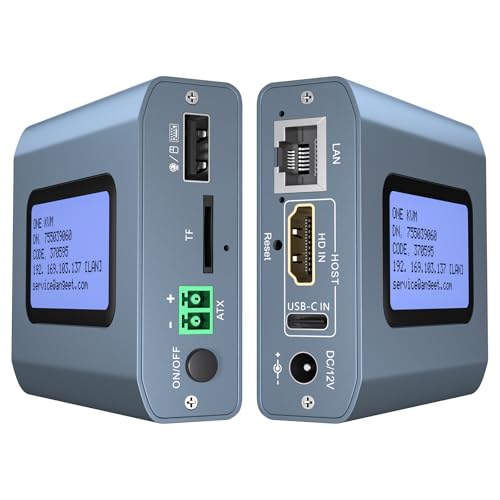
- 4K at 60Hz with under-60ms latency
- ZeroTier support for cross-network access
- Remote power control for desktop PCs
Best For: Single-host remote management and home or small-office access
Premium Rackmount Pick
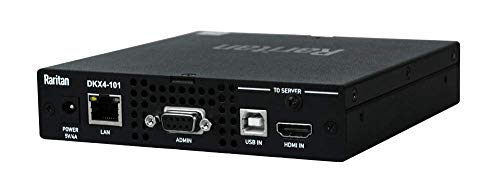
- Ultra-high-performance 4K KVM-over-IP
- Rack-mountable single-port design
- Remote Ethernet and USB control
Best For: Professional single-device rack and server-room installations
Best for Two PCs

- Remote switching between two computers
- 4K video with synchronized audio
- LCD IP display and ZeroTier support
Best For: Two-PC remote work, IT management, and disaster recovery
Enterprise Remote Control
Raritan Dominion KX III 16-Port

- 16-port KVM-over-IP capacity
- Two simultaneous remote users
- Virtual media, DVI, and dual power
Best For: Larger server-room deployments needing concurrent remote access
Rackmount Network Management
Tripp Lite NetCommander 8-Port

- Eight-port 1U rackmount design
- One local plus one remote user
- IPv4/IPv6 and directory authentication support
Best For: Compact rack deployments with moderate server-management needs
Legacy-System Access

- Single-port remote KVM access
- VGA up to 1920 × 1200 at 60Hz
- USB/PS/2, dual LAN, and dual power
Best For: One legacy or VGA-based system needing remote administration
Best Open-Source Pick – JetKVM IP KVM
The JetKVM is a compact choice among powered kvm over ip switches for remotely managing one computer. It connects through HDMI and USB-C, supports browser-based access, and offers local, cloud, and Wake-on-LAN options.
Best For: Home labs, developers, and users who need remote recovery access to a single computer.
Pros:
- Supports 1080p at 60 FPS with claimed 30–60 ms latency.
- Offers four power methods, including USB-C and a separate 5V supply.
- Open-source Linux platform with an expansion port for added hardware capabilities.
Cons:
- Designed for one controlled computer rather than multi-host switching.
- Remote cloud access is optional and depends on the JetKVM Cloud setup.
- Video connections use HDMI and USB-C, so compatibility should be checked before purchase.
The JetKVM stands out for its flexible power options, open-source design, and recovery-focused features. It is a practical fit when remote BIOS, reboot, or operating-system rescue matters more than managing several hosts.
Best Production-Ready Option – PiKVM V4 Plus
The PiKVM V4 Plus is a production-oriented option among powered kvm over ip switches, built around the Raspberry Pi CM4 platform. It combines remote KVM control with 1080p video support, multiple connectivity channels, and included installation accessories.
Best For: Server administrators and IT users who want a turnkey, open-source remote KVM system.
Pros:
- Supports 1920×1080 and 1920×1200 at 60 Hz.
- Provides Ethernet, Wi-Fi, and optional cellular connectivity.
- Includes a power supply, USB and Ethernet cables, and PCI brackets.
Cons:
- The supplied notes do not specify the number of host ports.
- Cellular connectivity requires the appropriate optional setup.
- Its 12V, 24-watt specification may require more planning than a small USB-powered unit.
With its turnkey accessories, CE certification, and broad connectivity options, the PiKVM V4 Plus is aimed at dependable remote administration. It is especially compelling for users who value an established Raspberry Pi-based platform.
Best Multi-Port PoE Model – GL.iNet Comet X Quad-Port KVM
The GL.iNet Comet X is a four-port choice among powered kvm over ip switches, using PoE to carry network and power over one Ethernet cable. It adds browser-based HTTPS access, local touchscreen control, and HDMI loop-out for simultaneous local and remote use.
Best For: Home labs, server rooms, and small IT environments managing up to four host systems.
Pros:
- Controls up to four systems through four HDMI inputs and USB-C device ports.
- Supports PoE with 5V Type-C backup power.
- Includes 4K at 30 Hz HDMI loop-out, a touchscreen, and rack-mount brackets.
- Provides 64 GB of eMMC storage for images, backups, and deployment files.
Cons:
- HDMI loop-out is limited to 4K at 30 Hz.
- PoE installation requires compatible network hardware.
- The chassis is designed for rack or structured server setups rather than minimal desktop use.
The Comet X is the strongest fit here for multi-host management and rack integration. Its PoE design, four-port switching, local controls, and storage make it a feature-rich option for an organized lab or server environment.
Best Rack-Mount Eight-Port Switch – ATEN KN1108VA KVM Over IP
The ATEN KN1108VA is a rack-mount eight-port option among powered kvm over ip switches for centralized remote administration. It is compatible with Windows, Mac, Sun, and Linux systems, including setups using USB, PS/2, Sun Legacy, or RS-232 connections.
Best For: Rack-based environments that need remote access to up to eight compatible systems.
Pros:
- Provides eight positions for centralized KVM management.
- Supports a wide range of legacy and current computer connections.
- Rack-mount design suits server-room installation.
Cons:
- The unit is relatively large and weighs 7.8 pounds.
- The supplied notes identify remote-only control and do not detail video resolution.
- Its broad connector compatibility may require additional cabling depending on the host systems.
The KN1108VA is the practical choice when port capacity and legacy-system compatibility take priority. Its rack-mount format makes it better suited to structured IT installations than compact home setups.
Best Value Remote Access – 4K Single-Computer IP KVM
This compact option is a practical choice among powered kvm over ip switches for remotely controlling one desktop, server, camera, or streaming device. It supports 4K at 60Hz, browser and app access, and software-free operation across Windows, macOS, Linux, and Android.
Best For: Remote access to a single desktop or server when remote power control and cross-network connectivity are priorities.
Pros:
- Supports 3840×2160 at 60Hz with latency below 60 milliseconds.
- Built-in ZeroTier can simplify secure cross-network access without port forwarding or VPN setup.
- Includes remote power on/off support for desktop computers and a 12V power adapter.
- Works through a web interface or ONE KVM app without extra drivers.
Cons:
- Remote power control is not supported for laptops.
- ZeroTier requires an online upgrade.
- It controls one target computer rather than switching between multiple hosts.
Choose this model if you need a straightforward single-host remote KVM with 4K video and desktop power management. Its included cables and metal housing also make it convenient for a compact installation.
Premium Rackmount Pick – Raritan Dominion KX IV-101
Raritan Dominion KX IV-101 Ultra High Performance 1-Port 4K KVM-Over-IP Switch
Check Price On AmazonThe Raritan Dominion KX IV-101 is a focused premium choice among powered kvm over ip switches, offering a 1-port 4K KVM-over-IP design for remote control of an Ethernet-connected device with USB peripherals. Its rack-mount form factor suits organized IT installations.
Best For: Professional users who need a dedicated, rack-mountable single-port 4K KVM-over-IP unit.
Pros:
- Provides ultra-high-performance 4K KVM-over-IP operation.
- Rack-mount design fits structured equipment installations.
- Supports remote control over Ethernet with USB device compatibility.
- Includes a two-year warranty description in the supplied listing.
Cons:
- Only one port is specified, so it is not intended for switching between multiple computers.
- The supplied notes provide limited detail about included cables, software access, and remote power features.
- Its 3.1-pound listed shipping weight and rack-mount format may be more than needed for casual users.
This is the most installation-oriented option in the group. It makes sense when rack compatibility and a dedicated 4K remote KVM are more important than multi-computer switching or extensive consumer-facing feature details.
Best for Two PCs – 4K Dual-Computer Remote KVM
This two-port model stands out among powered kvm over ip switches for users who need to access and switch between two computers remotely. It combines 4K video, synchronized audio, ZeroTier connectivity, an LCD IP display, and desktop remote power control in one hardware-based solution.
Best For: Remote management of two desktop PCs from a browser, app, or local controls.
Pros:
- Switches between two computers through the app, web interface, physical button, or wired remote.
- Supports 3840×2160 at 60Hz, synchronized audio, and under-60ms delay.
- LCD screen displays the acquired IP address and other information for easier setup.
- Includes ZeroTier, remote desktop power control, H.264 hardware encoding, and a 12V adapter.
Cons:
- It is non-PoE and requires a separate 12V power adapter.
- Web access is specified for LAN use, while WAN access is available through the app.
- Remote power on/off applies to desktop PCs only, not laptops.
If you regularly alternate between two systems, this model offers substantially more flexibility than a single-port unit. The LCD status screen and multiple switching methods are especially useful during setup and troubleshooting.
Enterprise Remote Control – Raritan Dominion KX III 16-Port
The Raritan Dominion KX III is a powered kvm over ip switch for environments that need centralized access to multiple systems. Its 16-port design, two remote-user capacity, virtual media, DVI local access, and dual power make it suited to demanding server-room deployments.
Best For: IT teams managing up to 16 connected desktop or server systems with concurrent remote access needs.
Pros:
- Controls up to 16 connected systems.
- Supports two remote users simultaneously.
- Includes virtual media and a DVI local port.
- Dual power supports operational redundancy.
Cons:
- Its 13.9-pound weight may be substantial for smaller installations.
- The supplied details identify DVI local access rather than a broader range of video connections.
Choose this model when capacity and concurrent remote administration matter more than a compact footprint. It offers a strong feature set for a larger, centralized KVM-over-IP setup.
Rackmount Network Management – Tripp Lite NetCommander 8-Port
The Tripp Lite NetCommander is a powered kvm over ip switch designed for compact rack installations. It connects eight systems over Cat5 cabling and supports one local and one remote user, with IPv4/IPv6 support and management options that include browser, hot-key, and push-button control.
Best For: Small to midsize rack environments needing eight-port access and one simultaneous remote connection.
Pros:
- Compact 1U rackmount design helps save rack space.
- Cat5 connectivity helps reduce cable clutter.
- Supports one local and one remote user simultaneously.
- Includes IPv4 and IPv6 support, plus RADIUS and LDAP/S remote authentication.
Cons:
- Eight ports provide less capacity than larger KVM-over-IP switches.
- Remote control uses a Java-based browser application.
- The supplied notes list conflicting warranty durations, describing both two-year and three-year coverage.
This is a practical choice when rack efficiency and network compatibility are priorities. Its cascade support can also expand control to as many as 128 servers from one station.
Legacy-System Access – ATEN CN9000 VGA KVM-over-IP
The ATEN CN9000 is a single-port powered kvm over ip switch for remote access to one PC or workstation. It supports VGA video up to 1920 × 1200 at 60Hz, USB and PS/2 peripherals, virtual media, dual LAN, and dual power, making it particularly flexible for mixed-generation equipment.
Best For: Remote management of one modern or legacy VGA-based workstation or server.
Pros:
- Supports VGA resolutions up to 1920 × 1200 at 60Hz.
- Works with both USB and PS/2 keyboard and mouse connections.
- Provides dual LAN and dual power functionality.
- Front-panel mini USB LUC port enables laptop console access.
Cons:
- Single-port design controls only one connected computer.
- It is limited to VGA video connectivity according to the supplied details.
- The listed product information states that no warranty is included.
The CN9000 stands out for compatibility rather than scale. It is a sensible fit when a single legacy or VGA-equipped system needs secure, flexible remote access and local service options.
How We Picked These Powered Kvm Over Ip Switches
We focused on the features that matter most in real remote-management scenarios: dependable network access, keyboard and mouse control outside the operating system, video resolution, local-console availability, user capacity, and compatibility with modern infrastructure. We also considered practical extras such as virtual media for installing operating systems, BIOS-level access, remote power control, webcam support, IPv6, ZeroTier compatibility, and rackmount design.
The selection includes compact devices for home labs and individual workstations alongside enterprise-oriented switches for multiple servers. Because deployment needs vary, specifications should be verified before purchase, particularly video inputs, network security features, licensing, and required cables or adapters.
Quick Comparison
| Best for | Look for | Typical choice |
|---|---|---|
| One computer or home lab | Compact hardware, simple setup, flexible networking | JetKVM, PiKVM, or GL.iNet Comet X |
| Two nearby computers | Multi-input switching and high-resolution video | ONE-KVM or a similar dual-computer model |
| Small server rooms | Rackmount construction, local console, remote user access | ATEN, Tripp Lite, or Raritan |
| Larger data centers | Port density, centralized administration, enterprise security | Raritan Dominion KX series |
Key Buying Factors for Powered Kvm Over Ip Switches
Video Resolution and Input Type
Check whether the switch accepts HDMI, DisplayPort, VGA, or a combination of interfaces. A device advertised as 4K may support that resolution only at a particular refresh rate or through a specific connection. For servers, lower resolutions may be sufficient; for workstations, high-resolution support can make remote operation much more comfortable.
Remote Power and Virtual Media
KVM access does not always mean electrical power control. If you need to reboot a frozen system, look for integrated power management or plan to add a compatible switched PDU. Virtual-media support is equally useful for mounting ISO files and installing or repairing an operating system remotely.
Security and Networking
Prefer HTTPS, strong authentication, role-based permissions, firmware updates, and a secure method of remote access. Avoid exposing a KVM interface directly to the public internet when a VPN, private overlay network, firewall, or zero-trust gateway is available. Consider IPv6, bandwidth requirements, and whether the device works reliably across your intended network.
Ports, Users, and Installation
Choose enough computer ports for current needs plus reasonable expansion. Enterprise models may support simultaneous local and remote users, while compact units often target one operator. Confirm rack depth, power requirements, cable availability, and whether a local console is important during network outages.
Who Should Buy Which Powered Kvm Over Ip Switches?
Home-lab users and individual PC owners should prioritize compact, affordable hardware with straightforward software and flexible remote networking. A single-port JetKVM, PiKVM, or GL.iNet solution can be ideal when one computer needs reliable remote access.
Users managing two machines should consider a dual-input 4K model to avoid repeatedly moving cables. Small businesses and server closets will usually benefit from a rackmount ATEN or Tripp Lite switch with local access and clear port management. For larger installations, Raritan Dominion models are better suited to higher port counts, shared administration, and structured data-center deployments.