Choosing among the best KVM over IP switches for dual monitors depends on more than video resolution. You also need to match remote-access features, network distance, USB support, switching speed, and the connection standards used by your computers and displays.
This roundup includes remote KVM devices, IP-based extenders, and dual-monitor KVM switches suited to offices, labs, control rooms, home workstations, and multi-PC gaming or productivity setups.
Best 10 Kvm Over Ip Switches for Dual Monitors Picks for 2026
Best Wireless KVM

- Wi-Fi 6 and wired connectivity
- 4K@30Hz passthrough with two-way audio
- Tailscale and self-hosted cloud support
Best For: Home labs and remote IT support
Best Long-Range KVM

- Reaches up to 390 feet over Cat cable
- Supports 4K@30Hz and 1080p@120Hz
- Works across an existing IP network
Best For: Server rooms and distributed workstations
Best BIOS-Access KVM

- BIOS-level remote control
- 4K@30Hz hardware-encoded video
- No software required on the host
Best For: Remote server maintenance and recovery
Best Dual-Monitor Extender

- Dual 1080p@60Hz HDMI output
- Up to 197 feet over one Cat cable
- Four receiver-side USB 2.0 ports
Best For: Dual-screen offices and gaming PCs
Best Remote Access

- Remote control for two computers via web or app
- 4K60 video with synchronized audio
- ZeroTier and remote desktop power control
Best For: Remote IT management and cross-network computer access
Best In-Home Extension
- Extends HDMI and USB control over a network
- Supports up to 2K60 over CAT cabling
- One-to-many receiver capability
Best For: Remote PC control from another room
Best Dual-Monitor Desk Hub
8K Dual-Monitor KVM Docking Station

- Shares two monitors between two computers
- Supports high-resolution and high-refresh video
- Adds USB-C docking, charging, Ethernet, and USB ports
Best For: Dual-monitor home offices and high-performance desks
Best Desktop Dual-Display Value

- Dual HDMI and DisplayPort monitor support
- 4K@60Hz with HDR and HDCP support
- USB 3.0 sharing and wired controller
Best For: Two desktop computers using HDMI and DisplayPort
Best High-Refresh DisplayPort Option

- Up to 4K@144Hz and 8K@60Hz support
- Extended or mirror dual-monitor modes
- Shares four USB devices at USB 3.0 speeds
Best For: High-refresh DisplayPort workstations and multitasking
Best Wireless KVM – Comet Pro Remote KVM
For shoppers comparing kvm over ip switches for dual monitors, the GL.iNet GL-RM10 Comet Pro is a compact remote-access option with Wi-Fi 6 and wired connectivity. It provides 4K video passthrough at 30Hz, two-way audio, and browser- or app-based access without requiring software on the controlled computer.
Best For: Home labs, remote IT support, and users who want flexible wired or wireless access with BIOS-level recovery capabilities.
Pros:
- Supports 2.4GHz and 5GHz Wi-Fi 6 plus wired connectivity.
- Offers 4K@30Hz video passthrough and two-way audio.
- Includes Tailscale support and optional self-hosted cloud deployment.
- Can support remote power control or hard resets with separately sold accessories.
Cons:
- It is a single-device remote KVM rather than a native dual-monitor extender.
- ATX Board and Fingerbot power-control accessories are sold separately.
- Remote video is limited to 30Hz at 4K.
The Comet Pro stands out when secure remote administration and flexible networking matter more than direct dual-display extension. Its touchscreen and broad operating-system support also make setup approachable.
Best Long-Range KVM – 4K HDMI USB KVM Extender
For kvm over ip switches for dual monitors in a server room or distributed workstation, this AV Access extender sends 4K HDMI, audio, and USB over a single Cat5e-or-better cable. It can also use an existing IP network and reaches up to 390 feet, making it suited to centralized equipment layouts.
Best For: Control rooms, server racks, and offices needing long-distance 4K KVM control over structured Ethernet cabling.
Pros:
- Extends HDMI, audio, and USB up to 390 feet over one Ethernet cable.
- Supports 4K@30Hz, 1080p@120Hz, and 7.1-channel audio.
- Receiver provides three USB 2.0 ports for peripherals.
- Up to 16 extender sets can operate on the same network using DIP switches.
Cons:
- It supports one HDMI video signal rather than a dual-monitor output.
- 4K operation is limited to 30Hz.
- Network deployments require suitable Gigabit infrastructure for stable transmission.
This model is a practical choice for long cable runs and professional installations. Its network-based design helps avoid dedicated KVM cabling, while plug-and-play compatibility reduces deployment complexity.
Best BIOS-Access KVM – Comet GL-RM1 Remote KVM
The GL.iNet Comet GL-RM1 is designed for remote computer and server administration, making it a useful alternative for buyers evaluating kvm over ip switches for dual monitors. It delivers 4K video at 30Hz, hardware H.264 encoding, remote audio, and BIOS-level access without installing software on the host system.
Best For: IT professionals and home-lab users who need remote rebooting, operating-system installation, and server maintenance.
Pros:
- Provides BIOS-level control for remote troubleshooting and OS installation.
- Supports 3840×2160 video at 30Hz with hardware encoding.
- Works with computers, laptops, routers, and servers without host software.
- Includes remote audio and file-transfer functionality.
Cons:
- It is not a dual-monitor KVM extender.
- Video output is limited to 30Hz at 4K.
- Power Delivery adapters cannot be used.
The GL-RM1 focuses on dependable out-of-band management rather than multi-display workstation extension. For remote recovery and maintenance, its BIOS access and software-free host operation are particularly valuable.
Best Dual-Monitor Extender – Dual 1080p HDMI KVM
Unlike many kvm over ip switches for dual monitors, this HDMI USB KVM extender is purpose-built for two displays. It sends dual 1080p HDMI video and USB 2.0 up to 197 feet over one Cat5e-or-better cable, with plug-and-play support for Windows, macOS, and Linux.
Best For: Dual-screen office workstations and gaming PCs that need low-latency 1080p extension over a long cable run.
Pros:
- Transmits two 1080p@60Hz HDMI signals over up to 197 feet.
- Provides four USB 2.0 ports for keyboards, mice, printers, cameras, and storage.
- Delivers visually lossless 4:4:4 8-bit video with zero-latency performance.
- PoC allows the receiver to power the transmitter through the Cat cable.
Cons:
- Maximum video resolution is 1080p rather than 4K.
- USB connectivity is limited to USB 2.0 speeds.
- It uses a direct extender setup rather than general-purpose network access.
This is the strongest fit in the group for a true dual-monitor setup. Its 60Hz output, dual HDMI transmission, and generous receiver-side USB connectivity prioritize everyday workstation usability.
Best Remote Access – 4K 2-Port IP KVM Switch
For shoppers comparing kvm over ip switches for dual monitors, this 2-port model emphasizes remote access rather than a traditional local dual-monitor workstation. It lets you switch between two computers through a web interface or app, with 4K video support, audio, and optional remote power control for desktop PCs.
Best For: Remote IT management, work-from-home access, and controlling two computers across a LAN or WAN.
Pros:
- Remote switching and keyboard/mouse control through a web interface or app.
- Supports 3840×2160 at 60Hz, synchronized audio, and hardware-based H.264 encoding.
- Built-in ZeroTier can simplify cross-network access, while the LCD shows the acquired IP address.
- Supports remote power on/off for compatible desktop PCs.
Cons:
- It is a single-video-input-per-host design, so the notes do not establish native dual-monitor output.
- Requires a 12V power adapter and is not PoE.
- Web access is listed for LAN use; WAN access is provided through the app.
This is the most remote-management-focused option in the group. Choose it when internet or network access matters more than a conventional dual-monitor desktop setup, and verify your monitoring requirements before buying.
Best In-Home Extension – HDMI KVM Over LAN Extender
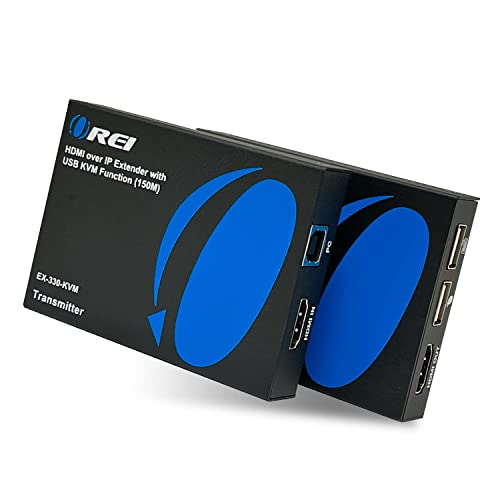
This OREI unit is a network-based KVM extender for moving one computer’s HDMI display and USB keyboard/mouse control to another location. For buyers researching kvm over ip switches for dual monitors, it is better understood as a home-network extension solution than as a dual-monitor switching hub.
Best For: Controlling a PC from another room over a wired home network or extending access to multiple receiver locations.
Pros:
- Extends HDMI and remote keyboard/mouse control over a home network.
- Supports transmission over CAT6/CAT7 cable and resolutions up to 2K at 60Hz.
- One-to-many functionality allows multiple receivers throughout the home.
- Plug-and-play setup requires no software installation.
Cons:
- The supplied notes describe a single HDMI source and do not indicate dual-monitor output.
- It is an extender rather than a two-computer KVM switch.
- Transmission distance and resolution depend on the network cabling and setup.
Consider this model when the main challenge is placing a screen and USB controls away from the computer. If you need to switch two computers across two monitors, look for a purpose-built dual-monitor KVM instead.
Best Dual-Monitor Desk Hub – 8K Dual-Monitor KVM Docking Station
For a conventional dual-monitor workstation, this AV Access model is the strongest fit among these kvm over ip switches for dual monitors, although it is a local KVM docking station rather than an IP-controlled switch. It connects a USB-C laptop and a desktop to two monitors while sharing peripherals, networking, storage, audio, and charging.
Best For: Hybrid workers, creators, and gamers who want one dual-monitor desk setup for two computers.
Pros:
- Designed to share two monitors, keyboard, mouse, audio, network, and USB peripherals between two computers.
- Desktop support reaches dual 8K at 60Hz or dual 4K at 165Hz, with high-refresh 1080p modes.
- USB-C connection can provide dual 4K60 video, 10Gbps data, and up to 100W charging for compatible laptops.
- Includes multiple 10Gbps USB ports and keeps both computers connected to Gigabit Ethernet.
Cons:
- It does not provide remote IP or internet-based KVM control.
- On macOS, the supplied notes say two external displays mirror rather than extend due to MST.
- Laptop resolution and refresh rate depend on the laptop’s USB-C video capabilities.
This is the clearest choice for a local two-computer, two-monitor desk. It combines KVM switching with docking features, but remote network access shoppers should choose an IP KVM instead.
Best Desktop Dual-Display Value – Unitek Dual-Monitor KVM
The Unitek is a practical choice among kvm over ip switches for dual monitors when both computers are desktop hosts. It combines HDMI and DisplayPort connectivity with USB 3.0 sharing, 4K@60Hz support, and push-button or wired-remote switching.
Best For: Desktop users switching two computers across two monitors with HDMI and DisplayPort connections.
Pros:
- Supports dual-monitor use with HDMI and DisplayPort inputs and outputs.
- Handles resolutions up to 4K@60Hz and supports HDR, HDCP, 3D, and HDMI 2.0.
- Provides USB 3.0 sharing with up to 5Gbps transfer speeds.
- Includes a wired desktop controller and 5V/2A power adapter.
Cons:
- Not compatible with laptops.
- Each host needs the required USB-B, HDMI, and DisplayPort connections for simultaneous HDMI and DisplayPort output.
- DP and HDMI cables are not listed among the included accessories.
This Unitek model is a strong fit for a conventional two-desktop workstation, especially if you want high-resolution dual displays and quick physical switching. Verify your computers have the necessary ports before buying.
Best Laptop-and-Desktop Docking Setup – AV Access Dual-Monitor KVM Dock
The AV Access KVM docking station stands out among kvm over ip switches for dual monitors for users moving between one USB-C laptop and one desktop. It combines dual HDMI display switching with docking features such as Ethernet, SD storage, USB ports, audio, and up to 100W USB-C PD input.
Best For: A home or office setup switching between one USB-C laptop and one desktop PC.
Pros:
- Switches two HDMI monitors and shared peripherals with one button.
- Includes USB 3.0, USB 2.0, USB-C, Gigabit Ethernet, SD card, and 3.5mm audio connections.
- Supports up to 4K@60Hz, plus higher refresh rates at 1440p and 1080p.
- EDID emulation helps reduce display reconnection during switching.
Cons:
- Designed for one USB-C laptop and one desktop, not two laptops or two desktops.
- macOS supports mirrored displays only; extended dual displays are not supported.
- A compatible USB-C PD power adapter for laptop charging is required but not included.
This is the most versatile option for a mixed laptop-and-desktop workspace, since it adds genuine docking functions beyond basic KVM switching. Confirm your laptop supports the required USB-C features and that your desktop can provide USB-B, HDMI, and DisplayPort connections.
Best High-Refresh DisplayPort Option – 4K 144Hz Dual-Monitor KVM
For demanding DisplayPort setups, this model is a compelling choice among kvm over ip switches for dual monitors. It supports up to 4K@144Hz or 8K@60Hz, offers extended and mirror modes, and shares four USB devices between two computers.
Best For: DisplayPort-based workstations that need high refresh rates and extended dual-monitor productivity.
Pros:
- Supports up to 4K@144Hz and 8K@60Hz, with backward compatibility for lower resolutions.
- Offers both extended and mirror display modes.
- Shares four USB devices with USB 3.0 speeds up to 5Gbps.
- Provides front-button and wired-remote switching without requiring drivers.
Cons:
- Each computer needs two DisplayPort cables and one USB-A cable; DP cables are not included.
- Each computer must have two DisplayPort outputs, and the product’s paired DP ports must connect to the same computer.
- Hotkey switching is not supported.
This KVM is tailored to high-performance DisplayPort systems where refresh rate and dual-screen flexibility matter. It is worth considering for compatible desktops, but carefully check port availability and cable requirements before ordering.
How We Picked the Best Kvm Over Ip Switches for Dual Monitors
We compared these 10 products by looking at the features that matter most in real dual-monitor installations: supported resolutions and refresh rates, HDMI or DisplayPort compatibility, USB peripheral sharing, remote access, network transport, maximum cable distance, switching methods, and setup requirements. We also separated true KVM-over-IP products from locally connected dual-monitor KVM switches, since they solve different problems.
For remote administration, BIOS-level control and network security are especially important. For desk-based use, display bandwidth, refresh rate, EDID handling, and reliable keyboard and mouse switching usually matter more than internet access.
Quick Comparison
- Best for remote access: GL.iNet Comet models and the ONE-KVM provide remote computer control, with features such as BIOS access or Tailscale support depending on the model.
- Best for long-distance extension: AV Access and OREI IP extenders use Ethernet cabling to carry video, USB, keyboard, and mouse signals over substantial distances.
- Best for a local dual-monitor desk: AV Access, Unitek, and the 4K/144Hz DisplayPort model are designed to share two displays between two nearby computers.
- Best for high-refresh use: Choose a model that explicitly supports your required refresh rate, such as 144Hz, rather than relying only on its maximum resolution claim.
Key Buying Factors for Kvm Over Ip Switches for Dual Monitors
Remote Access Versus Local Switching
A true KVM-over-IP device lets you operate a computer through a network, potentially from another room or location. A conventional KVM switch changes between nearby computers at a shared desk. Some products combine extension and switching features, but confirm whether remote control works over your LAN, through a secured VPN, or only through a direct cable connection.
Resolution, Refresh Rate, and Dual-Display Support
Check the exact output configuration rather than assuming that “4K” means two 4K displays. Verify whether the unit supports two monitors simultaneously, the desired refresh rate, HDR if needed, and the correct connector type. DisplayPort models may suit high-refresh PCs, while HDMI models can be easier to integrate with TVs, docks, and office monitors.
USB and Peripheral Behavior
Look for the USB version, number of ports, and whether the switch supports only keyboard and mouse or also storage, webcams, audio devices, and other USB accessories. USB 3.0 is preferable when transferring files or using bandwidth-heavy peripherals.
Distance and Network Setup
For Cat5e, Cat6, or Cat7 extensions, cable quality, termination, switches, and electrical conditions can affect results. Confirm the advertised distance and whether the transmitter and receiver require a dedicated point-to-point link or can share an existing network. Network-connected equipment should use strong passwords, current firmware, and a properly secured LAN or VPN.
Who Should Buy Which Kvm Over Ip Switches for Dual Monitors?
Remote IT administrators should prioritize the GL.iNet Comet or ONE-KVM options, especially when BIOS-level access, secure remote networking, or control outside the room is essential.
Businesses extending a workstation to another room should consider an AV Access or OREI HDMI-over-IP extender. These are practical for control rooms, classrooms, and equipment racks where the computer and displays are separated.
Desk users sharing two monitors between two nearby PCs should focus on the AV Access, Unitek, or high-refresh dual-monitor KVM switches. Match their input connectors and bandwidth to both computers before buying.
Gamers and fast-motion users should select the DisplayPort model advertised for 4K at 144Hz or another switch with a verified refresh rate that matches the monitor and graphics card. If your priority is office productivity rather than gaming, stable dual-monitor support and dependable USB switching may be more valuable than maximum refresh rate.