A compact PC case can save desk space without forcing you to compromise on graphics-card length, cooling, or upgrade potential. The right choice depends on more than exterior dimensions: motherboard support, radiator clearance, power-supply layout, and airflow all matter.
We’ve gathered 10 strong options across compact ATX, micro-ATX, and space-efficient gaming designs, so you can match your build plans to a case that fits both your hardware and your budget.
Best 10 Computer Cases for Compact Builds Picks for 2026
Balanced Airflow Pick

- ATX and micro-ATX support
- Two included 120mm fans
- 360mm front radiator support
Best For: First-time ATX airflow builds
Smallest High-Performance Layout

- 26.3L compact design
- 415mm GPU and 360mm radiator support
- No fans included
Best For: Compact mATX or ITX performance builds
Showcase Dual-Chamber Design

- Compact dual-chamber ATX layout
- Three included 120mm fans
- Panoramic wraparound glass
Best For: Visible ATX gaming and showcase builds
Budget Ready-to-Run Option

- 400W PSU included
- MicroATX and mini-ITX support
- 240mm radiator support
Best For: Budget office and entry-level compact PCs
Premium Glass Showcase

- Three-panel tempered glass for a clear component view
- Supports ATX and Micro-ATX motherboards
- Top mesh panel supports a 360mm AIO
Best For: Showcase ATX builds with clean AIO routing
Flexible Airflow Mid-Tower
- Supports horizontal or vertical placement
- Fits GPUs up to 415mm without the front fan
- Full front mesh and 360mm radiator support
Best For: Flexible, high-clearance ATX and E-ATX builds
Compact Micro-ATX Value
- Small Mini-Tower footprint for Micro-ATX systems
- Includes three 120mm FRGB fans
- Supports USB Type-C and GPUs up to 280mm
Best For: Budget-friendly compact Micro-ATX gaming builds
Best Pre-Built Cooling

- Six pre-installed PWM ARGB fans
- Opening tempered-glass side panel
- Supports ATX, Micro-ATX, and Mini-ITX
Best For: Airflow-focused builds with flexible motherboard support
Best Premium Compact ATX
- Supports ATX, M-ATX, and Mini-ITX
- Fits full-sized ATX power supplies
- Pillar-free panoramic glass panels
Best For: Showcase ATX builds with custom cooling plans
Best Compact 240mm Setup

- Supports a 240mm AIO cooler
- Fits GPUs up to 340mm
- Dual panoramic tempered-glass panels
Best For: Compact gaming builds with substantial cooling needs
Balanced Airflow Pick – NZXT H5 Flow
For computer cases for compact builds that still need ATX compatibility, the NZXT H5 Flow offers a practical mid-tower layout with strong airflow and straightforward cable management. Its mesh panels, included fans, and broad radiator support make it a flexible foundation for gaming or performance-focused systems.
Best For: First-time ATX airflow builds that need room for larger cooling hardware.
Pros:
- Supports ATX and micro-ATX motherboards in a compact mid-tower format.
- Includes two 120mm Quiet Airflow fans.
- Supports up to a 360mm front radiator and 240mm top radiator.
- Perforated panels and PSU-shroud intake help promote airflow.
Cons:
- The two PSU-shroud intake fans are not included.
- Its mid-tower footprint is larger than a mini-tower case.
The H5 Flow is a sensible choice when compactness matters but you do not want to give up ATX support, multiple expansion slots, or substantial cooling options.
Smallest High-Performance Layout – Lian Li A3-mATX
The Lian Li A3-mATX is designed for computer cases for compact builds where hardware clearance remains important. Its 26.3-liter mini-tower layout supports mATX or ITX boards, long GPUs, a 360mm radiator, and flexible PSU placement, while mesh panels prioritize ventilation.
Best For: Compact mATX or ITX systems using a long graphics card or liquid cooler.
Pros:
- Compact 26.3L design with support for GPUs up to 415mm.
- Supports up to a 360mm radiator and ten 120mm fans.
- Flexible ATX, SFX, and SFX-L PSU compatibility.
- Modular structure and wood front panel suit minimalist builds.
Cons:
- Fans are not included.
- Limited to mATX and ITX motherboards.
- Its compact, modular layout may require more careful component planning.
This is one of the most capable compact options in the group, but its cooling potential and component flexibility are best realized with deliberate part selection and fan placement.
Showcase Dual-Chamber Design – NZXT H6 Flow
For builders comparing computer cases for compact builds with a display-focused design, the NZXT H6 Flow combines a compact dual-chamber layout with panoramic glass and airflow-oriented mesh. Three pre-installed fans also provide a useful starting point for a clean, cool ATX system.
Best For: ATX gaming builds that prioritize component visibility, tidy cables, and included cooling.
Pros:
- Supports ATX, micro-ATX, and mini-ITX motherboards.
- Includes three pre-installed 120mm fans.
- Dual-chamber construction helps separate components and cable routing.
- Wraparound glass provides a broad interior view.
Cons:
- Its mid-tower dimensions are not as small as a mini-tower case.
- Storage capacity is listed at two internal bays.
- The white finish may not suit every build theme.
The H6 Flow is a strong middle ground for builders who want a compact-looking ATX case with attractive presentation and useful out-of-the-box airflow.
Budget Ready-to-Run Option – Rosewill FBM-X5
The Rosewill FBM-X5 is a practical choice among computer cases for compact builds when an included power supply is a priority. This mini-tower supports microATX and mini-ITX boards, includes a 400W PSU and rear fan, and offers several additional cooling configurations.
Best For: Budget office systems or entry-level compact gaming PCs using modest power requirements.
Pros:
- Includes a pre-installed non-modular 400W power supply.
- Supports microATX and mini-ITX motherboards.
- Offers space for up to a 240mm front radiator or multiple 120mm fans.
- Includes two USB 3.0 and two USB 2.0 ports.
Cons:
- Only one 120mm fan is included.
- The bundled 400W PSU may limit higher-power component choices.
- It has fewer expansion slots and less motherboard flexibility than ATX cases.
The FBM-X5 keeps the initial build simple and affordable, especially for office or entry-level systems, but verify the 400W power budget before installing power-hungry hardware.
Premium Glass Showcase – Lian Li O11 Vision Compact
The Lian Li O11 Vision Compact is a strong option among computer cases for compact builds when you want a refined dual-chamber layout without giving up ATX support. Its three-panel tempered-glass design highlights components, while the included top mesh panel supports a 360mm AIO installation.
Best For: ATX or Micro-ATX showcase builds using a 360mm AIO and, where applicable, a back-connect motherboard.
Pros:
- Three tempered-glass panels provide an uninterrupted component view.
- Supports ATX and Micro-ATX motherboards.
- Back-connect motherboard support and concealed side AIO tubing routing help maintain a clean interior.
- Includes a top mesh panel for 360mm AIO installation.
Cons:
- At 26.4 pounds, it is relatively heavy for a compact-focused case.
- Its four expansion slots may limit some expansion-heavy builds.
This case prioritizes presentation and cable-conscious water-cooling layouts. Choose it if a glass-forward design and back-connect compatibility matter more than minimizing weight.
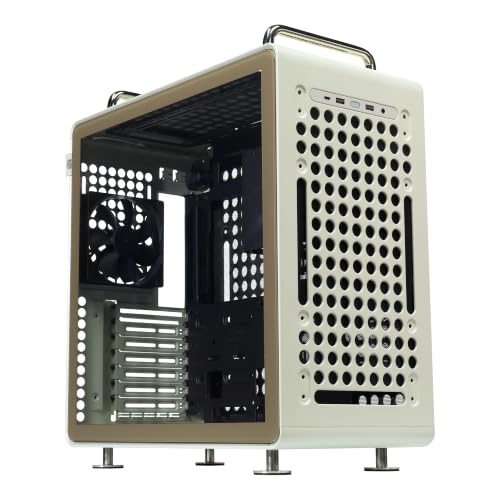
Flexible Airflow Mid-Tower – Cooler Master QUBE 540
The Cooler Master QUBE 540 brings useful flexibility to computer cases for compact builds, supporting horizontal or vertical placement while retaining broad hardware compatibility. Its full front mesh panel, 415mm GPU clearance, and support for up to a 360mm radiator make it suitable for powerful components in a relatively compact ATX form factor.
Best For: Builders who want flexible placement, strong airflow, and support for ATX, E-ATX, or smaller motherboards.
Pros:
- Works in both horizontal and vertical orientations with movable handles and a reversible I/O panel.
- Supports GPUs up to 415mm without the front fan.
- Supports ITX, ATX, and E-ATX motherboards up to 11 inches wide.
- Full front mesh and a pre-installed SickleFlow 120mm fan support airflow.
Cons:
- The 415mm GPU clearance figure applies without the front fan installed.
- Its 19.37-inch height may be less suitable for especially tight desktop spaces.
The QUBE 540 is a versatile pick when hardware clearance and positioning options matter. Its orientation flexibility and modern front I/O make it especially practical for adaptable desk setups.
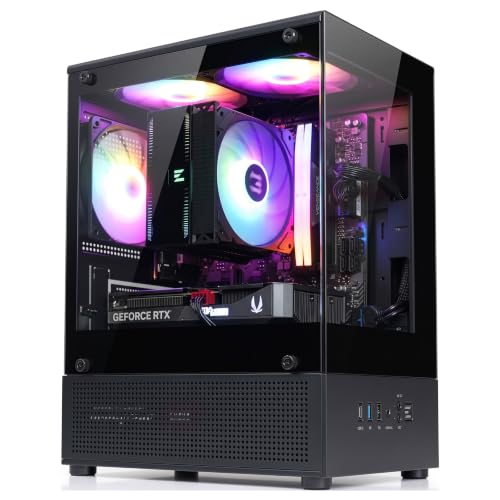
Compact Micro-ATX Value – Zalman CUBIX-G Micro-ATX
The Zalman CUBIX-G is one of the more space-conscious computer cases for compact builds, using a Mini-Tower layout designed specifically for Micro-ATX systems. It includes three preinstalled FRGB fans, a tempered-glass panoramic view, and front USB Type-C connectivity for a straightforward gaming setup.
Best For: Budget-conscious Micro-ATX gaming builds that need a small footprint and included lighting.
Pros:
- Compact 11.42-inch-deep, 7.87-inch-wide Mini-Tower design.
- Three preinstalled 120mm FRGB fans provide out-of-box airflow and lighting.
- Supports GPUs up to 280mm and CPU air coolers up to 155mm.
- Includes USB Type-C, USB 3.0, and flexible 2.5-inch/3.5-inch drive support.
Cons:
- Supports Micro-ATX motherboards only.
- The 280mm GPU limit rules out some larger graphics cards.
- Cooling is listed as air-only, with no supplied water-cooling support.
The CUBIX-G is a practical choice when desk space and included essentials take priority. Confirm your graphics-card and CPU-cooler dimensions before buying, since its compact layout has tighter hardware limits.
Best Pre-Built Cooling – MUSETEX NN8 ATX Mid-Tower
For shoppers comparing computer cases for compact builds, the MUSETEX NN8 offers broad component support in a conventional mid-tower layout. Its six pre-installed PWM ARGB fans, opening tempered-glass side panel, mesh front, and support for ATX, Micro-ATX, and Mini-ITX motherboards make it a practical choice when cooling and easy access matter more than the smallest footprint.
Best For: Builders who want a ready-to-use airflow setup, customizable lighting, and room for larger components.
Pros:
- Includes six pre-installed PWM ARGB fans with adjustable speed and motherboard lighting control.
- Opening magnetic tempered-glass side panel makes cleaning and hardware access easier.
- Supports ATX, Micro-ATX, and Mini-ITX boards, with space for a top 280mm radiator.
- Offers flexible storage capacity and multiple graphics-card installation options.
Cons:
- Its mid-tower size is less space-saving than a true mini-tower design.
- ARGB control requires a compatible 3-pin motherboard header and software.
- Motherboard, graphics card, power supply, and radiator are not included.
The NN8 is a strong value-oriented option for a compact-minded build that still needs ATX compatibility and generous cooling. Choose it if the included fans and accessible side door are priorities.
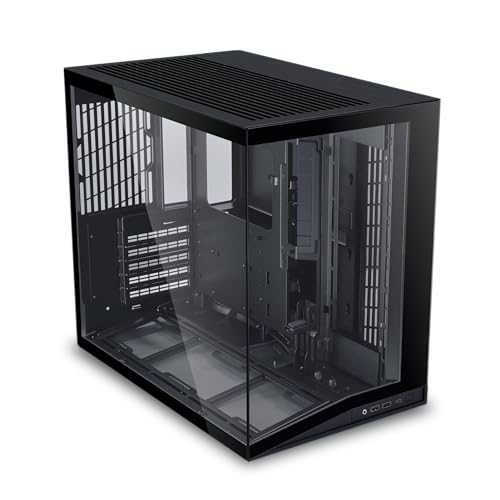
Best Premium Compact ATX – Lian Li O11D Mini V2
The Lian Li O11D Mini V2 is aimed at builders who want computer cases for compact builds without giving up standard ATX hardware. It supports ATX, Micro-ATX, and Mini-ITX motherboards, full-sized ATX power supplies, and full-length graphics cards while using a compact mid-tower footprint and a panoramic, pillar-free glass design.
Best For: Showpiece ATX systems that need flexible hardware support and clean component visibility.
Pros:
- Supports standard ATX, Micro-ATX, and Mini-ITX motherboards.
- Accommodates full-sized ATX power supplies and full-length graphics cards.
- Slanted bottom intake design is intended to improve direct airflow and GPU cooling.
- Includes horizontal and vertical GPU anti-sag brackets plus 24-pin cable-management support.
Cons:
- Fans are not included, so cooling hardware must be selected separately.
- Its 22-pound weight may be less convenient for frequent transport.
- Air-cooling and radiator compatibility depends on the specific components selected.
This case balances a relatively compact footprint with full-sized ATX compatibility and a premium display-oriented interior. It is best suited to builders who are comfortable planning their own fan layout and want a polished showcase build.
Best Compact 240mm Setup – RUIX OV502 Pro M-ATX Case
Among computer cases for compact builds, the RUIX OV502 Pro stands out for pairing a space-conscious design with support for modern hardware. Its expanded interior accommodates a 240mm AIO liquid cooler and graphics cards up to 340mm, while dual panoramic tempered-glass panels keep the finished system visible.
Best For: Compact gaming or creator systems using an M-ATX-oriented layout, 240mm liquid cooling, and a modern full-size GPU.
Pros:
- Supports up to a 240mm AIO liquid cooler.
- Accommodates graphics cards up to 340mm long.
- Dual panoramic tempered-glass panels provide a clear component view.
- Includes built-in fan, dust filter, RGB lighting, and four USB 3.0 ports.
Cons:
- The supplied details list ATX motherboard support, so buyers should verify the exact board-size fit before ordering.
- Only air cooling is listed in the detailed cooling specification despite 240mm AIO support in the product highlights.
- Compact internal layouts can require careful component and cable planning.
The OV502 Pro is a compelling option when cooling capacity and GPU clearance are more important than achieving the absolute smallest case. Confirm motherboard and radiator clearances for your exact parts before building.
How We Picked These Computer Cases for Compact Builds
We evaluated the selected cases around the concerns that matter most in a space-conscious PC build: internal layout, motherboard compatibility, graphics-card clearance, cooling support, airflow potential, cable-management room, included accessories, and overall value. The list includes compact ATX cases for full-size components as well as micro-ATX and mini-tower options for smaller systems.
Because “compact” does not mean the same thing for every builder, we considered both external footprint and the hardware each case can realistically accommodate. A case with a small desk footprint may still need substantial clearance behind or above it for ventilation and cables.
Quick Comparison
| Build priority | Best case type to consider | Why it matters |
|---|---|---|
| Full-size components in a smaller footprint | Compact ATX mid-tower | Preserves ATX motherboard and larger GPU compatibility. |
| Maximum component flexibility | Dual-chamber or modular ATX design | Separates cables and improves layout options. |
| Small, affordable gaming PC | Micro-ATX mini tower | Reduces size and cost while supporting mainstream hardware. |
| High-end liquid cooling | Case with 280mm or 360mm radiator support | Provides more cooling capacity for demanding CPUs. |
| Clean showcase build | Panoramic tempered-glass case | Highlights components, but may require more careful airflow planning. |
Key Buying Factors for Computer Cases for Compact Builds
Motherboard and GPU Compatibility
Confirm whether the case supports ATX, micro-ATX, or only smaller boards before buying. Then check maximum GPU length with front fans or a radiator installed. Modern graphics cards can be exceptionally thick, so slot width and side-panel clearance are just as important as length.
Cooling and Airflow
Look for a ventilated front, side, top, or bottom panel rather than relying solely on decorative glass. Check which fans are included and how many additional fans can be installed. If you plan to use an AIO cooler, verify the exact radiator size and mounting position supported by the case.
Power Supply and Cable Space
Compact layouts often make cable routing more difficult. Check the supported PSU form factor, PSU length limits, and the amount of space behind the motherboard tray. A modular power supply can make a tight build considerably easier to assemble.
Size, Access, and Future Upgrades
Measure your desk area, including clearance for front or rear cables and unobstructed intake air. Also consider removable panels, drive mounts, dust filters, and whether future storage, memory, or GPU upgrades will remain practical.
Who Should Buy Which Computer Cases for Compact Builds?
Choose a compact ATX case if you need a full-size motherboard, several expansion slots, or a large graphics card without moving to a bulky tower. A dual-chamber design is especially useful for builders who prioritize tidy cable management and a cleaner presentation.
Micro-ATX cases are the better fit for a smaller, lower-cost gaming or productivity system. They can provide an excellent balance of size and capability, but you should verify GPU and radiator clearance more carefully. Panoramic glass cases suit showcase builds, while mesh-heavy cases are generally the safer choice for sustained gaming workloads and quieter temperatures.
Before ordering, compare your exact CPU cooler, GPU, PSU, motherboard, and radiator dimensions against the manufacturer’s clearance figures. That final compatibility check is the best way to ensure your chosen case delivers a compact build without unpleasant surprises.