Compact PC cases leave little room for airflow, so the right fan can make a meaningful difference in temperatures, noise, and component longevity. The best option depends on your available mounting space, power connections, and whether you need active cooling for a computer or another enclosed device.
We’ve gathered 10 computer cooling fans for compact builds, covering slim 80mm and 92mm models, standard 120mm fans, and convenient USB-powered designs. Use the guide below to narrow the list by fit, control method, airflow needs, and noise priorities.
Best 10 Computer Cooling Fans for Compact Builds Picks for 2026
Performance Pick

- 120mm pressure-optimized fan
- 4-pin PWM speed control
- Up to 120.2 m³/h airflow
Best For: Compact systems with 120mm mounts, CPU coolers, or radiators
Thin RGB Option
ID-COOLING TF-9215 ARGB Slim Fan
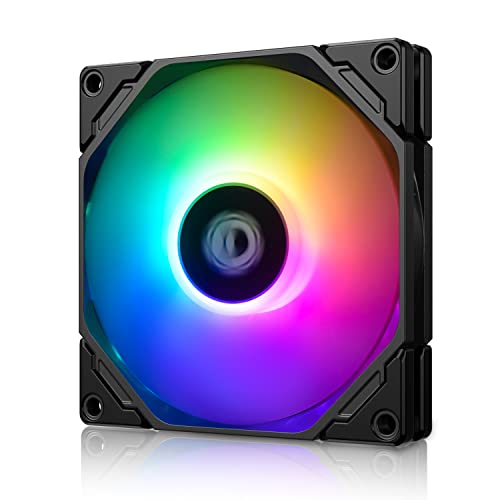
- Slim 15mm-thick design
- 800–2,500 RPM PWM range
- 5V 3-pin ARGB synchronization
Best For: ITX and HTPC builds with limited clearance and RGB support
USB Convenience Pick
AC Infinity MULTIFAN S3 120mm USB Fan

- USB-powered 120mm fan
- 52 CFM airflow rating
- Multi-speed controller included
Best For: Supplemental cooling for computers, consoles, and electronics
Two-Fan Value Pick

- Two 80x25mm fans included
- USB-powered 2,600 RPM operation
- 30 CFM rating per fan
Best For: DIY compact cooling projects and USB-powered equipment
Dual-Fan Quiet Cooling

- Two 80mm fans deliver 52 CFM combined airflow.
- Multi-speed control balances airflow and noise.
- Fans can stand upright or lie flat.
Best For: Compact builds and AV setups needing adjustable dual-fan airflow
High-Airflow USB Cooling

- Moves 56.7 CFM through USB power.
- Offers three speed settings.
- Includes guard, feet, screws, and nuts.
Best For: Mini PCs and enclosed electronics where higher airflow is the priority
Single-Fan Quiet Cooling

- Compact 80mm fan provides 26 CFM airflow.
- Runs at a stated 17 dBA noise level.
- Includes speed control and flexible placement.
Best For: Small systems needing quiet, targeted cooling from one fan
Best USB Versatility

- USB-powered for PCs, consoles, routers, and cabinets
- Three speeds up to 2,000 rpm and 51 CFM
- Anti-vibration feet allow horizontal or vertical placement
Best For: External cooling for USB-equipped compact setups
Best Quiet Console Cooling
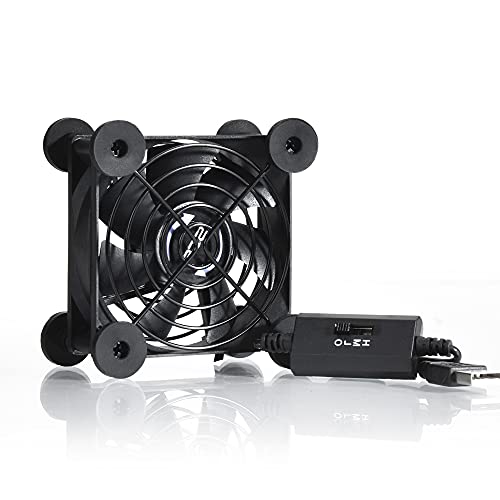
- Three speeds with 21 dB low-speed operation
- USB-powered for consoles, routers, and cabinets
- Protective grilles and feet support flexible placement
Best For: Quiet external cooling around compact electronics
Performance Pick – Noctua NF-P12 redux-1700 PWM
For builders seeking computer cooling fans for compact builds, the Noctua NF-P12 redux-1700 PWM offers a strong balance of airflow, static pressure, and noise control in a standard 120mm frame. Its 4-pin PWM connection lets a compatible motherboard adjust fan speed automatically.
Best For: Compact desktop builds using 120mm case mounts, air coolers, or water-cooling radiators.
Pros:
- Pressure-optimized design suits CPU coolers, radiators, and chassis ventilation.
- 1700 RPM PWM control can provide strong airflow when needed and quieter operation at idle.
- Rated for up to 120.2 cubic meters per hour of airflow with a maximum noise level of 25.1 dB(A).
- Includes a six-year manufacturer’s warranty.
Cons:
- Its 120x25mm frame may not fit especially thin or space-restricted layouts.
- It lacks integrated lighting for RGB-focused builds.
This is a practical choice when a compact system has room for a full-thickness 120mm fan and needs dependable cooling rather than decorative features.
Thin RGB Option – ID-COOLING TF-9215 ARGB Slim Fan
The ID-COOLING TF-9215 ARGB is designed for computer cooling fans for compact builds where every millimeter matters. Its 92x92x15mm slim profile fits low-profile coolers, HTPCs, and ITX systems, while PWM control allows speed adjustment from 800 to 2,500 RPM.
Best For: Space-restricted ITX, HTPC, and low-profile cooler installations that also want addressable RGB lighting.
Pros:
- 15mm thickness helps preserve clearance in compact enclosures.
- PWM range from 800 to 2,500 RPM supports quieter or higher-airflow operation.
- 5V 3-pin ARGB connector enables motherboard lighting synchronization.
- Rated for up to 44.3 CFM airflow.
Cons:
- The 92mm size provides less airflow capacity than a typical 120mm fan.
- Noise can reach 33.4 dB(A) at maximum speed.
- ARGB compatibility requires a motherboard or controller with a 5V 3-pin connection.
Choose this model when a standard fan is too thick and visual customization is important; just verify both the 92mm mounting pattern and ARGB header before buying.
USB Convenience Pick – AC Infinity MULTIFAN S3 120mm USB Fan
The AC Infinity MULTIFAN S3 is a straightforward option for computer cooling fans for compact builds that need USB-powered airflow rather than a motherboard-mounted case fan. Its included multi-speed controller helps balance airflow and noise, and the fan can stand upright or lie flat.
Best For: Computers, consoles, receivers, cabinets, and other electronics with an available USB port.
Pros:
- USB power works with ports commonly found on computers and AV equipment.
- Multi-speed controller allows manual adjustment for noise and airflow.
- Dual-ball bearings support flat or upright placement and are rated for 67,000 hours.
- Produces up to 52 CFM with a listed noise level of 18 dBA.
Cons:
- It is not a conventional 3-pin or 4-pin motherboard fan.
- Manual speed control may be less convenient than automatic motherboard PWM control.
- The 120x25mm form factor still requires adequate mounting space.
This fan is especially useful for supplemental cooling where internal fan headers are unavailable, though its USB connection makes it less suitable for a fully integrated airflow setup.
Two-Fan Value Pick – AITRIP 80mm USB Fan 2-Pack
The AITRIP two-pack provides flexible computer cooling fans for compact builds, DIY projects, and equipment with USB power available. Each 80x25mm brushless fan runs at a listed 2,600 RPM and connects through USB, making the pair useful for targeted airflow around small cases, printers, routers, or coolers.
Best For: DIY cooling projects and compact equipment that can use two small USB-powered fans.
Pros:
- Two fans are included for intake and exhaust or separate devices.
- Compact 80mm footprint suits smaller installations.
- USB connectors simplify power access without a dedicated fan header.
- Each fan is rated for 30 CFM airflow and uses a hydraulic bearing.
Cons:
- USB power does not provide motherboard-based speed control.
- At 26 dBA, these are not the quietest option listed.
- The 80mm size has less airflow capacity than a 120mm fan.
This pair makes sense when low-cost, flexible USB cooling is more important than polished cable integration or advanced fan control. Confirm that the 80mm mounting area and USB power source suit the project.
Dual-Fan Quiet Cooling – Compact USB Cooling Pair
For computer cooling fans for compact builds, the AC Infinity MULTIFAN S5 provides two space-conscious 80mm fans in one USB-powered setup. Its adjustable controller lets you balance airflow and noise, while the fans can stand upright or lie flat around a small PC or electronics enclosure.
Best For: Compact builds, AV cabinets, consoles, and electronics that benefit from dual-fan airflow.
Pros:
- Two 80mm fans provide a combined 52 CFM of airflow.
- Multi-speed controller helps tune noise and cooling performance.
- Dual-ball bearings are rated for a 67,000-hour lifespan.
- USB power and flexible placement suit tight spaces.
Cons:
- Uses more space and power than a single-fan option.
- Designed as an external USB cooling solution rather than a standard internal case fan.
The S5 is a practical choice when a compact setup needs more airflow than one 80mm fan can provide. Its 18 dBA noise rating and included controller make it especially suitable for noise-sensitive workstations and entertainment areas.
High-Airflow USB Cooling – 120mm Compact Case Fan
This 120mm USB fan is a straightforward option for computer cooling fans for compact builds, routers, consoles, and other enclosed electronics. It connects through USB, includes protective hardware, and produces 56.7 CFM of airflow for spaces where heat can build up.
Best For: Mini PCs, routers, gaming consoles, home-theater equipment, and tight enclosures needing a single high-airflow fan.
Pros:
- 56.7 CFM airflow supports effective heat removal.
- USB connection simplifies installation and power.
- Three speed settings allow basic airflow adjustment.
- Includes a protective net, feet, mounting screws, and nuts.
Cons:
- The 120mm frame is larger than an 80mm compact-build fan.
- Sleeve bearings have a lower stated lifespan than the dual-ball-bearing AC Infinity models.
- At 23 dBA, it is not the quietest option listed.
Choose this model when airflow capacity matters more than the smallest footprint. Its 4.7-inch square frame may need careful placement, but the USB design and included mounting pieces make it flexible for external or enclosure cooling.
Single-Fan Quiet Cooling – Adjustable 80mm USB Fan
For computer cooling fans for compact builds, the AC Infinity MULTIFAN S1 offers a simple single-fan solution with a small 80mm footprint. It uses USB power, includes a multi-speed controller, and can be positioned flat or upright to direct airflow where a compact system needs it.
Best For: Small PCs, consoles, receivers, and individual hotspots where quiet, adjustable cooling is needed.
Pros:
- Compact 80mm design delivers 26 CFM of airflow.
- 17 dBA noise rating supports quiet operation.
- Multi-speed controller provides airflow and noise adjustment.
- Dual-ball bearings are rated for 67,000 hours.
Cons:
- Provides less total airflow than the dual-fan S5.
- Best suited to targeted cooling rather than ventilating a larger enclosure.
The S1 is the most space-efficient pick in this group when one fan is enough. Its quiet operation, flexible orientation, and USB connection make it well suited to compact setups that need localized cooling without adding a full-size case fan.
Best USB Versatility – 120mm 3-Speed USB Cooling Fan
For computer cooling fans for compact builds, this 120mm USB model is a flexible choice when you need airflow without installing an internal fan. Its USB connection works with PCs, cases, cabinets, routers, consoles, DVRs, and other USB-equipped devices, while the included controller offers three speed settings.
Best For: External cooling for compact desks, cabinets, gaming consoles, routers, and other USB-powered equipment.
Pros:
- USB-powered design is broadly compatible and easy to set up.
- Three speed settings, with up to 2,000 rpm and 51 CFM airflow.
- Eight anti-vibration feet support horizontal or vertical placement.
- Dual-ball bearings and a listed 33 dB noise level support quieter operation.
Cons:
- External USB power limits it to devices with an available USB port.
- Its 120mm footprint may be too large for especially tight spaces.
This is a practical plug-and-play option for adding airflow around compact equipment rather than replacing a case’s internally mounted fan. The speed controller and flexible positioning make it especially useful for varied setups.
Best Slim Internal Fit – Thermalright 80mm Slim PWM Fan
Among computer cooling fans for compact builds, the Thermalright TL-8015W stands out for its 15mm-thick profile. Its 4-pin PWM connection lets a compatible motherboard adjust speed automatically, making it suited to cramped cases, CPU cooler assistance, and other internal cooling duties.
Best For: Slim desktop cases, radiators, CPU coolers, and builds where standard-thickness 80mm fans do not fit.
Pros:
- 15mm slim design helps accommodate restricted internal clearance.
- 4-pin PWM control supports automatic motherboard-based speed adjustment.
- Up to 2,200 rpm, 28.4 CFM airflow, and 1.25 mm H2O air pressure.
- Vibration-damping pads and S-FDB V2 bearings are designed for quieter, durable operation.
Cons:
- Its 80mm size and slim format may provide less airflow than larger fans.
- It requires a compatible 4-pin PWM motherboard connection.
This is the most purpose-built option here for an internal compact PC. Check mounting dimensions and motherboard headers first, but its slim chassis and PWM control make it a strong fit when space is the main constraint.
Best Quiet Console Cooling – 80mm 3-Speed USB Fan
If you need computer cooling fans for compact builds or nearby electronics, this 80mm USB fan offers a simple external cooling solution. It includes a three-speed controller, protective iron grilles, and shockproof feet for flat or upright placement beside a computer cabinet, console, router, or receiver.
Best For: Quiet external cooling for compact cabinets, gaming consoles, routers, receivers, and audio-visual equipment.
Pros:
- Three speed settings allow a balance between airflow and noise.
- Low-speed operation is listed at 21 dB, supporting quiet environments.
- USB power works with ports on compatible electronics and consoles.
- Double-ball bearings are rated for a 65,000-hour service life.
Cons:
- It is an external 5V USB fan, not a standard internally mounted PC case fan.
- The 80mm design provides up to 33 CFM, less than the larger 120mm USB model.
- Its 2-pin connector does not provide motherboard PWM control.
This compact fan is a sensible choice when you want targeted airflow with minimal setup and low-speed noise. The grilles and positioning feet also make it convenient for exposed, space-limited equipment areas.
How We Picked These Computer Cooling Fans for Compact Builds
We focused on fans suited to space-constrained systems and small enclosures, including slimline models that fit where standard fans cannot. The roundup also includes conventional PWM fans for motherboard-controlled cooling and USB fans with inline speed controls for routers, consoles, receivers, cabinets, and DIY projects.
Selection criteria included frame size, thickness, power connection, speed-control options, installation flexibility, and the likely balance between airflow and noise. Because compact builds vary widely, no single fan is ideal for every application.
Quick Comparison
| Fan type | Best for | What to check |
|---|---|---|
| 120mm PWM | Small cases with standard mounts | Available motherboard header and clearance |
| 80mm or 92mm slim PWM | Restricted CPU or case spaces | 15mm thickness and mounting-hole spacing |
| 120mm USB | Cabinets, receivers, routers, and larger vents | USB access and mounting position |
| 80mm USB or dual-fan USB | Small electronics and targeted airflow | Power source, cable length, and noise |
Key Buying Factors for Computer Cooling Fans for Compact Builds
Size and Clearance
Measure the mounting area before choosing a fan. Frame size is only part of the calculation: a 25mm-thick fan may not fit beside a graphics card, drive cage, side panel, or CPU cooler. Slim 15mm fans are useful in tight spaces, but they can deliver a different airflow and noise profile from full-thickness models.
Power and Control
Four-pin PWM fans can usually connect to a motherboard header and adjust speed according to temperature. USB fans are simpler for equipment without fan headers and often include a manual controller, but they generally do not provide automatic motherboard-based speed control. Confirm voltage and connector compatibility before installation.
Airflow, Pressure, and Noise
Use a fan with adequate airflow for the enclosure, while considering whether it will work against a filter, radiator, grille, or closely packed components. Quiet operation is especially important in living rooms and offices; a speed controller can help you trade maximum cooling for lower noise during light workloads.
Installation and Airflow Direction
Check screw-hole spacing, cable routing, and the fan’s airflow arrows. In most cases, aim for a deliberate intake and exhaust path rather than placing every fan in the same direction. Remove dust restrictions and leave enough space around the intake for the fan to work effectively.
Who Should Buy Which Computer Cooling Fans for Compact Builds?
Choose a 120mm PWM fan if your compact case supports standard 120mm mounts and you want motherboard-controlled cooling. Choose a slim 80mm or 92mm PWM fan when thickness is the main limitation around a CPU cooler or case panel.
Choose a USB fan for a router, game console, receiver, DVR, cabinet, or other device without an accessible motherboard header. A single 120mm USB model suits broader vents, while an 80mm or dual-fan setup works better for narrow areas or targeted cooling.
Before ordering, verify dimensions, connector type, available power, and the intended mounting method. That final compatibility check matters more than maximum rated speed when building or cooling a compact system.