Choosing the right mixer can make a home studio easier to control, expand, and record with. The best option depends on how many sources you use, whether you need USB recording, and how much hands-on mixing you want.
We’ve gathered 10 audio mixers and interfaces suited to different budgets and workflows, including compact stereo mixers, multichannel boards, USB-equipped models, and creator-focused options.
Best 10 Audio Mixers for Home Recording Picks for 2026
Best USB Interface
Focusrite Scarlett 2i2 4th Gen

- Two mic preamps and Hi-Z instrument inputs
- 24-bit/192kHz recording with 120dB dynamic range
- Includes recording software and plugins
Best For: Solo musicians and compact home studios
Best Compact Analog Mixer

- Eight-channel compact analog design
- Two mic/line inputs with phantom power
- Three-band EQ on every channel
Best For: Simple multi-source analog mixing
Best Mini Line Mixer
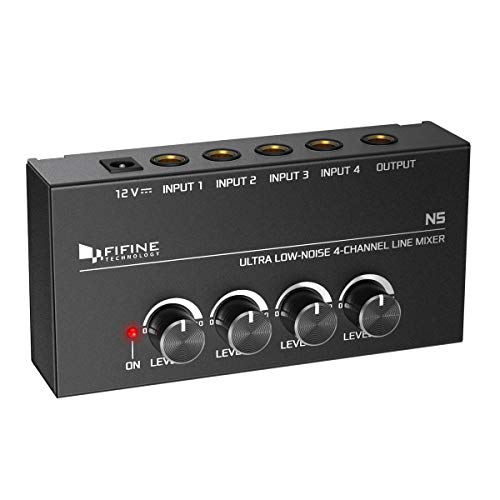
- Four independent volume-controlled line inputs
- Stereo or mono operating modes
- Compact metal enclosure with low-noise operation
Best For: Keyboard rigs and simple line-level submixing
Best USB Mixer With Effects
Mackie ProFX12v3 12-Channel Mixer

- Twelve-channel format for larger setups
- USB, XLR, and TRS connectivity
- Onyx preamps and built-in GigFX effects
Best For: Home studios and content creators needing multiple inputs
Best for Streamers

- XLR input with 48V phantom power
- Separate controls for four audio paths
- Mute, monitoring, RGB, and voice effects
Best For: One-microphone streaming and home creation
Best Compact Analog Pick

- Five-channel compact mixer
- Mic/line input with phantom power
- RCA and stereo line connections
Best For: Simple wired home mixing and playback
Best for Larger Setups
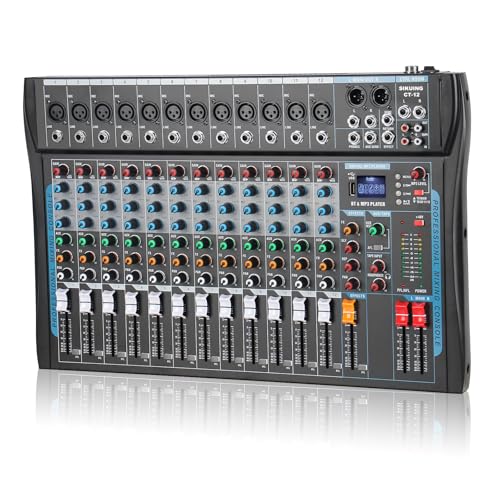
- 12-channel design with XLR and line inputs
- USB and Bluetooth connectivity
- Three-band EQ, DSP effects, and phantom power
Best For: Multi-source home studios and streaming
Compact Sub-Mixing Pick

- Independent level controls for each channel
- Stereo/mono switching for flexible routing
- Compact, low-noise design
Best For: Combining keyboards, guitars, bass, or other line-level sources
Connected Home Studio Pick

- USB-B interface for PC recording
- Three XLR inputs with 48V phantom power
- Bluetooth and USB playback options
Best For: Podcasters, streamers, and home recordists needing connectivity
Effects-Ready Studio Pick

- Four XLR inputs with 48V phantom power
- Three-band EQ and 16 DSP effects
- Bluetooth and USB playback support
Best For: Home studios, streaming, karaoke, and small live setups
Best USB Interface – Focusrite Scarlett 2i2 4th Gen
The Focusrite Scarlett 2i2 4th Gen is a strong choice for audio mixers for home recording when you primarily need to capture one or two microphones or instruments directly into a computer. Its two mic preamps, Hi-Z inputs, high-resolution recording, and USB connectivity suit vocal, guitar, and compact studio setups.
Best For: Solo musicians, vocalists, and home studios recording up to two input sources at once.
Pros:
- Two mic preamps and two Hi-Z instrument inputs support microphones, guitars, and other instruments.
- 24-bit/192kHz recording and a 120dB dynamic range are designed for detailed capture.
- Auto Gain, Clip Safe, Air modes, and included recording software simplify the recording workflow.
Cons:
- It has two audio inputs, so it is less suitable for larger multi-source recording sessions.
- It is an audio interface rather than a traditional mixer with multiple channel strips and hands-on routing controls.
Choose the Scarlett 2i2 if computer-based recording quality and simple operation matter more than having many simultaneous mixer channels. The included software bundle adds useful tools for getting started quickly.
Best Compact Analog Mixer – Mackie Mix8 8-Channel Mixer
The Mackie Mix8 is a practical option among audio mixers for home recording if you need several inputs, straightforward level control, and analog tone shaping. It combines two mic/line inputs, two stereo line inputs, three-band EQ on every channel, and an aux send in a compact format.
Best For: Home setups that need to combine microphones, instruments, and stereo sources without built-in USB recording.
Pros:
- Eight-channel layout provides more connection flexibility than a two-input interface.
- Two mic/line inputs include phantom power for studio condenser microphones.
- Three-band EQ on all channels, pan controls, and an aux send support practical signal shaping and routing.
Cons:
- Its supplied connectivity is wired and does not include USB computer recording.
- It has only two mic/line inputs, while the remaining inputs are stereo 1/4-inch line inputs.
The Mix8 makes sense when you want a simple analog control surface for combining sources or feeding another recording device. Consider a USB-equipped mixer or interface if direct computer recording is essential.
Best Mini Line Mixer – FIFINE N5 4-Channel Mixer
The FIFINE N5 is a compact line mixer for home recording setups that need to combine several line-level sources into one output. Its four independent volume controls, metal enclosure, and stereo or mono operating options make it useful for keyboards, instruments, monitoring, and basic submixing.
Best For: Keyboard rigs, small desktop setups, and four-source line-level submixes.
Pros:
- Four channels provide independent volume control for connected line-level sources.
- Stereo and mono operation support either stereo routing or mixing four mono signals into one output.
- Compact metal construction and low-noise operation suit desktop monitoring and routing.
Cons:
- It is designed for line-level signals and does not provide the mic preamps or EQ found on larger mixers.
- TRS/TS audio cables are not included.
- Its single output limits more complex routing options.
The N5 is best viewed as a focused submixer rather than a complete recording console. It can simplify a small rig, but users needing microphone gain, effects, or computer connectivity should look at a fuller mixer or interface.
Best USB Mixer With Effects – Mackie ProFX12v3 12-Channel Mixer
The Mackie ProFX12v3 is a versatile pick among audio mixers for home recording when you want a larger channel count, USB connectivity, and built-in effects. Its 12-channel format, Onyx preamps, and GigFX engine are suited to recording, live sound, and content creation.
Best For: Home studios and creators who need multiple inputs, USB recording, and onboard effects.
Pros:
- Twelve channels provide room for multiple microphones and other connected sources.
- USB, XLR, and TRS connectivity supports computer-based recording and broader studio or live-sound use.
- Onyx preamps and the built-in GigFX engine add recording capability and effects in one unit.
Cons:
- Its larger footprint is less convenient for very small desktop workspaces.
- It is a corded mixer and requires a 110-volt power source.
The ProFX12v3 is a good fit when a compact two-input interface is too limited and you want hands-on mixer controls plus USB. It offers a more complete central hub for recording, effects, and content-focused setups.
Best for Streamers – FIFINE Ampligame SC3
For creators comparing audio mixers for home recording, the FIFINE Ampligame SC3 is a practical one-microphone option with an XLR input, USB-C computer connection, and separate controls for key audio paths. Its built-in 48V phantom power also supports compatible condenser microphones.
Best For: Beginner streamers, podcasters, and home creators using one XLR microphone.
Pros:
- XLR microphone input with built-in 48V phantom power
- Independent controls for microphone, line in, headphones, and line out
- Front mute and monitor buttons plus four customizable sound-effect buttons
- Supports Mac and Windows, with RGB lighting and voice effects
Cons:
- Designed around one microphone input
- USB microphones are not supported through the XLR input
- XLR cable is not included
The SC3 emphasizes accessible control and streaming features rather than a large multitrack setup. It is a good fit when simple routing, monitoring, and hands-on effects matter more than numerous microphone channels.
Best Compact Analog Pick – Mackie Mix5
The Mackie Mix5 is a compact choice for shoppers seeking audio mixers for home recording without a large control surface. It combines one mic/line input, two stereo 1/4-inch line inputs, RCA playback and recording connections, and a simple two-band EQ.
Best For: Small home setups needing straightforward mixing, playback, or recording connections.
Pros:
- Compact five-channel design weighing 1.4 pounds
- One mic/line input with studio-level audio performance
- Two stereo 1/4-inch line inputs and dedicated RCA inputs/outputs
- Phantom power supports studio condenser microphones
Cons:
- Only one mic/line input is provided
- Two-band EQ offers less tone control than larger mixers
- Its listed connectivity is wired rather than Bluetooth or USB
The Mix5 keeps the workflow focused and space-efficient. Choose it for basic analog routing and recording tasks, especially when you already have the necessary external recording hardware.
Best for Larger Setups – 12-Channel Audio Interfacer
For home creators who need more inputs, this 12-channel board offers a broad feature set for audio mixers for home recording. It includes XLR and balanced line connections, USB and Bluetooth connectivity, per-channel controls, 16 DSP effects, and 48V phantom power.
Best For: Home studios, karaoke, interviews, and multi-source streaming setups.
Pros:
- 12-channel layout with XLR and balanced line inputs
- USB and Bluetooth connections for computers and mobile devices
- Independent volume and gain controls with three-band EQ
- 16 DSP effects, headphone monitoring, and 48V phantom power
Cons:
- More controls and connections may be unnecessary for a basic one-mic setup
- Bluetooth and USB performance depends on the connected devices
- The supplied notes do not specify individual channel counts for the 12 listed channels
This mixer is the most flexible option here for combining several sources and adding effects. Its larger channel count makes it better suited to expanding setups than minimalist desktop recording.
Compact Sub-Mixing Pick – Moukey 6-Channel Line Mixer
If you need straightforward audio mixers for home recording, the Moukey MAMX2 is a compact choice for combining several line-level sources. Its independent volume controls and stereo/mono switching make it practical for keyboards, guitars, bass, drum setups, or routing a simple sub-mix.
Best For: Home musicians and small setups that need to combine multiple line-level instruments without a complicated control surface.
Pros:
- Independent volume control for each input channel.
- Supports stereo or mono mixing with the appropriate TRS or TS cables.
- Compact, low-noise design for quick sub-mixing and monitoring.
- Uses a DC 5V power supply for flexible placement.
Cons:
- TRS and TS cables are not included.
- Designed for line-level mixing rather than a full microphone-focused recording setup.
- An externally certified power supply is recommended to help avoid interference.
This is a focused utility mixer rather than an all-in-one recording console. It makes the most sense when you already have compatible cables and need simple level control for several instruments or a compact sub-mix.
Connected Home Studio Pick – Aveek 5-Channel USB Mixer
Among audio mixers for home recording, the Aveek 5-channel mixer stands out for combining microphone inputs with PC recording, Bluetooth streaming, and USB drive playback. It also includes headphone monitoring, basic EQ, and built-in echo and delay effects for flexible home production and streaming.
Best For: Podcasters, streamers, and home recordists who want microphone connectivity plus convenient computer recording and playback features.
Pros:
- Three XLR inputs support microphones and 48V phantom power for condenser microphones.
- Built-in USB-B recording interface supports plug-and-play PC recording.
- Bluetooth streaming and USB drive playback add convenient music sources.
- Includes headphone monitoring, gain controls, 2-band EQ, echo, and delay effects.
Cons:
- Bluetooth, USB, and the 4/5-channel functions cannot be used simultaneously.
- Bluetooth range is listed as up to 15 feet.
- Output connections are intended for active speakers or power amplifiers, not passive speakers directly.
The Aveek offers a broad feature set for a small mixer, especially if computer recording and streaming are priorities. Its operating limitations are worth noting, but the combination of USB recording, phantom power, and monitoring makes it a versatile home setup option.
Effects-Ready Studio Pick – 6-Channel Bluetooth Mixer
This 6-channel console is a feature-rich option among audio mixers for home recording, with four XLR inputs, 48V phantom power, USB playback, Bluetooth, three-band EQ, and 16 DSP effects. It is suited to users who want hands-on control over instruments, microphones, streaming audio, or karaoke-style setups.
Best For: Home studios and live-streaming setups that benefit from multiple inputs, onboard effects, and wireless or USB playback.
Pros:
- Four XLR inputs support microphones and switchable 48V phantom power.
- Three-band EQ and separate faders provide hands-on tone and level control.
- Includes 16 DSP effects, including delay and reverb-style processing.
- Bluetooth and USB interfaces support wireless or USB music playback.
Cons:
- The supplied warranty description covers 90 days from purchase.
- It is a traditional analog mixer, so setup and operation may require consulting the manual.
- The listed dimensions and 2.3 kg weight make it less compact than a basic line mixer.
This mixer is a strong fit when effects and input flexibility matter more than minimal size. Its four microphone-capable channels and onboard processing offer useful control, while the analog workflow may be less immediate for beginners than a simpler USB-focused interface.
How We Picked the Best Audio Mixers for Home Recording
We evaluated these Audio Mixers for Home Recording by focusing on practical features rather than channel count alone. Key considerations included input flexibility, USB or computer connectivity, preamp and phantom-power availability, onboard effects, monitoring controls, noise performance, size, and ease of use. We also considered whether each model is better suited to recording, live sound, streaming, sub-mixing, or a combination of these tasks.
Because home studios vary widely, this list includes both true USB audio interfaces and traditional analog mixers. A mixer may offer more hands-on control and several physical inputs, while an interface often provides simpler computer recording and more direct integration with recording software.
Quick Comparison
| Best For | What to Look For |
|---|---|
| Solo vocals or instruments | Two quality inputs, direct monitoring, and USB recording |
| Small band or multi-mic sessions | More microphone channels, gain controls, and phantom power |
| Streaming and gaming | Simple controls, headphone monitoring, and quick volume adjustment |
| Sub-mixing keyboards or playback devices | Multiple stereo line inputs and low-noise operation |
| Live recording or small events | Durable construction, onboard effects, and flexible outputs |
Key Buying Factors for Audio Mixers for Home Recording
Input Type and Channel Count
Count the microphones, instruments, keyboards, and playback devices you expect to connect at the same time. A two-input interface is usually enough for a singer-songwriter, while a multichannel board is more practical for drum microphones, small ensembles, or several stereo sources.
USB Recording and Computer Compatibility
If you want to record directly into a computer, confirm that the mixer includes USB audio connectivity and supports your operating system. Some products function primarily as stereo USB mixers, while dedicated interfaces may provide more focused recording workflows and separate tracks depending on the design.
Phantom Power and Preamps
Condenser microphones generally require +48V phantom power. Check whether phantom power is available and whether it applies globally or to individual channels. Clean preamps and useful gain range also matter when recording quiet vocals or dynamic microphones.
Monitoring, Effects, and Noise
Headphone outputs, direct monitoring, balanced outputs, and independent level controls help prevent latency and simplify sessions. Built-in reverb or other effects can be useful for live use, but they are less important if you plan to add effects inside a digital audio workstation. Low-noise circuitry is especially valuable in smaller rooms with sensitive microphones.
Who Should Buy Which Audio Mixers for Home Recording?
Choose a compact USB interface such as the Scarlett 2i2 if your priority is straightforward computer recording with one or two sources. Pick a small analog mixer such as the Mix5 or Mix8 for basic source blending, rehearsal setups, or sub-mixing without extensive computer integration.
For larger home sessions, live recording, or small performances, a model such as the ProFX12v3 offers more channels, connectivity, and onboard processing. Compact FIFINE and Aveek options may suit streamers, podcasters, and casual creators who value accessible controls and a small footprint. The generic multichannel Bluetooth and DSP mixers are worth considering when karaoke, playback, wireless-style convenience, or built-in effects matter more than a refined studio workflow.
Before buying, confirm the connector types, total simultaneous inputs, USB routing, power requirements, and compatibility with your microphone and recording software. The best mixer is the one that supports your current setup without adding controls or features you will not use.