Choosing an OLED monitor for Mac photo editing comes down to more than panel type. You want accurate color, reliable calibration, strong Mac connectivity, and a screen size that fits your workflow.
This roundup focuses on displays that help you edit confidently, whether you need a premium studio monitor, a versatile USB-C desktop pick, or a portable second screen.
Best 10 OLED Monitor for Mac Photo Editing Picks for 2026
Editor’s Pick
MSI 27-inch 4K QD-OLED for Mac

- 27-inch 4K QD-OLED panel
- △E < 2 color accuracy
- Up to 98W USB-C power delivery
Best For: Mac photo editors who want OLED contrast and one-cable convenience
Premium Mac Studio
Apple Studio Display, Standard Glass

- 27-inch 5K Retina display
- P3 wide color with 600 nits brightness
- Built-in camera, mics, and speakers
Best For: Mac users who want a premium non-OLED display with excellent integration
Portable Pick
INNOCN 15.6-inch OLED Touch Monitor
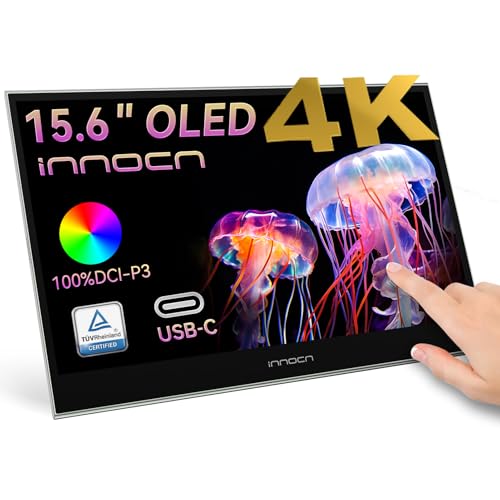
- 15.6-inch portable 4K OLED
- 100% DCI-P3 and 10-bit color
- USB-C plug-and-play with touch support
Best For: Traveling creators who need a compact second screen for photo editing
Mac Match
BenQ 27-inch 4K Display for MacBook

- Mac-tuned P3 wide color gamut
- Dual USB-C with 90W power delivery
- Height, tilt, swivel, and pivot adjustments
Best For: MacBook users who want a color-matched 4K editing monitor
Mac Studio Reference Pick
ASUS ProArt 27-inch 4K QD-OLED

- 27-inch 4K QD-OLED panel
- Delta E < 1 with hardware calibration
- Dual Thunderbolt 4 with 96W power delivery
Best For: Mac photo editors who want a color-critical 27-inch 4K OLED with Thunderbolt
Portable Editing Pick
ViewSonic 15.6-inch 4K OLED Portable

- 15.6-inch 4K OLED portable display
- 1.5 lb body with USB-C and 60W charging
- Built-in stand and Mac compatibility
Best For: Mac users who need a lightweight portable OLED monitor for travel
Large-Screen Pro Pick
ASUS ProArt 32-inch 4K HDR QD-OLED

- 31.5-inch 4K QD-OLED workspace
- Delta E < 1 with hardware calibration
- Dual Thunderbolt 4 and HDR support
Best For: Mac photo editors who prefer a larger 32-inch 4K OLED workspace
Color-Accurate 4K Workhorse

- 27-inch 4K desktop monitor with wide workspace
- 99% DCI-P3 and 99% Adobe RGB coverage
- USB-C with 96W Power Delivery for Mac setups
Best For: Mac photographers who want a highly accurate 4K desktop editing monitor
True OLED Pro Editor

- 4K HDR OLED with 1,000,000:1 contrast
- ΔE < 1 and hardware calibration support
- USB-C with 80W Power Delivery and calibrator included
Best For: Serious Mac editors who want a premium calibrated OLED desktop display
Editor’s Pick – MSI 27-inch 4K QD-OLED for Mac
If you want an OLED monitor for Mac photo editing that leans toward pro-level detail and color confidence, this MSI 27-inch 4K QD-OLED is a strong option. The 3840 x 2160 panel, △E < 2 color accuracy, and DisplayHDR True Black 400 support make it well suited to image work where contrast and tonal separation matter.
Best For: Mac users who want a color-accurate 4K OLED for editing and general creative work.
Pros:
- 4K QD-OLED panel with deep blacks and strong contrast for photo work
- △E < 2 color accuracy and HDR True Black 400 certification
- Dual USB-C with up to 98W power delivery for a cleaner Mac setup
- MSI Mac optimization software supports color synchronization and Mac shortcut keys
Cons:
- 120Hz is useful, but this is still more display than most editors strictly need
- 27-inch size may feel compact for users who prefer larger canvases
Overall, this is one of the more balanced choices if you want OLED contrast without giving up Mac-friendly workflow features. It combines high resolution, accurate color, and simple USB-C connectivity in a single package.
Premium Mac Studio – Apple Studio Display, Standard Glass
For Mac users who prioritize seamless integration over OLED contrast, the Apple Studio Display remains a premium reference point. Its 27-inch 5K Retina panel, 14.7 million pixels, P3 wide color, and 600 nits of brightness make it a polished display for detailed photo editing on Mac.
Best For: Mac users who want a deeply integrated 5K Retina display with strong color and built-in camera/audio.
Pros:
- 27-inch 5K Retina display with 14.7 million pixels for sharp detail
- P3 wide color and 1 billion color support for creative workflows
- Anti-reflective coating helps reduce glare in everyday use
- Built-in 12MP Center Stage camera, mics, and six-speaker audio
Cons:
- Not an OLED panel, so it won’t deliver OLED-style blacks and contrast
- Tilt-adjustable stand only; other stand options are sold separately
This is the most Mac-native display in the group, especially if you also want an excellent camera and audio setup. It is less of an OLED monitor for Mac photo editing and more of a premium, all-in-one Studio display experience.
Portable Pick – INNOCN 15.6-inch OLED Touch Monitor
If you need an OLED monitor for Mac photo editing that travels well, this INNOCN 15.6-inch portable display is built for flexibility. It offers 4K resolution, 100% DCI-P3 coverage, 10-bit color, and a touchscreen design that can work as a second screen for quick review or side-by-side editing.
Best For: Creators who want a portable OLED second screen for laptop-based editing.
Pros:
- Portable 15.6-inch OLED panel with 4K resolution
- 100% DCI-P3 and 10-bit color support for editing tasks
- Touchscreen input adds convenience for zooming and navigation
- USB-C plug-and-play design keeps setup simple
Cons:
- 60Hz refresh rate is basic compared with larger desktop models
- 15.6-inch size is best for secondary use, not a main workspace display
This is a smart pick if portability matters more than screen size. It gives you OLED image quality in a compact form, making it useful as a travel-friendly companion to a MacBook editing setup.
Mac Match – BenQ 27-inch 4K Display for MacBook
Although this is not an OLED monitor for Mac photo editing, it is designed specifically for MacBook users who want a color-matched desktop display. The 27-inch 4K panel, P3 wide color gamut, and BenQ’s Mac tuning make it a practical choice for photographers who care more about workflow simplicity than OLED contrast.
Best For: MacBook users who want an easy-to-match 4K editing display with USB-C convenience.
Pros:
- Mac-tuned color with P3 wide color gamut
- Dual USB-C with 90W power delivery supports a clean single-cable setup
- MacBook keyboard controls for brightness and volume
- Height, tilt, swivel, and pivot adjustments improve comfort
Cons:
- IPS-based display, so it does not offer OLED-level blacks
- 60Hz refresh rate is standard rather than premium
For Mac users who want accuracy and convenience more than absolute contrast, this BenQ is a very sensible option. It is especially appealing if your editing workflow benefits from Mac-specific controls and simple USB-C expansion.
Mac Studio Reference Pick – ASUS ProArt 27-inch 4K QD-OLED
If you want an OLED monitor for Mac photo editing with top-tier color accuracy and a polished all-in-one desk setup, the ASUS ProArt PA27UCDMR is built for that job. Its 27-inch 4K QD-OLED panel, Delta E < 1 calibration, and 99% DCI-P3 coverage make it a strong fit for image work where subtle color and contrast matter.
Best For: Mac photo editors who want a color-critical 27-inch 4K OLED with Thunderbolt connectivity and calibration tools.
Pros:
- 4K 27-inch QD-OLED panel with 100% sRGB and 99% DCI-P3 coverage
- World-leading Delta E < 1 color performance and hardware calibration support
- Dual Thunderbolt 4 ports with up to 96W power delivery
- Ergonomic stand plus Mac compatibility and built-in USB hub
Cons:
- 240Hz and gaming-focused features may be more than photo editors need
- 27-inch size may feel small if you prefer a larger canvas for timelines and palettes
Overall, this is one of the most complete OLED monitor options for Mac photo editing if your priority is accuracy, connectivity, and premium workflow features. It pairs professional color specs with Thunderbolt convenience, making it a practical studio choice.
Portable Editing Pick – ViewSonic 15.6-inch 4K OLED Portable
For an OLED monitor for Mac photo editing on the go, the ViewSonic VX1655-4K-OLED is a compact second-screen option that keeps setup simple. The 15.6-inch 4K OLED panel, USB-C connectivity, and built-in stand make it a practical travel companion when you need extra screen space for culling or light edits away from the studio.
Best For: Mac users who need a lightweight portable OLED monitor for travel or a second screen.
Pros:
- 15.6-inch 4K OLED display in a 1.5 lb, 0.6-inch-thick design
- USB-C connectivity with 60W charging helps reduce cable clutter
- Built-in stand and cover support portrait or landscape use
- Compatible with Apple/Mac operating systems
Cons:
- 60Hz refresh rate is modest compared with larger pro OLED displays
- 400 brightness and portable form factor are less suited to a fixed pro editing station
This is the most mobility-focused option in the group, so it makes sense when portability matters more than a full desktop workflow. For Mac photo editing, it works best as a travel display or backup screen rather than a main studio monitor.
Large-Screen Pro Pick – ASUS ProArt 32-inch 4K HDR QD-OLED
If you want a larger OLED monitor for Mac photo editing, the ASUS ProArt PA32UCDM gives you a 31.5-inch 4K QD-OLED panel with the same professional color-first focus as the smaller model. Its Delta E < 1 performance, 99% DCI-P3 coverage, and hardware calibration features make it well suited to detailed retouching and color-sensitive work.
Best For: Mac photo editors who prefer a larger 32-inch 4K OLED workspace with pro calibration features.
Pros:
- 31.5-inch 4K QD-OLED panel for a roomier editing layout
- Delta E < 1 color accuracy with hardware calibration and profile write-back
- 1000 nits peak brightness and VESA DisplayHDR True Black 400
- Dual Thunderbolt 4 ports plus broad HDR format support
Cons:
- Larger size and 19.8 lb weight make it less compact than the 27-inch option
- Hardware connectivity details center on HDMI and Thunderbolt, so the desk setup is more fixed than portable
This is the best fit if you want more screen real estate without giving up the professional OLED traits that matter in photo work. It is a strong Mac studio monitor for editors who want a bigger canvas and serious color tools.
Portable OLED Travel Pick – ViewSonic VP16-OLED
If you want an OLED monitor for Mac photo editing that can travel with your laptop, the ViewSonic VP16-OLED is a compact 15.6-inch option built for color work on the go. Its Pantone validation, 1080p OLED panel, and USB-C single-cable setup make it practical as a second screen for reviewing edits, sorting images, or doing quick adjustments away from your main desk.
Best For: Mac users who need a lightweight portable OLED monitor for color-aware photo editing and travel.
Pros:
- Pantone Validated for color reproduction confidence.
- OLED panel with 20,000,000:1 contrast ratio for deep blacks and strong image pop.
- USB-C connectivity with up to 40W charging helps reduce cable clutter.
- Lightweight 2 lb design with included case, hood, and stand for portability.
Cons:
- 15.6-inch 1080p resolution is not as spacious as a desktop 4K display.
- Best suited as a secondary screen rather than a full-time studio monitor.
For Mac photo editing on the move, this model balances portability with validated color support. It is not the biggest or highest-resolution option here, but it is the most travel-friendly OLED pick in the group.
Color-Accurate 4K Workhorse – ASUS ProArt PA279CRV
The ASUS ProArt PA279CRV is a strong practical choice if you want an OLED monitor for Mac photo editing features in a desktop-friendly 27-inch 4K format, even though it uses an IPS panel rather than OLED. It focuses on the specs that matter for editing workflows: 99% DCI-P3, 99% Adobe RGB, factory calibration, Delta E < 2 accuracy, and USB-C connectivity with 96W power delivery for a clean Mac setup.
Best For: Mac photographers and creatives who want a color-accurate 4K desktop monitor with USB-C convenience.
Pros:
- 27-inch 4K panel gives plenty of workspace for editing and tool palettes.
- 99% DCI-P3 and 99% Adobe RGB coverage support demanding color workflows.
- Calman Verified and factory pre-calibrated to Delta E < 2.
- USB-C with 96W Power Delivery simplifies MacBook single-cable use.
Cons:
- This model is IPS/LCD, not OLED.
- At 18.25 lb, it is a desk monitor rather than a portable option.
For Mac photo editing, this monitor stands out as a dependable desktop workhorse with excellent color specs and strong connectivity. If you care more about accuracy and workflow than OLED contrast specifically, it is the most balanced pick here.
True OLED Pro Editor – ASUS ProArt PA27DCE-K
If your priority is an OLED monitor for Mac photo editing with true professional-grade display hardware, the ASUS ProArt PA27DCE-K is the most specialized option in this roundup. It combines a 4K HDR OLED panel, 99% DCI-P3 coverage, true 10-bit color, and ΔE < 1 performance, plus hardware calibration and an included X-rite i1 Display Pro Calibrator for tighter color management.
Best For: Serious Mac photo editors who want a high-end OLED desktop monitor with calibration tools included.
Pros:
- 4K HDR OLED panel with deep blacks and a 1,000,000:1 contrast ratio.
- ΔE < 1 and hardware calibration support for very precise color work.
- 99% DCI-P3 coverage and true 10-bit color depth.
- USB-C with up to 80W Power Delivery plus an included calibrator.
Cons:
- Premium, specialized monitor that will likely cost more than general-purpose options.
- USB-C power delivery tops out at 80W, which is less than some competing desktop USB-C displays.
This is the most photo-editing-focused OLED pick of the three, with calibration hardware and color specs that fit serious desktop workflows. If you want the closest match to a dedicated professional Mac editing display, this is the one to shortlist.
How We Picked the Best OLED Monitor for Mac Photo Editing
For this OLED Monitor for Mac Photo Editing roundup, we prioritized color accuracy, Mac-friendly USB-C connectivity, high-resolution panels, and practical features such as power delivery, hub functionality, and calibration support. We also considered whether each display suits a pro desktop setup or a mobile editing workflow.
Quick Comparison
For the most demanding color work, the 32-inch and 27-inch professional OLED models offer the strongest combination of resolution and calibration features. If you want a simpler Mac desk setup, the Studio Display and Mac-focused 27-inch USB-C monitors are easier to live with. Portable OLED screens are best for culling, client review, and lightweight editing on the go.
Key Buying Factors for OLED Monitor for Mac Photo Editing
Color Accuracy and Calibration
Look for wide gamut coverage such as DCI-P3, low Delta E values, and hardware or factory calibration. If you edit for print or deliver color-critical work, these details matter more than refresh rate.
Resolution and Screen Size
Four-kilobyte resolution is the sweet spot for detailed retouching on Mac. A 27-inch display balances sharpness and workspace, while 32-inch models provide more room for timelines, palettes, and side-by-side comparisons. Portable displays are useful, but they are not a replacement for a full-size editing monitor.
Mac Connectivity and Power Delivery
USB-C with DisplayPort Alt Mode and enough wattage to charge your MacBook simplifies cable management. A built-in hub, dual USB-C ports, or one-cable docking can make a big difference in studio use.
OLED Strengths and Tradeoffs
OLED delivers deep blacks, excellent contrast, and strong shadow detail, which is ideal for reviewing tonal transitions. At the same time, buyers should weigh burn-in precautions, automatic brightness behavior, and whether the monitor includes tools to protect long-term image quality.
Who Should Buy Which OLED Monitor for Mac Photo Editing?
If you want the best all-around option for serious editing, choose a 27-inch or 32-inch professional OLED model with calibration support and USB-C power delivery. If you use a MacBook and want a cleaner desk setup, a Mac-optimized USB-C display is often the most convenient choice. If you travel frequently or need a second screen, a portable OLED monitor is the most flexible option.
For most buyers, the right OLED Monitor for Mac Photo Editing is the one that matches your desk space, calibration needs, and how often you move between studio and mobile work.