Choosing among the best Blu-ray drives for disc ripping means looking beyond advertised read speeds. Drive compatibility, UHD support, connection type, firmware, software, and your computer’s operating system all affect whether a disc can be read reliably.
This roundup compares 10 internal and external options, from portable USB-C burners to SATA-based UHD drives. Use the guide below to match the hardware to your discs, ripping setup, and preferred workflow.
Best 10 Blu Ray Drives for Disc Ripping Picks for 2026
Best Internal Speed Pick
ASUS BW-16D1HT 16X Blu-ray Burner

- 16X Blu-ray reading and writing
- BDXL support up to 128GB
- M-DISC compatible
Best For: Desktop users prioritizing speed and disc capacity
Best External UHD Option
archgon Aluminum External 4K Blu-ray Writer

- External USB drive for PC and Mac
- Reads UHD Blu-ray discs
- Writes regular Blu-ray, DVD, and CD
Best For: PC users needing external UHD-capable disc access
Best Slim USB-C Choice
ASUS SBW-06D5H-U External Blu-ray Burner

- Slim external form factor
- USB-A and USB-C cables included
- Supports Blu-ray and M-DISC
Best For: Portable laptop and desktop use
Best Hub-and-Drive Bundle

- Reads and writes Blu-ray, DVD, and CD
- Built-in USB hub and TF/SD slot
- Portable case and disc sleeves included
Best For: Laptop users needing disc access and extra ports
Best Portable Blu-ray Burner
Buffalo BRXL-PUS6U3 External Blu-ray Drive

- Supports Blu-ray, BDXL, DVD, CD, and M-DISC media
- Includes playback, authoring, editing, and backup software
- Lightweight USB-powered design with optional power support
Best For: Portable ripping, burning, and playback on Windows PCs and Macs
Best Internal 4K Option

- Internal 9.5mm SATA design for compatible laptops and desktops
- Supports BDXL, 3D Blu-ray, DVD, and CD media
- Windows 4K UHD playback support with suitable software
Best For: SATA laptop upgrades and Windows-based UHD Blu-ray setups
Best USB-C Hub Drive
Dainty 7-in-1 External Blu-ray Drive

- USB 3.0 and USB-C connectivity for Windows and Mac
- Reads and writes Blu-ray, BDXL, DVD, CD, and M-DISC
- Adds six USB and SD/TF expansion ports
Best For: Portable disc work plus extra connectivity for modern laptops
Reliable Blu-ray Ripper
LG BP50NB40 External Blu-ray Rewriter
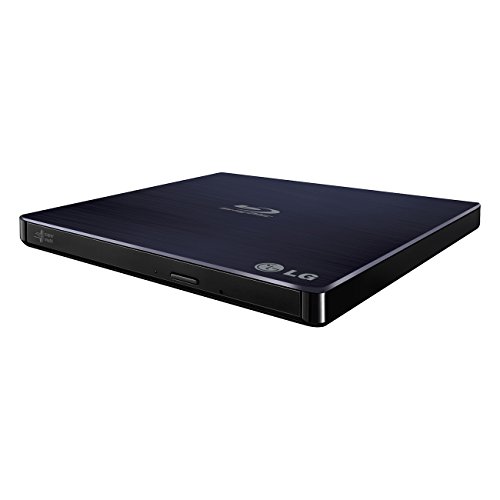
- Reads and writes compatible Blu-ray, DVD, and CD media.
- Works with Windows and Mac PCs.
- Supports M-DISC archival media.
Best For: Home archiving and flexible disc handling
Fast USB Blu-ray Ripper

- USB 3.0 and Type-C connections support flexible setups.
- Reads and writes compatible Blu-ray, DVD, and CD media.
- Includes an extra USB power cable for stable operation.
Best For: Laptop and desktop users with USB-A or USB-C ports
Playback-Focused Blu-ray Drive

- Reads Blu-ray, DVD, and CD media.
- Burns CDs and DVDs but not Blu-ray discs.
- Offers USB 3.0 and Type-C connectivity.
Best For: Portable Blu-ray playback and CD/DVD burning
Best Internal Speed Pick – ASUS BW-16D1HT 16X Blu-ray Burner
ASUS BW-16D1HT - Ultra-Fast 16X Blu-ray Burner with M-DISC Support, Black, 1 Year Warranty
Check Price On AmazonFor shoppers comparing blu ray drives for disc ripping, the ASUS BW-16D1HT is a fast internal option for compatible desktop PCs. It offers 16X Blu-ray read and write speeds, BDXL support up to 128GB, and M-DISC compatibility for long-term archival media.
Best For: Desktop PC users who want high-speed Blu-ray burning, reading, and large-capacity disc support.
Pros:
- 16X Blu-ray read and write speed
- Supports BDXL discs up to 128GB
- M-DISC support for archival storage
- SATA 6.0 Gb/s internal interface
Cons:
- Requires a compatible 5.25-inch desktop drive bay
- Not a portable external drive
- Listed operating-system compatibility is centered on Windows versions
This is a strong choice when speed and capacity matter more than portability. Its internal SATA design makes it best suited to a desktop build rather than a laptop or travel setup.
Best External UHD Option – archgon Aluminum External 4K Blu-ray Writer
archgon Premium Aluminum External USB 3.0 UHD 4K Blu-Ray Writer Super Drive for PC and Mac
Check Price On AmazonThe archgon external drive is a versatile candidate among blu ray drives for disc ripping, especially for users who need a USB-connected unit for a PC or Mac. It reads UHD Blu-ray discs and reads and writes regular Blu-ray, DVD, and CD media, though UHD playback requires compatible software and hardware.
Best For: PC users seeking an external aluminum drive with UHD reading capability and regular Blu-ray, DVD, and CD writing.
Pros:
- External USB design works with PC and Mac
- Reads UHD Blu-ray discs
- Reads and writes regular Blu-ray, DVD, and CD media
- Supports M-DISC BD-R and uses an aluminum enclosure
Cons:
- UHD playback requires compatible hardware and separately purchased software
- UHD Blu-ray software support is not available for Mac according to the supplied notes
- Blu-ray read speed is listed at 6X
Its broad format support and premium external enclosure make it appealing for PC-based disc work. Check CyberLink PowerDVD and the Ultra HD Blu-ray Advisor requirements before buying if UHD playback is important.
Best Slim USB-C Choice – ASUS SBW-06D5H-U External Blu-ray Burner
ASUS SBW-06D5H-U BDXL External Ultra Slim Blu-ray and MDisc Burner USB 3.1 USB-C 2 Cables Black
Check Price On AmazonFor a compact setup, the ASUS SBW-06D5H-U is one of the more convenient blu ray drives for disc ripping because it connects externally through USB 3.1 and includes both USB-A and USB-C cables. Its slim form factor supports Blu-ray and M-DISC burning for laptops and desktops.
Best For: Laptop and desktop users who want a portable external Blu-ray burner with USB-A and USB-C connectivity.
Pros:
- Ultra-slim external design
- Includes USB 3.1 Type-A and Type-C connectivity
- Supports Blu-ray and M-DISC burning
- Compatible with desktop and notebook computers
Cons:
- Listed Blu-ray read speed is 8X
- Does not offer the 16X write speed of the internal ASUS model
- Supplied operating-system details specifically list macOS, so verify compatibility for your system
This model balances portability and media support well. The included cable options are particularly useful for newer laptops that lack full-size USB-A ports.
Best Hub-and-Drive Bundle – External 8-in-1 Blu-ray Drive
This external model combines a Blu-ray burner with extra connectivity, making it a practical choice among blu ray drives for disc ripping when desk space and ports are limited. It reads and writes standard Blu-ray, DVD, and CD formats, while also providing USB ports and a TF/SD card slot.
Best For: Windows and Mac laptop users who want a portable disc drive with integrated USB expansion and card-reading features.
Pros:
- Reads and writes BD, DVD, and CD media
- Includes two USB-C ports, USB 3.0, USB 2.0, and a TF/SD card slot
- Supports USB-A and USB-C computer connections
- Compact design includes a carrying case and disc sleeves
Cons:
- Does not support 4K Blu-ray playback
- BD-XL is read-only and Blu-ray recording is limited to 50GB
- Playback software such as PowerDVD or Leawo is required for 3D Blu-ray
Its 8-in-1 design adds useful everyday functionality beyond optical media. Choose it when portability and extra ports are more valuable than UHD playback or high-speed Blu-ray burning.
Best Portable Blu-ray Burner – Buffalo BRXL-PUS6U3 External Blu-ray Drive
The Buffalo BRXL-PUS6U3 is a practical choice among blu ray drives for disc ripping when you want a portable, bus-powered drive for a Windows PC or Mac. It supports Blu-ray, BDXL, DVD, CD, and M-DISC media, while the included software suite adds playback, authoring, editing, backup, and photo tools.
Best For: Windows and Mac users who want a lightweight external Blu-ray drive for ripping, burning, playback, and media projects.
Pros:
- Works with Windows PCs and Macs using USB Type-A ports, including USB 3.2 Gen 1 through USB 2.0.
- Supports BDXL, regular Blu-ray, DVD, CD, and M-DISC media.
- Includes PowerDVD, Power2Go, PowerDirector, PowerBackup, and PhotoDirector LE.
- Compact 9.5-ounce design with integrated cable storage and optional power support.
Cons:
- The supplied connections are USB Type-A rather than USB-C.
- Some setups may require the included power cable or a USB charger for stable operation.
With broad disc compatibility and bundled CyberLink software, this Buffalo model is a well-rounded option for users who want one portable drive for disc ripping and writing. Its USB Type-A connectivity is the main consideration for newer laptops without that port.
Best Internal 4K Option – BU40N 6X SATA Blu-ray Drive
The BU40N is an internal 9.5mm SATA drive for compatible laptops and desktops, making it a specialized pick among blu ray drives for disc ripping. It reads and writes regular Blu-ray, DVD, and CD media, supports BDXL and 3D Blu-ray, and can play 4K UHD Blu-ray on Windows with suitable software.
Best For: Users upgrading a compatible laptop or desktop with an internal SATA optical-drive bay, especially Windows users interested in 4K UHD playback.
Pros:
- Supports up to 6x Blu-ray writing and 8x reading.
- Compatible with BDXL discs up to 100GB and 3D Blu-ray media.
- Supports 4K UHD Blu-ray playback on Windows with CyberLink PowerDVD.
- Includes a stated three-year after-service period.
Cons:
- It is a bare internal drive and does not include an external enclosure.
- Mac users cannot use it for UHD Blu-ray playback according to the supplied notes.
- Installation requires a compatible 9.5mm SATA tray-loading bay.
This BU40N makes sense when you specifically need an internal replacement or upgrade rather than a plug-and-play external drive. Confirm the bay size, SATA compatibility, and operating-system software requirements before ordering.
Best USB-C Hub Drive – Dainty 7-in-1 External Blu-ray Drive
The Dainty 7-in-1 combines an external Blu-ray burner with USB 3.0 and USB-C connectivity, making it a flexible choice among blu ray drives for disc ripping. It supports Blu-ray, BDXL, DVD, CD, and M-DISC media, and its six expansion ports can connect storage cards and USB accessories.
Best For: Windows or Mac users who need an external disc drive plus extra USB and SD/TF connectivity in a compact travel-friendly unit.
Pros:
- Works with USB 3.0 and USB-C connections on Windows 7–11 and Mac OS systems.
- Reads and writes Blu-ray, BDXL, DVD, CD, and M-DISC media.
- Six expansion ports add support for USB devices and SD/TF cards.
- USB-powered design includes an additional power cable for situations with insufficient power.
Cons:
- Its maximum BD-XL writing speed is 2x, slower than its 6x BD-R rate.
- The product has a one-year manufacturer warranty.
- Extended use may require connecting the additional power cable and a USB power adapter.
For users who value connectivity as much as disc access, the Dainty offers more versatility than a basic external drive. Its hub functionality is useful for laptops with limited ports, while the varying media speeds should be considered when planning large disc-writing jobs.
Reliable Blu-ray Ripper – LG BP50NB40 External Blu-ray Rewriter
LG BP50NB40 6x Blu-ray Rewriter BD-RE/8x DVD±RW DL USB 2.0 Slim External Drive (
Check Price On AmazonFor shoppers comparing blu ray drives for disc ripping, the LG BP50NB40 is a compact external rewriter with USB 2.0 connectivity, Windows and Mac compatibility, and support for Blu-ray, DVD, and CD media. Its 6x Blu-ray read capability and M-DISC support make it a practical option for home archiving and everyday disc handling.
Best For: Windows and Mac users who want a slim external Blu-ray rewriter for reading, writing, and archiving compatible discs.
Pros:
- Supports Blu-ray, DVD, and CD media with Blu-ray read speeds up to 6x.
- Compatible with PCs running Windows and Mac operating systems.
- M-DISC support adds an option for long-term archival media.
- Slim, lightweight design with a USB cable included.
Cons:
- USB 2.0 is slower than USB 3.0 alternatives.
- The listed operating-system support is centered on older Windows versions.
- Its 4MB cache is modest for larger disc-writing tasks.
The BP50NB40 is a sensible choice when broad disc support and M-DISC compatibility matter more than the fastest transfer interface. Choose a newer USB 3.0 model if speed is your main priority.
Fast USB Blu-ray Ripper – Dainty External Blu-ray Drive
The Dainty external drive is aimed at users seeking blu ray drives for disc ripping with USB 3.0 and USB Type-C connectivity. It supports Blu-ray, DVD, and CD media, includes an additional USB power cable for more stable operation, and works with Windows, macOS, and Linux computers when paired with suitable software.
Best For: Laptop and desktop users who need USB-A and USB-C flexibility, faster USB 3.0 transfers, and broad computer operating-system compatibility.
Pros:
- USB 3.0 provides up to 5Gbps bandwidth according to the product description.
- Supports Blu-ray, DVD, and CD reading and writing, with Blu-ray speeds up to 6x.
- Includes USB-A and Type-C connectivity for newer and older computers.
- Additional USB power cable is designed to improve operating stability.
Cons:
- Playback and writing software is not included.
- Not compatible with TVs, tablets, PS4, iPads, Chromebooks, projectors, or vehicles.
- Requires separate Blu-ray software for playback and disc tasks.
With dual connector support and an extra power lead, this Dainty model is convenient for mixed computer setups. Factor in the cost and compatibility of third-party software before buying.
Playback-Focused Blu-ray Drive – Portable USB 3.0 Disc Reader
This portable external drive suits shoppers comparing blu ray drives for disc ripping who primarily need Blu-ray reading plus CD and DVD burning. It connects through USB 3.0 or Type-C, supports Windows, Mac, and Linux, and is designed for lightweight use at home, work, or while traveling.
Best For: Users who need portable Blu-ray playback and CD/DVD burning but do not need to write Blu-ray discs.
Pros:
- Reads Blu-ray discs at up to 6x, DVDs at 8x, and CDs at 24x.
- USB 3.0 and Type-C connectors support modern laptops and desktops.
- Can burn CDs and DVDs while remaining portable and lightweight.
- Supports Windows, Mac, and Linux systems.
Cons:
- Cannot burn Blu-ray discs.
- Blu-ray playback requires third-party software.
- Not compatible with Chromebooks, TVs, tablets, iPads, or vehicles.
This model is best viewed as a Blu-ray reader and CD/DVD burner rather than a full Blu-ray rewriter. Its dual USB connectors and compact design are useful, provided Blu-ray writing is not part of your workflow.
How We Picked the Best Blu Ray Drives for Disc Ripping
We focused on drive type, disc compatibility, connection options, portability, and practical ripping considerations. The selection includes external USB drives for laptops and desktops, slim models for compact setups, and internal SATA drives for users who want a permanent installation. We also considered support for Blu-ray, DVD, CD, BDXL, M-DISC, and UHD formats where listed by the manufacturer.
Specifications and included accessories can vary by seller, so verify the current listing before buying. In particular, check whether playback or authoring software is included, since ripping software is often separate and may require additional setup.
Quick Comparison
| Drive type | Best for | Main advantage | Potential limitation |
|---|---|---|---|
| External USB | Laptops and flexible setups | Easy to move between computers | May need extra power or adapters |
| External USB-C | Modern laptops and Macs | Convenient current-generation connectivity | Compatibility depends on operating system and software |
| Internal SATA | Desktop ripping stations | Clean permanent installation | Requires an available drive bay and SATA connections |
| UHD-capable drive | 4K Blu-ray workflows | Supports higher-capacity UHD media | UHD ripping may require specific firmware and software |
Key Buying Factors for Blu-Ray Drives for Disc Ripping
Disc and Format Support
Confirm that the drive supports the media you plan to use. Standard Blu-ray support does not automatically guarantee UHD Blu-ray or BDXL compatibility. If you archive large collections, BDXL support and reliable dual-layer or triple-layer reading can be valuable.
Connection and Power
USB 3.0 or newer is preferable for external drives because it provides suitable bandwidth for large transfers. USB-C models can be convenient, but check whether the package includes both USB-C and USB-A cables. Some thin drives are bus-powered, while others include a power cable or may need more power than a single port supplies.
Firmware and Software
For Blu Ray Drives for Disc Ripping, firmware can matter as much as the hardware. UHD workflows may depend on a compatible drive revision and supported firmware. Also check your operating system and ripping application before purchasing; included playback software is not necessarily ripping software.
Speed, Noise, and Build
Advertised maximum speeds are best-case figures and can vary by disc, media condition, and software. A sturdy enclosure, good ventilation, and reasonable acoustics may matter more than peak speed for long archive jobs.
Who Should Buy Which Blu Ray Drives for Disc Ripping?
- Choose an external USB or USB-C model if you use a laptop, switch between computers, or want the simplest installation.
- Choose a UHD-capable external drive if your collection includes 4K Blu-ray discs and you are prepared to confirm firmware and software requirements.
- Choose an internal SATA drive for a dedicated desktop ripping station with a compatible case and available power and data connections.
- Choose a slim portable drive for occasional disc access, travel, and compact workspaces, while accepting that sustained ripping may be slower or noisier.
- Choose a model with M-DISC or BDXL support if long-term archival writing and higher-capacity media are important parts of your workflow.