The right Bluetooth adapter can add dependable wireless connectivity to a Linux desktop, mini PC, or Raspberry Pi without replacing existing hardware. However, compatibility, kernel support, range, and connection stability vary widely between USB dongles.
We selected 10 adapters covering everyday peripherals, audio, long-range connections, and newer Bluetooth standards. Use the guide below to narrow the list by Linux support, device needs, and setup priorities.
Best 10 Bluetooth Adapters for Linux Picks for 2026
Best Linux Nano Pick
Edimax BT-8500 Bluetooth 5.0 Adapter
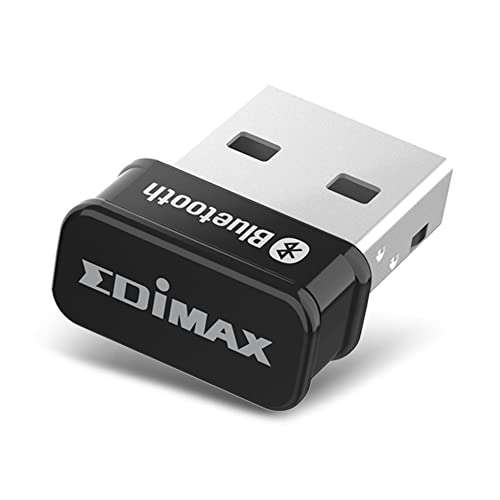
- Nano-sized Bluetooth 5.0 USB dongle
- Linux kernel 5.8+ and Mint 21 plug-and-play support
- EDR, BLE, and dual-mode connectivity
Best For: Compact Linux setups and everyday Bluetooth peripherals
Best Linux Compatibility List
Panda PBU40 Bluetooth 4.0 Adapter

- Lists support for numerous Linux distributions
- Bluetooth 4.0 with LE and EDR
- Up to 80-foot range with a Bluetooth Smart device
Best For: Linux users seeking broad stated distribution compatibility
Best Nano Windows Option
TP-Link UB500 Bluetooth 5.4 Adapter

- Tiny Bluetooth 5.4 USB design
- EDR, BLE, and broad backward compatibility
- Windows-only; explicitly does not support Linux
Best For: Windows PCs needing a compact Bluetooth adapter
Long-Range Low-Energy Pick

- Supports Linux, macOS, ChromeOS, Raspberry Pi, and PC.
- Bluetooth 4.0 Low Energy design helps conserve power.
- Up to 65 feet or 20 meters of stated range.
Best For: Linux users prioritizing low energy use and extended coverage.
Newest Bluetooth Standard Pick
ASUS USB-BT540 Bluetooth 5.4 Dongle

- Bluetooth 5.4 includes energy-saving BLE connectivity.
- Supports up to seven connected devices.
- Ultra-small USB-A design suits portable setups.
Best For: Linux and Windows users wanting Bluetooth 5.4 and multi-device support.
Easy Nano Upgrade Pick
Cudy BU530 Bluetooth 5.3 Nano Adapter

- Tiny 2g USB-A design stays nearly flush with laptops.
- Bluetooth 5.3 supports reduced audio lag and faster pairing.
- Linux driver is available from Cudy’s download center.
Best For: Linux users wanting a compact Bluetooth 5.3 upgrade with broad backward compatibility.
Long-Range Windows Pick

- Bluetooth 5.4 with up to 3Mbps transfer rates
- Advertised open-area range up to 500 feet
- Windows only; not compatible with Linux
Best For: Windows users who need extended Bluetooth range
Linux Compatibility Pick
StarTech Bluetooth 5.3 USB Adapter

- Supports Linux Kernel 5.19.0+
- Class 1 range up to 328 feet in open areas
- Supports audio, peripherals, BLE, and PAN
Best For: Linux users with Kernel 5.19.0 or newer
Compact Bluetooth 6.0 Pick
ASUS USB-BT600 Bluetooth 6.0 Adapter
- Bluetooth 6.0 with energy-saving BLE
- Supports up to seven device connections
- Ultra-compact and compatible with Linux and Windows 10/11
Best For: Linux users wanting a tiny multi-device adapter
Best Linux Nano Pick – Edimax BT-8500 Bluetooth 5.0 Adapter
The Edimax BT-8500 is a practical choice among bluetooth adapters for linux, especially if you want a tiny dongle with stated plug-and-play support for Linux kernel 5.8 or newer and Mint 21. Its Bluetooth 5.0 support, EDR, BLE, and backward compatibility also make it suitable for common peripherals and audio devices.
Best For: Linux users who want a compact, Bluetooth SIG-certified adapter with current-kernel plug-and-play support.
Pros:
- Nano-sized design takes up minimal USB-port space.
- Supports Bluetooth 5.0, EDR, BLE, and dual-mode connectivity.
- Plug-and-play support is listed for Linux kernel 5.8 or newer and Mint 21.
- Linux drivers are available for older kernels, with Fedora and Ubuntu support noted.
Cons:
- Plug-and-play Linux support depends on the kernel version.
- The listed older-kernel driver support is limited to Fedora and Ubuntu.
Choose the BT-8500 when small size and Linux compatibility matter more than an external antenna. Check your distribution and kernel before buying, particularly if you run an older Linux installation.
Best Long-Range Design – TP-Link UB500 Plus Bluetooth 5.3 Adapter
The TP-Link UB500 Plus stands out among bluetooth adapters for linux for its adjustable antenna and long-range design. However, the supplied compatibility information lists Windows support only, so Linux buyers should verify driver availability before choosing it.
Best For: Windows users who need an adjustable-antenna Bluetooth adapter for broader coverage.
Pros:
- Uses Bluetooth 5.3 with EDR and backward compatibility through older Bluetooth versions.
- Adjustable multi-direction antenna is designed to improve reception.
- Claims up to twice the speed and four times the coverage of Bluetooth 4.0 EDR adapters.
- Includes a two-year manufacturer warranty.
Cons:
- Supplied notes list Windows compatibility, not Linux support.
- Windows 7 requires a separately downloaded driver.
- Larger than a nano adapter because of its external antenna design.
This adapter may be attractive for range-sensitive Windows desktops, but it is not the safest Linux recommendation based on the supplied specifications. Confirm Linux driver support with TP-Link before purchase.
Best Linux Compatibility List – Panda PBU40 Bluetooth 4.0 Adapter
The Panda PBU40 is an older Bluetooth 4.0 option with one of the broadest stated Linux distribution lists in this group. It supports Bluetooth Smart Ready features, LE, and EDR, making it a straightforward candidate for keyboards, smartphones, and other compatible electronics.
Best For: Linux users who value broad distribution coverage and basic Bluetooth connectivity.
Pros:
- Lists compatibility with Mint, Ubuntu, Fedora, openSUSE, Lubuntu, Zorin, Kali Linux, and other Linux environments.
- Supports Bluetooth 4.0, Low Energy, and EDR.
- Rated for up to an 80-foot operating range when connected to a Bluetooth Smart device.
Cons:
- Uses the older Bluetooth 4.0 standard rather than Bluetooth 5.x.
- The supplied notes do not specify a modern Linux kernel or plug-and-play requirement.
- Its listed range depends on the connected Bluetooth Smart device and environment.
The PBU40 makes sense for Linux users running one of the explicitly listed distributions and needing reliable basic connectivity. If you want the newest Bluetooth features or a smaller current-generation design, consider a newer adapter instead.
Best Nano Windows Option – TP-Link UB500 Bluetooth 5.4 Adapter
The TP-Link UB500 is a compact Bluetooth 5.4 dongle with EDR, BLE, and backward compatibility. It is not one of the recommended bluetooth adapters for linux, though: the supplied notes explicitly state that it supports Windows PCs only and does not support Linux.
Best For: Windows users who want a tiny Bluetooth 5.4 adapter for peripherals, phones, and headsets.
Pros:
- Nano design can remain connected in a USB port while traveling or at home.
- Bluetooth 5.4, EDR, and BLE support provide current-generation connectivity features.
- Backward compatibility extends through Bluetooth 1.1 devices.
- Plug-and-play support is listed for Windows 8.1, 10, and 11.
Cons:
- Explicitly does not support Linux, macOS, TVs, or Windows 8.
- Windows 7 requires a downloaded driver.
- Existing internal Bluetooth should be disabled to avoid driver conflicts.
For a Linux system, skip this model despite its appealing Bluetooth 5.4 specifications. It is a better fit for Windows users who prioritize a barely noticeable nano adapter and broad Bluetooth-version compatibility.
Long-Range Low-Energy Pick – Hideez USB Bluetooth Adapter
The Hideez adapter is a practical option for shoppers comparing bluetooth adapters for linux, especially when low energy use and extended coverage matter. It supports Linux, macOS, ChromeOS, Raspberry Pi, and PCs, with a stated wireless range of up to 65 feet or 20 meters when paired with compatible devices.
Best For: Linux users who want a low-energy adapter for peripherals, audio devices, and Raspberry Pi setups.
Pros:
- Supports Linux, macOS, ChromeOS, Raspberry Pi, and PC systems.
- Bluetooth 4.0 Low Energy technology helps reduce power consumption.
- Offers a stated range of up to 65 feet or 20 meters.
- Works with devices such as mice, keyboards, headphones, speakers, and printers.
Cons:
- Not compatible with PS5, PS4, Xbox, or Logitech MX devices.
- May not work with iMac Retina, Hackintosh systems, or KVM switches.
- Mac users should verify that the computer’s built-in Bluetooth module is functioning before purchase.
Choose the Hideez when broad platform support and low-energy operation are more important than newer Bluetooth specifications. Check device compatibility carefully, particularly for gaming consoles and specialized Mac configurations.
Newest Bluetooth Standard Pick – ASUS USB-BT540 Bluetooth 5.4 Dongle
The ASUS USB-BT540 is a compact choice among bluetooth adapters for linux, offering Bluetooth 5.4 with Bluetooth Low Energy support. Its USB-A design supports Linux and Windows systems and can connect up to seven Bluetooth devices from one computer.
Best For: Linux and Windows PC users who want a small Bluetooth 5.4 adapter with multi-device support.
Pros:
- Uses Bluetooth 5.4 with Bluetooth Low Energy for energy-saving connectivity.
- Can connect up to seven devices.
- Ultra-small design is convenient for laptops and portable setups.
- Supports Linux, Windows 11, Windows 10, and Windows 8.1.
Cons:
- Uses a USB 2.0 Type-A interface, so it may require an adapter for USB-C-only devices.
- The supplied notes do not specify Linux setup steps or a stated operating range.
The USB-BT540 stands out for its current Bluetooth 5.4 standard and seven-device capacity. It is a strong fit for a Linux desktop or laptop with a USB-A port, provided your system has the appropriate support for the adapter.
Easy Nano Upgrade Pick – Cudy BU530 Bluetooth 5.3 Nano Adapter
The Cudy BU530 is a compact Bluetooth 5.3 option for shoppers seeking bluetooth adapters for linux. It plugs into a USB-A port, sits nearly flush with a laptop, and includes a Linux driver available from Cudy’s download center for manual installation.
Best For: Linux users who want a tiny USB-A adapter with Bluetooth 5.3 and support for older Bluetooth devices.
Pros:
- Compatible with Linux and multiple Windows versions.
- Nano 20x15x8mm design weighs 2g and stays flush with a laptop.
- Bluetooth 5.3 supports reduced audio lag and faster pairing compared with older versions.
- Works with Bluetooth 4.x, 3.x, and 2.x devices.
Cons:
- Linux users may need to manually download and install the driver.
- Requires a USB-A port.
- The supplied notes do not provide a specific wireless range.
The BU530 is a sensible Linux upgrade when minimizing bulk matters. Its backward compatibility broadens device support, while the available Linux driver keeps installation possible even though it may require more hands-on setup than Windows.
Long-Range Windows Pick – Techkey Bluetooth 5.4 Adapter
If you need a long-range option among Bluetooth adapters for Linux, note that this Techkey dongle is not compatible with Linux. It is designed for Windows 10, Windows 11, and Windows 8.1, with Bluetooth 5.4, Class 1 radio, and an advertised open-area range of up to 500 feet.
Best For: Windows desktop users who prioritize extended wireless range and fast connections for peripherals, speakers, headsets, and printers.
Pros:
- Bluetooth 5.4 with BLE, EDR, and backward compatibility through Bluetooth 2.1+EDR.
- Class 1 radio and extra-long antenna advertise up to 500 feet in open areas.
- Supports up to five connected devices and transfer rates up to 3Mbps.
- Plug-and-play design for supported Windows systems.
Cons:
- Not compatible with Linux, macOS, game consoles, TVs, or car stereos.
- Actual range can be reduced by obstructions and wireless interference.
This adapter offers impressive range and current Bluetooth features, but Linux shoppers should choose a different model in this roundup. For compatible Windows systems, it is a practical choice when distance matters.
Linux Compatibility Pick – StarTech Bluetooth 5.3 USB Adapter
For shoppers specifically comparing Bluetooth adapters for Linux, the StarTech AV53C1-USB-BLUETOOTH stands out with stated Linux Kernel 5.19.0+ support. Its Class 1 Bluetooth 5.3 connection combines a 100-meter open-area range with support for audio, peripherals, and PAN networking.
Best For: Linux users running Kernel 5.19.0 or newer who want a long-range adapter for keyboards, mice, headphones, file sharing, or tethering.
Pros:
- Explicitly supports Linux Kernel 5.19.0+ as well as Windows 7 through 11.
- Class 1 wireless range reaches up to 328 feet or 100 meters in open environments.
- Supports A2DP audio streaming, Bluetooth PAN, BLE, BDR, and EDR.
- Connects multiple devices with transfer speeds up to 2Mbps.
Cons:
- Linux support requires Kernel 5.19.0 or newer.
- Its stated transfer rate is lower than the 3Mbps claim of the Techkey model.
With clearly specified Linux compatibility, a Class 1 radio, and broad profile support, this is the most directly targeted option here for Linux desktops and laptops. Confirm your kernel version before buying.
Compact Bluetooth 6.0 Pick – ASUS USB-BT600 Bluetooth 6.0 Adapter
The ASUS USB-BT600 is a compact choice for Bluetooth adapters for Linux, with stated support for Linux and Windows 10/11. Its Bluetooth 6.0 connectivity includes BLE for lower-energy wireless connections and supports up to seven connected devices.
Best For: Linux or Windows laptop and desktop users who want a small adapter with current Bluetooth support and multi-device capacity.
Pros:
- Uses Bluetooth 6.0 with Bluetooth Low Energy for energy-saving connectivity.
- Supports connections with up to seven Bluetooth devices.
- Ultra-compact design is convenient for portability and low-profile use.
- Compatible with Linux and Windows 10/11, with backward compatibility for earlier Bluetooth versions.
Cons:
- The supplied specifications do not state a maximum wireless range or transfer speed.
- Linux support is listed, but no minimum Linux version is provided.
This ASUS adapter is a strong fit when size, Bluetooth generation, and the ability to connect several devices matter more than a published range specification. It is especially convenient for compact setups and laptops.
How We Picked These Bluetooth Adapters for Linux
We focused on adapters with stated Linux, Raspberry Pi, or broad operating-system support, while also considering Bluetooth version, USB format, range class, and likely use cases. Compact nano dongles suit laptops and crowded USB ports; larger or Class 1 models can be preferable when distance and signal strength matter.
Because Linux compatibility can depend on the chipset, kernel, distribution, and desktop environment, product listings should be treated as a starting point rather than a guarantee. Before buying, check current vendor documentation and community reports for your specific distribution.
Quick Comparison
| Best For | What to Look For |
|---|---|
| Basic keyboard, mouse, or controller use | Bluetooth 4.0 or newer and dependable Linux recognition |
| Headphones and speakers | Stable drivers, modern Bluetooth support, and suitable audio profiles |
| Longer-distance connections | Class 1 hardware, a clear USB position, and reduced interference |
| Small laptops or mini PCs | Nano-size USB-A or USB-C compatibility with minimal protrusion |
| Several connected devices | Recent Bluetooth versions and confirmation of supported connections |
Key Buying Factors for Bluetooth Adapters for Linux
Linux and Chipset Support
Look for explicit Linux compatibility, but verify the chipset and kernel requirements when possible. Some adapters work immediately through the standard Bluetooth stack, while others may need firmware, a newer kernel, or manual configuration.
Bluetooth Version
Bluetooth 5.x can improve efficiency, range, and reliability, but the connected device also limits the practical result. A newer version is useful for future-proofing, not a substitute for confirmed Linux support.
Range and Interference
Walls, metal cases, Wi-Fi congestion, and USB 3 interference can reduce performance. A short extension cable can move a dongle away from a desktop chassis, while Class 1 models may help with longer line-of-sight connections.
Device and Audio Needs
Confirm that the adapter fits your peripherals, including keyboards, mice, game controllers, phones, and audio devices. For headphones, Linux audio support also depends on PipeWire or PulseAudio configuration and the available profiles.
Physical Format
Nano adapters are discreet but can be harder to reposition. A standard-size dongle or extension cable may offer better reception, especially on a desktop tucked under a desk.
Who Should Buy Which Bluetooth Adapters for Linux?
Choose a compact nano adapter if you mainly need a keyboard, mouse, or controller and want a low-profile installation. Pick a modern Bluetooth 5.3 or 5.4 model if you want newer hardware and broader future usefulness, provided Linux support is confirmed.
For headphones, speakers, or multiple peripherals, prioritize tested compatibility and stable connections over the highest advertised Bluetooth number. If your computer is far from the accessory, consider a Class 1 or long-range adapter and use a clear USB position. Raspberry Pi and Linux enthusiasts should favor models with explicit support for their board, distribution, and kernel rather than relying only on the product title.