Sharing a keyboard, printer, scanner, or other USB device between two computers does not require unplugging cables every time you switch workstations. The right USB switch box provides a simpler, more organized connection.
We selected 10 two-port USB switch boxes with different port counts, USB standards, switching methods, and device compatibility so you can match the box to your desk setup and workflow.
Best 10 Two Port USB Switch Boxes Picks for 2026
Best Multi-Device Pick
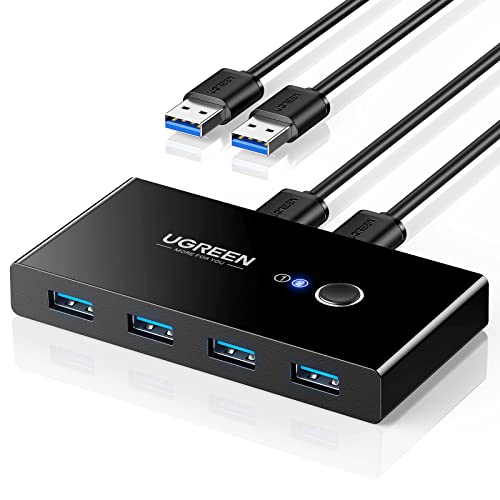
- Two computers share four USB peripherals
- Up to 5Gbps data transfer
- Includes two USB 3.0 cables
Best For: Multi-peripheral home and office workstations
Best Compact Bi-Directional Pick

- Works as 1-in/2-out or 2-in/1-out
- 5Gbps USB 3.0 transfer speeds
- Compact aluminum housing
Best For: Simple one-peripheral sharing setups
Best Remote-Controlled Pick
BENFEI USB 3.0 and USB-C Switch

- Shares four USB devices between two computers
- Includes button and remote switching
- Combines USB 3.0 and USB-C ports
Best For: Mixed-port desks needing convenient remote control
Best Simple Setup
SABRENT USB 3.0 Sharing Switch
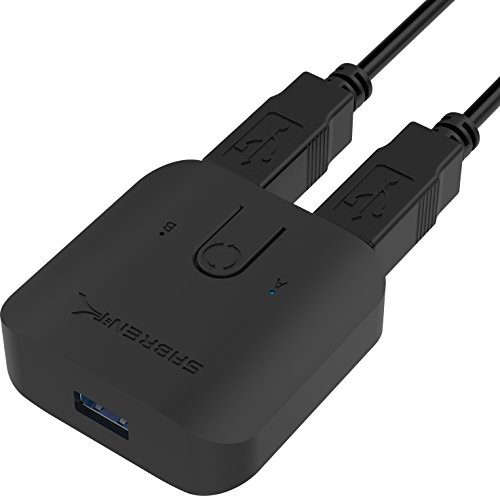
- Single-button computer swapping
- Plug-and-play, driver-free setup
- LED indicators and hub compatibility
Best For: Basic keyboard and mouse sharing
Best High-Speed Pick

- Up to 5Gbps USB 3.0 transfer speeds
- Supports two switching configurations
- Includes two USB 3.0 cables
Best For: Modern desks, gaming setups, and home offices
Best Basic Budget Option
2-Port USB 2.0 Manual Switch Box

- Shares one USB device between two PCs
- USB 1.1 and USB 2.0 compatible
- Compact push-button operation
Best For: Simple printer and peripheral sharing
Best Printer-Focused Pick
USB 2.0 Printer Sharing Switch

- Connects two computers to one printer
- Includes two 1.5m USB-B cables
- LEDs show the selected computer
Best For: Home offices and small printer-sharing setups
Flexible Bi-Directional Choice

- Supports 2-in-1-out and 1-in-2-out use
- Up to 5Gbps USB 3.0 transfers
- Includes two USB 3.0 cables
Best For: Flexible printer and peripheral sharing
Compact Travel-Friendly Pick

- One-button switching with LED status
- Up to 5Gbps transfer support
- Two-year warranty and portable design
Best For: Portable keyboard, mouse, printer, and scanner sharing
Dual-Device Sharing Choice

- Two computers can share two USB devices
- Up to 5Gbps USB 3.0 performance
- Includes two 5-foot USB cables
Best For: Two-computer workstations sharing multiple peripherals
Best Multi-Device Pick – UGREEN 4-Port USB 3.0 Switch
For shoppers comparing two port usb switch boxes, the UGREEN is a strong choice when two computers need to share several peripherals. It provides four USB 3.0 outputs, bundled connection cables, one-button switching, and optional USB-C power for demanding devices. It does not support monitors or video transmission.
Best For: Workstations that share keyboards, mice, storage drives, printers, scanners, or cameras between two computers.
Pros:
- Lets two computers share four USB devices.
- Supports transfer speeds up to 5Gbps and USB 2.0 backward compatibility.
- Includes two USB 3.0 cables and an LED status indicator.
- Works with Windows, macOS, Chrome OS, and Linux without drivers.
Cons:
- It is not a KVM and cannot switch monitors or video.
- High-power or multiple devices may require a separate power supply, which is not included.
- USB-C-only computers may need a USB-C-to-A adapter.
Choose this model if your priority is connecting multiple shared peripherals rather than switching a display. Its four-port layout and included cables make it particularly practical for a two-computer desk.
Best Compact Bi-Directional Pick – Aluminum USB 3.0 Switch
This aluminum USB 3.0 switch stands out among two port usb switch boxes because it works in either direction. Use it to let two computers share one USB peripheral, or to switch between two USB devices connected to one computer. Its compact housing and push-button control suit simple desk setups.
Best For: Users who need flexible one-device sharing or want to select between two USB peripherals on one computer.
Pros:
- Supports both one-computer/two-device and two-computer/one-device configurations.
- Offers data transfer speeds up to 5Gbps.
- Compatible with USB 3.0, USB 2.0, and USB 1.1 devices.
- Plug-and-play design requires no extra power supply or drivers.
Cons:
- USB 3.0 cables are not included.
- It shares one peripheral between computers rather than multiple peripherals simultaneously.
This is a good fit when you want a small, adaptable switch instead of a multi-port hub. Remember to budget for the required USB 3.0 cables.
Best Remote-Controlled Pick – BENFEI USB 3.0 and USB-C Switch
For a more convenient two port usb switch boxes setup, the BENFEI combines three USB 3.0 ports with one USB-C port and offers both onboard and remote switching. It is designed for two computers sharing several peripherals and includes optional USB-C power support for devices with higher consumption.
Best For: Desks where convenient remote switching and a mix of USB-A and USB-C peripherals are important.
Pros:
- Allows two computers to share three USB 3.0 devices and one USB-C device.
- Provides up to 5Gbps transfer speeds with USB 2.0 backward compatibility.
- Supports button or remote-control switching with LED status indicators.
- Works with Windows, macOS, Chrome OS, and Linux without drivers.
Cons:
- The supplied notes specify that it must use a BENFEI USB-A-to-USB-A cable.
- Optional power may be needed for high-consumption devices.
- Its USB-C port is described as a power-supply port, so the product should not be assumed to switch USB-C video.
The remote is the main reason to choose this model over a basic push-button switch. It is especially useful when the switch is positioned out of easy reach, while the mixed USB-A and USB-C ports add flexibility.
Best Simple Setup – SABRENT USB 3.0 Sharing Switch
The SABRENT USB-SW30 is a straightforward option among two port usb switch boxes for swapping a shared USB setup between multiple computers. Its single-button operation, LED indicators, plug-and-play design, and hub compatibility keep the installation simple.
Best For: Basic keyboard, mouse, and peripheral sharing where a compact physical switch is preferred.
Pros:
- Uses one button to swap between computer systems.
- Plug-and-play operation requires no additional drivers.
- LED indicators help distinguish the selected computer.
- Supports data transfer speeds up to 5Gbps and works with USB hubs.
Cons:
- The supplied notes do not list included USB cables.
- Its feature set is more basic than models offering multiple dedicated output ports or remote control.
- The listed compatible devices focus on keyboards and mice.
Choose the SABRENT when ease of use matters more than expanded connectivity. It is a sensible fit for a modest shared-peripheral arrangement controlled from the desktop.
Best High-Speed Pick – USB 3.0 Two-Computer Switch
For shoppers comparing two port USB switch boxes, this compact USB 3.0 model is a flexible choice for sharing peripherals between two computers—or switching two USB devices between one computer. It includes two USB 3.0 cables and uses a front-panel button for straightforward control.
Best For: Home offices, gaming setups, and users who want USB 3.0 speeds for devices such as keyboards, mice, flash drives, and printers.
Pros:
- Supports USB 3.0 data transfer speeds up to 5Gbps and is backward compatible with USB 2.0 and 1.1.
- Bi-directional design supports two computers sharing one USB device or two devices sharing one computer.
- Includes two USB 3.0 cables, one-button switching, and an LED status indicator.
- Compact aluminum housing needs no additional power adapter or driver installation.
Cons:
- It is intended for USB peripheral switching rather than video or display switching.
- The included setup is centered on USB 3.0 connections, so users with USB-B printer cables may need different cables.
Its combination of high-speed support, flexible switching, included cables, and compact construction makes it the most versatile option of these two port USB switch boxes for a modern desk.
Best Basic Budget Option – 2-Port USB 2.0 Manual Switch Box
This straightforward two port USB switch box lets two computers share one USB peripheral, including a printer, scanner, camera, or keyboard. Its compact manual design uses front-facing push buttons and supports USB 1.1 and USB 2.0 connections.
Best For: Basic printer or peripheral sharing between two computers when USB 2.0 performance is sufficient.
Pros:
- Allows two computers to share one USB device through a simple manual setup.
- Supports USB 1.1 and USB 2.0 devices with transfer rates up to 480Mbps.
- Compact and portable plastic design with separate front-panel buttons.
- Compatible with listed legacy Windows versions and Mac OS.
Cons:
- USB 2.0 is slower than the USB 3.0 alternative in this roundup.
- The supplied notes do not list included USB connection cables.
- Its operating-system support listing focuses on older Windows versions.
This is a practical, no-frills choice among two port USB switch boxes for older computers and simple shared-peripheral tasks, but it is less suited to high-speed storage or newer setups.
Best Printer-Focused Pick – USB 2.0 Printer Sharing Switch
Designed specifically for printer sharing, this two port USB switch box connects two computers to one USB-B printer and switches control with a manual button. Two 1.5-meter USB 2.0-to-USB-B cables and LED indicators are included for easier setup and status checking.
Best For: Small offices or home workspaces where two computers need to share one USB-B printer.
Pros:
- Purpose-built for connecting two computers to one printer.
- Includes two 1.5-meter USB 2.0-to-USB-B print cables.
- Manual button switching and separate LED indicators make the active computer easy to identify.
- Plug-and-play design requires no external power supply or driver installation.
Cons:
- Its printer-focused USB-B design is less flexible than a general USB peripheral switch.
- USB 2.0 performance is limited to the older standard rather than USB 3.0 speeds.
- The listed compatibility focuses on Windows XP through Windows 10 and common macOS systems.
For a dedicated printer-sharing setup, its included cables and visible status LEDs make it a convenient, focused alternative to more general two port USB switch boxes.
Flexible Bi-Directional Choice – DUOPURUI USB 3.0 Switch
If you need two port USB switch boxes with more than one operating mode, the DUOPURUI is a flexible option. It can connect two computers to one USB peripheral or let one computer share two USB devices, with physical-button switching and USB 3.0 speeds up to 5Gbps.
Best For: Users who want a compact, bi-directional USB switch for printers, scanners, keyboards, mice, or similar peripherals.
Pros:
- Supports both 2-in-1-out and 1-in-2-out configurations.
- USB 3.0 data transfer reaches up to 5Gbps and supports USB 2.0 and 1.1 devices.
- Plug-and-play compatibility with Windows, Mac OS, and Linux.
- Includes two USB 3.0 cables, plus LED status indication and one-button switching.
Cons:
- It is not a KVM and cannot switch monitors or transmit video.
- The USB output is intended for data, not display signals.
Choose this model when bidirectional flexibility matters as much as straightforward peripheral sharing. Its included cables and compact design make setup simple, but monitor switching requires separate equipment.
Compact Travel-Friendly Pick – Adoreen USB 3.0 Switch
The Adoreen is one of the more portable two port USB switch boxes for sharing a USB device between two computers. Its one-button design, LED indicator, driver-free setup, and USB 3.0 transfer support suit everyday peripherals such as keyboards, mice, printers, and scanners.
Best For: Travelers and office users who need simple computer-to-peripheral switching without frequent cable changes.
Pros:
- One-button switching helps share devices between two computers.
- Supports transfer speeds up to 5Gbps and backward compatibility with USB 2.0 and 1.1.
- Works with Windows, Mac OS, Linux, and Chrome OS without additional drivers.
- Compact, portable design and a stated two-year warranty.
Cons:
- Cables and a manual are not included.
- The manufacturer does not recommend it for high-speed mass-storage devices.
This is a practical choice for common USB accessories, especially when portability and uncomplicated switching are priorities. Plan to supply your own cables, and choose another solution if regular hard-drive or flash-drive use is central to your setup.
Dual-Device Sharing Choice – UGREEN 2-Port USB 3.0 Switch
For setups where two computers need access to multiple peripherals, the UGREEN is a strong two port USB switch box option. Its 2-in-2-out layout lets two computers share two USB devices, while a single button and LED indicator make switching between systems easy.
Best For: Home-office and desk setups where two computers share a keyboard, mouse, printer, webcam, or scanner.
Pros:
- Allows two computers to share two USB devices.
- Supports USB 3.0 transfer speeds up to 5Gbps and USB 2.0 compatibility.
- Plug-and-play support for Windows, macOS, Chrome OS, and Linux.
- Includes two 5-foot USB 3.0 A-to-A cables.
Cons:
- It does not switch monitors or transmit video because it is not a KVM.
- Its configuration is designed for two shared USB devices rather than the more flexible 1-in-2-out mode.
UGREEN is a sensible pick when you want to leave two peripherals connected and switch them between two computers together. It offers a tidy, cable-included setup, but display switching still needs a dedicated KVM or other video solution.
How We Picked the Best Two Port USB Switch Boxes
We compared these two-port USB switch boxes by looking at the features that matter most in everyday use: USB generation, available ports, switching method, compatibility, included cables, construction, and intended device type. Models with USB 3.0 support are generally better suited to external drives and faster peripherals, while USB 2.0 units can be practical for printers, keyboards, mice, and basic office accessories.
We also separated true sharing switches from simple adapters. A sharing switch lets two computers access one device, or in some cases lets one computer select between two devices. Check the stated signal direction before buying, because not every model supports both configurations.
Quick Comparison
| Feature | What to look for | Best suited to |
|---|---|---|
| USB 2.0 | Basic peripheral sharing | Printers, keyboards, mice, and scanners |
| USB 3.0 | Higher data-transfer speeds | Storage devices and modern peripherals |
| Multiple USB outputs | Several devices connected at once | Shared desktop workstations |
| Manual button | Simple physical switching | Fixed desk setups |
| Remote control | Switching without reaching for the box | Hard-to-reach or tidy workspaces |
| Bi-directional design | Supports more connection arrangements | Flexible device and computer setups |
Key Buying Factors for Two-Port USB Switch Boxes
USB Version and Speed
USB 3.0 is the safer choice when you may connect storage, webcams, or other bandwidth-demanding accessories. USB 2.0 is usually sufficient for input devices and many printers. Remember that the switch cannot increase the speed supported by the connected computer or peripheral.
Port Count and Layout
Choose a model with enough output ports for the devices you want to share. Four-port versions are useful for a keyboard, mouse, printer, and scanner, while compact one-device switches take less desk space. USB-C support can also reduce the need for an additional adapter on newer accessories.
Switching and Power Requirements
A front button is reliable and straightforward. Remote-controlled models can be more convenient when the switch is hidden behind a monitor or mounted out of reach. Check whether the unit is bus-powered or requires an external power source, particularly if you plan to use several connected devices.
Compatibility and Connection Direction
Confirm that the switch supports your computers’ operating systems and the devices you intend to connect. For bidirectional models, verify whether the advertised 1-in-2-out or 2-in-1-out arrangement matches your setup. Some products also require separate USB cables, so account for those before installation.
Who Should Buy Which Two Port USB Switch Boxes?
Choose a multi-port USB 3.0 switch if two computers need to share several peripherals at a workstation. A remote-controlled model is a strong choice when convenient switching matters or the box will sit out of reach. For a printer-only setup, a simple two-port USB 2.0 printer switch can be less expensive and easier to manage. If you want to alternate between two devices from one computer, select a clearly labeled bi-directional model. Buyers using newer accessories should prioritize USB 3.0, USB-C availability, and included cables to avoid compatibility surprises.