External recorders can extend a DSLR’s video capabilities with longer recording times, higher-quality codecs, larger monitoring screens, and more flexible workflows. The right choice depends on your camera’s outputs, desired resolution, and editing needs.
We compare 10 options ranging from compact monitor-recorders and HDMI capture devices to studio decks and dedicated DSLR audio recorders, so you can choose equipment that fits your production setup.
Best 10 Camera External Recorders for Dslr Cameras Picks for 2026
Best All-Around HDMI Recorder
Atomos Ninja 5.2-inch 4K Monitor Recorder

- Records 4Kp60 in ProRes, DNxHD, and H.265
- Supports up to 6Kp30 ProRes RAW
- Includes a 240GB SSD and power accessories
Best For: DSLR, cinema, and mirrorless creators needing monitoring plus recording
Best Studio-Style Option
Blackmagic HyperDeck Studio HD Mini

- Offers HDMI, USB, SDI, and RCA connections
- Records digital video to SD cards
- Includes a 2-year warranty
Best For: Studio setups needing flexible connectivity
Best Touchscreen Field Monitor
FEELWORLD CUT6S 6-inch Recorder

- Records up to 1080p30 to a USB flash drive
- Features a 6-inch 1920x1080 touchscreen
- Includes waveform, histogram, and vectorscope tools
Best For: Field shooters wanting monitoring tools and simple recording
Best Standalone 4K Capture Box
ClonerAlliance UHD Pro 4K Recorder

- Records up to 4K30 without a PC
- Supports H.264 and H.265 codecs
- Provides 4K60 HDMI passthrough
Best For: Standalone DSLR capture and desk-based recording workflows
Best for Easy Setup

- Records HDMI video up to 1080p30 to FAT32 USB drives
- 6-inch 1080p touchscreen with LUT support
- Includes waveform, focus, zebra, and false-color tools
Best For: DSLR shooters wanting monitoring and basic onboard recording
Best ProRes RAW Recorder

- Records ProRes and ProRes RAW to supported storage
- 1500-nit HDR touchscreen for bright-field monitoring
- Adds camera control and professional monitoring tools
Best For: Production users needing advanced RAW recording workflows
Best DSLR Audio Recorder

- Captures up to six tracks with four microphone inputs
- HDMI helps synchronize camera and audio recording
- Includes timecode and flexible camera-rig mounting
Best For: Filmmakers prioritizing multi-channel production audio
Best Budget Monitor-Recorder
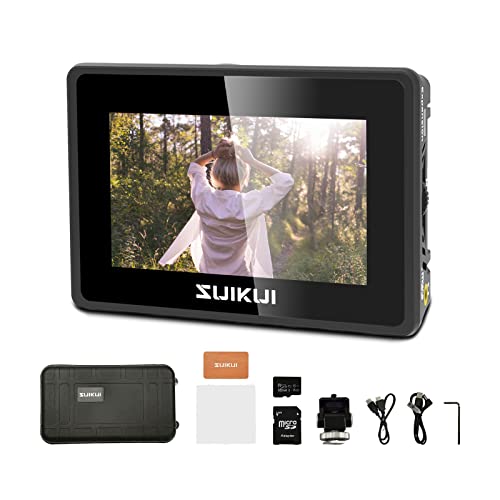
- Unlimited 1080p30 H.264 recording
- 3.5-inch monitor with exposure and focus aids
- Records to microSD or USB flash drives
Best For: Affordable Full HD DSLR monitoring and recording
Best Complete Recording Kit

- Records ProRes, RAW, DNx, H.265, and H.264
- Up to 6K RAW capture via CFexpress or USB
- Includes batteries, charger, case, and mounts
Best For: Creators wanting an all-in-one HDMI recording setup
Best Advanced Recorder

- 1500-nit HDR touchscreen monitor
- Captures up to 6K RAW to CFexpress or USB-C
- Supports ProRes RAW, DNx, H.265, and H.264
Best For: Advanced DSLR video production and RAW workflows
Best All-Around HDMI Recorder – Atomos Ninja 5.2-inch 4K Monitor Recorder
For creators comparing camera external recorders for DSLR cameras, the Atomos Ninja combines on-camera monitoring and recording in a compact package. It records up to 4Kp60 in Apple ProRes, Avid DNxHD, or H.265, while compatible cameras can reach up to 6Kp30 in Apple ProRes RAW.
Best For: DSLR, cinema, and mirrorless shooters who want a capable monitor-recorder with a bundled 240GB SSD.
Pros:
- Records up to 4Kp60 in several professional codecs.
- Supports up to 6Kp30 Apple ProRes RAW with compatible cameras.
- Includes a 240GB SE4 SSD and power accessories.
- AtomOS 11 adds a modern interface and improved responsiveness.
Cons:
- Uses HDMI connectivity, so camera compatibility depends on an HDMI output.
- Battery is not included; the package lists a battery eliminator and USB-C PD cable.
The Ninja is a strong choice when you need both a larger viewing screen and high-quality external recording. Its codec range and wireless RemoteView features add flexibility, though the HDMI connection and power setup should be checked before purchase.
Best Studio-Style Option – Blackmagic HyperDeck Studio HD Mini
The Blackmagic HyperDeck Studio HD Mini is a studio-oriented choice among camera external recorders for DSLR cameras. It offers HDMI, USB, SDI, and RCA connectivity, with SD card recording and compatibility listed for cameras such as the Canon EOS R5, Sony A7S III, and Nikon Z6 II.
Best For: Desktop or studio setups that need multiple connection types and a durable dedicated recorder.
Pros:
- Provides HDMI, USB, SDI, and RCA connectivity.
- Records digital video to SD cards.
- Compatible with several popular full-frame mirrorless cameras.
- Includes a 2-year warranty.
Cons:
- Its studio-recorder design is less portable than an on-camera monitor-recorder.
- The supplied details specify 3G-SDI video input rather than 4K recording.
Choose the HyperDeck Studio HD Mini when connectivity and studio integration matter more than a lightweight field rig. It is a practical fit for controlled environments, but mobile shooters may prefer a purpose-built monitor-recorder.
Best Touchscreen Field Monitor – FEELWORLD CUT6S 6-inch Recorder
The FEELWORLD CUT6S pairs a 6-inch 1080p touchscreen with recording features, making it a useful option among camera external recorders for DSLR cameras. It records compatible video up to 1080p30 to a FAT32 USB flash drive and includes SDI and HDMI signal handling for monitoring and output.
Best For: DSLR operators who want a larger touchscreen, exposure tools, and straightforward 1080p recording in the field.
Pros:
- 6-inch 1920×1080 touchscreen provides a detailed monitoring view.
- Records up to 1080p30 in MP4 to a USB flash drive.
- Includes waveform, vectorscope, histogram, and other monitoring tools.
- Supports 3G-SDI input/output and HDMI input.
Cons:
- Recording is limited to 1080p30.
- NP-F battery is not included.
- USB recording requires a FAT32 flash drive.
The CUT6S is appealing when monitoring and focus or exposure assistance are as important as recording. Its 4K60 HDMI input support expands monitoring compatibility, but the actual USB recording specification is limited to 1080p30.
Best Standalone 4K Capture Box – ClonerAlliance UHD Pro 4K Recorder
The ClonerAlliance UHD Pro is a standalone HDMI capture DVR for users comparing camera external recorders for DSLR cameras. It records to USB storage or a TF card without a PC, supports H.264 and H.265, and provides 4K60 HDMI passthrough while recording up to 4K30, including a cinematic 24fps mode.
Best For: DSLR users who need standalone 4K capture, passthrough, pause/resume recording, or scheduled recording.
Pros:
- Records UHD video without requiring a computer.
- Supports H.264 and H.265 codecs.
- Offers 4K60 HDMI passthrough and up to 4K30 recording.
- Includes pause/resume, schedule tasks, and audio-only recording options.
Cons:
- Does not support HDCP-protected sources.
- Included editing and conversion software is for Windows only.
- HDR and Dolby audio formats must be disabled at the source during recording.
UHD Pro is a flexible choice for tripod, desk, streaming, and capture workflows where a computer-free recorder is useful. Its passthrough and codec support are strong, but source-signal restrictions should be confirmed before building a workflow around it.
Best for Easy Setup – FEELWORLD CUT6
The FEELWORLD CUT6 is a practical choice for anyone comparing camera external recorders for DSLR cameras and wants a large on-camera viewing display. It records compatible HDMI video up to 1080p30 to a FAT32 USB flash drive while adding monitoring tools for exposure and focus.
Best For: DSLR shooters who want an integrated 6-inch monitor, basic HDMI recording, LUT support, and detailed exposure tools.
Pros:
- Records compatible HDMI video up to 1080p30 in MP4 format to a USB flash drive.
- 6-inch 1920×1080 touchscreen provides a clear, detailed viewing surface.
- Includes waveform, vectorscope, focus peaking, zebra, false color, and other filming tools.
- Supports LUT recording and HDMI loop-out for sending an image to another display.
Cons:
- Recording is limited to compatible video up to 1080p30.
- USB recording requires a separately connected FAT32 USB flash drive.
- HDMI output supports up to 1080p60 rather than the 4K input maximum.
The CUT6 is most appealing when monitoring and straightforward USB recording matter more than advanced codec options. Its large touchscreen and broad toolset make it a useful field companion for DSLR video work.
Best ProRes RAW Recorder – Atomos Ninja RAW
The Atomos Ninja RAW is a high-end option among camera external recorders for DSLR cameras and compatible mirrorless systems. It combines a bright HDR monitor with ProRes and ProRes RAW recording, camera controls, and professional monitoring tools.
Best For: Production users who need ProRes RAW workflows, camera control, HDR viewing, and flexible recording to CFexpress Type B or USB-C storage.
Pros:
- Records ProRes, ProRes RAW, and ProRes RAW HQ directly from supported cameras.
- 1500-nit 5-inch HDR touchscreen is designed for bright, detailed viewing.
- Provides camera control for start/stop, ISO, shutter, aperture, and white balance.
- Offers professional tools including EL Zone false color, focus peaking, and waveform.
Cons:
- Advanced recording requires compatible cameras and separately available storage media.
- Its professional feature set may be more than needed for basic DSLR recording.
- External USB-C storage and network-adapter use may require separately sold accessories.
For filmmakers working in supported ProRes RAW workflows, the Ninja RAW offers substantially more than simple HDMI capture. Its bright display, camera control, and editing-friendly formats make it the strongest production-focused choice in this group.
Best DSLR Audio Recorder – Tascam DR-701D
The Tascam DR-701D takes a different approach to camera external recorders for DSLR cameras by focusing on production audio rather than video capture. It records up to six tracks, supports HDMI synchronization, and is built for mounting with a camera or rig.
Best For: Filmmakers, documentarians, and DSLR crews who need multiple microphone inputs, timecode support, and synchronized location audio.
Pros:
- Four microphone inputs can be recorded individually and mixed to a stereo track for six-track recording.
- HDMI input and output allow the DSLR to start recording both devices and help prevent drift.
- Includes a timecode generator that can be jam-synced from compatible equipment.
- Top and bottom tripod mounts support camera-rig or standalone use.
Cons:
- It is an audio recorder, not a video monitor or video recording device.
- Runs on four AA batteries, with a listed average battery life of 3.75 hours.
- Its listed recording format is WAV, which may require separate video editing and synchronization workflows.
The DR-701D is the logical pick when clean, flexible production sound is the main concern. Its multi-track inputs and HDMI-based synchronization make it better suited to serious audio capture than general-purpose video recording.
Best Budget Monitor-Recorder – RH35 Unlimited Recording
The RH35 is a compact option among camera external recorders for DSLR cameras, combining a 3.5-inch preview monitor with unlimited 1080p30 HDMI recording. It records H.264 video to a microSD card or USB flash drive while providing useful exposure and focus aids.
Best For: DSLR users who want an affordable, lightweight monitor-recorder for straightforward Full HD capture and on-camera monitoring.
Pros:
- Records 1080p30 H.264 video without a stated recording limit.
- Includes peaking, zebra, waveform, false color, and other monitoring tools.
- Compact 3.5-inch display weighs about 120g and reaches 600 nits brightness.
- Supports recording to microSD cards and USB flash drives.
Cons:
- Display resolution is limited to 800 x 480.
- Recording is limited to 1080p30 rather than higher-frame-rate capture.
- Connectivity is centered on a single HDMI port and one USB port.
The RH35 prioritizes simple Full HD recording and essential camera-assist tools over advanced codecs or high-resolution capture. It is a practical fit for basic DSLR video setups, live presentations, and other HDMI recording needs.
Best Complete Recording Kit – Atomos Ninja TX GO Kit
The Atomos Ninja TX GO kit is a versatile choice among camera external recorders for DSLR cameras, pairing a 5-inch HDR touchscreen with HDMI recording, professional codecs, Wi-Fi 6E, and NDI 6 support. This bundle also adds batteries, a charger, cables, a carry case, and hot-shoe mounts.
Best For: Creators who want a ready-to-use external recorder package for HDMI DSLR or mirrorless camera rigs and extended shoots.
Pros:
- Captures ProRes, ProRes RAW, DNx, H.265, and H.264 video.
- Supports recording up to 6K RAW to CFexpress or USB media.
- Includes HDR touchscreen monitoring, camera control, and professional assist tools.
- Bundle includes two NP-F batteries, charger, power accessories, case, and mounts.
Cons:
- The full kit is more involved than a basic HDMI recorder.
- Recording media is not identified as included in the supplied bundle contents.
- Its 5-inch 1080p display may be less compact than smaller monitor options.
With advanced recording formats, wireless features, and a broad accessory package, this Ninja TX GO kit is designed for creators building a more capable field setup. It makes the most sense when codec flexibility and included power accessories matter.
Best Advanced Recorder – Atomos Ninja TX GO
Atomos Ninja TX GO 5-inch Camera Monitor-Recorder, HDMI CFexpress Wi-Fi HDR Touchscreen ProRes RAW
Check Price On AmazonThe Atomos Ninja TX GO is a high-end option among camera external recorders for DSLR cameras, offering a bright 1500-nit 5-inch HDR touchscreen and recording to CFexpress Type B or USB-C storage. It supports professional codecs, up to 6K RAW capture, HDMI input and output, and Wi-Fi 6E connectivity.
Best For: Video creators who need advanced RAW and editing-friendly recording formats, camera control, and outdoor-friendly monitoring in a compact monitor-recorder.
Pros:
- Records ProRes, ProRes RAW, Avid DNx, H.265, and H.264.
- Captures up to 6K RAW to CFexpress Type B or compatible USB-C storage.
- Bright 1500-nit touchscreen supports touch-to-focus and professional monitoring tools.
- Offers HDMI 2.0 input/output, Wi-Fi 6E, NDI support, and ATOMOSphere uploads.
Cons:
- Compatible CFexpress or USB-C storage is not listed as included.
- Some cloud services, network adapters, and calibration accessories are sold separately.
- Power options and storage add to the complexity of the setup.
The Ninja TX GO is the strongest choice here for users who will take advantage of RAW capture, professional codecs, bright HDR monitoring, and wireless workflows. Its capabilities are likely more than necessary for simple Full HD recording.
How We Picked These Camera External Recorders for Dslr Cameras
We selected products across the main categories DSLR filmmakers and content creators consider: on-camera HDMI monitor-recorders, SDI-capable field monitors, standalone video capture devices, studio playback decks, and portable audio recorders. We looked at recording format support, resolution and frame-rate handling, input and output compatibility, monitoring features, storage options, portability, and the practical needs of solo shooters.
Compatibility matters more than a long feature list. Before buying, confirm that your DSLR provides a clean HDMI signal, supports the required output resolution, and can maintain that signal during recording. Some cameras limit autofocus, overlays, frame rates, or recording duration when connected to an external device.
Quick Comparison
| Recorder Type | Best For | Key Consideration |
|---|---|---|
| HDMI monitor-recorder | On-camera filmmaking and monitoring | Camera compatibility and storage media |
| RAW monitor-recorder | Maximum post-production flexibility | Supported RAW formats and editing workflow |
| HDMI capture DVR | Simple recording or streaming setups | Codec, frame-rate, and passthrough limits |
| SDI field monitor | Longer cable runs and production rigs | SDI availability and power requirements |
| Studio recorder | Controlled studio or broadcast environments | Rack or desk integration and connectivity |
| DSLR audio recorder | Multi-channel production sound | Mic inputs, timecode, and mounting |
Key Buying Factors for Camera External Recorders for Dslr Cameras
Signal and Format Compatibility
Check HDMI type, SDI requirements, bit depth, chroma subsampling, and supported frame rates. A recorder may advertise 4K passthrough without recording 4K, or support RAW only from specific camera models. Verify the complete camera-recorder combination rather than relying on headline specifications.
Recording Quality and Storage
ProRes and ProRes RAW files are typically easier to edit and can preserve more grading flexibility, but they consume substantial storage. H.264 or H.265 files are smaller and more convenient for delivery, though they may be less robust for intensive post-production. Also confirm whether the unit uses SSDs, CFexpress cards, SD cards, or another medium.
Monitoring, Power, and Usability
A bright touchscreen, focus aids, exposure tools, waveform displays, and LUT support can be more valuable than a higher nominal resolution. For handheld or outdoor work, consider screen brightness, weight, battery options, cable placement, and whether the controls are usable while the camera is mounted.
Audio and Workflow Features
If the recorder must handle sound, check input count, phantom power, headphone monitoring, timecode, and camera-feed compatibility. Video-only recorders may need a separate audio solution. Wi-Fi, camera control, and reliable HDMI passthrough can also simplify a solo operator’s setup.
Who Should Buy Which Camera External Recorders for Dslr Cameras?
Choose a compact HDMI monitor-recorder if you want better monitoring and higher-quality files while filming on location. A RAW-capable model is the better fit for filmmakers whose DSLR supports compatible RAW output and who regularly color-grade footage. For straightforward capture, streaming, or backup recording, an HDMI DVR can be sufficient and easier to operate.
Choose an SDI field monitor when your rig uses professional SDI connections or requires longer cable runs. A studio recorder is better suited to fixed production spaces than lightweight DSLR rigs. Finally, select a dedicated audio recorder if clean, multi-channel sound is the priority. Whichever category you choose, match the recorder to your camera’s actual outputs, your editing software, and your preferred storage budget.