Choosing the right computer monitor for home office work can make a bigger difference than most people expect. The best models reduce eye strain, improve multitasking, and keep text sharp during long workdays.
Below, we focus on practical picks for productivity, comfort, and value, from budget-friendly 1080p displays to larger 4K options for users who want more space and sharper detail.
Best 10 Computer Monitor for Home Office Picks for 2026
Budget-Friendly Smooth-Refresh Pick
LG 24U411A-B 24-inch Full HD IPS Monitor

- 24-inch IPS panel with Full HD resolution
- 120Hz refresh rate for smoother scrolling
- Reader Mode and borderless design
Best For: home office users wanting a compact, smooth display
Comfort-First All-Rounder
Dell 24 Plus S2425HSM 23.8-inch FHD Monitor

- 144Hz FHD display with 1ms MPRT
- Height, tilt, pivot, and swivel adjustment
- Built-in dual 3W speakers
Best For: home office buyers who want ergonomics and integrated audio
Value Office Workhorse
Philips 241V8LB 24-inch FHD 100Hz Monitor

- Full HD VA panel with strong 3000:1 contrast
- 100Hz refresh rate for smoother everyday use
- EasyRead mode for long document sessions
Best For: budget-conscious home office buyers
Premium Productivity Upgrade
Dell S2725QS 27-inch 4K IPS Monitor

- 27-inch 4K IPS panel for sharper detail
- 120Hz refresh rate with FreeSync Premium
- ComfortView Plus and full ergonomic adjustment
Best For: professionals wanting a sharp, flexible home office display
Budget Compact Pick
Philips 22 Inch FHD 100Hz Monitor

- 21.5-inch Full HD display
- 100Hz with Adaptive-Sync
- Flicker-Free and Blue Light Filter
Best For: Small home office desks and basic everyday use
Best All-Rounder
Dell 24 SE2426H IPS 144Hz Monitor

- 23.8-inch IPS Full HD screen
- 144Hz refresh rate with 1ms MPRT
- TÜV eye comfort certification
Best For: Users wanting a versatile home office monitor with smooth motion
Value Connectivity Pick
Amazon Basics 23.8-inch 120Hz Office Monitor

- 23.8-inch IPS with 99% sRGB
- 120Hz with Adaptive Sync
- HDMI, DP, VGA, and speakers
Best For: Work-from-home setups needing flexible connections and good value
Clarity-Focused Compact Pick
Lenovo L22-4e 21.5" FHD IPS Office Monitor
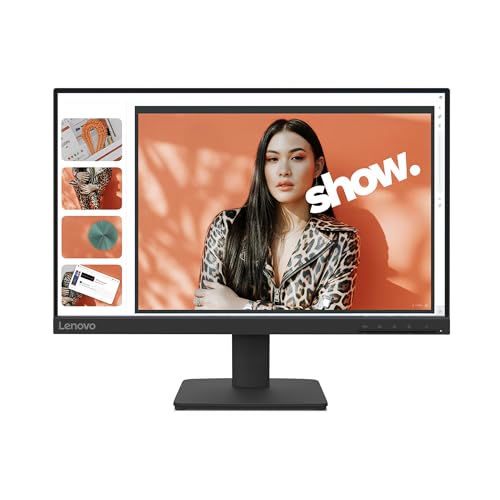
- 21.5-inch IPS panel with Full HD resolution
- 99% sRGB and 1300:1 contrast for crisp visuals
- 100Hz refresh and blue-light reduction for comfort
Best For: Compact desks and everyday home office productivity
Smooth Everyday Value
Acer KA242Y G0bi 23.8" 120Hz IPS Monitor
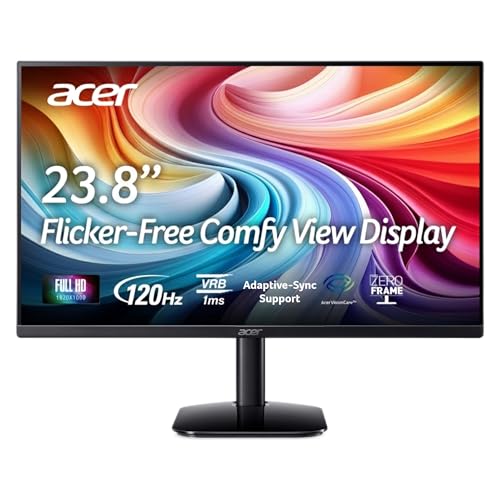
- 23.8-inch Full HD IPS display with more workspace
- 120Hz refresh rate and 1ms response time
- ZeroFrame design suits dual-monitor setups
Best For: A larger, smoother monitor for mixed work and home use
Budget-Friendly Eye-Care Option
SANSUI 24" FHD Eye Care Office Monitor

- 23.8-inch Full HD panel with 178° viewing angles
- Flicker-free and low-blue-light eye-care features
- VESA mount support with tilt adjustment
Best For: Affordable home office setups that need eye comfort and flexibility
Budget-Friendly Smooth-Refresh Pick – LG 24U411A-B 24-inch Full HD IPS Monitor
If you want a computer monitor for home office use that feels sharp, modern, and easy on the eyes, the LG 24U411A-B is a practical 24-inch option. Its Full HD IPS panel, 120Hz refresh rate, and Reader Mode make it a solid fit for everyday work, long document sessions, and light multitasking.
Best For: Home office users who want a compact, colorful monitor with smoother-than-standard scrolling.
Pros:
- 24-inch IPS panel with Full HD 1920 x 1080 resolution for clear everyday work.
- 120Hz refresh rate helps make scrolling and window movement feel smoother.
- Reader Mode lowers blue light for more comfortable extended reading.
- Virtually borderless 3-side design looks clean on a desk or in dual-monitor setups.
Cons:
- Only HDMI connectivity is listed, so it may be less flexible for some setups.
- Stand adjustment is limited to tilt.
- 250 nits brightness is fine for most offices, but not especially bright.
Overall, this LG is a straightforward choice if you want a reliable home office display with smoother motion and a tidy, modern look. It balances productivity features with everyday comfort rather than pushing into premium territory.
Comfort-First All-Rounder – Dell 24 Plus S2425HSM 23.8-inch FHD Monitor
The Dell 24 Plus S2425HSM is a strong computer monitor for home office setups that need comfort and a little extra polish. With FHD resolution, 144Hz motion support, built-in speakers, and full ergonomic adjustment, it covers workday basics and after-hours entertainment without feeling complicated.
Best For: Buyers who want an adjustable desk monitor with built-in audio and smooth everyday performance.
Pros:
- 144Hz refresh rate and 1ms MPRT support smoother motion than a standard office monitor.
- Height, tilt, pivot, and swivel adjustment make it easier to dial in an ergonomic setup.
- Integrated dual 3W speakers reduce the need for separate desktop speakers.
- 4-star TÜV-certified display is designed to reduce harmful blue light while keeping image quality strong.
Cons:
- FHD resolution is good for productivity, but not as sharp as 4K.
- Response time is listed as 8 ms in the details, so the speed specs are mixed.
- It uses HDMI connectivity only, which may limit connection options.
This Dell makes sense if comfort matters as much as screen quality in your home office. It is especially appealing if you want adjustability, built-in sound, and a clean all-in-one desk-friendly package.
Value Office Workhorse – Philips 241V8LB 24-inch FHD 100Hz Monitor
If you need a dependable computer monitor for home office tasks without paying for extras you will not use, the Philips 241V8LB is an easy-to-understand choice. Its Full HD VA panel, 100Hz refresh rate, and EasyRead mode are aimed at comfortable day-to-day productivity, documents, and general media use.
Best For: Budget-conscious users who want a simple, comfortable office monitor with good contrast.
Pros:
- Full HD 1920 x 1080 resolution keeps text and everyday content clear.
- VA panel with 3000:1 contrast ratio delivers deeper blacks and strong image depth.
- 100Hz refresh rate is a nice step up from basic 60Hz office displays.
- EasyRead mode is designed for a more paper-like viewing experience with long documents.
Cons:
- Glossy screen finish may be less ideal in bright rooms than matte options.
- Stand adjustability is not highlighted in the supplied details.
- Brightness is 250 nits, so it is more modest than some rivals.
For a straightforward home office monitor, Philips focuses on the essentials: clear resolution, strong contrast, and features that help with reading and daily work. It is a sensible value pick if you want a practical display rather than a feature-heavy one.
Premium Productivity Upgrade – Dell S2725QS 27-inch 4K IPS Monitor
The Dell S2725QS is the most premium computer monitor for home office work in this group, especially if you want extra workspace and sharper detail. Its 27-inch 4K IPS panel, 120Hz refresh rate, and ComfortView Plus make it a compelling fit for multitasking, content work, and long days at the desk.
Best For: Professionals who want a sharp 4K screen with ergonomic flexibility and modern comfort features.
Pros:
- 27-inch 4K resolution gives you much more detail and screen space for work.
- IPS panel with 99% sRGB supports vivid, accurate-looking color.
- 120Hz refresh rate and FreeSync Premium make motion feel smooth and responsive.
- Height, pivot, swivel, and tilt adjustment help you set up a better workstation.
Cons:
- It is a larger, heavier monitor than the 24-inch options here.
- 4K resolution may be more than some basic office users need.
- Premium features and 27-inch size likely place it above budget-focused picks.
If your home office setup benefits from sharper text, more room for windows, and a more refined display, this Dell stands out. It is the best fit here for users who want a clear step up in image quality and workspace flexibility.
Budget Compact Pick – Philips 22 Inch FHD 100Hz Monitor
If you want a computer monitor for home office use without taking up much desk space, this 21.5-inch Philips model keeps things simple and practical. It delivers Full HD sharpness, a 100Hz refresh rate, and a VA panel with strong contrast, making everyday work, streaming, and light gaming feel smooth and clear.
Best For: Small desks, budget-minded home office setups, and users who want a compact screen with good contrast.
Pros:
- Full HD 1920 x 1080 resolution on a compact 21.5-inch class screen
- 100Hz refresh rate with Adaptive-Sync for smoother motion
- VA panel with 3000:1 contrast and wide 178° viewing angles
- Flicker-Free, Blue Light Filter, and Eye Care features
Cons:
- Smaller screen size may feel limited for multitasking
- Only one HDMI port is listed
- Uses a glossy screen finish, which may not suit every lighting setup
Overall, this Philips monitor is a solid value choice if you need a straightforward display for daily office tasks and occasional entertainment. Its compact footprint and eye-comfort features make it especially appealing for smaller home workspaces.
Best All-Rounder – Dell 24 SE2426H IPS 144Hz Monitor
For a computer monitor for home office setups that also handles streaming or casual gaming, the Dell SE2426H offers a strong mix of speed and clarity. Its 23.8-inch IPS panel, 144Hz refresh rate, and wide viewing angles make it a flexible pick for people who want a monitor that looks good across work and downtime.
Best For: Home office users who want a versatile display with smoother motion and wide-angle IPS color consistency.
Pros:
- 23.8-inch Full HD IPS panel for consistent color and wide viewing angles
- 144Hz refresh rate with 1ms MPRT for smoother motion
- TÜV Rheinland 3-star eye comfort certification for reduced blue light
- Two HDMI ports and ultra-thin bezels for easy setup
Cons:
- Listed response time is 8ms in the product details
- Stand adjustment is limited to tilt
- Built-in speakers are not listed
As a home office monitor, this Dell stands out for balancing productivity features with smoother-than-average performance. It is a practical choice if you want a clean-looking display that can handle long work sessions and occasional entertainment.
Value Connectivity Pick – Amazon Basics 23.8-inch 120Hz Office Monitor
This computer monitor for home office use is built for straightforward value, with a 23.8-inch IPS panel, Full HD resolution, and a 120Hz refresh rate. It also adds practical extras like HDMI, DisplayPort, VGA, built-in speakers, and eye-comfort features, making it a flexible option for everyday desk setups.
Best For: Home office buyers who want broad connectivity, a clean design, and solid everyday performance.
Pros:
- 23.8-inch IPS panel with Full HD resolution and 99% sRGB coverage
- 120Hz refresh rate with Adaptive Sync for smoother motion
- HDMI, DisplayPort, VGA, and 3.5mm audio-out for flexible connectivity
- Built-in 2W x2 speakers plus LowBlue Light and Flicker-Free features
Cons:
- Response time is listed at 14ms
- Built-in speakers are basic at 2W x2
- Maximum 120Hz requires compatible hardware and the right cable setup
For a home office monitor, this Amazon Basics model is appealing because it combines a comfortable screen size with broad input support. It is a useful pick when you want simple versatility rather than premium extras.
Clarity-Focused Compact Pick – Lenovo L22-4e 21.5" FHD IPS Office Monitor
If you want a dependable computer monitor for home office work without taking up much desk space, the Lenovo L22-4e is built around everyday clarity and comfort. Its 21.5-inch IPS panel, 99% sRGB coverage, and 100Hz refresh rate make it a practical choice for spreadsheets, video calls, and general multitasking.
Best For: Compact home office setups that value color accuracy, eye comfort, and a clean look.
Pros:
- 21.5-inch Full HD IPS display with 178° viewing angles for consistent visuals.
- 99% sRGB gamut and 1300:1 contrast ratio for crisp, accurate-looking content.
- 100Hz refresh rate and 4ms response time for smoother everyday motion.
- Blue-light reduction, flicker-free support, and a matte screen for longer work sessions.
Cons:
- Smaller 21.5-inch screen may feel tight if you prefer extra workspace.
- Only one HDMI port is listed, so connectivity is limited.
- Basic tilt stand only; no height adjustment is specified.
Overall, the L22-4e is a solid fit if your home office prioritizes sharp text, good color, and an easy-on-the-eyes display in a compact footprint. It is especially appealing when you want a modern-looking monitor that stays practical rather than flashy.
Smooth Everyday Value – Acer KA242Y G0bi 23.8" 120Hz IPS Monitor
The Acer KA242Y G0bi is a straightforward computer monitor for home office users who want a bit more screen space and a smoother feel than standard 60Hz panels. Its 23.8-inch Full HD IPS display, 120Hz refresh rate, and 1ms response time make it a versatile pick for work, streaming, and light gaming after hours.
Best For: Users who want a larger 1080p office monitor with smooth motion and strong everyday versatility.
Pros:
- 23.8-inch Full HD IPS screen offers a comfortable amount of desktop space.
- Up to 120Hz refresh rate and 1ms response time for smoother motion.
- FreeSync support can help reduce tearing in supported content.
- Near bezel-less ZeroFrame design works well in multi-monitor setups.
Cons:
- Only tilt adjustment is listed, so ergonomics are limited.
- Brightness is rated at 250 nits, which is fairly standard.
- Connectivity is basic with one HDMI and one VGA port.
For a home office, this Acer is a practical middle ground: larger than a compact 21.5-inch display, but still simple and affordable in approach. The higher refresh rate is a nice bonus if you want your workday display to feel more responsive.
Budget-Friendly Eye-Care Option – SANSUI 24" FHD Eye Care Office Monitor
If you need a computer monitor for home office use with a simple, budget-conscious feature set, the SANSUI 24-inch model covers the basics well. It offers a 23.8-inch Full HD panel, 178° viewing angles, FreeSync support, and eye-care extras like flicker-free and low-blue-light modes.
Best For: Home office buyers who want an affordable 1080p monitor with eye-comfort features and VESA mounting.
Pros:
- 23.8-inch Full HD display with a 178° viewing angle for shared viewing.
- Flicker-free and low-blue-light features support longer work sessions.
- FreeSync support and 1ms response time add smoother motion handling.
- VESA compatibility and tilt adjustment make placement more flexible.
Cons:
- No speakers or headphone jack are included.
- 75Hz refresh rate is lower than some competing office monitors.
- Brightness is 250 nits, so it is best for normal indoor lighting.
This SANSUI monitor is a sensible choice if you want the essentials for a home office without paying for extras you may not need. The combination of eye-care features, VESA support, and a standard 1080p panel makes it easy to place and use every day.
How We Picked the Best Computer Monitor for Home Office
To build this roundup of Computer Monitor for Home Office options, we focused on the features that matter most for daily work: screen clarity, ergonomic flexibility, eye-comfort tools, connectivity, and overall value. We favored models with IPS or quality VA panels, adjustable stands where possible, and refresh rates that keep scrolling and window movement feeling smooth.
We also considered whether each monitor fits common home-office setups, including compact desks, dual-monitor arrangements, and mixed-use spaces that handle both spreadsheets and streaming.
Quick Comparison: What the Main Monitor Types Offer
Most buyers will land in one of three groups. A 23.8-inch or 24-inch 1080p monitor is the sweet spot for affordable everyday productivity. A 27-inch 4K model offers more workspace and sharper text, which is ideal for detail-heavy work. If you want a simple budget setup, entry-level 100Hz to 120Hz monitors usually provide a nicer feel than older 60Hz office displays.
Key Buying Factors for a Computer Monitor for Home Office
Screen Size and Resolution
For general office use, 23.8-inch and 24-inch screens are easy to fit on most desks. If you work with multiple windows, spreadsheets, design tools, or lots of text, a 27-inch 4K monitor can be a major upgrade. Resolution matters as much as size: 1080p is fine at 24 inches, while 4K is better on larger displays.
Panel Type and Viewing Comfort
IPS panels are usually the best all-around choice for a Computer Monitor for Home Office use because they deliver better color consistency and wider viewing angles. VA panels can offer stronger contrast, which may be appealing for mixed work and media use, but some buyers prefer IPS for sharper everyday readability.
Ergonomics and Adjustability
A height-adjustable stand, tilt, swivel, and pivot support can improve posture and reduce neck strain. If the included stand is basic, VESA compatibility gives you the option to add a monitor arm later.
Ports and Practical Extras
HDMI is essential, while DisplayPort can help on some setups. Built-in speakers are convenient, though usually basic. Features like flicker-free technology, low-blue-light modes, and adaptive sync can improve comfort and smoothness, especially if you use the same screen for work and light entertainment.
Who Should Buy Which Computer Monitor for Home Office?
Choose a 24-inch 1080p monitor if you want the best balance of price, space, and everyday productivity. Pick a 27-inch 4K monitor if you value sharper text and more room for multitasking. Go with a budget-friendly 100Hz office monitor if you want a clear upgrade from older 60Hz screens without spending much. If you need better posture support, prioritize a model with a fully adjustable stand or VESA mounting.
For most shoppers, the best Computer Monitor for Home Office use is the one that matches desk space, viewing comfort, and the type of work you do most often.