Reading a script while maintaining natural eye contact is easier with the right teleprompter. The best teleprompters for laptops help creators, teachers, presenters, and remote professionals stay on message without constantly looking away from the camera.
We selected 10 options spanning compact laptop setups, DSLR and smartphone rigs, built-in displays, and larger professional designs. The guide below explains which features matter most for your camera, screen, workspace, and recording style.
Best 10 Teleprompters for Laptops Picks for 2026
Best Professional Stand

- Supports laptops, tablets, and monitors up to 17 inches
- 60/40 beam-splitter glass for clear prompting
- Telescopic stand suits formal presentations
Best For: Conferences, broadcasts, and studio presentations
Best Compact Camera Rig

- Pre-assembled all-metal construction
- Works with smartphones, cameras, and webcams
- Includes carry bag and protective hood
Best For: Portable smartphone-prompted video setups
Best Built-In Display

- Built-in 9-inch FHD prompting display
- Drag and drop windows from a computer
- Works with cameras, webcams, and laptops
Best For: Streaming, video calls, and desktop presenting
Best Tablet-Based Value

- No-assembly aluminum teleprompter design
- 12-inch display with app and remote control
- Folds flat and includes a carry case
Best For: Tablet-based courses, tutorials, and streaming
Best Compact Pick
Little Prompter Personal Teleprompter

- Works with laptop cameras and webcams
- Lightweight, compact 6-inch folded design
- Requires a smart device for script display
Best For: Portable laptop-camera recording
Best Full-Size Option
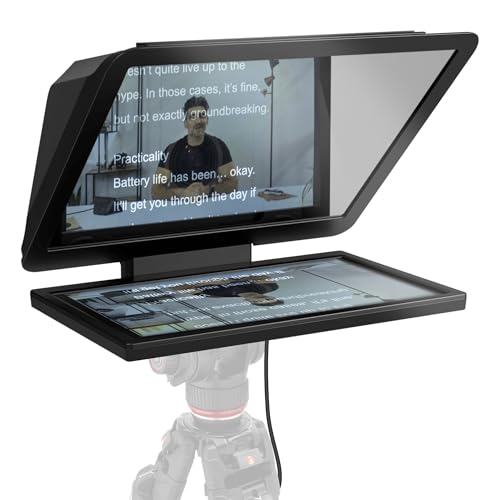
- 15.6-inch Full HD display
- Removable screen doubles as a spare monitor
- Voice Sync has specific hardware requirements
Best For: Large, flexible desktop video setups
Best Tablet-Compatible Pick
NEEWER X12 14-Inch Teleprompter

- Supports tablets and smartphones within size limits
- Includes remote control and carrying case
- Requires a compatible lens over 28mm
Best For: Tablet-based teaching, vlogging, and livestreaming
Best All-in-One Pick
NEEWER X11 Monitor Teleprompter

- Built-in 9-inch LCD monitor
- USB-C and HDMI computer connections
- Beam-splitter glass readable to 2.5 m
Best For: Laptop livestreaming and video conferencing
Best Large-Display Option
GVM 12-Inch Collapsible Teleprompter
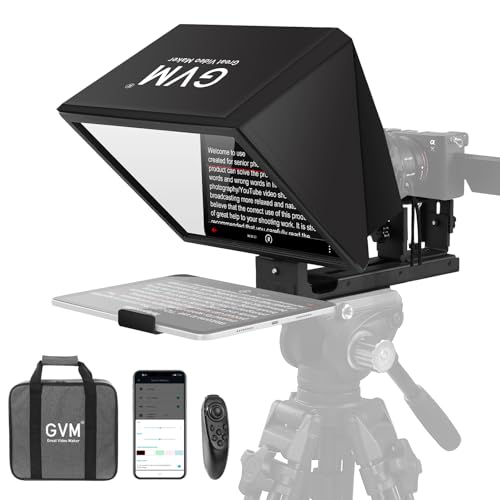
- 12-inch anti-reflective optical glass
- Wireless app and remote controls
- Folds into included carry case
Best For: Tablet-based presentations and video recording
Best Portable Value
LENSGO TC7 Foldable Teleprompter

- Folds in one second
- iOS and Android app control
- Supports phones, tablets, and cameras
Best For: Portable vlogging, teaching, and interviews
Best Professional Stand – Proaim Laptop Teleprompter
For buyers seeking teleprompters for laptops in professional presentation environments, the Proaim Speech Teleprompter offers a substantial stand-mounted setup. It supports laptops, tablets, and monitors up to 17 inches, with 60/40 beam-splitter glass for readable scripts and natural eye contact.
Best For: Conferences, speeches, broadcasts, training sessions, houses of worship, and studio or on-location productions.
Pros:
- Supports displays up to 17 inches, including laptops, tablets, and monitors.
- 60/40 beam-splitter glass helps maintain clear script visibility and eye contact.
- Included telescopic stand allows adjustable viewing height.
- Designed for professional presentation and broadcast settings.
Cons:
- At 18.5 pounds, it is considerably less portable than compact teleprompters.
- Its large 31.5 x 21.75 x 6.75-inch dimensions require substantial setup space.
The Proaim is a strong choice when stability, screen-size flexibility, and presentation quality matter more than portability. Its included stand makes it especially practical for fixed venues and formal production work.
Best Compact Camera Rig – Glide Gear TMP 75
Glide Gear TMP 75 Teleprompter - Laptop, DSLR, Smartphone - Carry Case, No Assembly
Check Price On AmazonThe Glide Gear TMP 75 is a compact option for shoppers comparing teleprompters for laptops and camera-based recording setups, although its prompting device is a smartphone rather than a laptop. It arrives assembled, uses all-metal construction, and works with DSLR, mirrorless camera, and webcam configurations.
Best For: Portable video shoots, webcam recording, and creators who already use a smartphone teleprompter app.
Pros:
- Pre-assembled and ready to use without complicated setup.
- Compatible with smartphones, DSLR cameras, mirrorless cameras, and webcams.
- Compact 2-pound design includes a protective hood and carry bag.
- 70/30 beam-splitting glass provides clear script visibility.
Cons:
- Does not support iPad tablets.
- A teleprompter app is not included.
- Its stated maximum weight recommendation is 2 pounds.
The TMP 75 makes the most sense for lightweight, camera-centered setups where smartphone prompting is acceptable. It is portable and durable, but it is not the right fit for users who specifically need a laptop or tablet as the script display.
Best Built-In Display – Elgato Prompter
For users researching teleprompters for laptops that can also handle video calls and streaming, the Elgato Prompter integrates a 9-inch display into the unit. It connects by USB to a PC or Mac, lets you move windows or apps onto the display, and supports laptops, webcams, smartphones, and DSLR cameras.
Best For: Streamers, remote presenters, video conferences, and creators who want scripts or chat visible while maintaining eye contact.
Pros:
- Built-in FHD display eliminates the need for a separate phone or tablet screen.
- Supports drag-and-drop placement of windows and apps like a monitor.
- Compatible with PCs, Macs, laptops, webcams, smartphones, and DSLR cameras.
- Camera Hub offers adjustments for text and chat appearance.
Cons:
- DisplayLink software is required on Mac, with DisplayLink Presenter required on Android.
- The 9-inch screen may provide less reading area than larger tablet-based units.
- It is a powered USB-connected setup rather than a fully standalone display.
The Elgato is particularly convenient for desktop workflows because the computer controls the display directly. It is a compelling choice for streaming and video conferencing, especially when eye contact and quick access to on-screen content are priorities.
Best Tablet-Based Value – NEEWER Basics X12B
The NEEWER Basics X12B is a practical tablet-based alternative for buyers considering teleprompters for laptops, particularly for online courses, presentations, and tutorials. Its no-assembly aluminum design uses a 12-inch beam-splitter setup, while the included remote and app control script playback from a compatible smartphone or tablet.
Best For: Tablet-based streaming, online courses, tutorials, and portable presentation recording.
Pros:
- No-assembly aluminum construction is designed for straightforward setup.
- 12-inch display and 75% light-transmittance glass support readable scripts from up to 10 feet.
- Included Bluetooth remote controls playback, speed, pages, and font size through the app.
- Foldable design and carry case simplify storage and transport.
Cons:
- It does not function as a monitor or provide direct on-screen self-viewing.
- The notes indicate it is not intended for phone shooting.
- The remote requires an AAA battery, which is not included.
The X12B is a convenient choice when you already have a compatible tablet and want app-based script control without assembly. Its foldable design improves portability, while its limitations make it less suitable for users seeking an integrated laptop display or phone-shooting setup.
Best Compact Pick – Little Prompter Personal Teleprompter
If you need teleprompters for laptops without adding a bulky studio setup, The Little Prompter is a portable option for built-in laptop cameras, webcams, and DSLRs. Its compact 6-inch folded design and weight of less than a pound make it convenient for home offices, classrooms, and small video setups. A smart device running a teleprompter app is required to display your script.
Best For: Laptop-camera users, instructors, business professionals, and creators who prioritize portability.
Pros:
- Works with built-in laptop cameras, webcams, and DSLRs
- Compact, lightweight design for easy transport
- Includes BeamSplitter 70/30 glass
- Supports iOS and Android teleprompter apps
Cons:
- Requires a separate smart device and teleprompter app for scripts
- Its compact design may provide less viewing area than larger models
The Little Prompter is a practical choice when desk space and portability matter most. It is especially suited to straightforward laptop-camera recording rather than large studio productions.
Best Full-Size Option – Elgato Prompter XL
For creators who want a larger reading surface, the Elgato Prompter XL brings a 15.6-inch Full HD display to a teleprompter setup. It can suit teleprompter use alongside laptop-based video work, while the removable display can also function as a spare monitor for video conferencing and multitasking.
Best For: Creators who want a full-sized display, extended reading distance, and a secondary monitor.
Pros:
- Large 15.6-inch Full HD display
- Removable screen can be used for conferencing and multitasking
- Supports DSLRs, mirrorless cameras, and studio cameras
- Voice Sync supports natural script pacing with compatible hardware
Cons:
- Weighs 7.43 pounds, making it less portable than compact models
- Voice Sync requires an NVIDIA RTX GPU or Apple M1 and better
The Prompter XL is the strongest fit for a more permanent or full-featured workspace. Its larger screen improves readability, while the removable monitor adds flexibility beyond prompting.
Best Tablet-Compatible Pick – NEEWER X12 14-Inch Teleprompter
The NEEWER X12 is a versatile choice for teleprompters for laptops and broader camera setups when you want to use an iPad, tablet, or smartphone as the script source. Its beam splitter glass offers 75% light transmittance, and reflected text can be read from up to 10 feet away. The included remote and app provide convenient script controls.
Best For: Online teachers, vloggers, and live streamers using tablets or smartphones with compatible cameras.
Pros:
- Fits supported tablets and smartphones up to 9.84 by 8.68 inches
- Includes RT-110 remote, phone holder, and carrying case
- App supports pausing, speed adjustment, and page turning
- Collapsible aluminum-alloy design is easy to store and transport
Cons:
- Not compatible with wide-angle lenses
- Camera lens focal length must be more than 28mm
- Not compatible with the 12-inch iPad Pro
The X12 offers a useful middle ground for creators who already own a tablet or phone for displaying scripts. Check the lens requirements and device dimensions carefully before buying.
Best All-in-One Pick – NEEWER X11 Monitor Teleprompter
For shoppers comparing teleprompters for laptops, the NEEWER X11 stands out as an integrated option with its own LCD monitor. Connect it to a compatible computer through USB-C or HDMI, or mirror content from supported mobile devices without relying on a separate phone or tablet for prompts.
Best For: Laptop-based livestreaming, video conferencing, and creators who want a built-in monitor with camera, webcam, or phone support.
Pros:
- Built-in 9-inch, 1024 x 768 LCD can serve as a second Windows or macOS display.
- USB-C computer connection and included screen-mirroring cable offer flexible setup options.
- Multi-coated 11-inch beam-splitter glass provides readable text at distances up to 2.5 meters.
- Adjustable Arca-type holder supports horizontal and vertical positioning.
Cons:
- HDMI setup requires a driver, and USB-A connection requires a driver as noted by the manufacturer.
- Phone mirroring is limited to iPhone and Android devices with DP protocol support.
- Voice sync is not supported, and the tripod or stand is sold separately.
The X11 is a strong choice when laptop compatibility and a self-contained display matter more than the simplest portable design. Verify your computer ports and device protocols before buying.
Best Large-Display Option – GVM 12-Inch Collapsible Teleprompter
The GVM 12-inch kit is a practical choice among teleprompters for laptops when you want a larger reading area and a flexible tablet-based setup. Its installation-free collapsible design accommodates a phone or tablet for scripts while supporting camera equipment on a tripod.
Best For: Presentations, live streaming, and video recording setups using an iPad, tablet, or smartphone as the script display.
Pros:
- Large 12-inch optical glass supports a stated reading distance of up to 15 feet.
- Fits smartphones and tablets up to 8.6 inches, including iPad models.
- Wireless remote and app control handle play, pause, scrolling speed, and font size.
- Collapsible aluminum-alloy design includes a carry case for transport.
Cons:
- It does not include a built-in monitor, so prompts depend on a compatible phone or tablet.
- At 5.68 pounds, it is heavier than many compact teleprompter designs.
- Camera compatibility depends on having a 1/4-inch or 3/8-inch mounting screw.
The GVM offers a roomy display and convenient wireless controls, making it appealing for longer reading distances. Choose it if you already plan to use a tablet rather than a laptop as the prompt screen.
Best Portable Value – LENSGO TC7 Foldable Teleprompter
The LENSGO TC7 is a compact option for shoppers browsing teleprompters for laptops who also want support for phones, tablets, or cameras. It folds in one second, works with the TCQI app on iOS and Android, and includes adapter rings for different camera setups.
Best For: Vloggers, online teachers, interviewers, and mobile creators who prioritize portability and flexible device placement.
Pros:
- Foldable design makes the 9.7-inch teleprompter easy to carry.
- TCQI app supports script entry, scrolling control, speed adjustment, and font or background changes.
- Works with smartphones, tablets below 9.7 inches, and cameras in vertical or horizontal placement.
- Includes eight camera lens adapter rings and supports wide-angle shooting with a 17mm lens.
Cons:
- The tablet support is limited to devices below 9.7 inches.
- Scripts are handled through the app or TXT files, and image-based scripts have limited text adjustment.
- The supplied details identify an optical teleprompter rather than a built-in laptop monitor.
The TC7 is a convenient travel-friendly choice with broad phone, tablet, and camera compatibility. It is best suited to creators who want app-controlled prompting and do not need an integrated display.
How We Picked the Best Teleprompters for Laptops
We compared these teleprompters based on laptop and tablet compatibility, camera positioning, reflective-glass quality, portability, setup requirements, and ease of script control. We also considered whether each model suits webcams, DSLRs, smartphones, or dedicated monitors. Because no single design fits every workspace, the selection includes compact personal units, collapsible kits, and full-sized models with integrated screens.
Quick Comparison
Compact teleprompters are usually the easiest choice for laptop-based video calls, online teaching, and mobile recording. Models designed around tablets offer flexibility because you can use a familiar screen and teleprompter app. Built-in-screen units simplify the setup and can provide more consistent text visibility, while larger professional teleprompters generally offer a wider viewing area and better support for substantial cameras or studio workflows.
Before buying, confirm the product’s supported device dimensions and the available camera mount. A teleprompter that technically supports a laptop may still be unsuitable if the laptop display is too large, too thick, or positioned too far behind the glass.
Key Buying Factors for Teleprompters for Laptops
Screen and Device Compatibility
Check the maximum screen size, usable viewing area, and mounting method. Some units work with laptops directly, while others are intended for tablets or phones placed in front of a laptop camera. Compatibility details matter more than the product name.
Camera Placement and Viewing Angle
The lens should sit close to the center of the reflected text so your eye line remains natural. Look for adjustable mounts if you switch between a webcam, DSLR, mirrorless camera, or smartphone.
Glass Quality and Readability
Clear, properly angled beam-splitter glass improves text visibility and reduces distracting reflections. If you record in bright rooms, prioritize a deeper hood and strong light control. Larger glass can also make scripts easier to read from farther away.
Portability and Setup
For occasional recording or travel, choose a collapsible design, carrying case, or no-assembly setup. Heavier aluminum models may be more stable but take up more desk and storage space.
Script Control
Confirm how scripts are displayed and controlled. App compatibility, remote controls, screen mirroring, adjustable scrolling speed, and text-size options can make a bigger practical difference than extra hardware.
Who Should Buy Which Teleprompters for Laptops?
Choose a compact personal teleprompter if you record at a desk, use a built-in laptop webcam, or need a portable setup. Tablet-compatible models are a strong all-purpose choice for creators who already own an iPad or Android tablet. Pick a built-in-screen teleprompter when you want a cleaner dedicated system with fewer separate components.
For DSLR or mirrorless cameras, prioritize sturdy mounting hardware, a suitably sized opening, and enough clearance for the lens. Full-sized models are better for studio presenters, longer camera-to-subject distances, and larger scripts. If you teach or present online, an app-compatible model with remote control can make pacing and hands-free operation much easier.