Choosing the right conference camera remote control can make a big difference in how smoothly meetings, webinars, and hybrid presentations run.
Below, we focus on the features that matter most: compatibility, range, presets, tracking support, and how easily each option fits a real conference room workflow.
Best 10 Conference Camera Remote Control Picks for 2026
Pro PTZ Pick
NexiGo 10X Optical Zoom Conference Camera

- 10x optical zoom for room and speaker shots
- Remote controls pan, tilt, zoom, and presets
- 1080p with noise reduction for cleaner video
Best For: Small to medium conference rooms and hybrid presentations
All-in-One AV Pick
TONGVEO 4K Webcam with Remote Control

- 4K webcam with built-in mics and speaker
- Remote controls zoom, FOV, mute, and volume
- AI auto-framing and voice tracking for meetings
Best For: Small rooms, teaching, and all-in-one video calls
Replacement Remote
Kandao Conference Camera Remote

- Made for Kandao Meeting Pro and Meeting S
- Infrared button control with 10-meter range
- AAA battery-powered replacement remote
Best For: Kandao owners needing a spare or replacement remote
Room-Coverage Pick
4K Conference Camera with Auto Framing

- 120° wide-angle 4K camera for larger rooms
- AI auto framing plus speaker and presenter tracking
- Built-in speakers and 4-mic array
Best For: Medium to large conference rooms with hybrid meetings
NexiGo replacement pick
NexiGo N990 (Gen 2) PTZ replacement remote

- Fits NexiGo N990 (Gen 2) 4K PTZ webcam
- No programming or pairing needed
- Infrared control with 32-foot range claim
Best For: Owners replacing a lost or broken N990 (Gen 2) remote
Logitech official remote
Logitech Rally conference camera remote
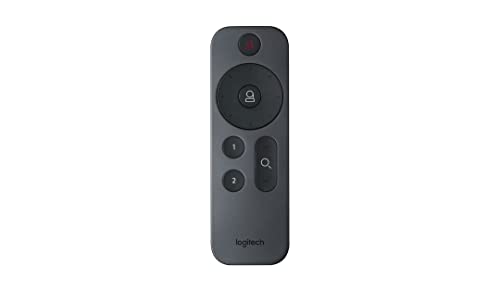
- Built for Rally ConferenceCam systems
- RF wireless control up to 10 meters
- Compact ergonomic remote with 3 buttons
Best For: Rally ConferenceCam setups needing a simple dedicated controller
All-in-One 4K Conference Camera
4K Conference Room Camera with Remote Control

- 5X digital zoom with remote presets and volume control
- AI face detection and presenter tracking for centered framing
- Built-in speaker and noise-cancelling mics in one unit
Best For: Small to mid-size meeting rooms that want simple remote-controlled framing and audio
PTZ Auto-Tracking Kit
4K PTZ Conference Camera with Speakerphone

- 350° pan, 180° tilt, and 5X digital zoom
- Remote presets plus gesture-based tracking control
- Includes speakerphone with 16.4 ft audio pickup
Best For: Rooms that need full PTZ movement and separate speakerphone audio
Smart Framing 4K Webcam
4K Video Conference Room Camera with Remote

- AI auto framing and presenter tracking help center meetings
- Remote adjusts mute, zoom, preset views, rotation, and volume
- All-in-one design includes speakers, mics, and USB plug-and-play
Best For: Teams that want automatic framing with easy remote adjustments
Pro PTZ Pick – NexiGo 10X Optical Zoom Conference Camera
If you need a conference camera remote control setup that can actually move with the meeting, this NexiGo PTZ system is built for it. The 10x optical zoom, silent pan/tilt movement, and autofocus/manual focus options make it useful for rooms where you want both wide coverage and tight speaker shots.
Best For: Small to medium conference rooms, church services, and live streaming setups that need remote-controlled framing.
Pros:
- 10x optical zoom helps frame both the full room and close-up speakers.
- IR remote control supports pan, tilt, zoom, and up to 10 presets.
- 1080p video with 2D/3D noise reduction aims for a cleaner image in low light.
- Flexible mounting options for hanging, wall, or tripod placement.
Cons:
- No built-in microphone, so you need separate audio.
- No mounting hardware is included.
This is a practical pick if you value remote camera control over extra audio features. It focuses on core PTZ performance and room coverage, which makes it a straightforward fit for budget-conscious conference spaces.
All-in-One AV Pick – TONGVEO 4K Webcam with Remote Control
This conference camera remote control option is aimed at teams that want video, audio, and framing tools in one device. The TONGVEO webcam combines 4K capture, built-in microphones, a speaker, AI auto-framing, and voice tracking, so it can simplify a meeting setup without requiring extra peripherals.
Best For: Small meeting rooms, online teaching, and users who want an all-in-one webcam with built-in audio.
Pros:
- 4K resolution at 30 fps for sharper meeting video.
- Remote includes 5x digital zoom, FOV switching, mute, volume, and flip controls.
- AI auto-framing and voice tracking help keep active attendees centered.
- Built-in dual microphones and a 3W speaker reduce the need for separate audio gear.
Cons:
- Digital zoom is not the same as optical zoom.
- Best suited to USB webcam use rather than larger dedicated room systems.
For buyers who want a compact conference camera remote control experience with less cable clutter, this model offers a lot in one package. It is especially appealing when you want to cover video, pickup, and playback in a single USB device.
Replacement Remote – Kandao Conference Camera Remote
If you already use a compatible Kandao setup, this conference camera remote control is a simple replacement or spare. It is designed specifically for Kandao Meeting Pro and Meeting S, using infrared connectivity and button control for basic conference camera operation.
Best For: Owners of Kandao Meeting Pro or Meeting S who need a direct replacement remote.
Pros:
- Compatible with Kandao Meeting Pro and Meeting S.
- Infrared control with button-based operation.
- Up to 10-meter range for room use.
- Uses AAA batteries and supports one camera device.
Cons:
- Only works with supported Kandao conference cameras.
- Limited to controlling one device.
This is not a full camera system, but it solves a specific need well: replacing or adding a remote for a supported conference camera. If your current Kandao remote is missing or worn out, this is the most direct match.
Room-Coverage Pick – 4K Conference Camera with Auto Framing
For larger meeting spaces, this conference camera remote control-friendly system is designed to reduce manual adjustments while keeping the whole room visible. It pairs a 120° wide-angle 4K camera with AI auto framing, speaker and presenter tracking, built-in dual speakers, and a 4-mic array for a more complete all-in-one setup.
Best For: Medium and large conference rooms that need broad coverage and automatic framing.
Pros:
- 120° wide-angle lens helps capture larger rooms.
- AI auto framing, speaker tracking, and presenter tracking reduce manual camera handling.
- Built-in dual speakers and 4-mic array simplify the audio setup.
- Works with Teams, Zoom, Google Meet, and other PC-based platforms.
Cons:
- Uses digital zoom, not optical zoom.
- Best suited to larger room deployments rather than a basic desk webcam setup.
This model is strong when the priority is room coverage and automation rather than fine-tuned manual control. It makes sense for hybrid work environments that want one device to handle video, pickup, and playback with less clutter.
NexiGo replacement pick – NexiGo N990 (Gen 2) PTZ replacement remote
If you need a conference camera remote control for the NexiGo N990 (Gen 2) 4K PTZ webcam, this replacement is built to restore basic hands-on control without any setup hassle. It uses infrared 3.0 technology, offers a stated 32-foot control distance, and is designed to work right after you install batteries.
Best For: NexiGo N990 (Gen 2) owners who want a simple no-pairing replacement remote.
Pros:
- Made specifically for the N990 (Gen 2) 4K PTZ webcam.
- No programming or pairing required; just add batteries.
- Infrared 3.0 is described as responsive with strong signal performance.
- Claims a wide control angle of more than 120 degrees.
Cons:
- Batteries are not included.
- Only supports one compatible device.
- Compatibility is limited to the listed webcam model.
This is a straightforward replacement if you already own the matching NexiGo camera and want the fastest path back to remote operation. It focuses on simplicity over extra features, which makes it practical for direct replacement use.
Logitech official remote – Logitech Rally conference camera remote
For a conference camera remote control made for the Logitech Rally ConferenceCam system, this gray remote keeps things simple with button-based operation and wireless convenience. It is intended for the Rally conference camera setup, with a stated 10-meter maximum range and ergonomic handling.
Best For: Logitech Rally ConferenceCam users who want an official-style remote for basic camera control.
Pros:
- Compatible with the Rally ConferenceCam system.
- Wireless RF connectivity with a 10-meter maximum range.
- Compact, ergonomic design with only 3 buttons.
- Lightweight build for easy handling.
Cons:
- Limited to one supported device.
- Only 3 buttons, so it is designed for basic control.
- Battery type is specific to lithium use.
This is a practical pick if you want a dedicated remote for a Logitech Rally setup rather than a universal controller. The minimal button layout suggests it is built for essential conference camera functions, not advanced customization.
EMEET software-linked remote – EMEET PIXY and Piko remote controller
This conference camera remote control is designed for EMEET’s P-Series webcams, including PIXY, Piko, and Piko+, and it is built around app-assisted control through EMEET Studio. It supports RF wireless use, a stated 32.8-foot range, and functions like PTZ adjustment, preset access, AI tracking, and privacy mode.
Best For: EMEET PIXY and Piko-series users who want remote access to tracking, presets, and camera adjustments.
Pros:
- Compatible with EMEET PIXY, Piko, and Piko+ webcams.
- Supports PTZ control, presets, AI tracking, and privacy mode.
- Wireless receiver setup with up to 32.8 feet of range.
- Can adjust brightness, zoom, mirroring, and flip from the remote.
Cons:
- Requires EMEET Studio for full function access.
- Batteries are not included.
- Limited to the EMEET P-Series family.
This is the most feature-rich option in the group, especially if you want to manage framing and tracking without touching your mouse. It makes the most sense when paired with the matching EMEET software and supported webcams.
All-in-One 4K Conference Camera – 4K Conference Room Camera with Remote Control
If you want a conference camera remote control setup that keeps meetings simple, this all-in-one RayBit unit combines a 4K webcam, speakers, noise-cancelling microphones, and remote control in one compact system. It is built for rooms that need better framing, clearer audio, and easy adjustments without having to reach for the camera.
Best For: Teams that want a single plug-and-play conference room camera with remote-managed zoom, speaker volume, and preset views.
Pros:
- Includes 5X digital zoom and remote control for zooming, muting, rotating the view, and setting preset camera positions
- AI face detection and presenter tracking help keep speakers centered automatically
- Built-in microphone array and hi-fi speaker support clearer two-way meeting audio
- Plug-and-play USB setup works with common conferencing apps on PC, Mac, laptop, desktop, monitor, and TV
Cons:
- Uses a compact fixed conference-camera design rather than a full PTZ mount system
- Remote batteries are not included
Overall, this is a practical choice if you want remote-controlled meeting adjustments in a tidy all-in-one unit. The combination of framing automation, decent zoom, and integrated audio makes it easier to manage everyday conference calls.
PTZ Auto-Tracking Kit – 4K PTZ Conference Camera with Speakerphone
This conference camera remote control option is a stronger fit for teams that want more camera movement and direct PTZ control. The TONGVEO kit pairs a 4K auto-tracking PTZ camera with a speakerphone, giving you remote access to preset positions, menu settings, and tracking modes for remote meetings.
Best For: Conference rooms that need PTZ control, gesture-based tracking, and a separate speakerphone kit.
Pros:
- 4K PTZ camera offers 350° horizontal and 180° vertical rotation with 5X digital zoom
- Remote control supports preset positions and camera menu adjustments
- Gesture control can switch auto-tracking modes and zoom in or out
- Includes a speakerphone with stereo microphones, noise reduction, and a 16.4 ft pickup range
Cons:
- Remote focus buttons are noted as not applying to this version
- Requires more setup than an all-in-one webcam-style unit
This is the most flexible pick here if your room benefits from PTZ movement and tracking options. It is especially useful when you want remote control plus gesture control for quick camera changes during presentations or hybrid meetings.
Smart Framing 4K Webcam – 4K Video Conference Room Camera with Remote
For buyers comparing a conference camera remote control model with automatic framing, this RayBit system focuses on keeping meetings easy and polished. It combines a 4K camera, hi-fi speakers, noise-cancelling microphones, and remote control into one setup designed for Windows TV, PC, laptop, and common conferencing apps.
Best For: Remote teams that want automatic framing, speaking follow, and simple remote control in a compact all-in-one camera.
Pros:
- AI face detection automatically adjusts framing for the number of people in the meeting
- Presenter tracking follows the person speaking to keep the focus centered
- Remote control handles mute, zoom, preset views, rotation, and speaker volume
- Plug-and-play USB setup works with many major conferencing platforms
Cons:
- Direct TV use requires a TV with Windows system support
- Remote batteries are not included
This model is a straightforward fit if you want automation first and manual control second. It is well suited to teams that need reliable framing assistance, easy audio handling, and a simple setup without extra drivers.
How We Picked the Best Conference Camera Remote Control
We prioritized products and accessories that improve everyday control in conference rooms, whether that means fast preset recall, reliable zoom adjustments, PTZ movement, or simple replacement remotes for existing systems. We also favored options that match common use cases like live streaming, speaker tracking, and multi-purpose meeting spaces.
Quick Comparison
When comparing a Conference Camera Remote Control, think in terms of setup and workflow. Some models are full camera systems with included remotes, while others are replacement controllers for specific platforms. A few are wireless controllers designed to trigger presets, zoom, and AI tracking functions. The best choice depends on whether you need to upgrade an entire room or just restore or improve control of an existing camera.
Key Buying Factors for Conference Camera Remote Control
Compatibility
Start with the camera brand and model. Replacement remotes must match the device exactly or support a clearly stated compatible series. Universal-style controls are less common in this category, so model fit matters more than general feature lists.
Control Functions
Look for the functions you use most often: power, zoom, pan/tilt, autofocus, preset recall, tracking mode, and menu navigation. For busy rooms, one-touch shortcuts are often more valuable than a long feature list.
Connection Type and Range
Wireless remotes should offer dependable range from the presenter position or conference table. If the room is large, make sure the remote’s connection method is suitable for the camera placement and seating layout.
Workflow and User Simplicity
A good Conference Camera Remote Control should reduce setup friction, not add it. Clean button layouts, quick pairing, and clear preset behavior matter more than advanced controls that only one person knows how to use.
System Vs. Accessory
Some buyers need a complete camera system with remote included, while others only need a spare or replacement control. If your current camera already performs well, a replacement remote may be the most cost-effective fix. If you need better framing, tracking, or speaker coverage, a full system may be the better upgrade.
Who Should Buy Which Conference Camera Remote Control?
Choose a full conference camera system if you are outfitting a new room, improving hybrid meeting quality, or need advanced framing and tracking. Choose a replacement Conference Camera Remote Control if your existing camera works well but the original controller is lost, damaged, or too limited. If you regularly switch between presenters, look for remote presets and tracking controls first, since those features save the most time in real use.