If you want fast, dependable shared storage for a Mac Studio, a desktop Thunderbolt RAID can deliver the right mix of speed, redundancy, and expandability. The best setup depends on whether you prioritize editing performance, backup safety, or sheer capacity.
Below, we focus on practical choices for creators, prosumers, and small studios that need a desktop Thunderbolt RAID for Mac Studio without guessing at compatibility or future growth.
Best 10 Desktop Thunderbolt RAID for Mac Studio Picks for 2026
Configurable RAID Pick
4-bay Thunderbolt 3 RAID enclosure for Mac Studio

- Dual Thunderbolt 3 ports with up to 1527MB/s sustained performance
- Works with 2.5-inch or 3.5-inch drives without adapters
- Supports RAID 0/1/4/5/1+0 and includes SoftRAID Premium
Best For: Mac Studio users who want a flexible four-bay RAID enclosure with advanced management
Dock-Style Workflow RAID
40TB dock and RAID storage for Mac Studio

- Dual Thunderbolt 3 ports plus USB hub, DisplayPort, and card slots
- RAID 0/1 setup with step-by-step wizard
- Includes Rescue Data Recovery Services and 3-year warranty
Best For: Mac Studio users who want a RAID enclosure with dock-style connectivity
Quiet Studio Enclosure
Quiet four-bay Thunderbolt 3 RAID enclosure
- Dual Thunderbolt 3 ports in a heat-dissipating aluminum chassis
- Supports 2.5-inch and 3.5-inch drives
- RAID 0/1/4/5/1+0 options for custom setups
Best For: Mac Studio users who want a quiet four-bay RAID enclosure
Smaller Dock RAID
20TB dock and RAID storage for Mac Studio
- Dual Thunderbolt 3 ports plus USB hub, DisplayPort, and card slots
- RAID 0/1 configuration with guided setup
- Includes Rescue Data Recovery Services and 3-year warranty
Best For: Mac Studio users who want a dock-style RAID with moderate capacity
High-Capacity Expansion
OWC ThunderBay 8 Eight-Bay RAID Enclosure

- Eight universal bays for 2.5-inch or 3.5-inch drives
- Dual Thunderbolt ports support daisy-chaining
- Plug-and-play setup with no drivers needed
Best For: Large Mac Studio storage arrays and future expansion
Creative Workflow Dock
LaCie 2big Dock RAID with Built-In Hub
- RAID 0/1 with dual Thunderbolt 3 ports
- Built-in card slots, USB hub, and DisplayPort
- Includes hot-swappable IronWolf Pro drives
Best For: Creative professionals who want storage plus desk connectivity
Balanced Dual-Drive Pick
G-RAID Thunderbolt 3 Storage System

- RAID 0, 1, or JBOD support
- Dual Thunderbolt 3 ports plus USB-C
- Stackable aluminum enclosure with 7200RPM drives
Best For: Mac Studio users wanting a configurable dual-drive RAID
Speed-first NVMe RAID
4-Bay USB4/Thunderbolt 4 NVMe RAID for Mac Studio

- 40Gbps USB4/Thunderbolt 4 support
- RAID 0/1/JBOD on Mac; RAID 5 on Windows
- Turbo fan and aluminum housing for cooling
Best For: Mac Studio owners building a fast NVMe RAID with active cooling
High-capacity RAID storage
80TB Thunderbolt 3 Desktop RAID for Mac Studio
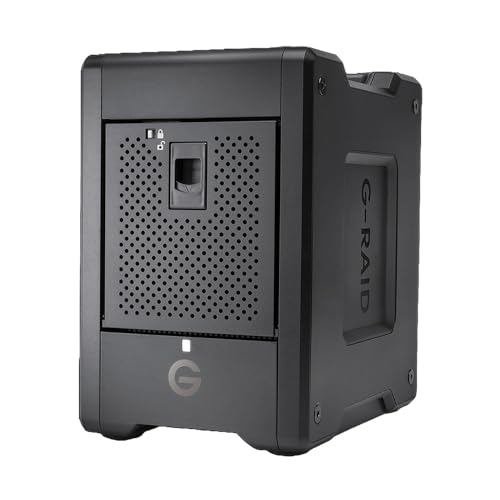
- 80TB with 4 removable Ultrastar HDDs
- Thunderbolt 3 dual ports with 40Gbps bandwidth
- Preconfigured RAID 5 plus RAID 0/1/10/JBOD
Best For: Mac Studio users who want large, removable RAID storage with RAID 5
Maximum-capacity studio RAID
160TB Thunderbolt 3 RAID for Mac Studio
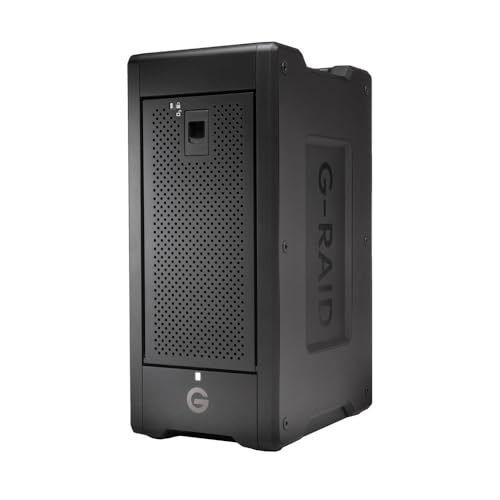
- 160TB total with 8 removable Ultrastar HDDs
- Listed speeds up to 1900MB/s read and 2000MB/s write
- RAID 0/1/6/10/50/60/JBOD support
Best For: Mac Studio studios needing the largest removable hardware RAID here
Configurable RAID Pick – 4-bay Thunderbolt 3 RAID enclosure for Mac Studio
If you want a desktop Thunderbolt RAID for Mac Studio that focuses on speed and configurability, the OWC ThunderBay 4 is built around four-drive expansion and Thunderbolt 3 connectivity. It supports both 2.5-inch and 3.5-inch drives, offers dual Thunderbolt 3 ports, and can be set up in RAID 0, 1, 4, 5, or 1+0 for different performance and redundancy needs.
Best For: Mac Studio users who want a configurable four-bay RAID enclosure with enterprise-style RAID management.
Pros:
- Up to 1527MB/s sustained performance with Thunderbolt 3
- Supports 2.5-inch or 3.5-inch drives with no adapter needed
- Flexible RAID modes: 0, 1, 4, 5, and 1+0 (10)
- Includes SoftRAID Premium for creating, monitoring, and managing arrays
Cons:
- Enclosure only at this listing, so drives are not included
- Built around Thunderbolt 3 rather than newer Thunderbolt versions
This is a strong fit if you need a desktop RAID platform that can be tailored to either speed or protection. The included SoftRAID Premium subscription adds useful control for users who want more than basic storage expansion.
Dock-Style Workflow RAID – 40TB dock and RAID storage for Mac Studio
LaCie 2big Dock 40TB External HDD - Thunderbolt and USB4 Compatibility, Data Recovery (STLG40000400)
Check Price On AmazonThe LaCie 2big Dock is a desktop Thunderbolt RAID for Mac Studio buyers who want storage plus built-in workflow connections. It combines dual Thunderbolt 3 ports with a USB 3.2 Type A hub port, card slots for CFexpress Type B, CFast 2.0, and SD cards, and a DisplayPort output, while offering RAID 0/1 setup through a guided wizard.
Best For: Mac Studio workflows that need onboard card readers, a dock-style hub, and large RAID storage in one unit.
Pros:
- Desktop RAID solution with 40TB capacity and up to 550MB/s speeds
- Dual Thunderbolt 3 ports plus USB 4 compatible Type A hub port
- Built-in CFexpress Type B, CFast 2.0, and SD card slots
- Includes Rescue Data Recovery Services and a 3-year manufacturer warranty
Cons:
- RAID choices are limited to RAID 0 or RAID 1
- Uses mechanical 3.5-inch drives, so it is not an SSD-based enclosure
This model makes sense if your Mac Studio setup needs more than raw storage and you value front-end convenience. The dock-style connectivity can reduce clutter, especially for media workflows that regularly offload cards.
Quiet Studio Enclosure – Quiet four-bay Thunderbolt 3 RAID enclosure
For a desktop Thunderbolt RAID for Mac Studio that emphasizes quiet operation and broad drive support, the OWC ThunderBay 4 is a practical four-bay enclosure. It pairs dual Thunderbolt 3 ports with a heat-dissipating aluminum chassis and supports 2.5-inch or 3.5-inch drives, making it a straightforward option for custom RAID builds.
Best For: Mac Studio users who want a quiet, all-metal four-bay RAID enclosure for custom drive installs.
Pros:
- Dual Thunderbolt 3 ports for flexible desktop connectivity
- Supports 2.5-inch and 3.5-inch drives without an adapter
- Configurable in RAID 0, 1, 4, 5, or 1+0 (10)
- Ultra-quiet aluminum chassis helps dissipate heat
Cons:
- Enclosure does not include preinstalled drives
- Listed data rate is lower than the speed-focused version of the ThunderBay 4 family
This is a good fit when you want a dependable RAID enclosure that blends into a studio environment. Its quiet design and flexible RAID support make it useful for everyday Mac Studio storage expansion.
Smaller Dock RAID – 20TB dock and RAID storage for Mac Studio
The 20TB LaCie 2big Dock is a smaller-capacity desktop Thunderbolt RAID for Mac Studio setups that still need dock-style convenience. It offers dual Thunderbolt 3 ports, a USB 3.2 Type A hub port, CFexpress Type B, CFast 2.0, and SD card slots, plus a DisplayPort output, making it practical for media and business workflows.
Best For: Mac Studio users who want a RAID dock with integrated card readers and a more moderate 20TB capacity.
Pros:
- Desktop RAID with 20TB capacity and up to 550MB/s speeds
- Dual Thunderbolt 3 ports plus USB hub and DisplayPort
- Built-in CFexpress Type B, CFast 2.0, and SD card slots
- RAID 0/1 setup with included Rescue Data Recovery Services
Cons:
- Only supports RAID 0 and RAID 1
- Mechanical 3.5-inch drive design is less compact than SSD enclosures
This version is a sensible choice if you want the LaCie dock experience but do not need the larger 40TB model. It keeps the same workflow-focused layout while scaling storage to a more modest level.
High-Capacity Expansion – OWC ThunderBay 8 Eight-Bay RAID Enclosure
If you need a desktop Thunderbolt RAID for Mac Studio with serious expansion headroom, the OWC ThunderBay 8 is built for large multi-drive setups. Its eight universal bays support 2.5-inch or 3.5-inch SSDs/HDDs, and the dual Thunderbolt ports make it easy to add more devices or daisy-chain multiple enclosures in a larger studio workflow.
Best For: Users who want a high-bay Thunderbolt RAID enclosure for large Mac Studio storage arrays and future expansion.
Pros:
- Eight drive bays support 2.5-inch and 3.5-inch SSDs/HDDs
- Dual Thunderbolt ports allow daisy-chaining additional devices
- Plug-and-play setup with no drivers needed
- Quick-swap trays make drive changes easier
Cons:
- Enclosure-only design means you supply your own drives
- Larger footprint than smaller dual-bay options
- Best suited to users who actually need eight bays
As a Mac Studio RAID expansion choice, this model stands out for scale and flexibility more than simplicity. It is a strong fit when you want room to grow and prefer a Thunderbolt enclosure that can anchor a larger storage stack.
Creative Workflow Dock – LaCie 2big Dock RAID with Built-In Hub
The LaCie 2big Dock is a practical desktop Thunderbolt RAID for Mac Studio users who want storage and connectivity in one unit. It combines RAID 0/1 flexibility with dual Thunderbolt 3 ports plus a USB4-compatible USB-A hub port, card slots, and DisplayPort, making it useful for laptop- or desktop-centered creative desks.
Best For: Creative professionals who want RAID storage plus built-in ports and card readers in a single Mac Studio desktop dock.
Pros:
- RAID 0/1 setup offers performance or redundancy options
- Dual Thunderbolt 3 ports add daisy-chain flexibility
- Includes USB-A hub port, CFexpress Type B, CFast 2.0, and SD slots
- Hot-swappable IronWolf Pro drives are included
Cons:
- Speeds are listed up to 550MB/s, which is below some multi-bay RAID enclosures
- Primarily positioned for Mac workflows
- Only 16TB capacity in this configuration
This is a strong all-in-one choice if you want your Mac Studio desk to stay tidy and functional. It leans more toward workflow convenience than raw enclosure expansion, which makes it especially appealing for media creators.
Balanced Dual-Drive Pick – G-RAID Thunderbolt 3 Storage System
The G-Technology G-RAID is a straightforward desktop Thunderbolt RAID for Mac Studio users who want dual-drive storage with flexible configuration. It offers RAID 0, 1, or JBOD support, dual Thunderbolt 3 connectivity, and a single USB-C port, all inside a stackable aluminum enclosure that fits well into a compact studio setup.
Best For: Mac Studio users who want a configurable dual-drive RAID with a clean, stackable design.
Pros:
- RAID 0, 1, or JBOD configuration options
- Dual Thunderbolt 3 ports plus a USB-C connection
- Dual Ultrastar 7200RPM hard drives included
- Stackable all-aluminum enclosure suits desktop setups
Cons:
- Only two drives, so capacity and scaling are more limited than larger enclosures
- Fewer built-in extras than dock-style RAID units
- Best for users who are comfortable with a simpler dual-drive layout
For many Mac Studio desks, this model hits a useful middle ground between size, flexibility, and simplicity. It is a solid choice when you want Thunderbolt RAID storage without moving up to a larger multi-bay enclosure.
Speed-first NVMe RAID – 4-Bay USB4/Thunderbolt 4 NVMe RAID for Mac Studio
If you want a desktop Thunderbolt RAID for Mac Studio that prioritizes NVMe speed over HDD capacity, the JEYI 4-bay enclosure is built for fast local storage over USB4 or Thunderbolt 4. It supports up to 40Gbps, uses an aluminum body with a turbo fan, and offers RAID options that can suit both Mac and Windows workflows when connected through the right interface.
Best For: Mac Studio users who want a compact, high-speed NVMe RAID enclosure with active cooling and flexible RAID modes.
Pros:
- Supports USB4/Thunderbolt 3/4 connections at up to 40Gbps.
- Mac supports RAID 0, RAID 1, and JBOD; Windows adds RAID 5.
- All-aluminum case, turbo fan, and thermal pads help improve cooling.
- Up to 32TB total capacity with four 8TB NVMe drives.
Cons:
- RAID configuration requires USB4 or Thunderbolt; standard USB will not create RAID.
- AMD systems may have compatibility issues on some USB4/Thunderbolt setups.
- Drive support is limited to NVMe M.2 2280 SSDs.
For a Mac Studio desk setup, this is the most speed-focused option in the group if you want NVMe performance and are comfortable matching the enclosure to the correct port type. It is less about turnkey storage and more about building a fast, cooled RAID array around your own SSDs.
High-capacity RAID storage – 80TB Thunderbolt 3 Desktop RAID for Mac Studio
SanDisk Professional G-RAID Shuttle 4-Bay Thunderbolt 3 RAID Array with 80TB (4x 20TB) Removable HDD
Check Price On AmazonThe SanDisk Professional G-RAID Shuttle 4 is a desktop Thunderbolt RAID for Mac Studio users who want large, ready-to-use capacity instead of building an SSD array from scratch. With 80TB of removable enterprise-class HDDs and Thunderbolt 3 connectivity, it is designed for media-heavy workflows like 4K and 8K editing, large transfers, and studio storage.
Best For: Creators who need a high-capacity Thunderbolt 3 RAID with removable drives and balanced RAID 5 protection.
Pros:
- Includes 80TB total capacity with 4x 20TB removable Ultrastar drives.
- Thunderbolt 3 dual ports deliver up to 40Gbps connectivity.
- Default RAID 5 provides a balance of performance and redundancy.
- Supports RAID 0, 1, 5, 10, and JBOD for flexible setups.
Cons:
- Uses 3.5-inch HDDs, so it is not as fast as an NVMe-based RAID.
- Heavier and more desktop-bound than smaller enclosures.
- Best suited to storage-heavy workflows rather than ultra-low-latency editing.
If your Mac Studio workflow values capacity, reliability, and simple deployment, this Shuttle 4 is a practical choice. It trades NVMe speed for a much larger built-in storage package and a hardware RAID setup that is easier to put to work immediately.
Maximum-capacity studio RAID – 160TB Thunderbolt 3 RAID for Mac Studio
For a desktop Thunderbolt RAID for Mac Studio that leans hard into capacity and throughput, the SanDisk Professional G-RAID Shuttle 8 is the biggest option here. It offers up to 160TB, dual Thunderbolt 3 ports, and hardware RAID modes that can be adjusted from a balanced RAID 5 setup to higher-performance or higher-redundancy configurations.
Best For: Studio teams and heavy media workflows that need maximum removable HDD capacity with flexible hardware RAID.
Pros:
- Massive 160TB capacity from 8 removable Ultrastar drives.
- Up to 1900MB/s read and 2000MB/s write speeds are listed.
- Supports RAID 0, 1, 6, 10, 50, 60, and JBOD.
- Dual Thunderbolt 3 ports and USB-C add flexible connectivity.
Cons:
- At 32 pounds, it is the least portable option in this group.
- 3.5-inch HDDs make it slower than an NVMe RAID enclosure.
- Likely overkill if you only need a compact desktop array for a single user.
This is the strongest pick when your Mac Studio needs a large, hardware-managed RAID system for serious production storage. It is built more like studio infrastructure than a compact accessory, so the payoff is scale, redundancy, and broad RAID flexibility.
How We Picked the Best Desktop Thunderbolt RAID for Mac Studio
We prioritized Thunderbolt 3 and Thunderbolt 4 models that fit Mac Studio workflows, with an emphasis on real-world transfer speeds, RAID flexibility, drive bay count, macOS compatibility, and expansion value. We also favored enclosures and systems that make sense for creative work, including video editing, large photo libraries, and long-term project archiving.
Quick Comparison
For most buyers, the choice comes down to capacity versus footprint. Two-bay systems are easier to place on a desk and are often the best entry point for backups or moderate-speed editing. Four-bay models offer a strong balance of performance, redundancy, and usable capacity. Eight-bay systems are better suited to larger media libraries and heavier multi-user workloads, but they take up more space and can cost more to populate.
Key Buying Factors for Desktop Thunderbolt RAID for Mac Studio
RAID Level and Data Protection
Think about whether you need RAID 0 for speed, RAID 1 for mirroring, RAID 5 for a balance of protection and usable capacity, or a JBOD-style setup for maximum flexibility. If the array will hold active client work, RAID 5 is often the most practical middle ground.
Drive Type and Performance
HDD-based arrays are usually the best value for bulk storage, while NVMe-based enclosures can deliver much higher performance for demanding editing or scratch-disk use. For a Desktop Thunderbolt RAID for Mac Studio, make sure the enclosure bandwidth matches the drives you plan to use.
Capacity Planning
Estimate today’s needs, then leave room for growth. Video projects, photo libraries, and backups fill faster than expected, so a larger bay count can be the smarter long-term choice even if you do not populate every slot immediately.
Mac Compatibility and Expansion
Check whether the system supports macOS features you rely on, such as automatic mount behavior, software RAID tools, and recovery support. Also consider whether you need dock-style extras like USB ports or card readers, or whether a cleaner storage-only enclosure is enough.
Who Should Buy Which Desktop Thunderbolt RAID for Mac Studio?
If you want the simplest path to reliable Desktop Thunderbolt RAID for Mac Studio, a two-bay dock or RAID enclosure is a strong fit. If you edit 4K or manage growing media archives, a four-bay model is usually the sweet spot. If you need maximum capacity, better scalability, or room for heavier workloads, step up to an eight-bay array. NVMe users should choose the JEYI enclosure when speed matters more than raw terabytes.
In short, match the array to your workflow first, then buy for capacity second. That approach usually leads to the best balance of speed, safety, and value.