Searching for a scanner that makes batch jobs simpler, not harder? Document scanners with touchscreen controls can speed up setup, presets, and daily scanning without constant computer clicks.
In this roundup, we focus on models that balance speed, connectivity, and ease of use for home offices, small businesses, and busy teams.
Best 10 Document Scanners with Touchscreen Picks for 2026
Editor’s Choice
Epson ES-590W Wi‑Fi Touchscreen Scanner

- Up to 45 ppm duplex scanning
- 100-sheet ADF for batch jobs
- 4.3-inch touchscreen with ScanWay
Best For: Busy offices needing fast, wireless, computer-free scanning
Most User-Friendly
ScanSnap iX1500 Touch Screen Scanner
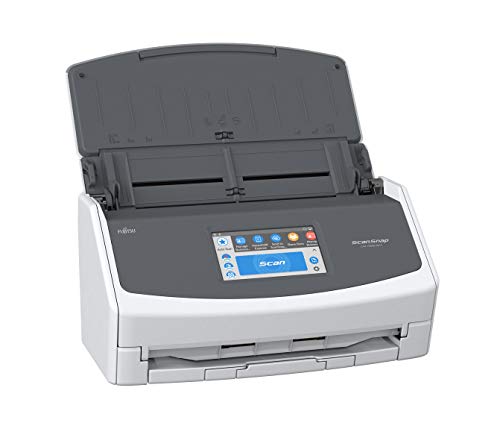
- 4.3-inch touch screen for one-touch scanning
- PC-less scanning to cloud and folders
- 50-sheet ADF with user profiles
Best For: Users who want simple scanning and shared access
Best Security Pick
Brother ADS-3350W Touchscreen Scanner

- Up to 40 ppm with duplex scanning
- 2.8-inch color touchscreen control
- Triple Layer Security and network options
Best For: Small offices that prioritize secure, flexible scanning
Best Renewed Value
Fujitsu iX1500 Renewed Touch Screen Scanner
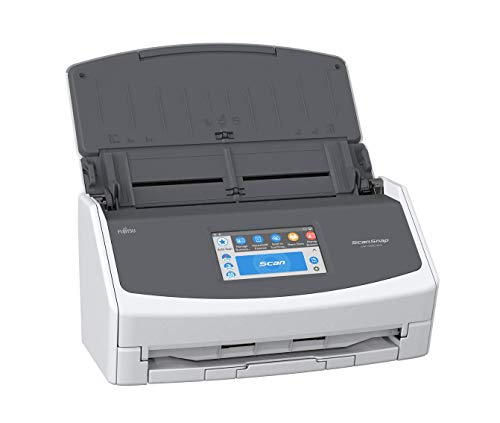
- 4.3-inch touch screen and cloud destinations
- Up to 30 ppm with 50-page ADF
- Automatic cropping and blank-page deletion
Best For: Budget-minded buyers wanting ScanSnap touchscreen features
Compact Wireless Office Scanner
Brother ADS-1800W 2.8" Color Touchscreen

- 2.8-inch color touchscreen for workflows and cloud saves
- Up to 30 ppm with single-pass duplex scanning
- USB-C or Wi‑Fi plus 20-page ADF
Best For: Small offices and home users who want a compact touchscreen scanner
Renewed Touchscreen Duplex Scanner
ScanSnap iX1500 4.3" Touch Screen
- Large 4.3-inch touch screen for easy scanning
- Up to 30 ppm duplex scanning with 50-page ADF
- USB or Wi‑Fi with cloud destination support
Best For: Users who want a simple touchscreen scanner for mixed documents and photos
Advanced High-Speed Touchscreen Scanner
ScanSnap iX2500 Large Touchscreen Scanner

- 45 ppm duplex scanning with 100-sheet feeder
- Large touchscreen with personalized profiles
- Wi‑Fi 6 and USB-C for flexible connections
Best For: Busy users who want fast scanning and touchscreen workflow control
Wireless Desktop Pick
Epson WorkForce ES-580W Wireless Color Duplex Scanner

- 4.3-inch touchscreen with wireless scanning
- 100-sheet ADF and 35 ppm speed
- Scans to cloud, USB, email, and OCR files
Best For: Wireless document scanning with touchscreen control and no-computer convenience
Premium Touchscreen Choice
ScanSnap iX2500 Premium Wireless or USB High-Speed Scanner

- Large touchscreen with personalized profiles
- 45 ppm duplex scanning and 100-sheet feeder
- Wi-Fi 6, USB-C, and cloud support
Best For: Heavy scanning with touchscreen profiles and premium connectivity
Compact Space Saver
ScanSnap iX1300 Wireless or USB Double-Sided Color Scanner

- Space-saving design for small desks
- Up to 30 ppm duplex scanning
- Wi-Fi/USB with document, photo, and card support
Best For: Small spaces and simple wireless scanning with a compact footprint
Editor’s Choice – Epson ES-590W Wi‑Fi Touchscreen Scanner
If you want document scanners with touchscreen that lean into speed and automation, the Epson WorkForce ES-590W is built for a busy desk. It combines wireless and USB connectivity with a large 4.3-inch color touchscreen, so you can scan to email, cloud storage, or a USB flash drive without always going back to your computer.
Best For: Fast office scanning, wireless workflows, and computer-free destinations.
Pros:
- Up to 45 ppm single-pass double-sided scanning for high-volume jobs
- 100-sheet ADF helps handle larger batches with fewer reloads
- 4.3-inch color touchscreen supports ScanWay computer-free scanning
- Wi-Fi and USB connectivity add flexible setup options
Cons:
- Windows minimum system requirement may limit some setups
- Designed as a desktop scanner, so it is not especially portable
For buyers focused on throughput and convenience, this Epson stands out because it pairs a large touchscreen with strong scanning speed and cloud-ready workflows. It is a practical fit when you want fewer steps between paper and digital filing.
Most User-Friendly – ScanSnap iX1500 Touch Screen Scanner
The ScanSnap Fujitsu iX1500 is a strong pick if you are comparing document scanners with touchscreen for simple everyday use. Its large 4.3-inch touch screen is designed for one-touch scanning, and it can send files to cloud services, desktop folders, or mobile devices through Wi-Fi or USB.
Best For: Home offices, small teams, and users who want simple one-touch scanning.
Pros:
- Large 4.3-inch touch screen makes scanning easy to start
- PC-less scanning to Google Drive, Dropbox, folders, and mobile devices
- 50-sheet ADF supports routine scanning tasks
- User profiles allow multiple people to share one scanner
Cons:
- 50-sheet capacity is smaller than some higher-volume rivals
- Rated as a 2018 release, so it is an older model
This model makes sense when ease of use matters more than maximum throughput. The touchscreen, ScanSnap Home software, and flexible destinations create a straightforward scanning setup for mixed personal or office paperwork.
Best Security Pick – Brother ADS-3350W Touchscreen Scanner
Brother ADS-3350W Wireless High-Speed Desktop Scanner | 2.8-inch Touchscreen | Scans Up to 40ppm1
Check Price On AmazonIf you need document scanners with touchscreen for a small office or work-from-home setup, the Brother ADS-3350W is a compact option with business-friendly controls. Its 2.8-inch color touchscreen gives quick access at the device, while wireless, wired Ethernet, and USB connectivity help it fit into different workflows.
Best For: Small offices that want fast scanning with built-in security and network flexibility.
Pros:
- Up to 40 ppm scanning with single- and dual-sided support
- 2.8-inch color touchscreen provides one-touch control
- Multiple connectivity options: Wi-Fi, Ethernet, and USB
- Triple Layer Security helps protect sensitive documents and connections
Cons:
- 2.8-inch screen is smaller than the 4.3-inch displays on some rivals
- 60-page capacity is solid, but not ideal for very large batches
For users who value control and security, this Brother balances speed, size, and network options well. It is a sensible desktop scanner when you need dependable scanning without giving up easy touchscreen operation.
Best Renewed Value – Fujitsu iX1500 Renewed Touch Screen Scanner
For shoppers looking at document scanners with touchscreen and wanting a lower-cost route, the renewed Fujitsu ScanSnap iX1500 keeps the core features of the line. It offers a large 4.3-inch touch screen, wireless and USB connectivity, and cloud-friendly scanning for documents, receipts, photos, and more.
Best For: Value-focused buyers who want ScanSnap touchscreen convenience in a renewed unit.
Pros:
- Large 4.3-inch touch screen supports easy destination selection
- Up to 30 ppm scanning with a 50-page ADF
- Scans documents, business cards, receipts, and photos
- Built-in software can crop and delete blank pages automatically
Cons:
- Renewed model includes a 90-day limited warranty
- 30 ppm is slower than faster desktop scanners in this roundup
This renewed model makes sense if you want the ScanSnap touchscreen experience without paying for a brand-new unit. It offers solid everyday scanning features, but buyers should weigh the shorter warranty and lower speed against the savings.
Compact Wireless Office Scanner – Brother ADS-1800W 2.8" Color Touchscreen
If you want document scanners with touchscreen that fit a home office or small workspace, the Brother ADS-1800W is built for quick, practical daily use. It combines USB-C or Wi‑Fi connectivity with a 2.8-inch color touchscreen, making it easy to scan documents, receipts, photos, and cards, then send files where you need them.
Best For: Small offices and home users who want a compact scanner with touchscreen controls, wireless flexibility, and fast everyday document handling.
Pros:
- 2.8-inch color touchscreen helps automate workflows and save directly to cloud services.
- Fast scanning up to 30 ppm with single-pass duplex scanning and a 20-page ADF.
- Handles business cards, ID badges, plastic cards, and long pages up to 197 inches.
- Includes bundled software for organizing files, receipts, contacts, and image cleanup.
Cons:
- 20-page feeder is smaller than larger office scanners.
- Best suited to light-to-moderate job sizes rather than high-volume archival use.
The ADS-1800W focuses on speed, convenience, and simple touchscreen operation in a compact footprint. For buyers comparing document scanners with touchscreen controls, it offers a strong balance of flexibility and everyday productivity features.
Renewed Touchscreen Duplex Scanner – ScanSnap iX1500 4.3" Touch Screen
The renewed Fujitsu ScanSnap iX1500 is a straightforward pick if you want document scanners with touchscreen control for mixed home or office scanning. Its large 4.3-inch touch screen makes it easy to scan to common destinations, while USB and Wi‑Fi connectivity support use with Mac, PC, and mobile devices.
Best For: Users who want a simple touchscreen scanner for documents, receipts, photos, and business cards with flexible destination options.
Pros:
- Large 4.3-inch touchscreen for easy destination-based scanning.
- Scans two-sided documents at up to 30 ppm with a 50-page ADF.
- Works over USB or Wi‑Fi, including scanning to cloud services and devices.
- Built-in software helps crop, clean up, and organize scanned files.
Cons:
- Renewed product, so condition and accessory details may vary.
- Wireless support is limited to 2.4 and 5 GHz Wi‑Fi rather than newer standards.
For shoppers who want a touchscreen interface without a steep learning curve, the iX1500 remains a practical all-around scanner. Its combination of duplex speed, easy presets, and document cleanup tools makes it especially useful for mixed everyday scanning.
Advanced High-Speed Touchscreen Scanner – ScanSnap iX2500 Large Touchscreen Scanner
Among document scanners with touchscreen features, the ScanSnap iX2500 stands out for speed, capacity, and modern wireless options. It uses a large touchscreen for personalized profiles, supports Wi‑Fi 6 and USB-C, and is designed to scan, sort, and optimize documents, receipts, photos, and business cards with minimal fuss.
Best For: Busy users who want a fast, high-capacity scanner with touchscreen presets and strong wireless connectivity.
Pros:
- Fast 45 ppm double-sided scanning with a 100-sheet document feeder.
- Large touchscreen supports personalized profiles and quick app handoff.
- Built-in Wi‑Fi 6 and USB-C offer flexible, stable connections.
- Automatic optimizations help name, sort, and organize scans from multiple document types.
Cons:
- Higher-capacity and more advanced than many casual users may need.
- Bulkier than compact desktop scanners.
The iX2500 is the most capable option here for users who scan often and want the interface to do more of the work. If touchscreen workflow control, paper handling, and speed matter most, this model is the strongest fit.
Wireless Desktop Pick – Epson WorkForce ES-580W Wireless Color Duplex Scanner
If you want a practical document scanner with touchscreen control, the Epson WorkForce ES-580W is built for fast, wireless everyday use. Its 4.3-inch touchscreen, 100-sheet feeder, and ability to scan directly to cloud services, email, or USB without a computer make it a strong fit for busy home offices.
Best For: Users who want a wireless, touchscreen scanner that can send files straight to cloud storage or USB without needing a PC.
Pros:
- 4.3-inch touchscreen makes wireless scanning simple to control
- 100-sheet ADF handles large scanning jobs in one pass
- Scans up to 35 ppm and captures both sides with single-step duplex scanning
- Supports searchable PDFs plus editable Word or Excel output via OCR
Cons:
- Lower sheet capacity than some larger office models
- Built around document scanning rather than mixed media workflows
Overall, the ES-580W stands out for straightforward touchscreen operation and flexible wireless destinations. It is a solid choice if you want a fast desktop scanner that keeps paperwork moving without requiring a computer at every step.
Premium Touchscreen Choice – ScanSnap iX2500 Premium Wireless or USB High-Speed Scanner
For shoppers comparing document scanners with touchscreen controls, the ScanSnap iX2500 is the premium fast-scan option in this group. It combines a large touchscreen, 45 ppm double-sided scanning, a 100-sheet feeder, Wi-Fi 6, and USB-C connectivity for a flexible setup at home or in the office.
Best For: People who want a premium scanner with touchscreen profiles, very fast duplex scanning, and strong wireless or USB flexibility.
Pros:
- Large touchscreen supports selectable personalized profiles
- Fast 45 ppm double-sided scanning with a 100-sheet feeder
- Built-in Wi-Fi 6 plus USB-C for stable connection options
- Handles documents, receipts, photos, business cards, and IDs
Cons:
- Premium feature set may be more than basic home users need
- Bulkier than compact scanners designed to save desk space
The iX2500 is the most feature-rich model here, especially if you value touchscreen shortcuts and broad file organization tools. Its combination of speed, connectivity, and automation makes it a strong pick for heavier scanning needs.
Compact Space Saver – ScanSnap iX1300 Wireless or USB Double-Sided Color Scanner
If desk space matters, this ScanSnap model is a smart document scanner with touchscreen-style one-touch simplicity through its Quick Menu workflow. The iX1300 is designed to stay out of the way, while still offering up to 30 ppm duplex scanning, Wi-Fi or USB connectivity, and easy handling for documents, photos, cards, and more.
Best For: Small spaces and users who want a compact scanner that still supports wireless scanning and easy document organization.
Pros:
- Space-saving design is made for tight desks
- One-touch scanning with up to 30 ppm duplex performance
- Can scan documents, photos, thick items, and plastic cards
- Wi-Fi or USB connectivity with computer-free use supported
Cons:
- 20-sheet capacity is lower than larger desktop scanners
- Not as fast as the higher-end ScanSnap iX2500
The iX1300 is the best fit when space is limited but you still want a capable scanner for everyday paperwork. It trades some capacity for a much smaller footprint and easy, no-fuss scanning.
How We Picked These Document Scanners with Touchscreen
We prioritized scanners that combine practical touch controls with fast duplex scanning, reliable paper handling, and flexible connectivity. Models made the list if they offered a clear workflow advantage, such as one-touch presets, wireless or USB support, or strong software integration for common office tasks.
We also favored scanners suited to real-world use: compact footprints, solid speed ratings, and features that reduce repetitive setup. Because Document Scanners with Touchscreen are often used for recurring stacks of receipts, forms, invoices, and multi-page files, ease of use mattered as much as raw throughput.
Quick Comparison
For speed-focused users, larger desktop models tend to be the best fit, especially if you scan long batches every day. For smaller desks or mixed home-office use, compact scanners are usually easier to store and simpler to move. Wireless models are best if multiple people need access, while USB-first options can be a better choice if you want a straightforward direct connection.
Key Buying Factors for Document Scanners with Touchscreen
Touchscreen Size and Usability
A larger display can make presets, destination selection, and error recovery easier. If several people will use the scanner, look for an interface that is clear, responsive, and easy to navigate without a manual.
Speed and Duplex Scanning
Scan speed matters most if you process large stacks regularly. Duplex scanning is essential for efficient double-sided capture and should be standard on any serious office scanner.
Wireless, USB, and Cloud Support
Wireless models offer more placement flexibility, while USB provides a dependable direct link. If you scan to shared folders or cloud services, confirm the device supports your preferred workflow out of the box.
Paper Handling and Document Mix
Consider the types of pages you scan most often. Mixed paper sizes, fragile receipts, business cards, and thicker documents can benefit from better feeders and smarter jam handling.
Who Should Buy Which Document Scanners with Touchscreen?
If you want the easiest daily experience, choose a touchscreen model with saved presets and strong wireless support. If your priority is the fastest batch processing, lean toward higher-speed desktop units. If desk space is limited, compact scanners are the better fit. And if you mainly scan occasional household paperwork, a simpler model with dependable duplex scanning may be all you need.
In short, the best Document Scanners with Touchscreen are the ones that match your volume, space, and workflow—not just the highest spec sheet number.