Finding a desk that moves smoothly is only half the job. If you want a setup that protects your walls, chair, and gear, a standing desk with anti collision feature is the smarter choice.
Below, we’ve narrowed the field to 10 options that combine everyday comfort, practical features, and safer height adjustment for home offices, gaming setups, and shared workspaces.
Best 10 Standing Desk with Anti Collision Feature Picks for 2026
Deep desktop pick
Grandder 55x32 Electric Standing Desk

- 31.5-inch depth suits ultrawide and dual monitors
- 2 memory presets for quick sit-stand changes
- Anti-collision tech helps protect equipment
Best For: Large-monitor setups that need extra desk depth
Wide workspace choice
Monomi 59-Inch Electric Standing Desk

- 59-inch top fits dual monitors and accessories
- 3 memory presets for easy height changes
- Anti-collision system protects against obstacles
Best For: Users who want a wide, straightforward standing desk
Custom-build frame
Xyndyx Dual Motor Standing Desk Frame
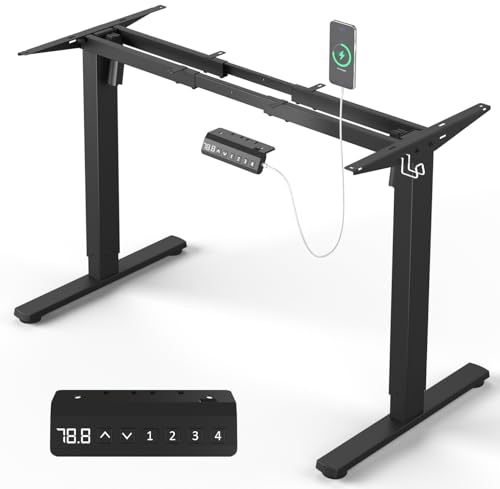
- Frame-only design for custom desktop builds
- 330-lb capacity with dual motors and crossbars
- Anti-collision sensors help prevent damage
Best For: Custom desk builds needing a strong adjustable frame
Organized office pick
Tangkula 55-Inch Standing Desk with Drawers
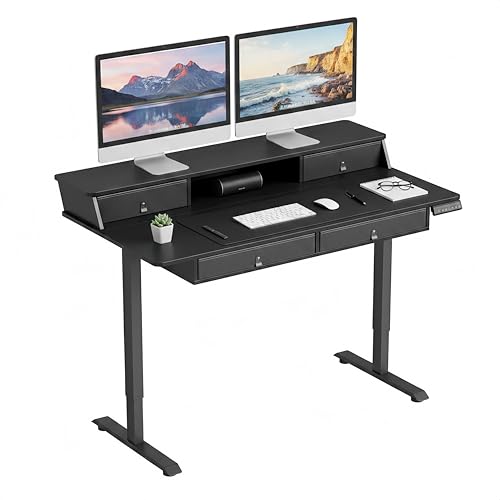
- Four drawers plus monitor stand and cubby
- 3 memory presets with a 28.5"-46" range
- Anti-collision feature adds safety
Best For: People who want storage and sit-stand flexibility
Spacious Safety Pick
63x24 Adjustable Desk with Mouse Pad

- Anti-collision reverses 2 cm on contact
- Four memory buttons for quick height changes
- 63" x 24" top with 200 lb capacity
Best For: People who want a roomy sit-stand desk with safety protection
Safe Easy-Setup Pick

- Anti-collision system reverses on obstacle detection
- Assembles in about 30 minutes
- Quiet motor lifts up to 176 lbs
Best For: Buyers who want a safety-focused desk that is easy to assemble
Frame Upgrade Pick

- Fits existing tabletops from 43" to 87" wide
- Dual motors and wider steel frame aim for low wobble
- Anti-collision reverses automatically on contact
Best For: Upgrading a tabletop you already own
Gaming Value Pick

- Anti-collision stops and reverses on contact
- Reinforced steel frame targets low wobble
- 48" x 24" desktop suits work and gaming setups
Best For: Affordable sit-stand use for work, study, or gaming
Feature-Rich Pick

- Anti-collision design helps prevent bumps during lifting
- 4 memory positions and LED display simplify use
- Heavy-duty steel frame with adjustable foot pads
Best For: A spacious home office desk with easy controls
Deep desktop pick – Grandder 55×32 Electric Standing Desk
If you want a standing desk with anti collision feature for a larger monitor setup, this Grandder model is built with extra depth in mind. The 31.5-inch desktop gives a 49-inch ultrawide or dual-monitor layout more breathing room, while the electric lift and preset heights make daily sit-stand changes simple.
Best For: Users who need a deep desktop for ultrawide monitors, dual screens, or a roomy home office/gaming setup.
Pros:
- 31.5-inch-deep desktop helps place ultrawide and dual monitors at a more comfortable viewing distance.
- 2 memory presets and electric height adjustment make position changes quick.
- Supports up to 176 lbs with a steel frame and T-shaped legs.
- Anti-collision technology stops and reverses when obstacles are detected.
Cons:
- Only 2 memory presets, which is fewer than some alternatives.
- It is a heavier-duty desk, so it may be more than some compact setups need.
This is a strong choice if workspace depth is your main priority, especially for larger displays. The safety feature and stable frame add practical value for everyday office or gaming use.
Wide workspace choice – Monomi 59-Inch Electric Standing Desk
This standing desk with anti collision feature is a solid fit if you want a broad, uncluttered work surface and easy height changes. The 59-inch top gives room for dual monitors, a laptop, and accessories, while the three memory presets simplify switching between sitting and standing.
Best For: Home offices, shared workspaces, and users who want a wide desk with simple preset control.
Pros:
- 59-inch desktop offers generous room for monitors, laptop, and work tools.
- 3 programmable memory presets make height switching convenient.
- Anti-collision protection stops and reverses if an obstacle is detected.
- Quiet dual-motor system and reinforced steel frame support up to 176 lbs.
Cons:
- The 24-inch depth may feel less spacious than deeper desks for some ultrawide setups.
- Black finish may not suit every room style.
Overall, this is a balanced option for people who want workspace size, safety, and convenience in one package. It leans practical rather than flashy, which makes it easy to recommend for daily use.
Custom-build frame – Xyndyx Dual Motor Standing Desk Frame
If you’re building a standing desk with anti collision feature around your own desktop, this frame-only option is worth a look. It supports a wide range of desktop sizes, offers a strong 330-lb capacity, and uses dual motors for quiet lifting and smoother everyday adjustment.
Best For: Buyers who already have a desktop and want a strong adjustable frame with high load capacity.
Pros:
- 330-lb maximum recommendation suits heavier setups.
- Dual motors and double crossbars are designed for stability and durability.
- 4 memory settings let you save preferred heights.
- Anti-collision sensors help protect against bumps and scratches.
Cons:
- Frame only, so you still need to supply your own desktop.
- Assembly is required before use.
This frame makes sense for custom desk builds where strength matters more than a bundled desktop. The combination of load capacity, memory presets, and safety features gives it a versatile foundation.
Organized office pick – Tangkula 55-Inch Standing Desk with Drawers
This standing desk with anti collision feature is a practical pick if you want organization built into the workstation. Along with height adjustment and three memory presets, it adds four fabric drawers, a monitor stand, and a side hook to keep everyday clutter under control.
Best For: Users who want storage, monitor elevation, and sit-stand flexibility in one desk.
Pros:
- Four drawers, a monitor stand, and an open cubby improve organization.
- 3 memory presets and a 28.5-inch to 46-inch height range support easy transitions.
- Anti-collision feature stops movement when obstacles are detected.
- 200-lb capacity and adjustable foot pads add practical stability.
Cons:
- The fabric drawer design may not suit users who prefer hard storage.
- 55 dB motor is quiet enough for most use, but not the quietest in class.
For a tidy home office or study space, this model stands out because it combines storage and ergonomics. It is especially useful if you want a more complete desk solution rather than just a basic lift top.
Spacious Safety Pick – 63×24 Adjustable Desk with Mouse Pad
If you want a standing desk with anti collision feature and a larger work surface, this Farexon model is built for everyday home office use. It offers smooth electric height adjustment from 27″ to 46″, memory presets, and a 63″ x 24″ desktop that gives you room for multiple devices and accessories. The anti-collision system adds a useful layer of safety by reversing when it meets an obstacle, while overheat protection helps support worry-free long sessions.
Best For: Users who want a spacious sit-stand desk with safety features, memory presets, and a free mouse pad.
Pros:
- Anti-collision technology reverses the desk 2 cm when it hits an obstacle.
- Large 63″ x 24″ desktop with cord retraction hole and included mouse pad.
- Four memory buttons make it easy to return to preferred heights.
- Double-beam frame supports up to 200 lbs for added stability.
Cons:
- The desktop uses two boards on sizes other than the 73-inch version.
- Some setup and controller reset steps may be needed if “RST” appears.
- Bulkier size may be more desk than smaller workspaces need.
Overall, this is a practical pick for buyers who value workspace room and built-in safety protections. The combination of anti-collision support, memory settings, and a sturdy frame makes it a solid everyday standing desk choice.
Quiet Everyday Desk – 48×24 Electric Standing Desk
This Cubiker model is a straightforward standing desk with anti collision feature benefits in a compact 48″ x 24″ format. It includes smooth electric height adjustment from 28.3″ to 46.5″, a quiet motor under 45 dB, and three memory presets for fast changes during the day. The heavy-duty steel frame and low-VOC materials make it a practical home office choice when you want simple, reliable sit-stand support.
Best For: Buyers who want a quiet, space-efficient electric standing desk for home office or gaming setups.
Pros:
- Quiet motor runs under 45 dB for smoother transitions.
- Three memory presets help you return to preferred heights quickly.
- Sturdy steel frame supports up to 176 lbs.
- 48″ x 24″ desktop gives enough room for dual monitors and daily essentials.
Cons:
- The notes do not list a dedicated anti-collision feature on this model.
- Smaller desktop may be limiting for larger multi-device setups.
- Only three preset positions are included.
For shoppers comparing electric desks in this size range, this Cubiker stands out for quiet operation and stable performance. It keeps the focus on basic comfort and convenience rather than extra bells and whistles.
Safe Easy-Setup Pick – 48×24 Maple Electric Desk
If you need a standing desk with anti collision feature in a simple, practical size, this TIQLAB model is a strong candidate. It adjusts from 28.3″ to 45.6″, includes two memory presets, and uses a quiet motor that lifts smoothly at 25 mm/s. The built-in anti-collision system is designed to detect obstacles and reverse direction, while the scratch-resistant desktop and smooth edges add everyday usability.
Best For: Shoppers who want a safety-minded sit-stand desk with easy assembly and a clean maple finish.
Pros:
- Built-in anti-collision protection helps protect furniture and belongings.
- Quick 30-minute assembly with labeled parts and included tools.
- Quiet lift system operates at less than 45 dB.
- Solid FSC-certified wood desktop with smooth edges for added comfort.
Cons:
- Only two memory presets are included.
- The split-top design may not appeal to everyone.
- 48″ x 24″ size is practical, but not as large as a full workbench-style desk.
As an all-around option, this TIQLAB desk balances safety, convenience, and clean design well. It is especially appealing if you want anti-collision protection without giving up easy setup or stable daily performance.
Frame Upgrade Pick – Desktronic Dual Motor Frame
If you want a standing desk with anti collision feature but already have a tabletop you like, this frame-only setup is a practical way to go. It turns an existing top into a fully electric sit-stand desk, while the wider steel frame and dual motors are aimed at keeping the platform steady as you move through height changes.
Best For: Buyers who want to upgrade a favorite tabletop with a stable, feature-rich electric frame.
Pros:
- Transforms an existing tabletop into an electric standing desk in under 20 minutes.
- Wider, thicker steel frame is designed for wobble-free support at various heights.
- Touchscreen controller includes 3 memory presets plus USB-A and USB-C charging.
- Anti-collision reverses automatically on contact for safer height adjustments.
Cons:
- Does not include a tabletop, so you need a compatible surface already.
- Best fit is limited to tabletops between 43" and 87" wide.
Overall, this is a strong choice if you value customization and already have a desktop you want to keep. The safety-focused anti-collision behavior, BIFMA certification, and wide frame make it especially appealing for a tidy, stable build.
Gaming Value Pick – 48×24 Electric Standing Desk
This standing desk with anti collision feature is built for everyday home office, study, and gaming use. With a reinforced steel frame, a 48" x 24" desktop, and a low-noise electric lift, it aims to deliver a straightforward sit-stand setup without feeling flimsy at full height.
Best For: People who want an affordable electric desk for gaming, work, or study with simple height controls.
Pros:
- Anti-collision tech auto stops and reverses by about 1 inch/2 cm on contact.
- Reinforced steel frame is designed for anti-wobble stability at full height.
- 2 memory presets make it easy to return to favorite sitting and standing positions.
- 48" x 24" desktop gives enough room for monitors, laptop, and accessories.
Cons:
- Only 2 memory presets, so it offers less customization than some rivals.
- Assembly is recommended for 2 people.
For shoppers who want a practical electric desk with safety features and a simple setup, this model covers the basics well. Its combination of anti-collision protection, real-tested capacity, and compact desktop size makes it a solid everyday option.
Feature-Rich Pick – COSTWAY 48-inch Standing Desk
If you want a standing desk with anti collision feature and a more guided control experience, this COSTWAY model is worth a look. It combines a 48-inch workspace, four memory positions, and an LED display with a heavy-duty steel frame built for a steady home office setup.
Best For: Users who want a spacious electric desk with more memory presets and a clear control panel.
Pros:
- Anti-collision design helps avoid bumps or accidental injuries while lifting.
- 4 memory buttons and LED display make height changes simple and repeatable.
- Heavy-duty steel frame and adjustable foot pads are meant to help with wobble on uneven floors.
- Low-noise motor lifts at 1 inch per second and stays under 50dB.
Cons:
- Ships in 2 packages, which may arrive separately.
- At 75 pounds, it may be less convenient to move than lighter desks.
This is a sensible pick if you want more control and a roomier work surface in a standard 48-inch footprint. The combination of 4 presets, cable management, and anti-collision protection makes it a well-rounded office desk.
How We Picked the Best Standing Desk with Anti Collision Feature
We focused on models that make daily sit-stand use easier and safer: anti-collision protection, dependable lifting systems, stable frames, useful memory presets, and dimensions that fit real workspaces. We also considered desktop size, load capacity, and extras like drawers, cable-friendly designs, and charging ports.
Quick Comparison
Some desks are better for ultrawide monitors and dual-screen setups, while others prioritize compact footprints or stronger frames. If you need a Standing Desk with Anti Collision Feature for a tight room, a 48-inch class model may be the best fit. If you run heavier equipment, look at higher-capacity frames and dual-motor systems.
Key Buying Factors for a Standing Desk with Anti Collision Feature
Safety and Anti-Collision Behavior
Anti-collision systems matter when the desk rises into shelves, window sills, armrests, or nearby furniture. Look for responsive detection that stops or reverses movement quickly without being overly sensitive during normal operation.
Stability and Lifting System
Dual motors often provide smoother motion and better load handling, especially for multiple monitors. A rigid frame and wider leg stance can reduce wobble at standing height.
Size, Capacity, and Workspace Fit
Choose a desktop that matches your setup instead of overbuying size. Larger tops suit ultrawide monitors and accessories; smaller desks work better in apartments, dorms, or spare rooms. Check both weight capacity and the usable surface area.
Controls and Everyday Convenience
Memory presets save time if multiple people share the desk or you switch positions often. LED readouts, USB charging, storage drawers, and accessory hooks can improve usability, but they should not replace core stability and safety.
Who Should Buy Which Standing Desk with Anti Collision Feature?
If you want the safest all-around pick, choose a Standing Desk with Anti Collision Feature that also offers solid capacity and memory presets. If you use heavy monitors or a custom workspace, a high-capacity frame may be the better foundation. For smaller rooms, prioritize compact dimensions and a quiet lift system. If organization matters most, look for built-in storage or monitor support. The best choice is the one that fits your room, your equipment, and how often you change positions throughout the day.