If you use a Mac, the right charging dock can do more than keep your mouse powered—it can improve comfort, cut cable clutter, and make your setup look much cleaner.
This roundup highlights the best options for different mouse types and workflows, from Apple Magic Mouse charging stands to premium docks with magnetic alignment and wireless charging.
Best 10 Ergonomic Mouse Charging Dock for Mac Picks for 2026
Razer Premium Dock
Magnetic RGB charging dock for supported Razer mice

- Magnetic wireless charging with secure puck alignment
- Integrated 4K Hz transceiver for supported mice
- 8-zone RGB plus charge-status lighting
Best For: Razer mouse users who want a premium dock with charging and polling support
Magic Mouse Ergonomic Stand
Compact angled dock for Magic Mouse 2nd and 3rd gen

- Angled design for more comfortable wrist positioning
- Fits Magic Mouse 2nd and 3rd generation
- Compact and space-saving desktop footprint
Best For: Mac users with a Magic Mouse who want a simple ergonomic stand
Razer Performance Dock
Black wireless charging dock with 8K polling support
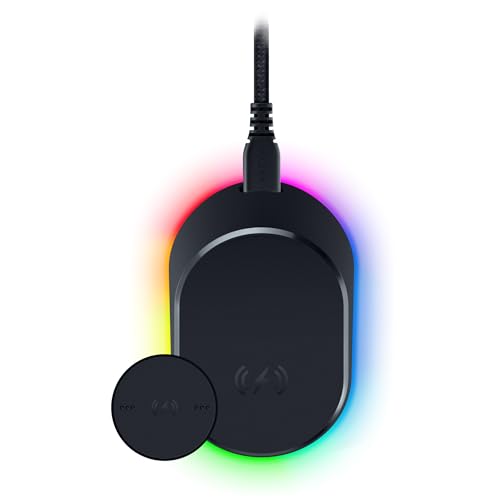
- Magnetic wireless charging with secure alignment
- Integrated 8K Hz HyperPolling transceiver
- Anti-slip base and battery status lighting
Best For: Razer mouse owners who want a premium dock with charging and polling features
Ascrono Magic Mouse Dock
White Lightning charging dock for Magic Mouse 2
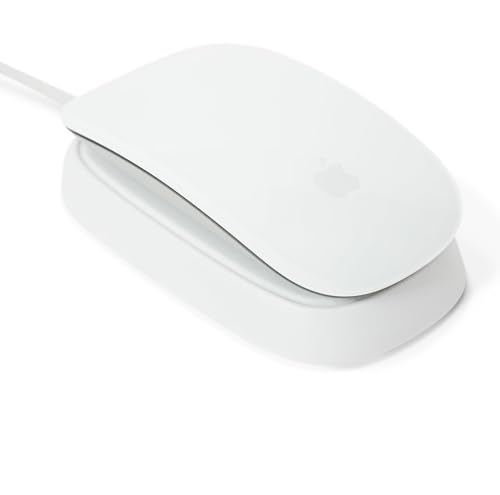
- Works with Magic Mouse 2 models from 2015-2022
- Acts as a dock, stand, and charger
- Includes 1.5 m USB-A cable and white finish
Best For: Mac users with a Lightning Magic Mouse 2 who want a simple matching dock
Vertical Comfort for Mac Users
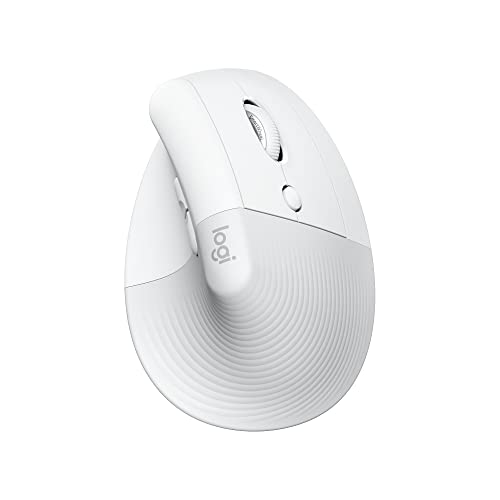
- 57-degree vertical design reduces wrist strain
- Quiet clicks and silent SmartWheel for focused work
- Bluetooth Low Energy works with Mac, iPad, and MacBook
Best For: Mac users who want an ergonomic wireless mouse for daily comfort
RGB Charging Dock for Gaming Mice
Razer Mouse Charging Dock Chroma

- Magnetic dock with charge-status RGB lighting
- Anti-slip feet help keep it stable on the desk
- Works only with select Razer wireless mice
Best For: Razer mouse owners who want a desktop charging dock with RGB
Wireless Charging Base for Magic Mouse

- Raises Magic Mouse 2 for a more comfortable hand position
- Adds wireless charging support for easier desk use
- Smart chip helps prevent overheating and overcharging
Best For: Magic Mouse 2 USB-C users who want charging plus a lifted grip
Ergonomic Docked Support
Apple Magic Mouse Dock for Mac

- Slanted ergonomic design for wrist comfort
- Fits Magic Mouse 2nd and 3rd generation
- Compact, durable, desk-saving dock
Best For: Magic Mouse users who want a compact ergonomic dock
Premium Performance Pick
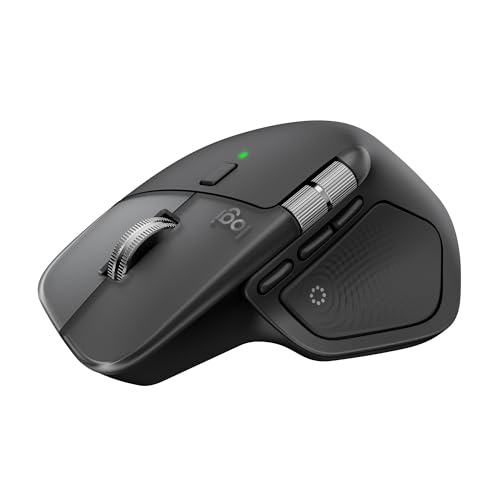
- Ergonomic design with natural tilt
- USB-C charging while you work
- Quiet clicks, MagSpeed wheel, haptics
Best For: Mac users who want a premium ergonomic productivity mouse
Charging Grip Upgrade
Magic Mouse 2 Wireless Dock Base

- Ergonomic grip raises the mouse height
- MagSafe pass-through supports easy charging
- Built-in charging protection and status light
Best For: Magic Mouse 2 owners who want a comfy charging grip
Razer Premium Dock – Magnetic RGB charging dock for supported Razer mice
If you want an ergonomic mouse charging dock for Mac-style desk setups that also doubles as a premium accessory, this Razer dock is built around convenience and desk presence. It uses a magnetic wireless charging puck, adds RGB lighting, and includes a transceiver for compatible Razer mice, but it is specifically designed for a short list of models.
Best For: Razer mouse owners who want a neat, feature-rich charging dock with wireless power and onboard polling support.
Pros:
- Magnetic wireless charging keeps the mouse securely aligned while docked.
- Integrated HyperPolling transceiver adds 4K Hz responsiveness for supported mice.
- 8-zone Chroma RGB lighting and charge-status lighting give clear visual feedback.
- Anti-slip base helps keep the dock stable on the desk.
Cons:
- Only works with select Razer mice: Basilisk V3 Pro, Cobra Pro, and Naga V2 Pro.
- More gaming-focused than a simple everyday charging stand.
- Requires the compatible wireless charging puck for use.
This is a strong pick if you already use a supported Razer mouse and want charging, status lighting, and desk stability in one accessory. It is less universal than an Apple-focused dock, but it is clearly built for a polished, high-performance setup.
Magic Mouse Ergonomic Stand – Compact angled dock for Magic Mouse 2nd and 3rd gen
For a simple ergonomic mouse charging dock for Mac users, this compact stand is aimed squarely at the Magic Mouse 2nd and 3rd generation. Its angled design is meant to improve comfort and reduce strain while keeping the mouse docked and close at hand.
Best For: Magic Mouse owners who want a small, ergonomic stand that saves desk space and keeps the mouse easy to reach.
Pros:
- Ergonomic slant is designed for more comfortable wrist positioning.
- Compatible with Magic Mouse 2nd and 3rd generation models.
- Compact footprint helps save desk space.
- Sturdy construction is intended for daily use.
Cons:
- Very basic product with no extra features listed beyond docking and comfort.
- Compatibility is limited to Magic Mouse 2nd and 3rd generation.
- Generic branding may matter to buyers who prefer a named accessory maker.
This is the most straightforward comfort-first option in the group. If your goal is simply to keep a Magic Mouse positioned neatly on the desk with a more ergonomic angle, it fits that use case well.
Razer Performance Dock – Black wireless charging dock with 8K polling support
This ergonomic mouse charging dock for Mac-style desks is really a performance accessory for supported Razer mice, not a universal charger. It combines magnetic wireless charging, a HyperPolling transceiver, and an anti-slip base, so it works best when you want a tidy dock with a strong gaming feature set.
Best For: Users of supported Razer mice who want wireless charging plus an integrated tabletop dock with high-end desk appeal.
Pros:
- Magnetic wireless charging keeps the mouse seated securely.
- Includes an integrated 8K Hz HyperPolling transceiver for compatible mice.
- Charge-status lighting shows battery level at a glance.
- Anti-slip base helps the dock stay put on the desk.
Cons:
- Compatibility is limited to Basilisk V3 Pro, Cobra Pro, and Naga V2 Pro.
- Its feature set is more gaming-oriented than general-purpose.
- Requires the wireless charging puck and compatible mouse.
If you already own a supported Razer mouse, this dock offers a clean charging solution with useful status lighting and extra connectivity. For everyone else, the narrow compatibility makes it a very specific buy.
Ascrono Magic Mouse Dock – White Lightning charging dock for Magic Mouse 2
If you need an ergonomic mouse charging dock for Mac use, this Ascrono station is built for the Magic Mouse 2 and focuses on simple, everyday charging. It works as a dock, stand, and charger in one, with a design that matches the white Apple look and includes a long USB-A cable.
Best For: Magic Mouse 2 owners who want a clean charging dock with a matching white finish and easy desktop placement.
Pros:
- Designed for Magic Mouse 2 models from 2015-2022 with Lightning connector.
- Functions as a charging dock, stand, and charger.
- Includes a 1.5 m USB-A cable for flexible setup.
- White finish matches the Magic Mouse aesthetic.
Cons:
- Does not support newer Magic Mouse models with USB-C.
- Compatibility is limited to Magic Mouse 2.
- Basic feature set compared with more advanced wireless docks.
This is a practical choice if you want a dedicated Magic Mouse 2 dock that keeps charging simple and visually tidy. The long cable and matching color help it blend into a Mac desktop setup without much fuss.
Vertical Comfort for Mac Users – Logitech Lift for Mac
If you want an ergonomic mouse charging dock for Mac-adjacent comfort without giving up a wireless setup, the Logitech Lift for Mac is a strong productivity-first pick. This vertical mouse is built for small to medium hands, uses Bluetooth Low Energy for Mac, iPad, and MacBook compatibility, and leans into quiet operation for focused work.
Best For: Mac users who want a comfortable vertical mouse for all-day desktop work and quiet scrolling.
Pros:
- 57-degree vertical angle helps reduce wrist pressure and encourages a more relaxed arm position.
- Whisper-quiet clicks and silent SmartWheel make it suitable for calm workspaces.
- Works with MacBook Pro, MacBook Air, iMac, and iPad via Bluetooth Low Energy.
- Includes 4 customizable buttons for quicker everyday shortcuts.
Cons:
- Uses a single AA battery rather than a built-in rechargeable dock system.
- Designed for small to medium hands, so it may not suit larger hands as well.
This is the practical choice if your priority is ergonomic comfort on Mac rather than a charging cradle. It’s a quiet, long-battery-life mouse that fits the Apple ecosystem cleanly, but it is not a dock-based charging solution.
RGB Charging Dock for Gaming Mice – Razer Mouse Charging Dock Chroma
If you’re shopping for an ergonomic mouse charging dock for Mac-style desk convenience, the Razer Mouse Charging Dock Chroma is really aimed at gaming mice rather than Apple peripherals. It’s a magnetic tabletop dock with charge-status RGB lighting, anti-slip feet, and USB connectivity for supported Razer models.
Best For: Owners of compatible Razer wireless mice who want a visible, stable charging dock with RGB integration.
Pros:
- Magnetic dock provides a simple place to park and charge a compatible mouse.
- Charge-status lighting gives a quick visual cue, including red for low battery and green for charging.
- Anti-slip Gecko Feet help keep the dock steady on a desk.
- Chroma integration works with Razer hardware and 30+ partners.
Cons:
- Compatibility is limited to specific Razer models such as DeathAdder V2 Pro, Naga Pro, Viper Ultimate, and Basilisk Ultimate.
- Not designed for Magic Mouse or general Mac mouse charging use.
This dock makes sense if you already use one of the supported Razer mice and want a cleaner charging routine. For Mac buyers, the main limitation is that it is not a universal or Apple-specific charging dock.
Wireless Charging Base for Magic Mouse – TATOFY Mouse Charger
For Mac users looking for an ergonomic mouse charging dock for Mac use with a Magic Mouse 2 USB-C setup, this TATOFY base is built around charging support and a raised grip. It lifts the mouse to a more comfortable height, adds wireless charging support, and keeps the design close to Apple’s aesthetic.
Best For: Magic Mouse 2 users who want a charging base that also improves hand position on the desk.
Pros:
- Ergonomic base raises the Magic Mouse 2 to a more comfortable working height.
- Wireless charging support helps eliminate awkward charging routines.
- Built-in smart chip helps prevent short circuits, overheating, and overcharging.
- Designed to match the original aesthetic of the mouse and MacBook accessories.
Cons:
- Compatible only with Magic Mouse 2 USB-C, so it is not a universal Mac mouse dock.
- Warranty coverage is short at 2 months.
This is the most directly relevant option here for a Mac user who specifically wants a charging base plus a more comfortable mouse angle. Its usefulness is tied tightly to the Magic Mouse 2 USB-C, but within that lane it solves both charging and ergonomics.
Ergonomic Docked Support – Apple Magic Mouse Dock for Mac
If you want a simple ergonomic mouse charging dock for Mac-adjacent Magic Mouse use, this dock focuses on comfort and desk organization rather than extra tech. Its slanted shape is meant to improve wrist positioning, and the compact wired design keeps your mouse close at hand while reducing clutter.
Best For: Magic Mouse users who want a compact, ergonomic dock that keeps the mouse secure and easy to reach on a Mac desk setup.
Pros:
- Ergonomic slant is designed to support a more comfortable wrist angle.
- Compatible with Apple Magic Mouse 2nd and 3rd generation models.
- Compact footprint helps save valuable desk space.
- Durable construction is built for daily use.
Cons:
- It is a dock, not a standalone mouse with built-in charging electronics.
- Limited to Magic Mouse 2nd and 3rd generation compatibility.
For buyers who mainly want a neat, stable resting spot with an ergonomic angle, this dock keeps the setup straightforward. It’s a practical add-on if your priority is comfort, space savings, and secure placement for a compatible Magic Mouse.
Premium Performance Pick – Logitech MX Master 4 for Mac
The Logitech MX Master 4 for Mac is a full-featured ergonomic mouse charging dock for Mac users in the sense that it pairs comfort, USB-C charging, and advanced workflow tools in one premium mouse. It’s built for macOS-first setups, with a natural tilt, thumb scroll wheel, and quiet clicks that make long work sessions more comfortable.
Best For: Mac users who want a premium ergonomic mouse with USB-C charging, customizable controls, and advanced scrolling.
Pros:
- Ergonomic shape with natural tilt helps reduce hand stress.
- USB-C charging lets you power up while you work.
- MagSpeed wheel and haptic controls are built for productivity.
- Quiet clicks and app-specific tools suit focused workflows.
Cons:
- Cable is not included for USB-C charging.
- Right-handed design only.
This is the strongest choice here for users who want more than a basic dock or grip: it’s a high-end Mac mouse with comfort and workflow features baked in. If you need a polished daily driver for macOS or iPadOS, it offers the most capability.
Charging Grip Upgrade – Magic Mouse 2 Wireless Dock Base
This Magic Mouse 2 accessory is a wireless charging dock and ergonomic grip base designed to improve comfort and make charging easier. It raises the mouse to a more natural height, adds MagSafe pass-through charging support, and keeps the charging process simple with a built-in status light and protection features.
Best For: Magic Mouse 2 owners who want a more comfortable grip and a cleaner wireless charging setup.
Pros:
- Raises the mouse for a more ergonomic hand position.
- MagSafe pass-through lets you charge without removing the grip.
- Smart charging chip adds short-circuit, overheating, and overcharge protection.
- Built-in breathing light shows charging status.
Cons:
- Only compatible with Magic Mouse 2 (Lightning).
- Mouse and charger are not included.
Compared with a basic dock, this option is more about upgrading the feel and charging convenience of an existing Magic Mouse 2. It makes sense if you want a more comfortable setup and a wireless charging path that stays out of the way.
How We Picked the Best Ergonomic Mouse Charging Dock for Mac
We focused on docks and mouse setups that make daily charging easier on Mac desks: stable bases, compatible charging methods, clean cable management, and a shape that supports a more comfortable hand position. For this roundup, we also favored products that fit common Mac accessories and avoid awkward desk clutter.
Quick Comparison
Some options are true charging docks for an existing mouse, while others are ergonomic mice with charging convenience built in. That difference matters: if you want to keep your current Apple mouse, choose a dock; if you want a bigger comfort upgrade, a vertical mouse like the Logitech Lift for Mac or MX Master 4 for Mac may be the better long-term pick.
Key Buying Factors for Ergonomic Mouse Charging Dock for Mac
Compatibility
Make sure the dock matches your exact mouse model and charging standard. Many Apple Magic Mouse docks are designed for Magic Mouse 2, while others support USB-C, Lightning, or magnetic charging pucks. A mismatch can make an otherwise good dock useless.
Ergonomics and Desk Position
The best Ergonomic Mouse Charging Dock for Mac should support a natural resting angle and keep the mouse easy to grab. Look for designs that raise the mouse slightly, reduce reach, and keep the charging point visible so you do not fumble when docking it.
Charging Method
Wireless charging, magnetic docking, and direct cable charging each have tradeoffs. Wireless and magnetic systems are cleaner and faster to use, while cable-based setups can be simpler and more affordable. Choose the method that fits your routine and how often you top up your mouse.
Build Quality and Stability
A dock should stay put when you remove or place the mouse. Anti-slip bases, weighted frames, and snug alignment help prevent daily frustration. This matters even more on smooth aluminum or glass-topped Mac desks.
Who Should Buy Which Ergonomic Mouse Charging Dock for Mac?
If you already love your Magic Mouse, buy a compatible charging dock and focus on fit, stability, and charging style. If you want better all-day comfort, consider a vertical or sculpted mouse instead of a dock-only solution. Razer users should prioritize dock compatibility with their charging puck or ecosystem, while Mac power users who want a premium balance of comfort and performance may be better served by a high-end ergonomic mouse with USB-C charging. In short, the best choice depends on whether your priority is preserving your current mouse, improving hand comfort, or simplifying your desk setup.