Choosing the right ultrawide monitor desk mount for Mac setup can transform your desk from crowded to clean, while improving viewing comfort and freeing up valuable workspace.
In this roundup, we focused on mounts that support large, heavy ultrawide displays, offer smooth adjustment, and fit common Mac-based productivity, creative, and gaming setups.
Best 10 Ultrawide Monitor Desk Mount for Mac Setup Picks for 2026
Vertically Stacked Heavy-Duty Pick
VIVO Dual Stacked Ultrawide Desk Mount

- Holds 2 ultrawides up to 49" and 44 lbs each
- Tilt, swivel, rotate, and height-adjust for alignment
- C-clamp or grommet install with cable clips
Best For: A stacked dual ultrawide setup with heavy-duty support
Most Adjustable Single Arm
ARES WING Ultrawide Gas Spring Arm

- Supports 17"-49" monitors up to 44 lbs
- Gas spring arm adds tilt, swivel, rotation, and height range
- C-clamp and grommet mounting with cable management
Best For: A highly adjustable single-arm mount for one large ultrawide
Flush-Against-Wall Pick
VIVO Dual Telescoping Ultrawide Mount
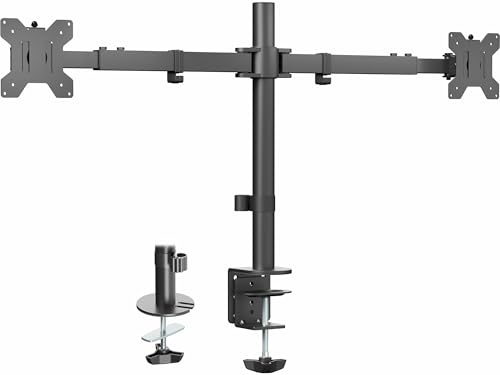
- Fits 2 ultrawides up to 38" and 22 lbs each
- Flush design stays behind the desk edge
- Telescoping arms with tilt, swivel, and rotation
Best For: Dual ultrawides where a flush-to-wall layout matters
Best Dual Ultrawide Flex Pick
ARES WING Dual Vertical Monitor Arm

- Holds 2 monitors up to 49" and 44 lbs each
- Full motion with tilt, swivel, rotation, and height adjustment
- Supports curved screens and includes cable management
Best For: Full-motion dual ultrawide setups and flexible stacking
Dual Heavy-Duty Pick
Heavy-Duty Curved Monitor Stacking Arm

- Supports 17" to 49" ultrawide or curved monitors
- Up to 44 lbs per arm with strong adjustability
- Cable management and clamp/grommet mounting
Best For: Mac desks that need a heavy-duty dual-arm mount for large ultrawide displays
Single Ultrawide Stability Pick
Premium 49-Inch Ultrawide Mount

- Supports 17" to 49" monitors up to 44 lbs
- Reinforced design helps resist sagging
- Easy snap-in installation with cable management
Best For: Single large ultrawide Mac setups that need stability and a cleaner desk
Dual Compact Workflow Pick
Fully Adjustable Steel Dual Ultrawide Stand

- Holds two monitors up to 38" and 22 lbs each
- Clamp or grommet mounting for flexible desks
- Tilt, swivel, rotation, and center-pole height adjustment
Best For: Dual-monitor Mac desks with ultrawides that stay under 38 inches
Heavy-Duty Stability
WALI 17-49" Ultrawide Monitor Arm

- Holds ultrawide screens up to 49 inches
- Supports up to 33 lbs with wide motion
- Built-in cable management for cleaner desks
Best For: Large Mac setups that need a sturdy, space-saving arm
Flexible Gas Spring
ErgoFocus Ultrawide Monitor Mount

- Fits ultrawide screens up to 42 inches
- Gas spring arm with 20,000+ fatigue-cycle testing
- C-clamp and grommet mounting included
Best For: Users who want smooth, adjustable positioning on a Mac desk
Highest Load Capacity
HUANUO TitanLift 49" Monitor Arm

- Supports up to 44 lbs for heavy ultrawides
- Reinforced aluminum build with 50,000-cycle testing
- Quick setup with built-in cable management
Best For: Heavy ultrawide displays in a premium Mac workstation
Vertically Stacked Heavy-Duty Pick – VIVO Dual Stacked Ultrawide Desk Mount
If you want an ultrawide monitor desk mount for Mac setup with a tall, stable footprint, this VIVO dual stacked stand is built for large screens up to 49 inches. It supports two ultrawides, offers strong steel construction, and gives you plenty of tilt, swivel, rotation, and height adjustment for a cleaner multi-screen workspace.
Best For: Users who want a vertically stacked dual ultrawide setup with heavy-duty support and flexible positioning.
Pros:
- Supports two ultrawide monitors up to 49 inches and 44 lbs each
- Offers +85° to -25° tilt, 160° swivel, 360° rotation, and pole height adjustment
- Detachable VESA plates make installation easier
- Includes cable clips plus both C-clamp and optional grommet mounting
Cons:
- Designed for VESA 75x75mm or 100x100mm screens only
- Best suited to desks that can handle a tall stacked mount
- Large dual-monitor footprint may be more than some Mac setups need
Overall, this is the most robust option here if your priority is stacking two big ultrawides in a secure, adjustable layout. It is especially appealing when you want maximum screen capacity without sacrificing cable organization.
Most Adjustable Single Arm – ARES WING Ultrawide Gas Spring Arm
This ultrawide monitor desk mount for Mac setup is a strong choice if you want a single arm that can handle very large screens while staying easy to position. The gas spring design supports monitors up to 49 inches and gives you a wide range of motion, making it useful for both productivity and gaming desks.
Best For: People who want a highly adjustable single-arm mount for one large ultrawide monitor.
Pros:
- Supports 17 to 49 inch monitors up to 44 lbs
- Gas spring arm offers tilt, swivel, rotation, and height adjustment
- Long arm extension helps dial in viewing distance
- Includes C-clamp and grommet mounting options with cable management
Cons:
- Requires VESA 75x75mm or 100x100mm compatibility
- Non-VESA monitors need a separate adapter
- Desk thickness limits apply for both mounting methods
If you want flexibility more than sheer bulk, this mount is a practical pick for a large Mac display. The combination of strong capacity and easy adjustment makes it a good all-around upgrade for an ultrawide workspace.
Flush-Against-Wall Pick – VIVO Dual Telescoping Ultrawide Mount
For a cleaner desk edge in an ultrawide monitor desk mount for Mac setup, this VIVO dual arm stand is designed to sit flush rather than protrude behind the desk. It supports two ultrawides up to 38 inches, uses telescoping arms for stability, and gives you the articulation needed to fine-tune screen position.
Best For: Dual-monitor users who want a flush-to-wall layout with moderately sized ultrawides.
Pros:
- Fits two ultrawide monitors up to 38 inches and 22 lbs each
- Telescoping arms are designed for strength and stability
- Flush setup keeps nothing extending past the back edge of the desk
- Includes tilt, swivel, rotation, and height adjustment
Cons:
- Not intended for ultrawides larger than 38 inches
- Lower weight capacity than the 49-inch heavy-duty options
- Only works with VESA 75x75mm or 100x100mm monitors
This is a smart option if desk clearance matters more than maximum screen size. It balances stability and a tidy profile well, especially for users who want dual screens without losing space behind the desk.
Best Dual Ultrawide Flex Pick – ARES WING Dual Vertical Monitor Arm
If your ultrawide monitor desk mount for Mac setup needs to hold two large displays with full motion, this ARES WING dual arm is built for that job. It supports monitors up to 49 inches, including curved models, and gives you enough reach and adjustment to stack or arrange screens more comfortably.
Best For: Users who want a full-motion dual arm for two large ultrawides or mixed monitor stacks.
Pros:
- Supports two monitors from 17 to 49 inches, up to 44 lbs per arm
- Offers tilt, swivel, rotation, and height adjustment up to 27.9 inches
- Works with flat, curved, and 1000R curved monitors
- Includes C-clamp, grommet mount options, and built-in cable management
Cons:
- Requires VESA 75x75mm or 100x100mm mounting patterns
- Non-VESA monitors need an adapter
- Dual-arm setup may be more mount than a single ultrawide requires
This is the most versatile dual-monitor pick in the group if you need motion and support for very large screens. It is a solid fit for users who want flexibility without giving up heavy-duty construction.
Dual Heavy-Duty Pick – Heavy-Duty Curved Monitor Stacking Arm
If you need an ultrawide monitor desk mount for Mac setup that can handle a big curved display or a two-screen workflow, this WALI arm is built for heavy-duty support. It fits 17″ to 49″ screens, supports up to 44 lbs per arm, and offers broad tilt, swivel, rotation, and height adjustment to help you fine-tune a comfortable viewing position.
Best For: Mac users who want a strong dual-arm mount for large ultrawide or curved monitors and flexible stacking options.
Pros:
- Supports ultrawide and curved monitors from 17″ to 49″ up to 44 lbs per arm.
- Offers +50°/-20° tilt, 90° swivel, 360° rotation, and 18.9″ of height adjustment.
- C-clamp and grommet mounting options fit desks 0.47″ to 1.77″ thick.
- Built-in cable management helps keep the desk area cleaner.
Cons:
- Designed for VESA 75x75mm and 100x100mm only.
- Dual-arm design may be more mount than you need for a single-monitor Mac desk.
- Desk thickness must stay within the stated range for proper installation.
This is the most versatile pick here if you want stacking flexibility and strong support for oversized displays. The tradeoff is that it’s a dual-arm solution, so it makes the most sense when your Mac workspace needs two monitors or a stacked layout.
Single Ultrawide Stability Pick – Premium 49-Inch Ultrawide Mount
For an ultrawide monitor desk mount for Mac setup centered on one large screen, this MOUNT PRO arm focuses on stability and clean desk space. It supports 17″ to 49″ flat or curved monitors, up to 44 lbs, and uses a reinforced gas-spring design with easy one-step snap-in installation.
Best For: Mac users who want a stable single-arm mount for a large ultrawide display and a tidy desk.
Pros:
- Supports 17″ to 49″ ultrawide and flat monitors up to 44 lbs.
- Reinforced arm and gas spring are designed to reduce sagging and improve stability.
- Offers 45° up / 35° down tilt, 90° swivel, and 8.4″ to 22.6″ height range.
- Detachable VESA plate and snap-in setup simplify installation.
Cons:
- Single-monitor design is not for dual-screen Mac setups.
- Requires VESA 75x75mm or 100x100mm compatibility.
- Desk thickness must fit the included clamp or grommet mounting range.
If your priority is supporting one large ultrawide screen with a more streamlined footprint, this is the most focused option in the group. It trades multi-monitor flexibility for a sturdier single-arm design and a cleaner setup.
Dual Compact Workflow Pick – Fully Adjustable Steel Dual Ultrawide Stand
If your ultrawide monitor desk mount for Mac setup is really about two smaller screens instead of one oversized panel, this VIVO stand is a practical fit. It supports two monitors up to 38″ and 22 lbs each, with strong articulation, a center-pole height adjustment, and either clamp or grommet installation.
Best For: Mac users building a dual-monitor desk setup with ultrawides up to 38 inches each.
Pros:
- Supports two monitors up to 38″ and 22 lbs each.
- Offers +90°/-90° tilt, 180° swivel, and 360° rotation.
- Height adjusts along the center pole for flexible positioning.
- Includes detachable VESA plates and integrated cable management clips.
Cons:
- Lower weight limit than the 49″ heavy-duty options.
- Only supports up to 38″ screens, so it won’t suit the largest ultrawides.
- Steel-and-plastic construction is not as premium-feeling as all-metal heavy-duty arms.
This is the most space-efficient dual-monitor choice here for medium ultrawide displays. It gives you useful movement and cleaner cable routing without stepping up to the size and weight capacity of the bigger mounts.
Heavy-Duty Stability – WALI 17-49" Ultrawide Monitor Arm
If you want an ultrawide monitor desk mount for Mac setup that prioritizes stability and desk space, this WALI arm is built for larger screens up to 49 inches. It supports flat or 1800R curved displays, offers broad motion adjustment, and keeps cables routed neatly along the arms for a cleaner workstation.
Best For: Mac users with a large ultrawide monitor who want a sturdy, space-saving single-arm mount.
Pros:
- Supports ultrawide monitors up to 49 inches and 33 lbs
- Offers strong ergonomic range with extension, height adjustment, swivel, tilt, and rotation
- Built-in cable management helps keep a Mac desk tidy
- Includes both C-clamp and grommet mounting options for compatible wooden desks
Cons:
- Only recommended for wooden desks
- Desk underside should not have a blocking crossbeam
- Users should verify VESA pattern, size, and weight before buying
This is a solid pick if your priority is dependable support for a big ultrawide rather than a lightweight, minimalist arm. The combination of 33 lb capacity, wide motion, and cable management makes it practical for a Mac-focused home office.
Flexible Gas Spring – ErgoFocus Ultrawide Monitor Mount
For an ultrawide monitor desk mount for Mac setup that needs easy positioning and a tidy footprint, this ErgoFocus gas spring arm is designed for flat or curved screens from 13 to 42 inches. It adds useful desk clearance, supports common VESA patterns, and includes cable management to keep your workspace organized.
Best For: Mac users with a medium-to-large ultrawide monitor who want smooth adjustment and a cleaner desk.
Pros:
- Fits screens up to 42 inches and up to 33.1 lbs
- Gas spring arm is tested for durability through 20,000+ fatigue cycles
- Swivels +/-90 degrees and rotates 360 degrees for flexible viewing
- Includes C-clamp and grommet mounting options for desks with or without a hole
Cons:
- Maximum screen size is smaller than some heavy-duty competitors
- Maximum tilt range is more limited than some premium arms
- Desk thickness is limited to 3.15 inches
This is a practical choice if you want an arm that is easy to adjust and suitable for many common ultrawide sizes without overcomplicating setup. It should work well for a Mac desk where screen position changes throughout the day.
Highest Load Capacity – HUANUO TitanLift 49" Monitor Arm
If your ultrawide monitor desk mount for Mac setup needs maximum holding power, the HUANUO TitanLift is built for screens up to 49 inches and up to 44 lbs. It uses a reinforced aluminum design, offers wide adjustability, and includes built-in cable management for a clean and stable workstation.
Best For: Mac users with a very large or heavy ultrawide monitor who want a premium-duty mount.
Pros:
- Highest weight capacity here at up to 44 lbs
- Fits 17-49 inch monitors with 75x75mm or 100x100mm VESA mounts
- Offers tilt, swivel, rotation, extension, and height adjustment
- Quick 3-step setup and built-in cable management simplify installation
Cons:
- Requires a wooden desk only
- Desk thickness must fall between 0.8 and 3.5 inches
- Cross beams or panels under the desk can prevent installation
This model stands out for users who need more load capacity and a sturdier build than typical monitor arms provide. If your Mac setup centers on a heavier ultrawide, it offers a strong mix of security, range, and convenience.
How We Picked the Best Ultrawide Monitor Desk Mount for Mac Setup
We selected mounts based on weight capacity, VESA compatibility, screen size support, motion range, build quality, and how well each design suits an Ultrawide Monitor Desk Mount for Mac Setup. We also favored models with stable arms, easy cable routing, and adjustment options that help align a large display with a Mac keyboard, dock, or laptop stand.
Quick Comparison
Single-arm mounts are the simplest choice for one large ultrawide display. Dual-monitor and stacked designs are better if you want a main screen plus a secondary display in a compact footprint. Heavy-duty gas-spring arms usually provide the smoothest repositioning, while reinforced steel or aluminum builds tend to feel more secure with larger panels.
Key Buying Factors for an Ultrawide Monitor Desk Mount for Mac Setup
Weight and Screen Size
Check both the diagonal screen size and the actual weight of your monitor. Many ultrawide displays are within the same size range but vary significantly in mass, especially curved panels and high-refresh models.
VESA Pattern and Clearance
Confirm whether your monitor uses 75×75 or 100×100 VESA mounting, and make sure the arm leaves enough room for ports, adapters, and any Mac dock connections.
Desk Thickness and Clamp Style
A sturdy clamp or grommet mount is important for stability. If your desk is thick, edged, or made from a softer material, verify the clamp range before buying.
Adjustability and Ergonomics
Look for height adjustment, tilt, swivel, and rotation so you can set the screen at eye level and reduce neck strain during long work sessions.
Setup Style
Single mounts work well for minimal desks, dual arms suit multitasking, and vertical stacking is ideal when you want one screen above another without widening the footprint.
Who Should Buy Which Ultrawide Monitor Desk Mount for Mac Setup?
If you use one large ultrawide for editing, coding, or daily work, a heavy-duty single arm is usually the best fit. If you split time between a main display and a side screen, choose a dual arm. If desk space is tight and you want maximum screen area, a stacked mount is often the smartest option. For a Mac setup that prioritizes a clean, premium look, choose an aluminum or steel model with smooth motion and solid cable management.