If you want a fast external SSD without the hum of a cooling fan, a fanless Thunderbolt storage enclosure is the cleanest way to build one. These enclosures pair high bandwidth with quieter operation and a simpler desk setup.
Below, we focus on models that balance real-world performance, thermal design, and broad device compatibility so you can choose the right enclosure for your workflow.
Best 10 Fanless Thunderbolt Storage Enclosure Picks for 2026
Ultra-Cool Fanless Pick
Qwiizlab 40Gbps USB4 Enclosure

- Fanless aluminum build for quiet operation
- USB4 and Thunderbolt 4/5 support up to 40Gbps
- Fits NVMe SSDs up to 8TB in multiple M.2 sizes
Best For: Quiet laptop or desktop setups that want passive cooling and 40Gbps speed
High-Speed Active Cooling Pick
UGREEN 80Gbps Fan-Cooled Enclosure

- Up to 80Gbps with Thunderbolt 5 hardware
- Built-in fan and aluminum body aid heat dissipation
- Supports 8TB NVMe SSDs in 2280 M-Key/M&B key formats
Best For: Thunderbolt 5 users who prioritize top speed and active cooling
Silent High-Performance Pick
UGREEN 80Gbps Dual-Chip Enclosure

- Dual-chip design supports up to 7000MB/s
- Fanless fin-based cooling focuses on quiet heat dissipation
- Fits NVMe SSDs up to 8TB across four M.2 sizes
Best For: Quiet users who want 80Gbps performance and broad device compatibility
Best Passive 80Gbps Option
ORICO X50PRO Fanless Enclosure
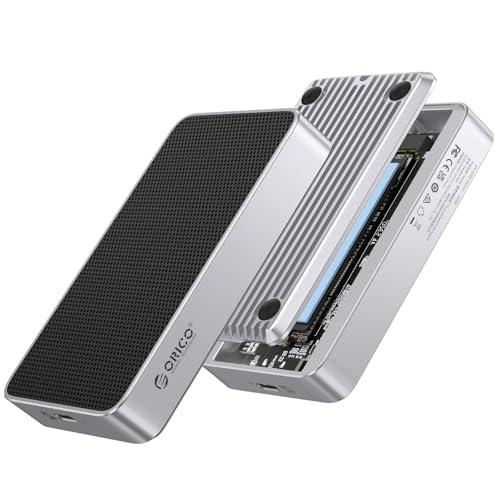
- Fanless aluminum cooling with heat film and bottom air duct
- Supports PCIe Gen 5/Gen 4 NVMe SSDs up to 8TB
- USB4 V2.0 / 80Gbps support with backward compatibility
Best For: Buyers who want a passive, quiet 80Gbps NVMe enclosure with 8TB support
Ultra-Fast 40Gbps Pick
TERRAMASTER D1 SSD Plus 40Gbps M.2 NVMe Enclosure

- Up to 3853MB/s read and 3707MB/s write in testing
- Fanless all-aluminum design with triple-sized heat dissipation
- Supports M.2 NVMe 2280 drives up to 8TB
Best For: Quiet, portable NVMe expansion for fast backups and editing
Top-Speed Premium Build
Qwiizlab Fanless 80Gbps NVMe Enclosure

- Over 6,300MB/s write and 5,900MB/s read via Thunderbolt 5
- Fanless aluminum chassis with internal copper heat dissipation
- Supports PCIe Gen 5/Gen 4 NVMe SSDs up to 8TB
Best For: Power users seeking maximum Thunderbolt 5 speed in a silent enclosure
Balanced Everyday Choice
UGREEN 40Gbps M.2 NVMe Enclosure

- Up to 3600MB/s with compatible Thunderbolt 4 hardware
- Fanless double-sided fin cooling design
- Supports NVMe drives up to 8TB in multiple sizes
Best For: Quiet everyday storage and travel-friendly cross-platform use
Silent Cooling Choice
OWC Express 1M2 40Gb/s Portable NVMe SSD

- Patented heat-dissipating, silent cooling design
- Up to 3836MB/s real-world performance
- Supports USB4, Thunderbolt, and USB-C
Best For: Quiet, portable NVMe builds with broad compatibility
Ultra-Cool Fanless Pick – Qwiizlab 40Gbps USB4 Enclosure
If you want a fanless Thunderbolt storage enclosure that stays simple, quiet, and fast, this Qwiizlab model is built around USB4 and Thunderbolt 4/5 performance. It targets users who want up to 40Gbps speeds in a compact aluminum shell, with passive cooling rather than a mechanical fan.
Best For: Quiet workstation or laptop users who want a 40Gbps external NVMe enclosure with passive cooling.
Pros:
- Supports USB4 and Thunderbolt 4/5 with sequential read speeds up to 40Gbps.
- Fanless aluminum design helps dissipate heat without added noise.
- Fits M.2 NVMe PCIe SSDs in 2230/2242/2260/2280 sizes up to 8TB.
- Includes thermal pads, USB-C cable, screwdriver, and screws.
Cons:
- Not compatible with Thunderbolt 2 or Thunderbolt 1.
- SSD is not included.
- Only supports one drive.
This is a practical pick if you want quiet operation and broad macOS/Windows support without moving up to a more complex 80Gbps enclosure. It makes the most sense for buyers prioritizing passive cooling and solid everyday Thunderbolt performance.
High-Speed Active Cooling Pick – UGREEN 80Gbps Fan-Cooled Enclosure
This fanless Thunderbolt storage enclosure alternative is for buyers who care more about maximum throughput than silent operation. UGREEN’s 80Gbps M.2 NVMe enclosure is designed for Thunderbolt 5 systems, while still staying backward compatible with Thunderbolt 4, 3, and USB4.
Best For: Thunderbolt 5 users who want very high transfer speeds and active cooling for long sessions.
Pros:
- 80Gbps enclosure with claimed theoretical speeds up to 7000MB/s on Thunderbolt 5.
- Built-in cooling fan plus aluminum body for stronger heat management.
- Supports 8TB NVMe SSDs in 2280 M-Key or M&B key formats.
- Includes cable, cooling pad, disassembly kit, and silicone case.
Cons:
- 80Gbps performance requires Thunderbolt 5 cable and host device.
- Only compatible with NVMe SSDs, not SATA NGFF drives.
- The fan turns on only when internal temperature reaches 40°C.
This enclosure is a stronger fit for speed-focused workflows than for users chasing total silence. If you have Thunderbolt 5 hardware and need fast external storage with active cooling, it offers a compelling feature set.
Silent High-Performance Pick – UGREEN 80Gbps Dual-Chip Enclosure
If you’re shopping for a fanless Thunderbolt storage enclosure with higher-end performance, this UGREEN model emphasizes silent cooling through a dual-sided fin design rather than a fan. It’s built for 80Gbps operation, with compatibility that spans Thunderbolt 5, Thunderbolt 4/3, USB4, and other USB-C standards.
Best For: Users who want a quiet 80Gbps enclosure with strong thermal design and wide OS support.
Pros:
- Dual-chip design with Intel JHL9480 and JMicron JMS583 for speeds up to 7000MB/s.
- Dual-sided aluminum fin structure is designed to improve heat dissipation without noise.
- Supports M.2 2230/2242/2260/2280 SSDs up to 8TB.
- Works with Windows, macOS, Linux, and Android.
Cons:
- Does not support SATA or mSATA SSDs.
- Pre-installed heatsink SSDs are not supported.
- Some thicker SSDs may require a thinner thermal pad.
This is a strong option if you want the higher ceiling of 80Gbps hardware but still prefer a no-fan approach. The fin-based cooling design makes it especially appealing for quieter desktop and mobile setups.
Best Passive 80Gbps Option – ORICO X50PRO Fanless Enclosure
For buyers searching for a fanless Thunderbolt storage enclosure with 80Gbps capability, the ORICO X50PRO is built around passive cooling and a dual-chip design. It combines a full aluminum shell, heat-absorbing film, and an air-duct layout to support high-speed external NVMe storage without a noisy fan.
Best For: Users who want an 80Gbps fanless enclosure with strong passive cooling and 8TB support.
Pros:
- Supports PCIe Gen 5 and Gen 4 NVMe SSDs with up to 6000MB/s read/write speeds.
- Fully fanless design uses aluminum, cooling film, and bottom air-duct airflow.
- Compatible with USB4 V2.0 / 80Gbps and backward compatible with slower standards.
- Supports 2280 M.2 NVMe SSDs up to 8TB.
Cons:
- 80Gbps speed requires compatible high-speed cables and host devices.
- Not compatible with M.2 SATA NGFF SSDs.
- Thunderbolt 3 systems may default to USB speeds up to 10Gbps.
This model stands out if your priority is quiet operation with modern 80Gbps hardware rather than a fan-cooled enclosure. It is especially attractive for users who want passive cooling and straightforward compatibility with current NVMe drives.
Ultra-Fast 40Gbps Pick – TERRAMASTER D1 SSD Plus 40Gbps M.2 NVMe Enclosure
If you want a fanless Thunderbolt storage enclosure that can double as a fast Mac or Windows expansion drive, the TERRAMASTER D1 SSD Plus is built around speed and simple compatibility. It supports Thunderbolt 5/4/3 plus USB 4/3.2/3.1/3.0/2.0, and the all-aluminum body is designed for silent operation and better heat handling under load.
Best For: Users who want a quiet, portable NVMe enclosure for fast backups, editing, and Mac mini expansion.
Pros:
- Up to 3853MB/s read and 3707MB/s write in testing with a 990 PRO 4TB on a Mac mini M4 Pro via Thunderbolt 5
- Fanless all-aluminum build with triple-sized heat dissipation for quieter long-session use
- Supports M.2 NVMe 2280 drives up to 8TB and works across Windows, Mac, Linux, Android, and iOS
- Includes backup software with scheduled Windows backups
Cons:
- Only supports M.2 NVMe drives, not SATA-based SSDs
- Top speeds depend on the host connection and compatible Thunderbolt/USB4 hardware
- Diskless design means you must supply your own SSD
Overall, this is a strong choice if you want a quiet, travel-friendly enclosure with broad device support and very high real-world throughput. It is especially appealing for users who need a bootable macOS SSD or a fast backup drive in a compact aluminum shell.
Top-Speed Premium Build – Qwiizlab Fanless 80Gbps NVMe Enclosure
For buyers looking for a fanless Thunderbolt storage enclosure at the high end of the speed range, the Qwiizlab 80Gbps enclosure is the most aggressive performer here. It uses an Intel JHL9480 controller, supports Thunderbolt 5 with backward compatibility for Thunderbolt 4/3 and USB4, and relies on an aluminum chassis with internal copper plating for passive cooling.
Best For: Power users who want the fastest fanless NVMe enclosure in this group for demanding Thunderbolt 5 setups.
Pros:
- Thunderbolt 5 performance rated at over 6,300MB/s write and 5,900MB/s read
- Fanless aluminum body with internal copper plate for heat dissipation
- Supports PCIe Gen 5 and Gen 4 M.2 NVMe drives up to 8TB
- Includes an Intel-certified Thunderbolt 5 cable and installation accessories
Cons:
- Premium speed comes with the need for Thunderbolt 5 hardware to reach top performance
- SSD is not included
- Supports only a single M.2 drive
This is the enclosure to consider when raw throughput matters most and you already have the right host system to take advantage of it. If you want a silent design with future-facing connectivity and top-tier speeds, Qwiizlab stands out.
Balanced Everyday Choice – UGREEN 40Gbps M.2 NVMe Enclosure
The UGREEN 40Gbps M.2 NVMe enclosure is a practical fanless Thunderbolt storage enclosure for users who want strong speed, broad compatibility, and a compact travel-ready design. Its ASM2464PD chip is rated up to 3600MB/s, and the double-sided fin cooling structure is built for quiet operation without a fan.
Best For: Users who want a quiet, portable NVMe enclosure for everyday storage, travel, and mixed-device compatibility.
Pros:
- Up to 3600MB/s with Thunderbolt 4 cables and devices
- Unique double-sided fin cooling design for fanless, quiet use
- Supports M.2 sizes 2230/2242/2260/2280 and up to 8TB capacity
- Works with Windows, Mac OS, Linux, Android, and a wide range of devices
Cons:
- Top speed depends on using compatible Thunderbolt 4 hardware
- NVMe-only design, so SATA NGFF and mSATA drives are not supported
- SSD is not included
For most shoppers, this is the most balanced option in the group: fast enough for serious external storage use, but still simple, quiet, and portable. It fits well if you want a no-fuss enclosure for backup, media, or general SSD expansion across multiple platforms.
Speed-Focused USB4 Pick – SABRENT USB4 NVMe SSD Enclosure
If you want a fanless Thunderbolt storage enclosure alternative with maximum speed, this SABRENT USB4 model is built for high-performance NVMe use. It supports PCIe NVMe drives in 2230/2242/2260/2280 sizes, works with Thunderbolt 3/4 and USB4 systems, and can run up to 3,900 MB/s over USB4 or 2,700 MB/s over Thunderbolt 3/4.
Best For: Creators, editors, and mobile users who want a fast portable enclosure with tool-free setup and broad USB-C compatibility.
Pros:
- Up to 3,900 MB/s on USB4 and 2,700 MB/s on Thunderbolt 3/4
- Tool-free installation for PCIe NVMe M.2 2230/2242/2260/2280 drives
- Compatible with Thunderbolt 3, Thunderbolt 4, USB4, and USB-C hosts
- Integrated active cooling fan helps keep transfers stable
Cons:
- Does not support SATA M.2 SSDs
- Not a true fanless design because it uses an active cooling fan
This enclosure makes sense if speed is the priority and you already plan to use a compatible NVMe drive. The fan and aluminum/ABS build are aimed at maintaining performance during large transfers, but buyers looking specifically for a fanless Thunderbolt storage enclosure should note that this model is actively cooled.
Silent Cooling Choice – OWC Express 1M2 40Gb/s Portable NVMe SSD
The OWC Express 1M2 is a strong choice if you want a fanless Thunderbolt storage enclosure-style DIY build with silent cooling. Its patented heat-dissipating aluminum heat sink design is meant to keep your SSD cool without a fan, while still delivering up to 3836MB/s real-world performance over USB4, Thunderbolt, and USB-C connections.
Best For: Users who want a quiet, portable NVMe enclosure with broad compatibility and a focus on thermal management.
Pros:
- Patented heat-dissipating design helps cool the SSD silently
- Up to 3836MB/s real-world performance
- Works with USB4, Thunderbolt, and USB-C computers and devices
- Supports NVMe M.2 2280, 2242, and 2230 drives
Cons:
- Enclosure-only product, so you provide the SSD
- Maximum performance depends on a compatible host connection
For buyers who value quiet operation and heat control, this OWC model stands out by combining a fanless-style cooling approach with strong portable speeds. It is a practical fit for a compact external SSD build, especially if you want a bus-powered enclosure that travels easily.
Docking Expansion Pick – ACASIS 40Gbps Dual-Bay NVMe Enclosure
If you need more than storage, this ACASIS dock combines dual NVMe enclosure support with expanded I/O for a workstation-style setup. It is built for 40Gbps hosts, includes built-in fans and an aluminum body for heat control, and adds HDMI, USB-A, dual USB-C 40Gbps ports, and 100W PD support.
Best For: Mac mini and laptop users who want a dual-bay NVMe dock with display output and cooling.
Pros:
- Dual-bay M.2 NVMe enclosure supporting up to 8TB total storage
- Built-in fans plus aluminum construction for heat dissipation
- Includes HDMI, USB-A, dual USB-C 40Gbps, and 100W PD
- Supports dual-monitor output and RAID 0 acceleration with two drives
Cons:
- Incompatible with non-40Gbps host devices
- Uses active cooling, so it is not fanless
- Speed limits vary by single-drive versus RAID 0 use
This is less of a simple enclosure and more of a desktop expansion dock with storage built in. If your priority is a fanless Thunderbolt storage enclosure, this model is not the right match, but it is compelling for users who want storage, ports, and dual-display support in one unit.
How We Picked the Best Fanless Thunderbolt Storage Enclosure
We prioritized enclosures that pair strong transfer speeds with practical thermal design, reliable USB4 and Thunderbolt compatibility, and easy setup. For a Fanless Thunderbolt Storage Enclosure, sustained performance matters more than peak claims, so we looked for models with solid aluminum construction, effective heat spreaders, and support for common M.2 NVMe drives.
We also favored options that make sense for different buyers, from compact portable builds to higher-end enclosures designed for newer Thunderbolt 5 systems.
Quick Comparison
Use the interface speed as your first filter. 40Gbps models are the safest bet for broad compatibility and excellent everyday performance. 80Gbps options are better if you want more headroom and own a newer host device that can take advantage of it. Fanless designs typically trade a little peak consistency under heavy loads for lower noise and fewer moving parts.
Key Buying Factors for a Fanless Thunderbolt Storage Enclosure
Thermal Design
Without a fan, the enclosure must pull heat away through its chassis. Look for aluminum bodies, finned housings, or dedicated heat dissipation structures. Better thermal transfer helps maintain speed during long file copies, video edits, or backup jobs.
Host Speed and Compatibility
Match the enclosure to your laptop or desktop port. Thunderbolt 4 and USB4 users should focus on 40Gbps models, while Thunderbolt 5 systems can benefit from 80Gbps options when supported. Always confirm support for your OS and connector type before buying.
Drive Support
Most buyers should verify M.2 size support, typically 2280, and NVMe compatibility. If you plan to reuse an older SSD, check whether the enclosure supports the exact keying and PCIe generation you need.
Build and Ease of Use
Tool-free access, secure drive retention, and sturdy enclosure construction matter for everyday convenience. A Fanless Thunderbolt Storage Enclosure should feel portable but durable enough to handle travel and repeated SSD swaps if needed.
Who Should Buy Which Fanless Thunderbolt Storage Enclosure?
Choose 40Gbps fanless models if you want the best mix of value, compatibility, and quiet operation for general creative work, backups, and portable storage.
Choose 80Gbps fanless models if you have a newer Thunderbolt 5 system and want more future-proof bandwidth for demanding transfers.
Choose fan-cooled alternatives only if you expect long, sustained writes and are willing to trade noise for additional thermal support.
In short, the best choice depends on your host device, your SSD, and how hard you plan to push the enclosure. For most buyers, a well-built Fanless Thunderbolt Storage Enclosure offers the simplest balance of speed, silence, and portability.