If you want a travel mechanical keyboard for MacBook use, the best options balance portability, reliable wireless connectivity, and a layout that still feels comfortable on the road.
From low-profile boards to foldable designs and compact Mac-optimized layouts, these picks focus on real travel convenience without giving up a satisfying typing experience.
Best 10 Travel Mechanical Keyboard for MacBook Picks for 2026
Slim Mac Mechanical
Keychron K3 Low-Profile 75% Wireless

- Low-profile mechanical switches with fast travel
- Bluetooth 5.1 for up to 3 devices
- Mac layout with extra Mac/Windows keycaps
Best For: traveling MacBook users who want a slim mechanical board
Portable Workstation Combo
Samsers Foldable Keyboard and Mouse Combo

- Full-size foldable keyboard with standard spacing
- Connects to 3 devices via 2.4G and Bluetooth
- Includes rechargeable mouse and hard case
Best For: travelers who want a complete portable typing setup
Foldable Mechanical Pick
RK ROYAL KLUDGE F68 Foldable Mechanical

- Foldable low-profile mechanical keyboard
- Bluetooth 5.0 with support for 3 devices
- Built-in stand holder for tablets and phones
Best For: travelers who want a foldable mechanical board with a stand
Portable Multi-Device Pick
Satechi 75% Mechanical Keyboard for Mac and Windows

- 84-key compact layout
- Connects to 4 devices
- 14 backlight patterns
Best For: Mac users who want a compact, backlit mechanical keyboard for travel and multi-device switching
Premium Mac Typing Pick

- Mac-specific key layout
- Connects to 3 Apple devices
- Smart backlighting and shortcuts
Best For: MacBook users who want a slim, premium keyboard for travel and everyday typing
Best TKL Travel Option
Keychron K8 Tenkeyless Wireless Keyboard

- 87-key TKL layout
- Bluetooth for 3 devices
- Up to 200-hour battery life
Best For: MacBook owners who want a tactile compact keyboard for travel, work, and light gaming
Emoji-Friendly Travel Pick
Logitech POP Keys for MacBook Users
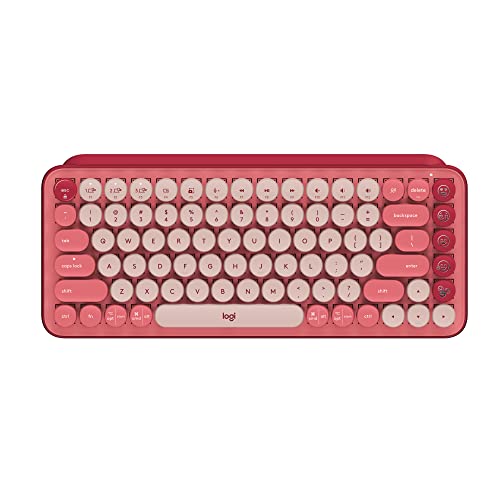
- Compact design for easier travel and storage
- Pairs with up to 3 devices via Bluetooth or USB receiver
- Typewriter-style tactile mechanical keys with 3-year battery life
Best For: MacBook users who want a portable, playful mechanical keyboard
Budget Compact Wired Pick

- 68-key compact layout with arrow and function keys
- USB plug-and-play support for Mac, Windows, and Linux
- Linear red switches with blue LED backlighting
Best For: Budget buyers who want a small wired keyboard for MacBook use
Slim Mac Mechanical – Keychron K3 Low-Profile 75% Wireless
If you want a travel mechanical keyboard for MacBook use that still feels like a real mechanical board, the Keychron K3 is built around portability and Mac-friendly productivity. Its low-profile switches, compact 75% layout, and thin aluminum frame make it easy to pack with a laptop while keeping the typing experience more substantial than a typical slim keyboard.
Best For: MacBook users who want a slim mechanical keyboard with a familiar Mac layout and multi-device switching.
Pros:
- Low-profile mechanical switches are slimmer and faster-traveling than conventional switches
- Connects to up to 3 devices via Bluetooth 5.1 for easy switching between laptop, tablet, and phone
- Includes a unique Mac layout plus extra Mac and Windows keycaps
- Reinforced aluminum body keeps it thin and lightweight for travel
Cons:
- Uses a single-color white backlight only
- Not water resistant
- Compact 84-key layout may take adjustment if you prefer a full-size board
Overall, the K3 stands out as a practical MacBook companion if you want mechanical feedback without giving up a slim travel profile. It balances portability, device switching, and Mac compatibility well.
Portable Workstation Combo – Samsers Foldable Keyboard and Mouse Combo
For anyone comparing a travel mechanical keyboard for MacBook alternatives, this Samsers combo is less about mechanical feel and more about packing a full mobile workstation into one case. The foldable full-size keyboard, pocket-sized mouse, and included hard case make it a straightforward choice when you need real travel convenience across Mac, iPad, phone, and laptop use.
Best For: Travelers who want a full-size portable keyboard-and-mouse setup for mixed-device work.
Pros:
- Full-size keys with standard spacing for a less cramped typing experience
- Supports up to 3 devices across 2.4G and Bluetooth modes
- Includes a rechargeable mouse and hard case for organized travel
- Quiet scissor-switch keys and mouse clicks suit shared spaces
Cons:
- Not a mechanical keyboard
- Mouse is designed for short productive sessions rather than all-day desktop use
- Larger combo kit takes more space than a keyboard alone
This is a strong pick if your priority is a complete portable setup instead of mechanical switches. It offers excellent flexibility for commuting, business trips, and temporary workstations.
Foldable Mechanical Pick – RK ROYAL KLUDGE F68 Foldable Mechanical
If you want a travel mechanical keyboard for MacBook use with a foldable design, the RK ROYAL KLUDGE F68 is built for portability without abandoning mechanical switches. Its low-profile red switches, aluminum body, and built-in stand holder make it especially useful when you’re typing on the go with a phone or tablet alongside a laptop.
Best For: Travelers who want a foldable low-profile mechanical keyboard with a built-in device stand.
Pros:
- Foldable mechanical design makes it easier to carry than a standard keyboard
- Low-profile red switches provide a quiet, linear typing feel
- Connects to up to 3 devices over Bluetooth 5.0 and also supports wired mode
- Built-in stand holder is handy for tablets and phones
Cons:
- Compatible devices listed in the details focus on smartphones and tablets rather than MacBook specifically
- Only 68 keys, so it is compact rather than full-sized
- White backlighting only
The F68 is a smart travel-first option if you want mechanical feedback in a foldable form factor. It is especially appealing when your mobile setup includes a tablet or phone stand.
Mac Travel Slim Pick – OMOTON Ultra-Slim Mac Wireless Keyboard
If you are shopping for a travel mechanical keyboard for MacBook use but prefer a thin, quiet non-mechanical option, the OMOTON is designed specifically for Mac devices. Its ultra-slim body, stable Bluetooth connection, and 8-degree ergonomic tilt make it a practical choice for business trips, hotel desks, and everyday Mac typing.
Best For: Mac users who want a lightweight, travel-ready wireless keyboard built specifically for macOS.
Pros:
- Designed exclusively for Mac devices and fully compatible with macOS 10.10 and later
- Ultra-slim and compact for easy packing in a travel bag or backpack
- Stable Bluetooth connection up to 33 feet
- 8-degree tilt helps improve typing comfort during long sessions
Cons:
- Not a mechanical keyboard
- Uses 2 AAA batteries, which are not included
- Not fully functional with non-Mac devices
This model makes sense if Mac compatibility matters more to you than mechanical switches. It is a focused, portable keyboard for users who want simple travel typing with a Mac-first layout.
Portable Multi-Device Pick – Satechi 75% Mechanical Keyboard for Mac and Windows
If you want a travel mechanical keyboard for MacBook that still feels feature-rich at a desk, the Satechi SM1 is built around portability and cross-device convenience. Its 75% layout keeps the footprint compact, while Bluetooth, USB receiver, and wired options make it easy to use across Mac, iPad, Windows, and Chromebook setups.
Best For: Mac users who want a compact, backlit mechanical keyboard with multi-device switching for work trips or hybrid setups.
Pros:
- Connects up to 4 devices and switches quickly between Bluetooth, USB receiver, and wired mode.
- Compact 84-key layout with low-profile brown switches for a balanced typing feel.
- 14 customizable backlight patterns with adjustable brightness for low-light use.
- Includes Mac/iPad and Windows key options plus USB-C cable and receiver.
Cons:
- Uses an A battery requirement, so it is not purely USB-rechargeable in the usual sense.
- Smaller layout may not suit users who prefer a full-size keyboard.
The Satechi SM1 stands out if you want a travel-friendly keyboard that can move between multiple devices without much fuss. It is more about versatility and compactness than maximizing desktop ergonomics, which makes it a solid match for mobile Mac users.
Premium Mac Typing Pick – Logitech MX Keys S for Mac
The Logitech MX Keys S for Mac is a practical choice if you want a travel mechanical keyboard for MacBook use, but prefer a quieter, laptop-like typing experience over a traditional mechanical feel. Its low-profile design, Mac key layout, and Bluetooth connectivity make it easy to pair with a MacBook, iPad, or other Apple devices on the go.
Best For: MacBook users who want a slim, backlit keyboard with premium typing comfort and easy multi-device switching.
Pros:
- Mac-specific layout and finishes designed to fit Apple setups.
- Can connect to up to 3 Apple devices via Bluetooth Low Energy.
- Backlit keys adapt to your hands and the surrounding light.
- Low-profile, laptop-like typing feels precise and comfortable for longer sessions.
Cons:
- Despite the product title, the supplied notes describe it as a membrane-style keyboard rather than a true mechanical model.
- More of a premium productivity keyboard than a travel-focused mechanical board.
If your priority is a refined Mac typing experience in a slim package, the MX Keys S is strong on comfort and convenience. It is less about mechanical-switch tactility and more about dependable, polished daily use.
Best TKL Travel Option – Keychron K8 Tenkeyless Wireless Keyboard
The Keychron K8 is a strong travel mechanical keyboard for MacBook users who want real switch feedback in a compact tenkeyless layout. It supports Bluetooth 5.1 for up to 3 devices, includes Mac and Windows keycaps, and adds wired USB-C mode when you want a more stable connection.
Best For: MacBook owners who want a tactile, compact mechanical keyboard that works well for travel, home, and light gaming.
Pros:
- 87-key tenkeyless layout keeps the size down without losing navigation keys.
- Bluetooth 5.1 supports up to 3 devices, plus USB-C wired mode.
- Brown switches provide tactile feedback with a 50M keystroke lifespan.
- Large 4000 mAh battery can last up to 200 hours with backlight off.
Cons:
- Compatible with macOS, but not identical to Apple’s built-in keyboard layout.
- White backlight only, so you do not get RGB lighting options.
The K8 is a smart pick if you want something more mechanical and more portable than a full-size board. It balances Mac support, wireless flexibility, and battery life in a format that is easy to carry in a travel setup.
Emoji-Friendly Travel Pick – Logitech POP Keys for MacBook Users
If you want a travel mechanical keyboard for MacBook use that’s compact but still feels fun to type on, the Logitech POP Keys is a strong style-first option. It connects by Bluetooth or the included Logi Bolt USB receiver, works with macOS, and its portable compact design makes it easier to pack than a full-size board.
Best For: MacBook users who want a portable mechanical keyboard with multi-device switching and a playful layout.
Pros:
- Compact, space-saving design that’s easier to carry and store
- Bluetooth or USB receiver connectivity with support for up to 3 devices
- Typewriter-style mechanical feel with tactile Romer-G switches
- Long 3-year battery life for lower-maintenance travel use
Cons:
- Emoji key customization requires Logitech software on macOS or Windows
- More focused on personality and portability than a minimalist work setup
Overall, POP Keys fits travelers who want a compact Mac-compatible mechanical keyboard that stands out on a desk or in a bag. Its portability and multi-device support are the main reasons to choose it over a more plain office keyboard.
Budget Compact Wired Pick – MageGee MK-Box for MacBook
The MageGee MK-Box is a practical travel mechanical keyboard for MacBook users who want a small wired board without spending much. Its 68-key layout keeps arrow keys and function keys, and the USB plug-and-play design makes it simple to use with Mac alongside Windows and Linux.
Best For: Budget-conscious MacBook owners who want a compact wired mechanical keyboard with a familiar key layout.
Pros:
- Small 68-key layout with arrow keys and F1-F12 kept in place
- USB plug-and-play compatibility with Mac, Windows, and Linux
- Linear red switches for a smoother, lighter key feel
- Adjustable blue LED backlighting with multiple modes
Cons:
- Wired only, so it is less flexible for cable-free travel
- More gaming-style in design than a clean office keyboard
For MacBook travelers who mainly care about size and value, this board covers the basics well. It’s a straightforward compact mechanical option, but the wired connection means it works best when you don’t mind carrying a cable.
Premium Low-Profile Travel Pick – Lofree Flow Lite for MacBook
If you’re looking for a travel mechanical keyboard for MacBook typing that feels refined and easy on the wrists, the Lofree Flow Lite is the most polished option here. Its low-profile design, wireless connectivity, and Mac/iOS support make it a strong pick for carrying between home, office, and cafe work sessions.
Best For: MacBook users who want a low-profile wireless mechanical keyboard with better typing comfort for long sessions.
Pros:
- Low-profile design promotes a more natural wrist position
- Three connection modes: 2.4GHz, Bluetooth, and wired USB-C
- Built-in 2000mAh battery with up to 80 hours of use
- Hot-swappable switches and PBT double-shot keycaps
Cons:
- Uses ABS body material rather than aluminum
- Pricier and more feature-rich than a basic travel keyboard
Among these options, Flow Lite is the best fit if comfort and versatility matter most. It’s built for longer typing sessions, but still keeps the wireless flexibility and travel-friendly features MacBook users often want.
How We Picked the Best Travel Mechanical Keyboard for MacBook
We focused on keyboards that make sense for mobile Mac users: compact footprints, easy Bluetooth pairing, dependable battery life, Mac-friendly key legends or shortcuts, and enough typing comfort for long sessions. We also favored models that can move between a bag, desk, and café setup without constant compromise.
Quick Comparison
For the easiest travel setup, low-profile and slim wireless models are usually the most MacBook-friendly. If you want a more tactile feel, low-profile mechanical options offer a better blend of key travel and portability. Foldable boards save the most space, while 75% and tenkeyless layouts tend to offer the best balance of function and size. Full-size features are less important unless you rely heavily on number entry.
Key Buying Factors for Travel Mechanical Keyboard for MacBook
Size and Layout
Look for 60%, 75%, or tenkeyless layouts if you want a smaller footprint. A compact layout is easier to pack, but make sure it still includes the keys you actually use, such as arrow keys, function row access, and delete.
Switch Feel and Profile
Low-profile switches are often the sweet spot for travel because they reduce bulk while keeping the benefits of a mechanical board. Traditional mechanical switches can feel better for long typing sessions, but they add height and weight.
Mac Compatibility
A true Travel Mechanical Keyboard for MacBook should support Mac key mapping, Command and Option labeling, or easy remapping. Multi-device Bluetooth support is also useful if you switch between a MacBook, iPad, and phone.
Power and Connectivity
Wireless Bluetooth is usually the most convenient for travel, but a USB-C wired option is helpful when charging or working in crowded wireless environments. Rechargeable batteries and auto-sleep features can make a noticeable difference on long trips.
Who Should Buy Which Travel Mechanical Keyboard for MacBook?
If you prioritize maximum portability, choose a slim or foldable model. If you type for hours and want a familiar desktop feel, a compact mechanical board with low-profile switches is a better fit. If you want the cleanest Mac experience, pick a keyboard designed specifically for Mac shortcuts and layout. For mixed work and travel, a 75% or tenkeyless board usually offers the best all-around balance.
In short, the best choice depends on whether you value size, typing feel, or Mac-first convenience most. The right Travel Mechanical Keyboard for MacBook should disappear into your setup when you do not need it, then feel instantly comfortable when you do.