When your photo library keeps growing, a reliable duplicator can save hours and reduce backup mistakes. The best options make it easy to clone drives, stage archives, and keep multiple copies in sync.
This roundup of hard drive duplicators for photo storage focuses on practical features like bay count, transfer speed, media support, and ease of use for photographers and small studios.
Best 10 Hard Drive Duplicators for Photo Storage Picks for 2026
4-Bay Standalone Cloner
StarTech 4-Bay Standalone Duplicator & Eraser

- Standalone cloning and erasing
- Supports SATA and IDE HDDs/SSDs
- Also works as a USB/eSATA dock
Best For: Users who need cloning, wiping, and docking in one unit
Easy Dual-Bay Cloner
SABRENT USB 3.0 Dual Bay Docking Station & Cloner

- Offline cloning for two drives
- Supports SATA HDDs and SSDs
- USB 3.0 dock with up to 5Gbps transfer
Best For: Simple two-drive photo backups and drive copying
Production-Scale Copier
Systor 1:11 HDD/SSD Duplicator
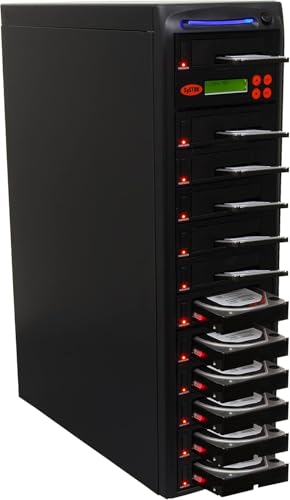
- Standalone 1:11 drive copying
- Up to 150MB/s transfer speed
- Supports data copying and sanitization
Best For: High-volume one-to-many drive duplication
Offline Cloning Dock
ORICO Dual Bay Hard Drive Cloning Dock

- Offline clone mode works without a computer
- Supports 44TB total across 2 SATA bays
- USB 3.0 with UASP and Trim support
Best For: simple offline cloning and flexible SATA backup
USB-C Clone Dock
SUITOK Dual Bay SATA Duplicator

- One-key offline cloning without a computer
- Up to 40TB total capacity across two bays
- USB 3.2 Gen 1 5Gbps with UASP support
Best For: large photo archives and fast dual-drive cloning
High-Capacity Duplicator Dock

- Offline 1:4 cloning without a computer
- Five bays support up to 5 x 20TB SATA drives
- Aluminum design helps with heat dissipation
Best For: Photographers needing offline multi-drive cloning
Standalone USB Duplicator
EZ Dupe USB Cyclone Duplicator

- Standalone one-touch copy, compare, erase, and format
- Supports USB flash drives and USB external HDDs
- Multiple erase and copy modes for flexible workflows
Best For: Batch duplication and erasing of USB photo drives
4-Bay Standalone Cloner – StarTech 4-Bay Standalone Duplicator & Eraser
If you need hard drive duplicators for photo storage in a workflow that also involves secure reuse or wiping, this StarTech 4-bay dock is built for more than simple copying. It works standalone for cloning or erasing SATA drives, and it also doubles as a docking station for quick access over USB or eSATA.
Best For: IT-minded users who want a standalone 4-bay duplicator, eraser, and dock for SATA/IDE drives.
Pros:
- Standalone sector-by-sector cloning with no computer required
- Supports duplicate, quick erase, and secure erase modes
- Works with 2.5/3.5-inch SATA and IDE HDDs/SSDs
- Also functions as a docking station for file transfer and recovery
Cons:
- Target drive must be equal to or larger than the source drive
- More of an IT tool than a casual consumer accessory
- Large and heavier than a simple single-bay dock
For photo archives that need cloning, migration, or secure wiping, this is the most versatile option in the group. The 4-bay layout and offline operation make it a practical fit when storage tasks are frequent and capacity matters.
Portable Photo Backup Drive – iDiskk 2TB MFi External Photo Backup Drive
For photo storage, this iDiskk drive is aimed at mobile backups rather than drive-to-drive duplication. It gives iPhone, iPad, Android, Mac, and PC users a portable 2TB option for moving photos and videos, with one-tap auto backup through the app.
Best For: Mobile users who want an external photo backup drive for phones, tablets, and computers.
Pros:
- One-tap automatic backup for photos and videos
- Built-in 5000mAh battery for portable use
- MFi certified and compatible with iPhone, iPad, Android, Mac, and PC
- Encryption option for protecting sensitive files
Cons:
- Requires the iDiskk Player app on iPhone
- Not a duplicator dock for cloning bare hard drives
- Backup workflow is app-based, not standalone copying
This model makes sense if your photo workflow starts on a phone and ends in portable backup. It is less about duplicating drives and more about simplifying everyday photo and video storage across devices.
Easy Dual-Bay Cloner – SABRENT USB 3.0 Dual Bay Docking Station & Cloner
This SABRENT model is a straightforward choice for hard drive duplicators for photo storage when you want a simple two-drive workflow. It supports offline cloning for 2.5-inch and 3.5-inch SATA HDDs or SSDs, and it also works as a USB 3.0 dock for regular transfers.
Best For: Users who want an easy dual-bay cloner for SATA drives and photo archives.
Pros:
- Offline cloning with no drivers required
- Supports 2.5-inch and 3.5-inch SATA HDDs and SSDs
- USB 3.0 transfer speeds up to 5Gbps
- Supports drives up to 10TB
Cons:
- Only supports two drives at a time
- Cloning speed is listed up to 60Mbps for offline copying
- Does not offer erasing features like some larger duplicators
For users who mostly need to copy or back up a pair of photo drives, this is a practical and easy-to-use option. Its plug-and-play design keeps the focus on fast setup rather than advanced duplication controls.
Production-Scale Copier – Systor 1:11 HDD/SSD Duplicator
If your photo storage workflow involves copying the same drive layout to multiple disks, this Systor unit is built for high-volume duplication. It runs completely standalone and can copy several SATA HDDs or SSDs simultaneously at speeds up to 150MB/s.
Best For: High-volume duplication and sanitization tasks that need one-to-many copying.
Pros:
- Standalone operation with no computer or software required
- Copies multiple drives simultaneously in a 1:11 workflow
- Up to 150MB/s transfer rate, or 9GB per minute
- Can copy data only or full drives, and supports DoD 5220.22-M sanitization
Cons:
- Designed for 3.5-inch desktop drives only
- More specialized than a simple photo backup dock
- Not aimed at casual single-drive users
This is the most production-oriented option here, especially when speed and repeatable drive cloning matter. For photo storage operations that need many identical copies, it offers the scale and standalone convenience to handle the job efficiently.
Offline Cloning Dock – ORICO Dual Bay Hard Drive Cloning Dock
If you want hard drive duplicators for photo storage that can also double as a general-purpose dock, this ORICO model is a practical pick. It supports offline cloning, so you can copy data from one SATA drive to another without connecting to a computer, and it works with 2.5-inch and 3.5-inch HDDs and SSDs up to 44TB total.
Best For: Users who want a simple offline clone dock for SATA photo archives and backup drives.
Pros:
- Offline clone function lets you duplicate drives without a PC
- Supports 2.5-inch and 3.5-inch SATA HDDs and SSDs
- USB 3.0 with UASP and Trim support for faster transfers
- Broad device compatibility, including Windows, Mac, Linux, and more
Cons:
- Target disk must be larger than the source disk for cloning
- Requires a drive inserted before the dock powers on
- Single-button clone workflow may be too basic for advanced needs
Overall, this is a straightforward dock for users who want easy, offline duplication and flexible SATA support. Its mix of cloning, hot-swapping, and broad device compatibility makes it a solid everyday storage tool.
Best for Everyday Use – iDiskk 2TB iPhone External Drive
For hard drive duplicators for photo storage on phones and tablets, this iDiskk drive is more of a portable backup option than a cloning dock. It is built for iPhone, iPad, Android, Mac, and PC use, with one-click photo and video backup through the app and a built-in battery for mobile storage on the go.
Best For: Mobile users who want quick photo and video backup from iPhone or Android.
Pros:
- One-click backup for photos and videos through the app
- 2TB capacity helps free up phone storage
- Built-in 5000mAh battery supports portable use
- Password protection is available for sensitive files
Cons:
- Not a drive duplicator or cloning dock
- Intel-based iMacs before March 2020 may have compatibility issues
- Best suited to mobile backup workflows rather than desktop archiving
This is a convenient choice if your main goal is getting photos off a phone quickly and securely. It is less about duplicating drives and more about fast, portable backup for everyday storage management.
USB-C Clone Dock – SUITOK Dual Bay SATA Duplicator
If you need hard drive duplicators for photo storage with modern connectivity, this SUITOK dual-bay dock is built for fast SATA backups and offline cloning. It supports one-key cloning without a computer, handles up to 40TB total, and uses USB 3.2 Gen 1 at 5Gbps for quick transfers and disk access.
Best For: Users who want a USB-C-era cloning dock for large photo archives and multi-drive backups.
Pros:
- One-key offline clone works without a PC or laptop
- Supports up to 40TB total across two bays
- USB 3.2 Gen 1 5Gbps connectivity for fast transfers
- Includes UASP, TRIM, and S.M.A.R.T. support
Cons:
- Clone target must still be appropriate for the source drive setup
- Open-air vertical design may not suit every desk setup
- RGB lighting is more cosmetic than functional
For users with large photo libraries, this dock offers a strong mix of capacity, speed, and standalone cloning. It is especially appealing if you want a simple duplicator that also feels current and well-equipped for daily storage work.
Phone Backup Pick – NEWQ 2TB Phone Hard Drive
If you want hard drive duplicators for photo storage that also double as an everyday backup drive, this NEWQ model is aimed at simple phone-to-drive transfers. It connects directly to iPhone, Android, iPad, MacBook, and Windows computers, and the 2TB capacity makes it useful when you need to keep large photo and video libraries in one portable place.
Best For: Phone and computer users who want a plug-and-play 2TB drive for backing up photos and videos.
Pros:
- One-touch backup makes it easy to copy photos and videos automatically.
- 2TB capacity is rated for roughly 500,000 photos or 20,000 short videos.
- Works with iPhone, Android, iPad, MacBook, laptops, and Windows PCs.
- Plug-and-play use keeps the process straightforward.
Cons:
- It is a backup storage device, not a multi-bay duplicator for cloning multiple drives.
- Mechanical drive design may be less compact than a small flash-based stick.
This is a practical choice if your priority is moving and safeguarding photo libraries across phones and computers without a complicated setup. It is especially appealing for users who value a large-capacity portable backup drive over dedicated enterprise duplication hardware.
High-Capacity Duplicator Dock – ORICO 5-Bay USB-C Duplicator
For buyers comparing hard drive duplicators for photo storage, this ORICO dock is built for serious offline cloning and expansion. It supports one-button duplication of four copies without a computer, and its five-bay design can handle 2.5-inch and 3.5-inch SATA SSDs or HDDs, which is useful when managing large photo and video archives.
Best For: Photographers and advanced users who need offline multi-drive duplication and high-capacity SATA storage.
Pros:
- Offline 1:4 duplication lets you clone multiple drives with one button.
- Five-bay design supports up to 5 x 20TB for large archives.
- USB 3.2 Gen 1 Type-C connectivity is built for broad device compatibility.
- Aluminum-alloy body and vertical layout help with heat dissipation.
Cons:
- Requires SATA drives, so it is not for copying USB flash drives directly.
- Backup before cloning, since the target disk is overwritten during duplication.
This is the most capable option here for users who want a true drive-cloning dock rather than a simple backup stick. It suits photo workflows where high-capacity storage, offline duplication, and expansion matter more than portability.
Standalone USB Duplicator – EZ Dupe USB Cyclone Duplicator
If you need hard drive duplicators for photo storage in a stand-alone format, the EZ Dupe USB Cyclone is built for copying USB flash drives and USB external hard drives without a computer. It supports a wide range of USB media, multiple copy modes, and erase options, making it a flexible tool for batch media handling.
Best For: Standalone duplication and erasing of USB drives and USB external hard drives.
Pros:
- Copies, compares, erases, or formats with one-touch operation.
- Supports USB flash media and USB external HDDs with power support.
- Multiple copy modes include essential files, full, partitioned, and percentage copy.
- Multiple erase modes include quick, full, DoD 3-pass, and DoD 7-pass.
Cons:
- Maximum speed is rated at 45 MB/s, which is modest for large transfers.
- Designed around USB media rather than SATA drives or multi-bay storage.
This model fits buyers who want a dedicated USB duplicator with straightforward standalone operation. It is especially useful when you need to duplicate or clear multiple photo storage drives in a repeatable workflow.
How We Picked the Best Hard Drive Duplicators for Photo Storage
We focused on Hard Drive Duplicators for Photo Storage that balance speed, compatibility, and dependable standalone operation. Priority went to models that support common SATA HDDs and SSDs, offer clear cloning workflows, and fit real-world photo backup routines without unnecessary complexity.
Quick Comparison
For most photographers, the main tradeoff is between simple dual-bay cloners and higher-capacity multi-bay duplicators. Dual-bay units are easier to manage and often better for one-off copies, while 4-bay and 5-bay stations help when you need to duplicate or archive several drives at once. USB flash duplicators are a different category, but they can still be useful for handing off compressed photo sets or client media.
Key Buying Factors for Hard Drive Duplicators for Photo Storage
Capacity and Bay Count
Choose a bay count that matches your workflow. If you only mirror one working drive to one backup drive, a dual-bay dock is usually enough. If you rotate archives, maintain multiple backups, or manage jobs for a team, a 4-bay or higher unit can be more efficient.
Drive Compatibility
Check support for 2.5-inch and 3.5-inch SATA drives, plus SSDs if you use them in your photo workflow. Some units also support USB media duplication, which is helpful for clients or field backups, but it does not replace SATA cloning.
Speed and Cooling
Faster interface support, such as USB-C or USB 3.x, helps when moving large RAW libraries. For longer duplications, look for solid cooling and stable power delivery so drives stay reliable during extended runs.
Standalone Cloning Features
The best duplicators work without a computer, which simplifies offline backups and reduces setup time. Verify whether the device supports one-to-many cloning, erase functions, or verification features if data integrity matters most.
Who Should Buy Which Hard Drive Duplicators for Photo Storage?
If you want a simple backup station for a single photo drive, a dual-bay cloner is the most practical choice. If you manage large archives or duplicate drives for clients, a multi-bay model offers better efficiency. If your workflow centers on phone exports, portable media, or quick file handoffs, a smaller photo-storage drive or USB duplicator may be the better fit.
In short, the right choice depends on how many copies you need, how often you clone, and whether your priority is speed, portability, or bulk archiving.